
FLYDIGI Vader 5 Pro
4.1Editor score
Three connection modes
Adjustable Hall Effect joysticks
Switchable trigger modes
Extensive button remapping
Discover the best controller for Star Wars Squadrons, comparing licensed Xbox pads, PC controllers, HOTAS systems, flight sticks, and throttles.
Finding the best controller for Star Wars Squadrons involves balancing target acquisition, throttle access, target switching, and sustained comfort. A conventional gamepad can handle the game effectively, but flight-oriented hardware offers more direct control over movement and targeting. The right choice depends on your platform, skill level, and preferred cockpit style.
This guide compares ten officially licensed, general-purpose, and specialty controllers using their supplied ratings, platform support, control features, connectivity, programmability, and intended gaming applications. It covers Xbox gamepads, PC-focused controllers, dual-throttle flight systems, and standalone HOTAS options for players seeking greater precision.
Each review identifies the standout strengths and practical trade-offs of its featured product, helping you determine which hardware best matches your approach to Star Wars Squadrons. Product ratings and availability can change over time, and current prices should be checked before making a final purchase.
4.1Editor score

4.0Editor score

4.3Editor score
The comparison below covers ten controllers suitable for Star Wars Squadrons, ranging from licensed Xbox gamepads to PC gaming pads, HOTAS systems, and dedicated flight controls. Platform support, precision features, programmability, and control style are the main differences to evaluate.






The Controller Gear Star Wars Squadrons bundle is an officially licensed Xbox wireless controller with a themed Pro charging stand, earning a 4.0 rating. Its most noticeable attraction is the presentation: it is designed specifically for Star Wars: Squadrons fans rather than players seeking a specialized HOTAS flight rig. It offers the familiar layout of an Xbox controller while adding a dedicated charging solution.
We may earn a commission when you buy through this link, at no additional cost to you.
The controller supports current and recent Xbox systems, Windows 10 PCs, and Mac operating systems according to the supplied information. A textured grip is intended to improve grip during extended sessions, while a 3.5mm headphone jack allows compatible headsets to be connected directly. The charging stand can recharge the controller in under three hours, and the stated battery life reaches 12 hours of continuous gaming.
The trade-off is that this remains a standard gamepad rather than a flight control system. It does not provide a separate throttle, a dedicated rudder axis, or the larger command surface offered by premium HOTAS products. Xbox button layout familiarity also means it offers fewer controls for advanced cockpit simulation, although the official license and charging stand compensate for some of that limitation.
This is the strongest thematic choice for an Xbox player who wants the Star Wars: Squadrons experience to extend into the physical setup without learning an unfamiliar flight-control layout. It is also practical for players who alternate between Squadrons and conventional console games. For a player whose main objective is maximum flight precision, however, a dedicated HOTAS option will provide more direct control.
The licensed artwork makes this bundle especially appealing to fans of the Star Wars setting. It brings recognizable franchise styling to a controller used for the game rather than relying on generic hardware.
The included Pro charging stand simplifies battery management, while wireless connectivity helps keep the playing area uncluttered. The stated 12-hour battery life also suits long multiplayer sessions.
We may earn a commission when you buy through this link, at no additional cost to you.
The FLYDIGI Direwolf 4 is a multi-platform PC controller with a 4.5 rating, making it one of the strongest-rated conventional gamepads in this list. It combines adjustable Hall Effect-style stick tension, switchable trigger behavior, a six-axis gyroscope, and a 1000Hz polling rate. Those features make it appealing for players who want more control than a basic controller offers.
We may earn a commission when you buy through this link, at no additional cost to you.
Its FORCEFLEX joysticks let users adjust tension from 40gf to 80gf, allowing the feel to be tuned for different games. FORCESWITCH triggers can move between a rapid Micro Mode and a Hall Effect linear mode, which may benefit quick combat inputs and more precise control situations. A rotary eight-way D-pad, silent ABXY buttons, stereo vibration, and software-based button customization round out the feature set.
The key limitation is platform support. The supplied information explicitly says the Direwolf 4 does not support Xbox or PlayStation consoles, and the dedicated charging dock requires a separate purchase. It can still work with PC, Nintendo Switch, TV, Android, and laptop systems through wired, Bluetooth, or 2.4GHz wireless connections, so it is versatile among non-Xbox platforms.
For PC players who want an adaptable controller but do not need a physical flight stick, the Direwolf 4 is a compelling choice. Its broad feature set and strong supplied rating make it a good match for Star Wars: Squadrons, particularly for players comfortable managing targeting and throttle inputs with standard gamepad controls.
Physical tension adjustment and two trigger modes make the Direwolf 4 adaptable to different play styles. These controls are particularly useful for players who switch between fast action and precision-oriented games.
Wired, Bluetooth, and 2.4GHz operation allow the controller to fit desktop, couch, and handheld-style setups. The separate dock requirement is worth considering if wireless charging is important.
We may earn a commission when you buy through this link, at no additional cost to you.
The Thrustmaster ESWAP X 2 PRO is a wired gaming controller for Xbox Series X|S and PC with a supplied rating of 3.4. Its defining features are mechanical face buttons, a mechanical D-pad developed with fighting game experts, refined S5 NXG mini-sticks, and four rear buttons that can be remapped directly on the controller or through THRUSTMAPPERX software.
We may earn a commission when you buy through this link, at no additional cost to you.
The mechanical buttons activate 64 percent faster than standard membrane buttons, and the stated activation distance is reduced to 0.01 inch. That responsiveness can be valuable when rapidly switching targets or issuing repeated actions. The rear buttons expand the command set without forcing the player to move the thumbs away from the sticks, which is helpful in a game with several simultaneous cockpit tasks.
Its main disadvantages are the lowest supplied rating in the group and its reliance on a 3-meter USB-C cable. It does not offer a separate throttle, rudder control, or flight-specific command display, so it remains a conventional gamepad rather than a true HOTAS. The wired design can also feel restrictive compared with wireless options.
This controller is best for Xbox and PC players who prioritize fast button activation, precise stick movement, and remappable controls over wireless convenience. It provides a more specialized competitive-gamepad experience than the licensed Controller Gear bundle, although players wanting authentic flight mechanics should consider a proper flight controller.
Mechanical face buttons and a short activation distance make the ESWAP X 2 PRO well suited to quick target switching. These controls reduce the need for long presses during busy combat sequences.
Four rear buttons can be remapped through the controller or THRUSTMAPPERX software. That allows frequently used cockpit commands to be placed under the player's fingers.
We may earn a commission when you buy through this link, at no additional cost to you.
The Logitech G X52 is a premium HOTAS flight control system with a 4.3 rating. It combines a joystick, throttle, programmable commands, an LCD, and a multi-position grip in one unit. Rather than approximating a flight cockpit with a gamepad, it places key commands and axes under the player's fingers for a more direct approach to Star Wars: Squadrons.
We may earn a commission when you buy through this link, at no additional cost to you.
Magnetic, non-contact X and Y axis sensors are designed for accuracy and longevity. The multifunction LCD can show programmed commands before activation and also includes a built-in clock for timing flight plans. A 3D twist handle supplies rudder control and can be locked when separate rudder pedals are in use, preventing accidental input when that extra axis is not required.
The five-position grip improves access to controls, while three modes and 282 programmable commands provide extensive customization. That programmability is one of the system's main advantages, but it also creates a learning curve. New players may need to establish profiles and practice controls before the layout feels natural. The all-in-one design also occupies more desk space than a standard gamepad.
The X52 suits dedicated flight-simulation players who want precise movement, speed control, and target commands in a single unit. It is particularly compelling for Star Wars: Squadrons if the player prefers a cockpit-style setup over the simplicity of a console controller. The extensive controls reward players willing to invest time in configuration.
Combining the stick, throttle, display, and commands in one housing offers a more coherent flight experience than a gamepad. It also reduces the need to move a hand between several separate devices.
With 282 commands spread across three modes, the X52 can place many actions close at hand. The LCD reduces guesswork by showing the currently programmed commands before they are activated.
We may earn a commission when you buy through this link, at no additional cost to you.
The Thrustmaster T-Flight Hotas One is a modular flight stick and throttle for Xbox and PC with a supplied rating of 4.5. It offers a more approachable entry into dedicated flight controls than many premium systems, with adjustable stick resistance, a responsive trigger, a hat switch, and multiple programmable buttons.
We may earn a commission when you buy through this link, at no additional cost to you.
The detachable throttle is the system's standout practical feature. It can remain beside the stick for a full HOTAS layout or be separated for a more flexible desk or lap arrangement. This makes it easier to fit different desk sizes and may be easier for new players to adapt to than a large permanent cockpit-style unit.
Unlike the Logitech G X52, the T-Flight Hotas One does not include a multifunction screen showing programmed commands. It also connects through USB rather than offering a stated wireless option. Compatible Thrustmaster TFRP rudder pedals are sold separately, so players who need dedicated rudder control must add another accessory.
This is a strong fit for Xbox Series X|S or PC players who want more direct flight control without moving to a large premium HOTAS. It suits both beginners and experienced pilots because the adjustable resistance and modular throttle can accommodate different preferences. In Star Wars: Squadrons, it offers more authentic movement and speed input than a standard gamepad.
The detachable throttle lets players choose between a combined cockpit layout and a separated configuration. That flexibility is useful for different desk shapes, seating positions, and play styles.
Resistance can be adjusted to suit the player's preference and different aircraft situations. The physical stick and trigger also provide more direct feedback than standard gamepad inputs.
We may earn a commission when you buy through this link, at no additional cost to you.
The Turtle Beach VelocityOne H.O.T.A.S. is a feature-rich flight system for Xbox Series X|S, Xbox One, and Windows PC. Its supplied product information does not include a customer rating, but it distinguishes itself through 73 programmable inputs, 15 axes, a full-color flight management display, and a swappable dual-throttle design.
We may earn a commission when you buy through this link, at no additional cost to you.
High-resolution 16-bit Hall Effect sensors support Flightstick II control, while adjustable throttle resistance and stick tension let the player tune the physical response. The swappable throttle offers selectable detents that act as tactile thrust reference points, a feature that can make speed management more deliberate and readable.
Customizable RGB lighting, adjustable left- or right-handed grips, and selectable twist rudder control are additional conveniences. The system can also work with pedals and mounting solutions when a larger cockpit arrangement is desired. That ecosystem support is beneficial for long-term upgrades, although it also means the complete setup may require more space and planning.
This is a compelling choice for an Xbox or Windows player who wants extensive customization and can benefit from live flight information on a display. It is especially useful for players who want to organize many commands and prefer an expandable setup. Because no rating is supplied, prospective buyers should examine current customer feedback and software compatibility for their own games and system configuration.
The full-color display can present live flight data and help with performance tuning. It gives the system a cockpit-like informational advantage over controllers without a screen.
Swappable throttle components, adjustable grip orientation, and support for pedals make the system adaptable. These features are useful as player preferences and available desk space change.
We may earn a commission when you buy through this link, at no additional cost to you.
The GameSir Tarantula 8K is a wired esports controller for Windows with a 4.7 rating, the highest supplied rating among the ten products. It is built around an 8000Hz wired polling rate, Gen-2 TMR sticks, dual-mode trigger stops, a six-axis gyroscope, and an extensive selection of programmable buttons.
We may earn a commission when you buy through this link, at no additional cost to you.
TMR stick technology uses magnetic sensing without physical contact, aiming to provide smooth, linear movement and resistance to stick drift. Trigger stops can switch between Hall Effect analog behavior and clicky microswitch response. The combination allows a player to choose continuous trigger travel for precise control or immediate clicks for fast actions.
Two lockable back buttons, two mini bumpers, and five extra front buttons support programmable macros. GameSir Connect software handles button mapping, performance settings, and macro recording. This is a substantial feature set for a gamepad, although it is designed around competitive PC gaming rather than flight-specific ergonomics.
The Tarantula 8K is a strong choice for Windows players who want exceptionally fast polling and extensive customization. It can handle Star Wars: Squadrons and other PC games with a responsive conventional controller, but it does not provide the throttle, rudder, or display of a flight-focused system. Its wired design also requires a nearby USB port.
The 8000Hz polling rate is designed to register input changes at a high frequency. For PC play, this can provide a very responsive experience when the hardware and system are properly configured.
Multiple rear, mini-bumper, and front buttons can be assigned to common cockpit commands. GameSir Connect adds profile and macro support for players who want a highly individualized layout.
We may earn a commission when you buy through this link, at no additional cost to you.
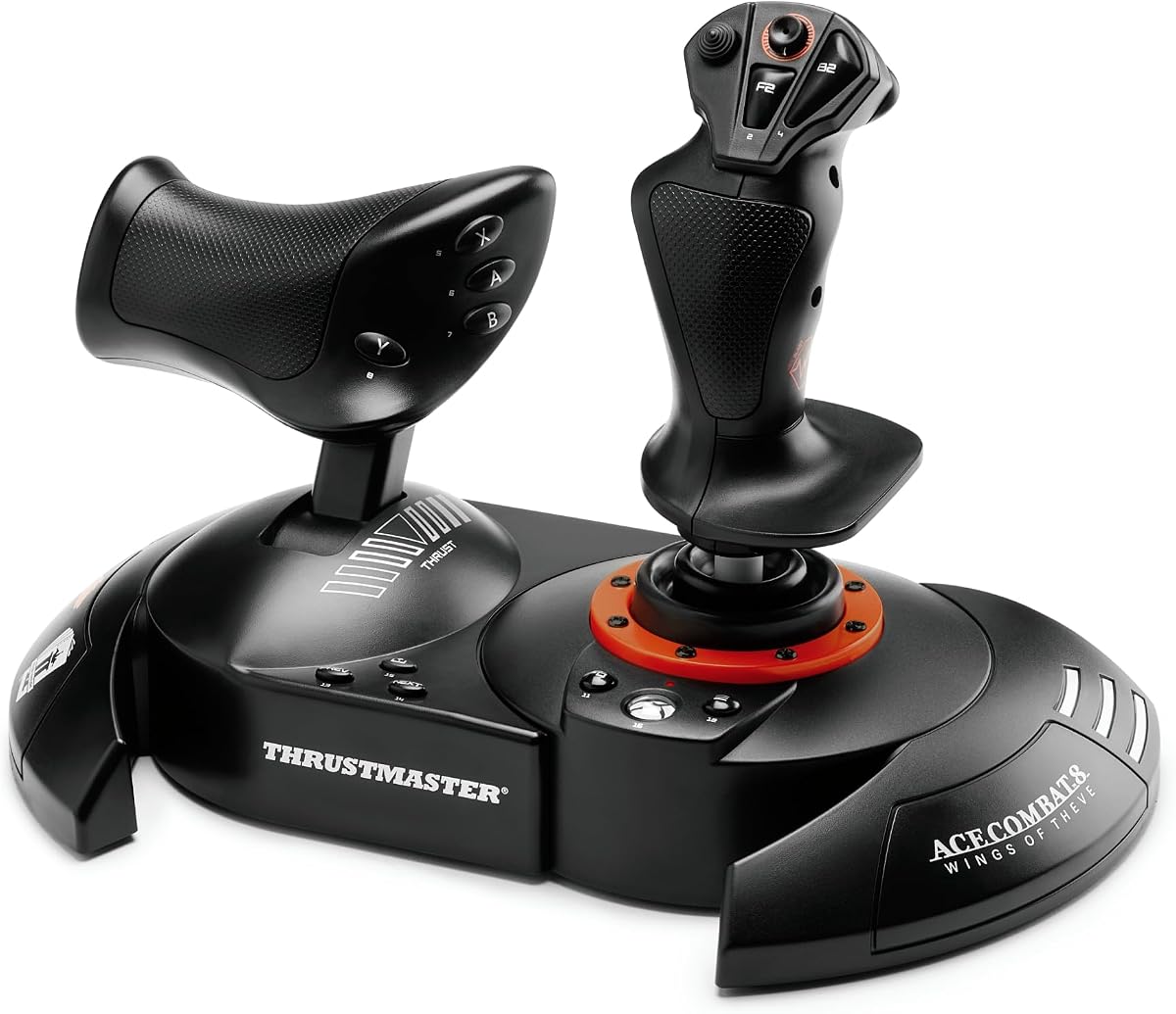
The Thrustmaster T.Flight HOTAS Neo ACE COMBAT 8 WINGS OF THEVE Edition is an officially licensed simulation controller for Xbox Series X|S, Xbox One, and PC. The supplied information does not provide a customer rating, but it lists 16-bit technology, seven control axes including the Z-axis, 16 action buttons, a rapid-fire trigger, and a multidirectional hat switch.
We may earn a commission when you buy through this link, at no additional cost to you.
The major attraction is the combination of physical flight controls and vibration feedback. A motor built into the grip is designed to communicate missile impacts, cannon bursts, and turbulence. A detachable throttle allows the player to alternate between a combined HOTAS position and a separated desktop arrangement, while the dual rudder system provides both joystick Z-axis control and a tilting lever on the throttle.
The Ace Combat license gives the hardware a strong thematic identity, although it does not change the underlying fact that the stick, throttle, and action buttons are general simulation inputs. There is no stated onboard flight display, and the supplied information does not mention wireless connectivity. The product is therefore a specialized but capable flight-control package.
Players who enjoy combat flight and want physical feedback will likely find the T.Flight HOTAS Neo engaging. It is a natural fit for Star Wars: Squadrons on Xbox or PC because it emphasizes combat sensation and accessible detachable hardware. The absence of a supplied rating makes current customer reviews particularly useful when evaluating the purchase.
Grip vibration is designed to make impacts, weapon bursts, and turbulence more tangible. That physical feedback can add intensity to dogfights and close combat encounters.
Players can reposition the detachable throttle and choose between two rudder approaches. These options support different desk layouts and preferred control techniques.
We may earn a commission when you buy through this link, at no additional cost to you.
The Logitech G X56 is a renewed PC-focused HOTAS controller with a supplied rating of 3.8. It combines a flight stick, twin throttles, an adjustable four-spring resistance system, RGB lighting, and more than 189 programmable controls. The mini analog stick adds control for pitch, roll, yaw, forward and backward movement, and other directional inputs.
We may earn a commission when you buy through this link, at no additional cost to you.
Its 16-bit aileron and elevator axes use Hall Effect sensing, while the throttle assembly includes a friction adjuster and locking function. The broad command count is useful for cockpit simulations that require many separate actions. The physical placement of controls under the fingers also makes the X56 a stated option for VR setups, where traditional gamepad handling can be awkward.
Because this listing is renewed, buyers should consider possible cosmetic wear and the availability of replacement parts or warranty coverage. It is also listed for PC rather than Xbox, which limits its usefulness for console players. Its supplied rating is lower than those of the Logitech G X52 and several other products in the list.
The X56 is most appropriate for a PC enthusiast who wants a detailed, programmable flight setup and is comfortable buying renewed hardware. It provides a broad feature set for simulation use, but the X52 may be the more attractive option for buyers who prioritize an integrated display, newer product status, or a broader command arrangement.
More than 189 programmable controls offer room to assign detailed cockpit actions. The mini analog stick also provides several directional functions beyond the primary flight axes.
The four-spring system lets the player select among different stick forces. A friction adjuster and throttle lock add further control over the physical feel of the system.
We may earn a commission when you buy through this link, at no additional cost to you.
The FLYDIGI Vader 5 Pro is a multi-platform PC gamepad with a 4.1 rating. Its headline specifications include Hall Effect joysticks with adjustable FORCEFLEX tension, three millisecond wired latency, four millisecond wireless response, a 216MHz main control chip, FORCESWITCH triggers, and a four-motor vibration system.
We may earn a commission when you buy through this link, at no additional cost to you.
The stick tension can be adjusted from 40gf to 100gf, allowing a light setup for rapid aiming or a firmer setup for controlled movement. Trigger modes switch between fast Micro response and Hall Effect linear behavior. The controller also includes customizable rear buttons, two mini shoulder buttons, four detachable rear buttons, and fixed rear controls for a dense command layout.
It supports PC, Nintendo Switch, TV, Android, and laptops, with wired, Bluetooth, and 2.4GHz connection options. It explicitly does not support Xbox or PlayStation, so an Xbox console player would need to rely on the PC version of the game or choose different hardware. The exclusive charging dock is also sold separately.
The Vader 5 Pro is a strong fit for PC and other supported platforms where a player wants a conventional controller with unusually deep physical customization. Its low-latency design, adjustable sticks, and multiple button types give it a competitive-gamepad character. Although it lacks a dedicated throttle and flight-style grip, the richer button layout can help players assign target and cockpit commands more effectively.
FORCEFLEX tension spans a broad range, allowing the player to tune the sticks for quick camera movement or smoother precise control. The FORCESWITCH trigger modes add a similar choice between immediacy and linearity.
Wired, Bluetooth, and 2.4GHz connections support different play locations. The stated three millisecond wired latency and four millisecond wireless response prioritize responsiveness across supported devices.
We may earn a commission when you buy through this link, at no additional cost to you.
The most important choice is between a conventional gamepad and a dedicated flight-control system. Platform compatibility, control precision, programmability, desk space, and comfort should be considered alongside the style of play you prefer.
A conventional gamepad is easier to learn, more compact, and usually better suited to players who want one controller for several kinds of games. Star Wars: Squadrons can be controlled through a gamepad, although targeting, throttle management, and cockpit actions may require more button combinations. A HOTAS or flight-stick system places movement and speed controls under the hands in a more direct arrangement, but it generally demands a larger setup and a learning period.
Choose a gamepad for simplicity and versatility. Choose a flight system when precise axes, realistic movement, and tactile throttle control matter more than a compact layout.
Check that the controller supports the exact platform and game edition you own. The Controller Gear bundle, Thrustmaster T-Flight Hotas One, and Turtle Beach VelocityOne are described for Xbox systems. The Logitech G X52 is focused on PC flight simulation, while the FLYDIGI products support several non-Xbox platforms but explicitly exclude Xbox and PlayStation.
Also distinguish between broad device compatibility and a specific game mode. A controller may work at the hardware level without offering the most natural function layout for Star Wars: Squadrons. Platform support should be the first filter, followed by control style.
Dedicated flight products provide a physical throttle, which can make forward and reverse speed management more intuitive. Models such as the Logitech G X52, T-Flight Hotas One, and Turtle Beach VelocityOne also offer rudder-related controls, while some include twist axes or swappable throttle components. These characteristics can reduce reliance on button combinations during complex maneuvers.
Prioritize a clear throttle and rudder arrangement if you want a cockpit-style experience. If you are comfortable with a standard gamepad, verify that the most-used targeting and boost commands can be placed on accessible buttons.
Precision depends on stable recentering, predictable movement, and control over stick tension. The FLYDIGI Direwolf 4 and Vader 5 Pro provide adjustable FORCEFLEX tension, while the ESWAP X 2 PRO uses refined mini-stick modules and the GameSir Tarantula 8K uses Gen-2 TMR sticks. Trigger behavior is also important, particularly for games where analog pressure and quick clicks serve different purposes.
Look for Hall Effect, magnetic, TMR, or similarly advanced sensing when consistent input is a priority. Adjustable tension and switchable trigger modes can be valuable, but the most suitable setup is the one that feels natural to the player.
Star Wars: Squadrons involves several cockpit tasks, so button mapping can determine how quickly you access weapons, targeting functions, and other commands. The Logitech G X52 supports 282 programmable commands across three modes, the Turtle Beach VelocityOne offers 73 programmable inputs, and the GameSir Tarantula 8K includes multiple programmable buttons with macro support. The FLYDIGI Vader 5 Pro also provides a large set of rear and auxiliary controls.
More options are not automatically better. A dense layout can overwhelm a beginner, while a carefully labeled and configured system can save time during combat. Favor remapping, profiles, and displays that make commands easier to understand.
Wired, Bluetooth, and 2.4GHz connections each have advantages. USB-C wired systems provide a consistent data path and eliminate wireless pairing concerns. Bluetooth offers convenience, while a 2.4GHz dongle is often positioned as a low-latency wireless alternative. The GameSir Tarantula 8K emphasizes an 8000Hz wired polling rate, and the FLYDIGI Vader 5 Pro lists three millisecond wired latency.
Choose wired connectivity when consistency is the priority. Select wireless when cable-free play and a tidier setup are more important. Check the controller's platform-specific compatibility before assuming every connection method works everywhere.
Comfort can determine whether a more advanced controller remains useful over time. The Logitech G X52 includes a five-position grip, the T-Flight systems use detachable throttles, and the Turtle Beach VelocityOne supports adjustable left- or right-handed positioning. Standard gamepads are smaller and easier to use on a couch, while HOTAS units usually require desk space and a stable placement.
Consider grip shape, hand size, desk depth, and whether you play seated. A physically impressive control system is not useful if it causes discomfort or cannot be positioned comfortably in your room.
A multifunction display can show programmed commands or live flight data without requiring the player to memorize every binding. The Logitech G X52 includes a command display, while the Turtle Beach VelocityOne provides a full-color flight management display. Vibration adds another feedback layer, especially in the officially licensed Thrustmaster Ace Combat HOTAS and the four-motor FLYDIGI Vader 5 Pro. Pedal and mounting support can provide a path toward a larger cockpit later.
Prioritize a display if configuration complexity is a concern, and consider feedback if immersion is important. Expansion options are useful for committed flight-simulation players, but they are not necessary for a streamlined one-device setup.
Begin by confirming the correct connection method for the game and platform. Xbox-compatible products can use their supported console or USB connection, while PC flight systems generally require a USB port. Pair wireless controllers before starting a mission, confirm that the correct profile is active, and verify that movement, throttle, targeting, and boost commands all respond as expected.
Spend time configuring the controls rather than accepting the default layout immediately. Assign frequently used actions to accessible buttons, test every input in the game, and adjust stick tension, throttle resistance, trigger behavior, or button mapping until the system feels consistent. For a HOTAS, begin with basic movement and speed commands before adding complex bindings. Save separate profiles for different games or play styles when the software supports them.
Care for the hardware by keeping it away from excessive moisture, dust, and forceful impact. Clean the grips and control surfaces with a soft, lightly dampened cloth, and avoid opening the housing unless the manufacturer provides repair instructions. For wireless models, use the specified charging method and remove the controller from the stand when it is not being used. Periodically check cables, connections, and stick movement for wear.
No. Star Wars: Squadrons can be played with a conventional controller, and the licensed Controller Gear Xbox pad is designed specifically for that purpose. A HOTAS or flight system can make movement, throttle, and target management feel more direct, but it also requires more desk space and a learning period. For a new player or someone who uses one controller for many games, a gamepad remains a practical choice.
A gamepad places movement, aiming, and actions on a compact controller with digital and analog inputs. A HOTAS integrates a flight stick, throttle, and programmable commands so that core flight tasks can be performed without switching to a keyboard. The HOTAS approach is more authentic, while a gamepad is generally easier to learn and more convenient across different games.
The Controller Gear Star Wars Squadrons bundle stands out for Xbox players because of its official theme, wireless operation, broad console compatibility, and included charging stand. The Thrustmaster ESWAP X 2 PRO and T-Flight Hotas One provide more specialized performance or flight-style control. The best choice depends on whether visual theme, mechanical response, or authentic flight inputs matter most.
The Logitech G X52, T-Flight Hotas One, Thrustmaster T.Flight HOTAS Neo, and other suitable PC flight systems are designed for flight-simulation-style play. You still need the PC version of Star Wars: Squadrons and must ensure the controller is recognized by the game. If the product does not explicitly list support, checking the manufacturer's current compatibility guidance is advisable.
Hall Effect joysticks use magnetic sensing without physical contact between internal components, which can improve durability and reduce drift-related concerns. They do not automatically make every player more accurate, because control feel, sensitivity, and practice remain important. If you enjoy the stick and value stable recentering, a Hall Effect design can be a worthwhile feature.
They are not required for basic play. Some HOTAS products include a twist or tilting rudder control, and compatible models can also work with separately sold pedals. Players who want realistic banking, yaw, and cockpit control may eventually add pedals, but doing so increases both setup complexity and desk requirements.
A wired controller generally offers the simplest setup and a stable data connection, which is useful for competitive or latency-sensitive play. Wireless systems provide more flexibility and reduce cable clutter, although pairing, battery life, and the specific wireless standard become additional considerations. The connection offered by your gaming platform and the size of your setup should guide the decision.
At minimum, a useful profile should place throttle, boost, targeting, weapons, and view-related actions where they can be reached without leaving the primary controls. More programmable commands are valuable only when their labels and layout are clear. Players should begin with a manageable set of bindings, test them in missions, and expand gradually rather than assigning every available input at once.
The Controller Gear Star Wars Squadrons bundle is the leading themed and general Xbox option, combining official presentation, wireless operation, broad platform support, and a charging stand. The FLYDIGI Vader 5 Pro stands out for players who want a highly adjustable conventional gamepad, while the Logitech G X52 is the strongest premium recommendation for a dedicated HOTAS experience with a throttle, display, and extensive programmability.
Your priority should determine the category you choose. Choose a standard controller for accessibility and versatility, a PC gaming pad for speed and customizable inputs, or a flight system for direct movement and throttle control. Within each category, consider comfort, supported platform, stick stability, button access, and the effort required to learn the layout before committing.
Ratings, software compatibility, product availability, and prices can change, so check current listings and customer feedback before purchasing. The included Amazon links provide convenient access to the featured products, but the final decision should reflect your platform, preferred control style, and the amount of desk space available.