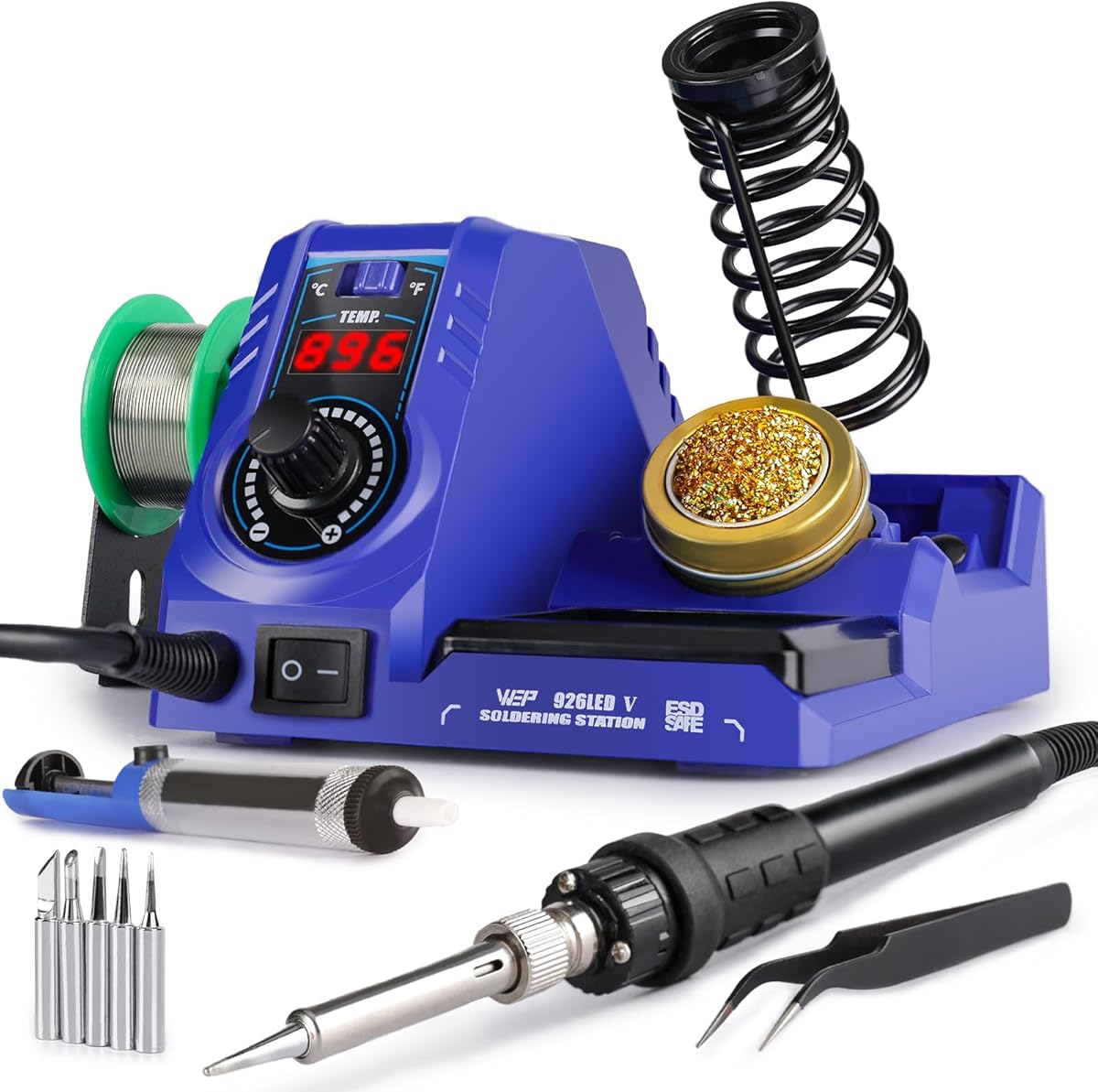
WEP 926LED V3
4.4Editor score
PID temperature stabilization
392-896°F adjustable range
Integrated compact iron holder
Five extra tips included
Compare the 10 best soldering iron station kits for electronics, focusing on temperature control, accessories, safety, hot-air capability, and ease of use.
A soldering iron station kit combines a temperature-controlled iron, a safe resting place, and essential tools in one practical bench setup. The best kits help beginners begin confidently while giving experienced users the control, accessories, and organization needed for electronics repair, circuit-board work, and detailed DIY projects.
We compared the ten featured kits by examining heater power, temperature range, PID stabilization, sleep and standby behavior, calibration options, display design, included accessories, and suitability for circuit boards, SMD work, phone repair, crafts, and hot-air rework. The list also distinguishes single-purpose soldering stations from combined soldering and hot-air systems.
Each review identifies the features that set its station apart and explains the trade-offs that could affect your workbench. The leading choices balance precise control, useful accessories, compact construction, and straightforward operation. Product availability, configurations, and prices can change, so verify the current listing and included accessories before purchasing.
4.4Editor score
4.6Editor score

4.4Editor score
The comparison chart highlights the practical differences among these ten kits, including heater output, temperature controls, safety features, bundled tools, and whether the station includes a hot-air rework function.


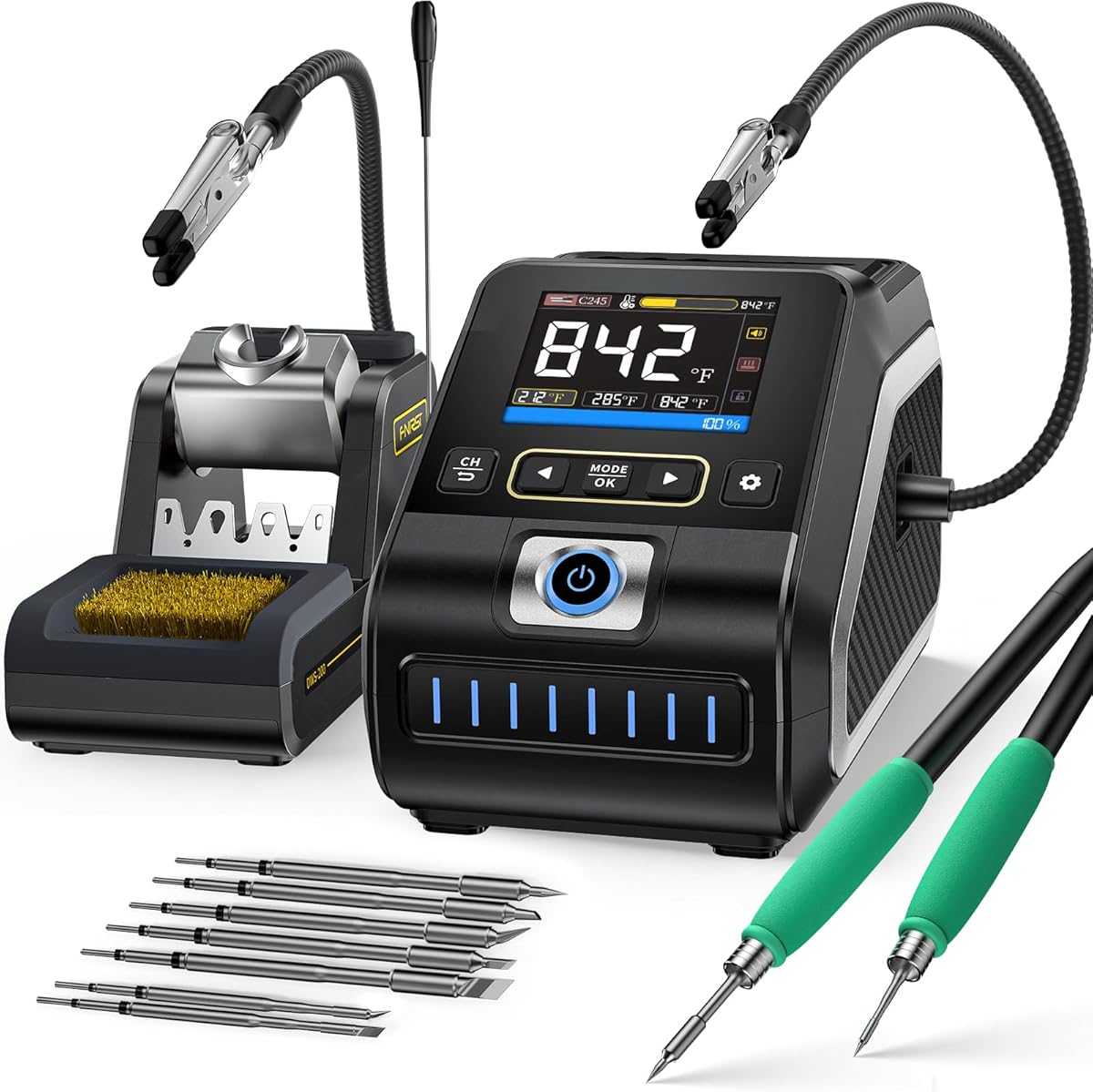
The FNIRSI DWS-200 is a high-output digital soldering station aimed at users who want fast heat-up, flexible temperature information, and a broad choice of iron handles. It carries a 4.6 rating and stands out from the list through its 200W rating, built-in pure-copper transformer, and compatibility with 100-240V input. That makes it a compelling option for serious repair benches and demanding electronic work.
We may earn a commission when you buy through this link, at no additional cost to you.
Its TFT display can present the temperature value, a temperature curve, or both together, helping users observe recovery and stability rather than relying on a single number. Three preset temperature sets support switching among common tasks, while sleep mode and automatic standby are triggered when the iron is placed in its stand. The supplied F210 handle is positioned for precision work, while the F245 handle is intended for SMD jobs and higher-power applications.
The package includes two helping hands and nine soldering tips, providing a useful range of shapes for through-hole work, fine electronics, and larger connections. The main compromise is complexity: the DWS-200 offers more capability than a first-time user may need, and it is only a soldering station rather than a combined hot-air rework system. Its broad voltage support is also more flexible than the 110-127V requirement listed for many other kits in this guide.
Choose the DWS-200 if you routinely work on circuit boards, perform repeated repairs, or want temperature curves and interchangeable precision handles. It is our Editor's Choice because the combination of power, monitoring, presets, and handle versatility makes it unusually adaptable. For a first simple electronics project, a less elaborate station may be easier to learn, but for a growing workbench, this model offers room to evolve.
The combined value-and-curve display gives users a clearer view of how the tip responds during a task. That information is especially useful when comparing different tip shapes or diagnosing sluggish heat recovery.
The F210 handle supports fine, controlled placement, while the F245 handle gives more power-oriented work a sturdier option. Matching the handle to the component can make a crowded board easier to navigate.
We may earn a commission when you buy through this link, at no additional cost to you.
The YIHUA 939D+ III EVO is a 110W digital station built for general electronics, advanced soldering, precision work, and repair. Its 4.4 rating reflects a balanced feature set, but the strongest attraction is the combination of four memory channels, simultaneous set-and-actual temperature display, PID stabilization, and digital calibration. Those tools let the user move between different jobs without repeatedly dialing in a new temperature.
We may earn a commission when you buy through this link, at no additional cost to you.
The 392-896°F range covers common soldering requirements, and the LCD gives immediate visual reference for both the selected and current temperatures. Four saved settings are particularly valuable for users who alternate between through-hole soldering, small SMD work, and heat-sensitive components. The included magnifier with LED lighting supports close inspection, while two helping hands hold parts securely during extended tasks.
The X2 storage system is a particularly thoughtful part of the design. It integrates the iron holder, cleaning tools, protective residual tray, temporary tip-storage slots, and solder-wire dispenser into a stable unit, reducing clutter and improving safety. The main limitations are that only three soldering tips are included and that the station does not offer hot-air rework, so users needing nozzle-based desoldering must purchase a separate system.
This is our premium pick because it offers the most polished combination of control, organization, and workbench accessories in a conventional soldering station. It is ideal for hobbyists, advanced learners, and repair technicians who work across varied projects. Users who only need a basic station may find some of these conveniences excessive, but for repeat work, the saved channels and integrated storage provide meaningful value.
Four memory channels let you preserve temperatures for different jobs or tip types. Moving between routine tasks becomes faster, reducing delays and the risk of using a setting that is unnecessarily hot.
The X2 holder keeps the iron, cleaning materials, tip storage, and wire dispenser together. Its protective residual tray and integrated structure also make it easier to maintain a clear, deliberate soldering area.
We may earn a commission when you buy through this link, at no additional cost to you.
The WEP 927-IV combines a 110W heating element with a broad 194-896°F adjustment range, three preset channels, and an unusually complete set of bench accessories. It has a 4.5 rating and is a strong fit for users who want more than a basic iron but do not need a combined hot-air system. The double numerical display is especially useful because it presents the set and actual temperatures simultaneously.
We may earn a commission when you buy through this link, at no additional cost to you.
Temperature presets reduce repetitive adjustments, while the sleep timer can be configured from 0 to 99 minutes. The station's integrated design includes an iron holder, tip cleaner, wire dispenser, helping hands, an LED magnifier, and storage slots for extra tips. That combination helps a new hobbyist start without assembling a large collection of separate tools and also keeps an established bench organized.
One trade-off is that three channels are fewer than the four offered by the YIHUA 939D+ III EVO. It also uses WEP #1400 soldering tips, a detail worth checking if you later add compatible replacements. The included LED magnifier may be useful for tiny components, although users with strong vision needs should confirm that the magnification and lighting suit their requirements.
The WEP 927-IV is our best budget selection because it makes the most of the station format without adding a hot-air function. It is a sensible recommendation for students, hobbyists, and repairers who value presets, useful organization, and a broad accessory set. Choose it when you want a capable, self-contained soldering station that can handle general electronics work while keeping the bench uncluttered.
The station combines three quick-access temperature channels with a dual display. This gives new users helpful shortcuts while still allowing the actual temperature to remain visible during a task.
Helping hands, tip cleaner, illuminated magnifier, solder dispenser, and tip slots are integrated around the station. This arrangement reduces clutter and keeps common accessories available during delicate work.
We may earn a commission when you buy through this link, at no additional cost to you.
The WEP 926LED V3 is a compact digital station designed as an accessible starting point for soldering hobbyists. It has a 4.4 rating and provides a 130W maximum heater output, a digital temperature readout, PID-based stabilization, and a 392-896°F adjustment range. Those features give it more consistency than a simple fixed-temperature iron while keeping the overall format approachable.
We may earn a commission when you buy through this link, at no additional cost to you.
The integrated iron holder saves desk space and is made from heat-resistant material for safe storage. Its automatic sleep function lowers the idle temperature after ten minutes, helping reduce wear on the tip and heating element. Users can switch the display between Celsius and Fahrenheit, which is convenient when following instructions written for either measurement system.
The bundle includes solder wire, five extra tips, tweezers, a desoldering pump, and a tip cleaner, covering several common starter needs. Compared with the WEP 927-IV, this model has a narrower lower temperature limit and does not offer saved temperature channels, LED magnification, or a separate tip-cleaning station. Those omissions matter less if your projects use standard electronics temperatures.
This is a good choice for a first bench, a student, or a hobbyist who wants digital control without a complex two-function station. It is also a sensible compact option for users with limited workspace. Choose the 926LED V3 when straightforward PID control, a space-saving holder, and a complete basic accessory set are more important than multiple presets or hot-air capability.
The station folds the holder into its body, making it useful on a crowded desk. The addition of solder wire, replacement tips, tweezers, a pump, and a cleaner makes it practical right away.
The PID microcontroller compensates for temperature changes and aims to keep the tip near the selected value. That stability can make repeated solder joints more consistent on common circuit-board projects.
We may earn a commission when you buy through this link, at no additional cost to you.
The YIHUA 926 III Digital is a 60W station with a 194-896°F range, digital display, PID stabilization, and a useful collection of accessories. Its 4.4 rating reflects dependable temperature control and a balanced package for electronics work. The station is rated for 110-127V with a US-standard plug and is designed for users working within that power specification.
We may earn a commission when you buy through this link, at no additional cost to you.
A master knob controls temperature and navigates functions such as Celsius-to-Fahrenheit conversion, sleep timing, and digital calibration. The sleep timer can be set to 5, 10, or 30 minutes, providing more flexibility than a fixed ten-minute delay. The rear metal mesh protects against accidental contact with the hot iron and also provides convenient storage for the six included YIHUA #1200/900M-series tips.
Two helping hands, stainless-steel tweezers, a solder sucker, lead-free solder wire, a wire dispenser, and a cleaning sponge make the kit more complete than a bare station. The relatively modest 60W output may require more dwell time than the 100W, 110W, 130W, and 200W options in this list when working on large joints or heat-resistant metal.
The 926 III Digital is a good general recommendation for electronics repair, circuit-board work, and learning temperature-controlled soldering. Its broad lower range, calibration support, and selectable sleep intervals make it flexible for different materials. Choose it when compact construction and useful controls matter more than maximum heating power.
A single master knob combines precise adjustment with menu access. Users can move between temperature control, display units, sleep timing, and calibration without navigating a complicated interface.
The rear mesh serves as a guard against accidental contact with the iron. Its storage slots also keep the six spare tips organized and within reach of the integrated holder.
We may earn a commission when you buy through this link, at no additional cost to you.
The YIHUA 926 III LED closely follows the established YIHUA 926 III formula, combining a 60W heater with a digital display and a 194-896°F range. It holds a 4.4 rating and is especially relevant for users who want access to lower temperatures as well as high-heat settings. PID heat control, calibration, sleep mode, and display-unit conversion give it more flexibility than a basic station.
We may earn a commission when you buy through this link, at no additional cost to you.
The integrated holder and rear mesh create a compact station-and-stand arrangement. Mesh storage slots provide a place for spare tips, while the protective screen helps reduce accidental contact with the hot iron. The sleep timer supports 0-, 5-, 10-, and 30-minute settings, letting users choose how aggressively the unit reduces its idle temperature.
The listed extras include two helping hands with alligator clips, six soldering tips, a roll of lead-free solder, a wire bracket, tweezers, a solder sucker, a sponge, a manual, and a small spanner for adjusting the helping hands. This is a thorough bundle, though the 60W heater remains the deciding limitation for users who routinely work with substantial thermal loads.
This model suits electronics assembly, repairs, and mixed-temperature hobby work where conserving bench space matters. It is also an alternative to the closely related YIHUA 926 III Digital listing, so buyers should compare the current images and listing details carefully. It remains a capable choice, but users seeking faster recovery or hot-air functionality should consider a higher-output or two-in-one station.
The 194°F lower limit provides more room than stations that begin around 356°F or 392°F. That can be useful for delicate work, lead-free solder, and users who prefer to regulate heat carefully.
Combining the stand with the station reduces the footprint and removes the need for a separate holder. The result is a tidier setup for home offices, classrooms, and compact electronics workspaces.
We may earn a commission when you buy through this link, at no additional cost to you.
The 100W Digital Green is a temperature-controlled station offering a 356-896°F range, digital display, calibration, and an adjustable sleep function. Its 4.5 rating makes it a practical middle ground for circuit boards, home DIY, crafts, and repairs involving mobile phones, appliances, and electronics. The 100W output should provide responsive heating for common bench tasks without the complexity of a dual-function rework station.
We may earn a commission when you buy through this link, at no additional cost to you.
The station supports Celsius and Fahrenheit conversion, while calibration helps align the displayed value with the tip's actual behavior. Its sleep timer can be set from 0 to 600 seconds, and an on/off switch provides a direct way to shut the system down. The steel-pipe handle design includes four vents intended to speed cooling when a soldering job is interrupted.
The accessory bundle covers a broad range of routine tasks: helping hands, solder-wire dispenser, cleaning sponge, iron-tip cleaner, five tips, elbow tweezers, solder sucker, solder wire, screwdriver, and mini wrench. The main limitations are the absence of saved presets and the lack of a dedicated hot-air function. Users doing frequent SMD rework may eventually want nozzle-based heating.
This station is a solid general-purpose choice for repair work and hobby projects. Its controls, calibration support, and cooling-oriented handle design are useful, while the included tools make it approachable for new users. Choose it over a higher-output premium model when your tasks are standard electronics repairs and you value a straightforward, accessible setup.
The vented handle is intended to dissipate heat more quickly when work stops. Better cooling can make the iron more comfortable to hold and reduce lingering heat in the tip assembly.
The sleep timer extends to 600 seconds, offering more choice than a fixed delay. Users can balance tip preservation against the inconvenience of waiting for the iron to cool after a short break.
We may earn a commission when you buy through this link, at no additional cost to you.
The 100W Digital Gray offers an approachable route into digital soldering with a 356-896°F adjustment range, 100W heating power, and a clear temperature display. Its 4.5 rating and extensive accessory list make it well suited to beginners, home workshops, and common electronics repairs. The station is designed for circuit boards, crafts, phones, appliances, and other accessible DIY jobs.
We may earn a commission when you buy through this link, at no additional cost to you.
Temperature calibration and Celsius-to-Fahrenheit switching add useful control, and the automatic sleep timer can be adjusted from 0 to 600 seconds. A physical on/off switch makes it easy to power down when the station is not being used. The ergonomic handle and silicone covering support comfortable handling, while four vents in the steel-pipe design encourage cooling after interrupted work.
The included helping hands hold small components at more than one angle, reducing the need to stabilize parts by hand. A solder dispenser, sponge, tip cleaner, five tips, elbow tweezers, pump, solder wire, screwdriver, and mini wrench cover the most common station needs. What it does not offer is preset temperature storage, hot-air rework, and the broad lower range available from the YIHUA 926 III models.
The 100W Digital Gray is a good recommendation for a learner or a general repair kit that will not monopolize bench space. It balances useful electronics with a straightforward setup. If you repeatedly alternate between very different jobs, add a model with memory channels; if you need to remove surface-mount components with hot air, consider a two-in-one station instead.
The large digital readout makes the selected temperature easy to see, and unit switching supports instructions from different regions. Calibration adds another layer of control for users who want the display to reflect actual tip conditions.
Helping hands and elbow tweezers keep a board or component steady without requiring you to hold everything with your working hand. This is useful for phone boards and other crowded assemblies where access is limited.
We may earn a commission when you buy through this link, at no additional cost to you.
The WEP 882D is a two-in-one electronics rework station that combines a soldering iron and hot-air gun in a compact body. It has a 4.5 rating and separates the controls for each function with individual LED displays, power switches, temperature buttons, and air-volume adjustment. This makes it a strong option for SMD work, component removal, shrinking tubing, and broader electronics rework.
We may earn a commission when you buy through this link, at no additional cost to you.
Both tools use PID temperature programs. The soldering side adjusts from 392-896°F, while the hot-air side covers 212-896°F and supports variable air volume. Sleep mode lowers the soldering iron's temperature when inactive, standby mode cools the hot-air gun in its holder, and automatic shutdown, calibration, and Celsius-to-Fahrenheit conversion add further control.
The kit is well equipped with two spools of solder wire, five soldering tips in I/B/K/3.2D/3C shapes, three hot-air nozzles, brass-wool tip cleaner, tweezers, and a desoldering pump. The trade-off is complexity and a larger learning curve compared with a conventional station. It is also listed for 110-127V operation, so users with other electrical systems should not connect it to an incompatible socket.
Choose the 882D if your work involves removing heat-sensitive surface-mount parts or doing repeated hot-air rework. The extra capability can justify the additional complexity for repair technicians and serious hobbyists. For ordinary through-hole soldering, a single-function station may be simpler, but for SMD and mixed rework, this model provides a notably versatile setup.
Independent displays and controls prevent one function's settings from interfering with the other. This is useful when switching between delicate soldering and broader hot-air heating within the same repair session.
The hot-air gun enters standby when returned to its holder and cools to 212°F. That behavior improves safety and reduces unnecessary heating while the station is not actively blowing hot air.
We may earn a commission when you buy through this link, at no additional cost to you.
The WEP 8786D-I SE is a two-in-one soldering and hot-air rework kit with a 4.3 rating. It combines an adjustable 392-896°F soldering iron with a 212-896°F hot-air station, PID stabilization on both functions, individual digital readouts, and adjustable air volume. It is aimed at electronics rework, desoldering, and users who want one bench unit to cover both contact heating and airflow heating.
We may earn a commission when you buy through this link, at no additional cost to you.
The soldering side includes a ten-minute sleep mode to reduce wear on tips and heating elements. The hot-air gun enters standby when placed in its holder, cooling to 212°F and stopping heating. This holder-based behavior provides a practical safety benefit, particularly in busy work areas where a hot-air gun might otherwise remain active during a pause.
The package contains lead-free solder wire, a desoldering pump, tweezers, three hot-air nozzles, and five soldering tips in I/B/K/3.2D/3C shapes. That is a functional mix for rework, although it is less extensive than the WEP 882D bundle, which adds a second solder spool and brass-wool cleaner. The simpler controls also mean fewer display modes than the FNIRSI DWS-200.
The 8786D-I SE makes sense for a technician or advanced hobbyist who regularly desolders components and wants both heating methods in one unit. Choose it over the WEP 882D if you prefer a focused package and do not need the extra cleaning and wire supplies. For light hobby soldering, a single-purpose station would be easier to operate and maintain.
Returning the hot-air gun to its holder triggers standby cooling. This makes pauses safer and helps the heating element and nearby components avoid prolonged high heat.
The five precision tips, three hot-air nozzles, pump, and tweezers cover common removal and placement tasks. The selection is particularly relevant to circuit-board rework rather than general household heating tasks.
We may earn a commission when you buy through this link, at no additional cost to you.
The right soldering iron station kit depends on your projects, experience, available space, and need for hot-air rework. Use the following factors to compare heater performance, temperature controls, safety features, and bundled accessories before making a selection.
Heater power affects how quickly the tip reaches temperature and how well it recovers after touching a cooler joint or component. The featured options range from 60W to 200W, with 100W, 110W, 130W, and 200W models occupying the middle and upper ends of the range. Higher output is generally useful for larger joints, dense boards, and repeated sessions, while lower output can still handle standard small electronics work.
Choose a 60W station for a compact, controlled bench and 100W to 130W for general-purpose work. Consider 200W when you routinely perform demanding repairs or want rapid heat recovery. Heater wattage is only one part of performance, so examine temperature stability and tip compatibility as well.
A broad range gives you room to work with different solder compositions and component sensitivities. The YIHUA 926 III models extend down to 194°F, while several WEP stations begin at 392°F and the 100W digital stations begin at 356°F. Upper limits commonly reach 896°F, with the FNIRSI DWS-200 reaching 842°F. PID stabilization helps maintain the selected temperature and recover after a brief interruption.
Prioritize PID control, a readable real-time display, and calibration if you work with small or heat-sensitive parts. A wide range alone is not enough if temperature swings noticeably. Check whether the display shows actual temperature, set temperature, or both, and confirm that the included tip shapes suit your usual joints.
Saved temperature channels are valuable when you alternate among different tasks. The WEP 927-IV offers three presets, while the YIHUA 939D+ III EVO stores four. Models without presets can still work well, but they require manual readjustment whenever you switch between general soldering, SMD work, and heat-sensitive components.
Look for one-touch preset access if you want fast changes. It is especially beneficial in a professional or educational bench where the same station serves many users. If you always work at one temperature, preset storage may matter less than holder quality, accessories, or footprint.
A two-in-one station adds a hot-air gun for removing and replacing surface-mount components, shrinking tubing, and performing other heat-intensive rework. The WEP 882D and WEP 8786D-I SE both provide separate soldering and hot-air controls, with three hot-air nozzles included. These systems are more versatile than conventional stations but require more space and involve a larger learning curve.
Buy a combined system if removing SMD parts is part of your regular work. Choose a single-function station for through-hole soldering, basic electronics repair, and smaller budgets. Check the hot-air temperature range and standby behavior, particularly whether the gun cools when returned to its holder.
A useful kit should provide the tools needed to begin working without immediately buying separate equipment. Common additions include helping hands, solder wire, a wire dispenser, tweezers, a desoldering pump, replacement tips, a sponge, a tip cleaner, and a screwdriver or wrench. The YIHUA and WEP bundles are generally comprehensive, with the WEP 927-IV standing out for its LED magnifier and the YIHUA 939D+ III EVO offering an integrated magnifier as well.
Count the number and shape of replacement tips as carefully as the accessory count. A larger bundle does not guarantee the exact tip you need. For beginners, solder wire, helping hands, a pump, and a cleaner provide the most immediate value. More experienced users may prefer fewer accessories and the freedom to select their own tips.
A stable iron holder, protective mesh, residual tray, tip storage, and integrated cleaning tools help create a safer and cleaner work area. Sleep mode lowers idle heat, automatic standby cools a hot-air gun, and an on/off switch offers straightforward shutdown. These details matter in shared workspaces and wherever a hot tool may be left unattended briefly.
Prioritize a holder that feels stable and keeps the iron tip away from combustible or conductive materials. Integrated storage is especially helpful when desk space is limited. Avoid placing loose tips near the station, and keep ventilation unobstructed so the heating assembly can cool as intended.
A digital display makes it easier to select and monitor a working temperature. The WEP 927-IV and YIHUA 939D+ III EVO show set and actual values simultaneously, while the FNIRSI DWS-200 can also display a temperature curve. Basic digital stations use a knob and menu controls, and the two-in-one WEP models add separate readouts for soldering and hot-air functions.
Choose a simple display for straightforward work, or a more detailed interface if you want to observe recovery behavior and store operating profiles. Make sure the controls are understandable without constantly referring to the manual. A larger screen is useful on a crowded bench, but display quality should still be judged by readability rather than size alone.
Most kits in this guide are designed for 110-127V operation with a US-standard plug, while the FNIRSI DWS-200 lists 100-240V input and includes a pure-copper transformer. Electrical compatibility is essential because an unsuitable voltage can damage a station and create a safety risk. Always verify the current listing rather than assuming that a similar-looking model shares the same input.
Choose a model explicitly designed for your local supply. Do not use an adapter to connect a 110-127V station to an incompatible outlet. If you travel internationally, a dual-voltage model may be more convenient, but you should still confirm plug, cord, certification, and manufacturer requirements.
Begin by reading the station's manual, confirming electrical compatibility, and inspecting the iron, cord, holder, tips, and controls. Place the station on a stable, heat-resistant, nonflammable surface with ventilation available. Before applying heat, install the appropriate tip, clean it, and connect the iron to the station according to the instructions.
Select a temperature appropriate for the solder and component, then allow the tip to heat fully. Tin the tip with a small amount of solder, clean excess flux from the work area, and secure the board or component with helping hands. Heat the joint and solder point together, feed a small amount of solder, then remove the solder before lifting the iron away to create a clean connection.
After each session, return the iron to its holder and let it cool naturally. Clean the tip with the appropriate sponge, brass wool, or tip cleaner without scraping the working surface aggressively. Wipe away residue, coil the cord without sharply bending it, and store the station away from moisture and combustible materials.
A soldering iron is the heated hand tool used to melt solder and make electrical connections. A soldering iron station kit includes that iron together with a control unit, a holder, and commonly used accessories such as replacement tips, solder, a pump, tweezers, and helping hands. The station generally provides more precise temperature control and better organization than a basic standalone iron.
It depends on the type of repair. A conventional soldering station is generally sufficient for through-hole joints, basic electronics, and many hobby projects. A hot-air rework station is more useful for removing or replacing surface-mount components, shrinking heat-shrink tubing, and heating assemblies evenly. Choose a two-in-one model if you expect frequent SMD rework rather than occasional soldering.
The correct temperature depends on the solder alloy, tip size, and component sensitivity. The stations in this guide cover broad ranges extending to approximately 896°F, allowing the user to select a suitable setting rather than relying on one fixed temperature. Start with the solder manufacturer's guidance and adjust while observing how quickly the tip recovers.
PID control helps the station compensate for changes in the tip's temperature. When a hot tip touches a cooler component or large joint, the controller can increase power to return it to the selected temperature. More stable heat can produce more consistent joints, reduce the need to touch the board repeatedly, and make temperature settings easier to repeat between projects.
Clean the tip during use when oxide or flux residue builds up, and give it a thorough cleaning after each session. Replacement frequency depends on use, soldering temperature, tip material, and whether the iron is repeatedly heated far above the working range. Avoid sanding the tip aggressively, as excessive abrasion can damage its plating and change its performance.
Helping hands are not strictly required, but they can make small components and circuit boards much easier to work on. They hold a board or part steady so you can focus on heating the joint and positioning the solder. Flexible-arm styles can also reduce the need to reposition a workpiece by hand, which improves control and comfort.
No. Tip compatibility depends on the station model, iron handle, and connection design, not merely the station's wattage. The WEP 927-IV specifically uses WEP #1400 tips, and the YIHUA 926 III kits use YIHUA #1200/900M-series tips. Check the manufacturer's compatibility information and match both tip shape and station model before ordering replacements.
Look for an integrated iron holder, stable base, protected tip-storage area, and space for the tools you use most. A digital display, sleep timer, and cleaning tray improve daily usability without taking up much room. Keep the station away from edges, leave ventilation paths open, and position the solder spool so the wire feeds naturally without crossing the work area.
The WEP 926LED V3 is the best budget option for a compact first setup, offering digital control, PID stabilization, sleep mode, and essential accessories without unnecessary complexity. The WEP 927-IV expands the package with three temperature presets, a wider lower temperature range, and an LED magnifier, making it an excellent general-purpose choice.
The FNIRSI DWS-200 is the Editor's Choice for high-power work, temperature-curve monitoring, interchangeable handles, and broad voltage input. The YIHUA 939D+ III EVO stands as the premium pick for its four memory channels, dual-temperature display, calibration, magnifier, and exceptionally integrated X2 holder. For hot-air rework, the WEP 882D and WEP 8786D-I SE provide the relevant two-function capability.
Prioritize the features your actual projects require: heater capacity, temperature stability, tip compatibility, safe storage, and the right accessories. Do not pay for hot-air capability or multiple presets if you will never use them, but do not overlook power recovery or calibration on a busy repair bench. Check the current listing, electrical requirements, included accessories, and latest price before making a final purchase.