
eufy Security 5-Piece Home Alarm Kit
4.3Editor score
No monthly subscription fees
Five-piece starter configuration
App alerts for detected events
Keypad Control Home Security Systems combine a physical control interface with sensors, alarms, and optional remote monitoring. A useful keypad should be intuitive, responsive, compatible with the rest of the system, and appropriate for the property being protected. The best choice depends on installation method, display preferences, and desired smart-home integration.
This guide compares ten complete systems and standalone keypads using information supplied for each product. It examines included components, control style, wireless or hardwired design, display type, app support, emergency features, compatibility, and user ratings. The list includes both complete starter kits and control-panel products intended for more specialized installations.
Each review explains the product's strongest benefits, practical limitations, and ideal buyer, while the comparison table makes the main differences easier to scan. Ratings reflect the supplied Amazon feedback, and configuration options can vary by property and existing equipment. Prices and availability change frequently, so shoppers should confirm current listings before purchasing.
4.3Editor score

4.7Editor score
5.0Editor score
As an Amazon Associate we earn from qualifying purchases.
The comparison below highlights the major differences among complete alarm kits, standalone keypads, and professional-style control panels, including installation style, included hardware, display format, connectivity, and the most relevant compatibility considerations.
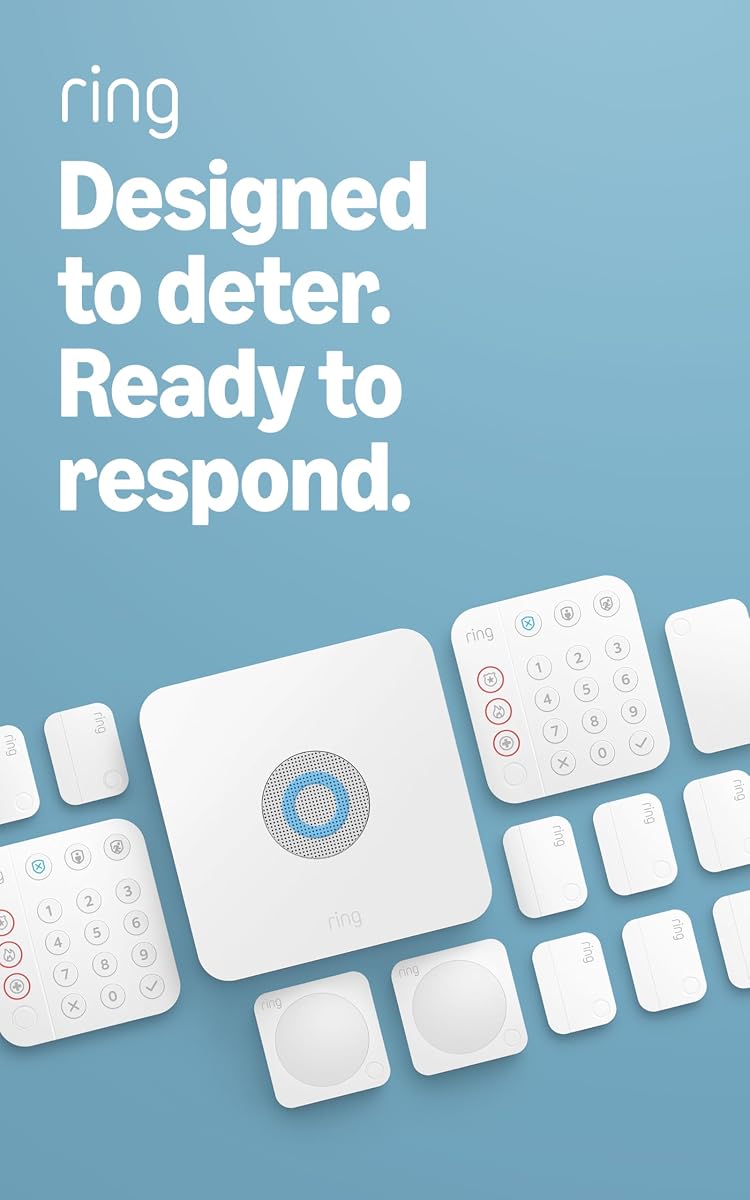


The Ring Alarm 14-Piece Kit is the most comprehensive starter package in this guide and carries a supplied rating of 4.6. It is positioned for two- to four-bedroom homes, with two keypads, eight contact sensors, two motion detectors, a base station, and a range extender. That unusually generous mix gives users a more useful starting point than a minimal sensor bundle.
We may earn a commission when you buy through this link, at no additional cost to you.
Its strongest feature is the balance between physical control and connected functionality. The keypads handle arming and disarming directly, while the Ring app provides notifications when the system is triggered. The range extender helps improve wireless coverage throughout the property, and the contact sensors monitor doors and windows. Additional Alarm Sensors and accessories can be added as needs change.
Professional monitoring and remote arming are tied to a compatible Ring Protect Plan, so the full feature set is not available from the hardware alone. The kit also depends on compatible Ring equipment and network connectivity for its connected features. These are important considerations for buyers who want a self-contained system with no recurring service expense.
This is the strongest pick for households wanting broad entry coverage, more than one keypad, and flexibility to expand without assembling a system sensor by sensor. It is particularly appropriate for larger homes, but the Ring 8-Piece Kit may be a more proportionate starting point for smaller properties. Buyers should compare both the included hardware and the optional subscription features before deciding.
Two keypads are useful when an entrance is not near the base station or when family members prefer different access points. Together with eight contact sensors and two motion detectors, the package offers broad detection coverage before any expansion.
The Ring app keeps users informed about triggered events, while the included range extender supports wireless reach. A compatible Ring Protect Plan adds remote arming, continued service during a Wi-Fi outage, and professional emergency monitoring.
We may earn a commission when you buy through this link, at no additional cost to you.
The eufy Security 5-Piece Home Alarm Kit has a supplied rating of 4.3 and focuses on a straightforward, subscription-free approach. Its package includes a HomeBase, keypad, motion sensor, two entry sensors, an owner's manual, and a Happy Card. It is a compact starting point for a home or smaller space that needs basic entry and motion coverage.
We may earn a commission when you buy through this link, at no additional cost to you.
The included components cover the central functions of a basic alarm system. Entry sensors can identify when doors or windows open, the motion sensor can detect movement, and the keypad provides an in-home control point. Users receive app notifications as soon as motion or a breach is detected, which makes the system useful without requiring constant attention at the keypad.
The most attractive benefit is the absence of recurring subscription fees for the core system. It also includes mounts for the keypad and motion sensor, making the basic installation more approachable. The tradeoff is the smaller hardware package: only one keypad and two entry sensors are included, so buyers with several entrances may need additional accessories.
This kit is a sensible choice for apartment residents, smaller homes, or anyone who wants app alerts and local keypad control without a monthly plan. It is less suitable for a large house needing extensive window coverage. Buyers should inventory their entry points and decide whether the five included pieces are sufficient before selecting it.
The HomeBase, keypad, two entry sensors, and motion sensor form a functional foundation for everyday protection. Because eufy describes the products as one-time purchases that combine security with convenience, the package avoids making subscription access a requirement for its core use.
The supplied mounts help position the keypad and motion sensor on walls, while the entry sensors attach to doors and windows. App notifications provide prompt awareness when the system detects motion or an entry breach.
We may earn a commission when you buy through this link, at no additional cost to you.
The Honeywell 6290W Touch Center combines a seven-inch color touchscreen with wireless control and voice functionality. Its supplied rating of 4.6 makes it one of the strongest-rated products in the list, and its large display is especially useful for users who prefer graphical menus over a small text keypad. It is a controller component rather than a complete alarm bundle.
We may earn a commission when you buy through this link, at no additional cost to you.
The touchscreen format can make arming, disarming, and status review more approachable for household members. Wireless communication simplifies how the control unit fits into an existing installation, while the color screen provides a more informative and visually organized interface. The integrated voice feature is a notable addition for hands-free or accessibility-oriented use.
Because this is a standalone alarm control rather than a full kit, it is not the right purchase for someone seeking a ready-made home system with sensors and a base unit. Buyers must have compatible alarm equipment or be prepared to assemble the broader system separately. Installation and programming may also call for more technical familiarity than a consumer-oriented wireless kit.
The Honeywell 6290W is best for a homeowner or installer who wants to upgrade an existing system with a prominent, color touchscreen keypad. It stands out from the fixed-display models in this guide because of its larger interface and voice capability. Confirm panel compatibility before ordering, as the product listing does not describe a complete starter package.
A seven-inch color screen gives users more room to review system information than a compact text display. The touchscreen format is suited to modern installations where visual status feedback and menu navigation are priorities.
The wireless design allows the control center to communicate without relying on a keypad cable. Its voice feature adds another way to interact with the alarm, making the unit less dependent on visual confirmation alone.
We may earn a commission when you buy through this link, at no additional cost to you.
The Honeywell Ademco 6150 Fixed Display Keypad offers a traditional approach to alarm control, with a fixed English display and physical controls. It has a supplied rating of 4.4 and is best suited to compatible installations that value a straightforward interface over a large touchscreen. As a standalone keypad, it does not include a complete set of sensors.
We may earn a commission when you buy through this link, at no additional cost to you.
Its fixed display provides essential system feedback without introducing a more complex menu-driven interface. Users can arm and disarm the alarm and view status through a familiar security-keypad format. This makes the 6150 potentially easier to understand than a large touchscreen for people who have used conventional alarm panels.
The main limitation is display size and information density. Users accustomed to graphical control screens may find the fixed display less informative, particularly when reviewing zones or more complex system status. The product also requires compatible Honeywell Ademco equipment and appropriate wiring or panel configuration, making it a better fit for an existing installation than a new self-contained system.
Choose the 6150 when straightforward local control and a proven fixed-display design matter more than expansive graphics. It is a practical add-on or replacement keypad rather than a whole-home security solution. Confirm the panel model and installation requirements before buying to avoid a mismatch.
The fixed English display and physical keypad layout keep everyday arming and status tasks visible. It avoids the learning curve associated with menu-heavy smart control interfaces.
This product is most relevant when expanding or servicing a compatible Honeywell Ademco system. Shoppers should check the panel requirements rather than treating the keypad as a standalone alarm system.
We may earn a commission when you buy through this link, at no additional cost to you.
The Ring Alarm 8-Piece Kit has the highest supplied rating in the guide at 4.7, reflecting strong customer feedback for a compact wireless package. It is intended for one- to two-bedroom homes and includes a base station, keypad, four contact sensors, one motion detector, and a range extender. The result is a balanced starting configuration without the larger footprint of a 14-piece kit.
We may earn a commission when you buy through this link, at no additional cost to you.
Physical arming and disarming are handled through the included keypad, while mobile notifications inform users when the alarm is triggered. The contact sensors detect opened doors and windows, and the motion detector adds room coverage. A range extender supports communication across a larger floor plan, which is particularly valuable in homes where the base station does not have an ideal central location.
Remote arming, operation during a Wi-Fi interruption, and professional monitoring require a compatible Ring Home subscription. Without that plan, buyers still receive the core alarm hardware and app notifications, but they should not assume every advertised smart feature is included. Additional sensors and accessories are sold separately.
This kit is an excellent starting point for small homes and users who want a proven, expandable wireless platform without buying a large collection of components immediately. It is also a sensible alternative to the 14-piece version when two- to four-bedroom coverage is not necessary. Buyers who prioritize remote management and professional response should compare the service requirements before purchase.
Four contact sensors, one motion detector, one keypad, and a range extender cover the primary needs of a one- or two-bedroom home. The package can be expanded as more rooms, entry points, or device types come into focus.
The Ring app sends notifications when the system is triggered, reducing the need to remain near the keypad. Buyers who want remote arming, outage continuity, or 24/7 professional monitoring can add a compatible Ring Home subscription.
We may earn a commission when you buy through this link, at no additional cost to you.
The eufy Keypad E10 is designed as an accessory for an existing compatible eufy setup rather than a complete alarm kit. It carries a supplied rating of 4.4 and distinguishes itself with four operating modes, a covert duress alarm, and a dedicated one-touch SOS function. Those emergency controls give it particular value for households seeking more than basic arming.
We may earn a commission when you buy through this link, at no additional cost to you.
The duress feature is intended for a coercion scenario. Entering a preset duress code can silently trigger emergency dispatch while making the keypad appear to disarm normally. The top-mounted SOS button offers a separate emergency path and must be pressed and held for two seconds. These functions make the keypad useful in situations where a conventional alarm button may not be sufficient.
Compatibility is the central purchasing condition. The E10 must work with HomeBase 2, HomeBase 3, or HomeBase Professional, so it cannot serve as a universal keypad for unrelated systems. It also needs the broader sensors and hub configuration provided by those platforms. The listed open-air communication range reaches up to 656 feet from a HomeBase, although real placement and obstacles can affect performance.
The E10 is best for owners of a compatible eufy system who want a more accessible wall control with advanced emergency functions. It is especially relevant where duress signaling could improve response options. Confirm the current HomeBase model and app ecosystem before ordering, and pair the keypad with appropriate sensors rather than expecting it to provide full coverage by itself.
A preset duress code can initiate an emergency response while preserving the appearance of a normal disarm. The feature is designed for coercion, where a visible or ordinary alarm action might not be appropriate.
Holding the top SOS button for two seconds triggers the alarm. The control also offers four arming and disarming modes, giving household members quick choices for common routines.
We may earn a commission when you buy through this link, at no additional cost to you.
The Ring Alarm Keypad, 2nd Gen, is a focused expansion accessory with a supplied rating of 4.7. It provides a physical place to arm and disarm a Ring Alarm system, making it useful for homes that need an additional control point near a garage, side entrance, bedroom, or common area. It is not a complete kit and should be considered alongside a base station and sensors.
We may earn a commission when you buy through this link, at no additional cost to you.
The main benefit is convenience. A keypad close to the point of entry reduces the need to walk to a central base station every time someone leaves or returns. Its second-generation design includes emergency response button features, which add a direct way to summon assistance through the connected alarm system when supported by the required service.
The listing specifically associates the emergency response functionality with a compatible Ring Home subscription sold separately. Users without that subscription should not assume the button provides every response feature available under the full service. Buyers must also own a compatible Ring Alarm setup or purchase the additional equipment needed to use this keypad.
This keypad is ideal for Ring Alarm owners who want a second or third control point. It is less suitable for a first-time shopper who needs a base station, sensors, and installation package, because the 2nd Gen keypad does not include those components. Confirm account and system compatibility before adding it.
Placing another keypad near a frequently used exit can make arming and disarming more convenient. It is particularly useful for properties with multiple entry paths or family members who spend time in separate areas.
The keypad is intended to work within an existing Ring Alarm system rather than as a universal controller. Its emergency response button adds another emergency control option when paired with a compatible subscription.
We may earn a commission when you buy through this link, at no additional cost to you.
The Honeywell Security 6160 Ademco Alpha Display Keypad is a dedicated control device for programming Adecco Vista alarm panels, as stated in the supplied product information. Its 4.6 rating reflects favorable customer feedback, while the alpha display differentiates it from simpler fixed-display keypads. It is best considered an installation component rather than a stand-alone security system.
We may earn a commission when you buy through this link, at no additional cost to you.
An alpha display can show more descriptive information than a purely numeric interface, making the keypad useful during panel setup and system configuration. Physical buttons provide direct control for arming, disarming, and programming tasks. For technicians or experienced owners of compatible Vista panels, this added information can make operation and troubleshooting more efficient.
The listing's misspelling of the panel family should not be ignored: the product is named as the Honeywell 6160 Ademco Alpha Display Keypad, and the compatibility claim refers to Vista panels. Purchasers should verify the exact panel model before ordering. The package dimensions and weight describe the product package rather than a complete system, and no sensors are included.
Choose the 6160 when maintaining or configuring a compatible Vista installation and need more than a basic status display. It is less appropriate for users who want a new wireless alarm ecosystem or need a full package with entry sensors and motion detection. Professional installation help may also be valuable for buyers unfamiliar with alarm-panel programming.
The alpha display can present text-based system information beyond what a very basic numeric display provides. That makes it more useful when a user needs to interpret programming prompts or zone-related status.
This keypad is designed around compatible Vista panels rather than broad cross-platform operation. Confirm the panel family, programming requirements, and connection method before treating it as a suitable upgrade.
We may earn a commission when you buy through this link, at no additional cost to you.
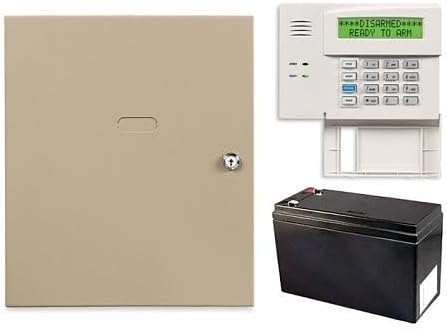
The Honeywell Home VISTA-20P 3-Piece Control Panel Kit has the highest supplied rating in the guide at 5.0. It is designed for buyers who want a professional-style control foundation rather than a simple consumer alarm bundle. The package includes the VISTA-20P panel, a 6160 keypad, and a 712BNP battery, giving the user a more substantial starting point for a wired or professionally configured installation.
We may earn a commission when you buy through this link, at no additional cost to you.
Its standout capability is communication flexibility. The panel supports IP and cellular radio reporting, as well as upload and download functionality, which can make it more appropriate for centralized monitoring or installer-managed systems. It is also described as compatible with Z-Wave-enabled smart-home devices such as thermostats, lights, and locks, creating an opportunity to connect security control with broader home automation.
The system supports four graphic touchscreen keypads, even though the supplied kit includes a 6160 rather than a touchscreen model. That means buyers can expand or customize the user interface, but doing so may require additional equipment. The package does not include a broad set of sensors, and installation of a panel with this level of configuration is more involved than setting up a self-contained wireless kit.
This kit is best for a serious DIY enthusiast, installer, or property owner seeking a scalable professional-style platform. It offers a compelling foundation when cellular and IP reporting matter, particularly alongside Z-Wave automation. Those same requirements make it less attractive to a small-home beginner who wants a simple box containing sensors and a hub.
Support for IP and cellular radio reporting gives the panel alternatives for transmitting system information. These capabilities are valuable for installations connected to professional monitoring or managed by an alarm professional.
Z-Wave compatibility allows the security platform to work with compatible thermostats, lights, and locks. Support for up to four graphic touchscreen keypads also makes the control side of the system highly customizable.
We may earn a commission when you buy through this link, at no additional cost to you.
The TUXEDO 7-Inch Touchscreen Security and Smart Controller combines a large display with a Honeywell-oriented control role. It has a supplied rating of 4.3 and is built for shoppers who want a prominent wall interface for security and smart-home functions. Unlike many consumer alarm kits, it is a controller rather than a package of sensors and detectors.
We may earn a commission when you buy through this link, at no additional cost to you.
Its seven-inch touchscreen is the defining feature, providing more room for status information and menu-based control than a conventional fixed-display keypad. The product title identifies it as both a security and smart controller, making it attractive for users who want their alarm and broader home functions in one place. That multifunction design is especially useful in a finished installation where wall space and wiring are already planned.
Installation is entirely hardwired, and the unit contains no internal battery. It draws power from the security system and relies on that system's battery backup, which avoids managing a separate keypad battery. At the same time, the absence of a local battery means the controller depends on the panel's power and backup arrangement. Buyers also need compatible wiring, panel equipment, and configuration for the broader Honeywell environment.
The TUXEDO controller is best for a homeowner building or updating a hardwired smart-security system and willing to plan the installation carefully. It is less convenient for renters or users seeking a self-contained wireless system. Before buying, verify panel compatibility, wiring requirements, and how the controller's smart functions integrate with the rest of the system.
The seven-inch display gives users a central visual command center. Combining security and smart-controller roles can reduce the number of separate wall interfaces in a more advanced installation.
Because the controller has no internal battery, it draws operating power from the security system. During an outage, it depends on the backup battery associated with that system rather than providing independent standalone protection.
We may earn a commission when you buy through this link, at no additional cost to you.
The right keypad control system depends on property size, installation method, existing equipment, display preferences, and emergency features. These factors help separate consumer-friendly complete kits from specialized control panels and accessories.
A complete alarm kit usually includes a base station, keypad, contact sensors, and motion detector, making it easier to assemble a functioning system. Standalone keypads and control panels provide flexibility for expanding or upgrading an installation but require compatible hardware and additional configuration. Buyers starting from scratch generally benefit from a complete kit, while existing-system owners should identify the panel and ecosystem before shopping for a separate keypad.
Choose a complete kit for straightforward setup, and choose a standalone controller when extending an established system.
Wireless systems are generally easier to place and reconfigure because sensors communicate without individual control cables. A range extender can improve coverage in a larger property, although walls and layout still matter. Hardwired controls offer a permanent connection to the alarm panel and can suit professionally planned installations, but they require compatible wiring, mounting work, and power arrangements. The TUXEDO controller is explicitly hardwired, while the Ring and eufy kits emphasize wireless components.
Prioritize wireless for easier installation and hardwired control for a planned professional-style setup.
A fixed text display supports arming, disarming, and status checks in a familiar, compact format. An alpha display can present more descriptive programming information, while a color or touchscreen interface provides a larger visual workspace. The right choice depends on the users and the panel: conventional keypads may be easier for some household members, while touchscreens suit people who prefer menu-based control and smart-home integration.
Select a display that matches the users' technical comfort and the amount of on-screen information they need.
App notifications help users learn about entry or motion events without being near the keypad. Remote arming, professional monitoring, cellular reporting, and continued operation during an internet outage may require a subscription or compatible reporting service. Compare recurring service requirements as carefully as the hardware, and do not confuse optional professional monitoring with the standard local alarm functions included in a kit.
Check whether remote control and professional response require a subscription before making the final choice.
Emergency controls can provide a direct path to assistance when a user cannot use a normal exit or arming routine. The eufy Keypad E10 stands out for a covert duress code and a two-second SOS hold, while the Ring Alarm Keypad includes emergency response button features when paired with a compatible subscription. Consider who may use the keypad, whether children or older adults need simple access, and whether a covert alert is appropriate for the household.
Prioritize dedicated emergency controls when rapid or discreet help is a central security requirement.
A one- or two-bedroom home may be adequately served by the Ring Alarm 8-Piece Kit, while a two- to four-bedroom home is the stated focus of the 14-piece version. Count exterior doors, accessible windows, hallways, and common areas before deciding. Two motion detectors and eight contact sensors provide a stronger starting point than a single entry sensor, but every property has a different layout and coverage needs.
Count entrances and high-traffic areas, then choose the kit whose included sensors match that floor plan.
Smart-home integration can allow an alarm system to work with compatible thermostats, lights, and locks. The Honeywell VISTA-20P panel is explicitly described as Z-Wave compatible, while the TUXEDO product combines security and smart-controller functions. Compatibility is not universal, so verify both the control hardware and the intended smart-home devices. A system may offer app control without supporting every automation standard.
Confirm the exact protocol and device list rather than assuming all smart-home products will connect.
A complete wireless kit normally includes the hub or base equipment needed to manage power and communication. Standalone professional keypads may draw power from the panel, while hardwired controllers can depend on the security system's backup battery. The TUXEDO unit has no internal battery and uses the system backup, illustrating why a buyer's existing power design matters. Confirm what is included before assuming a replacement will remain operational during an outage.
Trace the complete power path, including panel backup, before installing a control panel or hardwired keypad.
Begin by mapping entrances, important interior areas, and the best location for the base station or control panel. Install contact sensors on the selected doors and windows, position motion detectors where they can detect movement without being blocked, and mount the keypad at a comfortable height near a likely exit. For a complete wireless kit, connect the base equipment through the manufacturer's app and follow the setup sequence for sensors and accessories.
Test every zone and control option after installation. Arm the system in each supported mode, open a contact sensor, trigger the motion sensor, and confirm that the intended notification appears. Verify app access, emergency buttons, duress behavior, and any professional monitoring connection. If a professional installer is involved, request a walkthrough covering arming, disarming, bypass procedures, battery checks, and what to do after a false alarm.
Care for the keypad with a soft, dry cloth and avoid harsh cleaners that could damage the display or finish. Follow the manufacturer's guidance for battery replacement, especially for systems that use a panel backup battery rather than an internal keypad cell. Test the system regularly, update the app and firmware when prompted, and review user access or subscription details whenever household members or monitoring arrangements change.
Difficulty depends on the product. Consumer wireless kits are generally designed for self-installation and use mounts, adhesive sensor placement, and app-based setup. Professional-style panels and hardwired controllers can require compatible equipment, wiring, programming, and more careful system planning. Shoppers should check the installation requirements before buying and consider professional support if they are unfamiliar with alarm panels.
No. The eufy Security 5-Piece Home Alarm Kit is specifically described as having no monthly fees, while other products may offer optional professional monitoring or subscription-based features. For example, remote arming, continued operation during a Wi-Fi outage, and professional monitoring for Ring depend on a compatible plan. Check which features are included with the hardware before deciding whether a subscription is necessary for your needs.
That depends on the platform. The Ring Alarm kits are expandable with additional Alarm Sensors and accessories, and the Honeywell VISTA-20P panel supports up to four graphic touchscreen keypads. Standalone accessories such as the Ring Alarm Keypad and eufy Keypad E10 are intended for compatible existing systems. Verify the required hub, panel, app, and accessory versions before expanding an installation.
A fixed-display keypad uses a compact screen and physical buttons to show basic status and accept commands. A touchscreen keypad provides a larger visual interface that can present more menus, status information, and smart-home controls. The Honeywell 6150 and 6160 use conventional text-based interfaces, while the 6290W and TUXEDO offer seven-inch color touchscreens for users who prefer visual navigation.
Usually not without compatibility. A Ring Alarm Keypad is designed for the Ring Alarm ecosystem, while the eufy Keypad E10 requires HomeBase 2, HomeBase 3, or HomeBase Professional. Honeywell keypads and controllers are tied to compatible panel families and programming requirements. Always check the manufacturer's panel list and the product's stated compatibility before ordering a standalone keypad.
A duress code is a special code used to contact help when a person is being coerced and cannot safely trigger a normal alarm visibly. The eufy Keypad E10 includes a covert duress function that can initiate emergency dispatch while appearing to disarm the system. It also includes a separate one-touch SOS control for other emergency situations.
It depends on the building layout and the location of the base station. The Ring Alarm 8-Piece and 14-Piece kits include a range extender, which can help wireless sensors and keypads communicate across a larger home. Thick walls and long distances can still affect performance, so placement should be planned around the property rather than treating the extender as a guarantee of universal coverage.
A complete kit is usually more convenient for a new system because it includes sensors, a base station, and a keypad. A professional control panel is better suited to a planned installation requiring a specific panel, advanced reporting, Z-Wave integration, or multiple touchscreen keypads. The VISTA-20P provides the latter kind of foundation, while Ring and eufy kits are more approachable starting points.
The Ring Alarm 8-Piece Kit is the most balanced compact choice, offering a strong supplied rating, a useful sensor mix, app notifications, and optional professional monitoring. The Ring Alarm 14-Piece Kit expands that concept with two keypads, eight contact sensors, and two motion detectors for larger homes. For buyers seeking a simple no-fee foundation, the eufy Security 5-Piece Kit provides a compact alternative.
The Honeywell VISTA-20P Control Panel Kit is the premium choice for professional-style infrastructure, reporting flexibility, and Z-Wave integration. Standalone options serve more specific needs: the eufy Keypad E10 emphasizes duress and SOS functions, the Honeywell 6290W prioritizes a color touchscreen, and the TUXEDO controller suits a planned hardwired smart-security installation. Prioritize panel compatibility, installation method, and the value of the emergency or smart features you will actually use.
Ratings and product configurations provide a useful starting point, but they do not guarantee identical results in every home. Current prices, service plans, app compatibility, and available accessories can change, so shoppers should verify the live listing and manufacturer requirements before purchasing. The best system is the one that fits the property, supports the intended users, and delivers the required coverage without unnecessary complexity.