
40W Wireless Charging Pad, Dual 20W Fast Wireless Charging Mat
3.8Editor score
Two-device wireless charging
Up to 20W per position
Slim travel-friendly profile
A charging mat for multiple devices can simplify a crowded nightstand, desk, dorm shelf, or travel bag by consolidating phones, earbuds, watches, and other compatible hardware on one surface. The best model balances generous charging capacity, broad device support, dependable alignment, safe power management, and a layout that suits your routine.
This guide compares ten multi-device charging mats on the features that affect everyday use: supported devices, charging areas, case compatibility, portability, included adapters, watch support, and the ability to function as a desk mat or folding stand. It also distinguishes dedicated charging pads from hybrid products that combine wireless charging with larger work surfaces.
Each review below reveals how the product fits different households, including Apple-only desks, mixed phone ecosystems, shared rooms, and travel setups. Ratings and specifications reflect the available product information, while prices and promotions can change, so readers should confirm the current listing and accessory details before buying.
3.8Editor score
4.0Editor score

4.4Editor score
As an Amazon Associate we earn from qualifying purchases.
The comparison below highlights the main differences in device capacity, ecosystem support, included power accessories, portability, and intended use. Dedicated three-device mats prioritize organized charging, while larger mouse-pad models and high-watt USB hubs expand the definition of a charging mat.




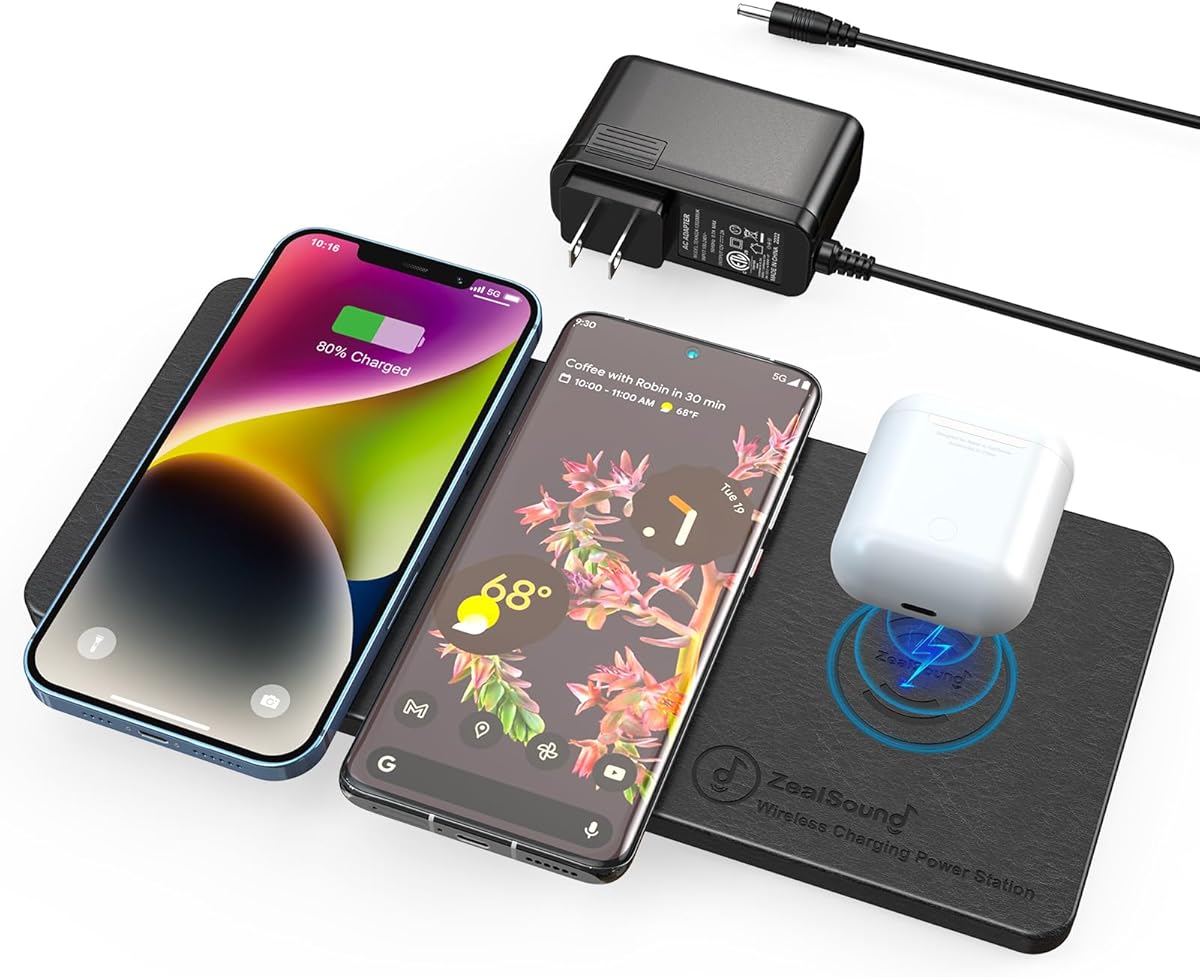
The ZealSound Wireless Charging Pad is a 4.0-rated, three-position charging mat designed for households that do not want separate cables for every phone and earbud case. Its strongest qualities are broad compatibility, an included 24W adapter, a case-friendly surface, and a slim profile that should transition easily between a nightstand, office desk, dorm shelf, or travel bag.
We may earn a commission when you buy through this link, at no additional cost to you.
Each of the three charging areas supports up to 10W for compatible hardware, making the pad practical for two phones plus a wireless-charging earbud case. It supports wireless-compatible iPhones from iPhone 8 onward, Samsung Galaxy phones, Google Pixel phones, AirPods with wireless charging cases, and Galaxy Buds. A case can remain attached when it is nonmetal and no more than 0.24 inches thick.
The main limitation is that it is not a watch charger. Apple Watch, Samsung Galaxy Watch, and other smartwatches are explicitly excluded. Charging speed can also decline with device limitations, case thickness, poor alignment, or when several devices draw power simultaneously. Users must remove metal rings, magnetic plates, wallet attachments, and grip accessories before expecting consistent performance.
This is the strongest general-purpose recommendation for someone who charges multiple phones and earbuds and values a complete package. The included adapter and 47.25-inch cable reduce setup friction, while the light-free surface suits shared bedrooms. Choose it unless a dedicated watch charging position is essential.
The included 24W AC-to-DC adapter and long charging cable make this a ready-to-use kit rather than an accessory-dependent purchase. It is particularly helpful when the nearest outlet is inconvenient or when an older adapter cannot support three charging areas properly.
Unlike an Apple-specific dock, this mat supports compatible iPhone, Samsung Galaxy, Google Pixel, AirPods, and Galaxy Buds devices. That makes it a sensible shared charging point for couples, families, roommates, and coworkers using different brands.
We may earn a commission when you buy through this link, at no additional cost to you.
The Mophie 4-in-1 Wireless Charging Mat is a 3.8-rated option for users who want more charging positions than a conventional three-device pad. It can handle up to four Qi-enabled devices and one USB-A device simultaneously, with the included Apple Watch charging stand extending its usefulness for an Apple-centered setup.
We may earn a commission when you buy through this link, at no additional cost to you.
Its multiple coils and marked alignment valleys make it easier to find the correct placement for a phone, earphones, or compatible watch. The mat can charge through lightweight smartphone cases up to 3mm thick, as well as through AirPods cases. A total output of 25W and built-in safety measures help manage heat and charging risk.
The trade-off is that the physical design is more complex than a plain three-pad mat. The dedicated watch stand occupies space, and the USB-A port requires another cable if you want to charge a device that does not support Qi. The listed compatibility also points most directly toward Apple Watch use rather than the broader Galaxy Watch support found in some alternatives.
Pick this product for an Apple desk where the phone, AirPods, watch, and another Qi device all need regular charging. It is less compelling for mixed watch ecosystems, but its four charging positions and understated fabric finish make it a polished workspace upgrade.
The ability to charge four Qi-enabled devices at once distinguishes this mat from simpler two- and three-device models. It works well for busy desks where several people leave phones and earbuds near the same central power source.
Easy-align valleys and intuitive markings reduce the guesswork involved in finding each charging sweet spot. Lightweight cases up to 3mm can remain in place, reducing the annoying need to remove a cover before bed or before a meeting.
We may earn a commission when you buy through this link, at no additional cost to you.
The Dual 20W Charging Mat is a 3.8-rated, two-device option that delivers strong nominal charging performance without the footprint of a larger multi-device station. At only 0.39 inches thick, it is designed to fit neatly beside a monitor, inside a laptop bag, or on a small nightstand where a standing dock would feel intrusive.
We may earn a commission when you buy through this link, at no additional cost to you.
Its two charging surfaces can accommodate compatible iPhones, Samsung Galaxy phones, AirPods, and Galaxy Buds. The built-in responsive chip selects among 20W, 15W, 10W, 7.5W, and 5W depending on the device. Charging can continue through phone cases up to 6mm, although metal, magnetic cards, and grip accessories may interfere.
The biggest purchasing caveat is that a PD 18W or QC 3.0 adapter is not included. Only USB-C-to-Type-C and USB-to-Type-C cables are supplied, so buyers need a suitable adapter to operate the mat. It also explicitly does not support watches, and real charging speed will vary by phone model and the number of devices connected.
This is a practical budget choice for a couple or a traveler who mainly needs to charge two phones and occasionally an earbud case. Its thin construction, high stated output, and included cables make it flexible, provided the buyer already owns a compatible power adapter.
A maximum 20W charging position makes this model more ambitious than many similarly sized mats. The sub-0.4-inch profile also means it can remain in a backpack without adding the bulk of a folding stand or upright dock.
Heat-dissipation openings, temperature control, surge protection, short-circuit protection, overvoltage protection, and overheating protection support safer operation. Its 6mm case allowance is among the more generous limits in this roundup.
We may earn a commission when you buy through this link, at no additional cost to you.
The Foldable Magnetic 3-in-1 Dock is a 4.2-rated travel charger for Apple users who want a phone, Apple Watch, and AirPods to share one compact setup. It folds through 180 degrees, allowing it to work as a horizontal charging surface or a phone stand for calls, video, and entertainment.
We may earn a commission when you buy through this link, at no additional cost to you.
Magnetic alignment helps position compatible iPhone 12-and-newer models on the charging area. The watch section supports a broad range of Apple Watch versions, while the earbud area supports AirPods 2, 3, and 4 models with magnetic wireless-charging support. A single cable connects the three device areas, reducing the number of separate leads needed on a trip.
The included 18W adapter and charging cable make the package straightforward to set up, while temperature, overvoltage, short-circuit, and overcurrent protections support safer use. The limitations are ecosystem and case related. This is not a universal multi-phone mat, and magnetic accessories or cases that interfere with the phone magnet can reduce charging performance.
Choose this dock for an Apple travel kit, hotel nightstand, or compact office where portability matters. It is especially appealing for people who watch media while their phone charges, since the magnetic section doubles as an adjustable stand.
The folding construction compresses the dock for transport, allowing a traveler to replace several bulky charging accessories with one organizer-friendly unit. It works equally well at home when folded flat or propped up for screen use.
The phone magnet is designed to pull compatible devices toward the correct charging area. That convenience comes with a case caveat, since wallets, grips, or other magnetic attachments may interfere with the magnetic connection.
We may earn a commission when you buy through this link, at no additional cost to you.
The ZealSound Wireless Charging Pad for 3 Devices is a 3.8-rated mat aimed at mixed-device homes that want more charging headroom than a basic three-pad design. Its three areas are rated at up to 15W, 10W, and 10W, and the included 36W adapter is designed to support stable multi-device performance.
We may earn a commission when you buy through this link, at no additional cost to you.
Compatibility covers recent iPhone 17, 16, and 15 series models, iPhone Air, iPhone 17e, Samsung Galaxy S25 and S24 series, Google Pixel 9 series, wireless-charging AirPods cases, and Galaxy Buds. The ultra-narrow phone charging zone is a thoughtful detail for phones with large rear camera modules, helping the device sit more evenly on the mat.
As with other general-purpose three-device mats, watch support is not part of the stated feature set. Users also need to align each device carefully and should avoid incompatible metallic or magnetic accessories. The PU leather surface is designed to resist slipping and is easy to wipe, while a heat-management design helps release warmth during charging.
This model is worth considering over the first ZealSound pad if higher stated output and a narrower charging position are priorities. It remains a strong choice for families alternating between iPhone, Galaxy, and Pixel hardware, but it does not replace a dedicated Apple or Galaxy watch charger.
The 36W included power supply offers more capacity than a typical entry-level adapter. Combined with the 15W, 10W, and 10W charging zones, it provides a useful foundation for charging several compatible devices together.
The narrow phone zone helps a large camera bump rest closer to the surface than on a broad pad. Better physical stability can make placement easier and may reduce the tendency for the phone to wobble when touched.
We may earn a commission when you buy through this link, at no additional cost to you.
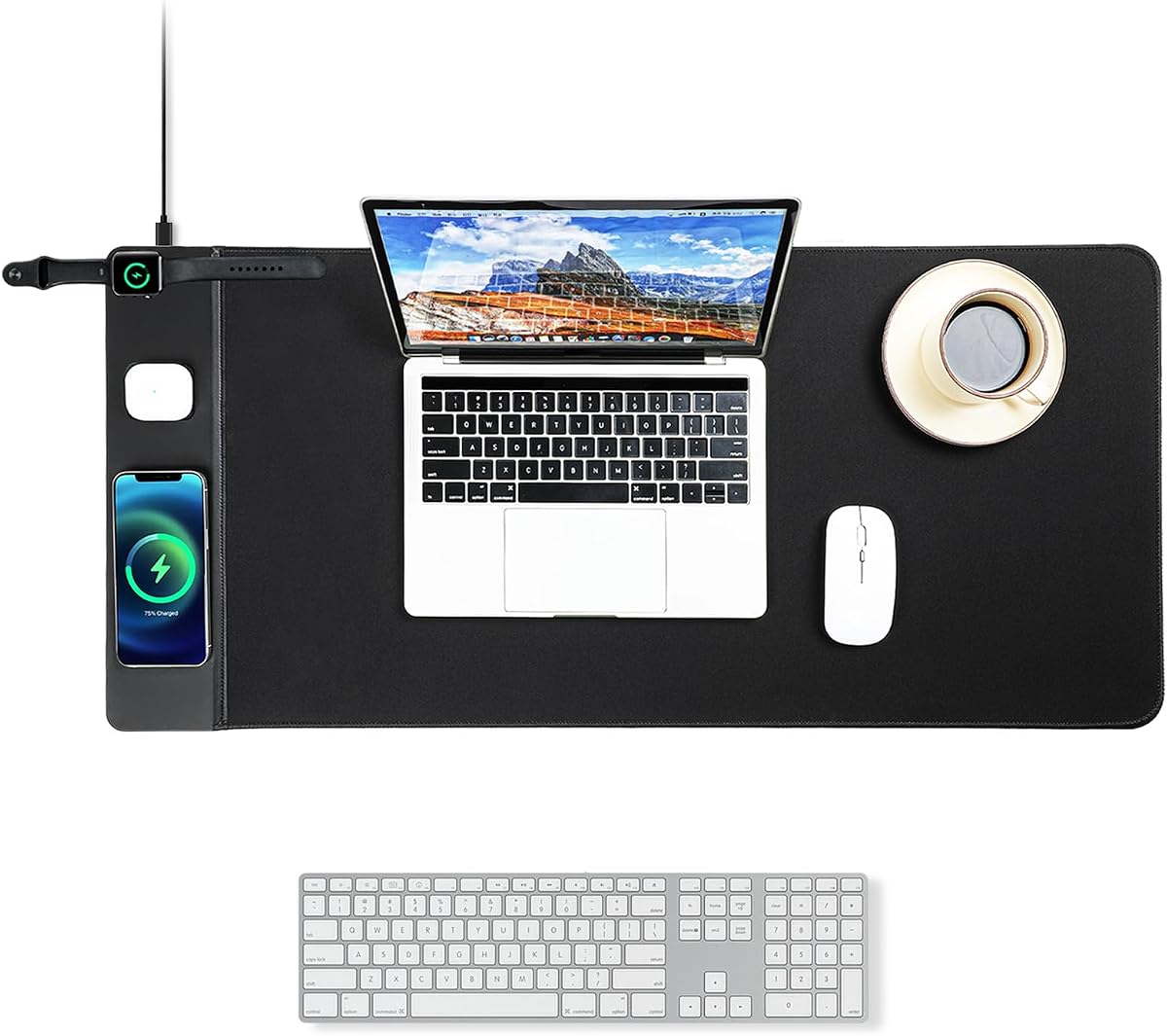
The VOVIPO 3-in-1 Wireless Charging Mouse Pad is a 4.2-rated hybrid that combines a large gaming surface with three charging zones. At 90 by 40 centimeters, it provides enough room for a keyboard, mouse, and other desktop items while charging a phone, wireless earbuds, and a compatible smartwatch.
We may earn a commission when you buy through this link, at no additional cost to you.
The charging outputs are divided by device class: up to 15W for a smartphone, 5W for earphones, and 2.5W for a smartwatch. It supports major recent iPhone and Galaxy series, several AirPods versions, and other Qi-enabled hardware. The micro-braid polyester surface is described as smooth, waterproof, scratch resistant, and comfortable for extended work or gaming.
A power adapter is not included, and the manufacturer recommends a 25W or greater fast-charging adapter with a fast-charging cable for optimized results. The watch output is modest, so this is better viewed as a convenient top-up function than a complete watch charging solution. Its large footprint may also be excessive for a small desk.
Choose this mat when you want one surface to handle both mouse movement and device charging. It is particularly attractive for a gaming or home-office setup where a conventional charging pad would compete for space, though buyers should account for the need to supply their own suitable adapter.
The extended dimensions reduce the need to reposition a smaller mouse mat during long sessions. A keyboard, mouse, and charging-equipped phone can share the same area without forcing a separate pad to occupy the desk.
A precision-locked edge is intended to resist warping, while the rubber base keeps the mat stable during movement. The waterproof surface also makes spilled drinks easier to manage around a busy charging area.
We may earn a commission when you buy through this link, at no additional cost to you.
The RTOPS Foldable 3-in-1 Station is a 4.3-rated Apple charging solution that can hold a phone vertically for calls, horizontally for video, and flat near other compatible devices. Its magnetic attraction helps guide the phone into position, while the foldable construction makes it suitable for both a desk and a travel bag.
We may earn a commission when you buy through this link, at no additional cost to you.
The station can charge an iPhone, Apple Watch, and AirPods at the same time. Stated maximum outputs are 7.5W for the phone, 5W for AirPods, and 3W for the watch. The included 20W PD adapter and cable make the setup complete, and the product is designed to operate as a single-cord charging point.
Compared with newer high-wattage alternatives, the phone output is modest. It also focuses on the Apple ecosystem, so mixed Android and smartwatch users may find it less versatile. The supplied information describes charging management, foreign-object detection, and interruption when temperature exceeds 104 degrees.
This is a good choice for an Apple user who values a foldable stand over maximum charging speed. Its adjustable viewing angles make it especially useful for video calls, bedside use, or keeping a phone visible while checking notifications.
The ability to move between upright and horizontal positions expands the product beyond overnight charging. A user can switch from a flat nightstand arrangement to a stable viewing angle for media or communication.
The charging management system is designed to interrupt charging if the temperature becomes excessive. Foreign-object detection adds another layer of control around coins, keys, or other conductive items left on the surface.
We may earn a commission when you buy through this link, at no additional cost to you.
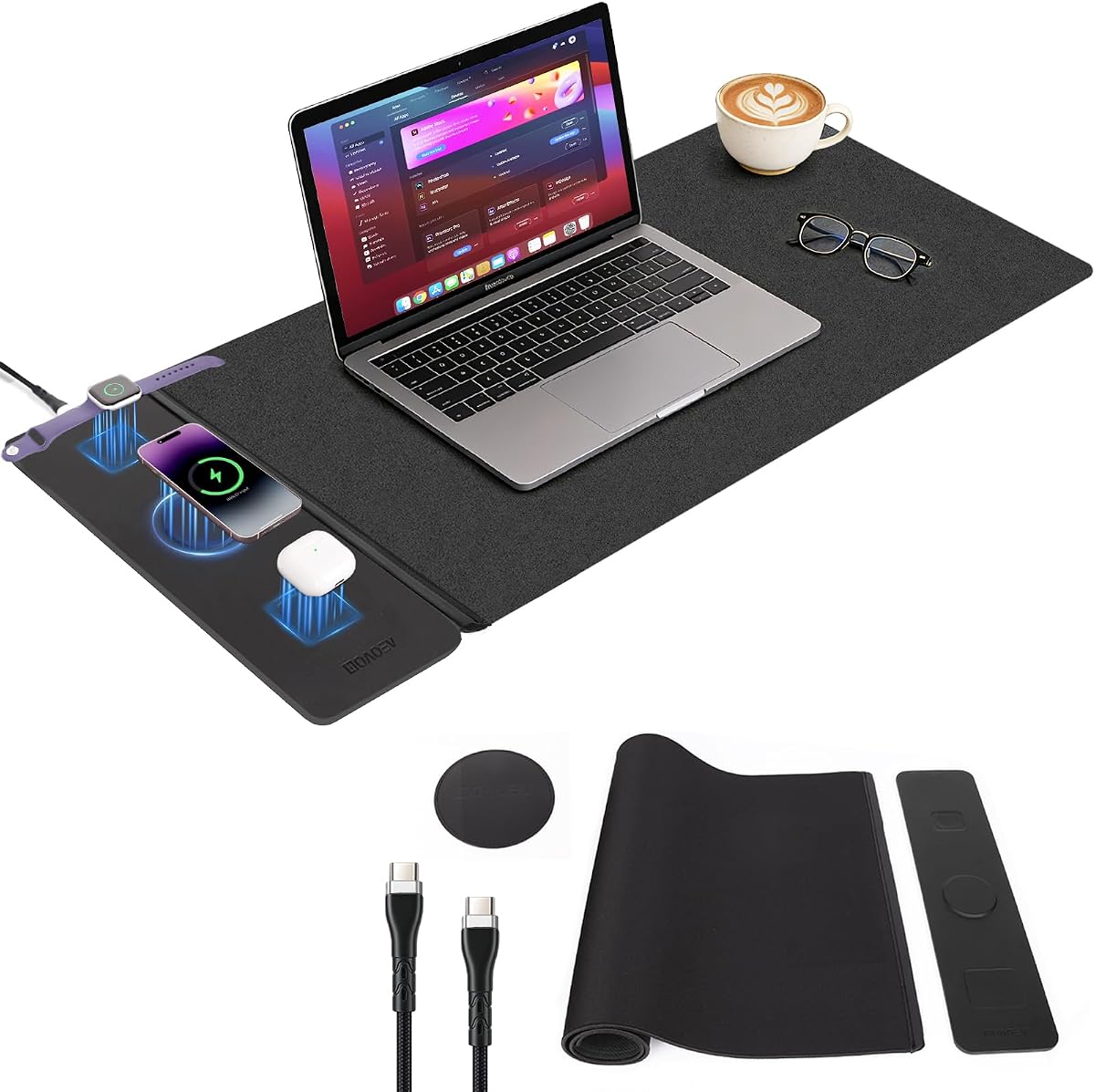
The 2nd Gen 3-in-1 Wireless Fast Charging Mouse Pad is a 4.1-rated large desk mat that combines a 90 by 40 centimeter working surface with simultaneous charging for a phone, smartwatch, and wireless earbuds. It is designed for users who want their charging area and mouse area to be one coordinated object.
We may earn a commission when you buy through this link, at no additional cost to you.
Its second-generation wireless system is claimed to deliver charging efficiency about 40% higher than conventional Qi 1.0 chargers based on lab testing described in the listing. The magnetic detachable panel is waterproof, easier to clean, and can be removed for convenient maintenance. A jacquard fabric surface and rubber base support smooth movement and stability.
Safety features include overload protection, metal-object detection, and automatic power reduction or pause when the temperature exceeds 45 degrees. The broad platform is suitable for iPhones, Android phones, and other wireless-charging-enabled devices. However, the supplied information does not state individual charging wattages, so buyers should not assume performance comparable to a dedicated high-output pad.
Choose this model for a spacious office, gaming desk, or work area where liquid spills and frequent cleaning are concerns. It is less suitable for compact desks, and users wanting precise charging speeds for particular phone models should review the current technical details carefully.
The magnetic panel can be detached for cleaning, helping protect internal charging components from coffee, tea, and other spills. It can also be used independently on a nightstand when a full-size mouse surface is unnecessary.
At 35.43 by 15.75 inches, the mat is larger than many common compact options. It can accommodate a keyboard, mouse, and tablet more comfortably, reducing the need to move a small mouse pad during the day.
We may earn a commission when you buy through this link, at no additional cost to you.
The Samsung Electronics Wireless Charger Trio is the highest-rated product in this guide at 4.4. It is a refined three-device charging pad built around Samsung's Galaxy ecosystem while still supporting compatible Apple iPhones, Galaxy Buds, and other Qi-enabled accessories.
We may earn a commission when you buy through this link, at no additional cost to you.
Six internal coils make alignment easier across the broad surface, reducing the repeated repositioning that can occur with a single-coil pad. The right side has a dedicated watch position with an interior magnet for guidance, while the larger left area accommodates a phone, earbuds, and other devices. A phone can charge through cases up to 3mm thick.
Watch compatibility has an important boundary: the dedicated right pad supports Galaxy Watch3, Galaxy Watch Active2, and Galaxy Watch Active models, not every modern watch. The status system uses red for charging, flashing red for an error, and green for a full charge. Although the lights can be dimmed, light-sensitive users may still prefer a completely light-free mat.
This premium pick is most compelling for a Galaxy household that wants a polished, recognizable charging surface with dependable alignment. It is also a good shared option for a home using both Samsung and Apple phones. The dedicated watch zone and broad coil layout justify selecting it when watch support and effortless placement are the highest priorities.
Six coils distribute charging options beneath the surface, making it less likely that a user must place a device in one exact spot. That convenience is valuable when the pad is shared by several people.
A magnetic watch area helps orient supported Galaxy Watches so they seat correctly. It is a meaningful benefit for Galaxy users, although buyers should verify the exact model because other smartwatch families are not supported by that position.
We may earn a commission when you buy through this link, at no additional cost to you.
The ASOMETECH 160W Charging Station is a 4.3-rated desktop hub for users whose collection of devices extends well beyond two or three wireless-compatible phones. It combines five wired USB outputs, including USB-C Power Delivery, with one wireless charging area and an informative LCD screen.
We may earn a commission when you buy through this link, at no additional cost to you.
The USB-C output reaches 65W, making the station suitable for compatible MacBooks, laptops, tablets, phones, and Bluetooth earphones. It supports PD 3.0, QC4+, PPS, AFC, and FCP protocols, while another wired connection offers up to 18W QC3.0 output. The wireless area supports 5W, 7.5W, 10W, and 15W depending on the connected device.
This is not a conventional mat with several separate wireless coils. It is a broader desktop charging hub, which is advantageous when a laptop, phone, tablet, earbuds, and watch all need wired and wireless power. Its LCD display reports real-time voltage, current, and power for each port and can be turned off, making it easier to use at night.
Choose this station for a power-heavy office or home desk that needs laptop charging alongside multiple mobile accessories. It is less suitable for someone whose only goal is a flat three-phone charging surface, but it offers the broadest wired charging selection in this roundup.
The LCD reports voltage, current, and power for each output, which can help users understand whether a cable or device is limiting performance. The screen control can disable the display when a darker bedside setup is preferred.
The 65W USB-C output gives the station a role beyond ordinary phone charging. Supporting fast-charge protocols across several ecosystems makes it a useful central hub for mixed-device offices and homes.
We may earn a commission when you buy through this link, at no additional cost to you.
The right charging mat depends on the devices you own, the space available, and whether wireless convenience or maximum wired power matters most. Review device support, total power, case limits, included accessories, and placement needs before choosing a model.
A three-device mat is a good match for two phones and one wireless-charging earbud case, while four-position designs can accommodate more accessories. Apple-specific stands may include a watch position, and large hybrid mouse pads often use separate areas for a phone, earbuds, and watch. Look at the physical spacing as well as the headline capacity because three tightly packed zones may be inconvenient for a large phone and bulky earbud case.
Wireless charging support varies by phone model, even within one brand. Check that every device in your routine has the appropriate Qi or magnetic charging capability. Earbuds usually need a wireless-charging case, and smartwatches are often limited to a specific ecosystem or a specific dedicated position. Do not assume a general Qi label means an Apple Watch, Galaxy Watch, or every earbud model will work.
Maximum wattage is most meaningful when it is allocated among the devices you plan to connect. A mat may advertise 40W across two areas, while another may assign 15W, 10W, and 10W to three positions. Phones also have built-in charging limits, and output commonly falls when several devices are active. Treat the stated maximum as a capability range rather than a guarantee that every connected device will receive the same speed.
Some multi-device mats include the wall adapter required to deliver their advertised performance, while others include only a cable. A 24W, 36W, or 65W adapter can be more appropriate for a three-device pad than an older phone charger. If no adapter is included, verify the required protocol and wattage before buying, and budget for a suitable fast-charging adapter if you do not already own one.
Case thickness limits range from roughly 3mm to 6mm across the products reviewed. A case allowance is only helpful if your actual cover fits within it and does not contain metal, cards, magnets, or attachments that block the charging field. Magnetic phone stands can also interfere with a magnetic case. Alignment markings, coils spread across the surface, and narrow charging zones can reduce placement errors.
A slim flat mat works well on a nightstand or shelf and is easiest to carry, while a folding dock can become a phone stand for media and calls. Large charging mouse pads trade bulk for useful desk area and are best on spacious workstations. Desktop charging hubs may include wired laptop outputs but usually offer only one wireless charging surface. Select the form based on where the system will live and what else needs to fit nearby.
Useful safeguards include temperature control, overvoltage and overcurrent protection, short-circuit protection, and foreign-object detection. These features help manage heat and accidental placement errors, but good habits still matter. For bedside use, a light-free design is preferable for light sleepers, while a dimmable status display may be acceptable in a shared office. Keep the surface dry and remove conductive objects before placing devices on it.
Travel users should favor a thin or folding design with the necessary adapter and cable included, reducing the number of separate items to pack. Shared users may prefer mixed-brand compatibility, more positions, and easy-to-read alignment guides. A sleep-friendly, light-free mat works well in a bedroom, while a larger work surface or powered USB hub suits a communal office.
Place the mat on a stable, dry, level surface and connect it to the included or a compatible power adapter. Before charging, remove coins, keys, cards, magnetic wallets, metal rings, and other objects that could create heat or interfere with alignment. For a charging hub, inspect each cable and connect devices to ports that match their supported charging protocols.
Center each phone over the appropriate charging mark or zone, and position wireless earbud cases with their charging coil directly over the intended spot. Magnetic iPhone docks benefit from removing incompatible magnetic accessories. If charging is inconsistent, lift the device, inspect the surface, recenter it, and try again before assuming the mat is defective. Watch-specific positions should only be used with the watch models explicitly supported by the manufacturer.
Keep the charging surface clean with a soft, dry or lightly damp cloth, and do not use harsh chemicals or allow liquid to enter the electronics. Avoid prolonged direct sunlight, high heat, and heavy pressure on the mat. Unplug it before cleaning, inspect cables for damage, and replace any charger or cable that shows signs of wear.
Yes, if the mat has multiple independent charging positions and the connected power adapter can supply enough combined power. Some models charge two phones, while others accommodate three phones or a combination of phones, earbuds, and watches. Actual output can decrease when several devices are active or when a device has a lower built-in charging limit.
Only if the case is within the manufacturer's thickness limit and contains no material that blocks wireless power. Metal plates, magnetic wallets, card inserts, and some grip accessories can interfere. A mat that supports 3mm cases may not work with a thick rugged case, while a 6mm model may accommodate more protective designs.
Many Qi-compatible mats can charge both iPhone and Android models in separate positions, provided each phone supports wireless charging. Models marketed for Apple devices often prioritize Apple Watch and AirPods compatibility and may not support every Android watch. Check the listed phone, earbud, and watch models before buying.
It is generally best to use the supplied adapter because it is matched to the mat's intended power level. Products without an included adapter may require a minimum wattage or a PD or QC-compatible charger to reach their stated output. Using an underpowered adapter can cause instability, slower charging, or failure to charge multiple devices.
They can be worthwhile on a gaming or office desk because they combine mouse control, device organization, and charging in one surface. The extra footprint is less attractive on a small desk, and a removable charging panel can sometimes be used independently. Consider your available area, cleaning habits, and whether you regularly use a full-size keyboard.
Only if it includes a dedicated watch position compatible with the exact watch model. General three-device phone-and-earbud mats often exclude smartwatches entirely. Apple-oriented stands may support Apple Watch, while certain Samsung pads include a magnetic area for selected Galaxy Watch models rather than the entire watch lineup.
The usual causes are poor alignment, an incompatible or overly thick case, magnetic accessories, foreign objects, or an underpowered wall adapter. Move the phone to the center of the designated zone, remove interfering items, and test with a manufacturer-recommended adapter. If the issue continues with a bare compatible device, consult the seller or manufacturer.
A mat with temperature control, foreign-object detection, and overcurrent or short-circuit protection is designed for regular charging, including overnight use. Place it on a hard, level surface, keep it clear of liquids and conductive objects, and use the intended adapter. Light sleepers may prefer a model without status lights.
The ZealSound 3-in-1 Charging Pad is the strongest general recommendation because it combines three positions, mixed-device compatibility, an included adapter, and a portable PU leather design. The Dual 20W Charging Mat serves as the budget option for buyers who already own a suitable adapter, while the Samsung Wireless Charger Trio stands out as the premium choice for Galaxy households that value alignment coils and a dedicated watch position.
Before buying, prioritize the devices you will charge every day, the number of independent positions, and whether an adapter is included. Also consider case thickness, watch support, light levels, portability, and the amount of desk space available. A large mouse-pad hybrid may be ideal for a workstation, while a slim three-device mat is more versatile for a nightstand or travel bag.
Ratings, compatibility details, and prices can change, so check the current product listing and included accessories before ordering. The best charging mat for multiple devices is not necessarily the one with the largest headline wattage; it is the model that safely powers your actual devices, fits your space, and remains convenient to use every day.