
Arteck HB192 Universal Keyboard
4.2Editor score
Three-device Bluetooth switching
Rechargeable six-month battery
Full-size stainless steel layout
Our Bluetooth Keyboard guide compares ten top models across multi-device switching, quiet typing, full-size layouts, ergonomics, battery life, and compatibility
A Bluetooth keyboard can transform a crowded desk by connecting wirelessly to a computer, tablet, or phone while preserving the comfort and familiar layout of full-size typing. The best choice depends on switch controls, key feel, portability, rechargeability, device compatibility, and whether a numeric keypad is essential.
This guide compares ten keyboards using the supplied product information, focusing on connection modes, layout, typing features, power management, compatibility, and intended workspace. It covers compact models for travel, full-size options for data entry, and ergonomic designs for longer sessions rather than treating every keyboard as a universal solution.
Each ranked review explains the strongest reasons to consider that model, along with practical compromises that may affect certain users. Product ratings provide an additional reference point, but current prices and availability change frequently, so shoppers should verify the latest listing details before making a purchase.
4.2Editor score

4.4Editor score

4.4Editor score
The table below compares all ten keyboards by device switching, layout, power approach, and practical specialty, making it easier to identify the model that best matches your devices and workspace.



The Arteck HB192 combines a familiar full-size layout with three-device Bluetooth switching and a 4.2 rating. Its stainless steel construction, low-profile keys, arrow cluster, number pad, and shortcut keys make it a practical general-purpose option for users who alternate between a computer, tablet, and phone without wanting to rearrange their workspace.
We may earn a commission when you buy through this link, at no additional cost to you.
The standout feature is direct switching among three paired Bluetooth devices using a single key. That simplifies a common multi-device problem and avoids requiring a separate keyboard for each screen. Broad compatibility across iOS, Android, macOS, and Windows extends its usefulness, while the rechargeable lithium battery is rated for up to six months under the stated two-hour daily-use assumption.
There are compromises to consider. This model relies on Bluetooth rather than also offering a 2.4G wireless receiver, so compatibility is slightly less flexible for systems without Bluetooth. It also lacks the software-driven shortcuts and customization available from more advanced premium models. Even so, its standard layout, rechargeable design, and multi-device capability offer a balanced package for everyday work.
Choose the HB192 if you want a substantial keyboard, a numeric keypad, and reliable switching among three Bluetooth devices at a practical budget-oriented level. It is especially suitable for home-office users who alternate among a desktop, laptop, and tablet. Those seeking compact portability, deeper personalization, or an additional wireless receiver should examine one of the later alternatives.
The three-device pairing system is the HB192's most useful differentiator. Switching with one key helps reduce friction when moving between a primary computer, a tablet, and a phone during a busy day.
Combining a numeric keypad with a rechargeable battery makes this model well suited to spreadsheets, inventory work, and ordinary document entry without the upkeep associated with disposable batteries.
We may earn a commission when you buy through this link, at no additional cost to you.
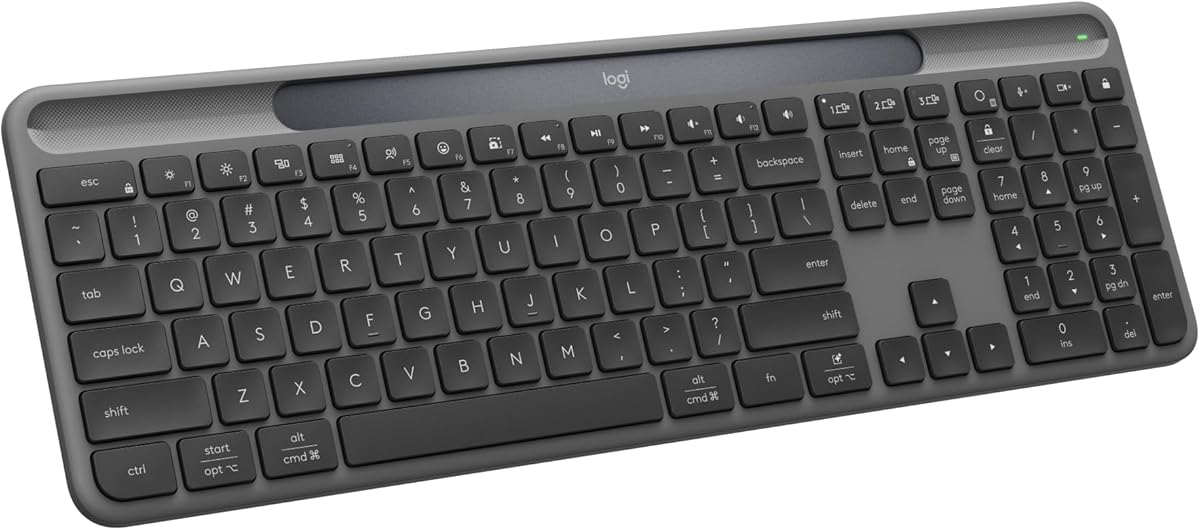
The Logitech Signature Slim K950 is a polished full-size wireless keyboard with a 4.4 rating, quiet typing, and one-tap switching among three devices. Its familiar laptop-style layout feels modern without sacrificing the number pad, making it a strong fit for professional desks, shared studios, and users who value a refined mix of comfort and functionality.
We may earn a commission when you buy through this link, at no additional cost to you.
Compatibility is one of its strongest attributes. It supports Windows, macOS, Chrome OS, Linux, iPadOS, iOS, and Android through Bluetooth or Logi Bolt. The Logi Options+ app expands the experience with customizable keys on Windows and macOS, while out-of-the-box shortcuts handle common tasks such as media control, muting, volume, and screen snipping.
Premium positioning brings some trade-offs. Logi Bolt receiver availability depends on the bundle, so buyers should verify whether a receiver is included for their intended setup. The keyboard also offers less physical adjustability than the Wave Keys model and lacks a dedicated 2.4G option described in the product information. Its refined typing and software features nevertheless create a clear advantage for productivity-focused users.
The K950 is the recommendation for shoppers who want a polished full-size keyboard, quiet operation, broad platform support, and meaningful customization. It works particularly well for professionals who alternate between a computer and tablet and want dedicated shortcuts without assembling a complicated multi-device setup. Those seeking maximum affordability or adjustable ergonomic support can look elsewhere.
Quiet typing makes the K950 appropriate for shared offices, libraries, and evening work, while its familiar key geometry should reduce the adjustment burden associated with unfamiliar compact layouts.
Logi Options+ support allows supported users to customize keys and streamline repeated tasks, while the built-in shortcuts provide convenient media, volume, mute, and snipping functions out of the box.
We may earn a commission when you buy through this link, at no additional cost to you.
The TECKNET KB005 earns a 4.4 rating by combining four connection modes with a full-size layout, an adjustable stand, and a rechargeable battery. It supports three Bluetooth connections plus 2.4G wireless, giving it broader connection flexibility than models that offer Bluetooth alone.
We may earn a commission when you buy through this link, at no additional cost to you.
Its 110 scissor-switch keys include a numeric keypad and offer 2mm key travel. An adjustable support stand changes the typing angle from three to seven degrees, while five extended non-slip pads help prevent movement during use. The built-in 500mAh battery is rated for up to 180 days under the stated two-hour daily-use assumption, and automatic sleep after 30 minutes of inactivity helps conserve power.
The keyboard is not as focused on software personalization as the Logitech K950. It also calls for a full charge before first use, which is a small inconvenience but ensures the rechargeable system begins in the intended condition. Its broad platform support, spill-resistant design, and inclusion of a USB receiver make these limitations minor for most users.
The KB005 is an excellent choice for users who want a full-size, rechargeable keyboard and maximum connection flexibility without moving into premium pricing. It is particularly useful for mixed Windows, iOS, macOS, and Android setups, as well as devices without Bluetooth that can use the included receiver. Its combination of features, rating, and adjustable ergonomics makes it one of the most balanced picks in the guide.
Three Bluetooth channels and a 2.4G receiver provide more ways to connect than a standard three-device Bluetooth keyboard, which is useful when one of the user's devices lacks native Bluetooth.
The three-to-seven-degree stand lets users tune the typing angle, and the finger-fit key design supports a steadier, more natural feel during extended sessions.
We may earn a commission when you buy through this link, at no additional cost to you.
The Arteck 2.4G USB Wireless Keyboard offers a 4.4 rating and focuses on straightforward computer typing. Its nano receiver provides a dedicated 2.4GHz connection, making setup as simple as inserting the receiver into a compatible PC and beginning to type.
We may earn a commission when you buy through this link, at no additional cost to you.
The slim full-size format includes arrow keys, a numeric keypad, and shortcuts. Stainless steel construction gives it a substantial feel, and low-profile keys are designed for quiet, comfortable use. Its rechargeable lithium battery is claimed to last up to six months when used for two hours per day, eliminating routine disposable-battery replacement.
The central limitation is that this is not a Bluetooth keyboard. It is designed around a USB receiver and a single host device rather than multi-device switching. Compatibility is also presented primarily around Windows computers, PCs, laptops, Surface devices, and smart TVs. Buyers who need to alternate among a computer, tablet, and phone should consider a Bluetooth or tri-mode model instead.
This Arteck is well suited to a fixed workstation where simplicity matters more than portability or cross-device flexibility. It provides the familiar benefits of a wireless full-size keyboard, including a number pad and rechargeable power, without requiring Bluetooth pairing. For a single-PC office or shared workstation, it remains a practical choice with a strong supplied rating.
The included nano USB receiver creates a dedicated 2.4GHz link, which can be simpler than navigating Bluetooth menus and especially convenient for a permanently assigned computer.
Although thin and light at the stated dimensions and weight, the keyboard preserves a number pad, arrow keys, and shortcut row for users who want a complete desktop layout.
We may earn a commission when you buy through this link, at no additional cost to you.
The seenda SK64-3 has the highest supplied rating in this roundup at 4.7 and combines a slim full-size design with three-device wireless connectivity. It can link to a desktop, laptop, or tablet through two Bluetooth channels and one 2.4G USB connection.
We may earn a commission when you buy through this link, at no additional cost to you.
Its three-zone layout includes a dedicated numeric keypad, arrow keys, and shortcut areas suited to spreadsheets, reports, email, and data entry. Low-profile scissor switches reduce typing noise and maintain a soft, responsive feel, making the keyboard appropriate for home offices, open offices, classrooms, libraries, and late-night sessions.
The USB-C rechargeable battery can charge in approximately two to three hours and is rated for up to 60 days depending on daily activity. Automatic sleep conserves power, and a physical power switch lets users shut the keyboard down when it is not needed. Compared with the TECKNET models, it supports one fewer Bluetooth channel, but its charging process is simpler because a USB-C cable is used directly.
Choose the SK64-3 for a modern full-size workspace where quiet typing, clean styling, and rechargeable power matter more than having three separate Bluetooth channels. It is a particularly attractive option for users combining one desktop, one laptop, and one tablet. Those requiring broader Bluetooth channel counts should compare the TECKNET KB005 or KB006.
Two Bluetooth channels and a 2.4G mode cover three typical work devices, while the slim metallic-look body keeps the arrangement visually uncluttered.
USB-C charging removes the need for proprietary charging hardware, while automatic sleep and a physical power switch provide two separate ways to manage energy use.
We may earn a commission when you buy through this link, at no additional cost to you.
The Logitech K480 is a compact Bluetooth keyboard with a 4.4 rating, built-in device cradle, and easy-switch dial for three connected devices. It is designed to bring the mouse closer to the user, reduce arm reaching, and support a more compact desk arrangement.
We may earn a commission when you buy through this link, at no additional cost to you.
The dial provides a tangible way to move among a computer, tablet, or phone running Windows, macOS, Chrome OS, Android, or iPadOS. Its integrated cradle holds many phones and tablets up to 0.4 inches thick and 10 inches wide, keeping the secondary screen visible while the keyboard is in use.
Power comes from two preinstalled AAA batteries, which are stated to last up to 24 months. That maintenance-free approach is convenient, though it differs from the rechargeable designs offered by several newer models. The most visible trade-off is the absence of a number pad, which makes the K480 less suitable for frequent data entry. Its spill resistance provides added durability for everyday accidents.
The K480 is best for people who work across a computer, phone, and tablet in a compact space and value a simple physical switch. It is also well suited to travel or hot-desking because it needs no charging cable. Users who regularly enter numbers should favor a full-size option such as the seenda SK64-3 or TECKNET KB005.
Removing the number pad brings the mouse closer to the keyboard, which can reduce reaching and is useful in smaller offices, shared desks, and travel setups.
The easy-switch dial makes device changes unmistakable and tactile, while the integrated cradle holds a compatible phone or tablet at a readable viewing angle.
We may earn a commission when you buy through this link, at no additional cost to you.
The TECKNET KB006 combines the connection flexibility of the full-size KB005 with a compact 86-key body. Its 4.4 rating reflects a balanced feature set that includes three Bluetooth channels, a 2.4G receiver mode, a rechargeable battery, and broad operating-system support.
We may earn a commission when you buy through this link, at no additional cost to you.
The compact dimensions make it easier to carry than a traditional full-size keyboard, while the finger-fit keys and adjustable stand support comfortable typing. Key travel is listed at approximately 2mm, and the scissor-switch design is rated for up to 10 million keystrokes. Spill-resistant construction adds protection for travel, shared workspaces, and everyday use.
The 500mAh battery is stated to last up to 180 days with approximately two hours of daily use, and the keyboard sleeps after 30 minutes of inactivity before waking with a key press. As with a compact board generally, the lack of a number pad is the key trade-off for spreadsheet-heavy users. Smaller key spacing may also take some adjustment if the user is accustomed to a full desktop layout.
Choose the KB006 for a traveler or hot-desker who wants four connection modes in a portable package. It is a better fit than a full-size model when desk space and portability outweigh the benefits of a numeric keypad. At a fixed office desk where data entry is frequent, the closely related TECKNET KB005 is the more logical alternative.
Three Bluetooth channels plus 2.4G support make the compact keyboard adaptable across several devices without requiring separate travel keyboards.
Finger-fit keys, 2mm travel, a three-to-seven-degree adjustable stand, and five non-slip pads help maintain comfort and stability on smaller desks.
We may earn a commission when you buy through this link, at no additional cost to you.
The OMOTON Ultra-Slim has a 4.5 rating and focuses on portable typing for iPads and iPhones. Its 78-key QWERTY layout, 0.2-inch profile, and stated dimensions of 11.2 by 4.7 inches make it easy to carry in a bag and use away from a conventional desk.
We may earn a commission when you buy through this link, at no additional cost to you.
Compatibility is a major selling point. The listed device range covers current and recent iPad generations, iPad Pro, iPad Air, iPad mini, and several iPhone generations. Twelve dedicated multimedia hotkeys provide direct control for volume, brightness, and music, making the layout particularly well suited to iPadOS and iOS tasks.
The keyboard uses two AAA batteries and is stated to offer up to 400 hours of use under a four-hour daily-use assumption. Automatic sleep after ten inactive minutes helps conserve power. Batteries are not included, and the product information notes that function keys are not fully compatible with other operating systems, so the design is clearly Apple-oriented despite its Bluetooth connection.
The OMOTON is a strong choice for an Apple user who wants a minimal keyboard for travel, study, or occasional tablet email. It offers strong portability and convenient Apple-specific shortcuts, but users who type across multiple systems or need a number pad should look at the Logitech K950 or TECKNET KB005. For Apple users, its narrow focus becomes a deliberate advantage.
The slim 78-key layout offers a practical typing surface without the bulk of a full-size board, making it easy to pair with an iPad in a café, classroom, or travel setting.
Twelve dedicated media and brightness hotkeys make common iOS controls easier to reach, although the product is less complete for non-Apple function keys.
We may earn a commission when you buy through this link, at no additional cost to you.
The Logitech Signature Slim Solar+ K980 stands apart through its LightCharge system, which combines a light-absorbing strip with a battery designed to sustain typing under solar or artificial illumination. Its 4.4 rating and full-size layout make it an intriguing option for users who want Bluetooth convenience without a routine charging cycle.
We may earn a commission when you buy through this link, at no additional cost to you.
The keyboard supports switching among a computer, smartphone, and tablet with a tap and connects across Windows, macOS, Chrome OS, Linux, iPadOS, iOS, and Android. Its familiar laptop-style typing includes a numeric keypad, while Logi Options+ provides customizable Smart Actions and shortcuts for supported setups.
The central trade-off is environmental dependence. The keyboard is designed to harvest ambient light, but users should understand that it is not just a conventional solar panel; the combined light-absorbing strip and durable energy-efficient battery manage the energy needs of typing. The product information also says it works out of the box with no charging cable, making the maintenance model especially attractive for a permanent desk.
Choose the Solar+ if you want a full-size multi-platform keyboard and prefer avoiding charging cables. It is well suited to a bright office or stable home desk where regular access to ambient light is likely. Users who spend long periods in dark environments or need maximum portability may feel more comfortable with a conventional rechargeable model.
LightCharge allows the keyboard to draw energy from available light while maintaining a durable battery, reducing the need to recharge routinely or carry a cable.
A numeric keypad, laptop-style layout, multi-device switching, and broad platform support make this more versatile than a basic travel keyboard.
We may earn a commission when you buy through this link, at no additional cost to you.
The Logitech Wave Keys is an ergonomic wireless keyboard designed for users who spend substantial time typing. Its 4.2 rating, wave-shaped layout, and cushioned memory-foam palm rest distinguish it from the conventional flat keyboards that dominate this category.
We may earn a commission when you buy through this link, at no additional cost to you.
The curved design is intended to place the hands, wrists, and forearms in a more natural position. The palm rest adds support and reduces pressure during extended work, while Logi Options+ allows users to personalize shortcuts. The keyboard has been designed and tested against criteria set by leading ergonomists and approved by United States Ergonomics, giving the ergonomic positioning a more formal basis than a purely aesthetic claim.
Connection options include Bluetooth and the Logi Bolt receiver, with Easy-Switch support for a laptop, tablet, and phone across Windows, macOS, iPadOS, and ChromeOS. The trade-off is adaptation: a sculpted design can feel different from a standard rectangular keyboard, and the body is bulkier than a slim portable model. Users with highly specific touch preferences may need time to adjust.
Choose Wave Keys when sustained comfort and wrist support are the main priorities. It is a strong option for office workers, writers, programmers, and anyone who finds a flat keyboard uncomfortable during long sessions. Those prioritizing portability, a numeric keypad, or a conventional layout should consider the full-size alternatives earlier in the guide.
The wave-shaped structure separates and angles key groups to support a more natural hand position, potentially reducing the discomfort associated with flat, extended typing positions.
The cushioned memory-foam palm rest provides a softer landing for the hands and adds wrist support during demanding daily work.
We may earn a commission when you buy through this link, at no additional cost to you.
The right Bluetooth keyboard depends on how and where you type, which devices you use, and how much you value portability, numeric entry, customization, or physical comfort. Reviewing these factors before shopping can prevent a layout mismatch and make multi-device use much easier.
A Bluetooth keyboard can connect directly to one or several devices, while tri-mode models add a 2.4GHz USB receiver for broader compatibility. The Arteck HB192 and Logitech K480 each switch among three Bluetooth devices, the Logitech Signature Slim K950 also supports three devices through one-tap controls, and the TECKNET KB005 and KB006 extend the choice to three Bluetooth channels plus 2.4G. Consider whether the devices you use support external Bluetooth keyboards and whether you need a fallback receiver for older or restricted systems.
Choose based on the number of devices you actually use, not simply the largest advertised channel count. Three paired devices are usually enough for a computer, tablet, and phone, while a fourth mode can be useful when one device lacks Bluetooth.
Full-size keyboards provide a numeric keypad, complete arrow cluster, and more shortcut keys, making them better for spreadsheets, accounting, inventory, and data entry. The Arteck HB192, Logitech Signature Slim K950, TECKNET KB005, seenda SK64-3, and Logitech Signature Slim Solar+ follow this approach. Compact models such as the Logitech K480, TECKNET KB006, and OMOTON save desk space and travel more easily, but their reduced layouts require adaptation and do not satisfy users who need rapid numeric entry.
Choose a full-size layout for dedicated productivity and a compact layout for mobility, shared desks, or mouse placement closer to the body.
Key feel is difficult to judge from specifications, but several models provide useful design clues. The seenda SK64-3 and TECKNET KB005 and KB006 use low-profile scissor switches, with the TECKNET models listing approximately 2mm of key travel. The Logitech K950 emphasizes quiet typing, while the Arteck HB192 and 2.4G keyboard describe their low-profile keys as quiet and comfortable. Users sensitive to noise should prioritize scissor-style or explicitly quiet designs rather than assuming every wireless keyboard is silent.
Expect the greatest comfort only after a period of adjustment, particularly with compact layouts or sculpted ergonomic designs. Noise-sensitive users should check the model's specific typing claims.
A keyboard can look comfortable and still force an awkward wrist angle, so physical support deserves attention. The Logitech Wave Keys uses a wave-shaped layout and a cushioned memory-foam palm rest to support a more natural position. The TECKNET KB005 and KB006 offer an adjustable stand with a three-to-seven-degree tilt, plus non-slip pads. Flat models may work well for users already comfortable with standard rectangles, but they generally offer fewer ways to tune hand and wrist position.
Choose an ergonomic or adjustable model when long sessions cause fatigue, and give a new shape or angle enough time to feel natural before judging it.
The list includes rechargeable lithium models, USB-C rechargeable models, a solar-powered design, and keyboards using AAA batteries. The Arteck models claim up to six months per charge, the TECKNET models claim up to 180 days under the stated daily-use assumption, and the seenda SK64-3 claims up to 60 days depending on activity. Logitech K480 uses two preinstalled AAA batteries with a stated life of up to 24 months, while OMOTON uses two AAA batteries that are not included. These figures depend on typing volume, inactivity settings, and usage patterns.
Choose rechargeability for a permanent desk, disposable batteries for simple travel or shared use, and solar charging only when the keyboard will have reliable access to ambient light.
Bluetooth capability alone does not guarantee identical behavior across operating systems. The Logitech K950, Solar+, and Wave Keys support broad platform ranges, while the Arteck HB192 and both TECKNET models explicitly cover Windows, macOS, iOS, and Android. Apple-oriented shortcut layouts may not behave identically on other systems. App-based customization through Logi Options+ adds another layer, but that feature is available only for supported platforms and configurations. Confirm that your devices, software versions, and preferred shortcuts are compatible before ordering.
Prioritize models that explicitly list your primary operating system, and treat app-enhanced shortcuts as a bonus rather than the foundation of a purchase.
Portability depends on more than being wireless. The OMOTON is listed as 0.2 inches thick and measures 11.2 by 4.7 inches, making it a focused travel option. The Logitech K480 uses a compact layout and integrated cradle, while the TECKNET KB006 reduces its footprint with 86 keys. Full-size boards are more likely to remain at one desk but may still be moved between home and office. Consider bag space, weight, and whether the keyboard must stand in a seated position or be used flat on a lap.
Choose a compact model when portability is frequent and choose a full-size board when desk stability, complete navigation, and number entry matter more.
Useful extras can streamline daily work but should be judged against your actual habits. The Logitech K950 provides one-tap media, mute, volume, and snipping shortcuts plus Logi Options+ customization. The Solar+ supports Smart Actions, and Wave Keys also offers app-based personalization. The OMOTON includes 12 Apple-oriented multimedia hotkeys. The Logitech K480's physical easy-switch dial and device cradle serve a different purpose, while the TECKNET stands provide physical angle adjustment. These features are most valuable when they remove friction from tasks performed many times each day.
Choose extra controls that solve a recurring problem, and avoid paying for software complexity that will not improve your particular workflow.
Begin by fully charging a rechargeable keyboard according to its instructions, then place it in the position you intend to use. Power it on and select its Bluetooth or receiver mode. Pair it through the Bluetooth menu on your computer, tablet, or phone, confirming the device name when prompted. Models with several channels require the matching channel to be paired before the easy-switch control can move among them.
For a multi-device keyboard, assign each paired channel to a device you use regularly and learn the switching control before returning the keyboard to storage. If a connection feels unreliable, check that the device remains nearby, restart Bluetooth, and verify that the keyboard has sufficient charge. With a 2.4G receiver, insert the supplied receiver directly into the intended computer and select the corresponding keyboard mode.
Care for the keyboard by keeping liquids away from the keys, cleaning the surface with a soft dry or lightly dampened cloth, and avoiding harsh chemicals. Do not immerse a model that is only described as spill-resistant. Respect automatic sleep and manual power controls, and store a compact keyboard in a protective case to protect the keys during travel. For rechargeable models, follow the stated charging guidance and fully charge the keyboard before first use when requested by the manufacturer.
Yes, but the number of simultaneous connections depends on the model. The Arteck HB192, Logitech K480, and Logitech Signature Slim K950 each support three paired devices, while the TECKNET KB005 and KB006 add a 2.4GHz receiver mode for further flexibility. All paired devices must support an external Bluetooth keyboard, and the keyboard may require separate pairing instructions for each channel.
No. A Bluetooth keyboard communicates through Bluetooth, while a 2.4GHz wireless keyboard uses a small USB receiver. Many models support both approaches, but the Arteck 2.4G USB Wireless Keyboard in this guide relies on its included receiver. A tri-mode keyboard can be especially useful when a device lacks Bluetooth or when the user prefers a dedicated receiver connection.
A full-size model with a dedicated numeric keypad is the most practical choice. The TECKNET KB005, seenda SK64-3, Logitech Signature Slim K950, and Arteck HB192 all include a number pad. The Logitech K950 stands out for customization and shortcuts, while the TECKNET KB005 offers adjustable tilt and the most extensive connection-mode selection.
The OMOTON Ultra-Slim is the most compact model listed, with a 0.2-inch profile and a 78-key layout designed for iPad and iPhone use. The TECKNET KB006 and Logitech K480 are also compact alternatives for users who need more standard key coverage. Whichever model is chosen, a protective sleeve or case can help prevent pressure and scratches during transport.
Not for writing, web browsing, email, or general coding, but it is valuable for accounting, data entry, spreadsheets, and entering numbers frequently. Compact models such as the Logitech K480 and TECKNET KB006 save space by omitting the pad. Before choosing a compact board, use an online keyboard visualizer or compare its dimensions with the keyboard already on your desk.
Not necessarily. Rechargeable models remove the need to keep spare batteries but require access to a charging cable and adequate charging time. Disposable-battery models can be ideal for occasional travel or shared use because replacing standard cells is simple. The Logitech K480 and OMOTON are examples of battery-powered options in this roundup, while most of the newer models use rechargeable or solar systems.
Most models listed explicitly support Windows and Apple operating systems, but shortcut behavior can vary. The Logitech K950, Logitech K480, Arteck HB192, TECKNET KB005, TECKNET KB006, and seenda SK64-3 list broad platform compatibility. The OMOTON is optimized for iOS and iPadOS and notes that some function keys are not fully compatible with other systems.
It can matter significantly if you spend long periods typing or have a preferred wrist angle. The TECKNET KB005 and KB006 include stands that adjust from three to seven degrees, while the Logitech Wave Keys offers a more substantial ergonomic palm rest and sculpted key arrangement. A user with a comfortable existing setup may not need extensive physical adjustment.
The TECKNET KB005 is the most balanced overall recommendation because it combines a full-size layout, four connection modes, a rechargeable battery, an adjustable stand, and strong platform compatibility. The Arteck HB192 is a practical budget-oriented option for three Bluetooth devices, while the Logitech Signature Slim K950 is the strongest premium choice for quiet typing, broad compatibility, and app-based customization.
Prioritize the features that affect your daily work. Choose a full-size keyboard with a number pad for frequent data entry, a compact model for travel or a smaller desk, an adjustable or ergonomic design for long sessions, and a rechargeable system for a permanent workspace. Multiple device channels matter only if you genuinely alternate among computers, tablets, and phones, so connection count should not replace layout and comfort in your decision.
Finally, verify the current listing, package contents, operating-system support, and receiver information before ordering. Product prices, ratings, and availability can change, and some wireless accessories are sold in different receiver configurations. Checking the latest product page helps ensure that the model and included accessories match your intended setup.
