
ZealSound K66 USB Microphone
4.4Editor score
Driver-free USB connectivity
Zero-latency headphone monitoring
Dedicated noise reduction mode
Adjustable gain and echo controls
Discover the best streaming equipment for beginners with a detailed comparison of microphones, mixers, webcams, lighting, and complete creator bundles in 2026.
Streaming equipment for beginners should make the path from setup to live broadcast feel straightforward, not intimidating. A dependable microphone, comfortable monitoring, clear video, and useful lighting can transform a modest desk into a creator workspace. The right combination also leaves room to learn without locking you into complex hardware.
This guide compares ten complete bundles and individual pieces designed for first-time streamers, podcasters, gamers, and online creators. We evaluated the supplied specifications, component lists, connection methods, sound controls, creator-focused features, device compatibility, and customer ratings. The list includes affordable single microphones as well as larger multi-person and video kits.
Each review explains what makes a product stand out, where its limitations matter, and which creator it suits best. You will also find side-by-side specifications, a practical buying guide, setup advice, and answers to common questions. Product ratings and configurations can change over time, and prices fluctuate, so confirm current details before buying.
4.4Editor score
4.3Editor score

4.7Editor score
This comparison covers ten creator-focused options, from a single USB microphone to full podcast, webcam, lighting, and DJ-control packages. The key differences are recording capacity, built-in sound processing, video support, device compatibility, and how much control each option gives a new creator.



The TENLAMP G10 Creator Audio Mixer Bundle with Microphone for Streaming earns a 4.1 rating and stands out as a compact, all-in-one starting point. It combines an audio mixer, condenser microphone, and related accessories in a single package, reducing the number of decisions a new creator must make before appearing on camera. Its integrated approach is particularly appealing for livestreams, podcasts, gaming commentary, singing, and short-form content.
We may earn a commission when you buy through this link, at no additional cost to you.
Audio tools cover the ground expected from a creator mixer. The system includes noise reduction, bass, treble, reverb, and pitch adjustments, along with multiple voice styles and triggerable effects such as applause and laughter. Its Follow Singing Mode is more specialized than the typical beginner feature set: the performer can hear the original track while the audience receives a mixed output containing the creator's voice and music. This makes the bundle relevant to streamers who perform, sing, or react to music.
The main trade-off is complexity relative to a simple USB microphone. A new streamer may initially find the number of sound styles and effects distracting, and the single bundled microphone may not satisfy a two-host production. The supplied description also indicates broad Windows, Mac, iOS, and Android compatibility, but physical adapters and the right application settings may still be needed for particular devices. Those considerations do not undermine the value of integrating the core audio chain.
This is a strong recommendation for a beginner who wants more hands-on audio control than a basic plug-and-play microphone provides but prefers a unified system over assembling separate components. Choose it when your content involves voice effects, live performance, gaming, or frequent changes between spoken commentary and music. It is less suitable for a two-person interview setup unless you plan to add another microphone.
Bundling the microphone, mixer, and essential accessories removes much of the friction associated with a first broadcast. The result is a coherent setup in which the creator can adjust the sound without navigating a complicated collection of boxes and adapters.
Voice changes, musical accompaniment, and triggered audience reactions can make a livestream more engaging. The Follow Singing Mode goes further by giving performers private original-track monitoring while maintaining a clean audience mix.
We may earn a commission when you buy through this link, at no additional cost to you.
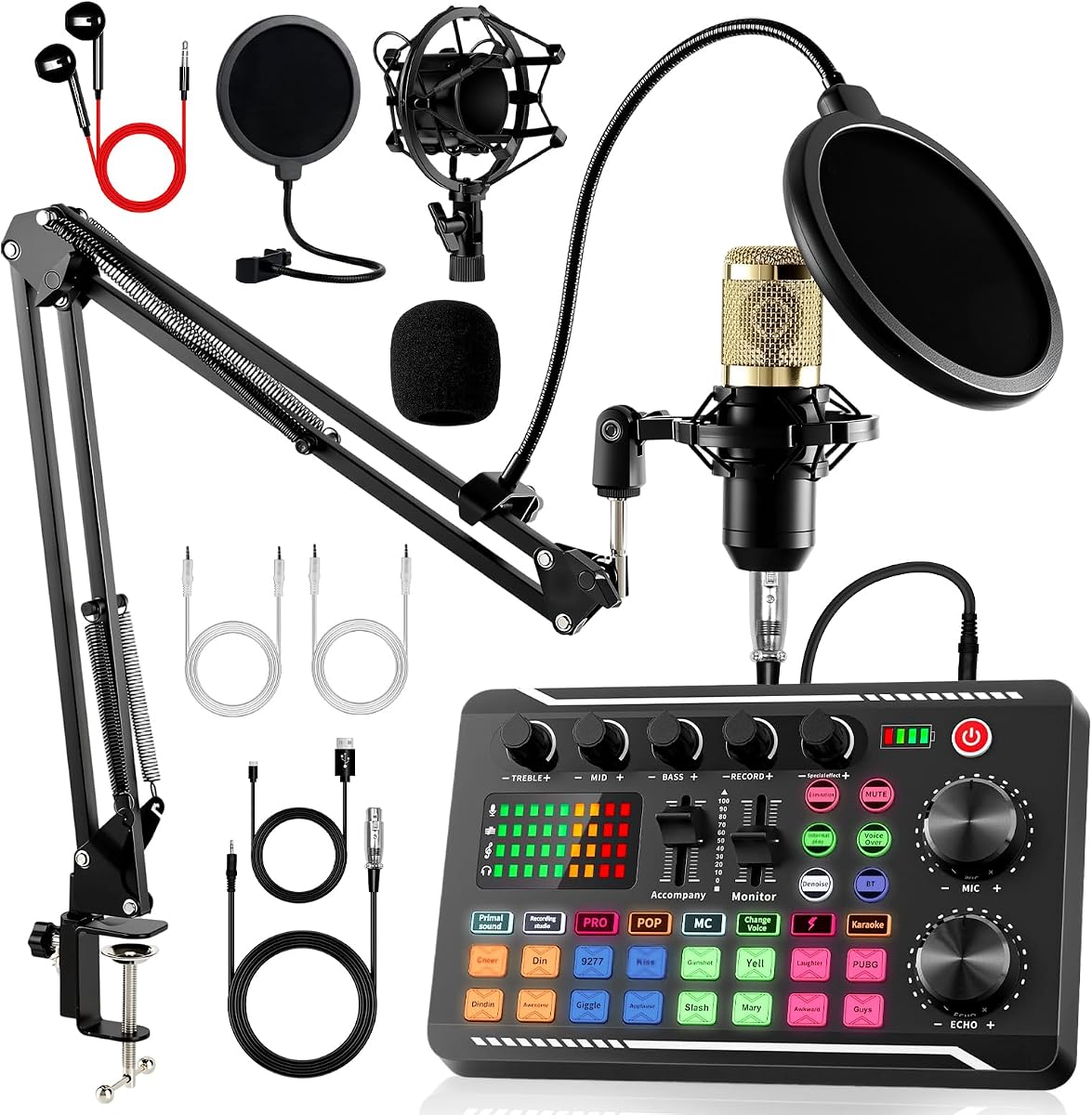
The Also GO Podcast Equipment Bundle, F998 Audio Mixer with BM800 Microphone carries a 4.2 rating and offers a broad starter package for novice podcasters and streamers. Its list includes an audio interface mixer, BM800 microphone, boom arm, earphones, shock mount, pop filter, foam cap, XLR cable, USB cable, and several 3.5mm audio cables. That breadth reduces the chance that a beginner must immediately purchase omitted accessories.
We may earn a commission when you buy through this link, at no additional cost to you.
The F998 sound card is the central attraction. It provides 16 background effects, seven podcast and recording modes, four voice-changing modes, and nine adjustable knobs. Cardioid microphone pickup, a layered pop filter, foam coverage, and noise-reduction processing support clearer voice capture. Importantly, these are physical controls and onboard features, so a new creator can experiment with the sound before becoming familiar with complicated digital audio software.
Connection options are accommodating. The bundle supports PCs, smartphones, laptops, Xbox, Windows, Mac OS, iOS, and Android, while the supplied guidance says no converters or drivers are required. Bluetooth pairing is presented as the convenient route for phones and tablets, whereas included cables are often easier for computers. The need to charge the device before first use is a minor inconvenience, and the dense feature set can overwhelm someone who wants a completely minimalist setup.
Best for a first-time podcaster, streamer, or voice-content creator who values a ready-made collection of accessories and wants to try several recording styles, this bundle offers a practical path into content production. It is especially useful if you want one microphone and an onboard mixer rather than a bare USB device. For conversations or podcasts with several hosts, look instead to a bundle explicitly designed for two or more people.
The included microphone arm, shock mount, pop filter, foam cover, earphones, and collection of cables make this more than a mixer-and-microphone package. A beginner can assemble a functional recording station with fewer separate purchases.
The bundled cables make desktop setup relatively direct, while Bluetooth offers a straightforward alternative for mobile broadcasting. That flexibility helps creators move between a computer-based workstation and a phone-centered workflow.
We may earn a commission when you buy through this link, at no additional cost to you.
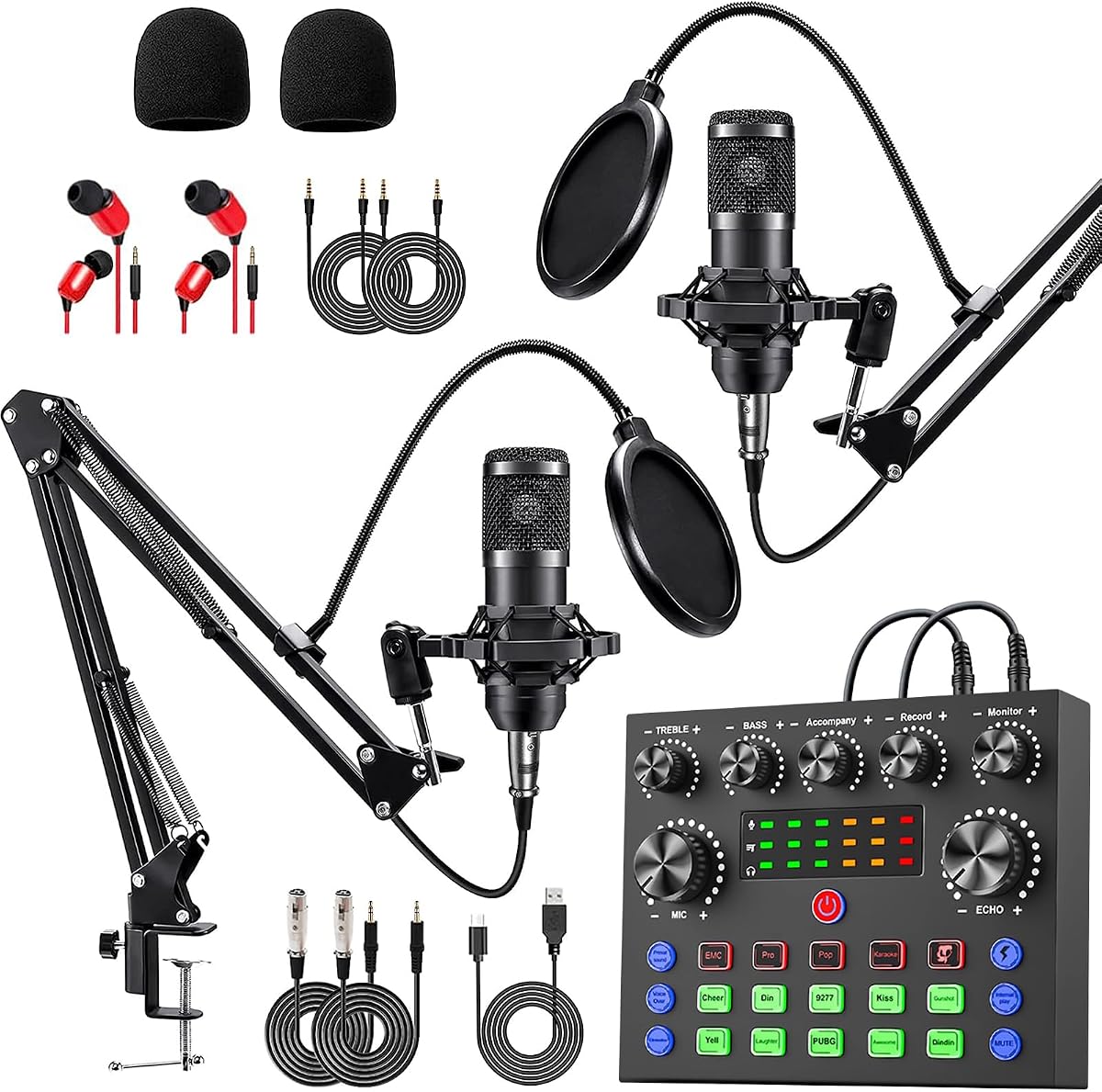
The Brvomussy Podcast Equipment Bundle for 2 has a 4.2 rating and is designed around two-person broadcasts rather than a single creator. It includes a live sound card, two condenser microphones, two hanging boom arms, earphones, shock holders, spray protections, foam covers, XLR and 3.5mm cables, a USB cable, and a manual. The package is comprehensive enough to support interviews, collaborative commentary, gaming shows, and group livestreams.
We may earn a commission when you buy through this link, at no additional cost to you.
Its cardioid pickup and intelligent noise reduction are designed to focus on voices, while the double-layer pop filter and windproof foam cap help manage plosive sounds and airflow noise. The mixer offers 10 effects, including reverb, bass, treble, noise reduction, accompaniment, dodge, and voice changing. Four voice variations and four sound modes expand the options for entertainment-oriented broadcasts, and the 13 listed functions provide more control than a basic single-mic unit.
Compatibility is another strength. The bundle supports Windows, iOS, Android, Mac OS, and Chrome OS, as well as PCs, smartphones, PlayStation 4, Xbox, and other game platforms. It can also accept guitar, bass, and other instruments. The trade-off is that two microphones, two arms, multiple cables, and a feature-heavy mixer require a larger, carefully arranged desk. New users may also find the abundant onboard effects more than they need at the outset.
Choose this bundle when your streaming plan regularly includes another host, remote conversational content, or a show format requiring two vocal positions. It is also a practical foundation for a small collaborative podcast. If your goal is a one-person gaming stream with the simplest possible connection, choose a single USB microphone instead. For the intended group format, however, this package delivers an unusually complete starting point.
Two microphones and two boom arms eliminate the need to improvise a second vocal station. Independent hosts can position themselves comfortably and join the same mixed audio workflow.
Instrument input allows guitar, bass, and similar sources to enter the mixer directly. Broad console and operating-system support also makes the package relevant to gaming streamers rather than only podcasters.
We may earn a commission when you buy through this link, at no additional cost to you.
The AM100-V8 Podcast Equipment Bundle has a 4.0 rating and delivers a conventional all-in-one recording setup for a beginner. Its components include a BM-800 condenser microphone, adjustable suspension scissor arm, shock mount, pop filter, anti-wind foam cap, power cable, and live sound card. That combination covers the common physical needs of a desktop recording setup without requiring the creator to build every accessory from scratch.
We may earn a commission when you buy through this link, at no additional cost to you.
The microphone uses a cardioid pickup pattern intended to capture the sound source directly in front of it. The supplied description also refers to a professional sound chipset and rich, mellow vocal capture. The sound card adds voice-changing and other effects, allowing a streamer to alter presentation for chat, calls, TikTok, YouTube, live performances, and short videos. This makes the package visually and functionally oriented toward interactive content rather than restrained voice-over work alone.
Compatibility extends across Windows, Mac OS, Android, and iOS, along with phones, computers, tablets, iPads, PS4, Xbox, Switch, and other game platforms. The tradeoff is that the included microphone is a single unit, so a co-hosted podcast would require expansion. The voice effects are entertaining, but beginners should treat them as optional tools rather than permanent features. The device should also be charged before first use.
This package is a sensible choice for a solo streamer, vlogger, gamer, or first-time podcaster who wants a familiar suspension-arm setup and playful onboard effects. It is less appropriate for a polished studio requiring multiple independent channels. Buy it when convenience and creative sound options matter more than a minimal one-device footprint, and begin with conservative effects while learning your levels.
The suspension arm, shock mount, and pop filter create a recognizable broadcast arrangement. It is an approachable visual setup for viewers accustomed to podcast and gaming streams.
Voice effects and broad platform support make the same kit useful for calls, short videos, music-oriented streams, and console sessions. A creator can begin with voice content and then experiment with more interactive formats.
We may earn a commission when you buy through this link, at no additional cost to you.
The Webcam Streaming Kit, 1080P Webcam, RGB Mic & LED Light for PC/Mac holds a 4.2 rating and offers the most immediately visible upgrade for a new on-camera creator. In one package, it combines a 1080p webcam, RGB USB microphone, and adjustable LED light. That combination addresses the three elements viewers notice first: a clear face, intelligible speech, and a well-lit desk.
We may earn a commission when you buy through this link, at no additional cost to you.
The webcam uses a CMOS sensor to capture 1920 by 1080 at 30 frames per second with automatic brightness and color compensation. Its 14mm condenser microphone uses cardioid pickup, includes a built-in pop filter and gain knob, and supports real-time headphone monitoring. The supplied specification states a signal-to-noise ratio above 70dB, giving a more technical indication of the microphone's intended clarity.
The lighting panel adds useful flexibility. Its CRI is listed above 90, the color temperature spans 3000K to 7200K, and it offers five modes, five brightness levels, a memory function, 180-degree rotation, and a monitor-mounting hook. The limitation is platform scope: Windows, Mac, Android, and iOS are supported, but PS5 and Xbox streaming requires a separately sold capture card. The three components also take more desk space than a microphone-only setup.
Choose this kit for a beginner entering video calls, livestreams, YouTube, Twitch, or team meetings who wants a coordinated visual package immediately. It is particularly useful if your built-in laptop camera produces a dim or uneven image. Console-focused creators should account for the capture-card requirement, while those with an established camera can purchase only the parts they still need rather than the full bundle.
A dedicated 1080p camera provides a noticeable visual upgrade over many built-in laptop cameras. Automatic brightness and color compensation help the image remain consistent as room lighting changes.
The adjustable panel lets creators switch between warm and cool tones, select a preferred brightness, and remember that setting. A monitor-mounted position also helps keep the light directed toward the presenter's face.
We may earn a commission when you buy through this link, at no additional cost to you.
The Pioneer DJ DDJ-FLX4 earns a 4.7 rating, the highest among the products in this guide. It is a two-channel DJ controller designed to help beginners learn beat matching and mixing while remaining useful for livestreaming, DJ-style broadcasts, and live performances. The layout comes from Pioneer DJ's professional controller design, making it a more specialized purchase than a conventional podcast or webcam bundle.
We may earn a commission when you buy through this link, at no additional cost to you.
Its standout beginner feature is Smart Fader, which automatically adjusts volume, bass, and BPM to help blend genres as the user moves a fader. Sixteen Performance Pads provide access to Hot Cues, Pad FX, Beat Jump, and Sampler functions, while the two-deck layout provides room to blend sources. The controller can work with Apple Music, Tidal, and Beatport and can stream or MC from a single device.
A built-in sound card supports connection to PC, Mac, iPhone, iPad, and Android through USB or Bluetooth. This makes the controller adaptable to both computer-based and mobile DJ workflows. The trade-off is the learning curve: this is not a one-button podcast kit, and using its advanced features effectively takes practice. A beginner attracted to live music mixing will find more long-term value here than someone who only needs clear speech capture.
Recommend the DDJ-FLX4 to beginners who specifically want to learn DJing, host music streams, or add live mixing to their content. It is the premium choice in this lineup because of its professional control layout, automated blending assistance, and strong rating. If your streaming plan centers on conversation, reactions, and a static camera, choose a microphone-centered kit instead.
Smart Fader automates several synchronization-related adjustments, reducing the number of manual techniques required for a first blend. It provides a learning bridge while still exposing the user to the familiar two-deck workflow.
Support for major streaming music services, a built-in sound card, and both USB and Bluetooth connections make it practical for a creator who performs rather than only speaks. The pads also support cues, effects, jumps, and samples.
We may earn a commission when you buy through this link, at no additional cost to you.
The Also GO Podcast Equipment Bundle for 2, V8s Sound Card with Voice Changer carries a strong 4.5 rating and targets creators who need two complete vocal positions. The package includes BM-800 podcast microphones, a DJ-style mixer, boom arms, shock holders, pop filters, foam covers, and 3.5mm earphones. That level of inclusion is helpful for a duo beginning a podcast or collaborative livestream.
We may earn a commission when you buy through this link, at no additional cost to you.
The V8s mixer combines a DSP chip, cardioid microphone technology, and noise reduction. It offers 10 effects, including reverb, treble, bass, and noise reduction, plus four voice changes: female, male, child, and monster. Four sound modes and 13 functions give the user room to develop a recognizable broadcast style, although the abundance of options means experimentation will take time.
The system supports PCs, smartphones, Xbox, Windows, Mac OS, iOS, and Android. Bluetooth pairing is highlighted as a convenient option for phones and tablets, while included cables are generally more direct for computers. The package should be fully charged before first use, and its two microphones, arms, and mixer demand careful desk placement. As with any multi-person setup, proper gain control and microphone separation will be important.
This bundle is a strong choice for a two-host podcast, gaming duo, or livestream featuring interviews. Its rating, wireless option, and complete accessory list make it particularly compelling for creators who want more freedom than a permanently wired single-microphone arrangement. For one-person speech content, its extra channel adds little and the simpler K66 microphone may be a more efficient purchase.
The microphones, suspension hardware, wind protection, headphones, and mixer are supplied together, giving a duo a usable foundation without assembling every element separately.
Bluetooth pairing gives phone and tablet users a simple route into the mixer. The included wired options remain useful for computer setups where stable, straightforward connectivity is preferred.
We may earn a commission when you buy through this link, at no additional cost to you.
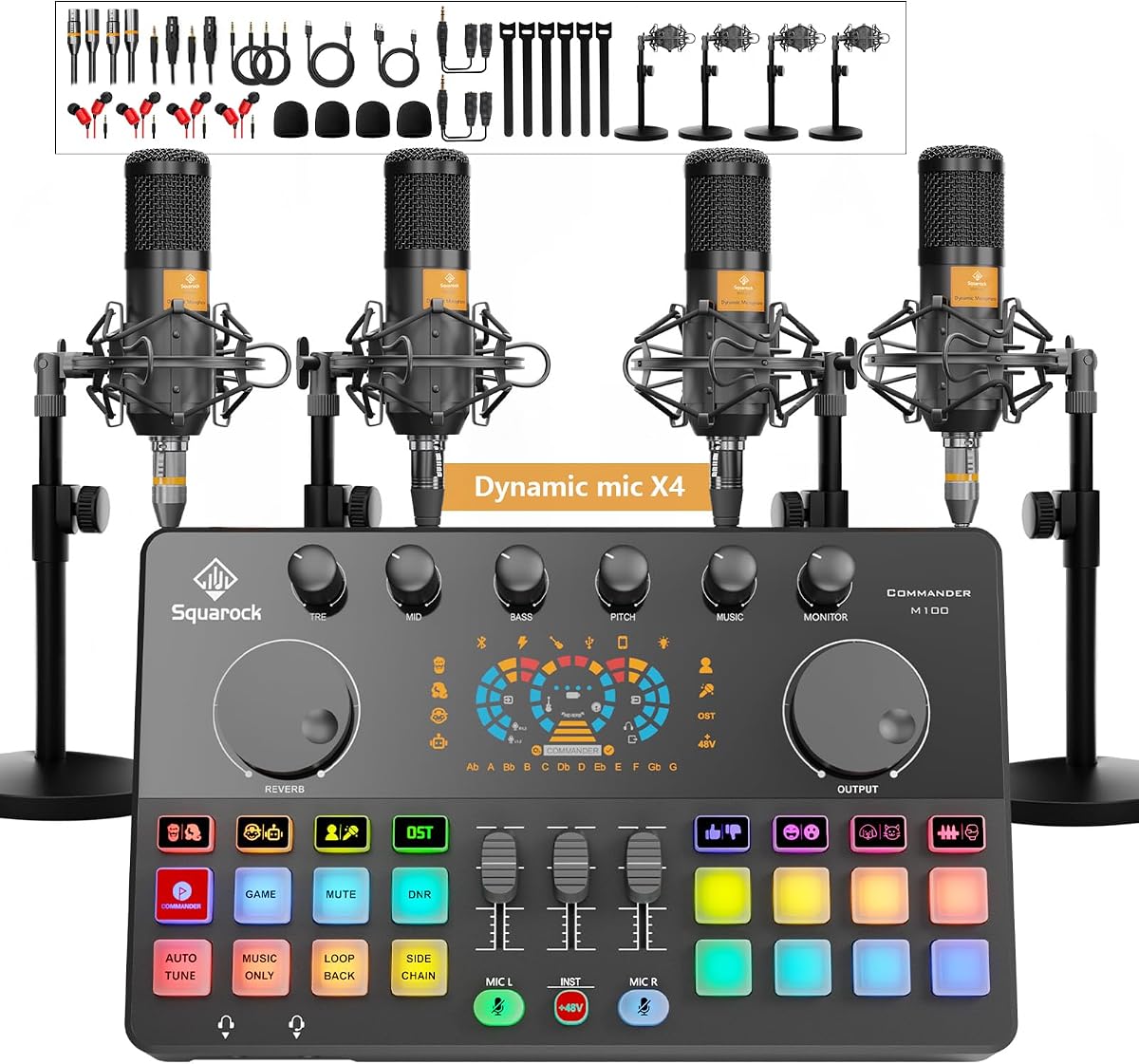
The Four-Person Podcast Bundle, M100 Audio Mixer, Dynamic Mics, Recording earns a 4.3 rating and offers the largest speaking team in the guide. It includes four dynamic microphones, desktop stands, monitor earphones, a multi-channel audio interface mixer, shock mounts, foam covers, earphone splitters, and a complete set of cables. The result is a ready-made foundation for a four-person podcast, panel discussion, group livestream, or collaborative recording session.
We may earn a commission when you buy through this link, at no additional cost to you.
The mixer is tuned for dynamic microphones and uses dual XLR and dual 3.5mm microphone inputs. Every independent channel has separate volume adjustment and one-click mute. Smart noise reduction is designed to reduce ambient hum, background noise, and room interference, while treble, mid, bass, reverb, pitch correction, loopback, side chain, auto-tune, voice changes, presets, and customizable sound pads provide substantial control. Bluetooth playback adds another route for background music.
This breadth is both the main appeal and the main challenge. Four microphones can introduce room echo, desk vibration, and crosstalk if they are not positioned properly. The package also requires a larger workspace and more careful gain management than a single-microphone system. Nevertheless, the built-in 4000mAh battery and wireless operation make the mixer more flexible for indoor or outdoor mobile sessions than a permanently wired setup.
Choose this package when regular collaboration is central to your content. It provides more participants and independent controls than the two-person bundles, while preserving a no-driver USB workflow for Windows, iOS, and Android. The four-person configuration is unnecessary for a solo creator, but for a small team it delivers a compelling all-in-one platform. Confirm that your software recognizes all four inputs, and test the setup in the intended room before a live broadcast.
Per-channel volume and mute controls let a host manage each participant during a live session. That is especially useful when one contributor is louder, quieter, or more prone to background noise than the others.
The built-in rechargeable battery and Bluetooth background playback reduce dependence on a fixed power outlet and computer audio source. The system is therefore more adaptable for location-based creative work.
We may earn a commission when you buy through this link, at no additional cost to you.
The sktome Podcast Equipment Bundle for 2 has a 4.1 rating and combines a V8s sound board, two microphones, and a detailed collection of accessories. The package list includes two condenser microphones, two hanging arm clippers, two 3.5mm earphones, shock holders, spray protections, foam covers, XLR-to-3.5mm cables, a USB charging cable, 3.5mm audio cables, and a manual. It gives two creators the physical tools for an immediate start.
We may earn a commission when you buy through this link, at no additional cost to you.
The microphones use metal construction and cardioid pickup intended to capture voices from the front. The integrated sound board adds reverberation, treble and bass adjustment, noise reduction, accompaniment, dodge, and voice change. It also includes 12 electric sounds, 12 sound effects, and 10 modes. Those options are useful for entertainment-oriented livestreams, although they can be more distracting than helpful to someone whose main goal is a neutral podcast voice.
The main drawback is that the number of settings creates a learning curve. A first-time creator should begin with noise reduction, level control, and a familiar sound mode before adding elaborate effects. The bundle must also be charged after delivery, and two hanging arms require enough desk or wall space to position microphones correctly. With careful placement, the cardioid pattern and included wind protection should support clear two-person capture.
This bundle is a good match for a duo that wants to experiment with character voices, interactive sounds, gaming commentary, or streamed performances. It is less compelling for a traditional interview where natural voices and minimal processing are priorities. Choose it when entertainment features and a complete two-microphone package matter more than a minimal setup, and rehearse the controls before going live.
The combination of sound effects, electric sounds, voice changes, and operating modes creates many ways to develop an entertaining stream. It is particularly suited to creators who deliberately build sound into their performance.
Matching microphones, arms, shock holders, pop protections, foam covers, earphones, and cables give both participants a similar recording position. That symmetry can make a two-host production easier to balance.
We may earn a commission when you buy through this link, at no additional cost to you.
The ZealSound K66 USB Microphone carries a 4.4 rating and represents the most focused approach to beginner streaming equipment. Instead of a large bundle, it delivers one desktop USB microphone with a weighted metal base, 360-degree rotatable body, foam windscreen, long USB cable, USB-C adapter, Lightning adapter, manual, and technical support. That focused design makes it easy to understand and quick to add to a new setup.
We may earn a commission when you buy through this link, at no additional cost to you.
The microphone uses a condenser capsule, cardioid pickup, a stated 40Hz to 18kHz frequency response, and a 46kHz sample rate. Its sensitivity is listed at -45dB plus or minus 3dB. The controls are unusually practical for a beginner: dedicated knobs manage microphone volume, monitoring volume, and echo, while a mute button offers immediate status through an LED. Holding the mute button activates an intelligent noise-reduction mode intended to reduce clicks, fan noise, air-conditioner hum, and background chatter.
The 3.5mm headphone connection supports real-time zero-latency monitoring, allowing a creator to hear what is being recorded without delay. The unit requires no drivers, apps, or software installation and is listed for Windows, Mac, PS4, PS5, tablets, iPhone, and iPad through its included adapters. It also works with common creator applications such as OBS Studio, Streamlabs, Discord, Audacity, and GarageBand. Its limitation is that digital noise reduction cannot fully solve poor acoustics or eliminate a noisy room.
Choose the K66 for solo creators who want clear speech, straightforward USB operation, and enough physical control to manage a stream without navigating complex menus. It is also useful for podcasting, gaming commentary, online classes, meetings, voice-over work, and ASMR. If you also need a camera and light, choose a webcam bundle instead. If you want a complete multi-person studio, consider the M100 system. For a first microphone, however, the K66 offers an admirably focused package.
The cardioid pattern focuses on the speaker in front of the microphone, while the foam windscreen helps soften plosive sounds. Its physical controls make it possible to improve levels without opening a complex application.
Zero-latency headphone monitoring lets a creator identify distortion, uneven volume, or unwanted noise before it reaches the recording. Separate monitoring and microphone controls make it easier to set comfortable levels.
USB-C and Lightning adapters, broad platform support, and driver-free operation remove many early compatibility barriers. The weighted base and rotatable body also make positioning on a shared desk straightforward.
We may earn a commission when you buy through this link, at no additional cost to you.
Begin by defining the kind of content you want to make, the number of people who will speak, and the devices you already own. Then prioritize the audio path, video needs, connection method, physical setup, and controls that will make your first broadcasts easier to manage.
A complete bundle can reduce the number of early purchases and make setup faster. The options in this guide range from one-person podcast kits with a mixer, microphone, arm, pop filter, and cables to four-person systems with multiple microphones and independent controls. A webcam kit adds video and lighting, while a DJ controller serves a different live-music workflow. An individual USB microphone offers a cleaner and more compact beginning when you already have a camera and comfortable headphones.
In short, bundles are convenient for fast starts, while individual devices are often better when your existing setup already covers some needs.
Condenser microphones are common in the podcast bundles listed here, while the four-person M100 package uses dynamic microphones. Condenser models can capture vocal detail and are often used in controlled recording spaces. Dynamic models are frequently chosen when multiple people share a room because they can offer greater rejection of off-axis sound, although placement and room treatment remain important. Consider your speaking style, room acoustics, and whether the microphone will be close to your mouth or mounted at a distance.
Choose the microphone type that suits your room and voice, not merely the one with the longest feature list. Always test the complete signal chain before a live event.
Solo streamers can focus on one high-quality vocal source, while interviews, duos, panels, and group podcasts need enough microphones and independent controls. The two-person packages include two microphones, and the M100 bundle supports four with per-channel volume and mute functions. A mixer built for multiple voices also needs space, separate positioning, and careful gain adjustment to prevent echo and crosstalk.
Match the number of channels to your regular format. Do not rely on one microphone positioned far from every participant if a clear, evenly balanced conversation is the goal.
USB plug-and-play operation is convenient for Windows and Mac creators, while Bluetooth can simplify phone and tablet workflows. Some products also support consoles, but console streaming may require a separate capture card, as noted for the webcam kit. Verify the included cables and adapters, confirm that your device has the correct port, and check whether your broadcasting application recognizes the microphone or mixer as an input. The listed operating-system support does not guarantee that every app or control will function identically.
Read recent compatibility details and test the exact device, cable, and software combination you plan to use. This prevents most connection-related surprises.
Noise reduction, bass, treble, reverb, pitch, voice changes, and effects can make a stream lively, but they are not substitutes for a controlled environment. Many listed products provide hardware controls, which is useful for quick changes during a live broadcast. A beginner should first learn microphone distance, angle, gain, and headphone levels, then add processing sparingly. Excessive reverb, echo, or voice effects can quickly reduce clarity and make multiple speakers harder to distinguish.
Prioritize clean, level-consistent audio first. Treat creative effects as optional tools rather than the foundation of a good broadcast.
Headphone monitoring lets a creator hear exactly what is being captured and identify problems before they appear in the stream. The K66, webcam kit, and several podcast bundles provide 3.5mm headphone connections. Real-time or zero-latency monitoring is especially useful for singing, performance, and live commentary. Closed-back headphones are generally better for recording because they help prevent microphone bleed, while comfortable open-back headphones may suit casual monitoring in a quiet room.
Use headphones while recording even if your software offers a level meter. Hearing the real signal remains one of the fastest ways to detect distortion, echo, and imbalance.
A clear voice cannot compensate for a dark, noisy, or poorly framed camera image. The webcam kit pairs 1080p at 30 frames per second with automatic brightness and color compensation, a USB microphone, and an adjustable LED panel. If you already own a good camera, you may only need a better microphone or light. If you do not own a camera, a video-focused bundle can provide a more coordinated beginning than assembling unrelated components.
Prioritize framing and face lighting before advanced camera settings. A simple, evenly illuminated image is often more valuable than a complex setup with poor placement.
Microphone arms, multiple stands, mixers, cables, and LED panels require room and can transmit desk vibration into microphones. Wireless operation and a built-in battery can help with mobile or outdoor creation, but batteries must be charged before use. A DJ controller is appropriate for music mixing, while a microphone-centered kit is better for conversation. Consider whether your format is stationary, mobile, conversational, musical, gaming-focused, or panel-based.
Choose equipment that fits both your content and your available workspace. A smaller focused setup is often more consistent than an ambitious arrangement you cannot position correctly.
Start by assembling the setup away from the live broadcast. Connect the microphone or mixer to the computer, install the necessary software only if the application requests it, and select the correct input in the broadcasting platform. Position the microphone slightly off-axis and close enough to capture a clear voice without excessive room sound. Add the pop filter or foam cover, connect headphones, and test the input meter before inviting anyone to join.
Next, set gain before adding effects. Speak at the volume you expect to use during the stream, watch the level meter, and reduce input gain if peaks enter the red range. Turn on monitoring and listen for hiss, hum, plosives, echo, or clipping. Adjust the microphone angle and distance, improve room treatment with soft furnishings, and keep the desk surface steady. Only then consider noise reduction, equalization, voice effects, or background music.
For ongoing care, switch off and disconnect devices before moving them, wind the cables loosely, and keep the microphone away from moisture, dust, and direct heat. Charge wireless or portable units before a session and clean foam covers and pop filters according to their care instructions. Back up important recordings, maintain consistent software settings, and run a short rehearsal before every important broadcast so a failed connection or muted channel does not interrupt the audience.
A clear microphone, wired or reliable wireless headphones, and a stable connection are the most important starting points. Video can come next if your platform is primarily visual. Many beginners benefit from a bundle that includes a mixer, pop filter, stand, and cables, but a simple USB microphone is sufficient for a first podcast or voice stream.
An audio mixer is useful when you need multiple microphones, instrument inputs, physical level controls, or onboard effects. It is less essential for a solo creator who only needs one USB microphone. If your content includes a second host, gaming commentary, music, or live sound effects, a mixer can simplify control and reduce the number of separate devices.
Condenser microphones can capture detailed, natural vocals and are included in many beginner podcast bundles. They can also pick up more room noise and handling vibration than some other microphone styles. A quiet room, shock mount, pop filter, careful gain settings, and moderate speaking distance are therefore especially important.
You do not need separate products if you choose a coordinated video bundle, such as the 1080p webcam kit in this guide. If you already own a satisfactory camera, purchasing only a microphone or light can be more efficient. A webcam improves image quality, but good framing and face lighting can matter more than resolution alone.
Several bundles list support for PS4, Xbox, Switch, and other game platforms, but the exact connection method matters. The 1080p webcam kit specifically notes that PS5 and Xbox streaming requires a capture card. Check the product's current compatibility details and your console's streaming requirements before purchasing.
Start by speaking closer to the microphone, positioning it behind a pop filter, and reducing microphone gain until peaks remain under clipping. Keep the microphone away from walls and reflective surfaces, use headphones, and place soft furnishings in the room if possible. If the mixer has echo, reverb, or noise-reduction controls, adjust them sparingly after the physical setup is clean.
Bluetooth can be convenient for phone and tablet workflows because it reduces cable clutter and simplifies a mobile setup. Wired USB connections are generally preferable for a stationary computer broadcast because they are straightforward and minimize wireless interruptions. Test whichever connection you intend to use under the same conditions as the live session.
No. Voice effects can be entertaining for chat interaction, comedy, gaming, or themed segments, but constant processing may reduce clarity and make a regular voice difficult to recognize. Begin with clean levels and conservative noise reduction, then use stronger effects selectively when they support the content.
The strongest general starting points depend on the format. The ZealSound K66 is the focused choice for a solo creator who wants simple USB operation, real-time monitoring, and physical controls, while the TENLAMP G10 appeals to users who want a unified mixer-and-microphone system with extensive effects. The Brvomussy, Also GO V8s, and sktome bundles cover two-person work, and the M100 package leads the group category with four microphones, independent channels, and portable battery operation.
The webcam kit is the most complete visual starting point, while the Pioneer DJ DDJ-FLX4 serves a specialized music-streaming and DJ-learning role. For a new streamer, prioritize a microphone that sounds clear, a connection method that works with your existing devices, monitoring you can understand, and a physical arrangement that fits your desk. Add sophisticated effects, extra participants, or DJ controls only when your content plan justifies them.
Before purchasing, confirm the latest compatibility details, included accessories, platform support, and current product configuration. Prices and ratings can change, so compare the live listing and recent customer feedback as well as the supplied specifications. Most importantly, rehearse the complete setup before it matters: a familiar workflow will do more for a beginner's stream than an intimidating collection of unused features.