
NIMO External GPU Docking Station
4.7Editor score
Integrated Radeon graphics
Built-in 240W power
USB4 and OCuLink ports
Compact 0.8L enclosure
Expert guide comparing the 10 best External GPU for Mini PC options, covering OCuLink and USB4 docks, graphics performance, power, and device compatibility
An external GPU for a mini PC can transform compact integrated systems into capable gaming, rendering, and AI workstations. The right dock depends on host compatibility, bandwidth, power delivery, card dimensions, cooling, and whether you want a DIY or all-in-one design.
We compared ten docks using their published specifications, included components, connection standards, power arrangements, display outputs, and compatibility notes. The list covers OCuLink enclosures, Thunderbolt and USB4 docks, portable systems with integrated graphics, and hybrid models that support both interfaces.
Each pick reveals a different route to expanded graphics performance, from a simple enclosure for bringing your own desktop card to a ready-to-use system with a built-in GPU and power supply. Product listings and availability can change, so verify current specifications before purchasing.
4.7Editor score
4.8Editor score

4.4Editor score
The table below compares connection methods, graphics configuration, power delivery, and practical compatibility across ten external GPU solutions for mini PCs.


This open-frame OCuLink dock is a practical way to add desktop graphics to a compatible mini PC, earning a 4.4 rating. It combines a PCIe 4.0 x4 connection, an SFF-8612 to PCIe x16 adapter, and an enclosure designed to accept standard ATX power supplies and large graphics cards.
We may earn a commission when you buy through this link, at no additional cost to you.
Its main strength is flexibility. The product information states that cards such as the RTX 4090 and AMD RX 7900 XTX are supported without length restrictions, making the enclosure more accommodating than compact designs limited by fixed internal dimensions. A detachable structure, 10μ gold-plated contacts, and status LEDs improve handling and make connection monitoring more convenient.
The included 50cm SFF-8611 male-to-male cable is thin, flexible, shielded, and designed to reduce electromagnetic interference. Users must provide both a graphics card and a standard ATX power supply, however, and OCuLink does not support hot-plugging. The host must be powered off before the cable is disconnected.
This is our top general-purpose pick for enthusiasts who already own a capable desktop GPU and want a straightforward way to connect it to a mini PC. It suits builders comfortable assembling graphics cards, cables, and external power, but it is less convenient than an all-in-one dock with integrated graphics and power.
The open enclosure and stated absence of length restrictions make this dock useful for large, high-performance graphics cards. That physical flexibility is valuable when the mini PC itself is compact and internal card space is limited.
The detachable cable and enclosure ends improve portability and storage, while the thin shielded cable is easier to route than a bulky conventional cable. Gold-plated contacts also support dependable conductivity.
We may earn a commission when you buy through this link, at no additional cost to you.
This OCuLink dock holds a perfect 5.0 rating and presents a simple enclosure for connecting a desktop graphics card to a compatible mini PC or laptop. It uses PCIe 4.0 x4 bandwidth, translates OCuLink to PCIe x16, and includes the dock, a 50cm cable, and a user manual.
We may earn a commission when you buy through this link, at no additional cost to you.
The open-frame construction is the defining advantage. It supports NVIDIA, AMD, and Intel graphics cards without the stated length limitations of many enclosed designs. The dock accepts a standard ATX power supply, letting owners choose a power capacity appropriate for the installed card and reuse a familiar desktop component.
There are some setup responsibilities. Appropriate GPU drivers must be installed before first use, or the dock may fail to detect the card. The shielded 50cm OCuLink cable includes metal shielding and conductive polymer interference protection, but the connection cannot be hot-plugged and requires a complete host shutdown before disconnection.
This model is an attractive recommendation for a builder who values a straightforward open design and strong feedback from users. It is best for someone who already owns a graphics card and standard ATX power supply and wants a portable, flexible bridge to a PCIe-capable mini PC.
Supporting NVIDIA, AMD, and Intel desktop cards makes this enclosure useful across different graphics ecosystems. Users can retain a card that already suits their gaming or professional workload.
Correct driver installation is essential for detection and stable operation. Installing the GPU software before the first connection avoids one of the most common sources of setup frustration.
We may earn a commission when you buy through this link, at no additional cost to you.
The MINISFORUM MGA1 is an all-in-one external graphics solution for mini PCs that lack room for a powerful discrete card. Its 4.2 rating reflects a useful package featuring an AMD Radeon 7600M XT with 8GB GDDR6, a built-in 240W GaN power system, and an OCuLink expansion link.
We may earn a commission when you buy through this link, at no additional cost to you.
Unlike conventional enclosures, the MGA1 does not require users to install a desktop graphics card or provide a separate power supply. The Radeon 7600M XT uses RDNA 3 architecture and is assigned up to 120W, while the system also allocates power to display output. This creates a relatively compact and approachable way to gain substantially stronger graphics than many integrated mini PC solutions.
Display connectivity includes one HDMI 2.1 and two DisplayPort outputs, with the listed specification describing support for three monitors. The multi-interface design also includes a USB-C port with 10Gbps data and 65W display output, three 10Gbps USB-A ports, a power switch, and OCuLink 4i.
The Follow the Startup function is limited to compatible MINISFORUM mini PCs using original wiring, so it should not be treated as a universal feature. Buyers who want a ready-to-use, relatively compact eGPU and already own a compatible OCuLink-equipped MINISFORUM system will find the MGA1 especially convenient.
The integrated Radeon 7600M XT and 240W power supply remove the two largest parts of a conventional DIY eGPU build. Users can focus on connecting and configuring the system rather than fitting and powering a desktop card.
Three video outputs, 10Gbps USB ports, and host charging support make the MGA1 more than a gaming accessory. It can also serve as a compact docking hub for a compatible mini PC.
We may earn a commission when you buy through this link, at no additional cost to you.
The MINISFORUM DEG1 combines a compact footprint with a full-featured OCuLink enclosure design, earning a 4.5 rating. Measuring about 14cm by 6.5cm by 2cm, it is easy to carry while accommodating a desktop graphics card and a user-supplied power supply.
We may earn a commission when you buy through this link, at no additional cost to you.
Its uplink and downlink use PCIe 4.0 x4, with the OCuLink side supporting transfer rates up to 64Gbps. ATX and SFX power supply compatibility gives buyers more sourcing options, while the lack of a stated card-length restriction supports a wider range of desktop graphics cards.
The Force Power On feature and LED provide a way to select between forced startup and follow-up startup modes. Signal amplifier chips support stable transmission, and the locking OCuLink connector helps prevent forced removal. Follow-up startup, however, is restricted to compatible MINISFORUM mini PCs using original cables, and the system must be shut down before unplugging OCuLink.
This is a strong recommendation for mobile mini PC users who want to bring a desktop card between locations. It is less suitable for buyers seeking a fully integrated system, because the graphics card and power supply must be supplied separately.
The DEG1's exceptionally thin open design makes it easier to pack than a full desktop enclosure. It offers a practical way to retain desktop graphics performance without carrying a complete tower.
Supporting both ATX and SFX units means owners can match the enclosure to the power demands and physical preferences of their chosen graphics card. The enclosure supports desktop cards without a stated length limit.
We may earn a commission when you buy through this link, at no additional cost to you.
This DEG1 variant is aimed at owners of high-end desktop cards, with its product information explicitly mentioning the RTX 4090 and AMD RX 7900 XTX. It has a 4.3 rating and uses OCuLink 4i for the uplink alongside a PCIe 4.0 x4 downlink.
We may earn a commission when you buy through this link, at no additional cost to you.
The design is straightforward for an enthusiast: install a compatible desktop GPU, connect a standard ATX or SFX power supply, and link the mini PC through OCuLink. The enclosure accepts graphics cards of various sizes, making it suitable for large cards that would be difficult to house in a smaller portable enclosure.
Its limitations are equally clear. The system only supports OCuLink rather than Thunderbolt, and both the graphics card and power supply are excluded. OCuLink does not support hot-plugging, so the host must be switched off before disconnecting the cable. The follow-start function requires compatible MINISFORUM mini PCs and original wiring.
Choose this model when you have a powerful desktop card and a mini PC with OCuLink but lack the space for a full-size internal GPU. It is less attractive for users who need broad USB4 or Thunderbolt compatibility or prefer a self-contained eGPU.
The lack of a stated card-length restriction gives flagship desktop GPUs more room to operate. That makes the enclosure a practical bridge for a compact host with a high-end graphics workload.
Using PCIe 4.0 x4 over OCuLink prioritizes bandwidth for compatible hosts. Buyers without an OCuLink port should not expect the enclosure to work through an ordinary USB-C or Thunderbolt connection.
We may earn a commission when you buy through this link, at no additional cost to you.
The Razer Core X V2 is a broad-purpose enclosure for Windows 11 systems using Thunderbolt 4, Thunderbolt 5, or USB4. Its 4.0 rating reflects a design focused on easier compatibility and polished physical construction rather than OCuLink-only performance.
We may earn a commission when you buy through this link, at no additional cost to you.
The enclosure supports desktop NVIDIA and AMD graphics cards up to four slots wide, making it suitable for substantial, multi-fan cards. Thunderbolt 5 can provide up to 80Gbps of bandwidth, while the included USB-C cable also supports up to 140W Power Delivery to the host device.
Installation is designed to be straightforward. The tool-free process uses included thumbscrews to install a PCIe desktop card and ATX power supply, and a built-in 120mm fan ramps up during heavy workloads. The vented steel chassis helps dissipate heat, although users still need to provide both the card and power supply.
Compatibility caveats include the lack of support for Mac devices with M1 or later chipsets. The Core X V2 is best for Windows mini PCs and laptops that need broad USB4 or Thunderbolt support and a conventional, full-size external enclosure.
Thunderbolt 4, Thunderbolt 5, and USB4 support gives the enclosure broader reach than an OCuLink-only model. A compatible host can simply connect when external graphics are needed.
Four-slot clearance accommodates substantial desktop cards, while the included 120mm fan and ventilated steel body support sustained cooling. The open card format is useful for upgrading hardware over time.
We may earn a commission when you buy through this link, at no additional cost to you.
The NIMO External GPU Docking Station earns a 4.7 rating by combining an AMD Radeon RX 7600M XT with 8GB GDDR6, a built-in 240W power supply, and a compact 0.8L enclosure. It is positioned as a ready-to-use alternative to assembling a dock around separate components.
We may earn a commission when you buy through this link, at no additional cost to you.
Connectivity is a major strength. The unit offers USB4 with bandwidth up to 80Gbps and a dedicated OCuLink PCIe 4.0 x4 connection rated at 64Gbps. It can support compatible laptops, mini PCs, notebooks, and handhelds, with up to 65W host charging through USB4.
The display configuration includes HDMI 2.1 and DisplayPort 2.0, supporting two monitors at up to 8K 60Hz or high-refresh 4K up to 120Hz when the host and displays support those modes. The integrated Radeon chip is rated at up to 120W and can also assist with gaming, rendering, editing, and encoding.
The fixed GPU configuration means buyers cannot upgrade to an arbitrary desktop card later. Proper airflow is also important, so the dock should rest horizontally on a stable, well-ventilated surface. Even so, it is our premium pick for a compact, polished, ready-to-use external graphics system.
OCuLink offers the direct PCIe 4.0 x4 path for compatible high-performance hosts, while USB4 broadens device support and simplifies single-cable use. Having both ports lets the user choose the most suitable connection.
The integrated 240W supply and compact chassis remove the need for a separate desktop power brick. A roughly 0.8L volume makes the unit more practical to move between a home, office, studio, or travel setup.
We may earn a commission when you buy through this link, at no additional cost to you.
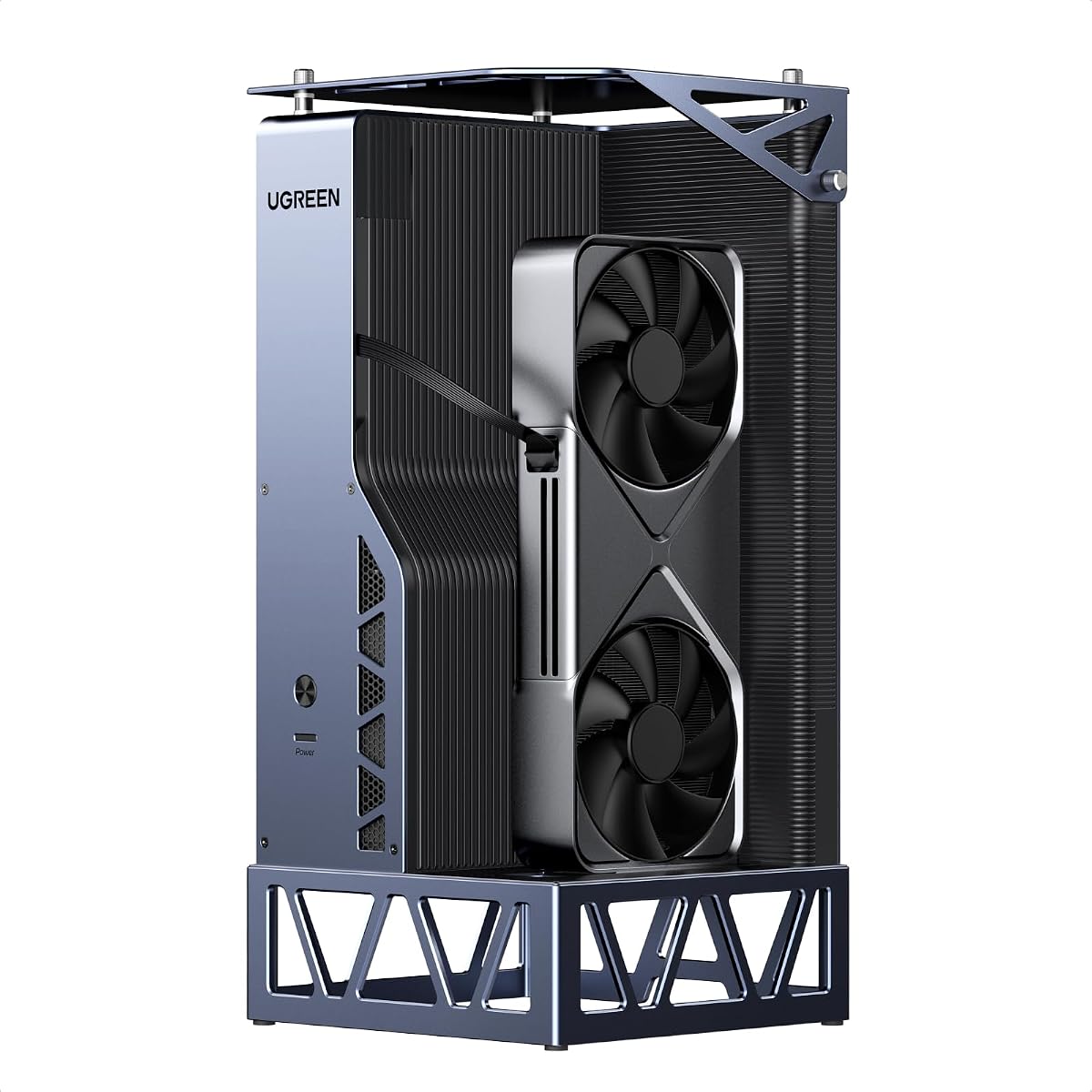
The UGREEN LinkStation is the strongest all-around pick in this guide, combining the highest listed rating of 4.8 with unusually broad enclosure functionality. It supports desktop NVIDIA, AMD, and Intel cards through either OCuLink at 64Gbps or USB4 and Thunderbolt 4 at 40Gbps.
We may earn a commission when you buy through this link, at no additional cost to you.
Compatibility extends beyond the headline connection standard. Tested cards include Intel Arc A770, several AMD Radeon models, and multiple NVIDIA GeForce cards, while the product information also mentions newer cards such as the RTX 5090. The removable top cover supports GPUs up to 370mm long and as thick as four slots, though the rear bracket opening is limited to dual-slot brackets.
Power support is designed for modern cards, including 12V-2×6 and PCIe 8-pin connections. The single-cable USB4 path can also deliver up to 100W charging to a host laptop. An all-aluminum semi-open chassis, low-RPM ATX 3.1 supply fan, signal booster, and cable storage compartment support a tidy, quiet workstation setup.
This is the most versatile choice for an enthusiast who wants OCuLink performance without giving up USB4 convenience. It also works with Windows, Linux, and Intel-based macOS according to the supplied information. The main caveat is that the enclosure is a platform, so buyers must supply a compatible desktop card and suitable power supply.
OCuLink provides the direct PCIe path for compatible hosts, while USB4 expands compatibility and offers a convenient hot-swap route. The built-in signal booster helps maintain stable high-speed communication.
Support for contemporary power connectors, large graphics cards, and host charging makes this a credible desktop replacement. Cable storage and the semi-open aluminum design help keep a compact workstation organized.
We may earn a commission when you buy through this link, at no additional cost to you.
The BOSGAME GVP 7600M combines an integrated Radeon RX 7600M XT with unusually broad expansion features, earning a 4.3 rating. Its 1.92-pound aluminum enclosure is designed for laptops, desktop PCs, and handheld consoles using Thunderbolt 3, Thunderbolt 4, USB4, or OCuLink.
We may earn a commission when you buy through this link, at no additional cost to you.
The Radeon 7600M XT includes 8GB GDDR6 and uses RDNA 3 architecture. Its default GPU power setting is 100W, while a Turbo Button can switch the limit to 120W for additional performance. The product information compares the card's performance to an RTX 4050 laptop, providing useful context for buyers comparing integrated mobile solutions.
The dock is more than a graphics adapter. It includes M.2 2280 PCIe 3.0 storage expansion, a RJ45 Ethernet port, and two USB-A 3.2 ports. Two HDMI 2.1 outputs support 4K at 60Hz, two DisplayPort 2.0 outputs support 4K at 120Hz, and the system can drive four displays.
This is a compelling portable hub for users who need connectivity beyond graphics. Its integrated graphics cannot be replaced, and performance depends on whether the host exposes the required interface. It is best for a compatible mobile or compact system that will benefit from both stronger graphics and additional ports.
Ethernet, USB-A, and M.2 storage expansion make the GVP useful beyond gaming. These features can turn a compatible portable computer into a more complete workstation with fewer separate accessories.
The default 100W setting offers a balance between power and thermals, while Turbo raises the limit to 120W. Users can select the mode that best fits their host, workload, and cooling environment.
We may earn a commission when you buy through this link, at no additional cost to you.
The Nimo All-in-One eGPU is built around the same general concept as other compact integrated docks: Radeon RX 7600M XT graphics, a 240W internal power supply, and no requirement to install a separate desktop card. Its 3.5 rating is the lowest in the group, so the product should be evaluated carefully against current host compatibility.
We may earn a commission when you buy through this link, at no additional cost to you.
Its two host connections are a USB4 port supporting up to 80Gbps and an OCuLink PCIe 4.0 x4 port supporting 64Gbps. The USB-C connection can provide 65W reverse charging, reducing the need to carry a separate host power adapter when the selected USB4 host supports charging and data transfer.
The enclosure measures 63 by 115 by 120.5mm, giving it a compact 0.8L-class footprint suited to travel. DisplayPort 2.0 and HDMI 2.1 outputs support up to two 8K 60Hz monitors or 4K 120Hz monitors when the complete system and connected displays support those specifications.
Its strengths are convenience, portability, and integrated power. The fixed Radeon configuration cannot be upgraded, and the lower rating category suggests some variability in owner satisfaction. It is most appropriate for buyers who prioritize a compact all-in-one package and have confirmed USB4 or OCuLink support.
Combining the graphics processor and 240W power supply into a small enclosure avoids carrying a desktop card, full-size power supply, and separate adapter. The result is easier to move between work and entertainment locations.
Through USB4, the system can handle data, graphics expansion, and up to 65W of host charging. OCuLink remains available for compatible systems that benefit from a direct PCIe 4.0 x4 path.
We may earn a commission when you buy through this link, at no additional cost to you.
Choosing an external GPU for a mini PC requires matching the host interface, graphics card, power supply, physical dimensions, display needs, and intended workload. The most important distinction is whether you want a DIY enclosure or an integrated, ready-to-use system.
Start with the ports available on the exact mini PC model. OCuLink offers a direct PCIe 4.0 x4 path at 64Gbps and is often favored for performance-sensitive graphics use, but it is not universal. Thunderbolt 4, Thunderbolt 5, and USB4 provide broader compatibility, with different bandwidth ceilings and host-dependent behavior. Some mini PCs expose OCuLink through a proprietary docking port, while others require a specific cable or adapter.
Confirm both the connector type and the host's supported operating system before buying. A physically similar USB-C port does not guarantee USB4 bandwidth, and macOS support varies by product and chip generation.
A PCIe 4.0 x4 link provides substantially more usable graphics bandwidth than older Thunderbolt arrangements, although the final experience also depends on the GPU, host, cooling, workload, and software. OCuLink docks in this guide advertise 64Gbps, while the Razer and UGREEN Thunderbolt or USB4 paths use different limits. Do not confuse the physical x16 slot inside an enclosure with the number of lanes available through the host uplink.
For gaming, rendering, and GPU compute, favor the highest lane and protocol combination that both the dock and mini PC support. For light acceleration or occasional use, a broadly compatible USB4 connection may be more convenient.
An empty enclosure lets you install a desktop graphics card and choose the power supply that meets your needs. It offers a wider performance ceiling and the ability to reuse or upgrade components, but assembly and cable management are your responsibility. An integrated dock contains its own graphics processor and power supply, making setup simpler and the package more portable.
Choose an enclosure if you already own a suitable desktop card or want freedom to upgrade. Choose an integrated model if convenience, a smaller footprint, and minimal parts matter more than access to the latest flagship desktop GPUs.
Graphics cards vary considerably in length, height, slot width, power connector, and cooler design. Product listings may refer broadly to different-sized cards without defining every bracket and clearance limitation. The UGREEN model allows cards up to 370mm long and four slots thick, but its opening is restricted to dual-slot brackets. Other open-frame docks advertise broader length compatibility.
Measure the card and inspect the enclosure opening before ordering. Pay particular attention to power-cable clearance, bracket position, and whether a multi-slot cooler interferes with the cover.
The graphics card, dock, and host may each require power from different sources. Desktop GPUs often need substantial supplemental power, while integrated Radeon systems draw from an integrated supply. ATX and SFX support determines which desktop power supplies can be used. The host may also need charging through the dock's USB-C connection.
Do not assume a mini PC can power a desktop GPU through its OCuLink port. The enclosure needs a suitable external supply, and that supply must meet the graphics card's requirements. For integrated systems, verify the stated GPU wattage and overall internal power capacity.
An external GPU can serve as a docking station, so consider HDMI and DisplayPort counts, maximum resolutions, refresh rates, USB ports, Ethernet, and storage expansion. The BOSGAME model stands out with M.2 storage, RJ45 Ethernet, and four display outputs. The MINISFORUM MGA1 offers three displays and several 10Gbps USB ports, while compact integrated docks are often limited to two displays.
Match output capabilities to the host, cable, GPU, and monitors. A dock can have the correct ports yet still be constrained by what the host's external display controller supports.
A powerful desktop card produces substantial heat, and an open-frame enclosure may depend more heavily on the card's own cooler and the surrounding airflow. Enclosed designs with a dedicated fan can provide more consistent cooling. Integrated mobile GPUs generally consume less power and need less external cooling, making them suitable for compact travel kits.
Decide whether the dock will remain on a desk or travel regularly. For frequent transport, weight, dimensions, cable storage, and the need for a separate power brick matter as much as raw card capacity.
Driver support, operating-system compatibility, and hot-plugging behavior can influence the experience. Install the correct GPU drivers before first use, particularly for OCuLink enclosures where the dock may not detect an unsupported card. OCuLink products in this guide require the host to be powered off before disconnection, while USB4 and Thunderbolt designs may support a more convenient connection workflow.
Check the manufacturer's current compatibility list and any BIOS or firmware requirements. A physically fitting GPU is not enough; the host must recognize the enclosure and expose the required lanes.
Begin by confirming that the mini PC supports the dock's connection and operating-system requirements. Install the latest appropriate GPU drivers, power down the host completely, and connect the OCuLink or USB4 cable as directed. For an empty enclosure, install the desktop graphics card, connect the compatible ATX or SFX power supply, and secure all cables before turning on the system.
For OCuLink docks, never remove the cable while the computer is running because hot-plugging is unsupported. Shut down the mini PC, wait for all power to stop, and release the locking mechanism if the connector has one. USB4 models may permit convenient reconnection, but following the manufacturer's instructions remains the safest approach. Once connected, select the external display output and install any dock-specific or GPU software required by the host.
Place the dock on a stable, ventilated surface and avoid blocking the graphics card, chassis fans, or power-supply vents. Keep connectors supported and cables free from sharp bends. For integrated systems, monitor thermals during extended rendering or gaming. When the dock is not needed, shut it down safely, disconnect it, and return the graphics card to a protective environment.
No. The mini PC must expose a compatible interface, such as OCuLink, Thunderbolt 4, Thunderbolt 5, or USB4, and its operating system must support the dock. Check the manufacturer's specifications for port type, PCIe lane availability, driver support, and display-output behavior before purchasing.
OCuLink commonly provides a direct PCIe 4.0 x4 connection rated at 64Gbps and is well suited to performance-sensitive use. USB4 is more widely available and may provide a simpler single-cable workflow, but bandwidth and host support vary. The best choice depends on the exact mini PC, dock, GPU, and workload.
No. Traditional enclosures require a compatible desktop graphics card and a suitable power supply, while all-in-one products include a mobile Radeon processor and integrated power system. Enclosures offer greater upgrade freedom, whereas integrated systems are simpler and generally easier to carry.
No. The OCuLink products reviewed here explicitly do not support hot-plugging. Shut down the mini PC completely before disconnecting the cable, and unlock the connector first if it uses a locking mechanism. This protects the host port and prevents unstable operation.
The requirement depends on the enclosure and installed card. Many OCuLink designs in this guide require a standard ATX unit, while the MINISFORUM DEG1 also supports SFX. A low-power integrated Radeon dock includes its own supply. Confirm both the connector type and the card manufacturer's power requirements.
The number depends on the dock, integrated GPU, and host operating system. The MINISFORUM MGA1 lists three outputs, the BOSGAME GVP 7600M supports a four-display configuration, and most compact integrated docks support two. Also verify that the mini PC can output through the chosen host interface.
It can provide a major graphics upgrade, but the result depends on the card, PCIe bandwidth, cooling, power, and game requirements. Integrated Radeon solutions improve portability, while a desktop GPU in an OCuLink enclosure usually offers a higher performance ceiling. CPU performance and storage speed can still become limiting factors.
The graphics card itself requires the appropriate GPU driver, and some docks may provide additional software or firmware. The reviewed OCuLink products specifically recommend installing the correct GPU drivers before first use because the dock may otherwise fail to detect the card. Keep host drivers and dock firmware current.
The UGREEN LinkStation is the most versatile overall choice because it combines OCuLink and USB4, broad desktop GPU support, modern power connectors, host charging, and roomy card clearance. The NIMO Radeon Dock is the premium all-in-one option for buyers who value portability, integrated power, and straightforward setup.
For DIY builders, the PCIe 4.0 x4 eGPU Dock and the two MINISFORUM DEG1 variants provide flexible paths to install a desktop card. The Razer Core X V2 is worth considering for hosts using Thunderbolt or USB4, while the MGA1, BOSGAME GVP 7600M, and compact Nimo system make more sense when portability matters.
Before ordering, verify the exact host interface, operating-system support, graphics card dimensions, and power requirements. Product specifications, firmware compatibility, and listing details can change over time, so consult the current manufacturer documentation and confirm that your mini PC supports the connection method before making a final choice.