
Samsung Galaxy Tab A11 WiFi Model
4.3Editor score
Compact 8.7-inch display
4GB RAM and 64GB storage
Expandable microSD storage
Looking for the best Tablet for Back to School Students? Compare 10 options for performance, displays, battery life, stylus support, storage, portability, and
A tablet for back to school students must balance lecture notes, web research, documents, video calls, and entertainment without becoming a burden to carry. The best models pair a readable, sharp display with enough processing power and memory for multitasking, dependable battery life, and a comfortable way to type, write, or sketch.
We compared all ten tablets using the supplied specifications, emphasizing screen size and resolution, memory, storage, performance hardware, battery claims, included accessories, connectivity, and education-focused features. The list covers premium models, practical Samsung and Lenovo tablets, compact options, and bundles designed for students and younger learners.
Each review explains where a model stands out and where compromises appear, helping you match the tablet to your course load, budget, handwriting needs, and commuting habits. Product configurations and prices can change, so confirm the current listing, region, included accessories, and warranty terms before purchasing.
4.3Editor score

4.6Editor score

4.6Editor score
The comparison below highlights the major differences in display, memory, storage, connectivity, and included study accessories, making it easier to identify the right tablet for lectures, assignments, and everyday use.




The Lenovo Idea Tab is a well-balanced college tablet with a 4.3 rating and a particularly attractive combination of screen quality, accessories, and study features. Its 11-inch 2.5K IPS touchscreen runs at 90Hz, offering enough room for split-screen research and detailed documents without making the device unwieldy for daily transport.
We may earn a commission when you buy through this link, at no additional cost to you.
The included Tab Pen and folio case make it easier to begin taking handwritten notes, while Circle to Search provides a convenient way to select visible information and find related results without manually copying a query. Lenovo AI Note, Squid, Nebo, and MyScript Calculator add focused tools for organizing notes, coloring work, and performing calculations. Quad Dolby Atmos-tuned speakers also make it useful for lectures, videos, and study breaks.
Its MediaTek Dimensity 6300 chip and 4GB of memory are less impressive than the specifications of several higher-ranked alternatives, particularly when comparing them with models claiming 8GB or more memory. The 72% NTSC color coverage may also be less suitable for advanced visual work. Nevertheless, the advertised battery life of up to 12 hours of YouTube use and the bundled accessories soften those compromises.
This is a strong recommendation for college and high-school students who want a refined display and stylus experience without moving to the premium tier. It is particularly useful for handwritten notes, web research, and media consumption. Students who routinely run many demanding applications at once should consider a higher-memory alternative, while most learners will appreciate the more focused package.
Circle to Search and the included learning applications help students move from information to notes with less app switching. These features are particularly valuable during fast-moving lectures when every minute spent reorganizing information matters.
The high-resolution 11-inch panel provides a useful compromise between a large reading area and portable dimensions. Its 90Hz refresh rate also gives scrolling and stylus interaction a smoother feel than many basic tablets.
We may earn a commission when you buy through this link, at no additional cost to you.
The Galaxy Tab S10 Lite carries a 4.6 rating and combines a polished Samsung software experience with useful pen support and extensive storage expansion. Its 10.9-inch display falls in the middle of the list, making it large enough for reading and note-taking but still reasonably portable for school days.
We may earn a commission when you buy through this link, at no additional cost to you.
The Exynos 1380 processor supports streaming, searching, note-taking, and multitasking, while 6GB of RAM is more appropriate for everyday student workflows than the 4GB found in some alternatives. The S Pen turns the tablet into a flexible notebook for handwritten notes, drawing, and math. Storage begins at 128GB and can be expanded with a microSD card up to 2TB.
Samsung also emphasizes intelligent tools such as Circle to Search, note cleanup, trigonometric equation solving, and an AI Hot Key available through a compatible keyboard. Galaxy device continuity can let students take calls on the tablet or move notes between other Samsung hardware. Vision Booster adjusts display brightness to the surrounding environment, improving usability across changing study locations.
This tablet is a compelling choice for students already invested in Samsung phones, laptops, or accessories, especially those who want a polished pen experience and generous expandable storage. The listing highlights battery life of up to 16 hours, making it appealing for long travel days. Check the exact package contents before buying, because some accessories may require separate purchase.
The S Pen is a meaningful advantage for lecture-heavy students who prefer handwritten notes, diagrams, and margin annotations. Its integration with Samsung note features reduces the friction of turning quick scribbles into organized study material.
Supporting up to 2TB of microSD expansion is unusually generous. Students can keep downloaded textbooks, lecture recordings, media, and project files together without constantly managing internal storage.
We may earn a commission when you buy through this link, at no additional cost to you.
The Galaxy Tab A11+ is one of the strongest all-around choices in this guide, earning a 4.6 rating for its balanced hardware and family-friendly design. Its 11-inch screen operates at up to 90Hz, creating a fluid canvas for web browsing, streaming, games, shared coursework, and video calls.
We may earn a commission when you buy through this link, at no additional cost to you.
The listed configuration provides 6GB of RAM and 128GB of storage, along with an upgraded chipset designed to keep common tasks responsive. The supplied information also mentions configurations up to 8GB of memory and 256GB of storage, so shoppers should check the exact variant selected. Quad speakers with Dolby Atmos improve the experience for classes, films, and group study sessions.
Google Gemini, Circle to Search, and a 5MP front camera add convenience for assignments and remote learning. Fast charging helps limit downtime between sessions. The main omission is that no stylus is listed with this particular package, which makes it less attractive for students who prefer handwriting. If your workflow depends heavily on handwritten notes, the Galaxy Tab S10 Lite or Lenovo models may be better choices.
This A11+ is ideal for students who want a large, fluid display without moving to a premium performance tier. It also works well as a shared family tablet for video calls, browsing, entertainment, and lightweight productivity. Its rating, memory, audio, and overall balance make it an especially safe all-purpose recommendation.
The 90Hz refresh rate improves the fluidity of scrolling, typing, and app transitions. On an 11-inch display, that smoothness is noticeable during long research sessions and makes the tablet more pleasant for general entertainment.
The slim, light design, strong audio, and capable front camera suit both student use and family communication. Multiple household members can benefit from one device for lessons, calls, and entertainment.
We may earn a commission when you buy through this link, at no additional cost to you.
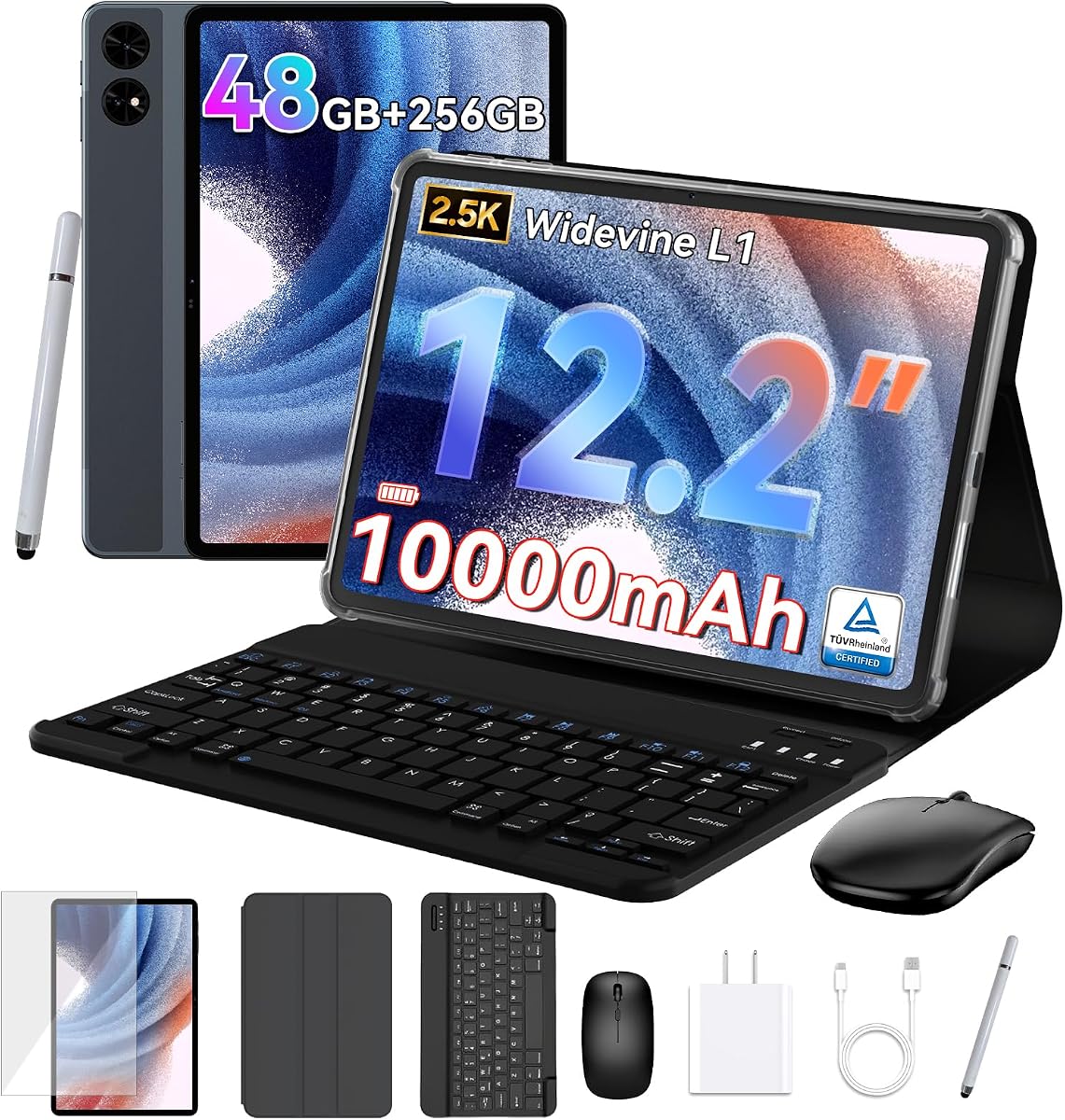
The TABWEE T60 is a feature-packed 12.2-inch Android tablet that pairs a 2.5K display with a large battery, GPS, a keyboard, mouse, stylus, and protective case. Its 4.4 rating suggests buyers generally find the extensive package worthwhile, though students should understand that the headline memory combines physical and virtual allocations.
We may earn a commission when you buy through this link, at no additional cost to you.
The supplied specifications describe 48GB of RAM as 12GB physical plus 36GB virtual, along with 256GB of UFS storage. Android 16 desktop windowing, Google Gemini, Private Space, and Predictive Back target productivity and organization. The 99% sRGB panel, anti-glare treatment, and eye-comfort features are attractive for long reading or creative sessions.
The 10,000mAh battery and integrated GPS distinguish it from ordinary classroom tablets, while Widevine L1 supports high-quality streaming on compatible services. The included keyboard, mouse, stylus, and case can create a portable workstation for documents and presentations. However, virtual memory does not function like dedicated RAM in every workload, and the marketing language makes independent verification of real-world performance especially important.
Choose the T60 if you value accessories and screen size more than established brand consistency. It is a practical choice for students seeking a laptop-like bundle, navigation, and a large battery. Be cautious with extended multitasking or heavy gaming until you understand the physical memory contribution, and verify the warranty registration terms directly with the seller.
The keyboard, mouse, stylus, and case reduce the need to buy several accessories separately. Android 16 desktop mode adds another layer of flexibility for essays, spreadsheets, remote classes, and presentations.
A 2.5K 12.2-inch screen offers abundant room for documents and media, while the 10,000mAh battery targets long study sessions. Anti-glare and eye-comfort features further improve suitability for extended use.
We may earn a commission when you buy through this link, at no additional cost to you.
The Evermyth 10-inch Android 16 tablet is a straightforward option for students who prioritize connectivity, familiar Android applications, and expandable storage. It has a 4.0 rating, with the supplied information emphasizing GMS certification, Play Store access, dual-band Wi-Fi 6, and Bluetooth 5.4.
We may earn a commission when you buy through this link, at no additional cost to you.
Its listed 24GB memory is divided into 3GB physical and 21GB virtual capacity, so it should be viewed as a 3GB device with additional virtual memory rather than equivalent to a tablet with 24GB dedicated RAM. The 64GB internal storage can be supplemented by up to 1TB through a TF card, although that card is not included.
The 1280-by-800 IPS panel is suitable for web research, documents, and video calls, but it lacks the sharpness of the 2.5K and 3K alternatives. A 5MP front camera and 8MP rear camera cover common needs. The 6,000mAh battery is advertised for up to eight hours of mixed use and as much as three days of standby, which is reasonable for ordinary schoolwork.
This model fits students who want a straightforward Android device with modern connectivity and do not need a premium display or extensive physical memory. It can serve well for note review, browsing, streaming, and online classes. Heavy applications, advanced creative work, and intensive multitasking are better served by a more powerful model with verified performance.
Wi-Fi 6 and dual-band connectivity can provide smoother downloads and more stable performance on crowded school networks. Bluetooth 5.4 also prepares the tablet for compatible keyboards, headphones, and other accessories.
GMS certification means students can access popular Play Store applications rather than relying on a limited software catalog. That makes setup and day-to-day use more familiar for most Android users.
We may earn a commission when you buy through this link, at no additional cost to you.
The Jeazans Android 16 tablet is designed as a complete 2-in-1 study setup rather than a bare tablet. Its package includes a Bluetooth keyboard, silent wireless mouse, stylus, folding leather case, and PD fast charger, giving students the main accessories needed for lectures and assignments.
We may earn a commission when you buy through this link, at no additional cost to you.
The 10.1-inch form factor is easy to carry, while the adjustable case provides several viewing angles for typing or watching a virtual classroom. The listed 24GB RAM again combines 3GB physical memory with 21GB virtual memory. With 64GB of storage and claimed expansion up to 4TB, the device should accommodate downloaded educational materials and media, subject to card availability and format support.
Dual HD cameras support classes and collaboration, while the stylus is useful for annotation and sketching. Wi-Fi 6 and USB Power Delivery improve connectivity and charging convenience. As with other Android tablets that rely on virtual memory, demanding work will reveal the limits of the physical 3GB allocation faster than the headline number suggests.
Students moving between lectures, library tables, and shared workspaces will appreciate the broad bundle and 2-in-1 flexibility. It is a better fit for users who value immediately usable accessories than for those wanting the sharpest display or strongest long-term performance guarantee. Confirm all bundle contents and regional warranty service before checkout.
The keyboard and mouse create a more practical typing environment for long assignments. The leather case supports multiple angles, helping the tablet work as both a compact laptop and a note-taking display.
The included stylus provides an immediate way to annotate documents and follow handwritten instruction. It also gives younger students a familiar way to practice writing and drawing without requiring another accessory purchase.
We may earn a commission when you buy through this link, at no additional cost to you.
The UKIDOZ Kids Tablet is tailored to students aged three to 12 and carries a 4.6 rating. Its strongest distinction is not raw hardware but a child-focused software environment with UKIDOZ Kids Space, learning games, picture books, and built-in parental controls.
We may earn a commission when you buy through this link, at no additional cost to you.
Parents can set screen-time limits, manage app permissions, and filter content through the included control system. That makes the tablet more appropriate for elementary learners who need a controlled digital environment. The 10-inch 1280-by-800 IPS display is responsive for reading, drawing, videos, and casual games, while Widevine L1 supports HD streaming on compatible services.
A 6,000mAh battery provides hours of learning and entertainment, and the included 180-degree adjustable case offers protection, grip, and multiple viewing positions. The stylus supports writing and drawing, while 5MP front and 8MP rear autofocus cameras cover calls and basic photography. The 24GB memory figure combines 3GB physical RAM with 21GB virtual memory.
This is the most focused option for parents buying a first tablet for a young child. Its controls and bundled accessories create a safer, more usable introduction than a standard adult tablet. Students in advanced high school or college will likely want a more open and productive workflow, while younger learners benefit from the curated content and simple protection.
Screen-time limits, app permissions, and content filters let adults tailor the device to a child's age and routines. These controls are the key reason to consider this tablet over a conventional Android model.
The lightweight body, adjustable protective case, and supplied stylus support comfortable use by children. The case also doubles as a stand, making video lessons and drawing sessions easier to manage.
We may earn a commission when you buy through this link, at no additional cost to you.
The international Samsung Galaxy Tab A11 is the most compact tablet in this guide, offering an 8.7-inch display for students who prefer a smaller reading device. Its 4.3 rating reflects a generally capable configuration with a 90Hz panel, 4GB of RAM, and a MediaTek Helio G99 processor.
We may earn a commission when you buy through this link, at no additional cost to you.
The 1340-by-800 WXGA+ resolution provides a readable canvas for notes, articles, and classroom applications. Its octa-core processor and 4GB memory are suitable for ordinary browsing, streaming, and productivity, although they are less generous than the 8GB offered by the premium Lenovo model. The 64GB storage can be expanded with a microSD card up to 2TB.
Its international status is the biggest caveat. The supplied information states that the model has no warranty, may require selecting a country during setup, and does not include a charger. Connectivity is limited to Wi-Fi, with no SIM slot, but dual-band Wi-Fi, Bluetooth 5.3, GPS, and a 3.5mm headphone jack are included.
This tablet works well for commuters, readers, and students who need a less bulky device for carrying between classes. It is also a straightforward choice for anyone comfortable buying an international model and managing the lack of regional warranty support. Buyers in supported markets should compare local Samsung models before making a final decision.
The 8.7-inch format is easier to fit into a small backpack than the larger models in this list. It remains large enough for substantial reading and document work without becoming a two-handed burden.
The listing states that the device is an international Latin American model with no warranty. Confirm compatibility, charger needs, setup behavior, and local service availability before purchasing.
We may earn a commission when you buy through this link, at no additional cost to you.
The Lenovo Idea Tab Pro is the premium choice for students who want a large, sharp display and more processing headroom. Its 4.6 rating, 12.7-inch 3K LCD panel, 8GB of memory, and MediaTek Dimensity 8300 processor distinguish it from the more basic Android tablets in the guide.
We may earn a commission when you buy through this link, at no additional cost to you.
The 3K screen is ideal for reading dense documents, editing detailed notes, reviewing diagrams, and watching high-quality lectures. Quad JBL Dolby Atmos speakers enhance media, while Wi-Fi 6E supports fast wireless transfers on compatible networks. The 360Hz touch sampling rate and advertised 90fps performance also make the tablet suitable for responsive stylus work and compatible games.
Google Gemini, Circle to Search, and the included Tab Pen Plus support research and AI-assisted study workflows. Low Blue Light certification, mono and chromatic viewing modes, and up to 11 hours of advertised video playback support long study days. The 45W quick charger helps when the battery runs down, although the larger screen and higher-end processor make this a heavier tablet overall.
This is the strongest choice for advanced students, creative learners, and anyone who regularly runs demanding applications. The included pen and folio complete a useful study package. Those who prioritize an ultra-light device or basic browsing may find the smaller and less powerful alternatives more practical.
The 12.7-inch 3K display makes small text and detailed diagrams easier to inspect. Low Blue Light certification and alternate viewing modes also support comfortable reading during extended sessions.
The Dimensity 8300 and 8GB memory provide a strong foundation for multiple apps, complex documents, and media. It is a better match for demanding academic software than most entry-level alternatives.
We may earn a commission when you buy through this link, at no additional cost to you.
The WXUNJA C5 is an 11-inch Android 16 tablet offering a large screen, substantial storage, and a long advertised battery at a value-focused level. Its 4.1 rating places it among the more modest choices, but its hardware should be sufficient for standard coursework, browsing, and media.
We may earn a commission when you buy through this link, at no additional cost to you.
The octa-core Unisoc T606 processor supports everyday apps and many games, while 128GB of internal storage is more useful for textbooks, recordings, and downloaded media than the 64GB found in several alternatives. Expansion up to 1TB adds flexibility. The 28GB memory figure consists of 4GB physical RAM and 24GB virtual expansion, so actual multitasking capacity depends on the physical allocation.
The 1280-by-800 display is basic in resolution, but its 11-inch size gives students a useful amount of visible workspace. Widevine L1 certification supports HD playback on compatible services. An 8,000mAh battery is advertised for eight to ten hours of playback, and 18W Power Delivery can speed up recharging.
This tablet fits students who want a large screen and generous storage without moving to a premium display. Split-screen, wireless casting, face recognition, a 3.5mm headphone jack, and Google Kids features broaden its usefulness. More advanced applications may expose the limits of the chipset and 4GB physical memory, so students in demanding majors should consider a stronger processor.
The 11-inch display balances reading space and portability, while 128GB of storage reduces the need to delete course files frequently. Expansion support makes the tablet more adaptable as a semester progresses.
The 8,000mAh battery targets long playback and study sessions, while 18W PD charging supports shorter stops between classes. Connectivity options such as the headphone jack and wireless casting add practical flexibility.
We may earn a commission when you buy through this link, at no additional cost to you.
The right student tablet depends on course demands, annotation habits, portability, and the balance between performance and battery life. Review these factors before choosing a model.
Screen size determines how comfortably you can read lecture slides, edit documents, and compare multiple sources. An 8.7-inch model is easy to carry, while 10.9-inch and 11-inch displays provide a better balance for extended work. A 12.2-inch or 12.7-inch screen is most useful for detailed diagrams, handwritten notes, media consumption, and laptop-style multitasking, but it is less convenient in a crowded backpack.
Choose the smallest display that still supports your typical reading and note-taking. Pairing a compact tablet with an external keyboard may be more practical than carrying a much larger model.
The processor handles application speed, web browsing, note conversion, video playback, and multitasking. Physical RAM matters more than a large headline number that includes virtual memory. Students running several browser tabs, a video meeting, documents, and cloud applications should favor 6GB or 8GB of physical memory and a current or capable chipset.
Do not treat virtual RAM as a full substitute for dedicated memory. Check the processor model and physical RAM separately before committing to a tablet marketed mainly through its combined capacity.
A tablet may need to store offline textbooks, lecture recordings, photographs, applications, and downloaded videos. At least 64GB is sensible for light use, while 128GB provides more breathing room for a full academic year. A microSD slot can make expansion inexpensive and convenient, although supported capacities and file formats vary by model.
Consider both internal capacity and expansion support. Also review the size of required course applications and avoid relying on cloud storage for materials that must remain available during unreliable campus connectivity.
A stylus can transform a tablet for mathematics, diagrams, annotations, and handwritten lecture notes. Some models include a pen and folio, while others support a compatible stylus sold separately. A keyboard is more useful for long essays and spreadsheet work, particularly when you want a compact laptop alternative.
Check whether the stylus is included, whether the folio is included, and whether the keyboard attaches through Bluetooth or a proprietary connector. Test or verify the typing case if you plan to write extensively.
Students spend long periods away from outlets, so battery capacity and realistic mixed-use endurance matter more than a single streaming claim. A 6,000mAh battery may suit lighter schedules, while 8,000mAh and 10,000mAh models are better suited to full days of lectures and travel. Fast charging can be valuable but requires a compatible charger, which some listings do not include.
Look for an advertised duration that resembles your daily workload. Carry a compact power bank or charging cable when the school day extends beyond the manufacturer's stated video or mixed-use runtime.
Wi-Fi performance affects research, downloads, and video calls. Dual-band Wi-Fi is broadly useful, while Wi-Fi 6 or 6E can improve results on compatible networks and crowded campuses. Bluetooth helps with headphones, keyboards, and styluses, while GPS adds value for navigation between buildings or on field trips.
International models may not include the same warranty as locally supported versions, and some omit chargers or require unusual setup steps. Verify regional software support, service availability, included cables, and network bands before ordering.
Younger students need a curated application environment, screen-time limits, content filters, and simple permission management. Adult-focused Android tablets provide broad access but typically leave those protections to the user or guardian. A dedicated kids tablet can make shared family use more manageable and reduce the likelihood of accidental access to unsuitable material.
For middle school, high school, and college students, evaluate whether a standard tablet offers enough control through operating-system settings. A stylus and protective case can matter more than a child-specific application library.
A tablet must survive backpacks, lockers, café tables, and daily transport. Look for an included protective case, reasonable weight, durable construction, and a folio that holds the tablet securely. The display size affects portability more dramatically than small differences in processor speed, so hold the device before ordering if possible.
For students carrying a device every day, weight and grip can outweigh extra screen inches. For a tablet that mostly stays at home, a larger panel and richer speakers may be the better priority.
Begin by configuring a secure student account, enabling automatic updates, setting an appropriate screen-time schedule, and organizing apps into folders for classes, communication, documents, and entertainment. Install the learning platform and file-storage apps required by your school before classes begin. Connect the included stylus or keyboard, update its software, and learn the gestures you will use most often.
Create a consistent note-taking system that separates lectures by date and course. Use the stylus for annotations and diagrams, then review and convert handwritten pages into searchable text when your software supports it. Save critical files locally as well as in cloud storage, and keep lecture recordings or large downloads synchronized before traveling to campus.
Protect the tablet with the supplied case, avoid leaving it in direct heat or inside a locked vehicle, and use a screen protector if you write frequently. Clean the display with a soft microfiber cloth, keep charging ports free of debris, and use only compatible chargers. Charge partially during short breaks when possible, and allow the device to cool before handling it while charging.
A tablet can be better for reading, annotating, attending classes, and light productivity because it is portable and works well with a stylus. A laptop remains preferable for advanced software, extensive typing, programming, and complex multitasking. Many students use both, with the tablet serving as a focused note-taking and reading device.
At least 4GB of physical RAM is a practical starting point for browsing, documents, and video calls. Students running many applications should aim for 6GB or 8GB of physical memory. Treat virtual memory as useful support rather than a replacement, because it cannot accelerate every workload like dedicated RAM.
A stylus is highly valuable for mathematics, diagrams, annotation, and handwritten notes. Some models include one, while others require a separate purchase, so compare the package contents carefully. If the tablet is mainly for typing and document editing, a keyboard may be more useful than a pen.
A student with light cloud-based needs may manage comfortably with 64GB, but 128GB is safer for downloaded textbooks, lecture recordings, applications, and media. Many models support microSD expansion, allowing students to keep less frequently used material on a removable card.
They can be, particularly when the specifications and accessories meet your needs. However, international listings may have different warranty coverage, charger inclusions, software setup, and regional compatibility. Read the listing carefully and compare local alternatives before saving money.
An 11-inch or 12.7-inch tablet generally provides comfortable handwriting space, while an 8.7-inch model is easier to carry. Larger screens suit diagram-heavy courses and split-screen work better. Choose based on the balance between your handwriting comfort, subject needs, and how much space you have in your bag.
All ten models support essential study functions such as web meetings, documents, and media playback, but performance varies with the processor and physical memory. Use a stable connection, a suitable case to raise the camera, and headphones for better privacy and audio quality during lessons.
A dedicated kids tablet can be useful when it includes age-appropriate content, parental controls, screen-time limits, and a protective case. Parents should still configure the device together, review permissions, update the software, and agree on safe charging and usage routines.
The Samsung Galaxy Tab A11+ stands out as the most balanced choice, combining a fluid 11-inch display, 6GB of memory, strong audio, and useful intelligence features. The compact Galaxy Tab A11 WiFi model is appealing for readers and commuters who value portability, while the Lenovo Idea Tab Pro offers the strongest premium combination of resolution, processing power, memory, and included pen.
Prioritize physical RAM, a comfortable screen, dependable battery life, and the accessories your courses actually require. Younger students benefit from robust parental controls, while advanced learners may need a faster processor and more memory. Pen support is essential for handwritten work, and a keyboard becomes increasingly important when essays and spreadsheets take center stage.
Before ordering, verify the exact configuration, display size, included accessories, charger, regional warranty, and compatibility with your school's required apps. Prices and product bundles can change, so check the current listing at the time of purchase and compare the final package rather than relying only on the headline specifications.