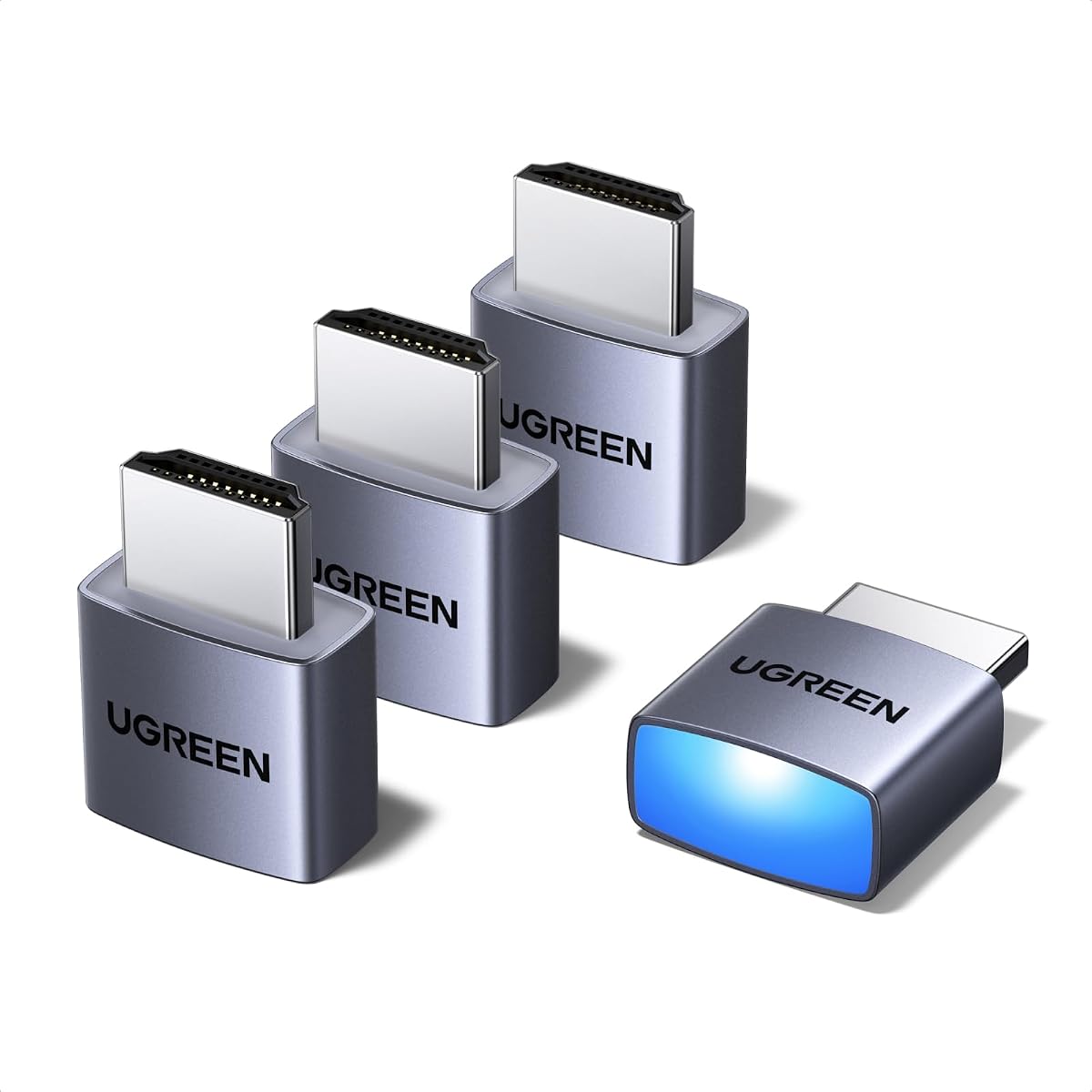
UGREEN 4 Pack HDMI Dummy Plug
4.6Editor score
4K virtual display support
Windows, Mac, and Linux
Four adapters included
Our HDMI Dummy Plug guide compares ten EDID emulators for headless PCs, remote access, 4K gaming, rendering, and cross-platform virtual displays at home.
An HDMI dummy plug is a compact EDID emulator that makes a computer believe a display is connected, allowing a GPU-equipped system to remain active without a physical monitor. The right adapter can improve remote access, support virtual workflows, and provide a dependable virtual display across different resolutions and refresh rates.
This guide compares ten HDMI dummy plugs based on resolution support, operating-system compatibility, construction, pack size, virtual-display features, and suitability for headless PCs. It covers standard 4K options, high-refresh models, HDMI 2.1 designs, and multi-packs for servers, remote workstations, rendering systems, and gaming computers.
Each review explains the product's strongest benefits, practical limitations, and ideal buyer profile so you can match an adapter to your setup rather than relying on headline resolution alone. Product ratings and availability can change, and current prices vary between sellers, so confirm the latest listing details before purchasing.
4.6Editor score

4.8Editor score

This side-by-side comparison highlights each dummy plug's resolution ceiling, refresh-rate support, pack quantity, and core platform compatibility, helping you distinguish everyday 4K adapters from high-refresh and multi-monitor options.


The UGREEN 4 Pack HDMI Dummy Plug is a strong all-around choice for headless computers that need a virtual display rather than a physical monitor. It carries a 4.6 rating and combines 4K at 60Hz support with a practical four-adapter bundle. Its status LED makes it especially convenient for systems located in a rack, office, server room, or another location that is not monitored continuously.
We may earn a commission when you buy through this link, at no additional cost to you.
The adapter uses an EDID emulator to make compatible hardware detect an active display, allowing the GPU to remain available for remote desktop work, video editing, game development, streaming, and other accelerated tasks. Its listed specifications include 4K Ultra HD at 60Hz using 4:2:0 chroma, compatibility with 1080p at 120Hz, and support for Windows, macOS, Linux, discrete GPUs, laptops, and other HDMI-output devices.
Construction is another strength. The aluminum shell is intended to dissipate heat during sustained workloads, while the gold-plated interface and internal design are meant to support stable signal transmission. Plug-and-play operation eliminates the need for drivers, configuration utilities, or a separate power connection. Remote-access applications named in the product information include RustDesk, TeamViewer, Sunshine, Moonlight, Parsec, and VNC software.
The primary limitation is that 4K is restricted to 60Hz and 4:2:0, so it will not satisfy a user seeking 4K at 120Hz. It is also a four-pack, which may be more than a single-PC owner needs. Even so, it offers a rare combination of recognizable branding, strong rating, multi-unit convenience, durable housing, and broad compatibility, making it an excellent choice for a home lab or collection of headless machines.
Four adapters allow you to cover several headless PCs without ordering separate devices for each HDMI port. This is useful for homelabs, remote workstations, server racks, and multi-GPU systems where maintaining a virtual display on more than one machine is important.
The integrated status LED gives immediate visual confirmation that the HDMI connection is active. That small feature is particularly helpful where the computer is out of sight but needs dependable remote-display support.
We may earn a commission when you buy through this link, at no additional cost to you.
This four-pack HDMI dummy plug stands out because it combines the highest rating in the selection with a broad set of supported modes. It supports 4K at 60Hz, 2K at 60Hz, and 1080p at 120Hz, while its virtual-display function is intended to keep the GPU active for remote access and accelerated work. The result is a versatile option for a homelab, small server collection, or several remote PCs.
We may earn a commission when you buy through this link, at no additional cost to you.
The adapter is marketed for Windows, macOS, and Linux systems and works with NVIDIA, AMD, and Intel graphics hardware. That broad hardware and software coverage makes it easier to standardize across a mixed environment. Its listed use cases include remote desktops, video editing, game development, mining, automated trading, simulation, screen sharing, cloud-gaming servers, and Kubernetes clusters.
Physical construction should suit long-running installations. The product information describes a heat-dissipating aluminum housing, a connection-status LED, and a tool-free plug-and-play design. No drivers, software, or external power are required. This reduces setup time and avoids adding another powered device to a remote or rack-mounted system.
It does not offer 4K at 120Hz, and its 4K output uses 4:2:0 chroma, which can limit fine color detail compared with a full RGB 4K pipeline. Users with an HDMI 2.1 graphics card and a high-refresh virtual workflow should look higher in the list. For most headless 4K tasks, however, the excellent rating, four-pack format, extensive platform support, and simple operation make this an especially well-rounded recommendation.
Supporting 4K, 2K, and 1080p gives administrators flexibility to select a mode suited to remote clients, rendering tasks, or older software. The adapter can provide a useful virtual-display target across several classes of remote-access workflow.
Support for the major desktop operating systems and all three leading graphics-card families makes this a sensible uniform accessory for organizations that do not want to maintain separate adapters for every machine.
We may earn a commission when you buy through this link, at no additional cost to you.
The DTech HDMI Dummy Plug is a compact three-pack designed for classic headless-server and remote-control use. Its 4.6 rating reflects a well-established option for users who need a computer to recognize a high-resolution display without keeping a physical monitor powered on. It is especially relevant to GPU-accelerated remote desktops, rendering, simulations, and GPGPU workloads.
We may earn a commission when you buy through this link, at no additional cost to you.
The adapter emulates a display up to 4096×2160 and is listed as compatible with Windows, macOS, and Linux. It operates in a plug-and-play manner without drivers, software, or external power. A gold-plated HDMI interface is intended to maintain a stable digital signal, while the small enclosure makes it practical for server farms, colocation environments, SOHO setups, and home servers.
One notable use case is addressing headless behavior on macOS systems, including Mac Mini servers that need screen-sharing access. The product information also lists game streaming, VR, and remote-controlled use as compatible applications. Because it ships with three units, the buyer can prepare several machines or retain spares without moving to a larger eight-piece bundle.
Its limitation is resolution timing: the listed emphasis is on high resolution rather than high refresh rates, so it is not the right choice for a 4K-at-120Hz virtual display. Nevertheless, its compact design, straightforward operation, cross-platform support, and multi-pack quantity make it a dependable option for administrators who prioritize a traditional headless adapter over cutting-edge timing support.
The product directly targets environments where a keyboard, mouse, and physical monitor are impractical. Its purpose-built simplicity makes it easy to add virtual-display capability to a server or remote workstation.
The three-pack format is practical for small offices, homelabs, and service providers. It also leaves room to assign separate adapters to different computers rather than repeatedly moving one between ports.
We may earn a commission when you buy through this link, at no additional cost to you.
This Fit Headless model is a straightforward HDMI dummy plug for users who need a stable virtual display at 1920×1080 and 60Hz. It has a 4.6 rating and an ultra-compact, low-profile design that is easy to keep connected in a crowded workstation or install behind a small-form-factor computer.
We may earn a commission when you buy through this link, at no additional cost to you.
The product information says it works with any graphics card that has HDMI output, assuming a normal display would work with that port. It supports Windows, macOS, Linux, and other compatible environments. No drivers, configuration steps, or power cable are required, allowing the adapter to function as a set-and-forget virtual display.
Its main purpose is to preserve GPU-accelerated remote-desktop capability. That makes it useful for servers, remote PCs, virtual-desktop applications, and workflows where software benefits from the graphics driver continuing to believe that a display is attached. The listing also references mining, Virtual Desktop, EDID, and pass-through applications.
The trade-off is resolution. A 1080p-at-60Hz target is sufficient for standard administration and many remote desktops, but it is not ideal for detailed 4K editing, high-resolution previews, or high-refresh streaming. Choose it when simplicity, compactness, and broad basic compatibility matter more than maximum timing.
The low-profile enclosure avoids taking up much space around the HDMI socket. This is useful for mini PCs, tightly arranged server shelves, and travel-oriented kits that need to remain compact.
At 1080p and 60Hz, the adapter covers a broad range of administrative and remote-access tasks. It is a practical choice when the main goal is keeping the GPU active rather than driving an advanced high-refresh workflow.
We may earn a commission when you buy through this link, at no additional cost to you.
This three-pack 4K HDR HDMI dummy plug is a balanced choice for a small server, home lab, or collection of remote PCs. It has a 4.5 rating and offers up to 4K at 60Hz, along with compatibility for 1080p at 60Hz and 120Hz. That makes it more versatile than a basic 1080p adapter without moving into HDMI 2.1 timing territory.
We may earn a commission when you buy through this link, at no additional cost to you.
The EDID emulator allows a compatible computer to create a virtual display for remote control and GPU-dependent tasks. Listed uses include mining, video rendering, simulation mirroring, game streaming, VR, and screen sharing. Compatibility includes discrete graphics cards, HDMI-equipped notebooks, Windows PCs, Mac Mini systems, macOS, Linux, and other operating systems.
Convenience is a major selling point. The units support hot swapping, require no installed drivers or software, need no external power, and use low-power operation. A gold-plated HDMI interface is designed to support reliable signal transmission, while the product information also notes a two-year warranty and direct seller support.
The bundle includes only three adapters, so larger deployments may need another product. Its 4K mode also does not reach 120Hz, making it less attractive for demanding gaming or streaming pipelines. For administrators who need several dependable 4K-capable virtual displays, however, the mix of hot-swappable operation and broad compatibility is compelling.
A three-adapter set is a natural fit for small offices, home servers, and technicians who service multiple headless PCs. It simplifies initial deployment while giving each computer its own dedicated virtual-display adapter.
The 4K-at-60Hz target improves remote previews and high-resolution desktop workflows over a basic 1080p solution. It is a sensible middle ground when 4K detail matters but high-refresh virtual streaming does not.
We may earn a commission when you buy through this link, at no additional cost to you.
This five-pack HDMI dummy plug is aimed at larger installations that need several virtual displays but want flexibility in default behavior. It supports up to 4K at 60Hz, 1440p at 120Hz or 144Hz, and 1080p at 120Hz, 144Hz, or 240Hz. Its default is 1080p, making it especially useful when compatibility with a broad range of remote clients is more important than starting at 4K.
We may earn a commission when you buy through this link, at no additional cost to you.
The adapter is built for desktops, laptops, small-form-factor PCs, development boards, Raspberry Pi systems, Mac Mini units, and Jetson Nano devices. The listed operating systems include Windows, macOS, and Linux. Its supported use cases cover remote control, screen sharing, VR display setup, multi-monitor simulation, rendering, mining, and remote sessions.
Construction details include a gold-plated connector, full-board copper pouring, new solder, and a thickened aluminum shell. The manufacturer describes the copper layout as supporting signal stability and reducing electromagnetic interference, while the shell provides durability and shielding. HDR simulation is another distinctive feature, with the listing claiming support for realistic brightness and color behavior.
No rating is provided, so buyers cannot compare its customer feedback with the rated products in this guide. Its default 1080p mode may also require adjustment for a workflow that expects 4K immediately. Even so, five adapters, a wide timing list, and robust construction make this a strong option for administrators deploying multiple headless systems.
The five-unit quantity suits rack-heavy homelabs, studios, trading stations, and development environments. Each machine can have a dedicated adapter, reducing the need to swap connectors during maintenance.
The default 1080p behavior favors broad compatibility, but users focused on 4K editing or detailed previews may need to change the selected mode after installation. Confirming the desired display target beforehand avoids avoidable setup friction.
We may earn a commission when you buy through this link, at no additional cost to you.
This HDMI 2.1 dummy plug is built for users who need more than a standard 4K-at-60Hz virtual display. It supports up to 4K at 120Hz, along with 4K at 60Hz, 1440p at 60Hz or 120Hz, and 1080p at 60Hz or 120Hz. Reaching 4K at 120Hz requires a graphics card and port that support HDMI 2.1, so hardware matching is essential.
We may earn a commission when you buy through this link, at no additional cost to you.
The adapter is designed for headless PCs, VR headsets, game streaming, remote desktops, cryptocurrency mining, rendering, and simulation mirroring. It works without drivers, software, power cables, or configuration and is advertised for Windows, macOS, Linux, discrete GPUs, and HDMI-equipped notebooks. Gold-plated construction supports stable digital signaling.
Remote-access and streaming examples in the product information include TeamViewer, AnyDesk, VNC, Moonlight, Steam Link, and SSH. The listing also discusses keeping GPU functionality active, making the adapter relevant to headless gaming computers, VR development, screen sharing, and streaming to devices such as the Steam Deck or ROG Ally.
There is an important operating-system caveat: the listing states that Windows 10 may support 4K at 120Hz with HDR, while Windows 11 may currently cap the same configuration at 4K and 60Hz with HDR. Other functions remain available. No rating is published, and actual timing depends on the complete graphics and operating-system chain. For users with compatible HDMI 2.1 hardware, it is the most targeted high-refresh option here.
The 4K-at-120Hz capability can make demanding remote interfaces feel more responsive, particularly when the host GPU, remote client, network, and encoder all support the required modes. The adapter supplies the virtual-display target that would otherwise be missing.
An HDMI 2.1 adapter cannot create capabilities the graphics card or operating system does not provide. Review the stated Windows caveats and confirm the resolution and refresh-rate combinations supported by the entire remote-access chain.
We may earn a commission when you buy through this link, at no additional cost to you.
The eight-pack 1440p default model is built for administrators, studios, and homelab operators who need many dedicated virtual displays. It supports 4K at 60Hz, 1440p at 120Hz and 144Hz, and 1080p at 120Hz, 144Hz, and 240Hz. Its default 1440p mode makes it an interesting middle-ground choice for remote workstations that want more detail than 1080p without always defaulting to 4K.
We may earn a commission when you buy through this link, at no additional cost to you.
The application list covers remote desktops, mining, rendering, streaming, VR, screen sharing, and multi-monitor simulation. Compatibility includes Windows, macOS, Linux, Raspberry Pi, Mac Mini systems, Jetson Nano devices, laptops, desktops, small-form-factor PCs, and development boards. Plug-and-play operation means no drivers or external power are required.
The physical design emphasizes long-term use. The listing describes a gold-plated connector, full-board copper pouring, new solder, and a thickened aluminum shell intended to provide durability and electromagnetic shielding. Hot-swappable support is useful during maintenance because an adapter can be moved without shutting down the entire operation, subject to the host system's own support.
The obvious trade-off is quantity: eight units are unnecessary for a single desktop and add unused hardware to the purchase. There is also no published rating for comparison. For a large deployment, however, the 1440p starting point, broad device support, and eight dedicated adapters create a practical package for administrators who want consistency across many machines.
The default 1440p mode offers a useful balance between desktop clarity and the processing demands of 4K remote sessions. It is particularly attractive for administrators standardizing remote-control workstations across multiple systems.
Hot-swappable operation and a durable metal enclosure fit equipment that will remain connected for long periods. These practical traits matter more in a large deployment than a feature with little effect on everyday use.
We may earn a commission when you buy through this link, at no additional cost to you.
This five-pack model differentiates itself with a default 2160p display target. It supports 3840×2160 at 60Hz, 2560×1440 at 120Hz or 144Hz, and 1920×1080 at 120Hz, 144Hz, or 240Hz. That makes it particularly attractive to users who want high-resolution virtual displays to be active from the start.
We may earn a commission when you buy through this link, at no additional cost to you.
The intended applications include remote control, cryptocurrency mining, video rendering, game streaming, VR, screen sharing, and multi-monitor simulation. It is listed as compatible with Windows, macOS, Linux, Raspberry Pi, Mac Mini units, Jetson Nano devices, desktop PCs, laptops, small-form-factor computers, and development boards. No drivers, software, or external power are needed.
Signal-related construction includes a gold-plated connector, full-board copper pouring, new solder, and a thickened aluminum shell. The listing associates these features with conductivity, corrosion resistance, signal stability, reduced electromagnetic interference, and improved shielding. It also includes HDR display simulation and describes brightness and color behavior for preview and mirroring applications.
The main limitations are the lack of a published rating and a 4K ceiling of 60Hz. A 2160p default can also demand more bandwidth than some remote clients are prepared to handle. Nevertheless, for multi-machine installations where 4K resolution is the priority, the five adapters and high starting resolution make this a capable and convenient bundle.
Beginning at 2160p can reduce the need to manually select a high-resolution target after connection. That convenience is useful for editing previews, detailed remote desktops, and multi-monitor workflows.
A 4K virtual display still needs a remote application, client device, and network that can handle the selected resolution. Check those limits before expecting the full benefit of the adapter's default mode.
We may earn a commission when you buy through this link, at no additional cost to you.
The 4K 120Hz 8K 30Hz model offers the broadest advertised timing range in the guide. It supports 4K at 60Hz or 120Hz, 8K at 30Hz, 1440p at 60Hz, 120Hz, or 144Hz, and 1080p at 60Hz, 120Hz, or 144Hz. As with any high-refresh dummy plug, the host graphics card and HDMI interface must support the desired mode.
We may earn a commission when you buy through this link, at no additional cost to you.
Its target applications are remote desktops, cryptocurrency mining, video rendering, game streaming, VR, simulation mirroring, and screen sharing. The listing names TeamViewer, AnyDesk, VNC, Moonlight, Steam Link, SSH, Raspberry Pi, Steam Deck, ROG Ally, Wacom Cintiq, and Govee Gaming Lights among possible environments. Support is listed for Windows, macOS, Linux, discrete GPUs, and HDMI-equipped notebooks.
The adapter uses a gold-plated connector and requires no drivers, software, power cable, or configuration. It is described as low-power and low-heat, and it is intended to preserve a detected monitor state so the GPU can continue working in a headless system. Mac users are directed toward display-resolution utilities when making timing adjustments.
This is also the premium-priced product in the lineup, so its wider capabilities should be weighed against the simpler 4K alternatives. No customer rating is published. For a user with modern HDMI 2.1 hardware who specifically needs 8K at 30Hz, 4K at 120Hz, or high-refresh 1440p and 1080p modes, however, it provides capabilities the other adapters do not.
Few standard dummy plugs advertise both 8K at 30Hz and 4K at 120Hz. This range gives advanced users more options for future graphics hardware, detailed previews, and high-refresh remote-access experiments.
The expanded timing support makes this model most relevant to technically demanding users. Basic administration tasks can be handled by a simpler adapter, while this one targets users who intend to use newer HDMI capabilities.
We may earn a commission when you buy through this link, at no additional cost to you.
Choosing an HDMI dummy plug requires balancing display timing, hardware compatibility, deployment scale, and operating-system behavior. The most important distinction is whether you need basic 1080p headless support or a high-resolution virtual display with advanced refresh rates.
Begin by identifying the exact resolution and refresh rate your software, remote client, and graphics card can sustain. A 1080p-at-60Hz adapter may be enough for standard administration, while video editing, detailed previews, high-refresh streaming, and some VR workflows benefit from 1440p or 4K. If you need 4K at 120Hz, select an HDMI 2.1 model and verify that the graphics card, port, driver, and remote-access application all support that timing.
In short, match the adapter to the highest mode your complete system can actually use, not merely the highest number on the packaging.
The dummy plug cannot exceed the capabilities of the connected graphics hardware. Basic EDID adapters work with many HDMI-equipped GPUs, but advanced 4K-at-120Hz and 8K modes require compatible HDMI 2.1 hardware. Integrated graphics, laptops, Mac Mini systems, development boards, and discrete gaming cards may expose different combinations of outputs and supported timings.
Confirm the HDMI version, available port, and operating-system support before ordering to avoid an adapter that is technically advanced but unusable with your system.
Windows, macOS, and Linux generally support plug-and-play display adapters, but their behavior can differ when changing resolution, enabling HDR, or working through remote software. Some high-refresh products include explicit Windows 10 and Windows 11 caveats, while macOS may require a display utility to select or adjust the virtual resolution. Linux users may also need to confirm that their remote-access application recognizes the emulated display correctly.
Check the current system requirements and recent user feedback for your exact operating-system version, especially when planning to use 4K, HDR, or refresh rates above 60Hz.
Pack size determines how easily you can standardize a deployment. One adapter is sufficient for a single PC, while three- and four-packs suit homelabs, small offices, and service technicians. Five- and eight-unit bundles are useful for racks, studios, development environments, and multiple remote workstations. Buying the number of units you expect to deploy also avoids repeated reconnection and makes assigning a dedicated adapter to each computer easier.
Choose a multi-pack when you manage several machines; choose a single adapter for a straightforward one-computer headless setup.
A virtual display should integrate with the software you already use. The featured products list applications such as TeamViewer, AnyDesk, VNC, RustDesk, Parsec, Moonlight, Steam Link, and Sunshine. However, the presence of a supported application in a product description does not guarantee every resolution, codec, and operating-system combination will behave identically.
Use an adapter that explicitly supports your primary remote-access tool, then test the complete chain before relying on it for unattended operation.
The central purpose of an HDMI dummy plug is to present EDID information that convinces the graphics system an active display is present. This can keep a GPU engaged for accelerated tasks or prevent a headless system from changing behavior when accessed remotely. It is not a transmitter, receiver, or physical monitor, and it does not provide an image you can view locally.
For GPU-intensive remote tasks, choose a model explicitly described as an EDID emulator or virtual-display adapter rather than a passive HDMI accessory.
An adapter that remains connected around the clock should provide a stable connector and a housing that can manage heat. Gold-plated contacts are intended to improve conductivity and resist corrosion, while aluminum shells can help dissipate warmth. Options with status LEDs make connection verification easier in racks or behind desks, and hot-swappable models can simplify maintenance when the host system permits it.
For unattended systems, favor a reputable enclosure, solid connector design, and status indication rather than choosing solely by advertised resolution.
HDR support can matter for video preview, display mirroring, and color-sensitive workflows, but it adds another layer of compatibility requirements. Some 4K adapters operate at 60Hz using 4:2:0 chroma, which reduces color detail compared with full RGB output. Others advertise HDR simulation and higher brightness behavior. These claims should be considered alongside the graphics card, application, display target, and operating system rather than treated as standalone guarantees.
Choose 4:2:0 for compatibility-focused remote administration and consider full-RGB or verified HDR workflows for professional color-critical work.
Begin by confirming that the computer's graphics output can use the adapter and that the intended resolution and refresh rate are supported by the GPU, operating system, and remote application. Connect the HDMI dummy plug directly to a graphics output, then power on or restart the system if the virtual display is not detected automatically.
After connecting, use the operating system's display settings or remote application's display selector to confirm that a virtual monitor appears. Select the required resolution and refresh rate, then test the remote desktop, screen-sharing, preview, or acceleration workflow. If a high-refresh mode is unavailable, verify the HDMI port version, graphics-card capability, driver, operating system, and client settings before changing adapters.
To care for the adapter, handle it by the housing rather than pulling it from the HDMI socket by the connector. Keep the port and plug free of dust, avoid sharp impacts and excessive bending, and ensure the attached cable has enough clearance for hot swapping if the host supports it. Disconnect it before moving a computer when practical, and inspect the connector if the virtual display becomes intermittent.
An HDMI dummy plug uses EDID information to make a computer believe a display is connected. This can keep a GPU active, enable a virtual monitor, and support remote desktop or GPU-accelerated workflows on a headless PC. It does not produce a visible image and is not an HDMI transmitter or receiver.
It can improve performance indirectly by keeping the graphics driver in a state where it believes a display is active. That is particularly useful for remote desktops, game streaming, rendering, and other accelerated tasks. Actual performance also depends on the GPU, encoder, network, client device, and remote application's settings.
The featured products are designed to operate as plug-and-play EDID emulators without additional drivers or dedicated software. Your operating system still needs functioning graphics drivers, and some remote applications may include their own virtual-display options. Testing the intended application is the best way to confirm the full workflow.
Yes. The listed products are generally described as compatible with Windows, macOS, and Linux, but behavior can differ by system version and remote application. macOS may require a utility for changing the selected display resolution, while Linux users should confirm that their VNC or remote-control software recognizes the virtual screen.
For routine remote administration, 1080p at 60Hz is usually sufficient. Video editing, detailed desktop work, and multi-monitor simulation benefit from 1440p or 4K, while demanding streaming and VR workflows may require 4K at 120Hz. The final choice must also be supported by your graphics card, HDMI port, operating system, and remote client.
Yes, you need an adapter, graphics card, and HDMI connection that all support the required bandwidth. The HDMI 2.1 products in this guide advertise 4K at 120Hz, but some also include operating-system limitations for that mode. Review the product caveats and test the complete display chain before deployment.
It can help a compatible Mac Mini retain a virtual display for remote access. The product information specifically highlights the macOS headless-display issue and lists Mac Mini systems among compatible devices. Because macOS display selection can differ by model and version, confirm that the chosen resolution appears after connecting the adapter.
Yes, as long as the graphics card exposes enough HDMI outputs and the operating system recognizes each emulated display. Multi-packs are useful for multi-GPU servers, homelabs, and multi-monitor workflows. Each adapter should be connected to a separate supported output, and the host must have enough resources to drive the additional virtual displays.
The UGREEN 4 Pack is the strongest balanced budget option, combining a four-unit bundle, 4K-at-60Hz virtual-display support, broad platform compatibility, and useful status feedback. The 4 Pack 4K HDR model earns the Editor's Choice for its 4.8 rating and strong cross-platform feature set, while the HDMI 2.1 4K 120Hz model is the premium choice for compatible high-refresh hardware.
For most headless PCs, start with 1080p or 4K at 60Hz and prioritize compatibility with your operating system, graphics card, and remote-access application. Move toward 1440p, 4K high refresh, or 8K only when the rest of the hardware chain can support those modes. Multi-machine users should choose a pack size that covers current and planned deployments.
Ratings, seller availability, and prices can change over time, so review the latest product listing before making a final decision. Compare the supported timing, default resolution, pack quantity, construction, and platform notes against your exact setup rather than choosing solely by the largest advertised number.