
Cisco N9K-C93180YC-EX
5.0Editor score
Forty-eight 25GbE SFP+ ports
Six 100GbE QSFP28 ports
3.6 Tbps switching capacity
Cut-through switching architecture
VXLAN and ACI support
Explore the best 25GbE switches with SFP28 ports, comparing speed, port layouts, management, optics, scalability, and ideal use cases.
A 25GbE switch with SFP28 ports gives high-speed networks a practical path for servers, storage arrays, virtualized workloads, and bandwidth-heavy workstations. The right model balances 25-gigabit uplink capacity, port count, switching throughput, management depth, optical options, and the cost of deploying compatible transceivers.
This guide compares ten switches selected for this networking category, including models explicitly equipped with SFP28 ports and several multi-gigabit or gigabit alternatives that reveal important differences in scale and feature support. We evaluated each option using its stated port configurations, switching capabilities, management features, physical design, and intended applications.
Each pick demonstrates a different path: compact managed aggregation, enterprise high-availability switching, high-density data-center connectivity, or a lower-tier foundation for gradual upgrades. Product availability, transceiver requirements, and prices can change, so confirm current specifications, compatibility, and costs before making a final purchase.
5.0Editor score

4.5Editor score
The comparison below highlights each model's port mix, management level, throughput, and practical deployment role. Because several featured switches focus on 10G or multigigabit access rather than native 25GbE uplinks, buyers should distinguish server-facing high-speed connectivity from lower-cost edge expansion.




The QNAP QSW-M7230-2X4F24T-US is a 30-port Layer 3 Lite managed switch built around a balanced combination of 25GbE SFP28, 100GbE QSFP28, and 10GbE RJ45 connectivity. No customer rating is listed for this listing, so its evaluation here is based on the supplied specifications rather than a rating score. Its standout feature is the combination of native 25-gigabit optical ports and much faster QSFP28 uplinks in one rack-oriented platform.
We may earn a commission when you buy through this link, at no additional cost to you.
The four SFP28 ports provide a direct path for servers, high-speed storage, and aggregation links, while the two QSFP28 ports can connect the switch to a broader 100-gigabit backbone. The 24 RJ45 ports are listed as 10GbE, making the unit useful for gradual migration because organizations can retain copper access while introducing 25G where bandwidth matters most. Its web GUI includes IPv4 and IPv6 static routing, VLAN support, QoS, and bandwidth control.
Priority Flow Control and Explicit Congestion Notification make this model particularly relevant to AI clustering, virtualization, storage area networks, and media-production environments where congestion can affect latency-sensitive transfers. These features should not be treated as substitutes for a complete data-center lossless fabric, but they do address important packet-loss and bottleneck concerns. The trade-off is that Layer 3 Lite management is intentionally less comprehensive than a full modular enterprise platform.
This is the most balanced recommendation for organizations that want genuine 25GbE SFP28 access without moving immediately to a dense 48-port enterprise switch. It works especially well for mixed copper-and-fiber networks that need 25G server ports, 100G uplinks, and web-managed segmentation. Buyers should verify transceiver compatibility, cooling requirements, operating environment, and the exact software features needed by their infrastructure.
Rather than forcing an all-fiber or all-copper design, this switch supports 10GbE access, 25GbE server connectivity, and 100GbE aggregation in the same chassis. That makes it a practical transition platform for growing virtualization, NAS, and clustered-computing environments.
PFC and ECN are particularly relevant when moving large flows between servers and storage. They help the switch respond to congestion in ways that can preserve throughput and reduce disruptive packet loss under demanding conditions.
We may earn a commission when you buy through this link, at no additional cost to you.
The TRENDnet TEG-S50284 is a 28-port multigabit access switch with 24 2.5GbE RJ45 ports and four 10GbE SFP+ ports. It carries a 4.8 customer rating, making it one of the strongest-rated products in this comparison, but it is important to note that it does not provide native 25GbE SFP28 connectivity. Its role is to deliver dense, cost-conscious access while offering faster optical uplinks.
We may earn a commission when you buy through this link, at no additional cost to you.
The 2.5GbE ports can provide up to 2.5Gbps over existing Cat5e or better cabling, which is valuable for modern workstations, access points, and small servers. The four SFP+ ports provide 10-gigabit links for uplinks or short high-speed server connections. A listed switching capacity of 120Gbps and support for IEEE 802.1Q VLAN traffic passthrough make it suitable for straightforward segmented access networks.
Its one-rack-unit metal housing includes mounting hardware, and smart fans adjust their speed according to cooling needs. TRENDnet also lists lifetime manufacturer protection, NDAA and TAA compliance for eligible U.S. and Canadian government deployments, and English-language technical support. These practical details can matter more than raw headline speed when deploying an access layer across offices, studios, or branch locations.
The TEG-S50284 is a compelling choice for users whose immediate need is widespread 2.5G access and 10G uplinks rather than a server fabric with 25G endpoints. It may also serve as an edge switch below a 25GbE-capable core. For this specific keyword, however, it is better understood as a budget building block than as a native 25GbE SFP28 solution.
Twenty-four 2.5GbE ports make this switch useful for modern access aggregation without forcing every endpoint to use 10G hardware. Existing copper cabling can remain in service while wireless, creative, and workstation devices gain useful bandwidth headroom.
The four SFP+ uplinks can connect the access layer to a faster core or local storage network. Administrators must confirm module, fiber, and transceiver compatibility before deployment.
We may earn a commission when you buy through this link, at no additional cost to you.
The Cisco Nexus N9K-C92160YC-X is a dense enterprise switch configuration built around 48 25GbE SFP28 ports and six QSFP+ or QSFP28 ports. It is listed as renewed, and the supplied information says Amazon-qualified vendors professionally inspect, test, and clean the unit. Accessories may not be original, while the product may arrive in generic packaging.
We may earn a commission when you buy through this link, at no additional cost to you.
Its strongest attraction is straightforward density: forty-eight native 25-gigabit optical ports give infrastructure teams room to connect a large group of servers without splitting them across multiple switches. The six QSFP+ or QSFP28 positions support higher-speed links toward spine switches or aggregation layers. Dual AC power is also relevant in installations where power redundancy and serviceability influence equipment selection.
Cisco Nexus switches are generally aimed at organizations with existing data-center operating practices, specialist configuration needs, or established support relationships. The supplied listing is sparse compared with the other models, so buyers should request the exact configuration, software version, included components, license status, and warranty details. A renewed listing may also differ from current new equipment in cosmetic condition or packaging.
This model is well suited to buyers who value port density and the Cisco Nexus platform more than a low-complexity installation. It is less appropriate for a small office or a homogeneous workstation environment that does not need forty-eight optical 25G connections. Confirm current transceiver support, power requirements, management access, and refurbishment terms before integrating it into a production fabric.
Forty-eight 25GbE optical ports simplify large server connections and reduce the number of switches required. This density is most valuable in virtualized environments where many hosts need consistent high-speed access.
The dual AC configuration is a meaningful hardware feature for rack deployments. Operators should still integrate it with the facility's power distribution and monitoring practices to gain the intended availability benefit.
We may earn a commission when you buy through this link, at no additional cost to you.
The MikroTik CRS520-4XS-16XQ-RM combines high-speed optical networking with substantial processing resources. Its supplied specifications list 24 gigabit SFP28 ports, 100-gigabit QSFP28 ports, 10-gigabit Ethernet ports, 4GB of DDR4 memory, and a quad-core ARM CPU operating at 2GHz. It holds a 4.6 rating, giving it a stronger user-feedback signal than many enterprise-focused listings in the group.
We may earn a commission when you buy through this link, at no additional cost to you.
The port mix is unusually flexible. Twenty-four 25GbE SFP28 connections can serve servers and storage nodes, while the QSFP28 ports offer paths into a 100G backbone or between switches. The additional 10GbE Ethernet access gives operators a way to integrate compatible endpoints without making every device optical. The hardware emphasis suggests a platform intended for demanding aggregation and data-center tasks.
MikroTik's strength is configurability, but that same strength can make installation less approachable than a turnkey web-managed switch. Routing, bridge settings, queues, and advanced features may require careful RouterOS planning. The listed processing power and memory are compelling, but actual application performance also depends on firmware, port configuration, traffic profile, and whether the deployment needs formal enterprise support.
The CRS520 is best for technically capable organizations that want dense 25G access plus 100G expansion at a potentially useful cost. It is less suitable for buyers seeking a simple consumer-style interface or a fully documented, turnkey enterprise fabric. Before purchasing, verify the exact count and breakout behavior of every port, compatible modules, RouterOS licensing needs, and support requirements.
A quad-core 2GHz processor and 4GB of DDR4 RAM provide resources that align with the switch's enterprise positioning. They are useful when the device handles more than simple endpoint forwarding.
The combination of 25GbE SFP28, 100GbE QSFP28, and 10GbE Ethernet allows a staged deployment. Operators can connect high-value servers directly while retaining faster uplinks for future expansion.
We may earn a commission when you buy through this link, at no additional cost to you.
The UniFi Aggregation Switch Pro is a fully managed Layer 3 switch with twenty-eight 10GbE SFP+ ports and four 25GbE SFP28 ports. No rating is supplied for the listing, so this recommendation is based on the stated specifications. The model stands out for its strong management integration, high throughput, and ability to consolidate 10G and 25G optical links.
We may earn a commission when you buy through this link, at no additional cost to you.
The switch lists 760Gbps switching capacity, 380Gbps total non-blocking throughput, and a forwarding rate of 565.44 Mpps. A 1.3-inch LCM color touchscreen provides local insight into system and connection status, while the UniFi Network web application and mobile app allow remote monitoring and configuration. The presence of 28 SFP+ ports makes it particularly attractive for environments with many fiber-based access devices.
One important caveat concerns mixed speeds within the four SFP28 ports. They support 1, 10, and 25Gbps modes, but mixed-speed operation is available only when all four are set to 1Gbps or all are set to 10Gbps. If one port is configured at 25Gbps, the others are limited to 25Gbps as well. This shared constraint can affect network design, especially when engineers want a small number of slower links alongside 25G connections.
The UniFi Aggregation Switch Pro is a strong fit for organizations already using the UniFi ecosystem and seeking managed Layer 3 aggregation without a full enterprise fabric. Its four 25G ports make it directly relevant to this category, while the 10G density offers plenty of room for general aggregation. Verify port-mode behavior, transceiver support, UniFi licensing, power resilience, and application compatibility before purchase.
Remote access through the web application and mobile app makes the switch easier to operate across distributed sites. Local status information remains available through the built-in touchscreen.
The listed switching capacity and forwarding rate support aggregation of many high-bandwidth links. Actual performance still depends on traffic mix, configuration, and the transceivers selected.
We may earn a commission when you buy through this link, at no additional cost to you.
The Dell EMC PowerSwitch N3224P-ON combines access-layer power delivery with high-speed optical aggregation. The supplied specifications identify a manageable, modular, Layer 3-capable switch with a total of 21 ports, including 10/100/1000/2.5G/5G/10GBase-T PoE++ access, four 25GbE SFP28 ports, and two 100GbE QSFP28 ports. No customer rating is listed.
We may earn a commission when you buy through this link, at no additional cost to you.
This port arrangement is unusual because it supports both power-over-Ethernet endpoints and high-bandwidth server or backbone connections. The multigigabit copper access can accommodate devices ranging from standard 1G clients to faster Wi-Fi, workstation, and camera equipment. Meanwhile, the four 25G and two 100G optical ports provide clear paths for infrastructure that is not limited to 10GbE.
The model is listed as rack-mountable at one rack unit and supports three-layer switching. Its stated power consumption of 944 watts is a significant operational consideration, although actual draw can vary with configuration and attached PoE loads. Buyers should not interpret the listed figure as a promise that every port will continuously deliver maximum PoE output; they should review the product's detailed power and thermal documentation.
This switch is compelling for campuses, studios, or enterprise edge environments that need PoE access plus genuine 25G aggregation. It is less appealing for a small installation with only a few endpoints because its capabilities and power requirements exceed the need. Confirm the exact port map, PoE budget, transceiver compatibility, software licensing, airflow, and support requirements before purchasing.
Combining PoE++ access with 25G and 100G optical ports lets organizations consolidate edge devices and backbone connectivity. This can simplify physical infrastructure when cameras, access points, and servers share a rack.
Three-layer support can support routed and segmented designs rather than limiting the unit to flat Layer 2 access. Exact routing features should be confirmed against the deployed software version.
We may earn a commission when you buy through this link, at no additional cost to you.
The TRENDnet TEG-3284WS is a web-smart multigabit access switch with 24 2.5GbE RJ45 ports and four 10GbE SFP+ ports. It carries a 3.4 rating, the lowest displayed customer score among the rated products in this list. It does not include native 25GbE SFP28 connectivity, so it is best understood as an edge option beneath a higher-speed core.
We may earn a commission when you buy through this link, at no additional cost to you.
The primary strength is remote operational convenience. Its web-based graphical management interface reduces configuration complexity, while TRENDnet's Hive cloud service can provide remote management, configuration, and diagnostics. The cloud option may require an additional fee, which should be evaluated against the operational value of centralized access. Locally, administrators can use features including access control lists, VLANs, IGMP snooping, QoS, RMON, SNMP traps, and syslog.
The 24 multigigabit ports support speeds from 10Mbps through 2.5Gbps and can work with Cat5e or better copper cabling. The four SFP+ positions provide 10-gigabit connectivity for uplinks, storage, or selected servers. Smart fans respond to cooling needs, and the metal 1U rack chassis includes mounting hardware. For government procurement in the United States and Canada, the listed NDAA and TAA compliance may also be relevant.
The TEG-3284WS suits distributed offices and branch networks where centralized access to a multigabit edge switch is important. Its lower rating and lack of native 25G mean it should not be selected as the core of a dedicated 25GbE fabric. Verify cloud subscription requirements, management feature availability, transceiver support, and local support expectations before making it part of a larger network.
Hive cloud management can make it easier to configure and diagnose switches across multiple locations. Organizations should review account, connectivity, and subscription requirements before relying on the service.
VLANs, ACLs, QoS, IGMP snooping, RMON, SNMP traps, and syslog cover many common operational needs. The web interface makes these tools more approachable for teams without extensive switch experience.
We may earn a commission when you buy through this link, at no additional cost to you.
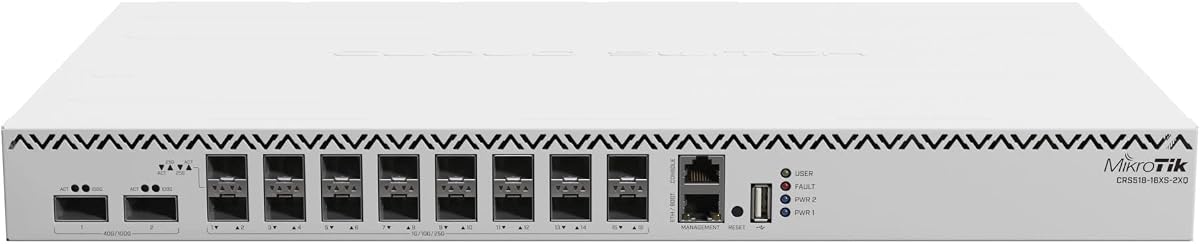
The MikroTik CRS518-16XS-2XQ-RM is a rack-mount Cloud Router Switch with a 4.5 customer rating. The title and supplied data identify sixteen SFP+ ports and two QSFP28 ports, along with a 650MHz processor and 64MB of memory. Because the listing does not explicitly quantify native 25GbE access, it belongs in the comparison as a compact optical aggregation platform rather than a confirmed 25GbE SFP28 endpoint switch.
We may earn a commission when you buy through this link, at no additional cost to you.
Sixteen SFP+ ports provide ample 10-gigabit aggregation for access switches, storage systems, and selected servers. The two QSFP28 positions add a path toward much higher bandwidth links, subject to compatible modules and configuration. Its Cloud Router Switch designation indicates that it can combine switching and routing functions under the MikroTik RouterOS ecosystem, making it useful for organizations that want more control than a basic smart switch offers.
The specification sheet for this particular listing is limited, so details such as full port speeds, queueing features, software capabilities, and power requirements are not available in the supplied information. That makes careful verification essential, especially when purchasing for a critical network. A listing title alone should not be treated as a complete technical datasheet, and buyers should confirm whether the QSFP28 interfaces support the intended direct-attach copper or optical media.
This model is best for technically experienced operators seeking a rack-mounted, high-port-count aggregation switch with a strong customer rating. It can fit an upgrade path that eventually leads to native 25G devices, but it does not replace a confirmed 25GbE SFP28 switch when the endpoint itself must run at 25Gbps. Review current MikroTik documentation, compatibility lists, and warranty terms before purchasing.
Sixteen SFP+ ports allow numerous devices to be aggregated over fiber rather than consuming separate physical interfaces on a router. This can simplify cabling and create a clear path to a faster backbone.
The QSFP28 positions provide an architectural route toward 100G-class connectivity. Actual link rates depend on the installed transceivers, cabling, and RouterOS configuration.
We may earn a commission when you buy through this link, at no additional cost to you.
The Cisco N9K-C93180YC-EX is the strongest data-center-focused option in this roundup, with 48 fixed 10/25Gbps SFP+ ports, six fixed 100Gbps QSFP28 ports, and a 5.0 customer rating. Its listed 3.6 Tbps switching capacity, sub-microsecond latency, and cut-through architecture target high-performance computing, virtualization, and large-scale data-center environments.
We may earn a commission when you buy through this link, at no additional cost to you.
The design gives administrators an excellent balance between server access and fabric uplink capacity. Forty-eight 25GbE ports can serve a dense fleet of hosts, while six 100GbE QSFP28 ports provide high-bandwidth connections to spine switches or other aggregation tiers. The back-to-front airflow orientation is important in data centers, where matching the switch to the rack's hot-aisle or cold-aisle arrangement is essential.
Beyond raw speed, the platform supports VXLAN, Cisco ACI, NX-OS, hot-swappable power supplies and fans, and a modular design intended for upgrades. These are meaningful advantages when the network must support virtualization, scalable segmentation, and operational resilience. The listing is renewed, however, so purchasers should confirm inspection status, exact accessories, software entitlements, warranty coverage, and hardware revision rather than assuming new-equivalent terms.
The N9K-C93180YC-EX is the top recommendation for a serious 25GbE data-center fabric with substantial server density. It is less compelling for a small business that needs only a few high-speed links or for operators unwilling to support enterprise switching platforms. Confirm airflow, power, licensing, transceiver, and support requirements against current vendor documentation before purchasing.
Forty-eight 25GbE ports and six 100GbE uplinks create a substantial front-to-back fabric without spreading a large server deployment over several low-density devices.
VXLAN support helps organizations create scalable overlay networks over physical switching infrastructure. ACI and NX-OS add established tools for automation, policy, monitoring, and administration.
We may earn a commission when you buy through this link, at no additional cost to you.
The D-Link DGS-1210-28 is a fanless smart-managed access switch with 24 Gigabit Ethernet ports and four Gigabit SFP combo ports. It carries a 4.4 rating and provides a mature Layer 2+ feature set, but it does not offer native 25GbE or SFP28 connectivity. It is included as a baseline that illustrates where a network's high-speed upgrade path begins.
We may earn a commission when you buy through this link, at no additional cost to you.
The switch supports bandwidth control, QoS, VLANs, port mirroring, link aggregation, spanning tree, IGMP snooping, and static routing. Security features include ACLs, 802.1X with RADIUS, ARP spoofing prevention, and D-Link Safeguard Engine. A surveillance mode with ONVIF support can detect compatible IP cameras and optimize video traffic, while cable diagnostics help simplify troubleshooting.
Its fanless one-rack-unit metal-style design is intended for silent operation and lower power use, with IEEE 802.3az energy efficiency listed as a feature. That makes it appropriate for offices, classrooms, surveillance rooms, and other access-heavy spaces where noise and heat can be undesirable. The lifetime warranty and listed NDAA compliance may be valuable for long-lived institutional deployments.
This D-Link is a sensible access switch when endpoints still operate at Gigabit speeds and the network needs reliable VLAN segmentation without expensive routing hardware. It is not a substitute for an SFP28 switch in a native 25GbE environment, so use it only where its 1G access and uplink speeds meet the requirement. Confirm whether the combo ports can be used simultaneously as copper and fiber in the desired configuration.
The fanless design reduces mechanical noise and keeps the switch suitable for offices and other quiet spaces. Its energy-saving features also complement deployments where the unit operates continuously.
ACLs, 802.1X, RADIUS, ARP spoofing prevention, QoS, and VLAN support provide useful controls for business access networks. These features make the switch more versatile than an unmanaged alternative.
We may earn a commission when you buy through this link, at no additional cost to you.
Choosing an SFP28 switch starts with defining the endpoints, uplinks, operating environment, management requirements, and optical ecosystem. Port speed alone is not enough: throughput, congestion handling, transceiver compatibility, software, and redundancy determine whether a model will work well in the intended network.
Native 25GbE support means the switch includes interfaces that can operate at 25Gbps with appropriate SFP28 transceivers. Some multi-gigabit switches look attractive because they have many RJ45 ports and SFP cages, yet their fastest optical uplink may remain at 10Gbps. The QNAP, MikroTik CRS520, UniFi Aggregation Switch Pro, Dell N3224P-ON, and both Cisco Nexus listings provide the clearest 25G or SFP28 options in this group.
Choose native 25GbE when servers, storage systems, or fabric links must operate above 10Gbps. For ordinary access devices, 2.5G or 5G can be more economical and easier to deploy. Do not infer native 25G support merely from a switch's overall speed or port count.
Access ports are only as useful as the path above them. A switch with 25GbE server ports should have enough 25G or 100G uplinks to prevent the aggregation layer from becoming the bottleneck. The QNAP's two QSFP28 ports, MikroTik's four 100GbE ports, UniFi's higher-speed capacity, and Cisco's six 100GbE ports support scalable backbone designs.
Calculate expected north-south and east-west traffic rather than simply matching port counts. If multiple switches share a limited uplink, oversubscription may reduce the benefit of fast server connections. Verify the exact uplink speeds, breakout behavior, and supported transceiver types.
A switch should have enough full-duplex switching capacity for the traffic crossing its ports. The UniFi Aggregation Switch Pro lists 760Gbps switching capacity and 565.44 Mpps forwarding, while the Cisco N9K-C93180YC-EX lists 3.6 Tbps. These numbers provide useful context, but they do not guarantee application performance because queues, packet sizes, contention, and configuration also matter.
For a small deployment, advertised throughput is rarely the first constraint. For high-density data centers, however, throughput and forwarding rate become central to sizing. Review whether the stated figure represents switching capacity, full duplex throughput, or another metric before comparing products directly.
Management needs range from a simple web interface to a complete Layer 3 or application-centric operating environment. The TRENDnet TEG-3284WS emphasizes web-smart and cloud access, the UniFi Aggregation Switch Pro integrates with the UniFi application, and Cisco Nexus supports ACI and NX-OS. QNAP provides Layer 3 Lite controls, while MikroTik offers broad configurability through RouterOS.
Choose a platform your team can configure, monitor, and troubleshoot confidently. More features are not automatically better if they create operational complexity or require support services that the organization cannot use. Check discovery, monitoring, firmware, access control, routing, automation, and logging workflows.
SFP28 is a form factor and platform family, not a guarantee that every optical, copper, or direct-attach option will work. Port speed, wavelength, reach, power budget, cooling, and vendor support must align. The UniFi model additionally lists shared mixed-speed restrictions among its four SFP28 ports, illustrating why detailed port documentation matters.
Budget for compatible modules, fiber patch cables, adapters where permitted, and testing equipment. Confirm whether the switch supports 1G, 10G, and 25G modes on each SFP28 interface and whether a port's behavior changes when other ports are configured. Do not assume a generic module will interoperate.
Nominal link speed does not guarantee good application latency. Storage replication, AI clustering, and east-west virtual traffic can create congestion even on fast links. The QNAP includes Priority Flow Control and Explicit Congestion Notification and is positioned for RoCEv2-related workloads. Other platforms may offer advanced queueing, but the supplied data does not specify equivalent behavior for every model.
Determine whether the target workload is loss-sensitive, whether the entire path supports the same congestion mechanism, and whether endpoints are configured appropriately. PFC requires careful design because it can move congestion rather than eliminate it. ECN and queue policies should be tested against real traffic patterns.
A switch may fit physically but still be unsuitable thermally or electrically. The QNAP, Cisco, Dell, MikroTik, and D-Link listings reference rack-oriented designs, while fanless products such as the D-Link are intended for quiet spaces. The Dell listing states 944W power consumption, making power budgeting especially important, while TRENDnet models use smart or temperature-responsive fans.
Match airflow direction to the rack, reserve power for PoE loads where applicable, and ensure service access around the unit. For edge deployments, fanless operation may be desirable, but a dense 25G switch may require active cooling to sustain performance. Check dimensions, rack units, power input, redundancy, and operating temperature.
Redundant power supplies, hot-swappable components, and modular designs can reduce disruption during maintenance. The Cisco N9K-C93180YC-EX lists hot-swappable power supplies and fans, while the renewed N9K-C92160YC-X has dual AC power. Warranty length, refurbishment status, firmware support, and replacement-part availability are equally important for long-lived infrastructure.
Prefer vendors and platforms with security updates, configuration backups, documentation, and support channels appropriate to the deployment. Renewed equipment can provide capable hardware at a different acquisition cost, but it requires additional scrutiny of condition, warranty, accessories, licenses, and return terms.
Begin with a documented port map and a bandwidth plan. Identify every 25GbE server, each 100G spine or aggregation link, all 10G access ports, and the management connection. Label each cable and keep the physical layout consistent with the logical design. Before inserting modules, confirm the switch supports the selected SFP28 speed, wavelength, reach, connector, and cooling requirements.
Configure the switch in a controlled sequence. Set the management address and administrative access first, update the approved firmware, define VLANs and access policies, configure link aggregation or routing where needed, and then activate server ports. Save a backup after each major stage. When using congestion-control features, document queue and priority settings so troubleshooting does not depend on memory alone.
Operate the switch with attention to environment and maintenance. Monitor port errors, utilization, temperature, power supply state, and optical link stability. Keep airflow unobstructed and use compatible optical cleaning methods for dusty connectors. Before replacing a redundant switch or transceiver, confirm the spare supports the same link rate and configuration, then compare the replacement's behavior with the original unit.
SFP28 ports support 25-gigabit-per-second links and use the SFP28 form factor, while ordinary SFP+ ports are commonly associated with 10-gigabit-per-second links. The connector can look similar, but speed support, electrical characteristics, and transceiver requirements differ. A switch cannot necessarily treat an SFP28 port exactly like an SFP+ port, so check the manufacturer's compatibility matrix.
No. A product may include 2.5GbE RJ45 access, 10GbE SFP+ uplinks, and gigabit ports without offering native 25GbE anywhere. The TRENDnet and D-Link models in this guide illustrate that distinction. Buyers focused on native server connectivity should verify an explicit 25Gbps port rating or SFP28 specification rather than relying on the general networking category.
Typical endpoints include servers with compatible 25GbE network interface cards, high-speed storage arrays, and other switches with matching optical or supported direct-attach connections. The switch and both endpoints must agree on speed, encoding, connector, wavelength, reach, and power requirements. Use an appropriate SFP28 transceiver on each optical end or a compatible direct-attach cable where the hardware supports it.
Only when a real endpoint requires the extra bandwidth. A small office with ordinary Gigabit clients may gain little from 25G access, while a studio, lab, or design office with large file transfers could benefit from 2.5G or 10G. A 25GbE switch is more compelling when it also consolidates multiple access switches, storage systems, or virtualized servers.
The appropriate figure depends on the number of simultaneous full-speed flows and the topology. Dense leaf switches with many 25G server ports and 100G uplinks need far more aggregate capacity than a small access switch. Compare full-duplex requirements, forwarding rates, and uplink oversubscription, and avoid judging a switch solely by its highest labeled port speed.
Some devices support mixed speeds, but the behavior may be restricted across ports or groups. The UniFi Aggregation Switch Pro listed here supports 1G and 10G when all four SFP28 ports are configured consistently, while configuring one at 25G limits the others to 25G mode. Always verify the exact model and port-sharing rules before installing mixed modules.
Management is strongly recommended in most professional deployments because faster links make VLAN segmentation, monitoring, congestion handling, and rapid fault isolation more important. A fully managed enterprise platform may suit large data centers, while a web-smart or Layer 3 Lite switch can serve smaller installations. Choose the operating model that matches the team's skills and support requirements.
Check the exact hardware model and revision, physical condition, included power supplies and cables, serial number, software status, licenses, warranty coverage, and return policy. The renewed Cisco models in this guide have different levels of supplied information, so verification is essential. Also confirm that the required SFP28 transceivers and management software are available separately.
The QNAP QSW-M7230-2X4F24T-US offers the best overall balance for organizations seeking a manageable mix of 25GbE SFP28 access, 10GbE copper endpoints, and 100GbE uplinks. The Cisco N9K-C93180YC-EX is the strongest high-density data-center choice, while the MikroTik CRS518-16XS-2XQ-RM is a capable compact aggregation option for technically experienced operators.
Prioritize native 25Gbps support when endpoints require it, then match uplink capacity, transceiver compatibility, management features, airflow, and power to the intended environment. A faster switch cannot compensate for an undersized uplink or incompatible optics. For deployments that only need broad edge access, the 2.5G and 10G alternatives can provide a more practical foundation for gradual expansion.
Finally, review current pricing, availability, warranty terms, and technical documentation before ordering. Switch platforms, transceiver inventories, and firmware support evolve, and the same model can be configured in several ways. Confirm that the final port map, software features, physical requirements, and accessory list match the network design you intend to operate.