
SUNLU S4 Filament Dryer
4.7Editor score
Four one-kilogram spool capacity
Automatic humidity control
Three circulating fans
350-watt PTC heating
Discover the best 3D printer filament dryer box options in this guide, comparing capacity, heating, humidity control, sealing, and filament compatibility.
A 3D printer filament dryer box protects moisture-sensitive filament from the humidity that can cause bubbling, stringing, clogging, poor adhesion, and uneven layers. The right enclosure combines controlled heating, effective airflow, secure sealing, and enough space for the spools and filaments you regularly use.
The products in this guide were compared using their published specifications, including heating range, chamber arrangement, capacity, displays, filtration, sealing, and supported filament formats. The list covers compact single-spool units, multi-spool dryers, direct-feed storage boxes, and larger models designed for high-volume printing workflows.
Each review explains the most useful features, limitations, and ideal buyer for all ten dryer boxes. Ratings reflect the listed customer feedback, while practical suitability depends on your filament types, printer setup, and drying needs. Product availability, configurations, and prices can change, so verify current details before buying.
4.7Editor score

4.6Editor score

4.7Editor score
The comparison below highlights each dryer's capacity, heating capability, controls, and intended use, making it easier to identify the right model for a single-printer workshop or a multi-spool production setup.
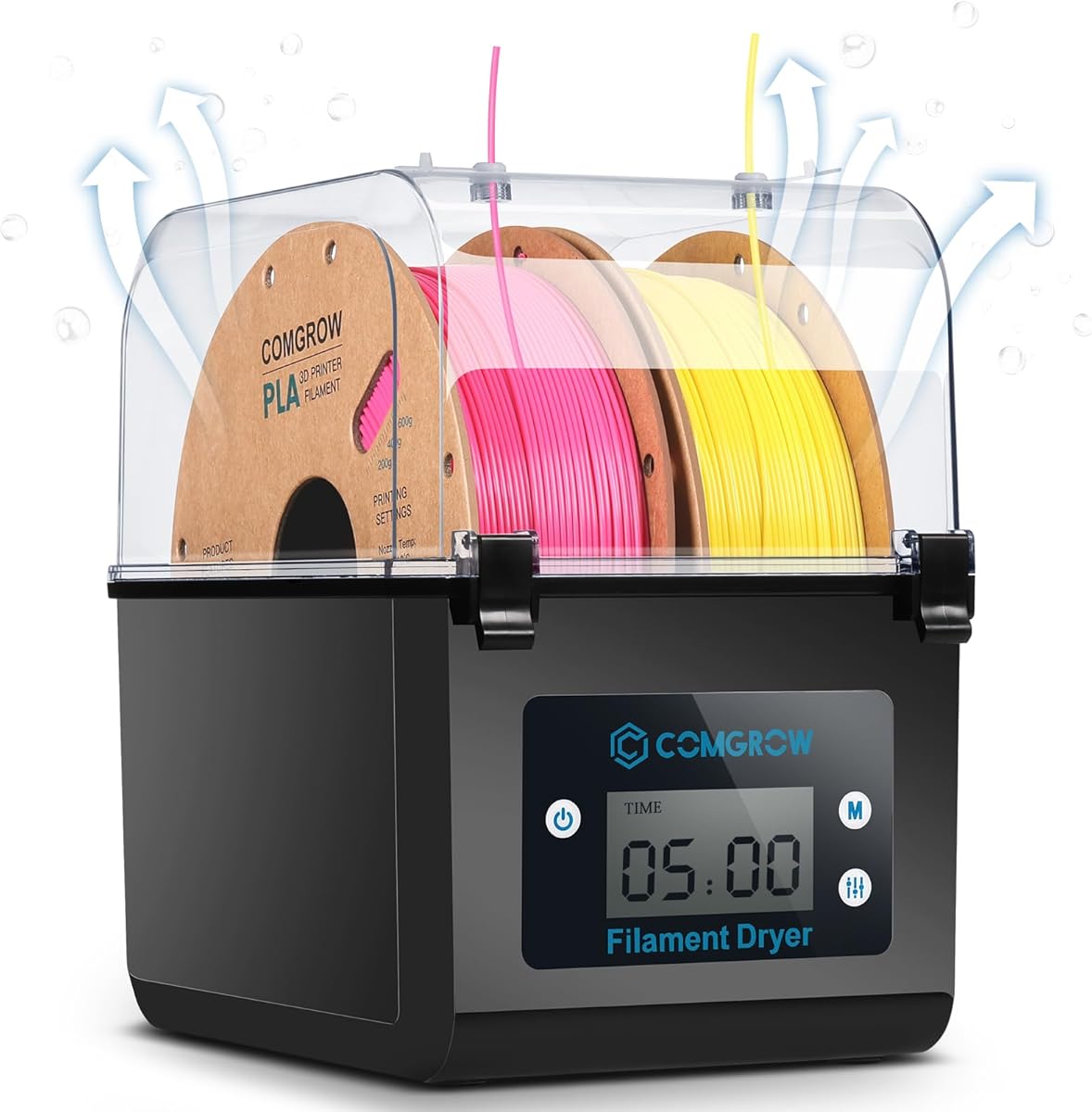



The Comgrow 3D Printer Filament Dryer Box is a two-spool enclosure that combines drying, storage, and print-time feeding in a relatively straightforward design. Its listed rating is 4.4, and its strongest feature is the combination of a sealed chamber, internal heating, environmental monitoring, and a spool holder.
We may earn a commission when you buy through this link, at no additional cost to you.
The inner chamber measures 9.29 by 6.49 by 9.13 inches and accommodates two rolls of one-kilogram filament. Temperatures adjust from 40°C to 50°C, while drying sessions can run from six to 12 hours. A two-inch LCD and touch buttons display operating information, making it useful for users who want clear control without navigating a complex interface.
Its maximum temperature of 50°C is modest compared with several higher-temperature models. The operating range and fixed-ish session choices may also be less flexible for demanding industrial polymers. Nevertheless, the product is designed for PLA, ABS, and silk filament, and its sealed outlet, plug, and internal heating make it a practical choice for common desktop printing materials.
This dryer makes the most sense for a printer owner who wants to dry two common spools and feed filament directly into a machine. It is particularly relevant when damp filament contributes to stringing, clogging, poor adhesion, or layer migration. For that user, Comgrow offers a compact combination of drying and enclosed storage without the complexity of a multi-chamber system.
The chamber holds two one-kilogram spools, giving users enough capacity to prepare different colors or filament types without dedicating separate dryers. Internal rollers and the outlet arrangement support a practical dry-and-print workflow.
The two-inch LCD presents temperature and humidity information during operation. Adjustable heating and timing make it possible to match a basic drying session to the filament and surrounding conditions.
We may earn a commission when you buy through this link, at no additional cost to you.
The Creality Space Pi X4 is a substantial four-spool dryer designed for users who need more capacity and a wider thermal range than compact enclosed boxes provide. With a listed rating of 4.6, it stands out for dual independent heating chambers and a maximum temperature of 85°C.
We may earn a commission when you buy through this link, at no additional cost to you.
The enclosure holds four standard one-kilogram spools or two large two-kilogram spools. Its two independent 200-watt chambers are advertised to remove moisture faster than single-chamber designs, while 360-degree circulation distributes heat through the enclosure. Custom settings range from 50–60°C for materials such as PLA, PETG, and TPU to 80–85°C for ABS, PET, PC, ASA, PA, and PAHT.
Its size and heating output make it less convenient for a cramped desk or lightweight travel setup. The dual-chamber system also adds complexity, although independent heat control is valuable when preparing different material families. The illuminated window is useful because it allows spool monitoring without interrupting the sealed environment.
The Space Pi X4 is best suited to serious hobbyists, educators, or small production studios that need several spools and broader material support. It also functions as a dryer and storage enclosure, making it attractive when long print queues, pauses, and overnight operation are common.
An 85°C ceiling gives the X4 more flexibility than boxes limited to 50–70°C. That range is particularly relevant for temperature-demanding polymers and advanced blends listed among the supported materials.
Two 200-watt chambers allow separate areas of the enclosure to heat independently. This arrangement is intended to improve circulation and provide more uniform drying across multiple spools.
We may earn a commission when you buy through this link, at no additional cost to you.
The Creality Space Pi SE is a straightforward one-spool dryer aimed at desktop users who want quick, controlled drying. Its listed rating is 4.4, while its principal strengths are fast PTC heating, fan-assisted circulation, and a display that tracks humidity and drying duration.
We may earn a commission when you buy through this link, at no additional cost to you.
The unit can reach 65°C within 15 minutes and allows temperatures from 45–65°C. Drying time can be adjusted from zero to 24 hours, enabling both short preparation sessions and longer storage-conditioning periods. A built-in fan circulates hot air through the chamber, while internal thermal insulation is intended to retain warmth and reduce exterior heat.
Single-spool capacity is the main limitation for people who regularly switch colors or materials. Its 65°C maximum also falls short of the Creality X4's 85°C ceiling. Even so, the SE covers a wide range of listed filaments, including PLA, PLA+, PETG, TPU, ABS, ASA, PP, PC, and PA, and supports both 1.75mm and 2.85mm diameters.
This is a good match for one-printer owners who need an uncomplicated dryer and already store filament elsewhere. The screen, knob, countdown timer, and humidity display make it approachable, while the Teflon tube pairing option can support smoother filament feeding.
The PTC heating system and internal fan work together to distribute warm air through the chamber. A stated 15-minute heat-up time is useful when filament needs quick attention between projects.
Temperatures from 45–65°C and timers extending to 24 hours offer useful flexibility. Users can select a shorter cycle for routine maintenance or a longer session for more demanding materials.
We may earn a commission when you buy through this link, at no additional cost to you.
The Creality Space Pi combines a one-spool enclosure with a comparatively large control interface. It carries a listed rating of 4.4 and is aimed at users who value detailed controls, filament presets, and the ability to run extended drying sessions.
We may earn a commission when you buy through this link, at no additional cost to you.
A 3.7-inch LCD touchscreen provides the primary controls and supports Celsius and Fahrenheit display. The dryer offers one-key settings for up to 12 filament types, including PLA-CF, PA-CF, and ASA, while manual temperatures cover 45–70°C. Timing extends from zero to 48 hours, and a parameter memory function restores the previous material and temperature after a power interruption.
Its one-spool format limits simultaneous capacity, and humidity is not listed as a displayed measurement. The enclosure also uses a 110-watt PTC heater, which should be considered when comparing rapid heat-up performance with higher-wattage models. Still, the fan-assisted 360-degree circulation, preset programs, and outage memory are useful features for a dedicated filament-preparation station.
Choose the Space Pi if you want touch-based operation and extensive timer control more than multi-spool capacity. It is well suited to experimenting with composite and engineering-style materials because of its preset and temperature range, provided the one-spool format matches your workflow.
Twelve one-key filament programs simplify common drying jobs, while manual adjustment allows users to respond to material, room-temperature, and humidity differences. The large touchscreen makes those adjustments easier to see.
The unit remembers the selected material and temperature after power is restored. That convenience reduces repeated setup and supports unattended drying routines.
We may earn a commission when you buy through this link, at no additional cost to you.
The SUNLU S1 Plus Black is a compact enclosed dryer for users who need a single spool dried in a controlled environment. Its listed rating is 4.3, and it combines a fan, a two-inch LCD, and adjustable heat and duration in a straightforward package.
We may earn a commission when you buy through this link, at no additional cost to you.
Temperature can be set from 35–55°C, allowing a useful range for common filament types. The screen displays temperature, time, and humidity, while button controls allow the drying duration and temperature to be changed. The maximum spool dimensions are 210 by 89 millimeters, and the listed diameter compatibility includes 1.75mm, 2.85mm, and 3.00mm filament.
The product supports PLA, PETG, ABS, TPU, nylon, and PA in the stated compatibility list. It does not offer a humidity-control range or multiple chambers, and its 55°C ceiling may not suit every advanced polymer. Nevertheless, the small footprint, environmental readout, and fan-assisted design make it a convenient option for a single-printer workspace.
The S1 Plus is best for a user who regularly uses one material at a time and wants a simple way to address moisture-related printing defects. It also suits beginners who value a clear display and uncomplicated controls over extensive presets and multi-spool capacity.
The built-in display reports humidity alongside temperature and time. This makes it easier to check the chamber environment without relying only on a timer or the printer's own conditions.
The compact single-spool enclosure fits more naturally into a modest hobby workspace. It accommodates several filament diameters while focusing on one spool at a time.
We may earn a commission when you buy through this link, at no additional cost to you.
The Polymaker PolyDryer is different from most heated models in this roundup because it focuses on sealed storage, desiccant support, and continuous filament feeding rather than active heating. It has a listed rating of 4.4 and is intended to protect filament between prints.
We may earn a commission when you buy through this link, at no additional cost to you.
The enclosure combines a sealed design with a desiccant-compatible interior and a visible hygrometer. Users can monitor storage conditions without relying on a dryer temperature setting. The spool remains inside while filament feeds to the printer, helping preserve the sealed setup during pauses, overnight jobs, and everyday use.
The absence of an active heater means it cannot replicate the controlled drying offered by the other products. The package also contains the storage box only, and users may need to provide suitable desiccant. Its maximum capacity is one kilogram, although it supports 1.75mm, 2.85mm, and 3.00mm filament.
The PolyDryer is best for maintaining a dry storage environment rather than actively baking moisture out of a heavily damp spool. It appeals to users who store filament longer, use vacuum bags or desiccant, and want the spool to remain enclosed while connected to a printer.
Direct filament feeding allows the spool to stay inside during use. Reducing repeated lid opening helps maintain the enclosure's moisture barrier throughout longer printing sessions.
The integrated hygrometer gives a visible indication of the internal environment. That information helps users judge when desiccant should be replaced or checked.
We may earn a commission when you buy through this link, at no additional cost to you.
The SUNLU SP2 is a two-spool heated dryer with a detachable storage base and a maximum temperature of 70°C. Its listed rating is 4.4, and its most distinctive feature is the ability to separate the heated drying section from the sealed storage section.
We may earn a commission when you buy through this link, at no additional cost to you.
A 250-watt PTC heating element is advertised to reach 70°C within 15 minutes, with 360-degree surround heating and a fan helping distribute warmth. The dry box holds two one-kilogram spools, and six silicone holes plus two PTFE tubes provide several ways to route filament. The storage base also has rollers and a holder that can accommodate spools up to three kilograms.
Although the storage base supports larger spools, the drying chamber's standard capacity is limited to two one-kilogram rolls. The detachable design also requires users to understand the difference between drying in the upper unit and storing filament in the base. Despite these nuances, the combination of high-temperature drying, a sealed base, and a touch display is versatile.
The SP2 is a strong choice for a user who wants active drying without giving up enclosed filament storage. It is particularly useful for multi-color workflows, workshop setups, and owners who want to prepare two spools and keep another protected during printing.
The heated chamber can be lifted away from the storage base using its strap handle. This separation supports distinct drying and storage tasks while keeping the overall system organized.
Six silicone openings and two PTFE tubes offer multiple routing choices. The system can therefore serve more than one printer or accommodate different extruder positions.
We may earn a commission when you buy through this link, at no additional cost to you.
The Sovol SH02 is a sealed two-spool dryer built around a 150-watt PTC heater. Its listed rating is 4.3, and it offers quick heat-up, nine filament presets, and safety features designed to monitor the heating system.
We may earn a commission when you buy through this link, at no additional cost to you.
The enclosure can reach 50°C within seven minutes and 70°C within 25 minutes, with an adjustable range of 40–70°C. A built-in fan circulates air through the chamber to support uniform heating. One-key programs cover PLA, TPU, PETG, ABS, ASA, PVA, PC, PA, and PP, reducing the need to memorize settings for each material.
Its two filament holes accept PTFE tubes, allowing two one-kilogram spools to dry at once. The manufacturer also states that desiccant bags can be added, although they are not included. A fan-stop alarm warns the user to replace a failed fan, while automatic heating cutoff and resumption are specified for extreme PTC temperatures.
The SH02 is a good choice for owners of one or two printers who need quick drying and a broad preset list. It is less compelling for users who require a built-in humidity display, and the need to add desiccant separately should be considered when building a complete moisture-control setup.
A stated seven-minute rise to 50°C makes the SH02 practical for short-notice filament preparation. The faster response also distinguishes it from less powerful single-chamber designs.
Automatic cutoff, automatic resumption, and a fan-failure alarm provide layered protection. These features are particularly relevant during extended unattended drying sessions.
We may earn a commission when you buy through this link, at no additional cost to you.
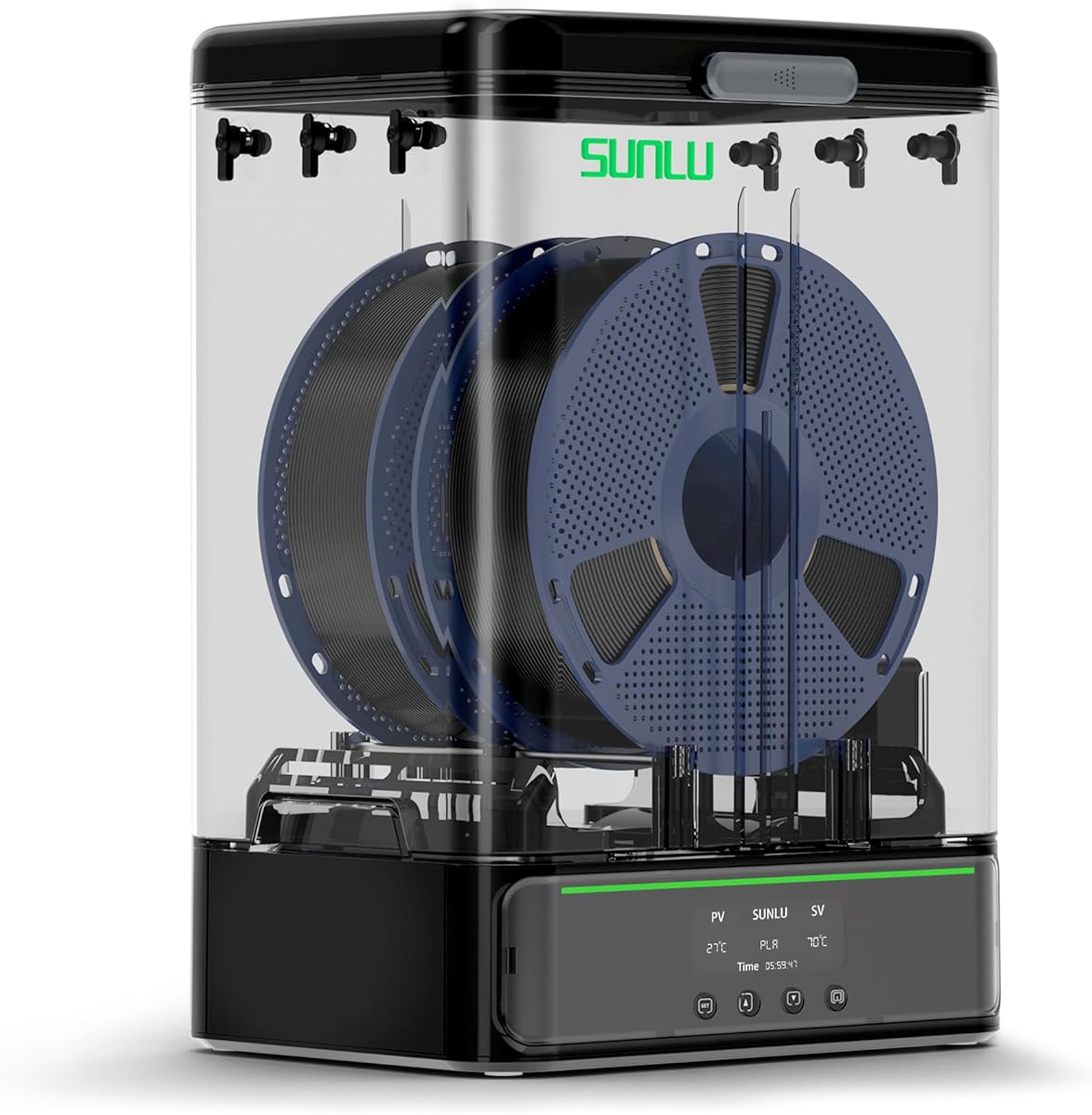
The SUNLU S4 is the most feature-rich premium dryer in this guide, combining four-spool capacity with automatic humidity management. Its listed rating is 4.7, and it is built for users who need precise environmental control across several materials or printers.
We may earn a commission when you buy through this link, at no additional cost to you.
A 350-watt PTC heater is advertised to move from 25°C to 50°C in 30 minutes. Three internal fans, including two side fans and one bottom fan, circulate air throughout the enclosure and maintain a stated temperature balance within plus or minus 3°C. The box can hold four one-kilogram spools and connect to four printers at the same time.
Its automatic mode adjusts humidity between 30% and 50%, starts drying when the selected humidity is reached, and stops when humidity falls below 25%. This is a more proactive approach than a fixed timer alone. The enclosure is physically large and uses more power than compact models, so countertop space and electrical load deserve consideration.
The S4 is best for advanced hobbyists, educators, and production-oriented users who manage several machines or filament types. It is particularly attractive when automatic environmental adjustment is more valuable than the smallest possible footprint or simplest interface.
Instead of relying solely on a timed heat cycle, the S4 can begin and stop drying according to the selected humidity range. This supports hands-off storage management in changing ambient conditions.
Four spool positions and support for four simultaneous printer connections suit workshops running multiple machines. The three-fan layout also targets consistent drying throughout the larger chamber.
We may earn a commission when you buy through this link, at no additional cost to you.
The SUNLU S1 Plus White is a quiet, single-spool enclosure intended for accessible filament drying and print-time use. Its listed rating of 4.7, broad timer range, and low operating noise make it appealing to home users and shared workspaces.
We may earn a commission when you buy through this link, at no additional cost to you.
The enclosure heats from 35–55°C, and the drying timer can be set anywhere from one to 99 hours. A default six-hour session is provided, while the product information notes that many common filaments require roughly three to six hours under normal circumstances. Two internal rollers allow filament to feed while the spool remains inside.
Its 55°C maximum is the main material limitation, and the single-spool format cannot prepare multiple colors simultaneously. The product also lists no humidity readout or automatic humidity regulation. However, the claimed operating noise of less than 10 decibels is a meaningful advantage for offices, bedrooms, and other quiet areas.
This S1 Plus is a strong budget-oriented choice for a user who needs one reliable drying chamber and values a long timer more than advanced automation. It supports 1.75mm, 2.85mm, and 3mm filament, accommodates common standard spools, and can remain connected during a print.
The enclosure is designed to operate below 10 decibels while its rollers guide filament directly to the printer. That makes it suitable for users who want drying without constant workshop noise.
A one-to-99-hour timer covers everything from a short three-hour preparation cycle to a long storage-conditioning routine. The six-hour default simplifies the initial setup.
We may earn a commission when you buy through this link, at no additional cost to you.
The most useful dryer is the one that matches your filament, workload, and printer arrangement. Capacity, temperature range, airflow, sealing, monitoring, and direct-feed design should be evaluated together rather than considering heating power alone.
Choose a temperature range that covers the materials you use regularly and leaves room for adjustment. The products here span 35–55°C, 40–50°C, 40–70°C, 45–65°C, 45–70°C, and up to 85°C. Higher ceilings can be useful for demanding polymers, but always follow the filament manufacturer's recommendations rather than assuming the highest setting is always appropriate.
In short: match the dryer to your materials, not merely to its maximum wattage.
Capacity affects how conveniently you can switch colors and materials. Single-spool units keep the footprint small, while two- and four-spool chambers support multi-color printing or multiple printers. Check both the number of spools and the permitted spool dimensions, especially if you use wide, tall, cardboard, or unusually heavy reels.
In short: one spool is convenient; multiple spools improve workshop flexibility.
Even heat and airflow help all sides of a spool dry consistently. PTC systems with one or more fans are common in this category, while the Creality X4 uses two independent heating chambers and the SUNLU S4 uses three fans. A quick heat-up figure is useful, but uniform circulation is at least as important when filament sits near a chamber wall.
In short: look for fan-assisted circulation and clearly stated heating distribution.
A strong seal keeps humid air out, but some heated models also need a controlled way for moisture to escape during drying. The Comgrow includes a silicone-sheathed outlet and plug that must be managed according to whether the unit is operating or in storage. Other models emphasize silicone seals, gaskets, and latches. Review the instructions carefully before assuming every outlet should remain closed.
In short: effective sealing includes both keeping moisture out and managing the drying cycle correctly.
A humidity display helps users judge the chamber environment, while automatic control can start and stop heating according to a chosen range. The SUNLU S4 goes furthest with an automatic 30–50% mode, while several products display humidity without automatically regulating it. Decide whether live visibility is enough or whether true closed-loop management is worth the added complexity.
In short: a readout informs you, while automation acts on the information.
Direct-feed dry boxes keep the spool enclosed while it feeds filament to a printer. Check the number and location of outlet holes, the tube material, and whether your printer's extruder position works with the enclosure. The Comgrow, SUNLU SP2, Sovol SH02, SUNLU S4, and Polymaker PolyDryer all describe direct-feeding arrangements, but each offers different numbers of connection points.
In short: verify outlet placement and tube routing before committing to direct printing.
Simple buttons and a compact LCD suit users who want quick adjustments, while a large touchscreen is easier for navigating presets and longer programs. The Creality Space Pi provides one-key settings for 12 filament types, the Sovol SH02 offers nine presets, and the SUNLU S1 Plus uses straightforward button-based controls. Presets save time, but manual adjustment remains important when room conditions vary.
In short: choose controls that are clear for your routine, not merely the largest display.
Look for protection against overheating and heater failure. The Sovol SH02 includes automatic cutoff and resumption behavior plus a fan-stop alarm, while the SUNLU S4 combines PTC, temperature-switch, and software protection. Cleaning the fan, checking seals, replacing desiccant where applicable, and keeping ventilation clear all help the enclosure operate safely and consistently.
In short: verify thermal safeguards and plan for routine seal and fan maintenance.
Begin by identifying the filament manufacturer and selecting a recommended temperature and duration. Place the spool in the chamber, connect any PTFE tubes with the correct routing, and close the lid or latch so the seal sits properly. For models with a moisture-release opening, follow the product instructions and open it only when the specified drying mode calls for it.
Set the temperature and timer, then start the cycle and verify that the display shows the active work state. Do not assume a powered-on unit is drying if its screen shows an error or standby message. Monitor the chamber during the first session, confirm the temperature and humidity readings when available, and adjust the schedule for the filament and ambient conditions.
After drying, allow the spool to cool if necessary before handling and place it in an appropriate sealed storage environment. Clean the rollers and interior regularly, inspect gaskets and latches for damage, and keep vents clear. Do not use the dryer for resin or other materials unless the manufacturer explicitly permits them.
A filament dryer box uses controlled heat, airflow, and sealed storage to reduce moisture in filament and protect it from humid air. Dry filament can help address stringing, bubbling, clogging, poor layer adhesion, and other defects associated with damp material. It can also keep a spool dry while it feeds directly into a printer.
It depends on the material and your local humidity. PLA is less moisture-sensitive than many polymers, while PETG, nylon, TPU, ABS, ASA, and composite filaments often benefit more from careful moisture management. Always follow the filament supplier's drying recommendations and avoid using a temperature that could soften, distort, or degrade the spool.
No. A higher ceiling expands material compatibility, but excessive heat can damage filament that was never intended for that temperature. More important is choosing a controlled range that includes safe drying conditions for the materials you own and provides reasonably even heat throughout the chamber.
Many models support print-while-drying by routing filament through sealed PTFE tubes and a feed opening. Check the dryer's outlet layout, tube routing, and your printer's extruder position. The chamber should remain sealed, and any instructions concerning moisture-release ports should be followed carefully.
A heated dryer actively warms filament to remove or reduce moisture, while a passive storage box focuses on keeping environmental moisture out. Some products combine both functions with detachable chambers, and the Polymaker PolyDryer emphasizes sealed storage, desiccant support, and humidity monitoring rather than active heating.
One spool is sufficient for a focused single-material setup, while two spools help with color changes. Four-spool models suit busy workshops, multiple printers, or users who store several materials. Also verify the maximum spool dimensions, because the number of positions does not guarantee that every reel will fit.
Not always. Most listed products with a display show the current humidity but still rely on the user to select a drying schedule. The SUNLU S4 includes automatic humidity control, allowing it to start and stop drying according to the selected range. Check the controls to determine whether a particular model only monitors or also automates.
Keep vents unobstructed, wipe the interior when it is cool, and inspect rollers, tubes, gaskets, and latches for damage. Follow instructions concerning moisture-release openings and desiccant replacement. If a fan stops, a temperature reading becomes abnormal, or an error appears, stop the cycle and check the manufacturer's troubleshooting guidance.
The SUNLU S4 stands out for advanced humidity automation, four-spool capacity, and multi-printer use, while the Creality Space Pi X4 offers the broadest temperature range and dual heating chambers. For a quieter, simpler setup, the SUNLU S1 Plus provides dependable single-spool drying with direct feeding and a long timer.
Prioritize the factors that affect your actual workflow: capacity for the number of active spools, temperature range for your materials, airflow for even drying, sealing for protected storage, and direct-feed compatibility for your printer. A simple model can be more useful than an advanced unit if it better matches a single-printer home setup.
Finally, verify the current listing, included accessories, dimensions, voltage requirements, and warranty details before purchasing. Product configurations and prices can change, and accessories such as desiccant or PTFE tubes may not be included. Checking those details against your filament and workspace will help avoid an inconvenient surprise after delivery.