
MAIWO 4-Bay 10Gbps DAS
3.5Editor score
Two automatic cooling fans
10Gbps USB-C interface
Daisy-chain expansion support
4K HDMI output
A four-bay hard drive enclosure with cooling fans gives you a convenient way to combine several SATA drives into one desktop or laptop storage system. The best models balance airflow, transfer speed, drive compatibility, power delivery, and practical maintenance features, making them useful for backups, media libraries, and high-capacity storage.
We compared all ten featured enclosures by examining their supported drive sizes, interface speed, capacity, cooling approach, hot-swap behavior, operating-system compatibility, and extra connectivity. The list includes direct-attached storage models, a RAID-capable option, a hybrid HDD and NVMe design, and enclosures with display or expansion features.
Each review identifies the enclosure's strongest use case and any meaningful limitations, while the comparison table makes the technical differences easier to scan. Ratings reflect the supplied customer feedback, and product availability, features, and prices can change, so readers should confirm current details before purchasing.
3.5Editor score

4.2Editor score
4.1Editor score
As an Amazon Associate we earn from qualifying purchases.
The comparison below highlights drive support, maximum stated capacity, host-interface speed, cooling design, and major configuration differences across all ten enclosures, helping you identify the model that matches your storage workload.


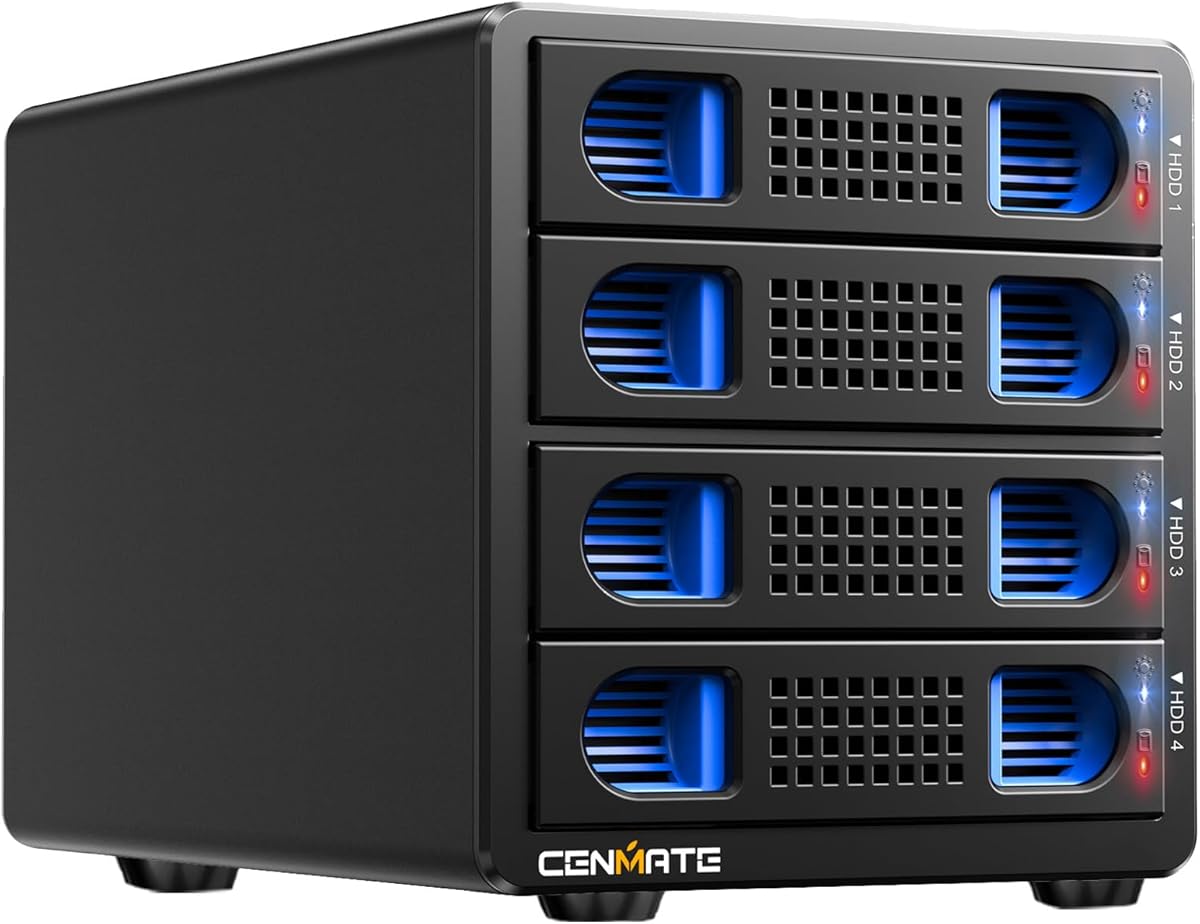
The CENMATE Aluminum 4 Bay Hard Drive Enclosure is a versatile direct-attached storage option with a 4.3 customer rating, the highest among the ten products listed. It accepts both 2.5-inch and 3.5-inch SATA hard drives and SSDs, combining generous capacity with a straightforward aluminum housing and a built-in two-inch cooling fan.
We may earn a commission when you buy through this link, at no additional cost to you.
Its 5Gbps USB 3.0 interface is faster than older USB 2.0 connections, and the supplied USB-A and USB-C cable options make it convenient to connect with different systems. The product supports up to 80TB in total when each bay holds a 20TB drive. Tool-free, hot-swappable trays add practical value for users who frequently move between backup media, editing files, or replacing drives.
The main compromises are the 5Gbps interface and the stated fan noise of approximately 40–50 decibels. It is not a RAID or NAS appliance, so each installed drive is presented as direct-attached storage rather than a managed network array. A quiet room, recording setup, or highly noise-sensitive user may prefer a fan-controlled model, while a dedicated DC power adapter supports steadier operation with multiple high-capacity disks.
This is a strong general-purpose recommendation for people who want one enclosure to handle mixed 2.5-inch and 3.5-inch SATA drives, tool-free access, and broad platform compatibility. It is especially appropriate for backups, archives, and high-capacity desktop storage. Buyers prioritizing the newest interface speed should compare the 10Gbps alternatives, but this model delivers a balanced feature set and the strongest listed rating.
The aluminum-alloy shell helps dissipate heat, while the built-in two-inch fan provides active airflow during sustained use. The enclosure is better suited to a work desk or studio than a silent listening environment because the manufacturer estimates fan noise at 40–50 decibels.
Tool-free, hot-swappable trays let you install or replace drives without tools and without shutting down the entire enclosure. This convenience makes the unit suitable for rotating backup disks, project media, and frequently accessed personal archives.
We may earn a commission when you buy through this link, at no additional cost to you.
The CENMATE Aluminum 4 Bay 10Gbps enclosure is built for users who want a faster host connection than standard 5Gbps USB storage while retaining the convenience of four direct-attached SATA bays. Its customer rating is 4.1, and the enclosure supports 2.5-inch and 3.5-inch HDDs and SSDs with up to 80TB of stated capacity.
We may earn a commission when you buy through this link, at no additional cost to you.
The USB 3.2 Gen 2 interface can reach 10Gbps, which is particularly useful for large media files and multi-drive workflows. Supplied figures list combined read and write performance of up to 1016MB/s with four HDDs and 510MB/s with one SSD, although the manufacturer notes that real results depend on the drives, computer, and other factors.
Its hot-swappable, tool-free design reduces downtime when drives must be changed, and the USB Type-C connection supports several contemporary host interfaces, including USB 3.0, USB 3.1, USB 3.2, Thunderbolt 3, and Thunderbolt 4. The trade-off is the persistent cooling fan, which is described as producing roughly 40–50 decibels of noise.
Choose this enclosure when a 10Gbps connection, mixed-drive support, and quick physical access are priorities. It is well suited to creative professionals moving large projects, editors working with local media libraries, and users consolidating several desktop drives. It is not intended to function as a NAS or hardware RAID system, so buyers who need those features must select a different architecture.
The 10Gbps interface provides additional headroom for large files and concurrent storage tasks. Actual transfer rates remain limited by the individual drives, host system, file sizes, and workload, so the connection should be paired with suitably fast SATA SSDs when maximum responsiveness matters.
The USB-C cable and broad interface compatibility simplify connections with modern laptops and desktops. Meanwhile, support for both 2.5-inch and 3.5-inch SATA devices lets the enclosure serve portable backups and high-capacity desktop storage without changing models.
We may earn a commission when you buy through this link, at no additional cost to you.
The MAIWO 4 Bay Hard Drive Enclosure combines a 10Gbps USB-C connection with two cooling fans and an aluminum-alloy housing. Its 3.5 customer rating is the lowest in the list, but the specification set is attractive for users seeking high-capacity direct-attached storage with expandable configurations.
We may earn a commission when you buy through this link, at no additional cost to you.
Two fans activate automatically when drive temperature exceeds 48 degrees Celsius, creating a more targeted cooling approach than a continuously running fan. The enclosure supports 3.5-inch SATA HDDs and SSDs, with up to 24TB per drive and 96TB total, according to the supplied information. Daisy-chaining lets it connect with other storage devices for broader capacity.
The 84W external power supply is designed to provide adequate power for larger-capacity hard drives, while the independent power switch offers direct control. A dedicated HD-TV port supports 4K video output, making the enclosure useful as part of a desktop media setup. Limitations include the lack of 2.5-inch support and the absence of RAID functionality.
This model is best for users who already use 3.5-inch drives and want automatic fan control, room for expansion, and 10Gbps connectivity. It can serve as a large local repository for archives or media and can work alongside a display. The modest rating warrants checking recent customer feedback, but the enclosure's cooling, expansion, and power provisions make it a practical budget-oriented choice.
Both fans activate only when the enclosure exceeds its stated 48-degree Celsius threshold. This can reduce unnecessary fan activity during lighter tasks while preserving airflow around multiple spinning disks under sustained load.
Daisy-chain expansion makes it possible to add compatible storage devices to a broader setup. The HDMI output also allows the enclosure to participate in a media workstation, provided the host computer can support the required display connection.
We may earn a commission when you buy through this link, at no additional cost to you.
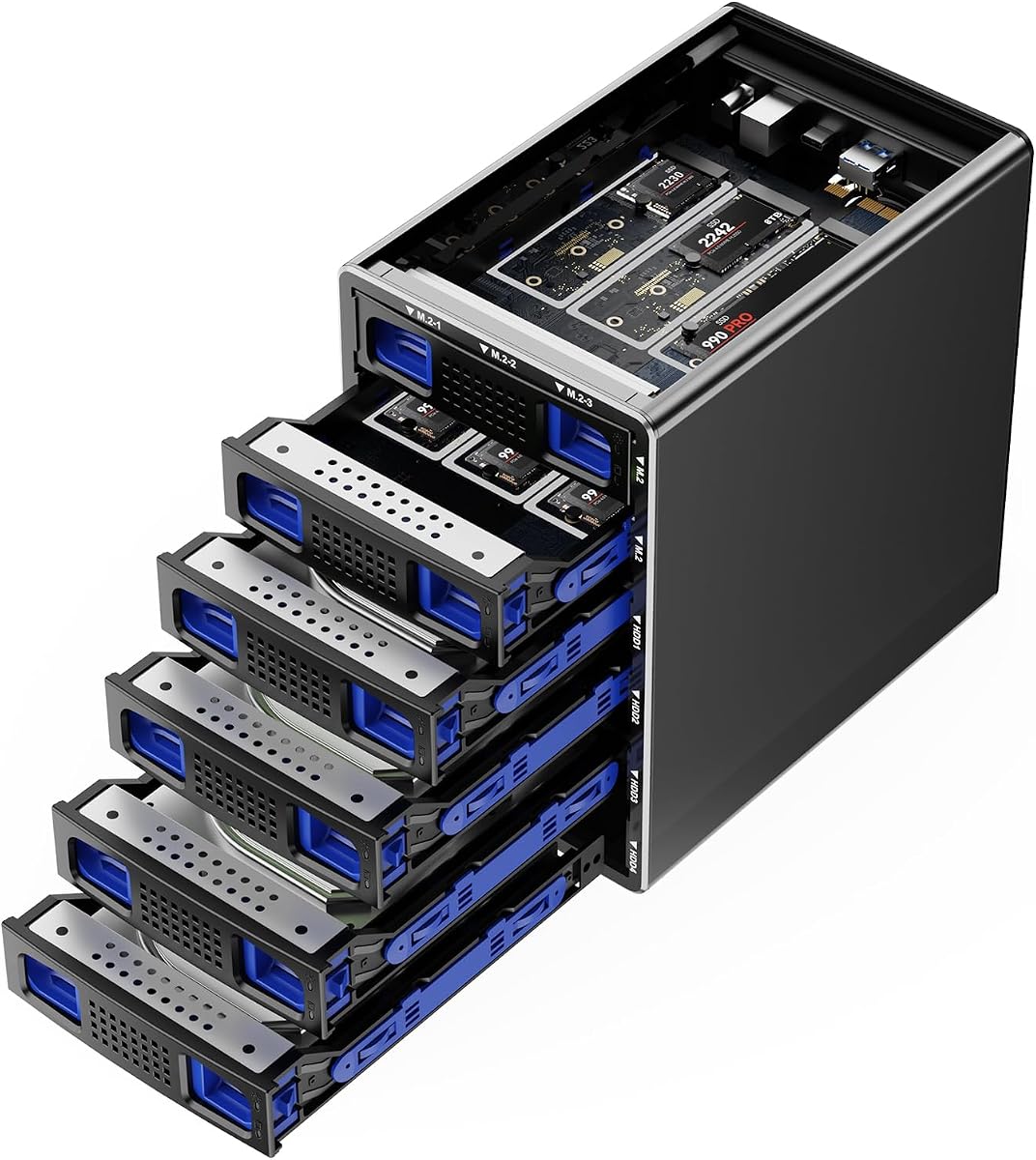
The CENMATE Hybrid enclosure stands apart from conventional four-bay models by combining four SATA bays with six M.2 NVMe positions. With a 4.1 customer rating and a stated combined maximum of 136TB, it is the most versatile premium option for buyers who want both high-capacity hard drives and fast solid-state storage in one enclosure.
We may earn a commission when you buy through this link, at no additional cost to you.
Four 2.5-inch or 3.5-inch SATA drives can provide up to 22TB each, while six M.2 NVMe SSDs can provide up to 8TB each. Supported NVMe lengths include 2230, 2242, 2260, 2280, and 22110. The USB 3.2 Gen 2 interface operates at up to 10Gbps, while the supplied full-load read figure is listed at 200–300MB/s.
An aluminum-alloy body and continuously operating two-inch fan are intended to protect drive temperatures and data reliability. This always-on approach is sensible for a mixed storage system, although the product is not recommended for people who are highly sensitive to sound. The design is more involved than a standard four-bay dock, and buyers must install the appropriate SATA and M.2 media themselves.
This enclosure suits advanced users who need a flexible combination of archival SATA capacity and NVMe performance. It could serve as a consolidated workstation for project files, hot caches, and large archives, provided the operating system supports the desired drive layout. It is the premium pick when ten drive positions and hybrid storage are more important than compactness.
The hybrid arrangement lets users place high-capacity HDDs and SSDs alongside compact NVMe drives instead of forcing every device into the same four-bay format. This is particularly useful for layered storage systems where frequently used data is kept separate from larger archives.
Five stated M.2 lengths broaden the range of compatible NVMe modules. Tool-free installation applies to the SATA trays, while the M.2 positions provide dedicated expansion for fast internal-style storage in a shared external enclosure.
We may earn a commission when you buy through this link, at no additional cost to you.
The WAVLINK 4-Bay Hard Drive Enclosure combines four SATA bays, automatic cooling, 10Gbps USB-C connectivity, and display output. Its 4.0 rating reflects a balanced feature package for users who want more than a simple external drive dock and need to manage several disks from a single workstation.
We may earn a commission when you buy through this link, at no additional cost to you.
The enclosure accepts 3.5-inch and 2.5-inch SATA HDDs or SSDs, with a stated maximum capacity of 88TB based on four 22TB drives. Two built-in fans activate at 48 degrees Celsius to assist with heat dissipation. The aluminum shell also supports thermal management and provides a rigid desktop enclosure for a larger storage collection.
Each bay has an independent on/off switch, allowing individual drives to be managed without powering down the complete system. An additional USB 3.2 Type-C port can support peripherals or daisy-chaining, while HDMI supports up to 4K@60Hz under DisplayPort 1.4 conditions. Buyers should note that 2.5-inch mounting brackets are not included and that host-side USB-C video support is required for HDMI use.
This is a compelling option for a shared desk where storage, peripherals, and a display connect through one enclosure. It is less appropriate for someone who needs only quiet external storage, since the fans may become noticeable during intensive work. Overall, the independent controls and useful connectivity make it a versatile 10Gbps dock for compatible workstations.
Independent bay switches let you power an individual drive down without cycling the entire unit. That makes the enclosure more convenient for mixed workloads where some disks are active while others are only being stored or archived.
The 4K@60Hz HDMI output and extra USB-C connection turn the enclosure into a multifunction docking station. Display operation still depends on a compatible host connection, so this feature should be confirmed before relying on it.
We may earn a commission when you buy through this link, at no additional cost to you.
The SABRENT USB 3.0 4-Bay 2.5in SATA SSD/HDD Docking Station is a focused solution for compact SATA storage. It has a 4.2 rating, supports as many as four 2.5-inch drives, and includes a built-in cooling fan with an optional on/off switch for users who want control over noise and power consumption.
We may earn a commission when you buy through this link, at no additional cost to you.
A 5Gbps USB 3.0 interface provides the stated transfer speed and remains backward compatible with USB 2.0 and 1.1 devices. The unit supports up to four 16TB 2.5-inch SATA drives, giving it up to 64TB of stated capacity. Tool-free insertion and a magnetic cover make it quick to move between portable SSDs, compact hard drives, and dedicated backup disks.
The main restriction is its 2.5-inch format. It does not support standard 3.5-inch desktop drives or drives thicker than 12.5mm, including 15mm models. It also lacks the 10Gbps speed, display output, and daisy-chain features found in some newer competitors. Within its narrower category, however, the enclosure remains straightforward and operationally flexible.
Choose this model for a compact multi-drive setup built entirely from 2.5-inch SATA devices. It is particularly appropriate for laptop users, travel-oriented backups, and media collections that benefit from tool-free access. The switchable fan is a thoughtful feature for quiet environments, while the continuous-operation design makes it suitable for an always-available drive dock.
Restricting the bays to 2.5-inch SATA media keeps the enclosure smaller and better suited to desks with limited space. This focus is especially helpful for laptop owners who want several external SSDs or compact hard drives without a full-size desktop chassis.
The optional fan control allows users to turn cooling off when appropriate. Because the enclosure is engineered for continuous operation, switching the fan becomes a practical balance between thermal management, power use, and ambient noise.
We may earn a commission when you buy through this link, at no additional cost to you.
The CENMATE 4 Bay enclosure with USB and eSATA is a practical option for systems that still value external SATA connectivity. It has a 4.0 rating, supports four 2.5-inch or 3.5-inch SATA devices, and offers up to 80TB of combined capacity through direct-attached storage.
We may earn a commission when you buy through this link, at no additional cost to you.
The primary USB connection delivers up to 5Gbps, while the included eSATA cable provides an alternative for compatible older or specialized workstations. The enclosure uses an aluminum-alloy body and a two-inch fan to manage heat, with stated fan noise around 40–50 decibels. A dedicated 12V adapter supports stable high-speed transmission and multi-drive operation.
The eSATA caveat is important. The port cannot use a computer's SATA-to-eSATA adapter, and the connected computer's eSATA implementation must support RAID functionality to expose multiple bays. Without that support, only one bay can be accessed. Hot-swapping is also not supported, so drives should not be changed while the system is active.
This enclosure fits users who want the familiarity of USB while retaining an eSATA option for compatible systems. Most buyers will use USB as the primary route, but eSATA can be useful in legacy professional environments. It is less appealing for maintenance-heavy users because the lack of hot-swapping makes drive changes less convenient than in the top-ranked CENMATE model.
External SATA can be valuable on compatible professional and legacy systems that benefit from a direct storage connection. The requirement for native multi-bay eSATA support means buyers should verify their computer before expecting all four drives to appear through that port.
The enclosure is a direct-attached storage device rather than a NAS or managed RAID system. Its role is to consolidate compatible SATA drives behind a single host connection while maintaining active airflow and stable external power.
We may earn a commission when you buy through this link, at no additional cost to you.
The WAVLINK 4-Bay enclosure with 32TB-per-drive support is an excellent all-around option for users building a high-capacity desktop storage system. Its 4.2 customer rating, 10Gbps interface, temperature-controlled fans, HDMI output, and individual bay switches make it one of the most complete docks in the comparison.
We may earn a commission when you buy through this link, at no additional cost to you.
Four SATA 6Gbit/s bays accept 3.5-inch and 2.5-inch hard drives or SSDs, with a stated maximum of 128TB when four 32TB drives are installed. The aluminum housing provides structural rigidity and passive heat dissipation, while dual built-in fans activate at 48 degrees Celsius when the enclosure becomes warm.
The main data path uses USB 3.2 Type-C at up to 10Gbps. A second USB 3.2 Type-C port can connect peripherals or support daisy-chaining, and HDMI can deliver up to 4K@60Hz under DisplayPort 1.4 conditions. Each bay includes an independent on/off switch, which provides useful control over individual disks and the hot-swappable workflow.
Buyers should confirm that their host supports the required USB-C video mode before expecting the HDMI output to work. Additional 2.5-inch-to-3.5-inch mounting brackets are also not included. Even with those caveats, this is a strong editor's choice for users who want substantial capacity, modern connectivity, active cooling, and flexible bay-level control in one enclosure.
Support for up to four 32TB drives creates a substantial local archive for photographs, video, project files, and backups. The 128TB figure is a maximum configuration rather than an included capacity, so users should select drives based on their needs and workstation's performance.
Beyond storage, the second USB-C connection and HDMI output can simplify a desktop setup. These features are particularly valuable for a single-computer workstation that needs a display, a high-speed storage volume, and room to add peripheral devices.
We may earn a commission when you buy through this link, at no additional cost to you.
The CENMATE Aluminum 4 Bay Hard Drive RAID Enclosure is the primary choice in this roundup for buyers who want configuration options beyond simple direct-attached storage. It has a 3.8 rating and supports RAID 0, RAID 1, RAID 3, RAID 5, RAID 10, CLONE, LARGE, and NORMAL modes across four SATA bays.
We may earn a commission when you buy through this link, at no additional cost to you.
The enclosure accepts 2.5-inch and 3.5-inch HDDs or SSDs, with up to 80TB of stated capacity. USB 3.0 and eSATA provide host connectivity, while a two-inch cooling fan and aluminum-alloy body help manage heat. The included 12V adapter is intended to provide stable power during multi-drive operations.
The RAID feature introduces meaningful responsibility. The manufacturer warns that designing RAID modes can result in data loss, and changing a mode requires returning the unit to NORMAL and following a physical switch-and-reset process. Hot-swapping is not supported, and macOS does not have RAID software for managing the array. Users should back up critical information before changing configurations.
This enclosure is best for users who understand RAID and want striped, mirrored, cloned, or expanded configurations in a desktop device. It is less suitable for a first-time NAS user, since it is not a network-attached solution and has limited hot-swap convenience. For uncomplicated storage with a newer interface, the 10Gbps direct-attached options are easier to manage.
RAID can improve performance, redundancy, cloning, or usable capacity depending on the selected mode, but it also changes how data is organized. The manufacturer explicitly warns that configuration changes may cause data loss, making an independent backup essential.
The eSATA connection can be useful on compatible systems, but it requires native support for accessing multiple bays. Otherwise, only one bay may be visible through eSATA, so USB remains the more broadly compatible connection for most buyers.
We may earn a commission when you buy through this link, at no additional cost to you.
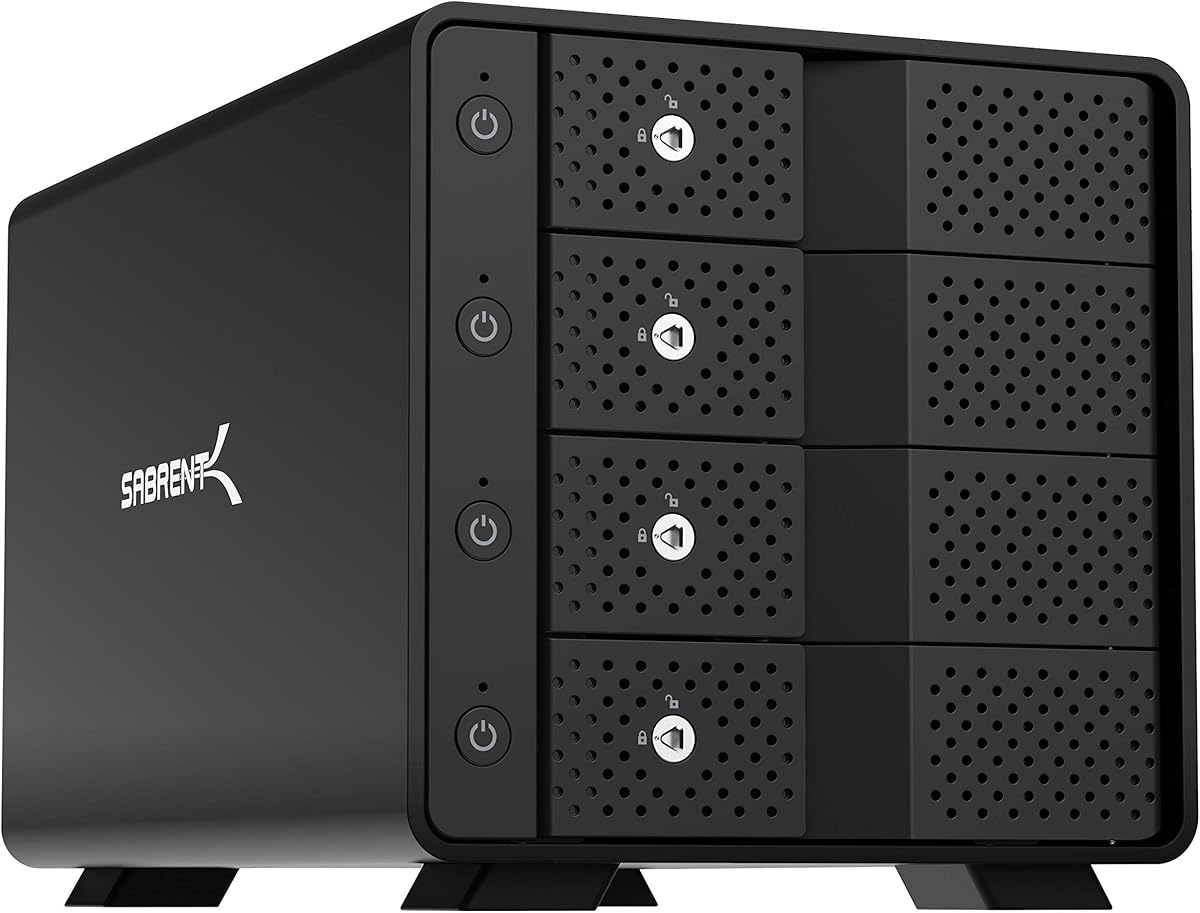
The SABRENT 4-Bay USB-C 10Gbps Hard Drive Enclosure is designed around stable multi-drive access, physical security, and straightforward maintenance. It has a 4.1 rating, uses a dedicated ASMedia ASM1351 controller for each bay, and connects to a host through one USB 3.1 Gen 2 Type-C port.
We may earn a commission when you buy through this link, at no additional cost to you.
The enclosure supports up to four 3.5-inch SATA HDDs or SSDs, with a maximum stated capacity of 80TB. It is backward compatible with USB 3.0 and 2.0, and the manufacturer recommends a USB-C-to-USB-C host connection for the most reliable link. A 92mm fan and aluminum-and-metal housing provide active cooling for continuous operation.
Physical controls are unusually well developed. Tool-free hot-swappable trays make drive changes convenient, while each bay has an on/off switch and activity LED. A locking key and Kensington slot add security for shared or semi-public installations. The enclosure is direct-attached rather than hardware RAID, and macOS, Windows, and Linux are supported.
Choose this model when drive independence, physical security, and 10Gbps connectivity matter more than 2.5-inch support. It is a strong candidate for a professional workstation, media room, or shared workstation where individual disks need reliable control. All four bays ship empty, so compatible drives must be purchased separately, and the JBOD-style design should not be mistaken for a managed RAID array.
A dedicated controller for every drive is intended to provide stable, independent connections. This architecture is useful in multi-drive systems because each installed disk has its own path rather than sharing a single internal controller.
Tool-free hot-swappable trays, individual switches, and activity lights simplify maintenance. The lock and security slot further distinguish the enclosure as a workstation solution designed to remain accessible while helping prevent casual interference.
We may earn a commission when you buy through this link, at no additional cost to you.
The right enclosure depends on drive size, interface speed, storage configuration, cooling behavior, host connections, and maintenance needs. Comparing these factors before buying prevents an expensive mismatch between the enclosure and your actual workflow.
Choose 10Gbps when your workload regularly moves large files and your computer has a matching USB-C port. A 5Gbps model remains appropriate for backups, archives, and general use when the priority is broad compatibility.
For general desktop use, support for both common SATA sizes offers the most flexibility. Choose a 2.5-inch-only enclosure for portability and a 3.5-inch-only model for maximum capacity with full-size disks.
Temperature-triggered fans can offer a quieter balance, while continuous cooling provides predictable airflow for intensive workloads. Buyers working in quiet offices or recording spaces should prioritize models with fan controls or automatic activation.
Choose direct-attached storage for backups and independent disks. Select a RAID-capable enclosure only if you understand the mode you need and maintain a separate backup of critical data.
Frequent drive swaps favor a hot-swappable design. For unattended or rarely serviced storage, tool-free installation and a stable power switch may be sufficient without hot-swap capability.
For several large desktop hard drives, prioritize the manufacturer's recommended external power supply. A suitable adapter helps maintain stable operation during sustained read and write activity.
Choose an enclosure with display output if you want to consolidate a desktop setup. Confirm host compatibility before purchase, especially if your computer's USB-C port is data-only.
Check the host interface, operating system, and any special requirements before buying. USB is generally the simplest and most broadly compatible method for accessing all four bays.
Before installing drives, verify that every disk uses a compatible SATA interface and fits the enclosure's stated size and thickness requirements. Connect the external power adapter, install the drives in their trays, and secure each tray fully. Connect the appropriate USB or eSATA cable to the enclosure before attaching the host connection, especially when the unit is not designed for hot-swapping.
After the host recognizes the storage, create the desired folders and verify that every drive appears with the expected capacity. Use a backup application or operating-system tool to copy important data, and avoid changing RAID modes, removing active drives, or unplugging the enclosure while transfers are underway. For enclosures with a display function, confirm the correct host and cable support before configuring video output.
Keep the intake and exhaust paths unobstructed, place the enclosure on a stable surface, and avoid stacking equipment tightly against its vents. Check the enclosure's temperature and fan behavior during sustained workloads. Periodically inspect cables, tray latches, and connections, and back up critical data independently of any RAID or multi-drive configuration.
Most of the listed enclosures support both SATA hard drives and SATA SSDs, although the exact drive-size rules vary. The SABRENT 4-Bay 2.5-Inch model accepts only 2.5-inch devices, while several other products support both 2.5-inch and 3.5-inch SATA media. Always confirm thickness, interface, and mounting requirements before installation.
No. Most four-bay enclosures in this guide are direct-attached storage devices that mount each drive independently. The CENMATE RAID enclosure offers several RAID, clone, large, and normal modes, but those must be configured deliberately. RAID should never be treated as a substitute for a separate backup of important data.
No. A 10Gbps interface can provide a higher theoretical ceiling, but actual performance depends on the hard drives or SSDs, host system, file sizes, controller, and workload. A single mechanical hard drive may not benefit fully from the faster link, while a capable SATA SSD can use the additional bandwidth more effectively.
Four nearby drives generate heat during sustained transfers, and stacked hard drives can restrict natural airflow. Aluminum cases help dissipate heat, while fans move cooler air across the disks. Temperature-controlled fans may start at a stated threshold, whereas always-on designs provide continuous cooling but may add more ambient noise.
Only if the computer's native eSATA connection supports the required multi-bay RAID functionality. Otherwise, the CENMATE eSATA models may expose only one bay through that port. The included eSATA cables should be used directly, and the manufacturer warns against relying on a computer's SATA-to-eSATA adapter.
Not necessarily. The WAVLINK enclosures support 2.5-inch drives but require additional 2.5-inch-to-3.5-inch mounting brackets, which are not included. Other products designed specifically for mixed drive sizes may provide a more convenient installation method, so check the complete drive list before ordering.
A hot-swappable enclosure is designed to let you remove and replace a drive without powering down the entire unit. The CENMATE 4-Bay eSATA and RAID models explicitly do not support hot-swapping. Even with hot-swap support, avoid removing a drive while the operating system is actively writing to it.
No. The products described here are intended primarily for direct-attached storage, with the RAID-capable CENMATE model offering local array modes but no NAS functionality. A NAS requires network connectivity, network-accessible file services, and usually software-based management, none of which should be inferred from a four-bay enclosure.
The CENMATE 4-Bay USB 3.0 offers the strongest supplied customer rating and a balanced combination of mixed-drive support, hot swapping, tool-free access, and active cooling. The WAVLINK 4-Bay 32TB model stands out for modern 10Gbps connectivity, high stated capacity, automatic fans, independent bay switches, and display output, while the MAIWO 4-Bay DAS provides similar cooling and expansion features at a budget-oriented tier.
Your priorities should guide the final choice. Choose a compact model for 2.5-inch portable drives, a RAID-capable enclosure only when you understand array management, and a hybrid model when SATA capacity and NVMe speed need to coexist. For most high-capacity desktop users, 10Gbps, temperature-controlled cooling, a stable power supply, and hot-swappable access offer the most practical foundation.
Before purchasing, verify the host connection, drive dimensions, capacity limits, operating-system support, and whether you need RAID, display output, or daisy-chaining. Product ratings, features, availability, and prices can change, so check the current listing and manufacturer guidance before making your final purchase.