
AULA S75 Pro Wireless Mechanical Gaming Keyboard
4.6Editor score
Informative multifunction display
Five-device wireless switching
Hot-swappable switch support
Extensive macro customization
Our 75 Percent Mechanical Keyboards guide compares ten compact models for sound, connectivity, build quality, customization, gaming features, and everyday
A 75 Percent mechanical keyboard offers a practical middle ground between a full-size board and a compact tenkeyless model. It preserves dedicated function and arrow keys while freeing valuable desk space for mouse movement, making it well suited to gaming, programming, office work, and everyday typing.
The keyboards in this guide were compared using the specifications and feature details supplied for each model. We considered layout, connection options, mounting or padding design, switch support, keycap materials, lighting, programmability, anti-ghosting, and the kinds of controls that affect daily usability.
Each pick highlights a different route into the compact mechanical keyboard market, from a straightforward wired design to wireless models with screens, knobs, extensive RGB effects, and configurable software. Product details and pricing can change, so check the latest listing information before making a final purchase.
Compact typing without the numeric keypad
Flexible connectivity for busy workspaces
Customization for games and everyday work
4.6Editor score

4.6Editor score

4.1Editor score
The comparison highlights the differences that matter most across these compact boards, including wired or wireless operation, key count, mounting design, switch compatibility, lighting, displays, rotary controls, and software-based customization.

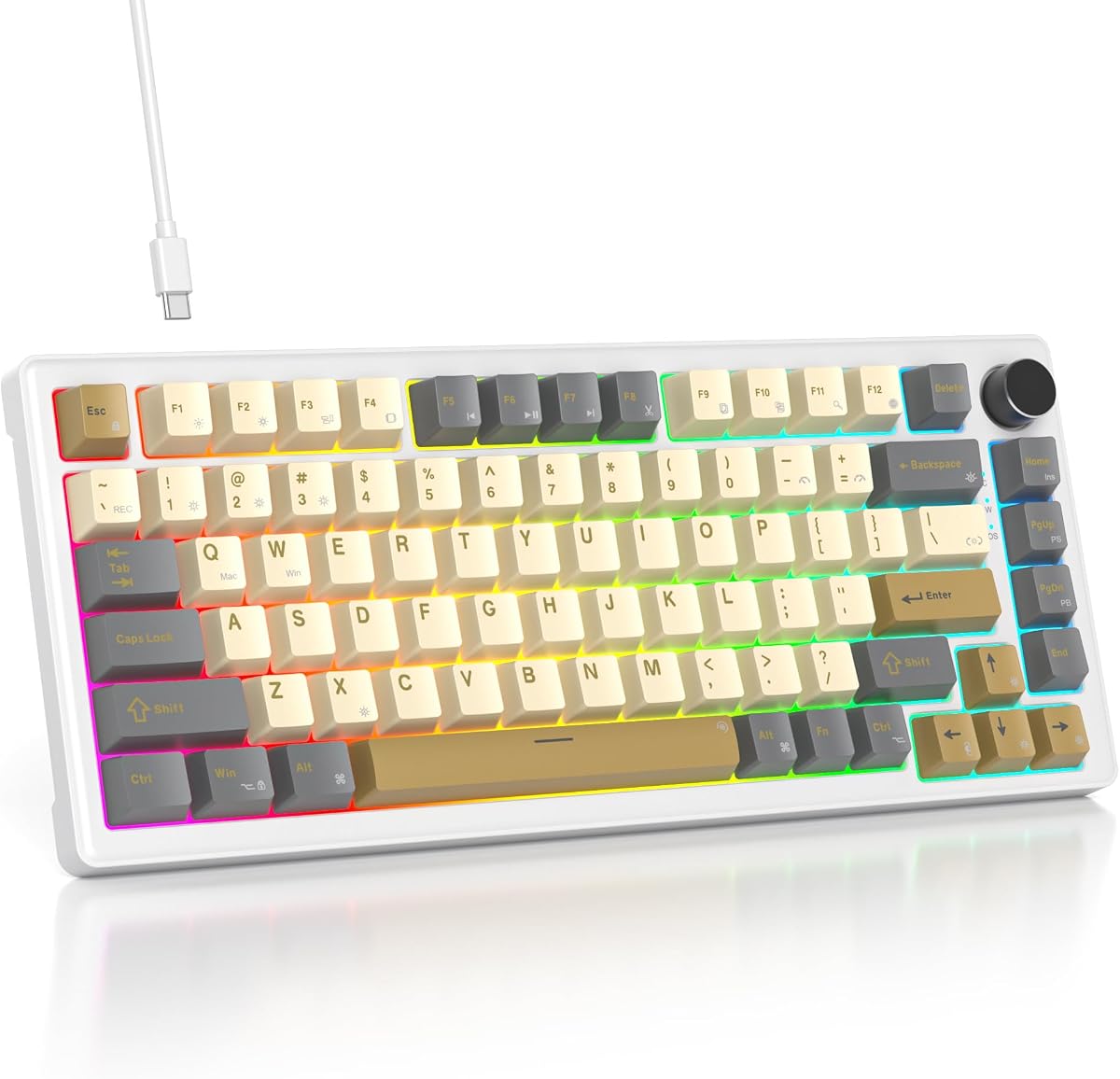


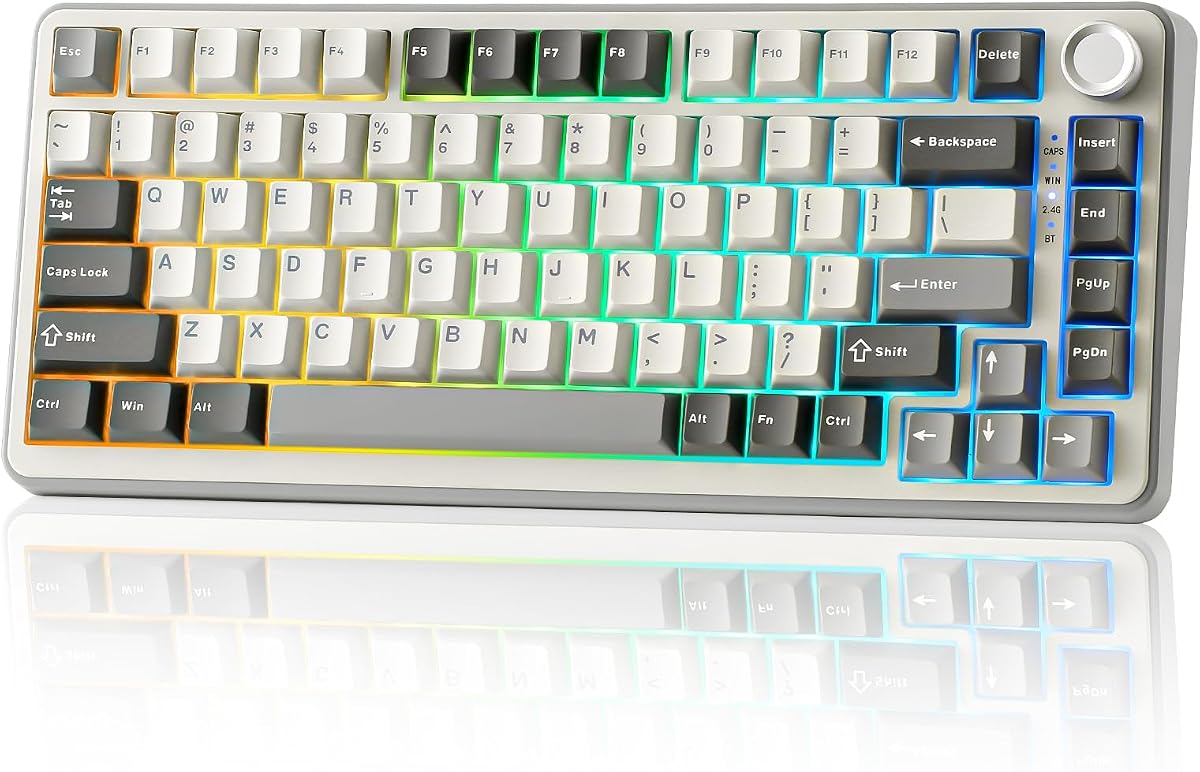


The AULA F75 Pro combines an 81-key 75 Percent layout with tri-mode wireless connectivity, hot-swappable sockets, RGB lighting, and a multifunction knob. Its supplied rating is 4.6, and the feature balance makes it a strong all-around recommendation for users who want one board for gaming, office work, and multiple devices.
We may earn a commission when you buy through this link, at no additional cost to you.
Its strongest advantages are flexibility. Bluetooth 5.0, 2.4GHz wireless, and USB-C wired operation allow quick movement between computers, tablets, phones, and game systems, with space for as many as five saved connections. The keyboard also accepts both 3-pin and 5-pin switches, comes with pre-lubed stabilizers and Reaper switches, and supports macro programming, N-key rollover, and a Windows-key lock.
Sound and feel are addressed through an advanced internal structure, an integrated silicone pad, single-key-slotting PCB design, and five layers of filling material intended to reduce cavity noise. Side-printed PBT keycaps provide a distinctive look and allow the backlight to shine through the legends, while 16 preset lighting effects and additional music-rhythm options add visual variety.
The knob provides quick access to volume, playback, brightness, and lighting effects, with separate gaming and office modes. That makes the F75 Pro especially useful for someone who wants frequent wireless switching and customization without giving up the arrow keys. The main compromises are the need for compatible software for advanced settings and the absence of a built-in status screen, but neither undermines its position as the most versatile board in this roundup.
Choose the F75 Pro if you want a balanced 75 Percent mechanical keyboard with broad device compatibility, wireless freedom, hot-swapping, macro support, and a rotary control without moving to a larger full-size layout. It is a particularly strong match for gamers, hybrid workers, and students who alternate among several computers.
The ability to store up to five device connections makes the F75 Pro useful beyond a single desktop. Shortcut keys and the side button provide convenient switching, while the 4000mAh battery supports the board's wireless ambitions.
Hot-swappable 3-pin and 5-pin sockets make it possible to change switches without soldering. The supplied pre-lubed Reaper switches, programmable keys, RGB controls, and knob add several avenues for tuning the board to a preferred feel.
We may earn a commission when you buy through this link, at no additional cost to you.
The RK ROYAL KLUDGE R75 is a wireless 75 Percent mechanical keyboard with a gasket-mounted structure, PBT keycaps, a metal knob, RGB lighting, and pre-lubed cream linear switches. Its 4.4 rating reflects a balanced design that emphasizes comfortable construction, clean acoustics, and practical customization.
We may earn a commission when you buy through this link, at no additional cost to you.
The five-layer sound-absorbing arrangement and poron cushioning between the PCB and case are central to the R75's appeal. A 1.2mm single-key-slotting PCB is intended to improve registration stability, while the included cream switches deliver a smooth linear action and relatively quiet sound. The hot-swap PCB supports both 3-pin and 5-pin switches.
Connectivity covers Bluetooth, 2.4GHz wireless, and wired USB, with rapid switching among three devices. Its 4000mAh battery is specified to provide at least seven days of use and potentially longer when RGB lighting is disabled. The CNC metal knob controls volume and mute functions, and it can be hot-swapped or programmed for another use.
The R75 does not attempt to overwhelm with a display. Instead, it concentrates on the elements that influence everyday typing: a soft gasket structure, responsive switches, PBT keycaps, useful arrow keys, N-key rollover, Windows-key lock, and more than 20 RGB modes. This focused approach makes it a sensible choice for someone who values sound and feel over an elaborate dashboard.
Choose the R75 for a wireless board that combines quiet linear switches with a cushioned structure and flexible connection options. It suits gamers, writers, and office users who want hot-swapping and PBT keycaps but do not consider a built-in display essential.
The gasket mount, poron cushioning, and five layers of absorbing material work together to reduce vibration and sharp internal noise. Combined with the pre-lubed cream switches, this gives the R75 a deliberately smooth and restrained character.
The removable CNC metal knob provides immediate volume and mute control, while its programmable design allows more advanced changes. Bluetooth, 2.4GHz, and USB operation make it easy to move the keyboard between a work computer and personal device.
We may earn a commission when you buy through this link, at no additional cost to you.
The V500 RGB 75% is a wired, compact mechanical keyboard designed for users who want a modern gasket-mounted structure and a creamy linear feel without a wireless receiver or rechargeable battery. It has a supplied rating of 4.6 and includes a control knob, RGB lighting, hot-swappable sockets, and programmable keys.
We may earn a commission when you buy through this link, at no additional cost to you.
Its five-layer padding and gasketed internal construction are intended to stabilize the assembly and create a softer, quieter action. Pre-lubed white jade linear switches provide smooth movement with minimal noise, and the hot-swap PCB accepts both 3-pin and 5-pin switches for future customization.
The retained 75 Percent format saves desk space without eliminating arrow keys. A knob provides direct volume adjustment, and the RGB system covers 16.8 million colors, selectable single-color settings, adjustable effects, and music-rhythm modes. The supplied driver also supports individual-key and combination macros, N-key rollover, and Windows-key locking.
Its most important limitation is the wired connection. That is not a disadvantage for a permanent gaming station or office setup, and it removes battery management and wireless pairing from the equation. However, it offers less freedom when moving between locations or sharing the keyboard among several computers.
Choose the V500 if your priority is a quiet, compact wired mechanical board with a cushioned feel and strong customization. It is an attractive fit for gamers, writers, and students who will keep it connected to a desk and value hot-swapping and programmable controls.
The gasket mount and five internal padding layers help control movement and reduce noise. Paired with pre-lubed linear switches, the result is aimed at users who prefer a smooth, restrained keyboard sound.
A fixed wired setup is straightforward and dependable for a main workstation. It also allows the board to focus its design on switches, mounting, lighting, and programmability rather than battery-related hardware.
We may earn a commission when you buy through this link, at no additional cost to you.
The MageGee MK-STAR is a straightforward 87-key wired mechanical keyboard for buyers who want a familiar tenkeyless layout without software setup. It retains dedicated arrow keys and F1-F12 multimedia functions, uses linear mechanical red switches, and carries a supplied rating of 4.1.
We may earn a commission when you buy through this link, at no additional cost to you.
Its appeal lies in how quickly it can be used. Plug in the USB cable and start typing without installing drivers or configuration software. The board supports Windows, macOS, Linux, and most compatible systems, making it a flexible choice for a home office, shared computer, or gaming desk.
Blue LED illumination provides multiple static and dynamic effects, with brightness and speed adjustable through Fn shortcuts. Full-key anti-ghosting and N-key rollover support accurate commands when several keys are pressed at once. ABS double-color injection keycaps, a sturdy metal top panel, and adjustable two-step kickstands provide a practical foundation.
This is not the most feature-heavy model in the guide. It does not offer hot-swappable sockets, wireless connectivity, a rotary knob, programmable macros, or RGB lighting. The red switches are smooth and fast but do not provide the tactile event or additional acoustic contrast of some other switch styles.
Choose the MK-STAR when ease of use, familiar key placement, and a compact footprint matter more than extensive customization. It is a good starting point for a new mechanical keyboard user and a dependable secondary board for a system that benefits from dedicated function and navigation keys.
The plug-and-play wired connection avoids driver installation and pairing. That simplicity makes this model approachable for beginners and useful wherever a stable, dedicated keyboard is needed.
The 87-key arrangement preserves separate arrow and multimedia function keys. This makes the board more versatile for spreadsheets, editing, gaming shortcuts, and operating-system commands than a layout without dedicated navigation controls.
We may earn a commission when you buy through this link, at no additional cost to you.
The Gasket-Mounted 82-Key is a wired RGB mechanical keyboard built around a soft gasket structure, full-key hot-swappable sockets, PBT keycaps, and configurable software. Its supplied rating of 4.6 indicates strong user satisfaction, and the board offers a concise feature set for both gaming and productivity.
We may earn a commission when you buy through this link, at no additional cost to you.
Its sound-absorbing pads and gasket mounting are intended to reduce noise and create a cushioned feel during extended use. Full-key anti-ghosting helps the board register simultaneous inputs accurately, while the included software adds RGB control, macro programming, and key remapping.
PBT keycaps are a notable inclusion because they are designed to resist oil and wear. Hot-swappable sockets allow users to experiment with different switch types without soldering, making the board more accommodating for both first-time mechanical keyboard owners and experienced hobbyists who want to modify an existing setup.
As a fixed wired design, it cannot provide the device-switching convenience of the AULA, RK, YUNZII, or Keychron models. It also lacks a display and rotary knob, so its customization is concentrated in the software and RGB system rather than visible hardware controls.
Choose the 82-Key model if you want a compact, wired board that combines tactile construction quality with straightforward hot-swapping and software customization. It is a strong option for gamers who need programmable commands and for typists who want to refine their switch and keycap preferences.
Full-key hot-swap sockets make the board accessible to customizers. Users can replace switches without a soldering setup, while the gasket structure and sound-absorbing pads help preserve a softer overall feel.
PBT keycaps are suited to regular use because they are designed to resist oil and wear. Software-based RGB, macro, and remapping tools give the compact layout enough flexibility for gaming shortcuts and work-focused commands.
We may earn a commission when you buy through this link, at no additional cost to you.
The AULA S75 Pro is the most feature-rich board in this roundup, combining an 80-key 75 Percent layout with tri-mode wireless connectivity, a customizable LCD, a multifunction knob, RGB lighting, and hot-swappable switches. Its supplied rating is 4.6, and the display gives it a clear advantage for users who want information visible at a glance.
We may earn a commission when you buy through this link, at no additional cost to you.
The screen can present battery status, date and time, operating system, GIF images, volume, and lighting information. It is interactive rather than merely decorative, allowing quick access to functions without memorizing every shortcut. To configure the image or GIF and calibrate the date and time, the user must download the Windows software and keep the keyboard in wired mode.
Connectivity includes Bluetooth 5.0, 2.4GHz wireless, and USB-C wired operation, with support for up to five saved devices. The board is listed as compatible with Windows, Mac, iOS, and Android, making it suitable for a wide collection of devices. Its advanced internal structure, integrated silicone pad, single-key-slotting PCB, and five layers of filling material focus on a soft, stable feel and reduced cavity sound.
The 80-key layout retains the arrow keys, and the side-engraved PBT keycaps are paired with south-facing LEDs so the backlight shines clearly through the legends. There are 19 RGB effects, more than 16.8 million colors, side lighting, and macro support for individual keys. The driver is Windows-only and requires wired mode, which is the most important practical limitation.
Choose the S75 Pro if you value an informative screen, extensive wireless switching, and deep customization enough to accept Windows-focused setup requirements. It is especially appealing to gamers and power users who want the display to show changing information rather than simply act as a static status panel.
The LCD can show battery status, time, operating system, volume, backlight settings, and custom images. That makes it more useful than a conventional indicator-light cluster for users who monitor several devices or frequently change keyboard modes.
Five saved device connections, tri-mode operation, programmable keys, and extensive RGB effects make this board suitable for a mixed gaming and productivity setup. The screen configuration and driver are limited to Windows in wired mode, so compatibility should be confirmed before purchase.
We may earn a commission when you buy through this link, at no additional cost to you.
The Keychron K2 is an 84-key Bluetooth mechanical keyboard with a Mac-focused layout, white LED backlighting, Super Red linear switches, and wired USB-C operation. Its supplied rating of 4.4 reflects a mature design aimed at home, office, and light gaming use.
We may earn a commission when you buy through this link, at no additional cost to you.
The defining feature is its Mac layout. It includes the necessary Mac function keys, while extra Windows and Mac keycaps support both operating systems. Bluetooth 5.1 allows connection to as many as three devices, such as a smartphone, laptop, and tablet, and a wired mode provides a fixed USB-C connection.
Its 4000mAh battery is specified to last up to 72 hours of typing or up to seven days in normal use based on eight hours per day. Anti-ghosting is supported, with N-key rollover in wired mode and 6K rollover in wireless mode. The Super Red switches are linear and rated in the supplied information for up to 50 million keystrokes.
Unlike many modern gaming-oriented alternatives, the K2 uses a restrained white backlight with a static white option. It also does not emphasize a rotary knob, a display, an extensive mounting system, or switch hot-swapping. Its appeal comes from compatibility, clean layout, familiar branding, and a balance of wireless convenience and Mac support.
Choose the K2 if you switch between Mac and Windows systems or want a compact wireless board for home and office use without a complex configuration process. It is especially suitable for a user who values device switching, battery endurance, and a complete set of platform-specific keycaps over extensive lighting effects.
The dedicated Mac layout and included alternative keycaps make platform switching more convenient. It also supports the function-key behavior expected by Mac users while remaining usable with Windows computers.
Bluetooth 5.1 connectivity allows the K2 to move among a phone, tablet, and computer. The stated battery endurance makes wireless use practical for a full work day, while USB-C provides a wired alternative.
We may earn a commission when you buy through this link, at no additional cost to you.
The YUNZII B75 Pro is an 82-key wireless mechanical keyboard that combines gasket mounting, five-layer padding, hot-swappable sockets, RGB lighting, and a multifunction knob. Its supplied rating of 4.6 makes it one of the strongest choices for users who want a flexible custom board across Windows and Mac systems.
We may earn a commission when you buy through this link, at no additional cost to you.
The internal design uses a gasket structure, precision-tuned stabilizers, pre-lubed switches, and five layers of padding intended to create a creamy sound and solid feel. Full-key hot-swap sockets accept both 3-pin and 5-pin switches. The supplied switch options include linear and tactile choices, giving users a starting point for different typing preferences.
Bluetooth, 2.4GHz wireless, and wired operation provide tri-mode flexibility, while a 4000mAh battery supports extended wireless use. The knob can adjust volume and backlighting, and a long press switches between gaming and office modes. More than 20 RGB patterns are available through south-facing LEDs, with additional control through programmable software.
Software allows key redefinition, macro settings, and RGB customization in Windows, and the keyboard is listed as compatible with Windows and MacOS. The main consideration is that advanced control depends on Windows software. Gaming-oriented tools are present but less central than on models that emphasize macro-driven competition features.
Choose the B75 Pro if you want a quiet, customizable wireless board with hot-swapping, a rotary control, and broad operating system support. It suits office workers, writers, programmers, and casual gamers who value the feel and construction of the keyboard as much as its lighting.
Full-key hot-swap sockets make it possible to revise the switch configuration over time. The gasket mount, five-layer padding, tuned stabilizers, and pre-lubed switches provide a softer and quieter starting point than a basic tray-mounted board.
The multifunction knob handles volume and lighting adjustments, while gaming and office modes provide quick context changes. Windows-based macro and remapping tools add flexibility without changing the board's clean 82-key layout.
We may earn a commission when you buy through this link, at no additional cost to you.
The Newmen GM326 is a compact wired mechanical keyboard designed for portability, straightforward gaming, and flexible daily use. It includes a detachable USB-C cable, a multifunction knob, rainbow LED lighting, hot-swappable 3-pin sockets, full-key anti-ghosting, and adjustable tilt legs.
We may earn a commission when you buy through this link, at no additional cost to you.
Its small footprint is central to the design. The 75 Percent layout saves desk space without becoming as restrictive as a highly condensed keyboard, and the detachable cable makes the board easier to pack for office use, business travel, or a shared gaming setup. Rainbow illumination provides six color choices and 20 lighting modes.
The included red switches are linear, smooth, and lightly resistant, supporting quick inputs without a pronounced tactile bump. Hot-swap sockets allow users to experiment with other 3-pin switches, although 5-pin switches are not listed as supported. The knob and three indicator lights provide quick access to sound and status information.
Full-key anti-ghosting allows multiple simultaneous commands, and compatibility is listed for Windows 7 through Windows 11 and Mac OS 10.10 or later. The stepped ABS keycaps are lighter than many PBT alternatives, and two-stage support legs offer two typing angles. There is no display or sophisticated onboard control suite.
Choose the GM326 if you want a small, detachable-cable keyboard with more features than a basic office model. It is well suited to portable setups, students, travelers, and gamers who value hot-swapping, a knob, and colorful lighting without needing wireless connectivity.
The detachable USB-C cable and small dimensions make the board convenient to move between locations. A wired design also removes the need to monitor a battery or manage wireless pairings.
Full-key anti-ghosting, hot-swappable red switches, a multifunction knob, and numerous lighting modes cover the essentials of a compact gaming keyboard. Indicator lights provide quick visibility of Caps Lock, Windows lock, and operating-system mode.
We may earn a commission when you buy through this link, at no additional cost to you.
The Womier SK80 stands apart with an angled color multimedia display, gasket-mounted construction, hot-swappable switches, and extensive RGB control. It carries the highest supplied rating in the group at 4.7, making it a notable option for buyers who want a visual focal point as well as a capable compact mechanical board.
We may earn a commission when you buy through this link, at no additional cost to you.
The upper-right screen can display custom GIF images, Caps Lock state, connection mode, Windows or Mac mode, system information, backlight brightness and speed, RGB mode and color, volume, and language. Its 11-degree angle is designed to align the display with normal viewing habits, and driver-based customization extends the visual options.
Internally, the SK80 uses a gasket mount, EVA positioning plate, and bottom filling to create a soft, responsive feel with reduced typing noise. Pre-lubed linear switches and south-facing transparent light diffusers provide a clean initial sound and visible illumination. The hot-swap PCB supports 3-pin and 5-pin switches.
Nineteen lighting effects, nine colors, adjustable brightness, flow rate, macros, and a music-synchronization mode provide broad visual and functional control. The detachable Type-C cable supports Mac and Windows systems. As with many display-equipped mechanical keyboards, the screen adds visual interest but does not make the board wireless.
Choose the SK80 if a customizable display, distinctive themed keycaps, and a soft gasket feel are central to your setup. It is best suited to a fixed desk where its angled screen can remain visible and its driver can be configured on a compatible computer.
The multimedia screen brings status details and customizable GIF images into the keyboard itself. This is especially helpful for users who want a more informative and visually distinctive centerpiece than a standard three-light indicator cluster.
The gasket mount, EVA plate, bottom filling, and pre-lubed linear switches prioritize a softer feel and cleaner sound. A detachable Type-C connection and broad software customization make the board well suited to a permanent Mac or Windows workstation.
We may earn a commission when you buy through this link, at no additional cost to you.
The right 75 Percent mechanical keyboard depends on how you work, which devices you use, and how much customization you want. Layout, connectivity, acoustics, switch support, lighting, and software should be weighed together rather than treated as isolated features.
A 75 Percent layout usually combines the main alphanumeric block, function row, navigation cluster, and arrow keys without a numeric keypad. Key counts vary among these picks, ranging from the Newmen GM326's compact design to the MageGee MK-STAR's 87 keys, so compare the actual key arrangement when possible. Look for dedicated arrow keys if you play games, edit video, navigate spreadsheets, or prefer keys that do not share functions with adjacent keys. The layout should also leave enough mouse space for your preferred sensitivity and hand position.
Wired keyboards are simple, consistent, and easy to carry when their cable detaches, but they remain tied to one host at a time. Wireless models offer greater flexibility, usually through Bluetooth for general devices and 2.4GHz for gaming-oriented use. The AULA F75 Pro and S75 Pro can save as many as five devices, while the RK R75 and Keychron K2 support three. Check operating-system compatibility as well, because some advanced controls, particularly screen setup and macro software, are Windows-specific or require a wired connection.
Mounting and padding influence stability, flex, sound, and perceived comfort. Gasket-mounted designs hold the internal assembly with flexible pads, while multi-layer foam and silicone structures are intended to reduce vibration and hollow cavity noise. The V500 RGB, RK R75, B75 Pro, and Womier SK80 all use gasket-oriented construction, but their exact internal materials and layouts differ. A layered board may better suit a shared office or late-night setting, while listeners who prefer a brighter, more traditional mechanical sound may make a different choice.
Linear switches move smoothly without a tactile bump, while tactile switches add a noticeable event during travel. The products in this guide include pre-lubed linear red, cream, and white-jade switch selections, and the B75 Pro also mentions tactile options. Hot-swappable sockets let you replace compatible switches without soldering, making it easier to experiment with sound and weight. Check the accepted pin count carefully: the GM326 is specified for 3-pin switches, while several other models accept both 3-pin and 5-pin options.
Descriptions such as creamy, quiet, thocky, and solid do not guarantee one exact sound. Switch choice, stabilizers, keycaps, plate material, case construction, internal foam, and the user's typing force all affect the result. Pre-lubed switches and tuned stabilizers can reduce unwanted noise, while gasket mounting and filling material may soften cavity sound. If office disturbance is a concern, prioritize a board with several sound-control features and consider quieter linear switches. Remember that keycap material and later switch modifications can change the final character.
A rotary knob can provide immediate control over volume, playback, lighting, or programmable functions. The AULA F75 Pro and RK R75 offer especially flexible knob behavior, and the S75 Pro adds a display. A screen can show battery status, time, operating system, RGB information, and custom images, but it also introduces more software and setup complexity. Displays are best treated as workflow aids rather than essential specifications. A clean knob, shortcut-driven lighting, and visible indicator lights may provide more benefit for a user who rarely opens configuration software.
RGB systems vary from a simple blue or white backlight to dozens of effects, millions of colors, music synchronization, and per-zone adjustments. South-facing LEDs, side-printed or side-engraved legends, and translucent switch diffusers influence how clearly the lighting appears. PBT keycaps are valued for oil and wear resistance, while ABS keycaps can offer brighter translucency and a different texture. Macro and remapping support is useful for game commands and work shortcuts, but it is not equally available across every model, and some drivers are limited to Windows and wired operation.
A compact mechanical keyboard may be purchased for a Windows gaming PC but used with a Mac, laptop, tablet, or phone later. Check the listed operating systems, modifier-key behavior, and included alternate keycaps. The Keychron K2 includes both Mac and Windows keycaps, while the Womier SK80 and several others support both platforms. Keyboard software should also be checked for permission requirements, operating-system restrictions, and whether a wired connection is mandatory. A board can be physically compatible with a device while omitting some of its advanced configuration features.
Begin with a stable, clean desktop and connect the keyboard using the appropriate wired or wireless method. For a wireless model, install any required driver before attempting to configure displays, macros, or saved devices. Pair it through Bluetooth or its 2.4GHz receiver, select the intended connection mode, and confirm that arrow keys, modifier keys, and the rotary control respond correctly. Wired models can be tested immediately in most cases, though software installation may still be needed for lighting or macro features.
When changing hot-swappable switches, turn the keyboard off, remove the keycaps with the supplied puller, align the replacement switch with the socket, and press it gently into place before reinstalling the keycap. Use switches with the correct pin configuration and avoid forcing the switch or socket. Do not pull a switch sideways once it is seated. For a more involved sound or feel adjustment, changing switches, stabilizers, or keycaps can affect the final result, so make one deliberate change at a time.
Keep the keyboard away from spills, dust, and prolonged direct sunlight. For routine cleaning, disconnect the power or wireless connection and use a soft brush or microfiber cloth with a small amount of suitable cleaner. Avoid spraying liquid directly onto the switches, display, knob, or USB port. Wireless models should be recharged according to the manufacturer's guidance, and removable batteries or long periods of disuse should be managed carefully. Periodically check that the cable, receiver, and feet are secure, and update software only through the source specified in the product listing.
A 75 Percent keyboard generally retains a separate function row and dedicated arrow keys, giving it more conventional navigation than a 60 Percent layout. A 60 Percent board is usually shorter and more portable, but it often requires additional key combinations for navigation. A 75 Percent model is a practical middle ground for people who want compact dimensions without giving up too many controls.
Yes, many 75 Percent mechanical keyboards are well suited to gaming because they free up desk space for mouse movement while retaining arrow keys. The most useful models add N-key rollover, Windows-key locking, programmable macros, and clearly controlled lighting. Wired or low-latency 2.4GHz operation is generally the simplest choice for a primary gaming setup, although the best interface depends on the game and the user's preferences.
A hot-swappable keyboard has sockets that allow compatible mechanical switches to be removed and replaced without soldering. A soldered design requires a soldering iron to change switches. Hot-swapping is convenient for experimenting with switch types, but users should confirm whether the board accepts 3-pin, 5-pin, or both types and should never pull a seated switch sideways.
Modern Bluetooth keyboards can provide a convenient way to move among several devices, and the boards in this guide use Bluetooth for broad platform support. Gaming users may prefer a dedicated 2.4GHz receiver for a more consistent connection, while office users often appreciate switching to a tablet or phone. Check the number of saved devices, battery endurance, and operating-system requirements before choosing.
A 75 Percent layout is generally a strong choice for a small desk because it removes the numeric keypad while keeping arrow keys and a function row. Mouse movement improves compared with a full-size board, but the footprint still varies among compact models. Compare exact dimensions, desk mat size, and your preferred mouse sensitivity before making a final decision.
PBT keycaps are often preferred for their resistance to oily shine, wear, and prolonged daily use. ABS keycaps can provide brighter light transmission and are often found on more affordable or visually translucent designs. Neither material automatically produces a better keyboard, so consider the keycap profile, texture, legends, and your switching habits alongside the material.
No. A display can show battery status, time, operating system, lighting information, or custom images, while a knob offers quick control over volume or lighting. These features are useful but not essential, and they often add software complexity. A simpler board with hot-swappable sockets, reliable connectivity, and a comfortable layout may serve your needs better.
Many gaming keyboards provide a Windows-key lock that disables the key during play. Several models in this guide explicitly support the feature, including the AULA F75 Pro, RK R75, V500 RGB, and MageGee MK-STAR. The shortcut or activation method varies, so check the product instructions or the shortcut combination before a gaming session and remember to restore normal behavior for general use.
The AULA F75 Pro is the strongest all-around selection because it combines tri-mode wireless connectivity, five saved devices, hot-swappable switches, programmable RGB, macros, a rotary knob, and a carefully layered internal structure. The AULA S75 Pro is the premium choice for buyers who value an informative customizable display, while the MageGee MK-STAR offers the simplest route into a compact mechanical keyboard without driver setup.
Prioritize the features that affect your actual routine. Choose a wired model for a dependable fixed desk, a wireless model for frequent device switching, and a gasket-mounted design for a softer and quieter feel. Hot-swappable sockets are valuable if switch experimentation matters, while a knob, display, software, or extensive RGB control should support rather than dictate your choice. Check Mac and Windows compatibility before buying.
Specifications, software behavior, and product offers can change over time, and prices fluctuate more frequently. Review the current listing, package contents, compatibility notes, and warranty information before ordering. That final check will help ensure that the 75 Percent mechanical keyboard you choose remains a good fit long after the initial setup.