
Epson Workforce WF-110 Wireless Color Mobile Portable Inkjet Printer
4.1Editor score
Built-in rechargeable battery
Full-color mobile inkjet output
USB and AC charging options
Wi-Fi Direct connectivity
Battery powered portable printers bring practical printing capability to places where fixed office equipment cannot go. The strongest choices balance useful output, manageable size, dependable wireless connections, and power that lasts through a trip, workday, school assignment, or family event. Print quality, paper support, and specialized features also matter when narrowing the field.
This guide compares ten portable printers using the specifications and features supplied for each model, with particular attention to built-in batteries, charging options, connectivity, print technology, paper handling, and intended use. It includes inkjet models for color and photos, thermal printers for monochrome documents, and compact all-in-ones designed to work away from a traditional printer stand.
Each review highlights the reasons a model belongs on the list while making its limitations clear. The top selections include a versatile all-in-one, a full-color photo printer, and a flexible thermal option, though the right choice depends heavily on whether you need documents, images, color, scanning, or specialized paper. Prices and availability can change, so confirm current details before buying.
4.1Editor score
4.5Editor score

4.6Editor score
As an Amazon Associate we earn from qualifying purchases.
The table below compares the ten shortlisted printers by power source, printing method, connectivity, paper format, and core functionality, making it easier to distinguish color inkjets, monochrome thermal units, document printers, and photo-focused models.
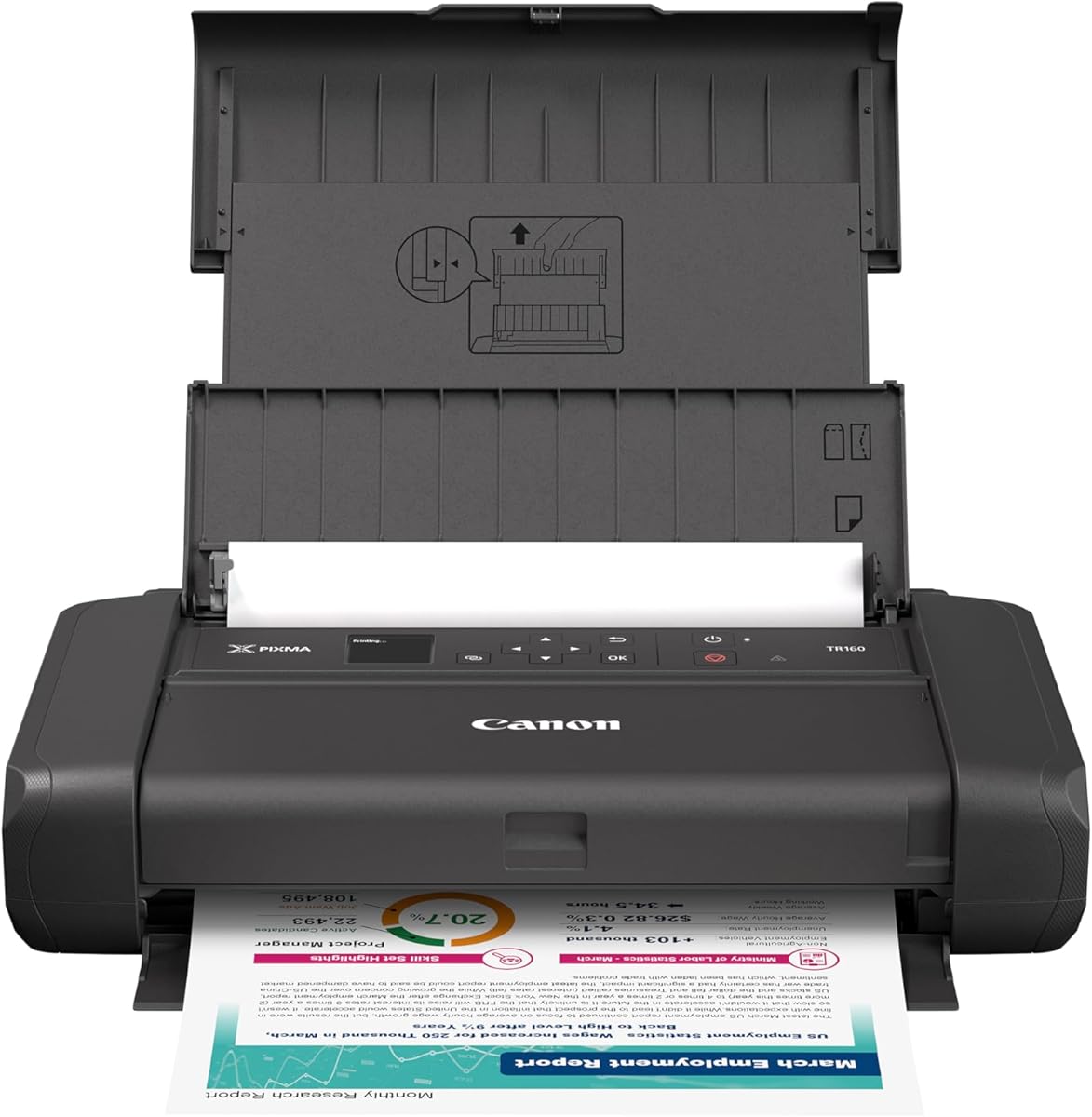


The Canon PIXMA TR160 is a lightweight wireless color inkjet built for documents and photos wherever a conventional printer is inconvenient. It carries a 4.2 rating and stands out for its five-color hybrid ink system, sharp black text, vibrant color, square printing, and borderless output on media up to 8.5 by 11 inches.
We may earn a commission when you buy through this link, at no additional cost to you.
Its small footprint makes it a sensible option for students, travelers, and home users who want more flexibility than a basic USB printer. Canon PRINT, Apple AirPrint, Mopria Print Service, and cloud connections provide several ways to send documents, while Wireless Direct Mode lets compatible devices connect without relying on a wireless router.
The 1.44-inch monochrome OLED is unusually useful for a portable model because it provides quick access to ink levels, printer status, and settings without requiring an app. The main trade-off is that the supplied specifications do not identify an internal battery. It is portable in size, but it generally needs an external power source unless another approved power method is available.
This printer is most appropriate for someone who prioritizes color quality, wireless flexibility, and compact document printing over true untethered operation. It deserves consideration as a portable printer, but buyers searching specifically for a battery-powered model should confirm their charging arrangement and consider the HP or Epson alternatives in this guide.
The hybrid ink system is a meaningful advantage for a compact printer because it supports both sharp office text and colorful photo-style output. Square and borderless options also make the TR160 useful for creative projects rather than basic paperwork alone.
Wireless Direct Mode expands access in hotels, shared workspaces, and other locations where a router may be inconvenient. App, AirPrint, Mopria, and cloud support give users several ways to choose the most convenient workflow for their device.
We may earn a commission when you buy through this link, at no additional cost to you.
The HP OfficeJet 250 is the most complete mobile all-in-one in this group, combining printing, scanning, and copying with a battery included. Its 4.3 rating reflects a balanced feature set for business travelers, mobile workers, and households that need more than a single-purpose portable printer.
We may earn a commission when you buy through this link, at no additional cost to you.
The included rechargeable battery allows the unit to fit the mobile use cases described in the product information, including work from a car, backpack, or briefcase. HP Auto Wireless Connect simplifies initial setup, and the printer can work wirelessly with or without a router, while the HP app provides mobile print and scan controls.
Its supported media range is notably broad for a portable inkjet. Letter, legal, statement, executive, multiple card sizes, several photo sizes, and several envelope formats can all be handled. The printer uses Original HP 62 series cartridges, which are widely recognized consumables, although cartridge-based color printing naturally adds a recurring material cost that thermal printers avoid.
This is the top recommendation for a buyer who wants a genuine mobile office in one device. Its scanning and copying functions justify the larger footprint for many professionals. Choose it when true battery operation and document versatility matter more than the ultra-compact dimensions or inkless operation of a thermal model.
Printing, scanning, and copying in one compact body prevents users from needing separate portable devices for each task. That versatility is especially useful for mobile notaries, field staff, students, and people who routinely handle paperwork away from a desk.
HP Auto Wireless Connect is designed to reduce setup friction, while HP Fast Charge can restore power in about 90 minutes with the printer switched off. Together, these features support a practical print-as-needed workflow during short trips and busy workdays.
We may earn a commission when you buy through this link, at no additional cost to you.
The HP OfficeJet 200 delivers the core benefits of a battery-powered mobile color inkjet in a simpler, more compact design than the OfficeJet 250. It carries a 4.4 rating and is aimed at users who want to print business documents away from an office but do not need scanning and copying functions.
We may earn a commission when you buy through this link, at no additional cost to you.
The battery is included, and the printer is designed to move between a car, backpack, or briefcase. HP Auto Wireless Connect supports straightforward setup, and the device can print wirelessly whether or not a router is present. The HP app also provides a mobile route for sending jobs, preserving much of the convenience associated with a larger all-in-one.
Original HP 62 series cartridges are used for output, and the supported media list includes standard business formats, cards, photographs, and envelopes. This gives the printer more flexibility than a small thermal model, particularly for users who occasionally need color or nonstandard paper sizes. The trade-off is that ink cartridges add ongoing expense and maintenance compared with direct thermal printing.
The OfficeJet 200 is an excellent middle ground for a mobile inkjet that prioritizes portability and printing alone. It is well suited to sales professionals, students, and travelers who want familiar inkjet output without carrying a scanner. If scanning is important, move up to the OfficeJet 250; if cartridge-free operation is more important, consider a thermal printer.
Unlike monochrome thermal units, the OfficeJet 200 can produce ordinary color output for presentations, forms, labels, and personal projects. That makes it more adaptable when one portable device must handle several document types.
Its smaller role-focused design reduces the space required in a car or bag compared with an all-in-one. The included battery and wireless setup preserve the core benefit of printing independently from a stationary office machine.
We may earn a commission when you buy through this link, at no additional cost to you.
The Epson Workforce WF-110 is a premium mobile color inkjet for buyers who value flexible charging and a genuine built-in power source. Its 4.1 rating is supported by a rechargeable lithium-ion battery, a compact body, and wireless printing for phones, tablets, and laptops.
We may earn a commission when you buy through this link, at no additional cost to you.
Charging can proceed through USB, an AC adapter, or while the printer operates on AC power. An optional external accessory battery can increase printing volume for extended periods away from an outlet. For everyday travel, the built-in battery is the more important feature, while the accessory option distinguishes the WF-110 for intensive mobile use.
Wi-Fi Direct and standard wireless connectivity give users flexible ways to connect iPads, iPhones, tablets, smartphones, and laptops. Epson designed its printing system for use with Epson Genuine Cartridges, and the stated warranty condition notes that non-genuine ink could cause damage not covered by the limited warranty. That restriction should be considered before purchase.
The WF-110 is a strong premium recommendation for mobile professionals or color-focused users who need more power flexibility than a basic portable printer. Its Wi-Fi 5 connection and cartridge requirement are the principal compromises. Nevertheless, the combination of internal battery, external battery support, color output, and flexible charging makes it especially convincing for extended work away from home.
USB charging, AC-adapter charging, and optional external battery support provide useful ways to adapt to different working environments. A user can recharge through available electronics while traveling or carry additional power for a demanding day.
Epson's cartridge requirement improves system consistency but reduces flexibility compared with printers that accept a broader range of ink products. Prospective owners should factor cartridge availability, genuine-ink policy, and ongoing ink use into the decision.
We may earn a commission when you buy through this link, at no additional cost to you.
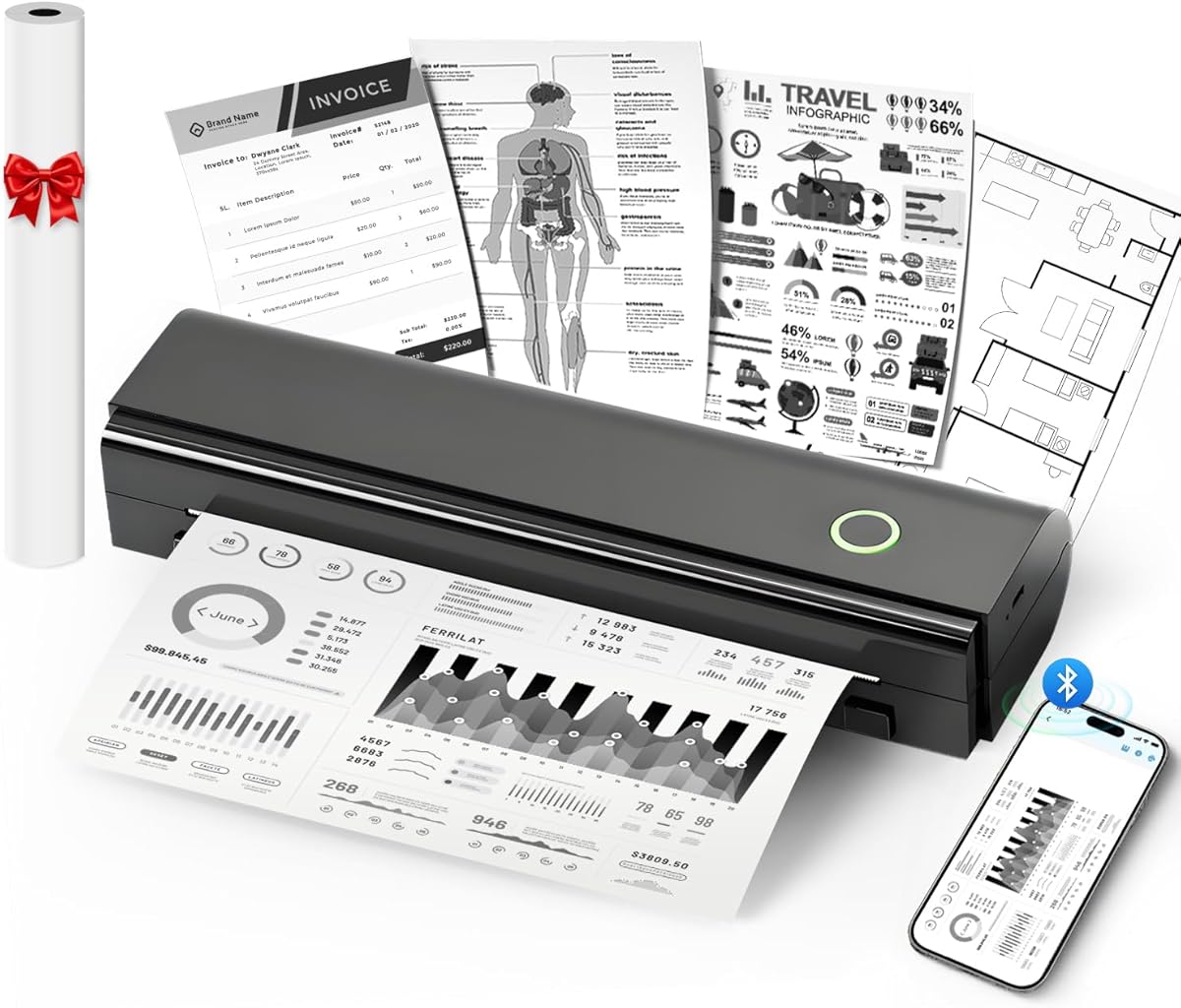
The Gloryang Inkless Portable Printer is a travel-focused thermal printer that arrives with a useful collection of accessories. Its 4.2 rating reflects a straightforward package containing the printer, three thermal paper rolls, a carrying case, charging cable, manual, and guide card.
We may earn a commission when you buy through this link, at no additional cost to you.
At 1.75 pounds and 1.7 inches thick, the printer is easy to place in a backpack or briefcase. Bluetooth connectivity works with iOS and Android devices through the Jadens Printer app, while laptop and computer users can install the relevant driver for a wired workflow. The built-in paper bin reduces bulk and helps keep the printing area organized.
Its central strength is the absence of ink, toner, and ribbons. Direct thermal technology simplifies maintenance and supports documents ranging from 2 inches to 8.5 inches. The included paper makes the package more immediately useful than a bare printer, although users must use compatible thermal media rather than ordinary or inkjet paper.
This model is a strong option for travelers, students, and mobile workers who want a monochrome printer that is ready to use. It can handle contracts, notes, emergency documents, images, and designs, but users seeking full-color photographs or standard-paper printing should look elsewhere. Its included case and paper make it particularly convenient as a gift or portable office kit.
The bundled case and three rolls of compatible paper reduce the need to assemble a separate travel setup. That convenience matters most for users who want to print immediately after a trip or in an emergency.
Direct thermal operation removes the need to manage ink cartridges, toner, or ribbons. The trade-off is restricted media compatibility and monochrome output, so ordinary paper and rich color remain outside the printer's design.
We may earn a commission when you buy through this link, at no additional cost to you.
The A285M is a small inkless thermal printer with a 4.0 rating and an unusually broad selection of supported paper widths. At 1.5 pounds, it is designed to move easily between business travel, vehicles, construction sites, classrooms, small offices, and homes.
We may earn a commission when you buy through this link, at no additional cost to you.
Its paper support includes US Letter, A4, 110mm, 80mm, and 53mm thermal formats, allowing the printer to handle documents, invoices, receipts, recipes, lists, and boarding passes. Phones and tablets connect through Bluetooth, while laptops and computers use USB-C after the necessary driver is installed.
The direct thermal system requires no ink, toner, or ribbon and avoids the clogging and cleaning issues associated with inkjet mechanisms. However, it only supports thermal paper and produces black-and-white output. The correct thermal-paper size must also be selected in the app, which is a small setup consideration that owners should understand before printing.
The A285M is a practical choice for users who need one portable machine to cover several paper formats. It is less suitable for color photographs, standard copy paper, or workflows that depend on a computer's Bluetooth capability. Its 5V 2A charging requirement also makes it important to use an appropriate power source.
Five thermal widths make the A285M adaptable to standard documents, compact labels, and receipt-style formats. This variety can eliminate the need to carry several dedicated thermal printers for different tasks.
Bluetooth serves phone and tablet workflows, while USB-C provides a separate route for computers. Recognizing the distinction before setup prevents confusion, since computer use requires a downloaded driver.
We may earn a commission when you buy through this link, at no additional cost to you.
The ETIKEZ D90E is a 2.08-pound thermal printer that combines straightforward document printing with a travel-focused package. It has a 4.3 rating, supports US Letter thermal paper, and includes a USB-C cable, ten sheets of paper, a travel case, and a guide.
We may earn a commission when you buy through this link, at no additional cost to you.
Phones connect through Bluetooth using the Labelnize app, while computers use USB after installing drivers from Labelnize.com or the included drive. The printer is not compatible with Chromebooks, a limitation worth checking for buyers whose primary computer runs ChromeOS. It can also serve as a personal travel printer for contracts, office documents, and emergency records.
Its inkless thermal system produces black-and-white output without ink, toner, or ribbons. The paper guidance is specific: the printer is intended for compatible A4 thermal paper and cannot accept ordinary copy paper. A helpful jam procedure presses the power button to pop up the paper, and the instructions advise against forcing the cover open.
The D90E fits buyers who want a simple, compact monochrome device with carrying supplies included. It is less useful for color, photography, and ordinary documents, and a charging adapter is not included. Still, the travel case, paper supply, app-based phone setup, and automatic ejection feature make it a neat mobile package for teachers, students, notaries, and traveling professionals.
The travel case protects the printer during transport, and the included sheets allow an owner to begin using it without immediately purchasing media. That makes the bundle particularly attractive for a mobile office or dorm-room setup.
The documented power-button ejection method offers a safer response to a jam than manually pulling the paper. Owners should still follow the guidance and use flat thermal paper to reduce curling after printing.
We may earn a commission when you buy through this link, at no additional cost to you.
The JADENS Portable US Letter Thermal Printer is a compact, rechargeable monochrome printer with the highest listed rating in this guide at 4.6. It is designed around direct thermal technology, supporting US Letter material without ink, toner, or ribbons.
We may earn a commission when you buy through this link, at no additional cost to you.
Its 1800mAh rechargeable battery is stated to provide up to three hours of continuous printing and as many as 360 sheets per charge. That endurance is useful for students producing worksheets, professionals handling contracts, and travelers printing a sequence of forms. A 203 DPI resolution produces sharp black text and recognizable monochrome images.
The Jadens Printer app handles iOS and Android connections and offers document, spreadsheet, image, design, and AI-related editing functions. Files can also be printed locally rather than uploaded to the cloud, which may appeal to users handling sensitive material. The main restriction is paper compatibility, as the printer is designed specifically for JADENS JD-166 US Letter thermal paper.
This is an excellent value-oriented choice for someone who mainly needs sharp monochrome documents and values a rechargeable form factor over color output. It is not a general-purpose printer for ordinary copy paper or photographs in full color. For its intended thermal-document role, however, it combines useful app features, strong portability, and a favorable listed rating.
The stated three-hour continuous runtime and 360-sheet capacity provide a useful margin for extended printing sessions. The compact body makes it practical to carry the printer rather than depend on finding a nearby outlet.
Local printing can reduce the need to upload documents to a cloud service, while the app's editing and AI features broaden creative options. Users can produce worksheets, flashcards, forms, notes, and monochrome graphics from a connected phone or tablet.
We may earn a commission when you buy through this link, at no additional cost to you.
The NDYIN N80 is a compact thermal printer with a 4.1 rating, built for mobile documents and the unusual specialty of tattoo transfer paper. It weighs 1.5 pounds and uses direct thermal technology, eliminating the need for ink, toner, and ribbons.
We may earn a commission when you buy through this link, at no additional cost to you.
Its 1500mAh rechargeable battery is stated to support printing up to 160 US Letter sheets per charge. A roll of US Letter thermal paper is included, while the printer also supports A4 material, folded paper, and tattoo transfer paper. Output at 203 DPI is intended to provide clear text and monochrome images.
Phones and tablets connect by Bluetooth through the Nada Print app. Laptops and computers do not support Bluetooth with this model and instead connect through USB-C after installing a driver. The package includes the printer, one paper roll, a manual, guide card, Type-C cable, and Type-C adapter, although the charging adapter is not included.
The N80 is a compelling choice for mobile users, students, field workers, and tattoo artists who value media flexibility. It handles contracts, invoices, boarding passes, recipes, and personal documents as well as tattoo templates. Its limitations are standard for this category: only thermal paper works, output is monochrome, and computer use requires a wired connection.
Support for tattoo transfer paper gives the N80 a purpose beyond routine receipts and forms. Artists can create and print templates from a connected mobile device without carrying a larger ink-based printer.
The ability to handle US Letter, A4, folded, rolled, and tattoo transfer media makes the printer more adaptable than many similarly compact thermal units. The included paper and cable also reduce initial setup friction.
We may earn a commission when you buy through this link, at no additional cost to you.
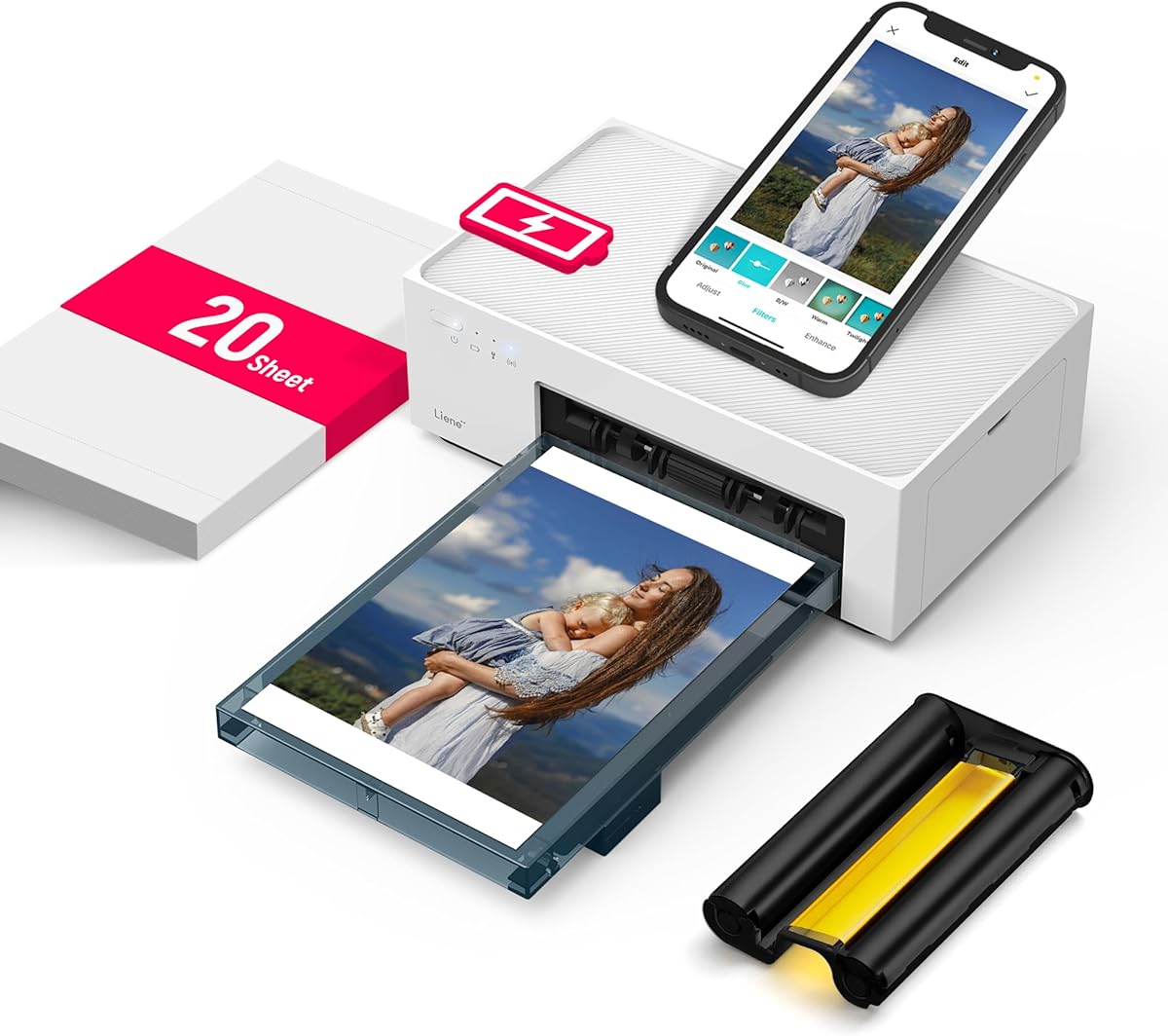
The Liene White M200 is the guide's leading portable photo printer, combining full-color 4×6-inch output with a rechargeable battery and a built-in Wi-Fi hotspot. Its 4.5 rating reflects a focused feature set for travelers, families, and anyone who wants to print images away from a home network.
We may earn a commission when you buy through this link, at no additional cost to you.
Dye sublimation applies the primary colors layer by layer, producing clear, vibrant photographs. The final layer is designed to improve resistance to water, scratches, and fading. The battery version can produce up to 40 prints per charge, while the magnetic top provides a convenient place to rest the photo cassette after printing.
The built-in hotspot is a major travel advantage because the printer can be reached over Wi-Fi without relying on a potentially unstable home network. It is compatible with iOS, Android, laptops, and PCs, and up to five users can connect simultaneously. The Liene app adds basic editing, filters, and borders, along with notifications when the ink cartridge or paper is running low.
The package includes 20 sheets of photo paper, one ink cartridge, and a power adapter. This printer is ideal for family events, baby milestones, celebrations, and travel memories. It is not the right choice for multipage office documents, and its dedicated photo format makes it less versatile than a mobile inkjet, but it delivers the strongest dedicated photo proposition here.
The integrated Wi-Fi hotspot allows several compatible devices to connect directly to the printer. That makes the M200 particularly useful in hotels, on vacations, and at gatherings where dependable router access may be unavailable.
Layered dye sublimation supports vibrant color, while the protective final layer is intended to improve durability against water, scratches, and fading. The result is better suited to keepsake photos than a standard monochrome mobile printer.
We may earn a commission when you buy through this link, at no additional cost to you.
Choosing the right battery powered portable printer requires balancing power capability, print technology, media restrictions, connectivity, and the kinds of documents or photos you need. The most important distinction is whether a color inkjet, a dedicated photo printer, or a monochrome thermal device best matches your routine.
True mobile operation generally requires either a built-in rechargeable battery or a clearly supported external battery system. The HP OfficeJet 250, HP OfficeJet 200, Epson Workforce WF-110, and Liene White M200 explicitly include rechargeable power, while the thermal products in this guide describe portable rechargeable designs. By contrast, the Canon PIXMA TR160 is compact and wireless but its supplied specifications do not identify an internal battery, so it should be treated as a portable printer that still needs a suitable power arrangement.
Check battery capacity, stated page count, charging time, and included accessories before purchasing. A model that lasts through several print sessions is more useful than one that only handles a short burst, especially for students, field workers, and travelers.
Color inkjets produce richer documents, graphics, and photographs but require ink or toner cartridges and are typically larger. Thermal printers use no ink, toner, or ribbons, making them compact and simple to maintain, but their output is monochrome and they accept special thermal paper rather than ordinary copy paper. The right choice depends on whether vivid color or simple, cartridge-free operation matters more.
Choose an inkjet for presentations, school projects, photo-like documents, or general printing. Choose a thermal printer for contracts, receipts, forms, notes, tickets, and other high-contrast black-and-white material you can source in compatible paper.
Portable printers are not automatically compatible with standard letter paper. The Gloryang and JADENS models support US Letter thermal media, the A285M supports several thermal widths, and the N80 handles US Letter, A4, folded, and tattoo transfer paper. The D90E is designed for compatible A4 thermal paper. In contrast, the OfficeJet and Epson inkjets use conventional inkjet systems, and the Liene M200 is dedicated to 4×6-inch photo media.
List the documents you actually print and verify every required size before buying. Also check whether ordinary paper, envelopes, cards, photographs, or labels are supported, because thermal restrictions can make a seemingly versatile printer unsuitable for a standard office workflow.
Mobile users generally want Bluetooth or Wi-Fi, while laptop and desktop workflows may depend on USB. The Canon supports app, AirPrint, Mopria, cloud, and Wireless Direct options. HP models use wireless setup, and the Liene M200 creates its own Wi-Fi hotspot. Several thermal printers support Bluetooth for phones but require a driver and USB-C cable for computers. The N80 explicitly does not support Bluetooth computer connections, and the D90E is not compatible with Chromebooks.
Match the connection method to your devices rather than assuming the word wireless applies to every platform. Download and app requirements should also be considered, particularly for computers, managed work devices, or users who want to print without cloud access.
Resolution matters most when text must remain legible in small fonts, forms contain fine lines, or an image needs to be recognizable. The JADENS and N80 thermal printers use 203 DPI, which is suitable for sharp monochrome documents and simple graphics. The Canon uses a five-color hybrid ink system for color detail, while the Liene M200 uses dye sublimation for full-color 4×6 photographs. The OfficeJet and Epson models are conventional color inkjets designed for general document output.
Consider the source material rather than relying on a single resolution number. Thermal devices are optimized for text and line art, while color inkjets and photo printers are more appropriate when appearance, shading, or photographic detail matters.
A printer that only prints is smaller and simpler, but a scanner and copier can save space in a mobile kit. The HP OfficeJet 250 combines all three functions with a battery, while the HP OfficeJet 200 focuses on printing in a smaller form. Thermal devices provide document and basic image output but do not offer the same scanning workflow. The Liene M200 concentrates on photos rather than multipurpose office functions.
Bring the size and weight of the entire device into your decision, including the paper, case, cable, and cartridge. A printer that fits the intended bag and can be operated with one hand may be more valuable than a technically broader model that is cumbersome to carry.
Thermal printers avoid ink, toner, and ribbon purchases, but they still require compatible paper. Inkjet models use cartridges, and the Epson specifically requires Genuine Cartridges under the stated warranty conditions. The Liene M200 includes an ink cartridge and photo sheets but produces only the dedicated 4×6 format. Glossy, heavier thermal media may also differ from ordinary paper in writing feel and archival behavior.
Consider more than the initial device cost. Estimate how often you will print, which supplies you can conveniently obtain, and whether color is truly necessary. Inkless operation is not completely supply-free, while a color inkjet's advantages may justify cartridge management for the right user.
A mobile printer normally depends on software to receive, preview, and format jobs. The supplied information mentions Canon PRINT, the HP app, Labelnize, Jadens Printer, Nada Print, and the Liene app. These tools may provide connection controls, document selection, editing, filters, design features, and supply warnings, but their requirements and platform compatibility should be confirmed before purchase.
Choose a printer whose app matches the devices and file types you use. If you need advanced document handling, check whether a laptop driver is required, and if privacy matters, determine whether jobs can remain on the local device rather than being uploaded to a cloud service.
Begin by fully charging the printer and installing the specified paper or photo supplies. Confirm that the battery is seated correctly, select the proper paper size in the app or driver, and perform a short test print before producing a full job. For thermal models, this means loading compatible rolls or sheets correctly; for the Liene M200, it means confirming that the ink cartridge and photo paper are properly installed.
Use the connection method designed for the device. Bluetooth is intended for many phone and tablet workflows, while USB and suitable drivers are commonly required for computers. The Liene M200's built-in hotspot offers a direct Wi-Fi route without a router. After each session, power down the unit, disconnect it, and store it in a dry place away from direct heat or prolonged sunlight.
For best results, use clean compatible media, avoid touching thermal paper excessively before printing, and change the selected size whenever you switch paper formats. Do not force paper through a jam. The D90E's power-button ejection method is a safer option, and all users should avoid opening the cover forcefully. Keep inkjet cartridges and genuine Epson ink requirements in mind, and allow the portable printer to rest if it becomes warm during sustained use.
A portable printer is designed to be compact or easy to carry, but it may still require connection to AC power. A battery powered portable printer includes a rechargeable power source that allows genuine untethered use. Always verify battery support in the specifications because a wireless or compact printer does not automatically operate without a cable.
They can be excellent for contracts, forms, receipts, worksheets, invoices, and other black-and-white documents. However, they generally require special thermal paper and cannot print on ordinary copy paper. They also do not provide the full color range of an inkjet or dedicated photo printer.
The Liene White M200 is purpose-built for 4×6-inch full-color photos and includes a rechargeable battery. It uses dye sublimation and has a built-in Wi-Fi hotspot, making it suitable for travel when no home network is available. Carrying sufficient compatible photo paper and the included ink cartridge remains important.
No, that is the central purpose of their rechargeable batteries. They can usually be charged at home or another location and then used for a number of sessions away from an outlet. Actual runtime varies with model, print volume, and workload, so check the stated battery and page estimates before a trip.
No. Direct thermal printers require compatible thermal media because the printing process uses heat to develop the image. Ordinary copy paper, regular inkjet paper, and other unsupported sheets will not work. The Gloryang, JADENS, A285M, D90E, and N80 each have specific media requirements that should be checked before ordering supplies.
The HP OfficeJet 250 is the clear multifunction choice in this group because it combines printing, scanning, and copying with a battery included. The HP OfficeJet 200 is smaller but focused on printing, while the thermal printers and Liene photo printer do not provide a comparable all-in-one office workflow.
Many can. The Canon offers Wireless Direct Mode, the HP models support setup with or without a router, and the Liene M200 creates a built-in Wi-Fi hotspot. Bluetooth serves as the direct mobile option for many thermal printers. Computer support varies, so check whether Bluetooth, an app, or a USB driver is required for the particular device.
Start with the required paper size, color needs, device types, and whether you need scanning or copying. Next, confirm battery runtime, charging accessories, app and driver requirements, and media availability. This avoids choosing an attractive but incompatible device that cannot handle the documents you regularly print.
The HP OfficeJet 250 is the strongest all-round choice for mobile productivity because it combines a rechargeable battery, wireless printing, scanning, and copying. The Liene White M200 takes the lead for full-color 4×6 photos, while the Epson Workforce WF-110 is a premium color inkjet with flexible charging and external battery support.
For monochrome documents, the JADENS thermal printer offers a compact rechargeable format, a 203 DPI display, and useful app functions. The Gloryang and A285M are practical alternatives when included accessories or multiple thermal widths matter. Prioritize genuine battery support, compatible paper, and the connection method used by your devices before comparing compactness.
Prices, availability, and bundle contents can change, so check the current listing before making a final decision. Read the product details for battery specifications, app requirements, included supplies, and media compatibility, and choose the printer that matches the documents you need rather than the model with the broadest specification list.
