
Crenova A4 Laminator
4.6Editor score
Hot and cold modes
A4 document capacity
Ten pouches included
Compact desktop design
A cold laminator machine protects documents and creative work without exposing originals to sustained heat. That makes it especially useful for old photographs, thermal receipts, labels, and heat-sensitive finishes, while manual or dual-mode alternatives can also handle ordinary school, office, and craft projects.
We compared the ten featured machines by examining cold-lamination capability, document width, roller or pressure system, included accessories, warm-up time, throughput, jam handling, portability, and intended workspace. The list covers manual, electric thermal, and dual-mode machines rather than assuming every buyer needs the same format.
Each pick highlights a distinct practical advantage, from no-electricity operation to large-format convenience and compact desktop design. Ratings and product details reflect the supplied listings, while availability and pricing can change, so confirm the latest specifications and current offer before making a purchase.
4.6Editor score

4.7Editor score

4.4Editor score
As an Amazon Associate we earn from qualifying purchases.
The table below compares all ten machines by their core capabilities, including the type of cold-lamination system, supported document width, power requirements, and included project tools. Several options require self-adhesive cold-lamination pouches that are not included with the machine.


The Scotch Cold Laminating System LS960 is a dedicated cold-laminating solution with a 4.4 rating. Its defining advantage is heat-free document finishing, making it attractive for originals that can be damaged by thermal processing. It also removes the need for an electrical outlet, allowing use in locations where powered equipment is inconvenient.
We may earn a commission when you buy through this link, at no additional cost to you.
The system uses an easy-loading 18-foot cartridge and includes five additional cartridges. That cartridge-based format gives the machine a professional, self-contained feel while keeping the operating process relatively straightforward. Since no heating element is involved, the system focuses on pressing a compatible laminating material onto the document without subjecting it to sustained heat.
The trade-off is that it is not the most automated choice in this guide. Unlike dual-mode electric laminators, the LS960 requires manual participation rather than offering a powered feed, automatic temperature control, or electronic warm-up cycle. It is also less versatile for routine thermal projects than machines that handle both pouch and self-adhesive methods.
Buyers working with heat-sensitive originals, conservation-minded projects, or temporary workstations should give this system serious consideration. It is especially compelling when avoiding electricity is a priority. For high-volume hot laminating or a broad classroom accessory set, one of the 13-inch electric models is more flexible.
Because the LS960 operates without heat, it is a sensible choice for photographs, labels, receipts, and other items that may react poorly to elevated temperatures. The heat-free approach is the machine's primary advantage over conventional thermal laminators.
Its no-electricity operation increases placement flexibility. The machine can support professional finishing at a workstation or other convenient location without requiring a dedicated outlet or powered desktop machine.
We may earn a commission when you buy through this link, at no additional cost to you.
The Qfun 13-Inch Laminator combines a 4.7 rating with unusually broad project support. It can laminate 11-by-17-inch posters, menus, and A3 documents, as well as smaller A4, A5, and A6 materials. Both hot and cold modes are available, giving it more range than a purely thermal desktop unit.
We may earn a commission when you buy through this link, at no additional cost to you.
One of the strongest features is the all-in-one design. The package includes a paper cutter, corner rounder, hole punch, binder rings, and 30 A3, A4, A5, and A6 laminating pouches. The accessories store inside the machine, helping reduce clutter while making it possible to trim, round, and punch materials immediately after lamination.
Performance specifications support frequent use. The stated warm-up is 60 seconds, and the listed speed is 450 millimeters per minute. NTC temperature control, dual rollers, a one-touch ABS jam-release button, and a 45-minute automatic shutoff round out the practical feature set. One limitation is that cold mode requires self-adhesive pouches, which are not included.
This is the most balanced recommendation for teachers, offices, small businesses, and serious craft users. It handles heat-sensitive work in cold mode but can also finish standard thermal projects. The broad 13-inch format and integrated toolkit reduce the need to purchase separate machines for trimming, rounding, or punching.
The integrated cutter, corner rounder, punch, rings, and stored pouches make this more than a basic laminator. It is well suited to users who prepare classroom sets, menus, craft pieces, and presentations as part of a larger finishing workflow.
A 13-inch feed path reduces the need to trim large documents, while the 60-second warm-up and 450mm-per-minute rating support productive use. These figures make the machine a practical option for repeatable batch jobs.
We may earn a commission when you buy through this link, at no additional cost to you.
The Crenova A4 Laminator is a compact desktop option with a 4.6 rating. It accepts documents up to A4 size and provides both hot and cold modes, giving users a practical option for ordinary school, office, home, and craft tasks without the footprint of a larger machine.
We may earn a commission when you buy through this link, at no additional cost to you.
Its 230-millimeter inlet accommodates A4 material, while the stated one-to-two-minute preheat period helps keep waiting time down. The package includes ten laminating pouches, a user manual, and an easy-to-read hot-or-cold switch. An ABS lever assists with paper removal if a jam occurs.
The machine measures 335 by 88 by 65 millimeters and weighs 742 grams, making it easy to carry or store. That portability comes with limits: it cannot accept 13-inch projects, and the listing does not include self-adhesive laminating sheets for cold mode. The compact feed path also makes it less suitable for large batches.
The Crenova is a strong recommendation for students, teachers, home crafters, and office users who primarily work with standard papers, photographs, cards, and certificates. It offers a more affordable way to access two operating modes while remaining easy to move and simple to operate.
Having both modes makes the machine useful beyond standard thermal pouches. Cold mode can protect old photos, documents, and other heat-sensitive items when paired with compatible self-adhesive laminating material.
At 742 grams and less than 34 centimeters long, the unit is easy to relocate between rooms or pack for use away from a fixed desk. Its small size is especially helpful in homes, classrooms, and shared offices.
We may earn a commission when you buy through this link, at no additional cost to you.
The VEVOR 29.5-Inch Manual Laminator is built for large-format cold work and carries a 4.5 rating. Its 29.5-inch width distinguishes it sharply from the compact A4 and 9-inch machines in this guide, making it relevant for oversized photographs, posters, signage, artwork, and professional mounting tasks.
We may earn a commission when you buy through this link, at no additional cost to you.
The all-metal construction is designed for stability and heavy-duty use. A hand crank provides controlled pressure through soft rubber rollers, while an adjustable roller position accommodates different material thicknesses. The folding table improves handling and storage, and four non-slip feet help keep the unit stable during cranking.
The absence of a power supply is both a strength and a limitation. Operators retain complete control without depending on an outlet, but throughput depends on manual effort and feeding consistency. The large work area also requires more room than a standard desktop laminator, and the 10-millimeter specification indicates that material capacity should be checked before a demanding job.
This machine is best for users who regularly laminate wide vinyl or photo film and prefer manual pressure. Studios, sign makers, and professional finishing operations may value its broad width and sturdy frame. People needing frequent short runs of standard A4 documents will usually find a smaller electric machine more convenient.
The 29.5-inch work width gives the machine a clear advantage for large-format photos, mounted prints, and advertising material. It is intended for projects that are too wide for conventional desktop laminators.
The hand crank lets the user control the rolling action directly, and the adjustable roller position supports different thicknesses. This mechanical approach is particularly useful for vinyl, photo film, and other cold-lamination materials.
We may earn a commission when you buy through this link, at no additional cost to you.
This 13-inch laminator offers a generous starting package and a 4.3 rating. It supports thermal and cold operation, accommodates A3, A4, A5, and A6 sizes, and is designed for common 3-mil and 5-mil thermal pouches. A 13-inch feed width allows large posters and 11-by-17-inch documents to pass through without prior trimming.
We may earn a commission when you buy through this link, at no additional cost to you.
The bundle includes 50 thermal laminating sheets distributed across several paper sizes, along with a paper cutter and corner rounder. That makes it appealing for a new user who wants consumables and finishing tools immediately available. The two-roller system applies heat and pressure in thermal mode, and the listed warm-up time is 95 seconds.
Cold mode again has a materials caveat: compatible self-adhesive pouches are required but not included. The machine's accessories are useful but less extensive than those in the Qfun and 13-inch 11-in-one kits, which include more tools such as punches and binder rings. Its 4.3 rating is also the lowest among the featured products.
Despite those limitations, it is a practical choice for first-time owners who want a wide machine and a large assortment of thermal pouches. It suits schools, offices, and home crafters producing posters, photographs, and documents. Shoppers willing to spend more for a broader integrated toolkit may prefer one of the more comprehensive 13-inch bundles.
The assortment lets users experiment with different document formats immediately. It reduces the need to make an additional consumables purchase before completing basic thermal projects.
A 95-second warm-up and 355mm-per-minute operating speed are useful for repeat jobs. The broad feed opening supports both smaller everyday papers and 11-by-17-inch sheets.
We may earn a commission when you buy through this link, at no additional cost to you.
The 13-inch 11-in-One Laminator combines a 4.6 rating with a broad accessory package and strong performance specifications. It is designed for teachers, offices, and home users who want to laminate and then trim, round, punch, and bind materials without keeping separate tools scattered across the workspace.
We may earn a commission when you buy through this link, at no additional cost to you.
The built-in compartment stores a paper cutter, corner rounder, hole puncher, three binder rings, and 30 pouches across A3, A4, A5, and A6 sizes. The machine has a 13-inch feed opening, a listed 60-second warm-up, and a stated laminating speed of 450 millimeters per minute.
Its dual-roller system and NTC temperature control are intended to regulate heat and pressure, while a 45-minute auto-shutoff adds safety. Cold mode accommodates heat-sensitive photographs, receipts, and labels, but requires self-adhesive pouches sold separately. The 11-in-one design also makes this machine more complex and potentially bulkier than a simpler laminator.
This model is especially suitable for busy classrooms and administrative offices that prepare a mix of posters, lesson materials, signs, and craft projects. The integrated tool set and one-touch jam release simplify workflow. For occasional users with limited storage needs, a smaller machine would provide a less crowded experience.
Storing the cutter, rounder, punch, rings, and pouches in the machine reduces desk clutter and keeps the workflow close at hand. It is a particularly useful design for classroom preparation and office project stations.
Hot mode supports routine documents, certificates, and menus, while cold mode gives heat-sensitive materials another route. The system also accommodates common 3-mil and 5-mil thermal pouches.
We may earn a commission when you buy through this link, at no additional cost to you.
The Scotch TL901X is a straightforward thermal laminator with a 4.7 rating. It is built for school, home, and office documents up to 9 inches wide and emphasizes a simple two-roller process rather than a broad collection of integrated project tools.
We may earn a commission when you buy through this link, at no additional cost to you.
Two heated rollers and two temperature settings are designed to create bubble- and wrinkle-free results with 3-mil and 5-mil pouches. The stated output is one letter-size page per minute, while a release lever allows the user to disengage a pouch quickly. Common applications include assignments, schedules, diplomas, flyers, photographs, and to-do lists.
Its most important limitation is that it does not offer cold mode. Buyers whose core requirement is heat-free protection should choose a dedicated cold system or dual-mode machine instead. The 9-inch width also makes it less suitable for 11-by-17-inch posters, and its focused design provides fewer accessories than the 13-inch kits.
For users who only need reliable thermal lamination of standard documents, the TL901X remains a clear and established choice. Its simple control scheme, compact format, and compatibility with common pouches make it well suited to dorm rooms, classrooms, and home offices with routine document-protection needs.
The two heated rollers provide controlled heat and pressure, while two temperature settings provide flexibility. This focused design is well suited to frequently handled school papers, photos, and office documents.
The machine accepts standard 3-mil and 5-mil pouches up to 9 inches wide. Buyers who already prefer compatible pouches may find the setup especially familiar and straightforward.
We may earn a commission when you buy through this link, at no additional cost to you.
The YE381 13-inch laminator offers thermal and cold modes, a broad feed width, and a useful cutting system. Its 4.3 rating places it among the lower-rated options here, but the machine's combination of size, tools, and document compatibility remains useful for many home, office, and school environments.
We may earn a commission when you buy through this link, at no additional cost to you.
The 13-inch opening supports A3, A4, and A6 documents, ranging from business-card-sized pieces to larger project sheets. Its double-roller system is designed for smooth results and lower operating noise, while a stated speed of 250 millimeters per minute gives users a clear expectation for batch production.
The built-in rotary paper trimmer offers straight, perforated, and wave patterns, with grid lines and a removable metal bar. A corner rounder and 50 pouches are also included. An ABS button helps release stuck pouches, and temperature control supports both thermal and cold operation, although cold mode still depends on the correct self-adhesive supplies.
This is a good choice for users who value a built-in trimmer and quieter operation as much as raw speed. It works particularly well for classroom posters, presentation materials, photographs, and general document protection. Those who need faster throughput may prefer a 13-inch model rated at 450 millimeters per minute.
The integrated trimmer supports straight, perforated, and wave cuts. That versatility reduces the need for separate finishing tools when preparing cards, classroom displays, and presentation materials.
The double-roller system is designed for smooth feeding with lower noise. It may be particularly suitable in shared rooms, offices, and learning spaces where a quieter machine is appreciated.
We may earn a commission when you buy through this link, at no additional cost to you.
This portable 9-inch Thermal Laminater is a compact dual-mode machine with a 4.6 rating. It handles documents up to A4 size and provides cold mode for stickers, older photographs, and fragile items, while hot mode covers ordinary papers, photos, and certificates.
We may earn a commission when you buy through this link, at no additional cost to you.
The machine takes three minutes to warm up, which is longer than the 60- or 95-second cycles claimed by several 13-inch models. Its advertised strengths are quiet operation, a lightweight portable design, and an ABS jam-release button. The product is positioned for teachers, students, parents, and home crafters who need a compact station.
Cold mode requires self-adhesive laminating sheets, which are not included. The manufacturer recommends 3- to 4.5-mil thermal pouches for best results, and users are advised to enter sealed edges first. As with other compact laminators, the 9-inch feed path cannot handle wide poster-size work.
The product is a good fit for smaller documents, photographs, classroom worksheets, and heat-sensitive keepsakes. It is particularly appealing where space and quiet operation matter more than high-volume speed. Buyers who routinely create 11-by-17-inch projects should choose a 13-inch model instead.
The cold setting gives old photographs, stickers, and fragile documents an alternative to thermal lamination. Compatible self-adhesive sheets are required for this function and should be obtained separately.
Its compact, portable form makes it easy to use on a desk, store in a drawer, or move between a classroom and home. The small footprint also makes it suitable for individual projects rather than production runs.
We may earn a commission when you buy through this link, at no additional cost to you.
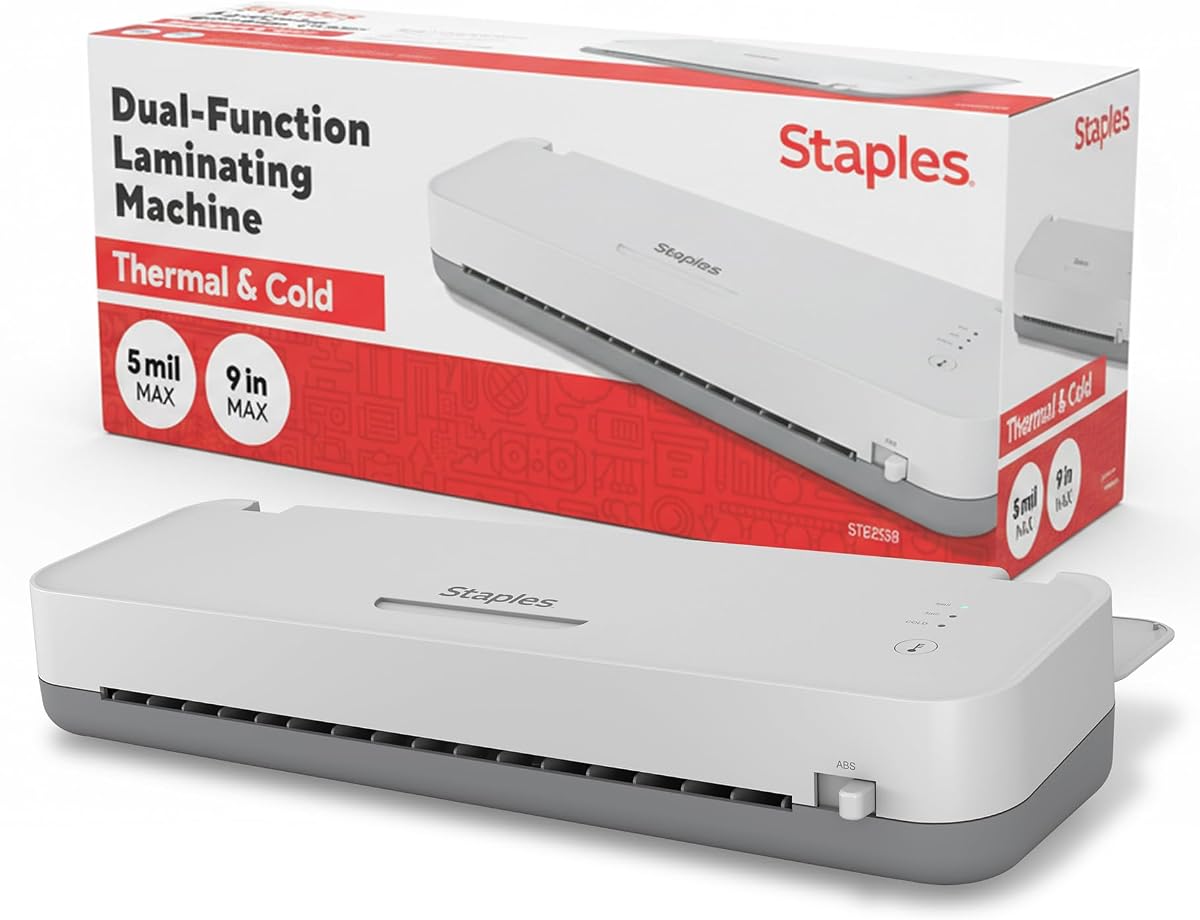
The Staples 12.9-inch Thermal and Cold Laminating Machine combines a 4.7 rating with a wide 13-inch throat. It is intended for office, school, and business use where documents, presentations, signs, and larger project sheets need to pass through without being reduced to standard letter size.
We may earn a commission when you buy through this link, at no additional cost to you.
Its two operating modes support both conventional thermal laminating and pressure-based cold work. Two rollers provide a seal, while reverse jam prevention is intended to reduce interruptions during long jobs. The stated throughput reaches 12 inches per minute, and the warm-up period is listed at three to five minutes.
The longer warm-up is less appealing than the one-minute cycles highlighted by some competing 13-inch products. This model also focuses on laminating rather than bundling cutters, corner rounders, punches, and rings. Users requiring a complete desktop finishing center may find a more integrated package a better fit.
The Staples is a strong recommendation for offices and professional environments that prioritize wide capacity, dependable dual-mode operation, and high throughput. It suits users who already own separate trimming tools or need to protect large materials consistently. For compact home projects, a smaller A4 machine will be easier to manage.
The 13-inch throat is appropriate for large menus, posters, signs, and presentation pieces. It offers more flexibility than compact 9-inch and A4 laminators without moving into manual large-format systems.
Two rollers create the sealing pressure, while reverse jam prevention is designed to keep long jobs moving smoothly. The listed 12-inch-per-minute speed supports productive office workflows.
We may earn a commission when you buy through this link, at no additional cost to you.
The right cold laminator depends on the originals you protect, the sizes you finish, the tools you already own, and how much control you need over pressure and feeding. These factors help separate dedicated cold systems from compact dual-mode and large manual machines.
A machine advertised for cold lamination should explicitly support heat-free operation, either as its only mode or as a selectable alternative to thermal lamination. This matters for old photographs, thermal receipts, labels, certain inks, and other materials that may discolor, warp, or otherwise react to heat. A purely thermal machine should not be considered a cold laminator even if it can use some self-adhesive films.
Choose a dedicated cold system for heat-free work, or a dual-mode electric model when you also want ordinary thermal laminating. Check whether the machine uses heat-activated pouches, self-adhesive pouches, or another pressure-based method, and confirm whether compatible cold supplies are included.
Document width is one of the most consequential choices. Compact A4 and 9-inch machines suit letters, photographs, cards, certificates, and classroom pages, while 13-inch models accept A3 and 11-by-17-inch materials. The VEVOR manual machine goes much wider at 29.5 inches, making it relevant to oversized photo film, posters, and professional mounting.
Choose based on your largest regular project rather than an occasional theoretical maximum. A machine that forces you to trim every document may waste time and material, whereas an oversized machine can occupy more workspace than a home user needs.
Manual systems offer direct control, no electrical requirement, and straightforward pressure. The VEVOR machine uses a hand crank and adjustable roller position, while the Scotch LS960 uses an easy-loading cartridge. These can be excellent for controlled workflows but demand more active participation than an electric feed.
Powered laminators automate insertion, apply consistent roller pressure, and are usually easier for frequent short jobs. Consider warm-up time, stated sheet speed, roller count, and whether the controls are understandable. A faster machine is most valuable when you regularly process batches rather than a single item.
Bundled pouches, paper cutters, corner rounders, hole punches, and binder rings can make a new laminating setup immediately useful. The Qfun and 13-inch 11-in-One models store a broad toolkit inside the machine, while the five-in-one and YE381 options include simpler cutting packages with generous pouch assortments.
Do not pay attention only to the number of advertised features. Consider whether the included accessories match your actual workflow. Someone who already owns a reliable trimmer and punch may prefer a simpler machine, while a teacher preparing complete classroom kits can gain real convenience from organized accessories.
Pouch thickness, sealing method, and size determine whether a machine can create the finish you want. Many featured units support common 3-mil and 5-mil thermal pouches, while the compact thermal laminater recommends a 3- to 4.5-mil range for best results. Dedicated cold systems may use special cartridges or pressure laminating film.
Look for a machine that accepts the supplies you can readily obtain. Before ordering a dual-mode unit, verify whether cold mode uses self-adhesive sheets and whether those sheets are included. This prevents a frustrating mismatch between the advertised feature and the materials on hand.
Warm-up time matters when documents must be finished at short notice. The Qfun and 13-inch 11-in-One models list 60-second warm-ups, the five-in-one model lists 95 seconds, and the portable 9-inch model lists three minutes. The Staples unit falls between three and five minutes, while the dedicated manual and cartridge systems do not rely on an electric heating cycle.
Compare warm-up alongside the stated processing speed. The Qfun and 11-in-One systems list 450 millimeters per minute, the five-in-one model lists 355 millimeters per minute, and the YE381 lists 250 millimeters per minute. For occasional use, convenience may matter more than peak throughput.
A jam can damage a document and interrupt a project, so easy release mechanisms deserve attention. Most electric models in the guide feature an ABS jam-release button or lever, while the Staples machine emphasizes reverse jam prevention. Always switch off the machine before using a release control, and never pull a trapped pouch forcefully.
Other useful safeguards include a clear warm-up indicator, automatic shutoff, stable non-slip feet, and a protective housing. These features do not guarantee flawless output, but they make routine operation more controlled and reduce the consequences of common mistakes.
A large-format machine can create a professional workflow, but it also demands storage room. The Crenova weighs 742 grams and is designed for easy carrying, while the portable 9-inch unit similarly targets desks, drawers, and shared workspaces. The 13-inch models occupy substantially more space, and the VEVOR manual system adds a large hand-cranked footprint.
Consider where the machine will live, whether it needs to travel, and how often it will be used. A compact model is often more practical for occasional home work, whereas a wide machine becomes worthwhile when large-format jobs are routine enough to justify the additional space.
Begin by identifying the correct material for the selected mode. Use compatible thermal pouches in hot mode and the manufacturer's specified self-adhesive sheets or cold-laminating material in cold mode. Clean and flatten the original, remove dust and debris, and make sure the item is centered within the feed width. For a pouch system, seal the pouch completely before insertion.
For an electric machine, place it on a stable, level surface, plug it in securely, and wait for the warm-up indicator before feeding a document. Feed the sealed edge first and keep the original aligned as the rollers pull it through. Do not pull or tug a moving sheet, and never place fingers near the rollers. Manual machines should be loaded evenly and operated with smooth, consistent cranking pressure.
If a jam occurs, stop the machine or disengage the feed, use the ABS release control where available, and remove the pouch without force. Allow heated components to cool as directed before cleaning. Wipe rollers gently with an appropriate dry or lightly damp cloth, keep hair and dust away from the intake, and store pouches flat in a clean, dry area away from excessive heat.
A cold laminator applies protective film using pressure rather than sustained heat. It is useful for heat-sensitive originals such as old photographs, thermal receipts, labels, and certain printed or painted surfaces. The exact cold process varies by machine, so users should follow the included instructions and use compatible laminating materials.
Yes, several featured machines offer both hot and cold modes. Thermal mode uses heat-activated pouches for everyday documents, while cold mode applies pressure with compatible self-adhesive sheets. These cold materials are generally not included, so buyers should verify the required pouch type and purchase supplies separately.
A 13-inch model is appropriate for A3 and 11-by-17-inch posters because those materials exceed the capacity of most 9-inch or A4 machines. However, the 29.5-inch VEVOR manual model supports much larger work. Choose according to your most common project size rather than the largest possible item.
Manual machines give the operator direct control over feeding and pressure and can operate without electricity. Electric models are usually faster, easier to use for short jobs, and better suited to batches. The best choice depends on project volume, workspace, personal preference, and how much control you want over each sheet.
Common causes include misaligned pouches, damaged or incorrectly sealed edges, material that is too thick, and attempting to laminate incompatible items. Feed sealed edges first and use recommended pouch thicknesses. If a jam occurs, stop the machine, use the release button or lever if provided, and remove the material without pulling forcefully.
Cold lamination is often preferable for valuable or heat-sensitive material because it avoids thermal exposure. Even so, test a less important duplicate first, confirm that the original is dry and clean, and use compatible supplies. A dedicated system such as the heat-free Scotch LS960 is designed specifically around this need.
Usually not. The supplied thermal pouches are intended for hot mode, while cold mode generally requires self-adhesive laminating sheets or another pressure-based material specified by the manufacturer. Check the packaging and manual, and purchase the correct cold supplies before beginning a project.
Let the machine cool fully, disconnect it if applicable, and wipe loose dust from the intake and rollers. Store the laminator on a stable surface where it will not be knocked or exposed to moisture or excessive heat. Keep unopened pouches flat and clean, and follow any storage guidance included with the product.
The Scotch LS960 is the clearest choice for dedicated heat-free finishing, offering cartridge-based operation without electricity. The Qfun 13-inch machine is the most versatile overall, while the compact Crenova model offers an accessible entry point for standard documents and heat-sensitive projects.
Prioritize compatibility with the originals you intend to protect, then choose a feed width that matches your typical work. A dedicated cold system is ideal for avoiding heat, a dual-mode electric model provides the broadest everyday utility, and a manual wide-format machine serves specialized oversized finishing needs.
Before ordering, check the latest listing details, included supplies, warm-up time, and current availability. Product features and pricing can change, and buying the correct cold-lamination material is just as important as choosing the machine itself.