
Meross Smart Home Energy Monitor
4.3Editor score
Local Home Assistant control
Five-year data storage
Solar surplus automation
Discover the best Energy Consumption Monitors for PC, comparing accuracy, displays, smart features, circuit coverage, and ease of setup.
Energy Consumption Monitors for PC range from simple outlet meters to sophisticated systems that track individual circuits, remote access, and changing electricity costs. The right monitor can reveal how much energy a computer, peripheral, or gaming setup consumes while helping identify expensive standby loads or inefficient components.
We compared all ten products by examining their measurement functions, display options, safety features, connectivity, circuit-level monitoring, data storage, and compatibility with typical PC equipment. The list includes affordable plug-in watt meters, app-connected smart plugs, and full-panel energy monitors for users who want a broader view of household electricity use.
Each pick below highlights the type of PC energy measurement it supports most effectively, along with important trade-offs. Ratings and product details reflect the supplied information, while availability, features, and pricing can change, so readers should confirm current specifications before making a purchase.
4.3Editor score

4.6Editor score

4.6Editor score
The comparison below covers outlet-level, smart-plug, and panel-mounted monitors, highlighting the measurement scope, connectivity, safety features, and historical-data options that matter most when evaluating energy use from a PC or surrounding electronics.


The Emporia Vue 3 is the strongest all-around option in this guide for users who want more than a single socket reading. It receives a 4.6 rating and combines real-time whole-home monitoring with sixteen branch sensors, allowing a PC workstation or nearby connected circuit to be evaluated alongside other household loads. Its UL-listed status adds a meaningful layer of assurance for an electrical installation.
We may earn a commission when you buy through this link, at no additional cost to you.
The supplied data highlights sensor accuracy within ±2%, app-based live reporting, and flexible data retention. One-second readings are available while the app is open, while minute and hour data are retained in the cloud for longer-term analysis. The Vue also supports automation for time-of-use rates, peak demand, excess solar, and rewards programs, making it useful for reducing or shifting consumption rather than merely observing it.
Circuit-level intelligence is the major advantage, but it also makes installation more demanding than plugging in a meter. The system supports common single-phase and split-phase configurations, with three-phase support depending on panel type and an additional sensor sold separately. Screw terminals can be trimmed to reduce panel clutter, but users without suitable electrical experience should avoid opening and modifying a live panel without qualified assistance.
This is the best recommendation for a serious PC energy enthusiast who also wants whole-home visibility, automation, and solar awareness. Those who only need to check one gaming PC can get a simpler and less invasive solution, but the Vue 3 provides the most comprehensive monitoring platform in this roundup for users prepared to install it correctly.
Sixteen included 50A sensors can distinguish major household loads, making it easier to determine whether a computer, air conditioner, water heater, or another circuit is responsible for a power increase. This produces far more useful information than a basic outlet meter when diagnosing changing energy use across a room.
The app can act on time-of-use schedules, peak demand, excess solar, and reward programs. Users can therefore turn monitoring into operational control, shifting flexible PC workloads or other appliance use toward periods that better match their electricity plan.
We may earn a commission when you buy through this link, at no additional cost to you.
The Upgraded Watt Power Meter Plug is a capable socket meter for measuring a gaming PC, monitor, server, or other connected device. Its 4.6 rating reflects a generally well-received product, while the combination of live electrical data, overload protection, and a sizeable backlit display makes it more versatile than a basic consumption indicator.
We may earn a commission when you buy through this link, at no additional cost to you.
Seven display modes cycle through power, cumulative energy, voltage, current, frequency, power factor, cost, minimum and maximum power, and operating duration. The screen measures 2.36 by 1.85 inches and is designed to remain readable across a 180-degree viewing angle. Backlight timing can be adjusted from ten minutes to one hour, four hours, eight hours, or continuously on.
Its overload threshold is adjustable from zero to 3,680 watts, and the display clearly warns when the connected load exceeds the selected level. The meter also preserves data when unplugged or if power fails unexpectedly. One limitation is that it measures only the connected load rather than providing an app, remote access, or whole-circuit history.
Choose this meter when you want a broad set of electrical readings without committing to a smart system. It is especially appropriate for testing a PC during gaming, rendering, benchmarking, or idle periods, then comparing those results with more efficient components. It is less appropriate for users who need continuous remote tracking or automatic scheduling.
Showing watts alongside volts, amps, frequency, and power factor gives a clearer explanation of system behavior than power alone. A user can compare idle and peak draw while learning how the PC's power supply and connected peripherals affect overall consumption.
An adjustable warning threshold helps protect the monitoring setup from excessive load. The meter alerts users before sustained consumption reaches the configured limit, although the appropriate setting depends on the connected equipment and the instructions supplied with the product.
We may earn a commission when you buy through this link, at no additional cost to you.
The SURAIELEC Outlet Watt Meter combines a wide electrical range with unusually long data retention. It has a 4.5 rating and is particularly interesting for PC users who want to leave a meter connected to a workstation and review power, energy, cost, and maximum or minimum demand over a prolonged period.
We may earn a commission when you buy through this link, at no additional cost to you.
Its measurement range covers 90–250 volts AC, zero to 16 amps, and zero to 3,680 watts. The stated Class 1.0 accuracy standard is supported by resolutions of 0.1 watt, 0.1 volt, 0.001 amp, and 0.001 kilowatt-hour. Users can also configure overload indication and energy rates, allowing calculated costs to better reflect their utility tariff.
The rechargeable battery backup is a standout feature because it can preserve data for up to 90 days during outages or while unplugged. Its compact construction is also practical around PCs because it leaves the lower socket accessible. As with other standalone meters, it cannot be queried remotely, and all analysis depends on its own display rather than a connected dashboard.
This is a good recommendation for users who want durable records without an app dependency. It can help determine whether a desktop, monitor, or game console follows a repeatable usage pattern. Buyers seeking remote access, automation, or circuit-level detail should instead consider one of the smart or panel-mounted systems.
The built-in rechargeable backup preserves measurements when the plug loses power. That makes the meter useful for long studies in which a sudden outage would otherwise erase the context needed to interpret a PC's consumption pattern.
Power, energy, current, voltage, frequency, power factor, and maximum or minimum demand appear on a backlit wide-angle display. The fine resolution provides useful detail for comparing normal operation, bursts of activity, and low-power states.
We may earn a commission when you buy through this link, at no additional cost to you.
The Meross Smart Home Energy Monitor stands apart with local-control, long-term tracking, and tight stated accuracy. Its 4.3 rating is slightly lower than those of several plug-in alternatives, but the supplied specifications make this a premium option for technically capable users who value privacy and Home Assistant integration.
We may earn a commission when you buy through this link, at no additional cost to you.
The monitor tracks power, voltage, current, and power factor within ±1% accuracy, while charts can break consumption down by minute, hour, day, month, or year. It stores up to five years of data and permits hourly report exports. Two main-circuit sensors and sixteen branch sensors provide enough granularity to isolate a PC, office, gaming room, or other recurring load.
The local-data model is the defining benefit. By connecting with Home Assistant, users can keep energy information on their own system without cloud delays, subscriptions, or a cloud lock-in, while the Open API and web controls support more advanced setups. Solar-surplus detection can also coordinate high-use devices such as water heaters and EV chargers with available generation.
This is the pick for a smart-home enthusiast who wants precise circuit-level control without sending detailed household energy data to a cloud service. It is less convenient for a simple outlet measurement, and users with basic wiring knowledge may find its installation and configuration more involved than a plug-in meter.
Home Assistant support allows the energy data to remain local, reducing dependence on remote services. Open API and web control features also make the monitor approachable for users who want deeper control over dashboards, alerts, and automations.
When paired with Home Assistant, the system can identify solar surplus and automatically direct power toward compatible high-use appliances. For PC owners with substantial renewable generation, this turns measurement into a more responsive energy strategy.
We may earn a commission when you buy through this link, at no additional cost to you.
The SEM-Meter Energy Monitor is especially relevant to shared spaces, rental homes, and home offices where transparent circuit allocation matters. Its 4.4 rating is supported by flexible panel compatibility, sixteen included branch sensors, and a privacy mode that can keep all energy data on a local network.
We may earn a commission when you buy through this link, at no additional cost to you.
Real-time usage is available through the app over 2.4 GHz Wi-Fi, with a stated accuracy range of 1%. Historical views cover current, daily, weekly, monthly, and yearly periods. Hourly exports remain available for 90 days, while day, month, and year data can remain available indefinitely. Time-of-use templates can include peak, off-peak, and holiday rates.
The standout application is allocating power among bedrooms, common areas, office equipment, and EV chargers without installing separate utility meters. Its MQTT privacy mode can operate on a local network without the vendor cloud or app, although Home Assistant with MQTT is required. A separate bundle is available for a light-commercial three-phase setup.
Choose SEM-Meter when the goal extends beyond measuring a single PC to understanding and assigning costs across multiple circuits. Property managers and shared-apartment residents may find its rate templates especially useful. It is less convenient than an outlet meter for a quick desktop test, but its automation and allocation capabilities are considerably broader.
Customizable peak, off-peak, and holiday pricing templates translate circuit activity into estimated costs. That makes it easier for landlords, roommates, or shared-office administrators to understand which area or device is responsible for higher consumption.
The Super Privacy Mode runs through the user's own MQTT server and local network. It supports privacy-conscious monitoring and continued operation without internet access, provided the required local infrastructure is configured.
We may earn a commission when you buy through this link, at no additional cost to you.
The HBN Watt Meter Plug is a simple, highly readable solution for checking the energy use of a PC, monitor, console, or peripheral. It has a 4.6 rating, a straightforward outlet form factor, and nine display modes that provide useful electrical information without requiring an account, app, or network connection.
We may earn a commission when you buy through this link, at no additional cost to you.
The display cycles through active power, apparent power, cumulative kilowatt-hours, usage time, frequency, power factor, voltage, current, and electricity cost. A backlit LCD with a 160-degree viewing angle makes values easier to inspect from different positions, and the light switches off after 15 seconds to conserve energy.
Cumulative data is stored in the event of a sudden power outage, allowing users to continue a consumption study after an interruption. The plug is rated for 125 volts AC at 60 hertz and up to 15 amps, with a maximum resistive or tungsten load of 1,875 watts. Users can reset cumulative readings by holding the reset control.
This is the best budget choice for most PC users who need a dependable, immediate answer about one outlet's consumption. It lacks the remote graphs and scheduling of the smart options, but that simplicity makes it easier to use and less dependent on software. It works particularly well for comparing a desktop's idle, gaming, and workload states.
The single-button interface and backlit display make the meter easy to check during normal use. Users can rotate through the most relevant values without learning a complicated dashboard or maintaining a connected software ecosystem.
Because cumulative readings survive an outage, users can leave the meter in place during a longer test. Its outlet-based design also makes it convenient to move between the PC, a monitor, and other electronics for direct comparisons.
We may earn a commission when you buy through this link, at no additional cost to you.
The KETOTEK Watt Meter Plug has the highest numerical rating in the group at 4.7, making it an attractive pick for PC users who want detailed, immediate measurements. It supports active and apparent power, true RMS voltage and current, frequency, power factor, minimum and maximum power, accumulated energy, cost, and total operating time.
We may earn a commission when you buy through this link, at no additional cost to you.
Its one-button layout assigns separate controls to common measurement groups. The meter is specifically described as suitable for computers, game consoles, printers, TVs, refrigerators, washing machines, dryers, and routers, giving it a broad range of household uses beyond a desktop tower.
Protection extends beyond a simple overload message. The LCD can display Overload, KWh ALARM, or COST ALARM, with the indicator flashing continuously, allowing users to set limits for power, cumulative energy, and cost. Data remains stored during a power failure, and the reset function can clear measurements while preserving settings when switching between appliances.
The KETOTEK is best for hands-on users who want rich electrical detail and adjustable warnings without an app. Its broad set of controls and alarms makes it particularly useful for repeated tests across a PC setup. Those wanting remote access, historical charts, or automatic scheduling will find the smart and panel systems more suitable.
True RMS voltage and current readings can be especially valuable when comparing modern computer power supplies, variable-frequency components, and other electronics with changing loads. The additional power factor reading helps users look beyond total watts.
Separate alerts cover instantaneous overload, cumulative kilowatt-hour use, and cost. These thresholds let a user define practical boundaries for a workstation rather than relying on a single generic warning.
We may earn a commission when you buy through this link, at no additional cost to you.
The two-pack watt meter configuration is a practical choice for PC users who want to compare two devices at once. It includes two outlet monitors, each with a 4.6 product rating, eight display modes, a backlit screen, overload protection, and automatic data preservation.
We may earn a commission when you buy through this link, at no additional cost to you.
Each meter tracks power, cumulative electricity, voltage, frequency, current, power factor, energy unit price, and total cost. This range makes the set useful for measuring a desktop against its monitor, comparing a gaming system with a more efficient workstation, or checking two components on separate circuits.
The default overload threshold is 1,800 watts, and the display and backlight flash when that threshold is exceeded. The housing is made from ABS material described as fireproof and anti-drop, while the US-standard plug and socket support familiar household connections. The backlight operates only while connected to AC power and switches off automatically after ten minutes without a button press.
This set is best for controlled comparisons rather than broad home monitoring. It provides a more efficient way to evaluate two PCs or peripherals at once, although the meters do not synchronize their readings into one remote dashboard. Cumulative energy, cost, unit price, and settings are saved after removal or a sudden outage.
Using one meter on a baseline system and another on a comparison build reveals relative consumption under similar conditions. This is particularly useful when deciding whether an upgrade offers meaningful efficiency gains rather than merely different performance.
Flashing the backlight and OVERLOAD message draws attention to a sustained load above the configured threshold. The warning is easy to notice, helping users disconnect the connected device when consumption reaches the meter’s limit.
We may earn a commission when you buy through this link, at no additional cost to you.
The P4400 Kill A Watt focuses on a clear task: connecting to an appliance, measuring efficiency, and calculating electricity use. Unlike the app-oriented models in this guide, it offers a large LCD and straightforward time-based views without remote connectivity. No numerical rating was supplied for this listing, so its evaluation relies on the documented functions.
We may earn a commission when you buy through this link, at no additional cost to you.
Users can select views for daily, weekly, monthly, or yearly consumption, and the meter calculates estimated electricity expenses over those periods. Its large display counts kilowatt-hours, making it suitable for users who want an understandable total rather than a dense collection of real-time electrical parameters.
Compatibility is limited to 115-volt AC appliances, and the product is designed to work with inverters. It is therefore more relevant to standard North American household equipment than to broad international voltage systems or modern USB-C-only peripherals. Its strengths are clarity and focused energy accounting rather than extensive automation.
The Kill A Watt is a good option for users who want an uncomplicated way to evaluate a desktop, monitor, or appliance and understand its estimated expenses. It does not provide the richer electrical analysis, alerts, or remote history found in the more advanced options, but its direct presentation remains useful for straightforward household energy checks.
The display centers on kilowatt-hour consumption and estimated expenses, with selectable day, week, month, and year periods. That focused format helps users understand total use without learning a complicated collection of technical modes.
The meter is intended for 115-volt AC appliances and compatible inverters. Users should verify that a device operates within those specifications before relying on the reading for a PC or peripheral.
We may earn a commission when you buy through this link, at no additional cost to you.
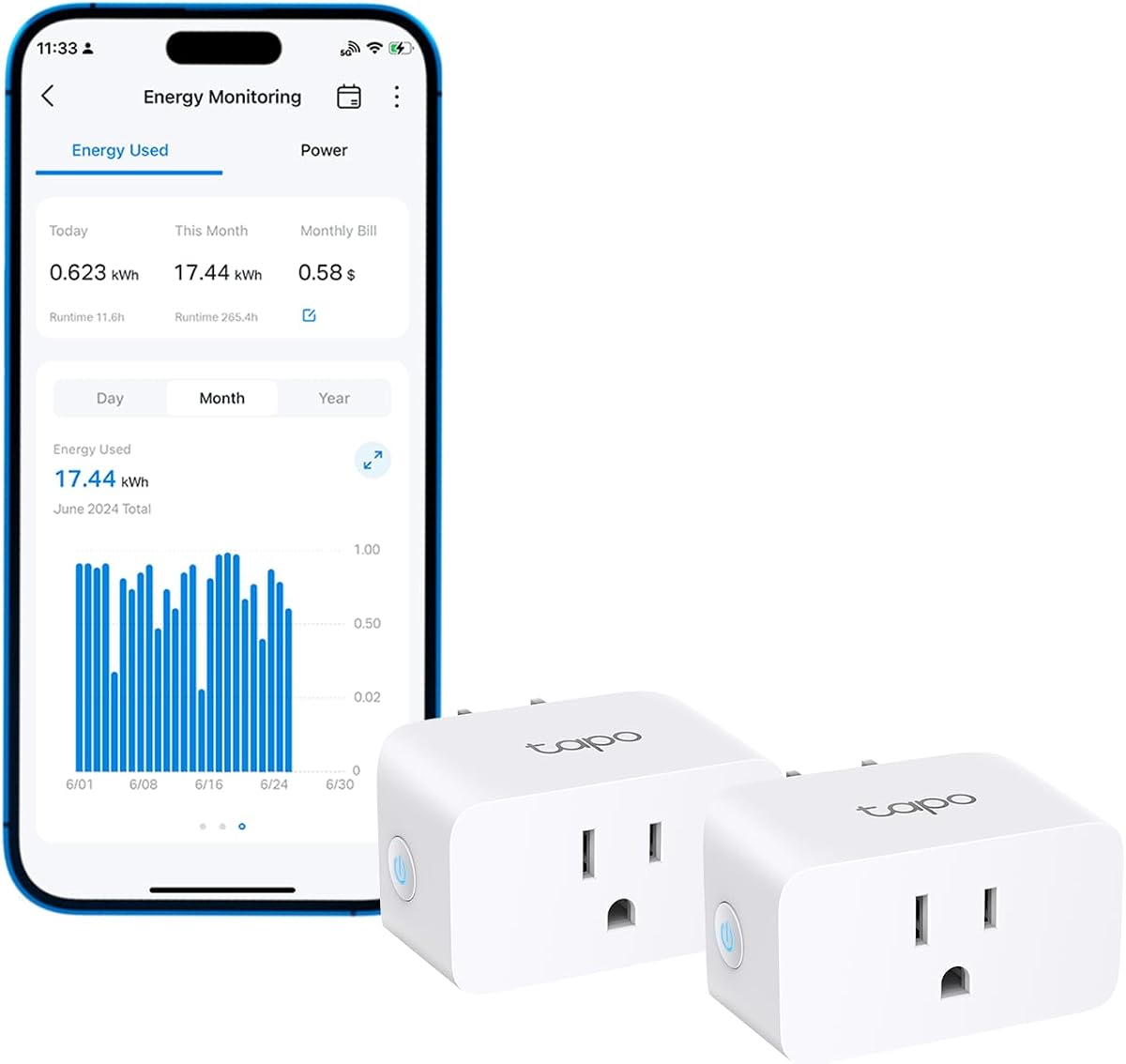
The Tapo P115 two-pack is the most approachable connected option for PC users who want to check energy remotely and automate when devices operate. It carries a 4.5 rating, supports clear app-based statistics and charts, and includes two 15-amp smart plugs for measuring separate pieces of equipment.
We may earn a commission when you buy through this link, at no additional cost to you.
The app can integrate energy information with billing systems for single and periodic readings, while programmable schedules allow high-consumption devices to run during off-peak periods. Users can also set a low-battery limit for compatible charging devices, automatically cutting power when the threshold is reached to prevent continued charging.
Safety and convenience come from automatic shutoff when a connected load is too high, along with remote control through the Tapo app. Built-in support for Alexa and Google Assistant adds another way to manage connected devices. Unlike a panel monitor, however, it observes only the appliances attached to each smart plug.
This is the best recommendation for someone who wants ongoing PC energy visibility without installing a circuit sensor. It is particularly useful for a primary workstation and a secondary system, allowing both to be observed over time. Users wanting full household allocation or local-only data should consider one of the panel-mounted alternatives instead.
The Tapo app turns individual plug readings into clear statistics and intuitive charts. A PC owner can compare consumption from different days, identify whether a workload raises demand, and review trends without approaching the outlet.
Programmable operation can move suitable device use into off-peak periods, while automatic shutoff responds when consumption becomes excessive. These features make the plugs more active energy-management tools than basic display-only meters.
We may earn a commission when you buy through this link, at no additional cost to you.
The best Energy Consumption Monitors for PC depends on whether you need one outlet reading, remote charts, or circuit-level visibility. Consider measurement scope, electrical compatibility, data retention, safety features, automation, and installation complexity before choosing.
An outlet meter measures only the device connected to it, which is ideal for comparing a desktop tower, monitor, console, or peripheral. A circuit monitor uses sensors around panel conductors to estimate the consumption of larger areas or individual branch circuits. The latter provides broader context and can isolate a PC that shares a circuit with other equipment, but it requires a more involved installation and compatibility check.
Useful monitors display watts, kilowatt-hours, volts, amps, power factor, and sometimes frequency. Kilowatt-hours are the key unit for comparing consumption over time, while power reveals instantaneous demand. The featured products claim accuracy standards or tolerances ranging from ±1% to ±2%, while some outlet meters identify Class 1.0 accuracy. Compare those specifications carefully, especially if you intend to use the data for hardware efficiency decisions.
A connected monitor can maintain historical charts, send threshold alerts, expose real-time data from another room, and schedule operation around off-peak periods. Most smart products require compatible Wi-Fi, commonly 2.4 GHz, and an app. Local-control alternatives can suit users who want Home Assistant integration, an Open API, or no dependence on a vendor cloud, although they require more technical configuration.
Historical data helps distinguish a temporary spike from a persistent efficiency problem. Standalone meters may retain only the latest cumulative values, while smart products can offer minute, hour, daily, monthly, and yearly views. Export functionality is also valuable for comparing upgrades or sharing results. Review retention periods carefully, because some products preserve detailed data temporarily while keeping only longer summaries indefinitely.
Check voltage, current, wattage, frequency, and plug format before connecting a meter. Most outlet products in this guide target standard US-style outlets, while one supports a wider 90–250-volt range. Circuit-level products must match the panel's phase and neutral arrangement, and some three-phase configurations require different sensors or bundles. Also verify the rated load against high-power computer equipment, displays, and peripherals.
Overload protection is useful when a meter is connected to a demanding workstation or appliance. Many outlet models display a warning and flash an indicator when a configurable wattage threshold is exceeded. Smart plugs may shut the outlet off automatically, while panel systems should carry appropriate electrical safety certification. UL, ETL, or equivalent certification provides better assurance than an unspecified enclosure alone.
A backlit LCD, wide viewing angle, and readable digits make a meter more useful when it sits near a floor or behind a desk. Standalone models often provide buttons for cycling through measurements and adjusting alarms, backlight duration, or cost settings. App-connected products trade a physical display for remote charts, which is useful for long-term tracking but less convenient for immediate visual checks.
If the PC setup shares a property with solar generation, net metering and surplus automation can reveal whether exported energy is being used effectively. Time-of-use rate templates, schedules, and programmable charging limits can shift consumption to less expensive periods. These features matter more than raw wattage resolution for households focused on reducing total expenses rather than merely identifying a power-hungry component.
Before connecting a monitor, identify the equipment and electrical circuit you want to measure. For an outlet model, plug the meter into a properly grounded outlet and then connect the PC, display, or power strip to the meter. For a panel-based system, switch off the relevant breaker, verify there is no power, and use qualified electrical assistance when the installation is beyond your experience.
Establish a baseline before changing hardware or settings. Record consumption while the PC is idle, then repeat the test under a consistent workload such as gaming, rendering, compiling, or sustained transfers. If using multiple meters, give each device the same test conditions and allow enough time for the readings to settle. Smart systems can automate this process through schedules, alerts, and downloadable reports.
Care for plug meters by keeping them dry, avoiding exposed high-heat locations, and not exceeding the rated current or wattage. Review the overload setting whenever you attach a different appliance, and keep the display and ventilation openings unobstructed. Clean the enclosure with a dry or lightly damp cloth, and never open a connected electrical device. Panel sensors should be checked for secure placement, and any wiring concerns should be referred to a qualified electrician.
A monitor cannot reduce consumption by itself, but it can reveal which components, workloads, or periods drive the highest demand. Comparing idle, gaming, and peak workload readings can reveal inefficient components, unnecessary peripherals, or opportunities to schedule demanding tasks during lower-cost periods. The largest savings usually come from changing the behavior or hardware identified by the data.
No. An outlet meter is sufficient when the PC has a dedicated cord and you want to measure that device directly. Circuit-level monitoring becomes valuable when the computer shares a receptacle, runs on a multi-outlet power strip, or when you want to compare it with displays and other room equipment. It also provides broader household context but requires a more involved installation.
Watts describe instantaneous power, or how quickly a device is consuming electricity. Kilowatt-hours measure energy consumed over time. For example, a computer operating at 200 watts continuously for five hours uses one kilowatt-hour. Energy bills are based on kilowatt-hours, so both figures are useful when evaluating PC efficiency.
That depends on how the power strip is connected. A monitor placed between the wall and the strip can measure the combined load of the connected equipment, provided the load remains within the meter's rating. A monitor placed at each individual plug can identify which peripheral contributes most, but this requires enough outlet positions and may be cumbersome.
A smart monitor is better when you want remote access, long-term charts, scheduling, alerts, or automation. A basic watt meter is often more convenient for immediate comparisons and does not depend on network configuration. The best choice depends on whether you need a one-time test or ongoing energy management.
Some panel-based monitors in this guide support solar or net metering, and the Meross model can use Home Assistant to detect solar surplus for automation. Outlet meters can still show the power consumed by a specific PC, but they generally do not distinguish grid use from locally generated power by themselves. Check the product's supported electrical configuration before installation.
The featured products provide stated tolerances or accuracy standards that range from about ±1% to ±2%, with the SURAIELEC model citing a Class 1.0 standard. Even a capable meter is less useful if it is outside its voltage range, connected to an unsuitable load, or used without following its setup instructions. Accuracy specifications should be considered alongside a clear display and consistent testing method.
A short test is enough to compare clear workload states, such as idle, gaming, and maximum load. Longer monitoring is better for recognizing schedules, idle consumption, changing component behavior, and peak household demand. Use several representative sessions and keep workload conditions consistent so the results remain meaningful.
The Emporia Vue 3 is the most complete choice for users who want circuit-level visibility, solar awareness, and app-based automation. The Meross Smart Home Energy Monitor is the premium pick for local Home Assistant operation, detailed historical tracking, and privacy-focused automation, while the HBN Watt Meter Plug offers the best budget path to immediate, readable PC measurements.
Prioritize the level of visibility your setup actually needs. A dedicated outlet can be handled with a simple plug-in meter, while shared circuits, multiple peripherals, and whole-room analysis justify panel sensors. Remote access, scheduling, long-term exports, and local operation can then determine whether a basic LCD meter or a connected smart system is the better fit.
Before purchasing, verify electrical ratings, outlet or panel compatibility, and the features required for your planned workflow. Product specifications, software behavior, ratings, and prices can change, so checking the current listing ensures the selected Energy Consumption Monitors for PC still provides the intended capabilities.