
TP-Link AV600 Powerline Adapter Kit
4.2Editor score
AV600 powerline networking
100 Mbps Ethernet port
Simple plug-and-play setup
Our Ethernet Line Extender guide compares 10 powerline, wired, coax, and coupler options for extending networks through homes, offices, and large buildings.
An Ethernet line extender carries a wired network connection beyond the normal reach of a single Ethernet cable. Depending on the technology, it can use household electrical wiring, telephone cable, coax, twisted-pair conductors, or a simple inline coupler, making it useful in homes, offices, and specialized installations.
The products in this guide represent several distinct approaches rather than variations of one design. We compared their connection media, stated range, port speed, wired or wireless coverage, power requirements, installation needs, and practical applications, while also considering the limitations associated with older wiring and shared electrical circuits.
Each numbered review explains the product's strongest use case, notable features, and trade-offs. The top selections highlight a straightforward powerline option, a feature-rich managed network extender, and a long-distance wired alternative. Product listings, features, and availability can change, so readers should confirm current specifications before buying.
4.2Editor score

4.2Editor score

4.8Editor score
This side-by-side comparison covers ten products spanning powerline adapters, active cable extenders, passive couplers, and wired transmission kits. The differences in range, throughput, power, and installation complexity are more important than the shared ability to extend a network connection.



The TP-Link AV1000 Powerline Ethernet Adapter KIT is a compact wired solution for extending a network through existing electrical wiring. It carries a 4.2 rating and offers a Gigabit Ethernet port, making it a practical middle ground between entry-level powerline products and more elaborate mesh systems. The kit includes two adapters and Ethernet cables, so it can form a complete point-to-point link.
We may earn a commission when you buy through this link, at no additional cost to you.
Its standout qualities are straightforward installation and useful wired throughput. HomePlug AV2 supports powerline speeds up to 1000 Mbps over a stated distance of as much as 750 feet, although actual performance depends on the internet connection, wiring condition, adapter distance, and electrical interference. The tiny Nano form factor also makes it less conspicuous than a larger adapter, and the power-saving mode can reduce energy use when the network is inactive.
The important trade-off is that this is strictly a wired extender. It cannot create a Wi-Fi network, and both adapters must be connected directly to wall outlets on the same electrical circuit. Surge protectors, extension cords, and power strips are not recommended, while large appliances can interfere with transmission. Performance may also be limited by AFCI breakers or by routers and gateways that use modified or non-standard firmware.
This kit is best for someone who needs a reliable wired connection in a garage, basement, attic, office, or another part of a home where running a new Ethernet cable would be inconvenient. It is especially suitable for a smart television, desktop, game console, or other device that benefits from a wired connection without the complexity of a full mesh network. For those circumstances, it is a well-rounded and approachable general choice.
The adapters create a network path over electrical wiring that already runs through the building. A Gigabit port on the remote unit allows it to serve a desktop, smart television, console, or access point without relying on Wi-Fi at the final hop.
The Nano-style units occupy little wall-outlet space, and the package includes the Ethernet cables needed for a typical two-adapter installation. Pairing and basic setup do not require configuration software.
We may earn a commission when you buy through this link, at no additional cost to you.
The NETGEAR PLP2000 is a two-pack powerline kit aimed at users who want high-speed wired connectivity through household electrical wiring. It has a 4.2 rating and uses HomePlug AV2 technology with an advertised maximum of 2000 Mbps. Two adapters form a complete link, while additional compatible adapters can be used to expand the network.
We may earn a commission when you buy through this link, at no additional cost to you.
Several features distinguish this model. Multiple data streams and beamforming are intended to improve coverage and direct communication through the wiring. A noise-filtered outlet is built into the adapter, which can help in areas where electrical noise is a concern. The system is also designed for devices such as smart televisions, streaming players, and game consoles, with Gigabit Ethernet ports available for connected clients.
Users should not interpret the advertised 2000 Mbps figure as guaranteed application throughput. Real results are constrained by the internet connection, electrical wiring, distance between outlets, interference, and the devices on the network. The kit is explicitly not a Wi-Fi device, and it is listed as made for use in the United States. Its plug-and-play design avoids driver installation and complex configuration.
This is a strong fit for a high-bandwidth home network where a wired path is wanted in multiple rooms. It is particularly relevant for homes with existing Ethernet infrastructure that needs an additional connection beyond the router. Buyers who need wireless coverage at the destination should instead consider a powerline kit with a built-in Wi-Fi radio, while those with problematic electrical wiring may need a cable-based alternative.
The advertised 2000 Mbps class makes the PLP2000 relevant to 4K streaming, gaming, and other connected devices that benefit from a fast wired path. Actual transfer rates still depend on the source and the electrical path.
The kit can support a broader powerline topology by adding compatible units. That makes it possible to extend wired connectivity beyond a single remote room without changing the underlying network approach.
We may earn a commission when you buy through this link, at no additional cost to you.
The VDSL Network Cable Extension kit is built to overcome the conventional 328-foot Ethernet limit and extend a connection as far as 7000 feet. It has a 4.4 rating and uses existing twisted-pair or telephone wiring rather than household electrical outlets. The kit arrives as a pair with one unit for the central location and another for the remote end.
We may earn a commission when you buy through this link, at no additional cost to you.
One of its strongest features is flexibility regarding the cable already present at the installation site. It can use CAT5, CAT6, CAT7, CAT8, or phone cable, with RJ45 and RJ11 connections listed among the supported arrangements. The setup does not require drivers or software installation, making it suitable for remote offices, detached structures, surveillance systems, and other long cable runs.
The tradeoff is that an impressive maximum distance does not guarantee high throughput over every conductor or installation. Cable category, length, shielding, connections, and electrical characteristics all influence performance. The units must be installed in the correct paired locations, and the connection is intended for wired clients rather than wireless devices.
This kit makes the most sense when a property already contains long runs of telephone or network cable and installing new Ethernet would be costly or disruptive. It is also appropriate for extending a router, modem, camera, computer, or VoIP phone to a distant location. Users seeking a compact home adapter should look at the powerline kits, while those needing the stated extreme reach should examine this dedicated cable-based system.
The extender can reuse installed telephone or network cable, reducing the need to pull new Ethernet through walls. This is valuable in buildings where cable pathways are already established.
The two supplied units are preset for their respective central and remote roles. Users connect the appropriate wiring and network devices without installing drivers or dedicated management software.
We may earn a commission when you buy through this link, at no additional cost to you.
The StarTech 10/100 Ethernet Extender is an unmanaged, single-port kit intended for long-distance network extension over copper wiring. Its 4.8 rating is the highest among the products reviewed. It can extend Ethernet beyond the typical 328-foot limit, reaching up to 984 feet at 100 Mbps over one pair and up to 2,624 feet at 10 Mbps over two pairs.
We may earn a commission when you buy through this link, at no additional cost to you.
This unit functions as a transparent network device, passing Ethernet protocols without introducing a visible routing layer. Listed support includes IEEE 802.1Q VLAN tag pass-through, Wake-on-LAN, jumbo frames, and PXE. DIP switches handle configuration, while LEDs indicate power, remote or master mode, network status, LAN speed, and link fault. Power adapters for both local and remote units are included.
The clearest limitation is speed. The Ethernet side is limited to 10/100 Mbps, which remains appropriate for basic office access, VoIP, remote monitoring, IP cameras, and management traffic, but is not a fit for a modern multi-gigabit backbone. It also has one port on each side, so additional connections require separate switching equipment. The device is built for technical installations rather than a simple consumer wall-outlet application.
The extender is a compelling choice for administrators extending a network to a remote building, surveillance location, access point, automation controller, or diagnostic station. It is particularly valuable when a transparent bridge, long range, and operational indicators matter more than maximum throughput. Its TAA designation also makes it relevant to procurement environments where applicable trade-agreement compliance is required.
VLAN tag pass-through and protocol transparency help the unit fit into established managed networks. This is more appropriate for administrators than for consumers seeking a simple room-to-room accessory.
Operators can choose one pair for faster transmission or two pairs for greater reach. The DIP controls and status LEDs assist with deployment and troubleshooting.
We may earn a commission when you buy through this link, at no additional cost to you.
The TP-Link AV600 Powerline Ethernet Adapter Kit is a basic wired extender for moving an Ethernet connection through existing electrical wiring. It has a 4.2 rating and belongs to TP-Link's powerline range, making it suitable for a straightforward link between a router and a remote wired device. The kit includes two adapters and an Ethernet cable.
We may earn a commission when you buy through this link, at no additional cost to you.
Its main attraction is simplicity. The units plug directly into wall outlets on the same electrical circuit, pair without configuration, and provide a 100 Mbps Ethernet connection. The stated powerline range reaches as far as 750 feet, which covers many homes with separate floors, basements, attics, or garages. A power-saving mode reduces consumption when the adapter is not actively working.
The limitations are important for anyone moving large files or operating a demanding home network. A 100 Mbps port is the practical ceiling for the wired client connection, and actual transfer performance also depends on the internet plan, electrical wiring, distance, and interference. There is no Wi-Fi capability, and the adapters should not be connected through surge protectors, extension cords, or power strips.
This kit works well for a basic office computer, smart television, or game console in a room where Wi-Fi is weak and a new cable run is undesirable. It is a sensible lower-cost approach when modest throughput is enough and the electrical circuit is reliable. Users who routinely transfer very large files should favor a Gigabit-port powerline or an active cable extender instead.
The 100 Mbps port is suitable for browsing, standard streaming, and many routine online activities. It provides a useful wired alternative in locations where wireless performance is poor.
The adapters use household wiring rather than requiring a new Ethernet route. Installation is quick when both outlets share the same circuit and the wiring is in good condition.
We may earn a commission when you buy through this link, at no additional cost to you.
The TP-Link AV1000 Powerline Ethernet Adapter with AX1500 Wi-Fi 6 combines electrical-wired backhaul with wireless client access. It carries a 4.1 rating and includes two adapters, allowing the first unit to connect to the router while the second provides a wired port and dual-band Wi-Fi in a distant room. This makes it suitable for users who need both connection types at the endpoint.
We may earn a commission when you buy through this link, at no additional cost to you.
Its AV1000 backhaul is listed for distances up to 980 feet, while the access point provides 1201 Mbps on the 5 GHz band and 300 Mbps on 2.4 GHz. It can accommodate up to 64 devices at once. One-click Wi-Fi cloning can copy the router's network name and password, and the kit can work with an EasyMesh-compatible router or range extender for broader whole-home coverage.
The tradeoff is that it solves more problems while adding more variables. Both adapters must use direct wall outlets on the same electrical circuit, and surge protectors are not supported. Actual performance can fall because of wiring quality, distance, network interference, and surrounding conditions. The Wi-Fi numbers also represent radio capability rather than a guarantee of real-world transfer speed.
This kit is ideal for a home that needs a wired connection for one device and Wi-Fi coverage for several others in the same remote area. It is also useful for basements, upper floors, garages, and offices where conventional range extenders struggle with thick walls. Buyers who only need a wired port can avoid the added complexity by choosing a simpler powerline adapter.
The remote adapter can connect a high-bandwidth device through Gigabit Ethernet or provide dual-band Wi-Fi for phones, laptops, and other wireless clients. This flexibility reduces the need for separate network-extending devices.
EasyMesh compatibility allows the kit to join a compatible whole-home system, while Wi-Fi Clone synchronizes the router's network name and password. These features simplify mixed wired and wireless expansion.
We may earn a commission when you buy through this link, at no additional cost to you.
The TP-Link AV1000 Passthrough Kit combines an AV1000 powerline connection with AC1200 dual-band Wi-Fi and a useful pass-through outlet. Its 4.0 rating reflects a practical design for extending connectivity where the electrical wall socket would otherwise be blocked. Both units must be placed directly on wall outlets belonging to the same electrical circuit.
We may earn a commission when you buy through this link, at no additional cost to you.
The wired side provides a Gigabit Ethernet port for a desktop, smart television, or game console, while the wireless side offers 867 Mbps on 5 GHz and 300 Mbps on 2.4 GHz. The adapter can be paired with a TP-Link OneMesh-compatible router, and one-click cloning copies the router's wireless name and password to reduce configuration work.
As with all powerline products, real speed depends on the electrical installation. Long distances, poor wiring, interference, and unsuitable adapters can reduce performance. Surge protectors are not supported, and the product does not overcome the need for both units to share a circuit. Its larger physical design may also be less convenient than a compact Nano adapter, although the pass-through outlet partly offsets that concern.
This kit is best for households that need both wired and wireless access in a difficult-to-reach area but also require the nearby wall outlet to remain available. It fits well in a home office, garage, upstairs room, or basement. Those seeking the newest Wi-Fi standard may prefer the AX1500 model, while users needing only a wired link can choose a smaller and simpler adapter.
The integrated pass-through socket lets another plug use the same wall position. This is particularly useful in rooms where outlets are limited or where blocking a receptacle would be inconvenient.
A Gigabit Ethernet port supports a fixed high-bandwidth device, while AC1200 dual-band Wi-Fi serves nearby wireless clients. OneMesh support and cloning reduce configuration friction.
We may earn a commission when you buy through this link, at no additional cost to you.
The UGREEN Ethernet Coupler is a passive inline solution for joining two Ethernet cables. It has a 4.7 rating and supports rates up to 10 Gbps, with downward compatibility listed for 1000 Mbps, 100 Mbps, and 10 Mbps. Unlike an active extender, it contains no processing electronics and needs no external power.
We may earn a commission when you buy through this link, at no additional cost to you.
The couplers use a female-to-female RJ45 arrangement and support Cat8, Cat7, Cat6A, Cat6, Cat5e, and Cat5 wiring. Their listed transmission distance is up to 328 feet, allowing a combined run that would otherwise exceed the normal reach of a single cable. The package includes two couplers, making it possible to extend a connection at a midpoint or join separate cable sections.
Because the device is passive, it cannot extend beyond the underlying Ethernet distance limit, regenerate a degraded signal, or transmit data over telephone-style conductors. It is best used with appropriate solid-conductor Ethernet cable and clean, secure terminations. The PoE support claim refers to carrying power and data through the connection for compatible devices rather than supplying power independently.
This coupler is a good fit for consolidating cable runs around furniture, under desks, through wall cavities, or along temporary installation routes. It can be particularly convenient for a PoE camera or access point where maintaining a single cable run is desirable. Users needing much greater distance or active signal regeneration should choose one of the dedicated long-range extender kits.
The female-to-female connectors join two cables without active electronics or configuration. This makes the solution portable, compact, and easy to deploy when a longer physical route is already available.
Support ranges from Cat5 through Cat8, and the listed 10 Gbps capability suits modern high-speed installations. PoE-compatible cable can carry both power and data to appropriate endpoints.
We may earn a commission when you buy through this link, at no additional cost to you.
The 600m Two-Wire Ethernet Range Extender is an active kit that can carry Ethernet over a single pair of copper conductors. It has a 4.6 rating and is supplied as two powered units, two power adapters, and adapters for connecting the line side to twisted pair or coax. It can use spare conductors in Cat5e or Cat6 cable, alarm or intercom wire, or the core and shield of RG59 or RG6.
We may earn a commission when you buy through this link, at no additional cost to you.
The extender receives, regenerates, and retransmits the signal at each end, allowing a point-to-point link of as much as 600 meters. Its maximum 10/100BASE-T rate is listed at 92 to 100 Mbps under suitable conditions, but throughput falls as distance increases and wire quality declines. The line behaves as a transparent Layer 1 segment, allowing VLAN tags, DHCP, camera streams, and discovery protocols to pass through.
The main limitations are installation complexity and the effect of conductor quality. Both ends need electrical power, and a mixed path of twisted pair, coax, and untwisted wire can reduce the rate. The enclosure has no IP rating, so exterior runs require the units to be mounted inside a sealed enclosure. The two-wire method also demands careful selection of which conductors carry the signal.
This kit is ideal for industrial, agricultural, campus, surveillance, or remote-building installations where a full four-pair Ethernet run is impractical. It is especially useful when existing low-pair cable or coax is available. For conventional home use, a plug-in powerline adapter will usually be easier, but this active system offers much greater reach and can reuse unusual wiring.
The system can use spare twisted-pair conductors or the core and shield of coax. This broadens installation options where pulling new Ethernet cable would be impractical.
Both units actively receive and retransmit the signal, allowing communication across a 600-meter span. The transparent Layer 1 behavior supports ordinary network discovery and management functions.
We may earn a commission when you buy through this link, at no additional cost to you.
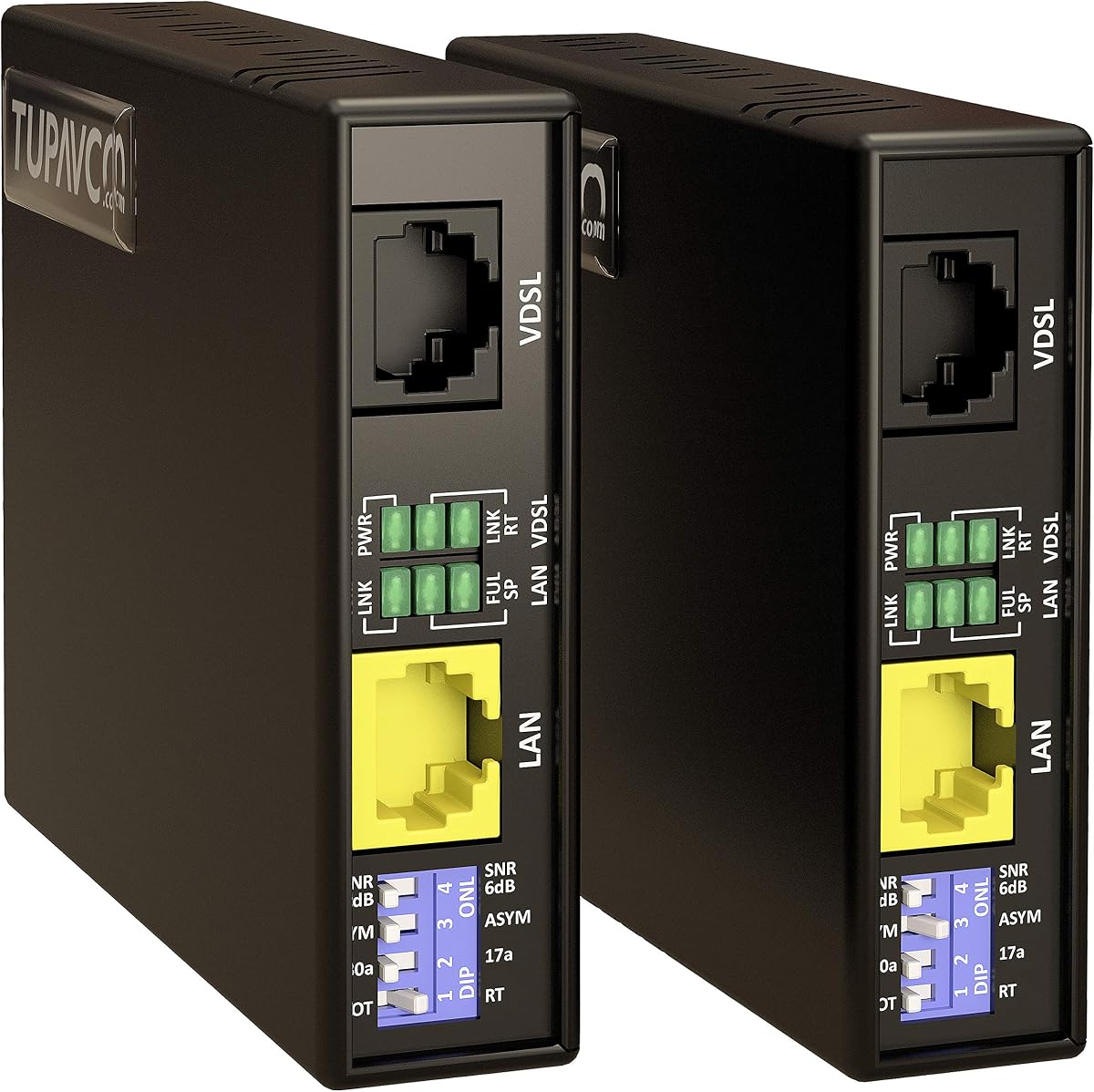
The VDSL 5000ft Ethernet Extender is a long-range kit designed to carry an Ethernet connection over existing phone or network cable. It has a 4.6 rating and supports a stated speed of up to 300 Mbps across distances exceeding 5000 feet. The Tupavco TEX200 uses standard RJ45 ports and LED indicators to provide visible status information.
We may earn a commission when you buy through this link, at no additional cost to you.
Its VDSL2 foundation lets the system work with either telephone wiring or network cable such as Cat5 and Cat6. G.INP support is intended to improve signal tolerance against noise and interference, which can be valuable in older or electrically busy buildings. A four-position DIP switch offers eight profiles, allowing the installer to match operating behavior to the cable and environment.
Installation still requires informed configuration. The maximum speed and distance are not automatic in every setting, since line quality and interference can reduce results. The system is intended to extend a wired service rather than produce Wi-Fi, and both ends must be connected with suitable wiring. The configuration switches add a technical step compared with consumer plug-and-play powerline kits.
This extender is a good fit for a campus, warehouse, apartment building, remote office, or detached structure with existing two-pair copper infrastructure. It offers a useful middle ground between basic 100 Mbps powerline adapters and more specialized active extenders. Installers should select the appropriate profile, use quality cable, and verify link indicators before considering the installation complete.
The kit can work over telephone or network cable, avoiding the expense of installing a new Ethernet path. This is useful in buildings where suitable wiring already reaches the remote location.
Eight DIP profiles give the installer more control than a fully automatic consumer adapter. LEDs provide a simple way to check power and network status during deployment.
We may earn a commission when you buy through this link, at no additional cost to you.
The right Ethernet line extender depends on the available wiring, required distance, network speed, power access, and whether the destination needs wired or wireless connectivity. Comparing those factors before buying prevents an otherwise capable device from being installed in an unsuitable environment.
Powerline adapters transmit data through electrical wiring and are the easiest option in many homes. Active cable extenders use telephone cable, twisted pair, or coax and are better for long runs or properties where powerline signals cannot travel reliably. Passive couplers merely join two Ethernet cables and cannot extend the standard 328-foot physical limit. Mesh-capable powerline kits serve devices that need Wi-Fi, while plain Ethernet-oriented products require a local cable at the destination.
Advertised powerline range and active extender range are maximum figures, not guaranteed throughput at every distance. Wire quality, electrical interference, cable category, connector quality, and the number of intermediate connections all affect performance. For powerline systems, verify that the relevant outlets share the same electrical circuit. For cable-based products, measure the actual route and confirm that the manufacturer supports the conductor type and cable category you intend to use.
A 10 Mbps connection may be sufficient for basic network access, while 100 Mbps is appropriate for many standard online activities. Gigabit links suit modern workstations, streaming devices, and game consoles, but only when the source device and internet connection can deliver comparable performance. Products advertising 2000 Mbps powerline rates can still be constrained by the internet plan, wiring, and endpoints. A 10 Gbps coupler only makes sense when both connected devices and the complete cable path support that rate.
Powerline products generally need both adapters connected directly to wall outlets on the same circuit. Surge protectors, extension cords, and power strips can prevent or reduce communication. AFCI breakers may also interfere with some powerline systems. Wired extenders require compatible copper, telephone, or coax pathways and may need adapters or terminal connections. Inspect the route before purchasing, particularly in homes with renovated wiring, older telephone cable, or multiple breaker panels.
A wired-only extender creates no wireless network. It is ideal for a desktop, television, console, camera, or access point that can be connected by Ethernet. If family members or portable devices need coverage in the remote room, choose a powerline kit with dual-band Wi-Fi. Mesh support, wireless cloning, and app-based management can make a combined unit easier to integrate, although they add complexity and require compatible network equipment.
Consumer powerline kits generally plug in, pair, and connect through their Ethernet ports. Passive couplers are similarly simple, requiring only two cables and correct termination. Active extenders may require DIP settings, screw terminals, coax adapters, separate power supplies, or careful pairing of local and remote units. More advanced kits can support VLAN tags, PXE, WoL, and diagnostic LEDs, which are valuable for IT teams but rarely necessary for a single home office.
Most plug-in powerline adapters draw power directly from the wall, while long-range active extenders require a power connection at both ends. The UGREEN passive coupler requires no electricity, and the StarTech unit includes local and remote power adapters. Check whether an outdoor route needs weather protection, especially for active units without an IP rating. Cable extenders also depend on secure terminations, and powerline installations should be reassessed if large appliances are added near the adapters.
Check the features your existing network depends on. DHCP, VLAN tags, Wake-on-LAN, PXE, camera discovery, and VoIP traffic may need to pass through the extender without alteration. Powerline compatibility with third-party routers can vary, especially when custom firmware is involved. Ethernet-based solutions generally present a more conventional network segment. For managed offices, transparent behavior and diagnostic indicators may be more important than maximum consumer bandwidth.
Begin by identifying the transmission path. For a powerline kit, confirm that both wall outlets are on the same electrical circuit and connect each adapter directly to the wall without a surge protector, power strip, or extension cord. For a wired extender, inspect the cable length, conductor type, terminations, and power availability before connecting the local and remote units. For a coupler, verify that the combined Ethernet route remains within the supported 328-foot distance.
Connect the source network to the local unit using Ethernet. After the powerline adapters are plugged in and allowed to pair, connect the remote device or switch to the appropriate Ethernet port. For an active cable system, apply any required DIP configuration at both ends, attach the two-conductor or coax line, and wait for the status lights to indicate a stable link. Check the relevant management interface or LED indicators before beginning a large transfer.
For routine care, keep indoor powerline units away from large appliances and electrical noise sources. Inspect long cable runs for loose connectors, damaged insulation, and sharp bends. Do not place non-weather-rated active units outdoors; use a sealed enclosure when the cable path is exposed. If throughput drops, test with the remote device connected directly, verify the circuit or cable path, and move large electrical loads away from the adapters before assuming the extender has failed.
An extender carries a connection farther, but it does not automatically increase the available internet service. Actual speed is limited by the slowest part of the path, including the internet plan, source router, extender, cable, and destination device. A Gigabit or 10 Gbps-capable product can prevent a low-speed device or cable from becoming the bottleneck, but it cannot make the external connection faster.
They generally need to be connected on the same electrical circuit because the adapters communicate through the wiring between those outlets. In many homes, the breaker panel divides the building into separate circuits. If a link does not establish, check the outlets and breaker labels, and try another known outlet on the intended circuit. Power strips and surge protectors should also be avoided.
An active cable extender is generally more suitable than a consumer powerline adapter when a long, reliable copper path is already available. Products such as the 600m two-wire system can use twisted pair or coax and regenerate the signal at each end. A mesh-style powerline unit may be easier if the detached building has compatible electrical wiring and access to power, but actual performance will depend on that circuit.
No. A coupler simply joins two Ethernet cables and contains no signal-regeneration electronics. It can organize or slightly lengthen a route only when the total cable length remains within the normal Ethernet limit. An active extender receives a weakened signal, regenerates it, and transmits it again, which is what allows much greater distances.
Some couplers and active extenders can pass PoE through compatible cable, allowing a compatible camera to receive both data and power over one run. The endpoint, switch, injector, and cable must all support the required PoE standard. If the equipment does not provide PoE, a separate power supply must be installed at the camera location.
The advertised rate is the maximum theoretical or link capability under favorable conditions. Electrical wiring quality, distance, interference, nearby appliances, AFCI breakers, the internet plan, and the connected devices can all reduce results. Direct wall-outlet placement without a surge protector or power strip is the best starting point for troubleshooting.
The reviewed TP-Link powerline kits generally include the cables needed to connect a router and a remote wired device. Always verify the package contents and plan any additional lengths before installation. A separate Ethernet switch can provide more ports when several devices need to be connected at the remote location.
It can, provided the extender passes the required protocols and traffic without modifying it. The StarTech model specifically lists IEEE 802.1Q VLAN tag pass-through and is designed to act as a transparent network device. Other systems should be checked for DHCP, VoIP, camera discovery, and management compatibility before deployment.
The leading choices serve distinct needs. The TP-Link AV1000 Adapter Kit is the most straightforward all-around option for a wired powerline extension, while the AV600 model provides a simpler and lower-tier alternative for modest network requirements. The StarTech 800m unit stands apart for long-range transparent networking, diagnostics, and professional management features.
Before choosing, prioritize the available wiring, required distance, and client speed. Use a plug-in powerline system when both outlets share a circuit and the destination needs an easy wired link. Choose an active extender for long runs, unusual copper, transparent bridging, or professional applications. Select a combined powerline and Wi-Fi model only when wireless clients need service in the remote area.
Finally, confirm the current specifications, package contents, compatibility details, and product listing before purchasing. Prices, ratings, and features can change over time, so the current retailer page is the best final source for availability and updated information.