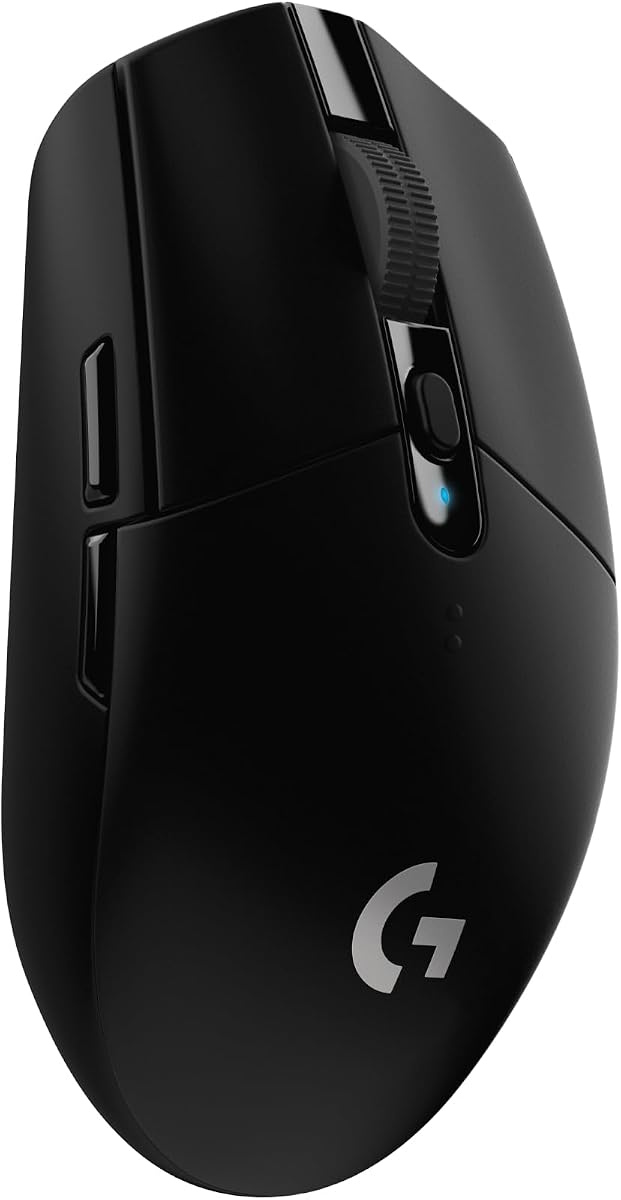
Logitech G305 Lightspeed
4.6Editor score
1 ms wireless report rate
12,000 DPI optical sensor
250-hour gaming battery life
Our best gaming mouse for CS2 guide compares wireless sensors, polling rates, weight, battery life, grip, and controls across ten competitive options for
A great mouse for Counter-Strike 2 should make precise movement feel effortless without imposing a steep learning curve. Sensor tracking, click response, shape, weight, wireless stability, and accessible side buttons all influence how confidently a player can flick, track, hold angles, and reset aim between engagements.
This guide compares ten wireless and wired gaming mice using the specifications supplied for each model. It considers tracking resolution, polling rate, connectivity, weight, battery endurance, switch longevity, button layout, and design features, with particular attention to the precision and responsiveness valued in competitive CS2 play.
The list shows which mouse suits each priority: ultra-low latency, lightweight control, long battery life, familiar ergonomics, or simple wireless freedom. Ratings and product details can change over time, and current prices should be checked before buying, especially for limited editions, renewed listings, and limited promotional periods.
4.6Editor score

5.0Editor score

4.6Editor score
The comparison below covers ten gaming mice suited to different CS2 priorities, from lightweight wireless competition to a dependable wired option. It highlights the most important hardware differences without treating any single specification as a substitute for comfort and aim control.


The SteelSeries Wireless Gaming Mouse CS2 Dragon Lore Edition is the most thematically complete choice in this guide, combining Counter-Strike 2 and AWP Dragon Lore-inspired design with a capable 18K DPI TrueMove Air optical sensor. It carries a supplied rating of 5.0, making it the highest-rated option listed, although that rating should be considered alongside the fact that this specific product is a renewed listing.
We may earn a commission when you buy through this link, at no additional cost to you.
Its main competitive strength is the combination of true 1-to-1 tracking, lag-free 2.4GHz wireless connectivity, and up to 200 hours of stated battery life. The sensor was co-developed with PixArt, while the durable switch design is rated for 80 million clicks. Bluetooth adds convenient support for other devices, although competitive players should normally use the 2.4GHz connection and its included receiver.
The main trade-off is the renewed condition. A renewed listing may offer a different level of cosmetic wear or previous-use history than a new product, and the Dragon Lore theme will not appeal to every CS2 player. The specification set is nevertheless balanced, and 18K DPI gives users ample sensitivity range without requiring an unusually sensitive mouse.
This is a strong recommendation for CS2 players who value the combination of competitive specifications, wireless freedom, long battery life, and game-specific styling. It is especially appealing as a themed upgrade rather than a bare performance tool. Buyers should inspect the listing's condition details and current availability carefully, but the hardware itself offers a persuasive foundation for precise first-person aiming.
The TrueMove Air sensor supports up to 18,000 DPI and emphasizes pixel-perfect tracking. That resolution range supports everything from low-sensitivity arm movement to faster wrist corrections, while the 2.4GHz mode keeps the mouse focused on responsive competitive play.
Up to 200 hours of stated gaming battery life reduces charging interruptions, and Bluetooth makes the mouse useful away from a gaming desktop. For CS2, the 2.4GHz connection is the more relevant option because it is designed to minimize wireless lag.
We may earn a commission when you buy through this link, at no additional cost to you.
The Razer Viper V3 Pro 8Khz Wireless Esports Gaming Mouse, CS2 Edition is built for players who want the strongest specification package here. Its supplied rating is 4.6, and the headline combination of 8000Hz wireless polling, a 54 g body, and a Focus Pro 35K optical sensor gives it an unmistakable performance focus.
We may earn a commission when you buy through this link, at no additional cost to you.
The HyperPolling technology works with Razer HyperSpeed to report movement at up to 8000Hz, reducing the interval between cursor position reports. The Gen-3 optical switches offer 0.2 ms actuation and a stated 90 million-click lifecycle. Together, these details are particularly relevant to CS2 players who value immediate click response, rapid flicks, and dependable wireless behavior in crowded environments.
Its 54 g weight is aggressive in the opposite direction from the 82 g Razer Viper V3 HyperSpeed, but ultra-light construction can reduce the effort required for rapid repositioning. The trade-off is that a lighter shell may offer less perceived resistance when making deliberately slow corrections, and players with a strong grip may prefer a more substantial design. The CS2 edition also carries a premium feature set rather than a minimalist approach.
This mouse is best for competitive players who prioritize high polling, low actuation delay, and minimal mass. Those who want a more conventional shape, longer battery life, or a lower-cost route into competitive gaming should compare the other options. For players seeking the most technically advanced configuration in this roundup, the Viper V3 Pro 8KHz is the premium recommendation.
The 8000Hz polling rate reports cursor position eight times as often as a standard 1000Hz mouse. This can make already-small mouse movements feel more immediate, although the visible benefit depends on the system, monitor, sensitivity, and movement style.
At 54 g, the mouse is designed for swift swipes and precise flicks. Players should test their preferred sensitivity and grip, because ultralight designs can feel exceptionally fast during sudden directional changes and less planted during slow tracking.
We may earn a commission when you buy through this link, at no additional cost to you.
This SteelSeries CS2 Dragon Lore Edition mouse shares the same core hardware identity as the renewed top-ranked product, but appears as a separate new listing with a supplied rating of 3.7. That rating is the lowest among the ten products and warrants careful attention, particularly when the specifications themselves are competitive and attractive.
We may earn a commission when you buy through this link, at no additional cost to you.
The 18K DPI TrueMove Air sensor, 2.4GHz wireless mode, up to 200-hour battery life, and 80 million-click durability rating form a capable foundation for CS2. The Dragon Lore-inspired appearance is especially relevant for players who enjoy coordinated Counter-Strike aesthetics, while Bluetooth expands the mouse's usefulness beyond a gaming setup.
Compared with the Razer Viper V3 Pro 8KHz and Keychron G3 8K, this model does not advertise an 8000Hz polling rate or unusually low weight. That may make it less appealing to players who obsess over the newest competitive specifications. Conversely, some users may prefer a shape and feature balance that does not emphasize an ultralight shell or a very high polling figure.
The purchase is best suited to a CS2 fan who values the themed design, dependable wireless connectivity, and strong sensor resolution. Because the listed customer rating is comparatively modest, prospective buyers should look for recent customer feedback, confirm the exact condition, and verify that the shape feels comfortable before committing. The core feature set is compelling even though the social proof is not as strong.
The AWP Dragon Lore-inspired design makes this mouse visually distinct from conventional black esports models. For players building a themed PC, that presentation is part of the product's appeal rather than a secondary detail.
The mouse skips any stated 8000Hz claim, so it is better judged on the 18K sensor, responsive 2.4GHz link, and long battery life. Those fundamentals are more important to many CS2 players than having the highest published polling number.
We may earn a commission when you buy through this link, at no additional cost to you.
The BenQ Zowie U2 Wireless Gaming Mouse is a compact, uncomplicated option with a strong supplied rating of 4.8. Its renewed listing identifies it as a 60 g wireless mouse with a 3200 DPI sensor, five buttons, 70 hours of battery life, and an enhanced receiver designed to reduce signal interference.
We may earn a commission when you buy through this link, at no additional cost to you.
The shape is the central selling point. Inward-curved sides are intended to support agility and stability during multi-angle movement, while the left-side curve and overall back contour reduce the angle required for the index finger to click. The side buttons are also positioned for easier thumb access, an important consideration when players use commands that demand immediate execution.
Its maximum 3200 DPI is modest compared with sensors rated at 18,000, 30,000, 35,000, or 44,000 DPI. That limitation is not necessarily a drawback because CS2 players can use a wide range of in-game sensitivity and physical mouse sensitivity. The plug-and-play, driverless approach also reduces setup friction for players who do not want to manage additional software.
This renewed Zowie U2 is a compelling recommendation for players who prefer a small, light, easy-to-use wireless mouse with accessible controls. Those seeking maximum sensor resolution, high polling specifications, extensive onboard profiles, or a heavy shell should look elsewhere. Confirming the condition and expected longevity of a renewed battery are sensible precautions.
The inward-curved sides and 60 g weight support quick repositioning in multiple directions. The shape may appeal to fingertip and claw-grip users, although individual comfort still depends on hand size and preferred sensitivity.
The enhanced receiver is designed to reduce signal interference, while the driverless setup keeps configuration simple. Players who value immediate plug-and-play operation can use the mouse without a mandatory installation process.
We may earn a commission when you buy through this link, at no additional cost to you.
The Keychron G3 8K Carbon Fiber is a feature-rich wireless mouse built around an extremely light 47±3 g body. Its supplied rating is 4.7, and the combination of an 8000Hz polling rate, 30000 DPI PixArt PAW3950 sensor, tri-mode connectivity, and 160-hour battery life makes it a strong all-around contender.
We may earn a commission when you buy through this link, at no additional cost to you.
The mouse supports 2.4GHz, Bluetooth 5.3, and USB-C wired modes, with switching among up to three paired devices. Its 8000Hz report rate equates to a 0.41 ms interval, eight times the reporting frequency of a standard 1000Hz mouse. For CS2, the 2.4GHz connection is the primary competitive mode, while the other options suit travel and productivity.
Five onboard profiles and five programmable buttons offer more customization than simpler plug-and-play alternatives. DPI above 5000 is configured through Keychron Launcher Web, and the raised hump, contoured curves, and finger contact points aim to balance support, rapid swipes, and controlled fixed-point braking. The 47±3 g weight is exceptionally low, which may feel fast and responsive to some players but less stable to others.
The G3 8K is recommended for competitive players who want a featherlight shell, extensive setup options, and high-polish wireless specifications without giving up multi-device use. It is a particularly good fit for a CS2-focused desktop that also handles everyday productivity. Buyers who prefer a more substantial mouse or dislike web-based configuration should consider a simpler model.
The 8000Hz polling rate reduces the time between position reports, while the PAW3950 sensor supports up to 30000 DPI. Together they offer ample room for fine-tuning both in-game sensitivity and physical cursor speed.
Five onboard profiles allow separate CS2 and everyday configurations without repeatedly opening software. Buttons can be remapped, assigned to shortcuts, or used for macros through Keychron Launcher Web.
We may earn a commission when you buy through this link, at no additional cost to you.
The BenQ Zowie U2 Wireless Gaming Mouse delivers a focused set of features for players who want a light, compact, driverless mouse. It has a supplied rating of 4.6, five buttons, a 3200 DPI sensor, 60 g weight, and up to 70 hours of stated battery life.
We may earn a commission when you buy through this link, at no additional cost to you.
Its design is built around movement stability and quick access. The inward-curved sides support multi-angle changes of direction, the back shape reduces the thumb angle for faster index-finger clicking, and the side-button placement is intended to make thumb access easier. The enhanced receiver is designed to reduce interference, helping maintain a steadier connection in busy wireless environments.
The mouse is deliberately straightforward. It does not advertise an 8000Hz polling rate, onboard profile system, or high maximum DPI, and the driverless approach means fewer opportunities for deeper customization. That simplicity is a genuine advantage for players who want to connect the receiver and begin playing, but it may disappoint users who enjoy tuning every button and sensitivity step.
The U2 is a strong recommendation for CS2 players who prefer a smaller form factor, accessible side controls, and minimal setup. It may be especially useful for travel because of its compact wireless design. Those who need maximum sensor resolution, extensive remapping, or a very low polling interval should examine the Razer, SteelSeries, Keychron, or Logitech G PRO X options instead.
The mouse's curves are intended to reduce the angle needed for index-finger clicks while making side buttons easier to reach. That can benefit rapid command use, although players should consider whether the compact shape suits their hand.
The plug-and-play arrangement reduces initial setup and can be useful at LAN events or when switching computers. The five-button layout keeps command access straightforward without adding a dense competitive control surface.
We may earn a commission when you buy through this link, at no additional cost to you.
The Logitech G305 Lightspeed remains one of the most approachable wireless gaming mice in this collection. It has a supplied rating of 4.6 and pairs a 12,000 DPI HERO optical sensor with 1 ms Lightspeed reporting, a 3.4-ounce design, and an exceptionally long stated battery life of 250 hours during continuous gaming.
We may earn a commission when you buy through this link, at no additional cost to you.
Its sensor supports up to 400 IPS precision, which is ample for a wide range of desktop play surfaces, while the 1 ms report rate provides a responsive wireless foundation. The single AA battery is another major strength: the mouse can operate for up to 250 hours, and Logitech G HUB's Endurance mode can extend battery life to as much as nine months.
The compact design and built-in nano receiver storage make the G305 easy to move between a gaming desktop and a laptop. Its controls and sensor resolution are less ambitious than the top 8000Hz models, but not every player needs a large sensor range or high polling specification. The simple, proven package remains useful for routine matchmaking, ranked play, and travel.
This mouse is a recommended pick for players who want dependable wireless performance, long battery life, and a lightweight body at a modest feature level. It can also serve as a capable general-purpose mouse. Competitive specialists seeking a very light carbon shell, extensive onboard profiles, or the highest published polling rates should look to the premium alternatives.
A single AA battery can power up to 250 hours of continuous gaming, reducing the likelihood of a dead mouse during a long session. Endurance mode further prioritizes battery conservation when maximum responsiveness is not essential.
The G305 weighs only 3.4 ounces and stores its nano receiver inside the mouse. That makes it a practical option for gaming laptops, tournaments away from home, and players who move between computers regularly.
We may earn a commission when you buy through this link, at no additional cost to you.
The Razer Viper V3 HyperSpeed balances a moderate 82 g weight with advanced tracking and exceptional battery endurance. It has a supplied rating of 4.4, a Focus Pro 30K optical sensor, HyperSpeed wireless connectivity, and up to 280 hours of stated high-performance gaming on one AA battery.
We may earn a commission when you buy through this link, at no additional cost to you.
The forward sensor placement is designed to improve tracking consistency, while the sensor's support for glass broadens the surfaces on which it can operate. Five DPI stages can be selected through a conveniently placed top button, and that control can be customized. Mechanical Gen-2 switches are rated for 60 million clicks and use gold-plated contact points.
At 82 g, it is noticeably heavier than the 47±3 g Keychron G3, 54 g Viper V3 Pro, and 60 g Zowie U2. Some players appreciate the additional mass because it can feel more settled during deliberate corrections, while others prefer the rapid movement of ultralight shells. It also does not advertise the 8000Hz polling rate found in the Viper V3 Pro.
The Viper V3 HyperSpeed is a good recommendation for players who want high sensor resolution, long battery life, and straightforward wireless control without requiring a premium high-polling configuration. It is well suited to long sessions and multi-device use. Players searching specifically for the lowest possible weight or fastest polling should compare it with the Keychron and 8KHz Razer options.
The Focus Pro 30K sensor includes a forward sensor position and claims tracking on a wider variety of surfaces, including glass. This adds flexibility when a player's available desk space or surface type changes.
Up to 280 hours of stated gaming battery life is among the strongest endurance figures in the list. It makes the mouse appealing for extended play and reduces dependence on a charging routine.
We may earn a commission when you buy through this link, at no additional cost to you.
The Razer DeathAdder Essential is a straightforward wired gaming mouse for CS2 players who prefer a stable cable and familiar ergonomic form. Its supplied rating is 4.5, and it includes a 6,400 DPI optical sensor, five programmable buttons, dedicated sensitivity controls, and mechanical switches rated for 10 million clicks.
We may earn a commission when you buy through this link, at no additional cost to you.
A wired connection removes battery concerns, receiver pairing, and wireless interference from the equation. That reliability can be valuable in tournament environments, although it also means the mouse is tied to a nearby USB port and is less convenient for travel. The ridged, rubberized scroll wheel provides grip and controlled scrolling for menus or other high-stakes adjustments.
The DeathAdder Essential supports button remapping and complex macro assignments through Razer Synapse. Its maximum sensor resolution is lower than that of the newer models in the guide, and the stated 10 million-click rating is also more modest. Neither specification makes it unsuitable for CS2, but they place it more clearly in the practical, established category than the ultra-modern high-polling group.
This mouse is recommended for players who value a dependable wired connection, a familiar right-handed shape, and configurable controls without the complexity of a multi-mode wireless device. It is also a logical choice for desktop setups where cable management is simple. Those prioritizing portability, long battery life, or extreme low weight should look toward the wireless alternatives.
A permanent wired connection gives competitive players a consistent link to the computer and avoids low-battery interruptions. The trade-off is reduced portability and the need for a nearby USB port.
Five programmable buttons can be remapped through Razer Synapse, and the DPI controls allow sensitivity changes during play. The ribbed scroll wheel adds tactile control beyond basic movement and clicking.
We may earn a commission when you buy through this link, at no additional cost to you.
The Logitech G PRO X Superlight 2 combines a 60 g chassis with 8 kHz polling, 44,000 DPI tracking, and up to 95 hours of battery life. Its supplied rating is 4.5, and the feature set is aimed at competitive players who want a light wireless mouse with highly responsive specifications.
We may earn a commission when you buy through this link, at no additional cost to you.
The HERO 2 sensor tracks over 888 IPS, supports up to 44,000 DPI, and is calibrated to operate without smoothing, acceleration, or filtering. Zero-additive PTFE feet are intended to deliver smooth gliding, while LIGHTFORCE hybrid switches provide tactile click feedback. The mouse also supports USB-C charging and is compatible with POWERPLAY.
Its 8 kHz polling rate closely matches the leading 8000Hz specification in this guide, but the sensor resolution and 60 g weight produce a different performance balance from the 54 g Razer Viper V3 Pro. The G PRO X Superlight 2 can feel more substantial and controlled, although comfort still depends on grip and hand size. The supplied rating is also lower than several alternatives.
This is a worthwhile recommendation for competitive players who value high sensor resolution, smooth tracking, fast polling, and a proven lightweight design. It suits users who want advanced performance without the ultralight 47 g approach of the Keychron G3. Buyers should compare its shape against their preferred grip and ensure their PC and software environment support the features they intend to use.
Up to 44,000 DPI and over 888 IPS tracking provide a wide operating range for different sensitivity styles. The stated absence of smoothing, acceleration, and filtering supports the goal of direct cursor movement.
The 8 kHz reporting rate delivers rapid position updates, while 60 g provides a middle ground between heavier ergonomic mice and ultralight carbon-shell rivals. This balance can suit players who want quick flicks with a slightly more settled feel.
We may earn a commission when you buy through this link, at no additional cost to you.
The most important choice is the one that supports your preferred grip, sensitivity, and movement habits. Beyond shape, consider sensor tracking, wireless responsiveness, click quality, battery life, software, and whether a wired or wireless connection best fits your setup.
A capable optical sensor should track consistently, maintain control during rapid movement, and support the sensitivity range required by your in-game settings. The models in this guide range from 3,200 DPI to 44,000 DPI, but raw resolution is not the same as practical accuracy. A lower-DPI mouse can still be excellent for CS2 when paired with a suitable sensitivity, while an extremely high resolution offers more room for fine adjustment. The Razer Viper V3 Pro uses a Focus Pro 35K sensor, the Keychron G3 uses the PAW3950, and the Logitech G PRO X Superlight 2 uses HERO 2, all of which emphasize competitive tracking.
Choose a sensor with enough resolution for your style, then prioritize consistency over chasing the largest number. Check the supplied tracking claims, supported surfaces, and any required configuration utilities.
Polling rate describes how frequently the mouse reports its position to the computer. Higher rates can reduce the interval between movement updates, which is especially relevant during quick flicks and abrupt direction changes. The Razer Viper V3 Pro and Keychron G3 offer 8000Hz wireless polling, and the Logitech G PRO X Superlight 2 supports 8 kHz. The Logitech G305 provides a 1 ms report rate, while the other wireless models do not make a comparable high-polling claim in the supplied specifications.
Polling should be treated as one part of the complete experience. Sensor quality, frame rate, sensitivity, connection stability, and the player's own technique all affect perceived performance.
CS2 rewards repeatable aim, so comfort and grip consistency often matter more than a minor specification difference. The BenQ Zowie U2 uses inward-curved sides to support quick multi-angle movement and places side buttons for easier thumb access. The Keychron G3 has a raised hump, contoured curves, and defined finger contact points for full-palm support. The Razer DeathAdder Essential offers a familiar right-handed ergonomic profile. Players should consider mouse length, width, height, and the location of controls rather than relying only on weight specifications.
If possible, test the shape with your normal grip and sensitivity. A mouse that feels excellent in a store can become tiring after weeks of use, while a less exciting shape may prove preferable for long sessions.
Weight influences how easily a mouse can be repositioned and how planted it feels during controlled corrections. The Keychron G3 is exceptionally light at 47±3 g, the Razer Viper V3 Pro weighs 54 g, and the Zowie U2 and Logitech G PRO X Superlight 2 are listed at 60 g. At the other end, the Razer Viper V3 HyperSpeed weighs 82 g. Lighter mice can make fast flicks feel effortless, but a heavier model may feel easier to stop and control during deliberate adjustments.
Do not treat a lower weight number as automatically better. Match the mouse to your grip and movement style, and avoid changing sensitivity too drastically while evaluating a new model.
Clicks need to register cleanly and quickly because firing and weapon commands occur constantly in CS2. The Razer Viper V3 Pro advertises 0.2 ms optical switch actuation and a 90 million-click lifecycle. The SteelSeries Dragon Lore models list 80 million clicks, the Razer Viper V3 HyperSpeed lists 60 million, and the Razer DeathAdder Essential lists 10 million. These are durability figures, not guarantees that every switch will feel identical over time.
Consider both actuation speed and physical feedback. Players who prefer a sharp, light click may prioritize optical switches, while tactile mechanical switches can provide clearer confirmation of each firing action.
Battery endurance determines how often a wireless mouse needs attention. The Logitech G305 offers up to 250 hours of gaming on one AA battery, while the Razer Viper V3 HyperSpeed lists up to 280 hours. The SteelSeries Dragon Lore models claim up to 200 hours, the Keychron G3 up to 160 hours, and the Razer Viper V3 Pro and Logitech G PRO X Superlight 2 up to 95 hours. The Zowie U2 lists 70 hours. A wired mouse sidesteps this factor entirely.
Compare battery figures in the context of charging convenience. Some players prefer replaceable batteries, while others favor a rechargeable design and USB-C charging. Always keep a charged mouse or spare batteries available for tournament play.
The SteelSeries Dragon Lore mice support both 2.4GHz and Bluetooth, while the Keychron G3 adds USB-C wired mode and can switch among up to three paired devices. The Razer Viper V3 HyperSpeed includes multi-device support, and the Logitech G305 stores its nano receiver inside its compact body. The Razer DeathAdder Essential is wired, which can be advantageous where a consistent connection matters more than portability. For CS2, use the lowest-latency wireless mode offered by the mouse and keep the receiver close to the computer.
Choose connectivity based on where you play. Dedicated tournament stations may favor wired simplicity, while laptop players and multi-computer users may value compact receivers, device switching, and Bluetooth.
The right mouse should make common commands easy to reach without making accidental inputs likely. The BenQ Zowie U2 is driverless and uses five buttons, offering simple access to side commands. The Razer DeathAdder Essential provides five programmable buttons through Razer Synapse. The Keychron G3 supports five programmable buttons and five onboard profiles, allowing separate gaming and productivity setups. The SteelSeries and Razer Viper models offer additional options through their respective software ecosystems. Software can adjust sensitivity, buttons, polling behavior, and other settings, but it also adds setup complexity.
Prioritize models whose configuration process matches your experience. New players may appreciate plug-and-play operation, while competitive players may want direct DPI selection, onboard memory, and rapidly accessible remapping.
Begin by placing the receiver in a clear area near the computer and charging or installing fresh batteries before a match. Connect the mouse through its intended competitive mode, then open the available configuration software to set a comfortable DPI, verify button assignments, and remove unused functions. Test the same sensitivity in CS2's practice range rather than changing both hardware and in-game settings at once.
Use a consistent mousepad large enough for the movement style you employ. Keep the optical sensor free of dust, and avoid playing on fabric, glass, or uneven surfaces unless the manufacturer explicitly supports them. For wireless models, check the battery level and receiver placement before a session, and keep a wired backup or spare batteries available if the mouse supports either option.
Clean the mouse gently with a dry or lightly damp cloth, taking care not to push moisture into buttons, seams, or the sensor opening. Replace the battery when performance becomes inconsistent, and periodically review firmware, sensor, button, and polling settings through the official software. If aim or tracking suddenly changes, check for debris, battery issues, accidental DPI changes, and software updates before assuming the mouse has failed.
No. Higher polling can reduce the interval between cursor reports, but the visible improvement depends on the mouse, monitor, sensitivity, and movement style. Sensor consistency, grip, and comfort are equally important. An 8000Hz mouse may not feel meaningfully different to every player, particularly at lower graphical settings or with moderate movement speeds.
A wired mouse removes battery management and wireless interference concerns, making it a simple choice for dedicated desktop setups. Wireless mice now provide competitive-grade responsiveness and greater flexibility across computers. Choose wired if consistent connectivity and maximum simplicity matter most, or wireless if portability and a cleaner desk are priorities.
No. DPI only determines how far the cursor moves for a given physical mouse movement. A CS2 player can perform well with a modest sensor if the physical and in-game sensitivity combination feels natural. The more important considerations are tracking consistency, mouse control, and a sensitivity that supports repeatable movement.
There is no single shape that suits every hand and grip. Fingertip players often favor smaller mice, claw-grip users may prefer distinct contact points, and palm-grip players may appreciate a fuller hump. The Zowie U2, Keychron G3, Razer Viper V3, and DeathAdder Essential all present different approaches, so comfort should be evaluated with your normal grip.
Any amount beyond a typical match can be sufficient, but longer life is useful for tournaments and regular play without charging. The G305 and Viper V3 HyperSpeed offer especially long stated endurance, while several other models provide 70 to 200 hours. Players should still check the battery before important sessions and keep a backup ready.
It depends on the model. The BenQ Zowie U2 is explicitly driverless and supports plug-and-play use, while other mice use their software for DPI, button remapping, polling settings, and onboard profiles. If you prefer immediate operation, choose a mouse that works well without configuration; if you want extensive tuning, software support may be worthwhile.
No. Lower weight can reduce the effort required to move quickly, but it can also feel less planted during slow corrections. Players who make small, deliberate adjustments may prefer a moderately weighted mouse. The best choice is the one that feels repeatable across a full session, not simply the lightest model available.
Use the practice range and test several common movements, including wide flicks, short corrections, slow tracking, and quick repositioning. Keep the sensitivity fixed while comparing shapes and weights, then play a few normal matches before making a final decision. Adjust grip and settings gradually to avoid confusing preference changes with an actual performance decline.
The SteelSeries CS2 Dragon Lore Edition stands out as the strongest overall thematic recommendation, pairing an 18K DPI sensor, 2.4GHz wireless, and up to 200 hours of battery life with Counter-Strike-specific styling. The Razer Viper V3 Pro 8KHz is the premium performance choice for players who want 8000Hz polling, a 54 g body, and 0.2 ms optical switches, while the Logitech G305 offers a proven, lightweight wireless design with remarkable battery endurance.
Prioritize the factors that match your actual habits. Lightweight players may favor the Keychron G3 or Razer Viper V3 Pro, simplified setups may suit the BenQ Zowie U2, and the Logitech G PRO X Superlight 2 combines 8 kHz polling with a 60 g body. If you dislike wireless management entirely, the DeathAdder Essential provides a consistent wired alternative.
Check the current price, availability, warranty details, and recent customer feedback before making a final purchase, as costs and product information can change. For limited editions and renewed listings, review the condition description and included accessories carefully. A competitive mouse should feel comfortable, track reliably, and suit your sensitivity—not merely carry the largest specification numbers.
