
HUANUO Ventilated Steel Riser
4.8Editor score
Powder-coated steel platform
Raises devices 3.94 inches
Supports up to 44 pounds
Large under-stand storage area
A laptop lift can transform a cramped workstation by raising your screen, improving airflow, and reclaiming useful space beneath your computer. The best models combine stable construction, easy angle adjustment, device protection, and enough size for your particular laptop. A well-matched stand is especially helpful for long typing sessions, video calls, and multi-screen setups.
We compared these 10 laptop lifts using the specifications and product information provided for each model. The list covers portable aluminum stands, metal risers, ventilated monitor-style shelves, rotating designs, and options for laptops from 10 to 17.3 inches. We considered adjustability, stability, load capacity, cooling, compatibility, storage, portability, and everyday usefulness.
Each review explains what distinguishes that stand from the rest and identifies the kind of user most likely to benefit from it. The three leading choices are highlighted in the top picks, while the comparison table provides a quick overview of all 10 options. Prices and availability can change, so check the current listing before making a final purchase.
4.8Editor score

4.8Editor score

4.7Editor score
As an Amazon Associate we earn from qualifying purchases.
This side-by-side comparison shows the key differences in construction, adjustment, laptop compatibility, stability, cooling, and storage across all 10 recommended stands.




This metal laptop stand combines an approachable desktop design with the adjustability many users want from a laptop lift. It carries a 4.6 rating, places the screen higher, and allows the viewing angle to be changed according to the user and workspace. Multiple ventilation holes, rubberized contact areas, and a 17.6-pound support limit make it a practical all-rounder for routine desk use.
We may earn a commission when you buy through this link, at no additional cost to you.
The most useful feature is the range of height and angle positions. That flexibility lets a user move between a more upright posture for reading and a lower position for typing, rather than committing to one fixed geometry. The open metal platform also encourages airflow around the base of a laptop, while silicone pads on the top and bottom help prevent movement and protect the computer and desktop.
Its portable, foldable shape is a meaningful advantage for people who alternate between a home desk, office, and shared workspace. The product information states that it fits laptops from 10 to 15.6 inches, including common MacBook, Dell XPS, HP, ASUS, Lenovo, Acer, Chromebook, and Microsoft Surface models. It does not cover larger gaming laptops, and metal surfaces can pick up cosmetic marks, so careful placement matters.
This is a strong choice for someone who wants straightforward adjustment, broad everyday laptop compatibility, and a stand that can travel. Choose it when flexibility and ventilation matter more than a rotating base or a particularly broad 17.3-inch fit. For most people seeking a functional, portable riser without an overly complex design, it remains one of the most versatile selections in this guide.
The movable supports let you raise the display and change the screen angle rather than working with a laptop flat on the desk. This is especially useful when your chair, desk, or external keyboard changes the ideal relationship between your eyes and the display.
Multiple ventilation openings support airflow, while silicone pads help reduce sliding and scratching. Always place the laptop near the rear retaining edge so it cannot slide forward when you type.
We may earn a commission when you buy through this link, at no additional cost to you.
The BESIGN LS03 is a polished, straightforward laptop lift that earns a 4.8 rating and balances several priorities exceptionally well. Its aluminum construction looks more like a permanent desk accessory than a temporary prop, while the detachable, folding structure keeps setup and storage uncomplicated. It can raise a laptop by six inches and accommodate 10- to 15.6-inch devices.
We may earn a commission when you buy through this link, at no additional cost to you.
This stand gets the fundamentals right. The open aluminum surface promotes airflow, and rubber material at the contact points helps hold the notebook in place while protecting it from scratches. Its stated load capacity is 8.8 pounds, which is appropriate for a wide range of mainstream laptops, though buyers with unusually heavy systems should verify the weight of their specific machine.
The main limitation is that its position is less fluid than the rotating or multi-angle models later in the list. It can elevate the screen, but it does not offer the same 360-degree swiveling or extensive height choices. Its folding design is still excellent for storage, and the detachable assembly reportedly takes only three steps, making it much easier to move between daily setups.
The LS03 is our top all-around recommendation for a reason: it is attractive, easy to assemble, portable, stable for ordinary laptops, and focused on the features users actually need. It is particularly well suited to home offices, students, and hybrid workers who want a dependable riser without a complicated mechanism. If you need a larger fit, rotating base, or much heavier load rating, those needs point toward a more specialized alternative.
The silver aluminum finish suits a professional desk better than a visually bulky plastic riser. Because the platform folds flat, it can remain part of your everyday setup without permanently occupying valuable workspace when it is not in use.
A detachable three-step design reduces setup time and makes the stand easy to pack. Folding it flat creates room for papers, keyboards, and accessories in a drawer, bag, or shared cabinet.
We may earn a commission when you buy through this link, at no additional cost to you.
The Nulaxy stand is built for users who want a more substantial support structure than a lightweight desk prop. It has a 4.7 rating, a stated capacity of 22 pounds, and a dual-support rod mechanism designed to resist wobble. Its compatibility range extends from 10- to 16-inch laptops, covering both everyday notebooks and many larger portable systems.
We may earn a commission when you buy through this link, at no additional cost to you.
Stability is the defining strength. The two support points are intended to distribute weight evenly, which can make the platform feel more settled during sustained typing. A geometric upper vent pattern adds airflow beyond the open-frame designs used by many competitors, while silicone pads grip the laptop and help protect both the computer and desk surface.
Its dual-fold construction is less compact than the BESIGN LS03 or Amazon Basics stand, and users with very light notebooks may find the engineering more substantial than necessary. The stated 22-pound limit is useful for heavier machines, but weight capacity alone does not guarantee that every larger laptop will fit. Users should still check dimensions, connector clearance, and the manufacturer’s guidance.
This model is well matched to power users, students with heavier computers, and anyone who has found inexpensive laptop stands too shaky. The combination of a high load rating, wide 16-inch compatibility, and advanced ventilation makes it a durable-feeling desk solution. It is less compelling for people who prioritize the smallest possible folded package over stability.
The dual-rod mechanism spreads the load across two support arms, reducing the movement associated with many single-hinge stands. That makes the platform a sensible choice when the keyboard is used intensively for typing, editing, or gaming.
The upper panel uses a geometric vent layout intended to move air around the base of the computer. The open design helps when a laptop is running demanding applications for extended periods.
We may earn a commission when you buy through this link, at no additional cost to you.
This HUANUO riser is more versatile than a basic laptop platform because it offers three height settings and a substantial storage area underneath. Its 4.7 rating reflects a generally useful design for users who want to lift not only a laptop but also a monitor, printer, or other desktop equipment. The platform stands at 3.94, 4.72, or 5.51 inches depending on the selected leg position.
We may earn a commission when you buy through this link, at no additional cost to you.
The under-platform space measures 12.40 by 7.09 inches, making it possible to keep a full-size keyboard, papers, a cable box, or small accessories out of the way. Powder-coated steel provides a rigid base, the ventilated top assists heat dissipation, and anti-slip rubber pads help protect both the raised device and the desk. Its 44-pound capacity is the highest stated limit among the models in this guide.
Because it is a fixed monitor-style riser rather than a folding laptop stand, it occupies more space and is less convenient for travel. The platform is also wider than a dedicated notebook holder, which may be awkward on a compact desk. On the other hand, that width is precisely what allows it to accommodate peripherals, making it a better fit for a permanent workstation.
Choose this model for a home office where desk organization matters as much as screen elevation. It is especially useful for users who alternate between a laptop and a monitor, need accessible storage, or want one shelf to support several types of equipment. The three heights make it easier to find a comfortable setup than a single fixed riser, while tool-free assembly keeps initial setup manageable.
The large open area beneath the platform can hold a keyboard, documents, chargers, or other daily essentials. Elevating these items makes the desktop look cleaner without requiring drawers or a separate organizer.
The selectable settings let you raise or lower the platform without replacing the entire riser. This is helpful in shared workspaces where different people use the same desk and need different viewing heights.
We may earn a commission when you buy through this link, at no additional cost to you.
The Adjustable Metal Riser Holder offers nearly the same broad feature set as the first product in a straightforward metal format. It has a 4.6 rating, supports laptops from 10 to 15.6 inches, and can be adjusted to suit different viewing preferences. Its folding profile makes it a sensible option for people who alternate between a dedicated desk and temporary work locations.
We may earn a commission when you buy through this link, at no additional cost to you.
A 17.6-pound stated capacity provides plenty of margin for most portable computers. The metal frame forms a durable-looking support, while rubber mats on the hook and silicone pads on the top and bottom are intended to stop sliding and protect the finish of the laptop. Several ventilation holes also help keep air moving beneath the device.
The trade-off is refinement. A utilitarian metal riser may show scratches or fingerprints more readily than a satin aluminum model, and the adjustable mechanism is less fluid than a swivel design. The stated compatibility stops at 15.6 inches, so owners of 16- or 17.3-inch laptops should look elsewhere. There is also no large storage shelf beneath the platform.
This stand is best for buyers who prioritize adjustability, a strong stated load capacity, and portability at a practical cost. It is a good match for a student moving between classes, a commuter working from cafés, or an employee dividing time between home and office. If appearance and rotation are secondary, it delivers the essential laptop-lifting functions without unnecessary complexity.
The foldable design reduces the amount of space the stand occupies when packed away. It can travel inside a backpack or laptop bag, allowing you to maintain a more consistent screen height wherever you work.
Silicone pads on the upper and lower surfaces improve grip and help keep the laptop from sliding. The retaining hook adds a second point of security without requiring adhesive accessories.
We may earn a commission when you buy through this link, at no additional cost to you.
The HUANUO Vented Steel Shelf delivers the essentials at a notably practical level of complexity. It carries a 4.8 rating, raises a device 3.94 inches, and uses a broad 14.57-by-9.25-inch steel platform. Rather than focusing on portability, this model makes a strong case for buyers who want one durable shelf to support a laptop, monitor, printer, or console.
We may earn a commission when you buy through this link, at no additional cost to you.
The powder-coated steel construction is rigid, and the stated 44-pound capacity provides a high safety margin. Perforations across the top promote airflow around equipment, while non-slip feet help prevent movement and protect furniture. A large area beneath the shelf can hold papers, a keyboard, gaming accessories, or a cable box, making it a dual-purpose organization solution.
The height is fixed, so it cannot accommodate a seated user who needs a more dramatic lift or a shared desk requiring multiple positions. Its open-leg construction and wide platform also make it unsuitable for travel. However, the perforations, rigidity, and storage function compensate for those limitations if the stand will remain in one place.
This is an excellent budget-oriented choice for a permanent workstation, particularly if you want to reclaim desk area while raising a screen. It is less appropriate for someone seeking a compact laptop accessory or precise ergonomic positioning. For a monitor, large laptop, or printer where storage and sturdy support matter, however, it offers a remarkably capable package.
The wide steel top can serve as a monitor riser, laptop shelf, printer platform, or console stand. That flexibility makes it useful in offices and entertainment areas where equipment changes over time.
Raising the top surface creates a practical cavity for frequently used items. Keeping a keyboard or documents underneath helps maintain a clear working area without additional furniture.
We may earn a commission when you buy through this link, at no additional cost to you.
The Lamicall Aluminum Stand is a refined option for larger portable computers and users who want a wide compatibility range. It has a 4.7 rating and fits notebooks from 10 to 17.3 inches, including MacBook, Dell XPS, HP, ASUS, Acer, Chromebook, Surface, and Alienware models. Its larger aluminum base and adjustable angle are designed for stable, everyday desk use.
We may earn a commission when you buy through this link, at no additional cost to you.
The heavyweight base is a meaningful improvement over many lightweight stands. It helps limit shaking, sliding, and falling while you type, and the smooth edges make contact with the computer more reassuring. Multiple ventilation openings encourage airflow, while anti-skid silicone protects the laptop from movement and scratches. The stand can also fold for travel or compact storage.
It does not offer a rotating base, so sharing a screen with someone seated beside you requires repositioning the entire unit rather than swiveling the laptop. Its aluminum construction and broad base also mean it will not be the lightest accessory in a travel bag. Even so, the stated range accommodates more laptop sizes than most dedicated models in the guide.
The Lamicall stand is a good fit for owners of a large 17.3-inch notebook, professionals who switch between several laptop brands, and users who want a refined permanent desk accessory. It is also useful for business or office deployments where consistent sizing and appearance matter. Travelers will appreciate the folding feature, but those prioritizing effortless screen sharing should choose a rotating design.
Supporting laptops up to 17.3 inches distinguishes this model from stands that stop at 15.6 inches. That makes it useful for larger productivity notebooks and portable systems that need a broader platform.
The heavier base compensates for the lack of rotation by keeping the fixed platform settled during typing. It is a strong alternative for users who prioritize a stable fixed position over quick screen sharing.
We may earn a commission when you buy through this link, at no additional cost to you.
The LOXP rotating stand adds a feature many conventional risers lack: a base that turns through 360 degrees. It has a 4.6 rating, supports 10- to 16-inch laptops, and combines rotation with height and angle adjustment. That combination makes it especially interesting for collaborative work, presentations, and desks where a laptop is viewed by more than one person.
We may earn a commission when you buy through this link, at no additional cost to you.
Because the display can turn without moving the entire stand, sharing a presentation becomes much simpler. The one-piece fiber metal construction is described as more durable and stable than ordinary aluminum alloy designs, while non-slip silicone helps keep the computer from sliding during rotation. Adjustability also allows the screen to approach eye level whether the user is sitting or standing.
The product information does not provide a specific numeric load capacity, which makes it harder to compare with models that clearly state their limits. Its base also needs enough free space to rotate without contacting nearby objects. While the 10- to 16-inch compatibility is broad for portable laptops, it does not cover 17.3-inch devices.
Choose LOXP for collaborative desks, client consultations, team meetings, and shared workstations. It gives you a practical reason to use a stand even if your personal viewing position is already comfortable: the screen can move toward another person without being lifted or disconnected. For a fixed personal workstation, a simpler aluminum model may be sufficient, but this stand adds useful flexibility.
The rotating base allows a colleague, client, or group to view the display without rearranging the laptop and its peripherals. This is particularly helpful in meeting rooms and consultation spaces.
Height and angle adjustments let you adapt the screen as your posture changes. The result is useful for alternating between seated desk work and standing tasks during the day.
We may earn a commission when you buy through this link, at no additional cost to you.
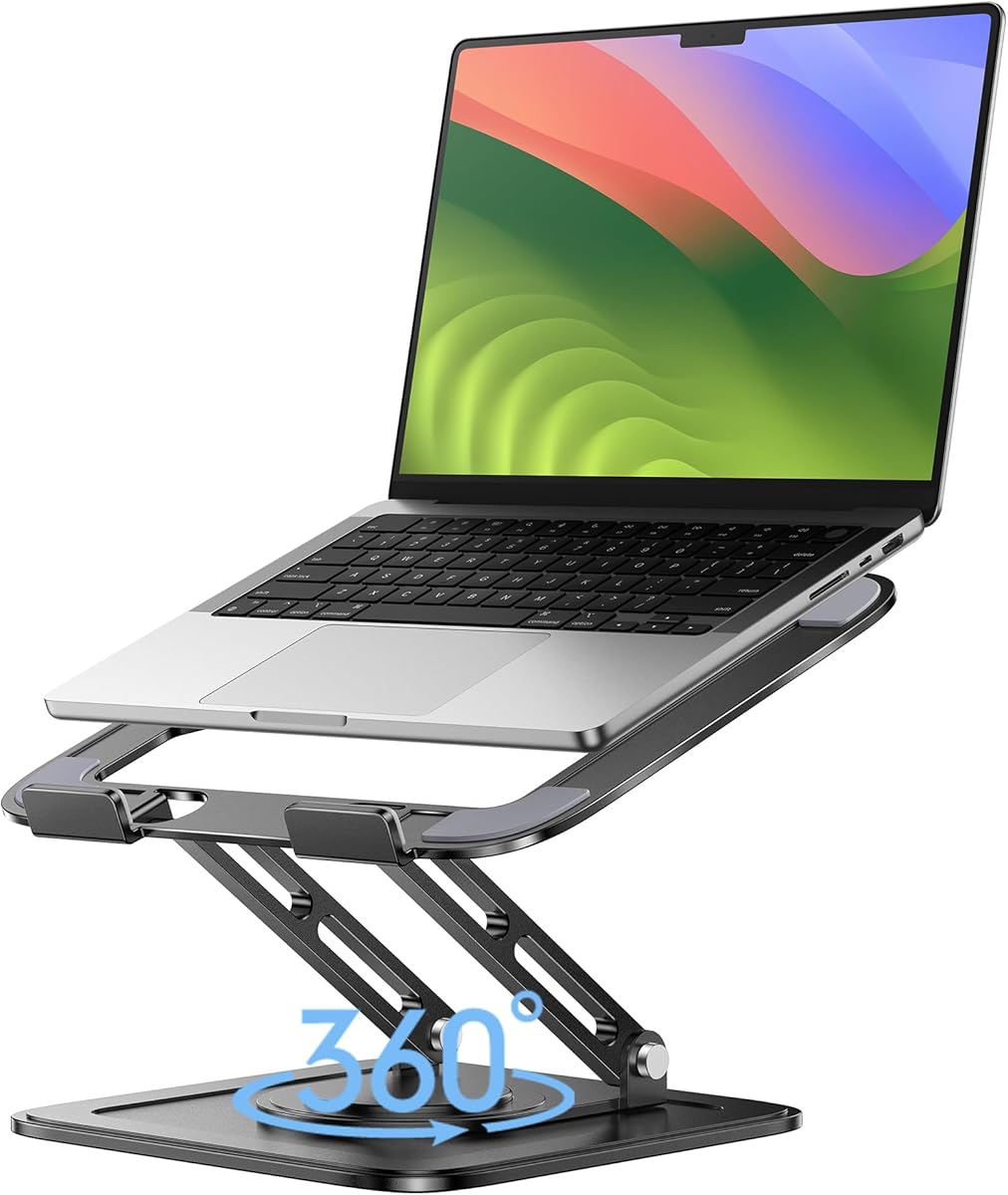
The Lamicall Swivel Aluminum Stand is the most feature-rich premium choice in this roundup. It has a 4.7 rating, supports 10- to 17.3-inch laptops, and combines a 360-degree rotating base with multiple height and angle positions. The weighted aluminum construction and extra-wide base are designed to provide a stable, polished workstation for demanding users.
We may earn a commission when you buy through this link, at no additional cost to you.
Rotation makes the stand more than a simple riser. You can share a screen during presentations, demonstrations, or group work without moving the entire device, and the folding design allows it to travel or be stored away. A large base reduces the risk of shaking and slipping while typing, while ventilation holes and the open aluminum structure support heat dissipation.
The obvious trade-off is size and weight. A larger, heavier base and more complex adjustable mechanism require more desk and bag space than a slim fixed-angle stand. The product also doubles as a projector mount, but that is a specialized secondary use that most buyers will not need. A fixed aluminum model may be more appropriate if rotation will rarely be used.
This stand is our premium recommendation for people who work across multiple devices, collaborate often, or want a single stand to handle everything from a notebook to a larger portable system. It is particularly attractive for office professionals, students sharing projects, and users who value a refined setup. The combination of broad compatibility, rotation, adjustment, cooling, and a stable base justifies its more substantial design.
The 360-degree base lets the display turn toward a nearby person or group. This is useful for conference presentations, client demonstrations, collaborative editing, and shared group projects.
The enlarged aluminum base provides a stable foundation for supported laptops from 10 to 17.3 inches. It offers a wider range than most rotating competitors, making it useful for mixed-device workspaces.
We may earn a commission when you buy through this link, at no additional cost to you.
The Amazon Basics Ergonomic Stand offers a balanced combination of height adjustment, portability, and protective design. It has a 4.6 rating, supports up to 7 inches of height adjustment, and fits laptops and tablets from 10 to 15.6 inches. Its open aluminum structure promotes airflow, while silicone pads and retaining hooks help keep the device secure.
We may earn a commission when you buy through this link, at no additional cost to you.
The adjustment range is among the most useful in the guide because it allows a user to bring the display closer to eye level without replacing the stand. A laptop and separate keyboard can therefore become a more natural workstation, especially for long writing or editing sessions. The rust-resistant aluminum keeps the overall appearance clean, and the open hollow form helps release heat.
It is rated to support 11 pounds, which is sufficient for many mainstream laptops but requires attention for heavier systems. The product information also warns that larger or heavier devices may affect overall balance and stability. At 1.7 pounds, the stand itself is not ultralight, although its folded dimensions of 10 by 8.7 by 1.8 inches allow it to fit within many laptop bags.
This is a versatile choice for students, remote workers, and anyone using an external keyboard. Its folding profile makes it convenient for changing locations, while the broad height range helps with ergonomic positioning. Choose it when you want a recognizable, no-frills approach with generous adjustment and ventilation. More specialized rotating options are better for collaborative screen sharing, and this fixed design will not suit every angle preference.
Up to 7 inches of adjustment can move the display into a much more suitable viewing position. The range is particularly helpful for people pairing a laptop with a separate keyboard or working across different chair and desk heights.
The stand folds into a 10-by-8.7-by-1.8-inch package and weighs 1.7 pounds. That makes it easy to keep in a laptop bag, move between rooms, or place in a drawer when it is not needed.
We may earn a commission when you buy through this link, at no additional cost to you.
The right laptop lift depends on your device, workspace, and daily routine. Consider screen height, stability, cooling, portability, compatibility, and the amount of storage you need before choosing a model.
A useful laptop lift should raise the screen closer to eye level while preserving a comfortable relationship between the display, keyboard, and external peripherals. Fixed-height risers are simple and can be visually tidy, but adjustable models are better when you alternate between sitting and standing, share a desk, or use different chairs. Look for multiple height positions, movable supports, and a range of angles rather than judging adjustment solely by the maximum elevation. The Amazon Basics model offers up to 7 inches of height adjustment, while the BESIGN LS03 provides a stated 6-inch lift, and rotating models allow the display to turn as well as tilt.
A stand must remain still when you type, especially if the laptop is elevated and you have a separate keyboard. Pay attention to the stated load capacity, the number of support points, the base size, and whether anti-slip materials are present. The Nulaxy stand uses a dual-rod mechanism and lists a 22-pound capacity, while the two larger HUANUO shelves support up to 44 pounds. The BESIGN LS03 has a lower stated limit of 8.8 pounds, but that is sufficient for many ordinary notebooks. Always place the stand on a flat, firm surface, and avoid pressing down on unsupported front edges.
Compatibility involves more than a broad size range. Check the laptop dimensions, the depth of the support platform, and whether rear ports can remain accessible without forcing the screen into an extreme angle. Most models support 10- to 15.6-inch laptops, while the two Lamicall aluminum stands extend to 17.3 inches, and the Nulaxy covers up to 16 inches. The product listings name common MacBook, Dell XPS, HP, Lenovo, ASUS, Acer, Chromebook, Google Pixelbook, Surface, and Microsoft Surface systems, but model dimensions should be confirmed before purchase.
Laptops are designed to move heat through vents, often located along the rear or underside. Raising a computer on an open platform improves airflow and keeps its base from sitting flush against the desk. Models such as the Nulaxy stand add a geometric vent panel, the HUANUO shelves use perforated or ventilated steel, and the Lamicall stands include multiple openings. An open aluminum design is also generally cooler than a solid surface, though actual temperatures depend on the laptop, workload, room conditions, and whether vents are blocked.
If your laptop moves between a home office, a traditional workplace, a classroom, or a café, portability can matter more than a large under-platform storage shelf. The BESIGN LS03, both Lamicall aluminum stands, the Nulaxy, the two adjustable metal models, and the Amazon Basics stand can fold for transport. Their final packed size and weight still differ, so measure the inside of your bag before ordering. Permanent monitor-style shelves provide more storage but are best left in one location.
A rotating base is valuable when a laptop must be shown to another person. The LOXP and rotating Lamicall models allow the screen to turn through 360 degrees without relocating the whole computer, which is useful for presentations, team projects, and client meetings. A fixed stand is quieter, visually simpler, and may have a smaller footprint. Rotation is not essential for a private workstation, but it can prevent repeated unplugging and awkward repositioning in a shared environment.
Raising a laptop creates usable room beneath it, but the amount depends on the stand’s design. The HUANUO Vented Steel Shelf provides a broad platform and a large storage cavity, while the three-height HUANUO riser includes a stated 12.40-by-7.09-inch storage area. A compact folding stand offers much less concealed storage but takes up less room when folded. Consider what you plan to place underneath, such as a full-size keyboard, notebooks, a printer, charging accessories, or a cable box, and ensure the rear legs do not interfere with a desk drawer.
Start by placing the stand on a flat, stable section of the desk and unfolding or assembling its supports as directed. Position the laptop with the retaining hook or upper edge at the rear of the platform, away from the front lip. Adjust the height and angle before connecting cables, and make sure the display is comfortably visible without forcing you to hunch forward. When using an external keyboard and mouse, allow enough room for your forearms to rest naturally.
Check the fit and balance after every significant adjustment. Keep the laptop centered over the supporting structure, do not press down on an overhanging edge, and avoid placing the device closer to the front than necessary. Leave the laptop’s side and rear vents unobstructed. If the stand rotates, turn it slowly and keep nearby objects outside its sweep so the device, cables, or platform cannot be struck.
For care, wipe the metal or aluminum surfaces with a soft, dry or lightly damp cloth, then allow them to dry before replacing the laptop. Clean silicone pads and the retaining hook occasionally to remove dust that might reduce grip. Avoid abrasive cleaners, excessive moisture, and sharp tools. When folding a portable stand, protect the hinge and confirm that all support arms are fully seated before placing it in a bag.
A laptop stand can help by bringing the screen closer to eye level, reducing the need to look downward for long periods. It works best when paired with an external keyboard and mouse so your hands remain in a comfortable typing position. A stand cannot correct every source of discomfort, and users with persistent pain should consider an ergonomic assessment.
Choose a stand that securely supports your laptop without overhang and accommodates its weight. Most options fit 10- to 15.6-inch laptops, while the Lamicall models extend to 17.3 inches and the Nulaxy supports up to 16 inches. Also check the platform depth and confirm that your ports remain accessible.
Aluminum is often lighter and has a cleaner finish, while steel generally emphasizes rigidity and load capacity. Neither material automatically guarantees better ergonomics; the platform design, support structure, adjustment range, and stability matter more. Select the construction that suits your device, portability needs, and workspace style.
Laptop stands can improve passive cooling by creating an open space beneath the computer and preventing its bottom vents from sitting directly against the desk. Models with perforated surfaces or additional vent patterns may move air more effectively. They cannot replace good ventilation practices, and heavy workloads can still produce heat regardless of the stand.
A rotating stand is especially useful for presentations, group projects, client meetings, or any shared desk where another person needs to see your screen. It allows the display to turn without unplugging and moving the whole computer. For a private fixed workstation, a simpler non-rotating model may provide better value and use less space.
You can use the laptop for calls or secondary tasks while placing your main display on a separate monitor riser. If the stand also supports a monitor, ensure the device fits the platform and remains within the stated load capacity. Separating the displays can also provide a more natural viewing position than trying to place both screens directly in front of you.
Place the laptop against the retaining hook and center it over the support area. Most models include silicone pads or rubber contact points intended to improve grip. Clean those surfaces regularly, avoid pushing the laptop against the front edge, and use a stable desk surface. A stand with an appropriate width and a firm support is safer than one with a very small platform.
Several models in this guide fold flat for transport, including the BESIGN LS03, Nulaxy, Lamicall, Amazon Basics, and adjustable metal stands. Before packing one, verify its stated folded dimensions against your laptop bag. Avoid forcing the hinge, and make sure the stand is completely folded so it cannot damage other items.
The BESIGN LS03 is the strongest all-around pick because it combines an attractive aluminum build, easy detachable assembly, effective elevation, ventilation, and a compact folding design. The HUANUO Vented Steel Shelf is the best budget-oriented option when a sturdy platform and useful storage matter, while the rotating Lamicall model is the premium choice for large laptops, collaboration, and flexible screen positioning.
Prioritize the features your routine actually requires. Choose a broad, weighted base for heavy typing, a wide platform and storage cavity for a permanent workstation, a 17.3-inch range for a larger computer, or a 360-degree swivel if you frequently share your screen. Foldability and lightness matter for commuters, whereas a high-capacity fixed shelf is often better for a home office.
Review the current product listing before ordering, as prices, availability, and product details can change. Confirm the laptop dimensions, weight, desk space, and intended viewing position, then choose the stand that offers the right balance of stability, cooling, portability, and convenience for your workspace.
