Dell Precision 3490
5.0Editor score
Lightweight 3.09-pound workstation
32GB DDR5 and 1TB SSD
Triple 4K external display support
Choosing a laptop for CAD work means balancing processing power, graphics performance, memory, display quality, and portability. The most effective workstation laptops can handle demanding models, renderings, simulations, and large project files while still providing the connectivity and battery life needed for work away from a desk.
We compared the featured Dell Precision, HP ZBook, and Lenovo ThinkPad P16s models using their documented processors, professional GPUs, memory, storage, displays, ports, operating systems, and workstation credentials. The list includes mobile workstations, performance flagships, and a lighter Precision option for users who need less graphics power than a desktop replacement.
Each numbered review explains who the configuration suits, which CAD benefits it emphasizes, and where its compromises appear. Ratings reflect the supplied customer feedback, while technical details are based on the listed product information. Pricing and availability can change, so confirm the current configuration and application requirements before purchasing.
5.0Editor score

4.4Editor score

5.0Editor score
As an Amazon Associate we earn from qualifying purchases.
This side-by-side comparison highlights the principal differences in processor class, graphics hardware, memory, storage, and screen size. The list spans lightweight mobile workstations and more powerful systems intended for intensive modeling, visualization, rendering, and multi-monitor professional work.


The Dell Precision 7680 shown here pairs a 4.4 customer rating with the Intel Core i9-13950HX vPro processor, making it a compelling option for architects, engineers, and technical professionals who need substantial CPU throughput. Its 16-inch FHD+ anti-glare screen provides a practical balance of workspace and portability, while 32GB of DDR5 CAMM memory and a 1TB PCIe NVMe SSD create a solid foundation for CAD and multitasking.
We may earn a commission when you buy through this link, at no additional cost to you.
The i9-13950HX can reach up to 5.5GHz and brings strong performance for complex assemblies, rule-heavy models, data processing, and engineering computation. CAMM memory is designed to offer higher performance and greater routing flexibility than conventional SODIMM arrangements, while the NVMe drive supports rapid project-file access. Two Thunderbolt 4 ports, USB-C, USB-A, HDMI, and Ethernet provide the connectivity expected from a mobile workstation.
This particular listing specifies Intel UHD integrated graphics rather than a discrete professional GPU. That distinction matters for users who routinely perform photorealistic rendering, GPU-heavy visualization, or GPU-accelerated simulation. For conventional 2D drafting, extensive 3D modeling, and processor-intensive design work, the high-end CPU can still be highly effective, but the other Precision 7680 configurations in this guide provide dedicated graphics options.
The system is best suited to a professional who wants flagship-class processing and workstation expandability without moving to the larger 17.3-inch Precision 7780. It supports up to three external 4K displays without a docking station, includes a privacy-shutter webcam, and runs Windows 11 Pro 64-bit. Overall, it is an excellent processor-focused recommendation for CAD work, provided the listed graphics configuration meets the software demands of your projects.
The i9 processor is the defining strength of this configuration. Its high clock speed and core count make it well suited to large assemblies, detailed modeling, and multitasking between CAD, browser, office, and communication applications.
Support for three external 4K displays makes the laptop useful for a side-by-side arrangement of drawing palettes, project references, specifications, and collaboration tools. The included Thunderbolt and USB-C connectivity provides a modern foundation for peripherals.
We may earn a commission when you buy through this link, at no additional cost to you.
This Dell Precision 7680 combines a 4.3 rating with the Intel Core i5-13600HX processor, 32GB of DDR5 CAMM memory, and an NVIDIA RTX 1000 Ada GPU with 6GB of dedicated memory. It is a more graphics-capable selection than the integrated-graphics configuration above, making it a practical option for users who need accelerated 3D views, rendering, or GPU-assisted design without moving to a top-tier graphics card.
We may earn a commission when you buy through this link, at no additional cost to you.
The processor can reach up to 4.8GHz and provides a balanced foundation for drafting, BIM modeling, visualization, and multi-application workflows. The dedicated RTX 1000 Ada GPU is particularly relevant to CAD programs that rely on hardware-accelerated visualization. A 1TB PCIe NVMe M.2 SSD provides fast storage, while the 16-inch anti-glare FHD+ display keeps the overall workstation manageable for field use.
The GPU's 6GB of memory is the most significant limitation. Large assemblies, data-heavy scenes, and render pipelines may benefit from more graphics memory, especially when several demanding applications or high-resolution outputs are involved. The 1920-by-1200 panel is also less expansive than a 4K screen, although external display support reduces the impact for users who work primarily at a desk.
This configuration is best for architects, engineers, and designers who want dedicated graphics without the specifications of the RTX 2000 or RTX 4000 alternatives. It supports up to four external monitors at 4K resolution without a docking station, includes two Thunderbolt 4 ports, and comes with Windows 11 Pro. Choose it when balanced CPU and GPU performance is the priority.
The RTX 1000 Ada GPU adds dedicated rendering and visualization capability, making the system more appropriate for 3D CAD than a configuration limited to integrated graphics. Its six gigabytes of dedicated memory can assist with moderate scenes and visual workflows.
Four-monitor support is useful for professional workspaces where drawings, model properties, reference material, and communication applications need separate screen space. The anti-glare built-in display also remains practical for travel and client meetings.
We may earn a commission when you buy through this link, at no additional cost to you.
The HP ZBook 8 G1i earns a 4.1 rating and brings together 64GB of DDR5 memory, a 2TB PCIe NVMe SSD, an RTX 500 Ada GPU, and a 16-inch touchscreen. It is especially compelling for CAD professionals who need generous working memory, extensive local storage, and a feature-rich mobile workstation for travel, presentations, and on-site design work.
We may earn a commission when you buy through this link, at no additional cost to you.
Its Intel Core Ultra 7 255H processor includes 16 cores and 16 threads with a maximum listed speed of 5.1GHz. That provides ample throughput for BIM, engineering, 3D modeling, rendering preparation, and concurrent applications. The 64GB memory is unusually generous for CAD, helping when users work with large assemblies, datasets, browser-based collaboration tools, and multiple virtualized environments.
The main graphics compromise is the RTX 500 Ada card's 4GB of dedicated GDDR6 memory. While it can accelerate professional graphics tasks, users working with unusually large scenes, high-resolution rendering, or GPU-intensive simulation may need more graphics memory. The 1920-by-1200 touchscreen is useful for direct interaction, but color-critical work would benefit from the stronger displays found on some competitors.
HP lists ISV certifications for applications including SolidWorks, AutoCAD, ANSYS, Revit, and MATLAB, which adds useful confidence for professional adoption. Windows 11 Pro, Wi-Fi 7, Bluetooth 5.4, a numeric keypad, fingerprint reader, and up to eight 8K displays through Thunderbolt 4 make it a strong all-around mobile CAD recommendation for users who value memory, storage, and connectivity.
The 64GB configuration gives CAD users considerable room for large assemblies, asset libraries, simulations, and multiple applications. This is particularly helpful for teams that work on enterprise models or keep major project directories locally.
The slim 16-inch touchscreen supports direct sketching, model review, and presentations. A privacy-shutter camera, fingerprint reader, backlit keyboard, and numeric keypad add convenience without compromising the professional focus.
We may earn a commission when you buy through this link, at no additional cost to you.
The renewed Dell Precision 3581 is a practical workstation option for CAD users who want dedicated graphics, a capable 14-core processor, and a smaller 15.6-inch footprint. No numerical customer rating was supplied for this listing, so there is not a rating figure to interpret. Its documented hardware is still well suited to drafting, design, and moderate 3D workflows.
We may earn a commission when you buy through this link, at no additional cost to you.
The Core i7-13800H provides 14 cores and reaches up to 5.2GHz, while 32GB of DDR5 memory runs at 4800MHz. A 1TB PCIe NVMe M.2 drive supports fast startup and file access. For graphics-dependent applications, the NVIDIA GeForce RTX A500 includes 4GB of dedicated memory, offering an advantage over systems with only integrated graphics.
As a renewed product, its condition and history may differ from a new workstation, although the listing includes a two-year on-site Next Business Day warranty. It also ships with Windows 11 Home rather than the Pro editions used by most other systems in this guide. That distinction may matter to organizations that require Remote Desktop, BitLocker administration, Group Policy, or other Pro features.
This laptop is best for a budget-conscious student, small studio, or independent professional who needs a dedicated GPU and a compact workstation. The RTX A500's four gigabytes of memory and FHD non-touch display are the main constraints for more advanced visualization. For conventional CAD, moderate rendering, and on-site work, however, the core specification is compelling.
The combination of a 14-core processor, 32GB DDR5 memory, and an NVMe drive creates a responsive foundation for mainstream CAD. It is a sensible way to access dedicated workstation graphics without using a flagship mobile platform.
The 15.6-inch display is smaller than the 16- and 17.3-inch alternatives, making the system easier to carry between project locations. Its non-touch FHD panel is straightforward and serviceable for everyday design work.
We may earn a commission when you buy through this link, at no additional cost to you.
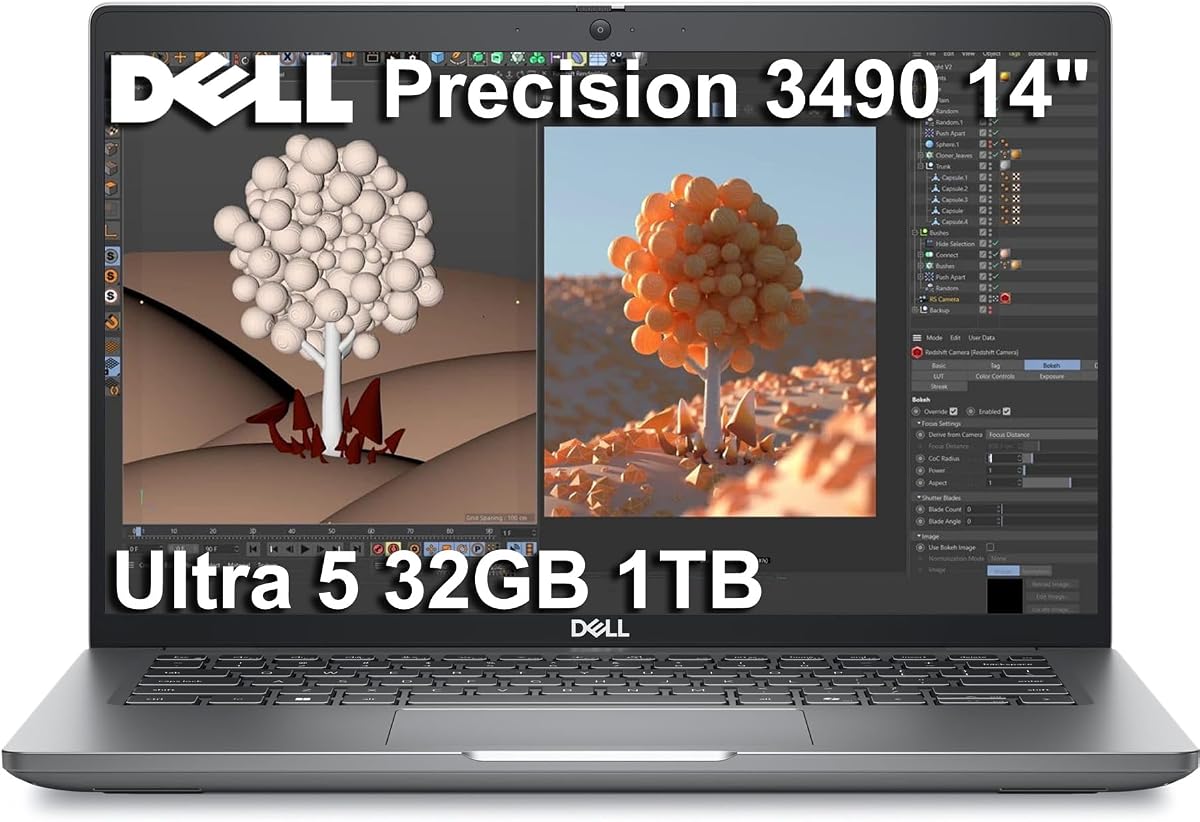
The Dell Precision 3490 combines a 5.0 rating, a 3.09-pound chassis, and 32GB of DDR5 memory, making it a strong budget-oriented recommendation for CAD users who value mobility. It is the lightest workstation listed here and offers a capable alternative to larger systems that function more like permanent desktop replacements.
We may earn a commission when you buy through this link, at no additional cost to you.
Its Intel Core Ultra 5 135H processor has 14 cores and can reach up to 4.6GHz, while 32GB of DDR5 memory and a 1TB SSD support demanding productivity tasks. The laptop includes Windows 11 Pro 64-bit, professional application credentials, and MIL-STD-810H testing. It is designed for architects and engineers who need to review drawings, make regular edits, and collaborate away from a fixed office.
The primary limitation is the use of Intel integrated graphics. This configuration may feel constrained in photorealistic rendering, GPU-heavy visualization, complex simulation, or large 3D scenes. The 14-inch FHD display also offers less room than the larger alternatives, although support for up to three external 4K monitors allows a much larger desktop when the user is at a desk.
For 2D drafting, floor plans, BIM review, technical documentation, and moderate 3D work, the Precision 3490 can deliver a capable experience. It is especially attractive to buyers who need workstation features, Pro software, a good rating, and low weight without moving to a flagship model. Among the more affordable systems in this roundup, it stands out for its balance.
A 3.09-pound design reduces the fatigue associated with carrying a full-size workstation to meetings, job sites, and client locations. It retains professional application support, Pro security features, and durable construction.
The 32GB memory configuration is sufficient for serious CAD multitasking and several large project files. Three-display support creates a flexible desk arrangement for model windows, specifications, and collaboration tools.
We may earn a commission when you buy through this link, at no additional cost to you.
The Dell Precision 7780 earns a 5.0 rating and represents the most capable premium configuration in this guide. It combines an Intel Core i9-13950HX processor reaching up to 5.5GHz with an NVIDIA RTX 4000 Ada GPU and 12GB of dedicated memory. The result is a high-end mobile workstation for serious CAD, rendering, simulation, and visualization work.
We may earn a commission when you buy through this link, at no additional cost to you.
Its 17.3-inch IPS display is one of the standout features. The anti-glare panel offers 500 nits of brightness and 99% DCI-P3 color coverage, making it better suited to detailed visual work than many FHD alternatives. Four external monitors can be connected at 4K resolution, while a full-size keyboard with numeric keypad, Ethernet, multiple USB ports, and two Thunderbolt 4 connections create a professional desk setup.
The RTX 4000 Ada card has substantially more dedicated memory than the other graphics configurations listed, making it the strongest option here for GPU-accelerated design, rendering, or 3D visualization. Even so, the 17.3-inch chassis is large and likely less convenient for frequent travel. The listed 32GB of memory is also modest for a flagship platform, particularly when more than 64GB is available in another configuration.
This is the strongest recommendation for users whose CAD work benefits from serious graphics performance and color-capable visualization. Architects, visualization specialists, engineers, and studio teams can take advantage of the powerful combination. Those who need mobility should consider the smaller Precision 3490 or ThinkPad P16s, but for maximum workstation capability, this Precision 7780 is the standout choice.
The RTX 4000 Ada's 12GB of dedicated memory provides considerably more headroom for detailed 3D scenes, visualization, and rendering than the other GPUs in this guide. It is the leading choice for graphically intensive CAD work.
The 17.3-inch 99% DCI-P3 display gives designers a generous canvas and a more vivid presentation of model materials and visualization. Its 500-nit brightness also helps when working in bright offices or studio environments.
We may earn a commission when you buy through this link, at no additional cost to you.
The RTX 2000 Ada-equipped Dell Precision 7680 offers an appealing middle ground between mainstream workstation graphics and the flagship RTX 4000 configuration. It has a 3.9 rating, an Intel Core i7-13850HX processor, 8GB of dedicated graphics memory, 32GB of DDR5 system memory, and 2TB of NVMe storage.
We may earn a commission when you buy through this link, at no additional cost to you.
The eight-gigabyte GPU is a meaningful step up from the six-gigabyte RTX 1000 configuration and can be beneficial for larger 3D models, rendering, and visualization. The i7-13850HX provides a strong professional processor foundation, while the two-terabyte drive offers ample room for asset libraries, project archives, and local software installations. This balance makes the system attractive to users who want more graphics capability without moving to the 12GB flagship card.
The 16-inch anti-glare display has a listed 45% NTSC color gamut, which is not ideal for color-critical visualization. The supplied customer rating is also lower than those of the other rated Precision configurations, though that feedback does not reveal the precise reasons. Buyers should not interpret the rating as a direct measure of processor or graphics performance, but it is still useful context when comparing customer experience.
This model is best for CAD professionals whose work includes regular 3D visualization and occasional rendering, while remaining within a conventional mobile workstation platform. Four 4K external displays, two Thunderbolt 4 ports, Ethernet, and Windows 11 Pro reinforce its professional suitability. Choose it when eight gigabytes of graphics memory offers a better balance than either the entry-level or flagship GPU options.
Eight gigabytes of dedicated graphics memory allows the RTX 2000 Ada configuration to take on more demanding visual workloads than the smaller RTX 1000 option. It remains a practical middle tier for many professional 3D workflows.
The 2TB NVMe drive is useful for architects and engineers who keep drawings, textures, simulation inputs, and archived project files close to the workstation. Fast PCIe storage reduces delays when opening large local assets.
We may earn a commission when you buy through this link, at no additional cost to you.
This Dell Precision 7780 configuration stands out for its 128GB of DDR5 CAMM memory. Paired with the Intel Core i9-13950HX, NVIDIA RTX 4000 Ada with 12GB of memory, and a 17.3-inch 500-nit display, it is built for CAD users who need to operate many demanding applications or exceptionally large project sets simultaneously.
We may earn a commission when you buy through this link, at no additional cost to you.
The processor includes 24 cores and reaches up to 5.5GHz, while the RTX 4000 Ada GPU supplies dedicated graphics performance for visualization and rendering. The major advantage is memory capacity: 128GB allows users to keep large assemblies, design applications, browser tabs, virtual machines, and collaborative platforms open with less concern about memory pressure.
Storage is the notable limitation because this configuration lists a 512GB PCIe M.2 NVMe drive. That amount may be insufficient for users with extensive texture libraries, historical project files, local development environments, or large simulation datasets. External storage or a larger internal drive may be necessary. The large 17.3-inch form factor also makes this less attractive for users who need a genuinely compact workstation.
This is an excellent choice for CAD studios, engineering teams, and technical users who prioritize memory and graphics capacity over storage convenience. The 99% DCI-P3 ComfortView Plus display, Windows 11 Pro, smart-card reader, IR camera, and full-size backlit keyboard further support a professional environment. For maximum working memory in a mobile workstation, it is the clear leader here.
The 128GB capacity can accommodate large design files, engineering datasets, multiple browser applications, and virtualized tools at the same time. This reduces the need to close and reopen work when a project becomes computationally demanding.
The combination of flagship CPU, RTX 4000 Ada graphics, and a 99% DCI-P3 display makes this a strong system for intensive CAD and visualization. Its large enclosure is best suited to a fixed professional workspace or occasional transport.
We may earn a commission when you buy through this link, at no additional cost to you.
This Dell Precision 7680 combines the RTX 2000 Ada GPU with 64GB of DDR5 memory, 2TB of NVMe storage, and the Intel Core i7-13850HX processor. Its 5.0 rating makes it one of the strongest customer-rated options in the roundup and a well-balanced choice for intensive CAD multitasking.
We may earn a commission when you buy through this link, at no additional cost to you.
Compared with the 32GB RTX 2000 configuration, the additional system memory is valuable for large assemblies, complex BIM environments, simulation data, and multiple virtualized tools. The eight-gigabyte RTX 2000 Ada GPU also provides a more substantial graphics foundation than integrated-only systems, while 2TB of fast storage accommodates extensive project directories and asset libraries.
The main display limitation is its listed 45% NTSC anti-glare coverage, which is less suitable for users judging colors in rendering, material visualization, or presentation work. The 16-inch FHD+ resolution is also only 1920 by 1200. The system remains large compared with the Precision 3490, so buyers should consider how often it must travel.
This configuration is best for professionals who need more memory than a standard 32GB laptop but do not require the absolute graphics capacity of the RTX 4000. It offers four-monitor support, two Thunderbolt 4 connections, Ethernet, and Windows 11 Pro. For CAD teams balancing 3D performance, storage, and heavy multitasking, it is a particularly coherent configuration.
The 64GB configuration gives users room to operate CAD, visualization, office productivity, communication, and browser tools concurrently. It is especially useful for teams that maintain large model libraries or use multiple project environments.
The RTX 2000 Ada GPU and 2TB NVMe drive work together well for users who need capable 3D visualization without moving to a flagship graphics configuration. The drive is large enough for many active project collections.
We may earn a commission when you buy through this link, at no additional cost to you.
The Lenovo ThinkPad P16s Gen 4 is a portable workstation built around an Intel Core Ultra 7 255H processor, 32GB of DDR5 memory, and a 1TB PCIe SSD. Its 4.0 rating reflects a balanced approach to large-screen productivity, mobility, and professional compatibility rather than maximum graphics performance.
We may earn a commission when you buy through this link, at no additional cost to you.
The processor has eight cores and can reach up to 5.1GHz, providing solid performance for 2D drafting, BIM workflows, technical documentation, moderate 3D modeling, and general engineering productivity. The 16-inch WUXGA display offers narrow borders, 400 nits of brightness, and an anti-glare coating, making it practical for extended work in varied lighting. Three external 4K displays can be connected through HDMI and Thunderbolt 4.
Because this listing specifies Intel Graphics without a dedicated GPU, it is less suitable than the Dell and HP alternatives for heavy rendering, large photorealistic scenes, or GPU-accelerated simulation. The 32GB memory is adequate for mainstream professional work but offers less capacity than the 64GB and 128GB configurations. Users should verify whether their required CAD package and add-ons depend on discrete graphics.
This ThinkPad is best for architects, engineers, software developers, and technical professionals who need Windows 11 Pro, a large workspace, and a portable machine for travel. Windows features such as BitLocker, Remote Desktop, Hyper-V, and Group Policy add enterprise value, while the numeric keypad, fingerprint reader, Ethernet, and Wi-Fi 7 support productive daily use.
The P16s balances a 16-inch screen with a more portable design than heavier performance-focused workstations. That makes it suitable for professionals who need a large drafting canvas while moving between offices, sites, and studios.
Windows 11 Pro, virtualization support, Group Policy, and BitLocker suit managed business environments. Two Thunderbolt 4 ports, HDMI 2.1, Ethernet, Wi-Fi 7, and Bluetooth 5.4 provide a broad selection of wired and wireless connections.
We may earn a commission when you buy through this link, at no additional cost to you.
The right CAD laptop depends on the software, model complexity, rendering demands, and working environment. These factors help distinguish a lightweight professional system from a graphics-intensive mobile workstation.
A modern Core i7, Core i9, or Core Ultra 7 processor is appropriate for most professional CAD work. Core count and clock speed influence model regeneration, assembly calculations, rendering preparation, simulations, and multitasking. The featured Intel Core i9-13950HX configurations reach up to 5.5GHz, while the Core Ultra 7 255H reaches up to 5.1GHz. These faster processors provide more headroom when a project combines CAD with visualization, large datasets, or communication applications.
A dedicated GPU is important for 3D modeling, real-time visualization, rendering, and GPU-accelerated simulation. The RTX 1000 Ada listed with one Precision 7680 includes 6GB of dedicated memory, while the RTX 2000 Ada configurations include 8GB and the RTX 4000 Ada alternatives include 12GB. The RTX A500 in the Precision 3581 has 4GB. More graphics memory can help with large scenes, high-resolution textures, and render buffers, although actual application requirements should guide the choice.
CAD workflows benefit from ample RAM because operating systems, design software, browsers, visualization tools, and collaboration applications all compete for memory. The featured systems range from 32GB to 128GB. A 32GB configuration is a sensible starting point for conventional drafting and modeling, 64GB is preferable for large assemblies, multiple applications, and virtual machines, and 128GB suits data-heavy teams or highly parallel workflows.
PCIe NVMe storage improves startup, application loading, autosave, and access to local project assets. The roundup includes 512GB, 1TB, and 2TB drives. Active project files and frequently used software benefit from more capacity, while 1TB is a practical starting point for many users. Users who routinely keep extensive texture libraries, archived drawings, or simulation datasets should consider 2TB or supplementary storage.
A larger screen reduces palette switching and gives model details more room. The featured displays measure 14, 15.6, 16, and 17.3 inches. The Precision 7780's 17.3-inch panel is listed with 99% DCI-P3 coverage and 500 nits, while the ThinkPad P16s and HP ZBook use 16-inch 400-nit and 300-nit anti-glare panels. Built-in color accuracy matters most for visualization and presentation, whereas external monitors can provide a better workspace for many desk-based users.
A workstation is only useful where the work happens. The Precision 3490 weighs just 3.09 pounds and stands apart for mobility, while the 16-inch HP ZBook 8 G1i and ThinkPad P16s seek a larger-screen balance. The 17.3-inch Precision 7780 models and 16-inch Precision 7680 configurations are more likely to function as mobile workstations carried between locations but used primarily at a desk. Consider screen size, weight, battery needs, and the frequency of on-site work together.
Professional CAD users often run a model window, drawing palette, specification browser, and communication application simultaneously. The featured systems support between three and four external 4K monitors, with some using Thunderbolt 4, USB-C, and HDMI. The HP ZBook also lists support for up to 8K output through Thunderbolt 4. Connectivity should include USB-A peripherals, Ethernet for stable large-file transfers, and a docking solution when additional displays or specialized devices are required.
Most CAD professionals need Windows 11 Pro features such as BitLocker, Remote Desktop, Group Policy, Hyper-V, and centralized management. Windows 11 Home on the renewed Precision 3581 may be sufficient for an individual but less appropriate for managed organizations. Warranty terms also vary among the resealed and renewed listings. Review the disclosed upgrade coverage, remaining manufacturer support, and local service arrangements before making a final decision.
Before beginning a project, install the complete current version of the required CAD application, its rendering engines, plug-ins, and device drivers. Professional application certifications can guide compatibility, but a clean driver setup remains important. Update the operating system, create a recovery point, and confirm that project file locations are compatible with any cloud synchronization or backup policy used by your organization.
Organize large project directories so the operating system, application cache, and temporary render files are not competing for limited drive space. Use autosave and versioned backups rather than relying on a single saved file. For long computations, keep the laptop on a stable surface with ventilation unobstructed, connect power, and monitor system temperature and task progress through the CAD application's available tools.
Transport the machine in a padded protective sleeve, keep liquids away from the chassis, and avoid leaving the workstation in a hot vehicle. Clean the display and exterior with manufacturer-approved methods, and schedule periodic storage and memory checks. For a renewed system, document the existing condition and thoroughly test ports, cooling, display, battery, keyboard, and installed software before the return window expires.
For general 2D drafting, 32GB of RAM is a strong starting point and allows CAD software, a browser, and office applications to run together. Large BIM assemblies, simulations, rendering, and virtualized environments benefit from 64GB. A 128GB configuration is most useful for exceptionally large projects or heavy parallel application use. Matching memory to your actual project size is more important than simply choosing the largest option.
A dedicated GPU is generally advisable for Revit, 3D modeling, visualization, rendering, and GPU-accelerated simulation. Integrated graphics may handle basic drafting and less demanding 2D workflows, but complex scenes benefit from dedicated memory and hardware acceleration. The RTX 1000 Ada, RTX 2000 Ada, RTX 4000 Ada, and RTX A500 options in this guide provide a stronger foundation for professional 3D work.
A 16-inch laptop generally offers a stronger balance of screen area and portability. A 17.3-inch model provides a larger drawing and model canvas, which is useful at a fixed desk, but it is heavier and consumes more space when carried. The Precision 7780 also features a 500-nit, 99% DCI-P3 display, making the larger size particularly attractive for visualization work.
Yes, and external displays are often essential for professional CAD productivity. The featured systems support multiple external displays through HDMI, USB-C, and Thunderbolt connections, with several configurations supporting four 4K monitors. Check the maximum display count and resolution for the exact model, and verify that your docking station and peripherals are compatible with the ports you plan to use.
A 1TB PCIe NVMe drive is a useful starting point for active drawings, software, and project assets. The featured 2TB configurations provide more room for extensive libraries and archived work, while the 512GB option is most appropriate when files are stored on network drives or portable storage. CAD files can be large, especially when textures, meshes, and rendering outputs are included.
Windows 11 Home can run compatible CAD applications, but Windows 11 Pro is usually more appropriate for business-managed environments. Pro includes Remote Desktop, BitLocker, Group Policy, and Hyper-V features commonly used by professional teams. The renewed Precision 3581 lists Home, while the other featured configurations generally provide Pro, so organizational requirements should be checked before purchase.
A renewed workstation can be suitable when the hardware meets the application's requirements and the buyer's warranty and return terms are acceptable. The featured renewed Precision 3581 includes a Core i7 processor, 32GB of memory, an NVMe drive, and a dedicated RTX A500 GPU. Before purchasing, confirm the system's condition, battery expectations, warranty coverage, and compatibility with the required CAD software.
The required graphics memory depends on model size, texture resolution, rendering output, and whether multiple applications use the GPU simultaneously. The 4GB RTX A500 and 6GB RTX 1000 Ada are suited to mainstream professional workflows, while 8GB RTX 2000 Ada and 12GB RTX 4000 Ada configurations offer more headroom. Always check the recommended hardware for your specific CAD package and add-ons.
The Dell Precision 3490 stands out as the most mobile and budget-conscious selection, combining a 5.0 rating, a 3.09-pound chassis, 32GB of DDR5 memory, and Pro software. The Dell Precision 7680 with the i9 processor is the strongest all-around choice for CPU-heavy work, while the RTX 1000 Ada version adds dedicated graphics without moving to the most demanding hardware tier.
For intensive 3D workflows, the Dell Precision 7780 with the RTX 4000 Ada offers the strongest graphics memory and a color-capable 500-nit display. The 128GB configuration leads in multitasking capacity, whereas the 64GB RTX 2000 Precision 7680 provides a more balanced specification. The HP ZBook 8 G1i and ThinkPad P16s are worthwhile when memory, portability, enterprise features, or large screens matter alongside CAD performance.
Before buying, confirm the exact processor, GPU, memory, and storage configuration, then compare those specifications with the minimum and recommended requirements of your CAD software. Prices, availability, and seller details can change, so check the current listing at the time of purchase and review the warranty terms carefully.