
SATA to 4 Pin Power Cable Adapter
4.7Editor score
SATA male connector
Molex LP4 female connector
Seven-inch three-pack
Compare the best LP4 Molex SATA Power Adapter options for drive compatibility, cable length, connector direction, multi-drive splitters, packaging, and easy
An LP4 Molex SATA power adapter bridges the connector gap between legacy 4-pin peripheral power supplies and modern SATA hard drives, SSDs, and optical drives. The right adapter should provide secure connections, suitable conductor sizing, a manageable cable length, and compatibility with the devices and power supply in your system.
This guide compares ten adapters based on their supplied connector configurations, supported drive types, cable length, pack quantity, construction details, and installation approach. It covers both straight adapters for one SATA device and Y-cables that provide two SATA connections from one Molex source, along with different packing options.
Each review explains the product's strongest use case, practical trade-offs, and ideal buyer. The top selections range from a budget three-pack to a locking adapter and a flexible multi-drive option, while all products remain subject to changing availability and retailer pricing. Always verify connector orientation before installation.
4.7Editor score

4.8Editor score

4.7Editor score
The comparison below highlights connector direction, cable length, output arrangement, and pack quantity so buyers can quickly identify the adapter that fits their legacy power supply and storage devices.

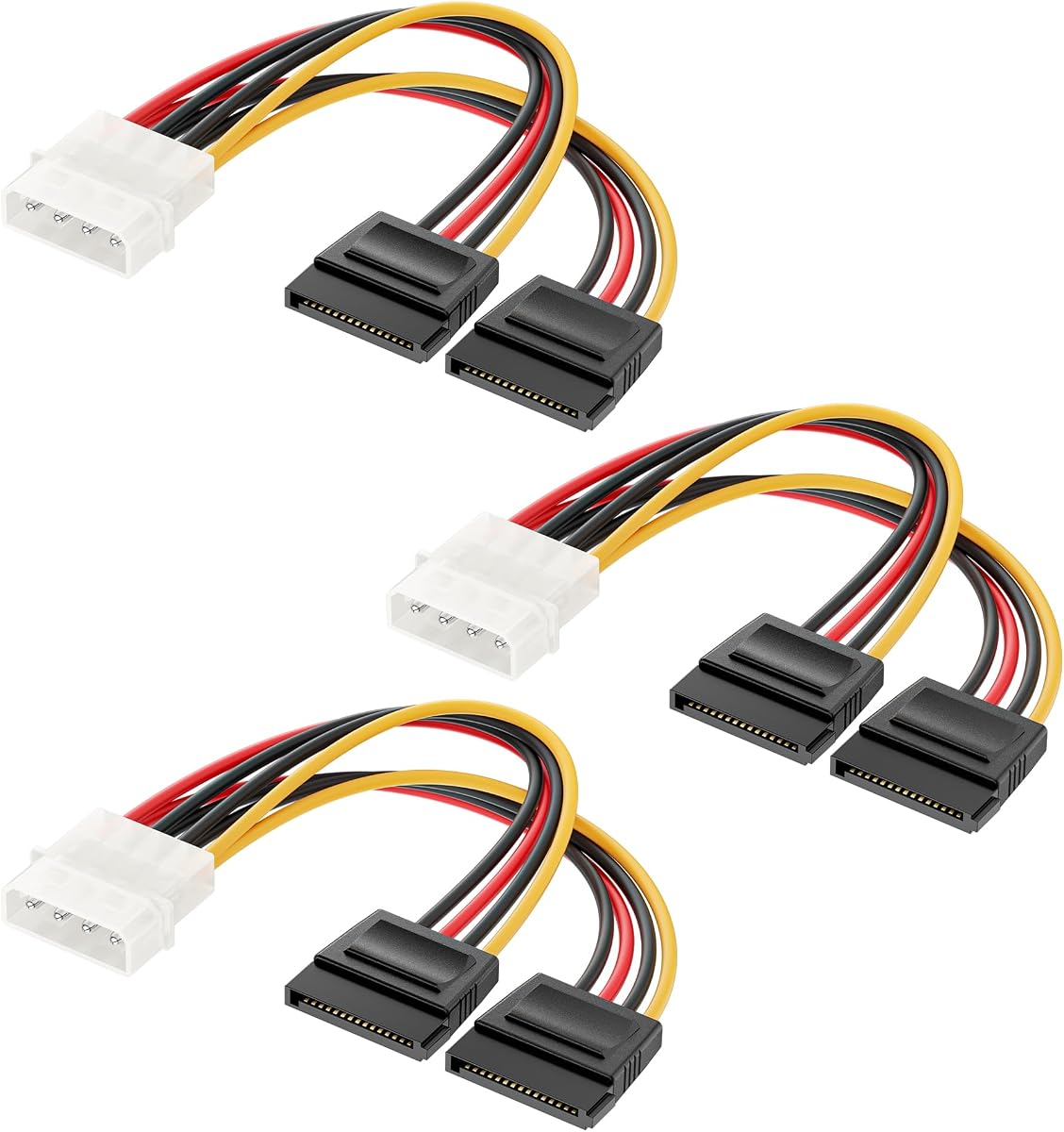


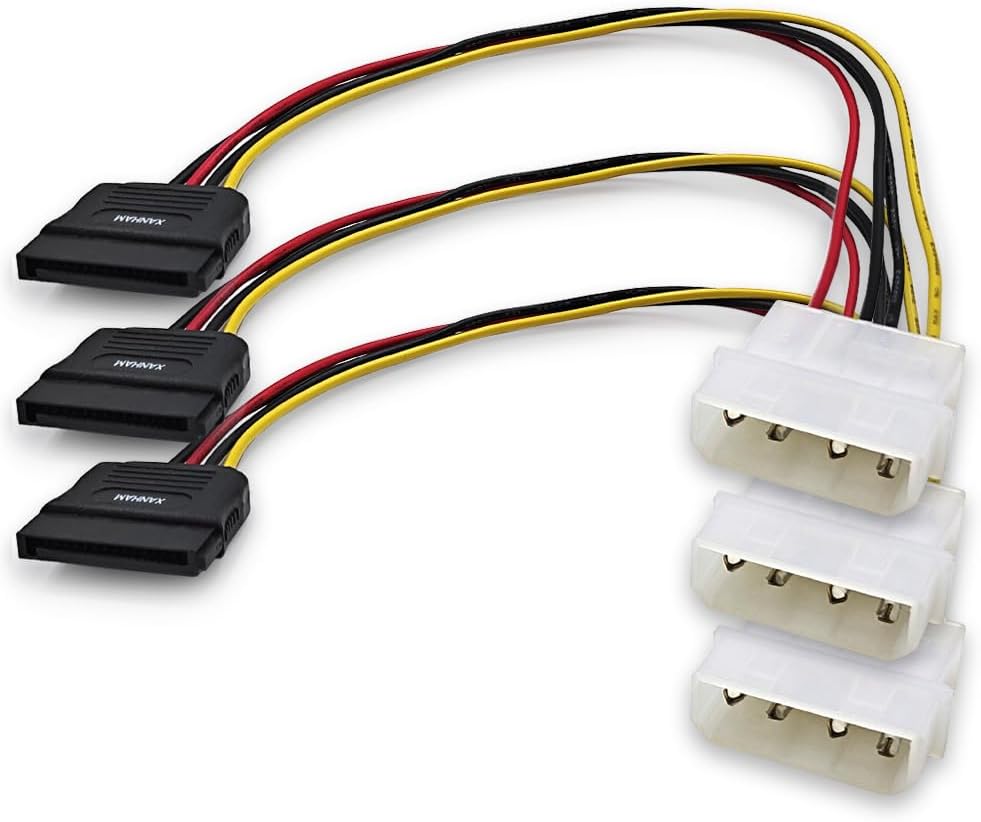


This three-pack SATA to 4 Pin Power Cable Adapter is a straightforward solution for connecting a modern SATA device to a legacy LP4 source. It has a 4.7 rating, and its defining feature is the clearly stated arrangement: a SATA 15-pin male connector on one end and a Molex LP4 female connector on the other. Each cable measures seven inches, making it practical for internal desktop installations.
We may earn a commission when you buy through this link, at no additional cost to you.
The three-pack adds useful flexibility without requiring users to purchase three separate cables. One adapter can connect a hard drive, another can serve an optical drive, and the remaining unit can remain available as a spare. The product information identifies the cable as useful for powering IDE hard drives from SATA power supplies, while also describing the connector arrangement in the opposite functional direction.
Its main limitation is that it serves only one SATA device per cable. It is not a Y-cable, and the specified female LP4 end means it is intended to receive a 4-pin Molex plug rather than plug directly into a female Molex socket. Buyers must therefore confirm that their existing power lead and adapter orientation align. No locking feature is specifically listed for this model.
This is a strong budget choice for a straightforward one-drive upgrade, repair, or legacy-system refresh. It is particularly attractive when three cables are useful and the buyer is comfortable confirming connector gender before ordering. For installations that require two SATA devices from one Molex port, a dedicated splitter would be a more efficient choice.
Including three units makes this adapter more versatile than a single-cable package for technicians, builders, and anyone planning more than one storage connection. The compact length supports tidy routing around conventional desktop drive cages.
The product connects one SATA device through an existing 4-pin Molex connection, avoiding the need to replace a functional legacy PSU merely because it lacks native SATA outputs.
We may earn a commission when you buy through this link, at no additional cost to you.
Cable Matters' three-pack combines a 4-pin Molex input with SATA power outputs for internal drives and optical devices. Its 4.7 rating reflects strong customer reception, and the set is among the most practical options for anyone adapting several pieces of legacy equipment. Each cable measures six inches, emphasizing neat routing inside a desktop chassis.
We may earn a commission when you buy through this link, at no additional cost to you.
The product information calls out compatibility with SATA hard drives, solid-state drives, and optical drives. It also notes stable 5V SATA device power delivery from 12V ATX systems. This makes the adapters relevant to older PCs whose power supplies offer Molex peripheral outputs but no dedicated modern SATA connector.
The main compromise is cable reach. Six inches is helpful in tight bays and around drive cages, but it may be insufficient when the source connector is farther away or when another section of cable must be routed around obstructions. The package also provides one SATA output per adapter, so a Y-cable would be preferable for two devices sharing a single Molex source.
Overall, this is a premium pick for technicians and builders who value a well-rounded three-pack, broad device support, and compact routing. It is especially helpful when replacing several loose or unreliable SATA power leads. Confirm connector orientation and available slack before installation, and shut down the system before changing any power cable.
The six-inch lead is short enough to reduce excess cable around a standard drive bay. That can improve accessibility during maintenance and make it easier to trace each SATA power connection.
The stated use cases include SATA hard drives, SSDs, and optical drives, making the pack useful beyond a single storage-upgrade project.
We may earn a commission when you buy through this link, at no additional cost to you.
This Cable Matters Y-cable converts one legacy Molex LP4 connection into two SATA power outputs. With a 4.6 rating and a three-cable pack, it is designed for builders who need to connect multiple modern storage devices without replacing an otherwise functional legacy power supply.
We may earn a commission when you buy through this link, at no additional cost to you.
The six-inch Y-shaped design supports internal routing and can reduce the number of separate Molex connections required. Each branch provides a SATA connection suitable for hard drives, SSDs, or optical drives according to the supplied information. Stable 5V SATA power delivery from 12V ATX systems is specifically cited.
Buyers should consider the implications of feeding two devices through one source connector. The listed product description emphasizes reliable power delivery, but it does not provide independent load specifications or per-branch protection. Users should also allow for the physical space occupied by the split and both SATA plugs. The short lead is beneficial for tight cases but can be restrictive in larger layouts.
This is the most useful option in the list when the goal is to power two SATA devices from one Molex port. It is well suited to legacy PC upgrades, multi-drive desktop builds, and repair work where preserving the original PSU is important. Verify that the power supply can meet the combined requirements of all attached drives before use.
The dual-output arrangement is the central advantage of this product. It allows two compatible SATA devices to share one 4-pin Molex source, reducing both connection count and cable clutter.
Three Y-cables provide ready replacements for multiple installations or repair benches. The included quantity makes the package useful for builders planning storage expansion.
We may earn a commission when you buy through this link, at no additional cost to you.
StarTech's LP4SATAFM12 is a 12-inch SATA-to-LP4 power adapter intended to power a 4-pin Molex device from a SATA power connection. Its 4.6 rating and model-specific designation make it a recognizable option for repair inventories and system upgrades where a slightly longer reach is beneficial.
We may earn a commission when you buy through this link, at no additional cost to you.
The 12-inch length distinguishes it from the many six- or seven-inch adapters in this guide. It can span a larger distance within a case, which may be helpful when the SATA source is located away from the drive bay. The straightforward one-device format avoids the added bulk of a Y-cable and remains easy to route in relatively open chassis.
The package contains a single adapter, which is less convenient for technicians who need several replacements or for builders installing multiple drives. It also does not solve the problem of powering two SATA devices from one Molex source. As with the other products, users should inspect the actual connectors and confirm the intended power direction before use.
StarTech is the most suitable choice when cable length takes priority over multipack value or dual-output capability. It works well as a targeted repair cable or a comfortable connection in a larger desktop layout. Install it with the system powered off, and check the connector fit carefully before applying force.
The 12-inch cable provides more placement freedom than compact adapters. That extra length can reduce strain when the Molex source is not immediately adjacent to the target drive.
With no splitter branch, this adapter keeps the installation simple. It is best suited to a system that needs one additional legacy-powered device.
We may earn a commission when you buy through this link, at no additional cost to you.
This three-pack turns a 4-pin male IDE Molex connector into dual 15-pin female SATA power outputs. It carries a 4.3 rating and focuses on connecting modern storage equipment to legacy desktop power supplies. Its seven-inch format balances branch reach with manageable internal routing.
We may earn a commission when you buy through this link, at no additional cost to you.
The supplied description highlights premium copper conductors and a tough PVC jacket. It also states that the SATA ends use secure latching interfaces intended to reduce accidental disconnections. Compatibility is listed for 3.5-inch and 2.5-inch SATA hard drives, SSDs, and SATA optical drives, giving the splitter broad relevance to storage expansions.
As with any Y-cable, the total electrical requirements of both connected devices should be considered. The listing describes the adapter as a bridge from a legacy PSU to two SATA devices, but it does not provide detailed per-port current ratings. Its 4.3 rating is lower than those of the other products, so buyers should pay particularly close attention to compatibility and expected use.
This splitter is a sensible option for an older desktop that needs two SATA-powered drives but has limited Molex outputs. It also suits refurbishment, repair, and NAS-style storage expansion where preserving the existing PSU is a priority. The latching ends are a useful feature, but connectors must still be aligned correctly and the system shut down before installation.
Copper conductors are identified as a core construction feature. They form the internal path that carries power from the Molex source to each SATA branch.
Secure latching interfaces are intended to keep the SATA plugs seated during extended use. This is particularly helpful in desktop cases where cables may be moved during maintenance.
We may earn a commission when you buy through this link, at no additional cost to you.
This three-pack provides 7.8-inch cables with a 4-pin Molex male end and SATA 15-pin female end. Its 4.4 rating reflects a practical product aimed at builders and technicians installing or replacing SATA drives in systems that have only Molex-style power outputs.
We may earn a commission when you buy through this link, at no additional cost to you.
The product's strongest documented detail is its UL-listed AWM 1007 construction, including VW-1 fire resistance and 22 AWG copper conductors. It is also described as tested before packing. These construction and inspection details make it useful for users who want more than a basic short jumper cable.
Each adapter provides one SATA connection, so two drives will still require two Molex source connections. The 7.8-inch length is slightly longer than the common six-inch format, which may help with small routing adjustments. Compatibility is listed for hard drives, SSDs, CD-ROM drives, hard disk drives, and DVD drives.
This is a good fit for straightforward SATA additions where a three-cable stock and documented cable construction are priorities. It is also appropriate for repair work involving IDE-style PSU connections. Users should verify that the Molex male and SATA female arrangement matches their available cable and drive sockets before installation.
UL-listed AWM 1007 cable with VW-1 fire resistance is a notable specification. It provides a more concrete basis for comparison than generic durability claims.
Three tested cables support multiple drive installations or provide convenient spares. The set is well suited to technicians who routinely replace storage power leads.
We may earn a commission when you buy through this link, at no additional cost to you.
This seven-inch three-pack is the highest-rated product in the guide, with a 4.8 rating. Its key feature is the locking latch on the 15-pin SATA connection, which is designed to help the plug remain seated while reducing the chance of accidental disconnection.
We may earn a commission when you buy through this link, at no additional cost to you.
The product connects a modern SATA hard drive or optical drive through a Molex LP4 port and is compatible with 5V SATA devices powered by a 12V ATX supply. The supplied information lists hard disk drives, SSDs, CD drives, and DVD drives among compatible equipment. Copper core wire is also specified for the power path.
The adapter does not support hot-plugging, so the system must be turned off before the cable is connected or replaced. It also supplies only one SATA output per cable. Buyers should reconcile the title's connector description, which identifies a Molex IDE 4-pin male to SATA 15-pin female arrangement, with the actual sockets in their system before ordering.
This is the strongest all-around recommendation because it combines the highest rating, a useful three-pack quantity, a practical seven-inch length, and a positive locking feature. It is ideal for desktop storage upgrades, legacy PSU conversions, and technicians seeking a dependable replacement cable. Confirm orientation and never install it while the computer is energized.
The stated locking latch helps keep the SATA plug secure. That reduces concern about a power lead working loose during routine case access or vibration.
Compatibility with hard drives, solid-state drives, and multiple optical-drive formats makes the three-pack useful across several common upgrade and repair scenarios.
We may earn a commission when you buy through this link, at no additional cost to you.
This eight-inch three-pack has one of the clearest technical descriptions in the guide. It specifies a SATA 15-pin male connector, a 4-pin Molex LP4 female connector, 18 AWG copper wire, and a length of 20 centimeters, or eight inches. It holds a 4.7 rating.
We may earn a commission when you buy through this link, at no additional cost to you.
The explicit wire size and conductor material make the adapter easier to evaluate against alternatives. Copper wire is identified as strong and durable, while easy insertion and removal are highlighted as usability features. The eight-inch length offers a little more routing reach than the six- and seven-inch alternatives.
The adapter serves one SATA device per cable and has no locking feature listed. Its female LP4 connector is designed to accept an existing 4-pin Molex plug. That direction should be checked carefully against the power supply or adapter cable in the intended system, especially because SATA and Molex connector shapes can appear similar at a glance.
This is a good choice for users who prioritize documented conductor specifications, a three-cable quantity, and slightly greater reach. It is well suited to drive replacements, basic SATA additions, and maintaining spare internal power leads. Its simple one-to-one design avoids the space requirements of a Y-cable and remains easy to route.
The stated 18 AWG copper construction gives buyers a concrete electrical specification. It is particularly useful for distinguishing this cable from listings that provide only generic construction claims.
The 20-centimeter lead is slightly longer than several compact competitors. It can offer additional placement flexibility without introducing the bulk of a twelve-inch adapter.
We may earn a commission when you buy through this link, at no additional cost to you.
Duttek's two-pack uses a 4-pin IDE Molex male connector and SATA 15-pin female connector to connect SATA storage and optical devices. Its 4.4 rating and latch-focused design make it a practical choice for anyone who wants a more secure SATA power connection in a legacy system.
We may earn a commission when you buy through this link, at no additional cost to you.
The latch design is intended to prevent accidental disconnections and keep the adapter attached at the SATA end. The product description also presents the adapter as a way to reduce damage to SATA power cables and extend their usable life by providing a dedicated connection point. PVC and metal construction is noted for durability and portability.
A notable omission is a stated cable length. Buyers therefore cannot compare routing reach from the supplied information and should examine the physical product dimensions before purchase. The pack also contains only two cables rather than three, which may be limiting for multi-drive projects or maintenance inventories.
This adapter is best for users who prioritize a locking SATA connection and want to reduce wear at the drive's power socket. It suits hard drives, SSDs, CD drives, and DVD drives. Plug-and-play installation is simple, but hot-plugging is not supported, so the system must be powered off before the cable is changed.
A dedicated Molex-to-SATA adapter can reduce repeated handling of the cable that plugs directly into the drive. This may help protect the device-side SATA power connection over time.
The locking design is intended to keep the SATA plug from falling out. It is useful in systems where internal cables may be nudged during routine maintenance.
We may earn a commission when you buy through this link, at no additional cost to you.
The CRJ adapter powers a 4-pin peripheral Molex device from a 15-pin SATA power connector. It has a 4.7 rating and a total length, including connectors, of 12 inches or 30 centimeters. Its all-black construction is intended to minimize visual clutter inside a desktop case.
We may earn a commission when you buy through this link, at no additional cost to you.
The sleeving and matching black connectors give the cable a coordinated appearance that can be useful in systems where exposed multicolored wiring would be distracting. The longer 12-inch lead provides more placement freedom than compact six- or seven-inch adapters, especially when the SATA source and Molex device are separated.
The supplied description emphasizes the low-tolerance nature of the legacy 4-pin connector and advises careful pin alignment during insertion. This is an important installation detail because the Molex plug can be sensitive to being forced at an angle. The package contains one adapter and does not provide a dual-SATA Y arrangement.
This product is a good fit for powering or connecting a legacy 4-pin peripheral device from a modern SATA source, particularly when reduced cable visibility matters. It is less relevant to users whose primary goal is adding several modern SATA drives. Even with careful alignment, it is essential to power down the system before connecting or removing the adapter.
Black connectors and high-density black sleeving reduce the visual prominence of the cable. This is useful for builds with side panels or for users who prefer a uniform internal appearance.
The 12-inch total length offers more freedom than compact adapters. It can help maintain a tidy layout when the device and SATA source are not directly adjacent.
We may earn a commission when you buy through this link, at no additional cost to you.
The most important selection factors are connector direction, required output count, physical reach, conductor construction, and compatibility with the devices and legacy power supply involved.
Begin by identifying the actual connectors on both ends of the adapter and the sockets available in your system. Some listings describe a SATA male to LP4 female arrangement, while others describe a Molex male to SATA female arrangement. These are not interchangeable descriptions, and the intended power flow can also differ. Look closely at the number and shape of pins, but do not force a connector because visual similarity can lead to incorrect alignment.
Choose the direction that mates with your existing power lead and device socket without requiring an improvised extension. Confirm whether you need a Molex plug to enter a female socket or a female Molex end to receive an existing male plug. The product title and connector details should agree before you buy.
A straight adapter serves one SATA device, while a Y-cable provides two SATA outputs from one Molex source. Single adapters are generally simpler and leave more Molex ports available. Y-cables are useful when adding multiple drives to a legacy system with limited peripheral connectors, although they place two devices on one source and add bulk near the drive bay.
Choose a straight cable for one drive, a replacement lead, or a system with ample Molex capacity. Choose a Y-cable for two compatible SATA devices when conserving ports is the priority. Review the listed power requirements of every attached device and avoid assuming that two outputs guarantee unrestricted combined capacity.
Cable length should match the distance between the source and device without creating unnecessary loops. Six-inch cables are useful in tight drive cages, seven- and eight-inch leads offer modest additional reach, and twelve-inch adapters can make distant placement easier. Excess cable can obstruct airflow, complicate servicing, or interfere with other components.
Measure the intended route before selecting a length. If the drive bay is close to the source, a compact six-inch lead may offer the cleanest result. If the cable must cross a larger chassis or reach a legacy peripheral positioned away from the drive cage, twelve inches may be more useful.
Wire gauge and conductor material help indicate how the adapter is built to carry power. Several products in this guide specify copper conductors, while others identify a particular AWG measurement. A clearly documented conductor specification makes comparison easier and can be especially relevant when the cable will power multiple drives or serve in a repair environment.
Prefer products that state their wire size and material rather than relying only on generic durability language. Do not infer a maximum current rating solely from AWG or copper content, because the entire connector and power-delivery design matters. Follow the drive manufacturer's requirements and the guidance for the power supply being used.
A locking latch can keep a SATA plug seated and reduce accidental disconnection, which is useful in systems that are opened frequently or contain vibration. Other products emphasize easy insertion and removal without listing a latch. The choice depends on whether stronger retention or easier servicing is more important in the intended installation.
Look for a latch only if it works with the device-side SATA socket and does not interfere with neighboring connectors. A securely seated plug is desirable, but the adapter must still be installed with the system powered off. Never rely on the latch as permission to hot-plug.
Confirm that the adapter is intended for SATA hard drives, SSDs, optical drives, or the specific legacy Molex device you plan to connect. Most options are presented for 5V SATA devices powered through a 12V ATX system, but the listing language differs across products. The intended hardware combination should be clear before installation.
Check the device, power supply, and intermediate cable together. Make sure the adapter does not require a connection sequence that leaves one endpoint mismatched. Also verify that the physical connector can be inserted without pressing hard against neighboring components.
Three-packs dominate this category because they provide immediate spares and support multi-drive installations. Two-packs offer a smaller backup, while single-cable products can be the simplest choice for one planned connection. Technicians and builders may prefer multipacks because failed or worn cables can be replaced without another trip to a supplier.
Choose the quantity based on current devices and realistic spare needs. More cables are useful, but they are not automatically better if the buyer needs dual outputs or a different connector direction. Match the pack configuration to the actual installation plan.
Construction claims such as UL-listed cable, fire resistance, copper conductors, PVC jackets, and locking interfaces can help distinguish more thoroughly documented products. These details do not replace correct installation, but they may provide confidence when a cable is used in a repair kit or repeatedly handled system.
Inspect each cable before use and reject any cable with damaged insulation, bent pins, or a cracked connector. Install with the system disconnected from power. These adapters are designed for power connections, not data transfer, and the instructions explicitly warn against hot-plugging on applicable products.
Before installation, shut down the computer, switch off the power supply, and disconnect the mains cable. Identify the adapter's Molex and SATA ends, then confirm that each connector matches the corresponding socket in shape, pin count, and orientation. Inspect the cable and plugs for damaged insulation, loose pins, cracks, or bent contacts.
Connect the adapter in the correct direction. If it is a straight Molex-to-SATA cable, attach the Molex end to the compatible 4-pin source and press the SATA end fully into the drive or optical drive until it is seated. For a Y-cable, connect the Molex trunk to the source and attach each SATA branch to its intended device. Do not force a plug that does not align naturally.
After connecting everything, arrange the cable so it does not obstruct fans, drive mechanisms, expansion cards, or other connectors. Power on the system and confirm that the intended drives are detected. If a drive is not recognized, power down, reseat the connectors, and check orientation rather than repeatedly forcing the plug. Hot-plugging is not supported, and hot-plugging is not supported.
It is a power cable or converter that bridges a legacy 4-pin Molex peripheral connector and a modern 15-pin SATA power connector. It allows compatible SATA hard drives, SSDs, or optical drives to use power from an older system or PSU. It carries power only and does not replace a SATA data cable.
No. They differ in connector direction, cable length, conductor specifications, latch design, and whether they provide one SATA output or two. Some connect a SATA male plug to an LP4 female socket, while others connect a Molex male plug to a SATA female socket. Verify both endpoint arrangements before purchasing.
The dual-output design is intended to power two compatible SATA devices from one Molex connection. You still need separate SATA data cables for each drive. Check the combined power requirements of the two devices and the capabilities of the source PSU, and do not assume that every drive combination is supported equally.
No. The applicable product instructions require the system to be turned off before a power cord is changed. Hot-plugging a storage power connection can cause data loss, electrical damage, or an unsafe shutdown. Shut down the operating system, switch off the PSU, disconnect mains power, and only then work on the cable.
Choose the shortest length that reaches without tension and still allows the cable to be routed neatly. Six-inch versions suit tight drive cages, while eight- and twelve-inch leads offer more placement flexibility. Excess cable should be bundled so it does not interfere with airflow or other components.
Yes, several products in this guide are explicitly compatible with SATA SSDs as well as hard drives and optical drives. The adapter must match the SSD's SATA power socket and the output direction of your legacy supply. The SSD still requires its own SATA data connection to the motherboard or controller.
Legacy 4-pin Molex connectors have relatively tight tolerance and must be aligned carefully. Look for the keyed shape, keep the plug square to its socket, and avoid twisting the pins or forcing it at an angle. If it does not insert smoothly, stop and verify that it is the correct connector and orientation.
Yes. An LP4 Molex SATA power adapter supplies only electrical power; it does not carry data. Each hard drive or SSD also needs a SATA data cable connected between the storage device and the appropriate controller, such as the motherboard SATA interface or an expansion controller.
The three leading choices serve different priorities. The 4 Pin Molex to SATA Power Cable Adapter is the budget-friendly straight-cable option, Cable Matters' six-inch three-pack offers a polished multipack for broad device use, and the locking Molex to SATA Cable stands out with its 4.8 rating, three-pack quantity, and secure SATA connection.
Before buying, prioritize exact connector orientation, the number of SATA outputs needed, and the amount of cable reach required. Straight adapters are best for one device, while Y-cables are more useful for two drives sharing one Molex source. Pay close attention to locking features, conductor specifications, supported drive types, and whether your system has enough available power.
Retailer pricing and availability can change, so compare the current listing and customer feedback before purchasing. Also verify the connector descriptions against your own hardware and remember that power must be disconnected before installation. With those checks complete, the right adapter can extend the useful life of a legacy PSU while supporting modern SATA storage.
