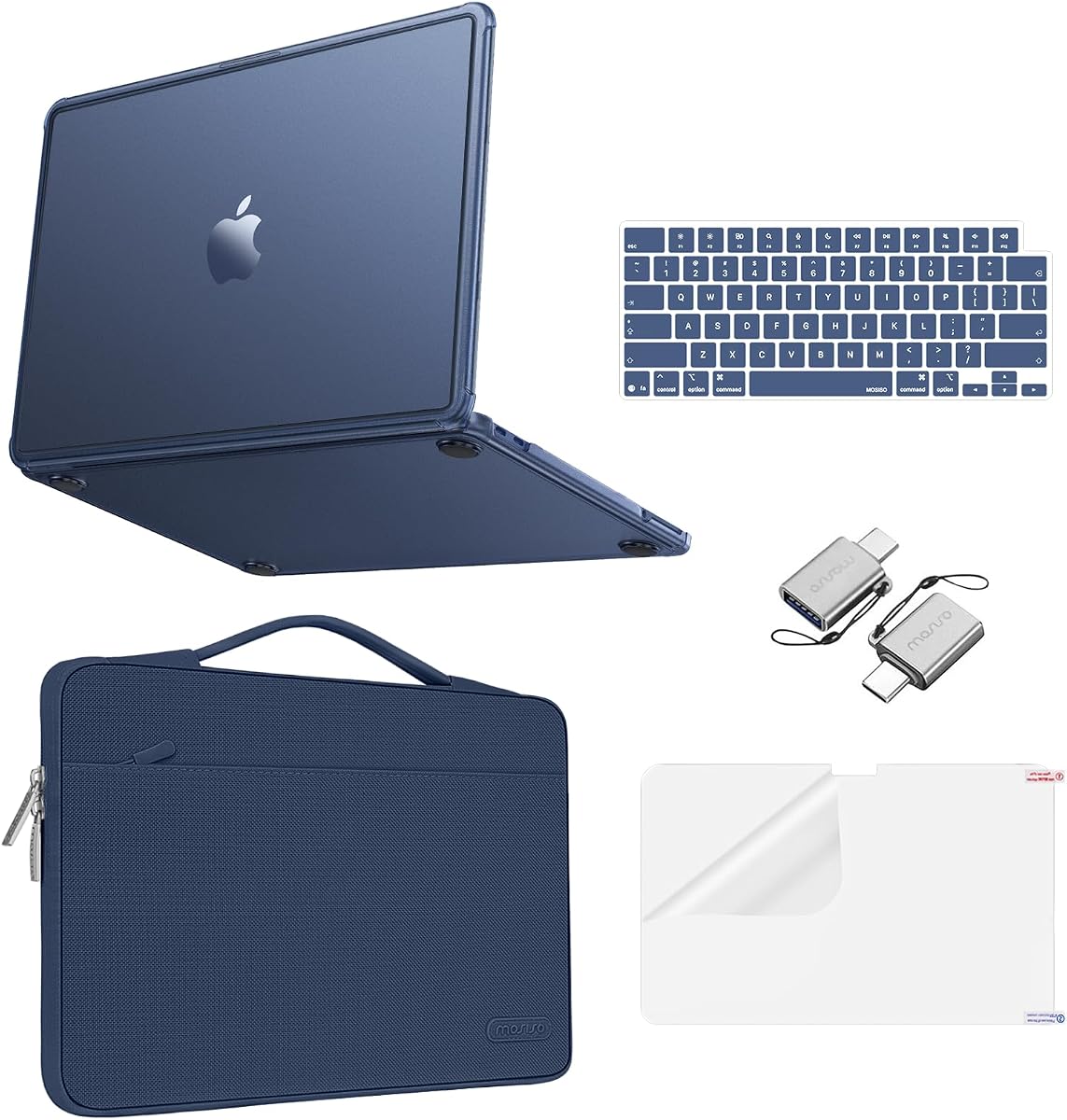
MOSISO Matte Case and Sleeve Kit
4.6Editor score
Fingerprint-resistant matte finish
Protective carrying sleeve
Keyboard and screen protection
MacBook Neo accessories can transform a compact new laptop into a more practical workstation, learning tool, and travel companion. The right additions should match the device precisely, preserve its clean design, and solve a real everyday problem without creating unnecessary clutter or interference.
This guide evaluates ten MacBook Neo accessories across protection, connectivity, privacy, shortcut learning, and port maintenance. Compatibility details, included components, materials, installation methods, and intended uses are compared using the supplied product information, with particular attention to the 2026 13-inch A3404 model.
Each review reveals what a product does best, where buyers should be cautious, and who is most likely to benefit from it. Ratings and specifications reflect the latest supplied listing data, while prices and availability can change, so shoppers should confirm current details before purchasing.
4.6Editor score

4.6Editor score

4.7Editor score
As an Amazon Associate we earn from qualifying purchases.
The comparison below organizes the ten accessories by purpose, compatibility, protection, and included components, making it easier to identify the right upgrade for work, travel, study, or everyday use.


The 2026 Mac OS Shortcuts Sticker is a compact productivity aid with a 4.6 rating and one of the most practical forms an accessory can take. Rather than adding ports, bulk, or another component that must be carried, it places 52 useful macOS commands directly in the user's line of sight near the palm rest. It is explicitly designed for the 2026 13-inch MacBook Neo, although the same design also supports common MacBook Air and MacBook Pro sizes.
We may earn a commission when you buy through this link, at no additional cost to you.
Its strongest feature is the balance between compact information and practical organization. The shortcuts are divided into Basics, Navigation, Finder, Screenshots, and System, allowing users to find a command without studying a dense block of text. The ultra-thin 0.10mm vinyl is designed to remain comfortable beneath the wrists, while the matte, water-repellent surface is intended to withstand coffee, perspiration, and smudges. Residue-free adhesive also makes the sticker more practical for owners who may upgrade devices or change their working habits.
The main limitation is that a keyboard sticker is educational rather than protective. It will not guard the display, keyboard, chassis, or ports, and buyers seeking those benefits will still need a shell, sleeve, or screen accessory. Color selection also requires some care: Clear Black is suggested for light finishes, Clear White for dark finishes, while Opaque Black and Pink are described as suitable for any model. The sticker may also be less useful to experienced macOS users who already memorize most common commands.
It is an excellent choice for new MacBook Neo owners, students, seniors, and anyone who wants a discreet reminder of useful commands without opening a browser or memorizing a long list. It also works well alongside other accessories because it adds almost no weight. For these reasons, it is the most versatile productivity-focused selection in the guide and our Editor's Choice.
Keeping shortcuts on the palm-rest area makes them available during demonstrations, troubleshooting sessions, and routine workflows. The organized grouping helps users learn recurring commands while the 0.10mm profile preserves a comfortable typing surface.
The matte, water-repellent vinyl is better suited to daily use than a delicate paper reference. Its residue-free adhesive and thin construction also make the sticker comparatively easy to remove when the laptop is cleaned, sold, or repurposed.
We may earn a commission when you buy through this link, at no additional cost to you.
This MOSISO bundle combines a transparent hard shell with keyboard covers, a clear screen protector, and a small storage bag, earning a 4.5 rating. It is specifically molded for the 13-inch 2026 MacBook Neo with the A18 Pro chip and model number A3404. Buyers should confirm that model number on the back of their laptop, because the listing explicitly states that it is not designed for other models.
We may earn a commission when you buy through this link, at no additional cost to you.
The engineering polycarbonate shell is intended to guard against scratches, scuffs, dust, and minor everyday impacts while retaining a clear view of the laptop's design. Its smooth surface is also described as reducing visible fingerprints and smudges. Installation requires no tools: the top and bottom sections are gently pushed into place and can be removed again when needed. The thin construction avoids the heavy appearance commonly associated with basic protective shells.
There are some practical cautions. Model-specific fit rules out use with other laptops, and a clear shell can show fingerprints depending on lighting and handling. Although the bundle is more complete than a standalone case, owners who already own a high-quality keyboard cover or screen protector may not need every included component. Cases can also affect third-party hub compatibility if their lower edge or port area is obstructed, so accessories should be checked together before purchase.
This kit is best for owners who want visible protection without concealing the MacBook Neo's finish. It also suits students and frequent travelers who want a coordinated collection of basic protective pieces in one purchase. Confirm the A3404 model number first, and use the included bag for storage when the laptop is not in use.
The high-transparency shell preserves the appearance of the Neo while adding coverage around the upper and lower sections. A smooth, fingerprint-resistant surface helps it remain presentable during ordinary office and school use.
Two dustproof keyboard covers, a clear screen protector, and a storage bag supplement the shell. This makes the package convenient for buyers who want several basic accessories without sourcing each one separately.
We may earn a commission when you buy through this link, at no additional cost to you.
The MOSISO Matte Case and Sleeve is the most premium-style bundle in the list, combining a precision-molded case, a protective carrying sleeve, two keyboard covers, and a screen protector. Its 4.6 rating reflects a strong balance of appearance, device protection, and travel readiness. Compatibility is limited to the 2026 MacBook Neo 13-inch A3404 equipped with the A18 Pro chip, so checking the model number is essential.
We may earn a commission when you buy through this link, at no additional cost to you.
The matte finish is engineered to reduce the appearance of fingerprints, smudges, and daily scuffs, making it especially appealing for users who prefer a restrained, uniform look. Its accompanying sleeve adds another layer of physical protection. The 360-degree design has stated internal dimensions of 13.39 by 9.25 by 0.79 inches, while the external measurements are 13.98 by 9.84 by 0.79 inches. A front pocket provides room for small accessories, and the polyester construction is described as portable and lightweight.
The trade-offs are added bulk and narrower device compatibility. A sleeve-and-case combination naturally takes up more room than a simple shell, and buyers who carry the laptop in a larger padded bag may not need both pieces. The listing also notes that transparency can differ by color, an issue that matters less for buyers intentionally seeking a matte appearance. As with any fitted case, buyers should verify that it does not interfere with docks or other accessories.
This set is a strong recommendation for commuters, business users, and anyone who wants the MacBook Neo to remain visually clean while traveling between locations. It provides more complete day-to-day protection than a single screen film or keyboard cover. For the intended A3404 model, it is a particularly complete premium protection package.
The matte surface is intended to conceal fingerprints and minor scuffs better than a high-gloss shell. That makes it practical for frequent handling in offices, classrooms, and shared workspaces.
The padded sleeve and front pocket extend the package beyond a desktop case. Together, they provide a convenient way to carry the Neo, small cables, and other compact accessories between destinations.
We may earn a commission when you buy through this link, at no additional cost to you.
This MOSISO option pairs a crack-resistant case with a sixteen-grid quilted carrying sleeve, two keyboard covers, and a screen protector. It carries a 4.6 rating and is designed specifically for the 2026 13-inch MacBook Neo A3404. Unlike the previous MOSISO bundle, its visual emphasis is on the soft, padded sleeve rather than a fully transparent presentation.
We may earn a commission when you buy through this link, at no additional cost to you.
The sleeve's plush interior is intended to cushion the laptop against scratches, bumps, and everyday shocks. Its stated internal dimensions are 12.99 by 8.66 by 0.79 inches, with external dimensions of 13.38 by 9.25 by 0.79 inches. Square-quilted polyester gives the accessory a more tactile, travel-oriented appearance while remaining suitable for business, daily commuting, and general travel.
The case still provides daily scratch and scuff protection and is designed to slip off without leaving the laptop looking marked. However, users who need a slimmer bag may find the padded exterior bulkier than a simple sleeve. The model restriction is another important limitation, and the set may be more protection than necessary for owners who rarely travel or already keep the laptop inside a padded compartment.
This kit is a practical choice for users who frequently carry the MacBook Neo between work, school, or meetings. Its combination of a fitted shell and cushioned sleeve is especially useful when the laptop will not remain stationary for long periods. Confirm the A3404 model number, measure the available bag space, and then decide whether the additional protection justifies the slightly fuller setup.
The plush sleeve interior adds a gentle barrier between the laptop and the surrounding bag. Its quilted construction also gives the set a distinct, travel-ready appearance.
A fitted case handles surface contact while the sleeve handles bumps during transport. Adding keyboard covers and a screen protector creates several complementary barriers against common daily hazards.
We may earn a commission when you buy through this link, at no additional cost to you.
The EooCoo Crystal Clear Protection Kit has the highest listed rating in this roundup at 4.7. It is tailored to the 13-inch 2026 MacBook Neo with the A18 Pro chip and model number A3404, and the listing explicitly says it is not compatible with other laptop models. Its combination of a clear case, keyboard cover, screen protector, and USB-C-to-USB-A adapters makes it one of the most versatile entries.
We may earn a commission when you buy through this link, at no additional cost to you.
The transparent hard-plastic shell fully exposes the color and design of the laptop while adding full-edge coverage against scratches, scuffs, fingerprints, dust, and minor bumps. Its ultra-slim, lightweight construction minimizes the bulk that can make a laptop feel less portable. The included screen protector and keyboard cover extend the protection to two of the most frequently touched and exposed surfaces.
The USB-C adapters are a useful addition for working with older USB-A accessories, although buyers should verify that their peripherals work with the included adapters before relying on them. The product remains exclusive to model A3404, and any clear case can show fingerprints depending on lighting. Owners using a hub should also check the case's port clearance because a fitted lower shell can interfere with some connector designs.
This kit is an excellent choice for buyers who want broad accessory coverage in one coordinated package without adding substantial weight. It works especially well for students and office users who want the laptop's finish to remain visible. It is our Best Budget pick because it combines a strong rating, a useful adapter pair, and several useful protection pieces in one bundle.
Transparent polycarbonate provides physical protection while allowing the laptop's own color and design to remain the focus. The low-profile construction is helpful for users who value portability.
Two USB-C-to-USB-A adapters can help connect compatible legacy peripherals. Buyers should still confirm device and peripheral support before purchasing, especially if USB-A accessories are central to their workflow.
We may earn a commission when you buy through this link, at no additional cost to you.
The VENTION 6-in-2 USB-C Hub is built for users who need more ports than the MacBook Neo provides, particularly when connecting external displays, USB-A devices, storage, and power. Its 4.2 rating reflects a capable but compatibility-sensitive design. The hub combines one fixed USB-C port with a detachable magnetic USB-C connector, several USB-A ports, HDMI, and dedicated charging functionality.
We may earn a commission when you buy through this link, at no additional cost to you.
The stated bandwidth reaches 80Gbps, and the product supports demanding display configurations. HDMI output is listed at 4K and 60Hz, while compatible Thunderbolt hosts can use the USB-C connections for 8K output up to 240Hz. The magnetic connector allows the hub to attach and detach more conveniently, reducing repeated insertion of a bulky fixed plug. A dedicated USB-C power port supports up to 140W passthrough, with 100W through the standard PD port.
Case compatibility is the most important caveat. The listing warns that a bottom case can prevent the standard connection from fitting correctly and recommends a seven-shaped single plug for use with a case, although this can reduce appearance and connection stability. The 8K modes also require a Thunderbolt-enabled host and compatible display chain. Buyers should not treat every listed resolution as available in every setup.
This hub is best for desktop users, hybrid workers, and creative professionals who regularly connect a MacBook Neo to multiple accessories. It is less important for users whose workflow remains entirely wireless. Confirm case clearance, display requirements, and power needs before purchasing, and use the recommended connector arrangement when working with a protective shell.
The combination of USB-C, USB-A, and HDMI makes the hub useful for external storage, peripherals, displays, and charging. It reduces the number of separate adapters required at a shared workstation.
Up to 80Gbps supports demanding data workflows, while the dedicated PD path helps maintain laptop power during extended sessions. Actual display resolution depends on the host, cable, hub mode, and monitor.
We may earn a commission when you buy through this link, at no additional cost to you.
This magnetic privacy screen protector is designed for the 13-inch 2026 MacBook Neo A3404 and carries a 4.2 rating. It provides a practical privacy layer for offices, airports, and cafés without permanently altering the display. Strong magnetic attachment allows the filter to be installed or removed in roughly a second, and the product description states that this approach avoids adhesive residue.
We may earn a commission when you buy through this link, at no additional cost to you.
The privacy technology limits side viewing beyond plus or minus 30 degrees, focusing visibility for someone seated directly in front of the display. The ultra-thin 0.065mm PET construction is designed to fit most protective cases without preventing lid closure. Anti-glare and blue-light blocking features are also included, along with scratch resistance and a high-transparency viewing layer intended to retain brightness and color quality.
As with any privacy filter, the restricted viewing angle is also a functional trade-off. A coworker sitting beside the user will not be able to see the screen as easily, and some users may notice reduced brightness or reflections under bright lighting. Compatibility is restricted to model A3404, and the product should not be assumed to fit other 13-inch MacBook variants. Screen brightness settings may need adjustment as conditions change.
This protector is best for frequent travelers, shared workspaces, and anyone who regularly handles confidential information away from home. It is particularly useful for people who want protection they can remove when working at a desk at home. Verify the model number and review your need for side visibility before choosing it over a conventional clear screen protector.
The magnetic design makes it practical to expose the filter only in public. That flexibility is valuable because unrestricted viewing is not necessary in every location.
At 0.065mm, the protector is designed to avoid interfering with lid closure or most fitted cases. Its PET material also adds scratch protection alongside the privacy function.
We may earn a commission when you buy through this link, at no additional cost to you.
The Peslv Magnetic Privacy Screen is a feature-rich alternative for the 2026 13-inch MacBook Neo A3404. It earns a 4.2 rating and distinguishes itself through a reinforced magnetic top strip, a removable design, and a dedicated storage clip. The filter can be installed by aligning it with the upper bezel and pressing gently, making it convenient to deploy when privacy matters.
We may earn a commission when you buy through this link, at no additional cost to you.
Its viewing restriction is calibrated to plus or minus 30 degrees, limiting visibility from many side angles. The filter layer is described as reducing 95% of blue light and 92% of ultraviolet light, while the matte anti-glare surface is said to intercept 95% of reflected light. A scratch-resistant layer adds basic display protection, and the 1:1 modeling is intended to match the Neo's screen dimensions closely.
The same light-control features that improve comfort in bright spaces can change the screen's appearance, and the narrower viewing area makes it less convenient for collaborative work. The listing is specific to model A3404, so buyers should not rely on the general 13-inch label. The included clip is useful, but the filter still needs enough storage space to remain flat and undamaged.
This privacy screen is best for users who work frequently in airports, trains, cafés, and shared offices, particularly when sensitive documents or messages are on screen. It is also a good choice for buyers who prioritize a matte finish and detailed eye-comfort specifications. Confirm compatibility, carry the included storage clip, and remove the filter when direct collaboration or maximum brightness is more important.
The anti-glare surface and high stated light-reduction figures make the filter useful in offices and travel environments. Display brightness can be adjusted to compensate for the more subdued appearance.
A reinforced magnetic strip helps keep the filter aligned with the display. The included storage clip makes it easier to carry the protector without bending or creasing it.
We may earn a commission when you buy through this link, at no additional cost to you.
The Synerlogic sticker is a laminated macOS shortcut reference with a 4.6 rating. It displays important keyboard commands directly on compatible laptops, helping students, professionals, creatives, and new Mac users work without repeatedly searching for a command. Its clear-and-black appearance is intended to blend discreetly with the palm-rest area rather than dominate the keyboard.
We may earn a commission when you buy through this link, at no additional cost to you.
The sticker is designed to fit MacBook Air and MacBook Pro models regardless of processor type or macOS version. It also fits iMacs and Mac Minis according to the listing. Its laminated vinyl construction and carefully arranged commands make it function as a permanent desktop reference, while the shortcut symbols provide quick access to common tasks. The Shift symbol is clearly identified for users who are still learning keyboard combinations.
Most importantly, the product explicitly states that it is not intended for the MacBook Neo or 11-inch and 12-inch MacBooks. It should therefore not be included in a buyer's shortlist for a Neo despite its otherwise strong reference design. The newer adhesive may leave a light residue when removed, although the listing says this can be wiped away with a soft cloth and warm, soapy water. Air bubbles are also possible if the entire backing is peeled away at once.
For a Neo owner, this product serves mainly as a useful point of comparison: it demonstrates what a durable shortcut reference can offer, but it is not a compatible selection. Owners of an Air or Pro may find it more relevant. Installation should be done gradually by folding back a small section of backing, aligning the sticker, and pressing as the liner is removed.
Keeping common commands visible removes the need to visit a website every time a shortcut is forgotten. The laminated design is suited to a reference that will remain on the device for an extended period.
The listing specifically excludes the MacBook Neo. Buyers searching for accessories for that model should use the Neo-compatible sticker in the guide and confirm every printed dimension before ordering.
We may earn a commission when you buy through this link, at no additional cost to you.
The CaseBuy Dust Plug Set is a compact maintenance accessory for the 2026 MacBook Neo 13-inch with the A18 Pro chip and model A3404. It carries a 4.7 rating and focuses on keeping vulnerable openings clear of dust, debris, scratches, and minor liquid splashes. Its low-profile silicone design helps the laptop retain a clean appearance while ports are not being used.
We may earn a commission when you buy through this link, at no additional cost to you.
The bundle contains a broad assortment of protective pieces: three USB-C port plugs, one MagSafe 3 plug, one HDMI plug, one SDXC plug, one headphone-jack plug, and two webcam covers, along with a small plastic storage case. The silicone is described as flexible yet durable, and the plugs are designed for easy insertion and removal without leaving residue.
The principal inconvenience is that covers must be removed before the relevant port can be used. Frequent travelers who routinely connect chargers, external storage, and displays may find the extra step inconvenient, particularly if a particular plug is easy to misplace. Buyers must also check the model number carefully because the set is designed only for A3404. Covers should never be forced into a port if the fit feels incorrect.
This set is best for owners who leave the MacBook Neo in a bag, on a desk, or in shared storage for extended periods and want to prevent particles from entering unused ports. It is especially useful as part of a broader care routine that includes a protective case. Those who use many accessories every day may prefer a smaller collection of covers for their most frequently exposed ports.
Flexible silicone plugs help block dust and debris from ports that are not in active use. Their low-profile construction also helps preserve the laptop's streamlined appearance.
The set covers USB-C, MagSafe 3, HDMI, SDXC, and headphone openings, plus the webcam. A small storage case helps keep the different pieces together when they are not attached.
We may earn a commission when you buy through this link, at no additional cost to you.
The right MacBook Neo accessory depends on the device model, intended workspace, and the problem you most need to solve. Start with exact compatibility, then consider protection, portability, display needs, and the number of accessories you realistically expect to carry.
Most of the fitted cases, privacy filters, and port covers in this guide are designed specifically for the 2026 13-inch MacBook Neo A3404 with the A18 Pro chip. A shared screen size does not guarantee identical port placement, dimensions, or lid construction, so the model number printed on the back of the laptop should be checked before adding anything to the cart. Accessories that appear similar across MacBook generations can differ in camera placement, hinge geometry, port arrangement, and case openings.
A hard shell helps with scratches, scuffs, dust, and minor bumps, while a sleeve is more valuable when the laptop is transported frequently. Keyboard covers and screen protectors address different surfaces and should not be treated as substitutes for a case. A complete kit is convenient for many buyers, but the most useful setup depends on where the device spends its time and how it is carried.
Clear cases reveal the laptop's finish but may show fingerprints and small marks more readily. Matte shells create a more uniform appearance and are described as resisting visible fingerprints, while quilted sleeves prioritize texture and cushioning. Think about whether maintaining a completely visible finish matters more than a low-gloss look or a coordinated travel kit.
A fitted bottom case can prevent a hub's fixed USB-C plug from sitting correctly. Some hub manufacturers recommend a different single-plug arrangement for case compatibility, although that may affect appearance and connection stability. Buyers who plan to use a case and dock together should evaluate both products before ordering and avoid assuming that two individually compatible accessories will work together without interference.
Privacy filters improve visual privacy but narrow the viewing angle, and anti-glare surfaces can make the display appear less bright than an uncovered panel. High-resolution output through a hub also depends on the host, connection mode, display, and cable. Review these practical limitations before purchasing, especially if color accuracy, maximum brightness, or effortless screen sharing is important to your work.
A multiport hub is most valuable when a user regularly connects external monitors, storage, USB-A peripherals, or wired networks. The VENTION hub includes a detachable magnetic connector, multiple USB-C and USB-A connections, HDMI, and power passthrough, but its case compatibility and display requirements deserve careful review. Users who work primarily through wireless peripherals may gain little from carrying one.
The most useful accessories are often those that can remain installed without affecting comfort, portability, or appearance. The shortcut sticker uses 0.10mm vinyl, while the magnetic privacy screen uses 0.065mm PET. Port covers are similarly compact, although they must be removed before use. Consider how often you carry the laptop, how you store it, and whether added components are likely to be forgotten at home.
A protection bundle may include a shell, sleeve, keyboard covers, screen protector, storage bag, adapters, or webcam covers. The value of a bundle depends on whether each included item serves a real need. Compare the contents against accessories already owned, and check whether duplicate screen protectors or keyboard covers reduce the package's usefulness for your particular setup.
Begin by confirming the model number and comparing the accessory's listed dimensions or fit notes with your exact MacBook Neo. Install fitted cases while the device is powered off and on a clean, flat surface. Apply each top and bottom section gradually, checking port openings and hinge alignment before pressing the remaining edges into place.
For adhesive items, clean the palm-rest or lid surface with a soft, lint-free cloth and allow it to dry fully. Align the sticker before removing much of its backing, press gradually, and avoid trapping air beneath it. Magnetic filters should be aligned with the top bezel and pressed gently into position, then stored in the supplied case or clip when they are not needed.
Remove port plugs before connecting cables, clean silicone covers occasionally, and avoid pulling them from the edges. For hubs, select the connector arrangement recommended for the case in use, connect power before demanding display workloads, and use compatible cables and displays. Store cases and sleeves in a dry, dust-free place, and follow the device manufacturer's cleaning guidance for the laptop itself.
No. Most fitted accessories in this guide are designed specifically for the 2026 13-inch MacBook Neo A3404 with the A18 Pro chip. MacBook Air and MacBook Pro models may use similar screens but differ in dimensions, ports, hinges, and accessories. Always check the model number on the back of the laptop and compare it with the product listing before purchasing.
The most useful choice depends on the student's routine. A shortcut sticker can support faster learning of macOS commands, while a clear or matte case and keyboard covers help with daily wear. A privacy screen is valuable in crowded classrooms, and a sleeve is useful for carrying the laptop between classes. Students who want one coordinated option may prefer the EooCoo protection kit.
It can, particularly when a hub uses a wide or fixed connector that occupies the lower portion of the port area. The VENTION listing warns that some bottom cases may not fit properly and recommends a seven-shaped single plug for compatibility, though this may affect appearance and connection stability. Check both products' fit guidance and test the connection before relying on the setup.
They can change how the display looks because anti-glare and light-filtering layers affect brightness, reflections, and viewing angles. Both privacy filters in this guide restrict visibility beyond approximately plus or minus 30 degrees, which can make side-by-side viewing more difficult. Users can raise screen brightness and remove the filter when working in a private, controlled environment.
Clear cases are better for buyers who want the laptop's original color and design to remain fully visible. Matte cases are better for a uniform appearance and for reducing the visibility of fingerprints and smudges. Both can provide useful scratch and scuff protection, so the choice is primarily aesthetic and depends on how much you value the original finish.
Only if the sticker is explicitly designed and sized for the Neo. The Synerlogic sticker in this guide specifically states that it is not compatible with the MacBook Neo, even though it supports MacBook Air and MacBook Pro models. The 2026 Mac OS Shortcuts Sticker is the compatible option in this roundup, with model-specific placement guidance.
The MOSISO Puffy Sleeve Kit combines a fitted shell with a quilted, soft-lined sleeve and additional keyboard and screen protection. It is well suited to commuting and travel, provided the A3404 model number is confirmed and the available bag space can accommodate the sleeve's external dimensions. Travelers who prioritize lower weight may prefer a standalone shell.
They protect different areas. A case covers the laptop's exterior, while dust plugs cover exposed openings that may collect debris when the device is not in use. Port plugs are especially useful for long-term storage or travel, but they must be removed before the corresponding port is needed. The CaseBuy set includes several types so users can cover only the openings they regularly leave exposed.
The strongest overall choice is the 2026 Mac OS Shortcuts Sticker because it adds useful reference information with almost no bulk, while explicitly supporting the MacBook Neo. The MOSISO Matte Case and Sleeve is the most premium protection setup, and the EooCoo Crystal Clear Protection Kit delivers the best balance of protection, useful extras, and affordability.
Prioritize exact A3404 compatibility before any other consideration. Then choose according to the problem you actually face: use a case and sleeve for transport, a privacy filter for public spaces, a hub for wired productivity, and a shortcut sticker for faster learning. Bundles can be efficient, but buyers should also compare the included pieces with accessories they already own.
Ratings, product configurations, and prices can change, so shoppers should review the current listing before buying. Check the model number, examine port and case clearances, and confirm that every included component has a place in the intended setup. With those checks complete, the right MacBook Neo accessory can make the new laptop more convenient without sacrificing portability or visual appeal.