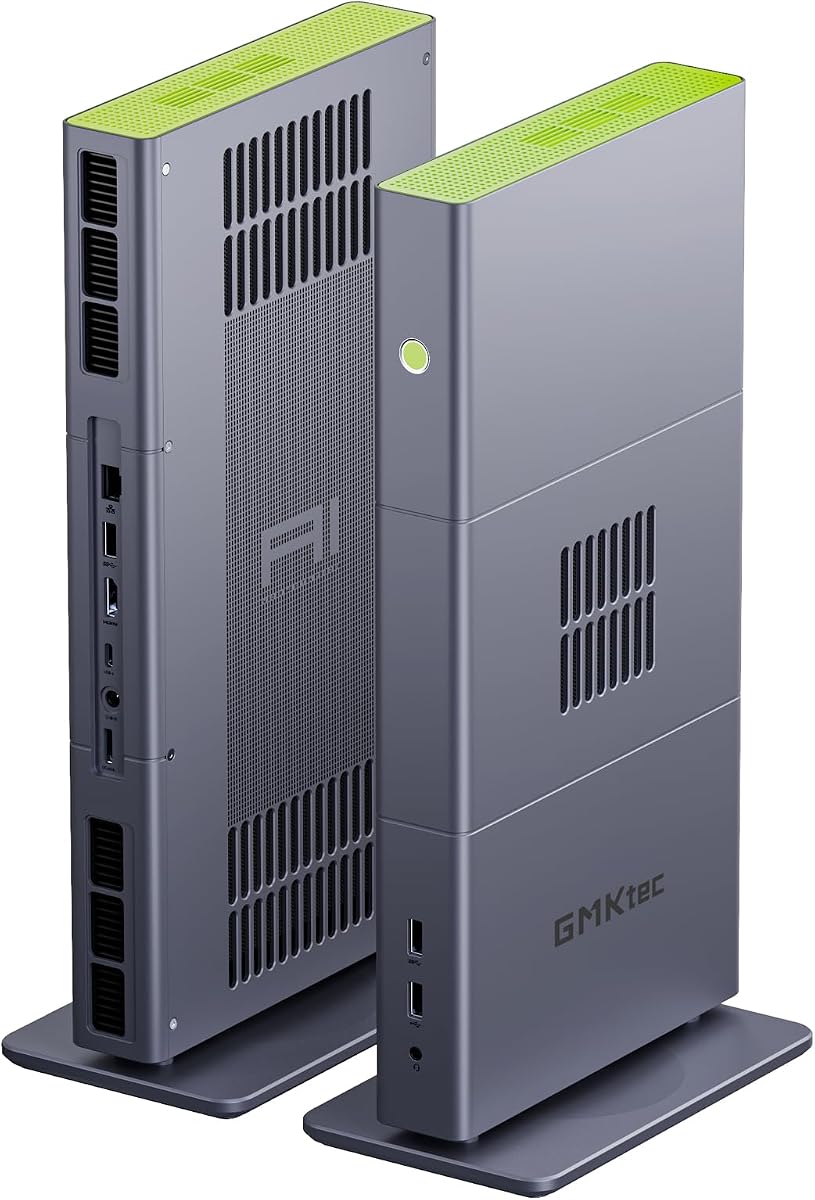
GMKtec X3 AI Mini PC
4.1Editor score
Ryzen AI Max+ 395 processor
One-hundred-twenty-eight-gigabyte unified memory
OCuLink external GPU support
Our Mini PC for Claude Code guide compares ten compact systems for coding, multitasking, local AI work, connectivity, and overall productivity for developers.
A Mini PC for Claude Code should deliver enough processing power, memory, and storage to keep development tools responsive while fitting neatly beside a monitor. The best choices balance capable processors, fast NVMe storage, useful networking, and displays that support a productive multi-window workspace.
We compared ten mini computers using their supplied processor, memory, storage, graphics, display, networking, and expansion specifications. The guide covers value-oriented models, current AMD systems, more powerful local-AI hardware, and compact options designed primarily for coding, browsing, office work, and multitasking.
Each recommendation shows which developers may benefit most, along with the compromises that come with its size and specification. Ratings and configurations can change over time, while retailer availability and pricing also fluctuate, so verify the current listing before making a final purchasing decision.
4.1Editor score

4.8Editor score

4.6Editor score
The comparison below organizes all ten systems by processor, memory, storage, and connectivity, making it easier to identify the right balance of development performance, expansion potential, and desktop practicality.


The KAMRUI Pinova P2 combines a four-core, eight-thread Ryzen 4300U processor with 16GB of LPDDR4 memory and a 512GB SSD. Its 4.4 rating and supplied specifications position it as a capable compact development system for Claude Code, browser-based workflows, terminal tools, and several simultaneous applications.
We may earn a commission when you buy through this link, at no additional cost to you.
The processor operates at up to 3.7GHz and gives the P2 more general-purpose capability than many entry-level N-series alternatives. The supplied material specifically contrasts it with the Intel N95 and i3-10110U, emphasizing stronger multi-core performance for browser tabs, media, and virtual machines. Two M.2 positions add useful storage flexibility, while 10Gbps USB and 2.5K DisplayPort support can improve development workflows.
Its integrated Radeon graphics are described as capable of driving three 4K displays at 60Hz through HDMI, DisplayPort, and USB Type-C. That makes it attractive for a developer who wants the code editor, documentation, browser preview, and communication app visible at once. The trade-off is fixed LPDDR4 memory and an older processor architecture that will not match newer Zen 4 or Zen 5 systems in sustained heavy workloads.
This is a strong option for developers who want more capability than a basic thin client without moving to a premium workstation. It is particularly useful for cloud-centric Claude Code sessions, container management, documentation work, and multi-monitor coding. Buyers prioritizing future CPU headroom or upgradeable memory should consider the Glorlin 6800H or GMKtec M6 Ultra instead.
Sixteen gigabytes of memory helps the system maintain multiple editor tabs, terminal windows, browser instances, and background services without relying on swap as frequently. Fast SSD storage further reduces the delay associated with launching tools and loading project files.
Triple-display support is one of the P2's strongest practical advantages. You can dedicate separate screens to source code, a terminal running Claude Code, browser documentation, and a video call, improving visibility without a large desktop tower.
We may earn a commission when you buy through this link, at no additional cost to you.
The GMKtec M6 Ultra pairs the six-core, twelve-thread Ryzen 5 7640HS with 32GB of dual-channel DDR5 memory and a 1TB PCIe SSD. That is a generous development configuration, giving Claude Code users ample room for large repositories, multiple containers, editors, browsers, and local language-model experiments.
We may earn a commission when you buy through this link, at no additional cost to you.
The Ryzen 5 7640HS runs at a 4.3GHz base speed and boosts to 5.0GHz, while its Zen 4 architecture should provide responsive performance in compiler-heavy and multitasking workloads. Memory can be expanded to 128GB, and the storage arrangement supports additional PCIe 4.0 capacity, making the system easier to grow as a development workstation or local server.
Connectivity is another strength. Two 2.5GbE RJ45 ports are useful for separating network traffic, connecting to fast storage, or operating as a small server. The M6 Ultra also supports three displays, including 8K output through USB4 according to the supplied specifications. Its Radeon 760M graphics handle hardware encoding and decoding alongside light gaming tasks.
Choose the M6 Ultra when you regularly run containers, large builds, multiple services, or local AI experiments and want room to expand. The premium over a basic mini PC is justified by CPU power, memory capacity, storage, and networking. It is less compelling when your workflow is limited to lightweight cloud-based coding and you rarely need more than one or two displays.
The included 32GB of DDR5 and the 1TB SSD create a comfortable starting point for demanding projects. Expansion support prevents a modest initial configuration from becoming a permanent limit when repositories, virtual machines, or local model files begin consuming more resources.
Dual 2.5GbE connections make the M6 Ultra more versatile than typical office mini PCs. One interface can serve the main network while another connects directly to fast storage, a second workstation, or a dedicated development segment.
We may earn a commission when you buy through this link, at no additional cost to you.
The Glorlin Ryzen 7 6800H is the most balanced recommendation in this guide. It combines eight CPU cores, sixteen threads, speeds up to 4.7GHz, 16GB of dual-channel LPDDR5 memory, and a 512GB NVMe SSD. Its 4.8 rating is also the highest numerical rating among the supplied listings.
We may earn a commission when you buy through this link, at no additional cost to you.
For Claude Code, the eight-core processor provides a generous amount of parallel performance for repositories, terminals, editors, containers, and browser-based tools. LPDDR5 memory running at 6400MT/s helps maintain responsiveness when many applications are open, while the NVMe drive provides fast startup and project access. The Radeon 680M adds stronger graphics capability than basic integrated alternatives.
The major compromise is fixed memory. Sixteen gigabytes is sufficient for many development setups, but users running multiple containers, virtual machines, large local models, or memory-heavy IDE features may eventually want more. Dual M.2 storage expansion is available, and dual LAN, WiFi 6, Bluetooth 5.3, USB 3.2, USB 2.0, HDMI, DisplayPort, and Type-C make the system well connected.
This mini PC is best for developers who want strong general performance without moving into a premium local-AI workstation. Its processor, fast memory, strong integrated graphics, and three-display support make it more future-proof than basic dual-core alternatives. It is our Editor's Choice because it offers the best balance for everyday Claude Code work.
Eight cores and sixteen threads give Claude Code-related tools room to work alongside compilers, source control, containers, and test suites. The processor is better suited to sustained multi-application work than the smaller four-core and low-power options in this list.
LPDDR5 memory and an NVMe SSD support quick application switching and file access. This matters when a development session involves large node modules, local build caches, multiple browser tabs, and an agent scanning a broad codebase.
We may earn a commission when you buy through this link, at no additional cost to you.
The Beelink Mini S13 is built around the 13th-generation Intel Twin Lake N150, a four-core, four-thread processor that can reach 3.6GHz. With 16GB of DDR4 memory and a 500GB M.2 SSD, it offers a practical base for lighter Claude Code sessions, web-based development, scripting, and everyday office work.
We may earn a commission when you buy through this link, at no additional cost to you.
The processor's power consumption is listed at up to 25W, making the Mini S13 appropriate for a quiet, compact workspace. The supplied information says it offers an improvement over the N100 and N95, while improved cooling includes a larger silent fan, copper heat sink, and SSD cooling shield. Two displays at 4K 60Hz can be connected through the system's HDMI outputs.
The main limitation is four cores and four threads. That is enough for focused terminal work, lightweight editors, documentation, and cloud-oriented development, but it has less headroom than the Ryzen 7 6800H or Ryzen 5 7640HS when compiling large projects or running several virtualized services. Storage can be expanded through dual M.2 2280 positions.
The Mini S13 suits developers who prioritize low power, a small footprint, and simple cloud-assisted workflows over local compute. Wake on LAN, PXE boot, RTC wake, auto power on, and Intel Unison support add useful manageability for an office, laboratory, or home development node.
For repositories hosted remotely, editor work performed in a browser, and modest terminal workloads, the N150 can provide an efficient base. Its low power draw also makes it easier to operate continuously near a display or in a compact home office.
Wake on LAN, PXE boot, scheduled RTC wake, and auto power on make the system attractive for managed workspaces. These features are less common in mini PCs than many buyers expect and can simplify deployment as a dedicated development endpoint.
We may earn a commission when you buy through this link, at no additional cost to you.
The Glorlin Ryzen 5 3501U offers four cores, eight threads, and speeds up to 3.7GHz in a compact form. Paired with 16GB of DDR4 memory and a 512GB SSD, it is a sensible value option for developers who spend most of their time in a terminal, editor, browser, and communication applications.
We may earn a commission when you buy through this link, at no additional cost to you.
The included memory is a meaningful advantage over many eight-gigabyte mini PCs. It allows more applications to remain open, reducing pressure on the system when Claude Code works alongside documentation, a code repository, a terminal, and a browser-based test interface. SSD storage also provides a noticeably more responsive experience than a traditional hard drive.
Triple-display support expands the desk efficiently, while WiFi 6, Bluetooth 5.3, Ethernet, USB, and audio connections cover common development accessories. The 4.2 rating suggests generally positive user reception, though the supplied data does not provide enough detail to interpret the distribution of reviews.
This model is most appropriate for everyday development and study rather than intensive local model work. It makes a good companion machine for source editing, shell commands, documentation, and managed code environments. Those wanting greater CPU performance should move to the Ryzen 7 6800H, while those prioritizing the lowest acquisition cost can examine the Beelink SER3.
Sixteen gigabytes gives the Ryzen 5 3501U enough room for a more realistic development workflow. You can keep an IDE, terminal, browser, and background synchronization or container tool active with less concern about exhausting memory.
Support for three displays is useful for separating Claude Code conversations and terminal output from source files and reference documentation. The compact enclosure also leaves more desk space for notebooks, keyboards, and other accessories.
We may earn a commission when you buy through this link, at no additional cost to you.
The GMKtec X3 AI Mini PC is the specialist choice for developers combining Claude Code with local AI, large models, content creation, and advanced development workloads. Its Ryzen AI Max+ 395 processor provides 16 cores, 32 threads, boost speeds up to 5.1GHz, and an integrated AI engine advertised at up to 126 TOPS.
We may earn a commission when you buy through this link, at no additional cost to you.
The standout specification is 128GB of on-board LPDDR5X unified memory. That capacity allows large language models to use system memory directly, which is especially valuable for local model testing and development tools that need substantial working memory. The 2TB PCIe 4.0 SSD provides generous room for model files, repositories, containers, and datasets.
Its Radeon 8060S integrated graphics uses 40 compute units under RDNA 3.5, and OCuLink PCIe 4.0 x4 expansion provides a route to a dedicated external GPU. The supplied specifications also highlight WiFi 7, Bluetooth 5.4, and 2.5GbE networking. Together, these features position the X3 as a compact professional platform rather than an ordinary office mini PC.
Choose the X3 if you routinely run local language models, test AI-assisted development pipelines, or need a compact system that can later accept a more powerful graphics card. It is unnecessary for ordinary cloud-based Claude Code use, and its advanced hardware requires careful attention to cooling, power, and memory-intensive workloads.
The 128GB unified-memory configuration gives local model applications far more room than conventional mini PCs. That can be decisive when a developer wants to experiment with larger quantized models alongside an IDE, browser, and agent tooling.
OCuLink support allows the X3 to connect to an external GPU enclosure. It provides a flexible development platform for graphics acceleration, AI experimentation, rendering, and other tasks that would exceed the limits of integrated graphics.
We may earn a commission when you buy through this link, at no additional cost to you.
The Getorli Ryzen 5 3501U is a compact development desktop with a four-core, eight-thread Ryzen 5 3501U processor, 16GB of DDR4 memory, and a 512GB NVMe SSD. These specifications suit everyday coding, web development, scripting, office work, and media streaming with Claude Code in the browser or terminal.
We may earn a commission when you buy through this link, at no additional cost to you.
The NVMe drive supports rapid boot and application loading, while 16GB of RAM provides a comfortable starting point for multiple browser tabs and common development programs. Memory can be expanded up to 32GB, adding long-term flexibility that is not available with several fixed-memory alternatives in this roundup.
Two HDMI outputs can drive two 4K displays, which is enough for a typical split-screen arrangement with code on one monitor and documentation or an agent session on the other. WiFi 6, Bluetooth 5.3, Ethernet, two USB 2.0 ports, two USB 3.0 ports, and two USB Type-C ports cover most accessories.
The Getorli is a good value pick for students, remote workers, and developers with moderate coding demands. It is less appropriate as a primary machine for large local model experiments or intensive compilation. Its strongest appeal is the combination of 16GB memory, NVMe storage, upgradeability, and a straightforward dual-monitor layout.
A 512GB NVMe drive gives the system quick access to source trees, dependencies, and build artifacts. The included 16GB of memory can also be expanded, making it easier to extend the machine's useful life as project requirements grow.
The mixture of USB-A and full-featured USB-C connections allows peripherals such as external drives, keyboards, mice, webcams, and displays to connect without relying on a large desktop. Wireless and Ethernet options support both portable and fixed installations.
We may earn a commission when you buy through this link, at no additional cost to you.
The C3 Mini PC uses an Intel Core i3-5005U processor with 8GB of DDR4 memory and a 512GB M.2 SSD. Its 4.2 rating and 15W low-power design make it a viable endpoint for basic web browsing, office applications, light multitasking, and remote development workflows.
We may earn a commission when you buy through this link, at no additional cost to you.
Claude Code itself can be used through a terminal, and a browser-based development environment can shift more demanding processing to a remote server. In that model, the C3's primary roles are displaying the workspace, handling input, and maintaining network connectivity. Its two HDMI outputs support displays up to 2560×1600 at 60Hz.
Memory can be expanded to 32GB, and storage can reach 4TB when the M.2 expansion and additional 2.5-inch drive are used. The system also supports Wake on LAN, PXE boot, RTC wake, and auto power on, making it suitable for thin clients, digital signage, and real-time monitoring terminals.
This is not the strongest choice for large local repositories or parallel build workloads, because the dual-core processor and 8GB memory limit headroom. It is most useful for remote development, dedicated terminals, or a lightweight secondary computer where low power and always-on functionality matter more than maximum performance.
When the heavy compilation and testing occur elsewhere, the C3 can act as an affordable thin client. Its wake and boot features also make it possible to operate more like a managed office endpoint than a conventional personal desktop.
The C3 can add NVMe or SATA drives and a larger 2.5-inch disk. That makes it suitable as a lightweight file server, media repository, monitoring terminal, or development endpoint where local storage requirements exceed the included configuration.
We may earn a commission when you buy through this link, at no additional cost to you.
The Beelink SER3 combines a Ryzen 3 3200U processor with 8GB of DDR4 memory and a 256GB NVMe SSD. Its 4.5 rating places it favorably among the listed products, while the compact design and familiar port selection make it a practical desktop for basic coding and office tasks.
We may earn a commission when you buy through this link, at no additional cost to you.
The dual-core, four-thread processor can reach 3.5GHz and handles straightforward source editing, command-line work, browsing, and documentation. Four USB 3.2 Gen2 ports support fast external storage and accessories, while dual HDMI outputs can drive two 4K displays. Radeon Vega 3 graphics support high-resolution video playback.
Its limitations are the 8GB starting memory and relatively small 256GB storage. RAM can be upgraded to 16GB, while NVMe and 2.5-inch storage options provide additional capacity. It remains better suited to lightweight development than local AI workloads or heavily parallel compilation.
The SER3 is a good choice for a secondary workstation, student setup, or inexpensive home office. Its 4.5 rating supports confidence in the overall package, although reviewers should consider whether their intended workflow needs the additional memory and storage included with the Glorlin 3501U or BOSGAME E5.
Four 10Gbps USB ports are unusual in a compact budget system and provide useful bandwidth for external SSDs, backup drives, and other peripherals. This is a practical advantage when project assets move regularly between computers.
Two HDMI outputs let a developer keep code and reference material open separately. The arrangement is modest compared with triple-screen systems, but it remains a practical way to improve workflow without moving to a full-size desktop.
We may earn a commission when you buy through this link, at no additional cost to you.
The BOSGAME E5 stands out as a budget mini PC with unusually flexible networking and storage. Its Ryzen 3 5300U processor provides four cores, eight threads, and speeds up to 3.7GHz, while the standard configuration includes 8GB of DDR4 memory and a 256GB M.2 SATA drive.
We may earn a commission when you buy through this link, at no additional cost to you.
Dual SODIMM slots allow memory expansion up to 64GB, and a second M.2 2280 PCIe 3.0 position supports additional NVMe storage without replacing the original drive. This makes the E5 attractive for developers who want to begin modestly and expand as repositories, containers, or virtual machines become more demanding.
Two Realtek RTL8125 2.5GbE ports enable dedicated network connections, firewall duties, high-speed NAS use, and more advanced routing experiments. Triple 4K output is available through HDMI, DisplayPort, and a full-function Type-C port. The full-function front Type-C also supports data transfer, display output, and Power Delivery.
Despite its low-cost positioning, the E5 is not designed for demanding professional 3D rendering or intensive AAA gaming. For Claude Code, it is most useful as an affordable development, network-services, or remote workstation after adding RAM. Its 4.6 rating makes it a strong budget selection with unusually good physical expandability.
Although the E5 starts with 8GB, its two SODIMM positions can accept considerably more memory. Upgrading can make the difference between a simple terminal and a comfortable machine running several containers, editors, browsers, and development services at once.
Two 2.5GbE ports are particularly useful for home labs, firewall experiments, direct-to-NAS workflows, and separated development networks. The E5 can function as more than a general-purpose desktop when its networking capabilities are put to use.
We may earn a commission when you buy through this link, at no additional cost to you.
The right Mini PC for Claude Code depends on whether your work is primarily remote and text-based, whether you run containers and builds locally, and whether you need local AI models or a multi-screen workstation. Processor cores, memory, storage, connectivity, and expandability should be considered together.
Claude Code itself may appear lightweight, but a useful development environment also includes an editor, terminal, browser, version control, container runtime, language servers, and potentially a database or virtual machine. An eight-core processor with sixteen threads, such as the Ryzen 7 6800H, provides a comfortable amount of headroom for these concurrent tasks. A four-core processor can still work well for focused cloud development, while a dual-core option is better suited to remote endpoints and lightweight editing.
Choose based on workload, not just advertised clock speed. Prioritize more cores for parallel builds and containers, and prioritize newer architecture for sustained performance and efficiency.
Sixteen gigabytes is a sensible starting point for active coding because browser tabs, editors, containers, and language servers can consume memory quickly. Thirty-two gigabytes is preferable for heavier multitasking or virtual machines. Fixed LPDDR memory may be efficient and compact, but upgradeable DDR4 or DDR5 SODIMMs allow the system to grow as project demands increase.
Check whether the stated maximum includes the current memory and what type is supported. For most developers, 16GB is the practical minimum and 32GB offers a better margin for intensive workflows.
Fast NVMe storage reduces waiting during boot, dependency installation, repository indexing, and build operations. A 256GB drive can fill quickly when combined with container images, node modules, SDKs, virtual machines, and local model files, so a 512GB or 1TB drive is preferable for a primary development machine.
Also inspect the number and type of storage positions. Systems with two M.2 slots or an additional 2.5-inch bay give you room to add capacity without replacing the boot drive.
Cloud-based Claude Code workflows do not require a dedicated graphics processor, but local language models, GPU-assisted tools, media rendering, and large development datasets can benefit from stronger integrated graphics or external GPU support. The GMKtec X3 AI Mini PC is the clear specialist in this category, combining 128GB unified memory, a high-core-count Ryzen AI processor, and OCuLink expansion.
Most developers can ignore this premium route. Buy stronger graphics only when your workflow includes local inference, GPU acceleration, rendering, or other demanding visual tasks.
A three-display mini PC can divide the workspace into a source-code monitor, a terminal running Claude Code, and a browser for documentation or issue tracking. Dual-display support is still useful, while single-output systems may encourage window switching. Check both the maximum number of displays and the supported resolution and refresh rate for each output.
The KAMRUI P2, Glorlin 6800H, and BOSGAME E5 support triple 4K output, making them particularly suitable for a command-center style development desk.
Claude Code relies on a dependable internet connection for model access, package downloads, repository synchronization, and remote services. WiFi 6 or newer can be sufficient, but wired Ethernet often provides lower latency and more consistent behavior. A second high-speed Ethernet port becomes valuable for server duties, direct storage links, or network segmentation.
Consider 2.5GbE when you plan to use the mini PC as a firewall, NAS endpoint, development server, or high-transfer-rate network appliance. Standard gigabit Ethernet remains appropriate for ordinary web development.
Low-power processors can reduce heat, noise, and energy use, which matters for a compact office or a system left running through scheduled tasks. More powerful hardware benefits from improved cooling, larger cases, and carefully positioned vents. Beelink's Mini S13 specifically lists an upgraded fan, copper heat sink, and dedicated SSD cooling shield, while the BOSGAME E5 describes a cooling fan and copper heat pipes.
Avoid blocking vents and leave enough clearance around the enclosure. If the system will run continuously, prioritize documented cooling improvements, low-power operation, and remote wake or boot functions.
A good developer mini PC should have enough USB connectivity for a keyboard, mouse, external storage, webcam, and peripherals. Display outputs matter more than the number of USB ports, while a VESA bracket can free desk space by mounting the system behind a monitor. The Beelink Mini S13 includes a wall-mounted bracket, and the KAMRUI P2 supports VESA mounting.
Check the physical dimensions and included mounting hardware before ordering. A compact system that can sit directly behind the monitor can make a surprisingly large difference in workspace cleanliness and cable management.
Begin by connecting the mini PC to a display, keyboard, mouse, and network, then install the current operating system updates and your preferred development environment. Create separate user accounts for work and experimentation, enable automatic system backups, and configure the machine to save projects to an appropriate NVMe drive. Keep the operating system, source repositories, dependency caches, and container images on storage with sufficient free space.
Organize Claude Code sessions with a clear project root and version-control workflow. Review proposed changes before accepting them, run tests locally when possible, and avoid storing secrets directly in prompts or untracked files. For remote development, use a secure connection and configure the terminal, editor, and file synchronization tools to work together without creating conflicting local edits.
Maintain the system by leaving ventilation openings unobstructed, cleaning dust from vents periodically, and avoiding placement inside a closed cabinet without airflow. Back up important repositories and configuration files, monitor available storage, and keep the system updated. When using external GPUs, local AI software, or sustained CPU workloads, allow adequate clearance around the enclosure and verify that cooling and power delivery remain stable.
Claude Code can be used on relatively modest systems, especially when development work is hosted in the cloud. The mini PC still needs to run your editor, terminal, browser, version-control tools, and any local build services efficiently. A four-core processor with 16GB of memory is a practical starting point, while eight cores and 32GB provide more comfort for containers, virtual machines, and heavy multitasking.
Yes, 16GB is sufficient for many text-focused development workflows. It can comfortably handle an editor, a terminal, a browser with several tabs, and ordinary Git operations. Memory pressure becomes more likely with multiple containers, local virtual machines, large language models, database services, and other demanding applications, so upgradeable memory is valuable when available.
NVMe storage is the preferred choice because it offers much faster access than SATA SSDs and hard drives. The difference is especially noticeable when installing dependencies, loading repositories, switching applications, and building large projects. Consider at least 512GB for a primary coding machine and look for a second M.2 position if you expect to use containers or local AI models.
No. Claude Code does not require the specialized Ryzen AI platform for ordinary use. A Ryzen AI Max+ 395 system makes more sense if you want to run large local language models, conduct AI acceleration experiments, edit demanding media, or connect an external GPU. Most developers working primarily with cloud-hosted projects can get adequate performance from a less expensive four-core or eight-core mini PC.
A dual-core mini PC can handle light editing, browsing, documentation, and remote server work, but it has limited headroom for compilation, containers, and multitasking. If the system is a dedicated thin client with computing performed elsewhere, that may be perfectly adequate. For a primary development machine, a four-core processor with 16GB of memory is generally a safer starting point.
Yes, but the number and resolution depend on the model. The KAMRUI P2, Glorlin 6800H, GMKtec M6 Ultra, GMKtec X3, and BOSGAME E5 support three-display configurations, while several other options support two displays. A multi-screen setup can keep code, the Claude Code terminal, documentation, and video calls visible simultaneously, reducing the need to switch windows.
Wired Ethernet is generally preferable when available because it tends to offer lower latency and more consistent throughput. WiFi 6 or newer is sufficient for normal usage, but dual 2.5GbE systems provide additional flexibility for local servers, NAS devices, and network experiments. Keep the mini PC on Ethernet for large repository syncs, container pulls, and stable remote sessions.
The best operating system depends on your project requirements, tools, and comfort with the platform. Windows is convenient for general office work and broad application support, while Linux may be preferred for container-heavy server workflows and certain development environments. Check whether the model is sold with the operating system preinstalled and whether your required tools, drivers, and remote-development clients support it.
The Glorlin Ryzen 7 6800H is the best overall choice because it combines eight cores, sixteen threads, fast LPDDR5 memory, NVMe storage, and strong integrated graphics in a practical compact package. The GMKtec X3 AI Mini PC is the premium option for local AI and GPU-expansion requirements, while the BOSGAME E5 represents an adaptable budget system with exceptional memory, storage, display, and networking expansion.
For most developers, prioritize a processor with at least four modern cores, 16GB of memory, NVMe storage, reliable networking, and enough display outputs for your preferred workflow. Move to 32GB or more if you run containers, virtual machines, or local models, and choose upgradeable memory when your budget allows it. A separate powerful laptop or desktop may still be preferable for specialized compiler, rendering, or GPU workloads.
Retailer listings, configurations, warranty terms, ratings, and prices can change, so confirm the current specification and total cost before ordering. The best Mini PC for Claude Code is not simply the fastest model; it is the one that comfortably supports your editor, terminal, browser, build tools, and preferred workspace without exceeding your budget or expanding beyond your needs.