
COMeap Xbox AV Cable
3.8Editor score
Complete connection kit
Composite RCA to HDMI
Includes 4K HDMI cable
USB-powered converter
Original Xbox Upscaler guide comparing ten converters, adapters, and scan converters for retro gaming, with compatibility, resolution, setup, and picture-qualit
An Original Xbox upscaler connects the console’s legacy video output to a modern television, monitor, or projector. The right device should preserve the Xbox’s native signal, support the output mode you want, synchronize audio correctly, and install without unnecessary complexity.
This guide compares ten Original Xbox converters and related retro-gaming devices based on their documented connection methods, supported resolutions, audio handling, power requirements, and display compatibility. It includes component-to-HDMI adapters, composite-to-HDMI kits, an open-source scan converter, and several compact HDMI alternatives.
The selections show that the most useful upscaler depends on your console setup and display. Some products simply convert the original signal, one adds 4K conversion, and another is a more advanced RGB scan converter. Product listings and prices can change, so confirm the current specifications before buying.
3.8Editor score

4.4Editor score

The table below compares the ten products by signal path, resolution support, power needs, and practical fit for Original Xbox owners.
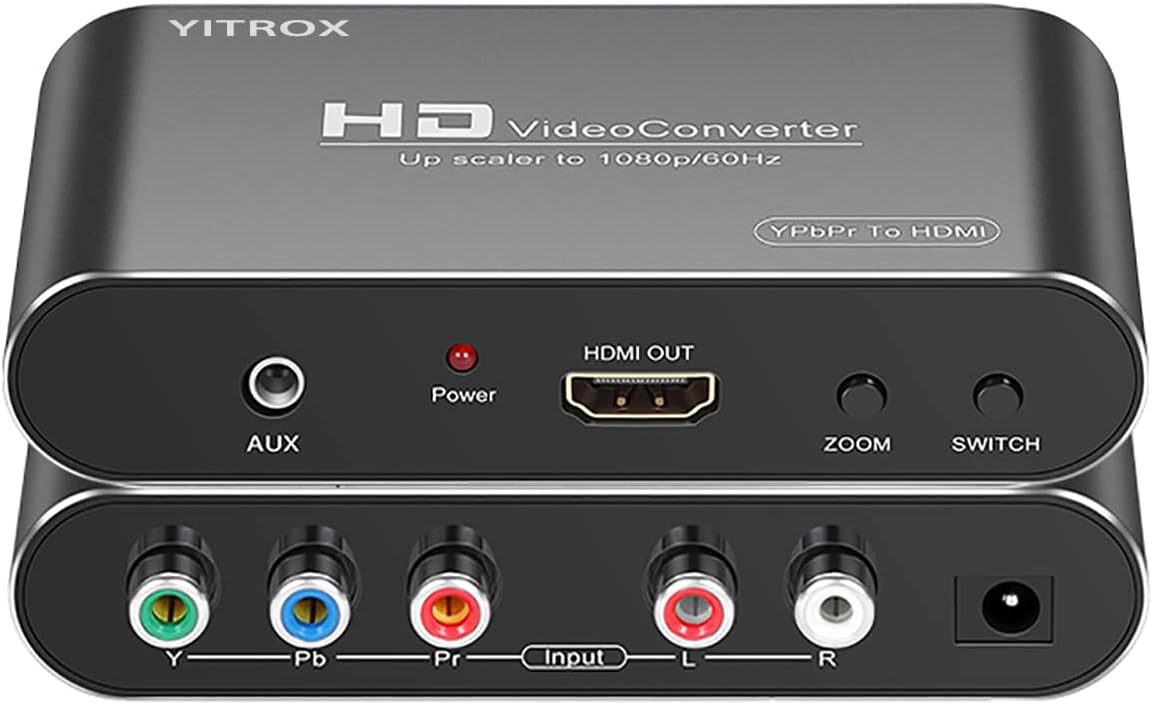


The Component to HDMI Converter Upscaler Scaler is a flexible choice for owners who want more than a basic signal adapter. It has a 4.1 rating and supports analog YPbPr video plus right and left audio inputs, producing an HDMI signal for contemporary televisions, monitors, and projectors. Its most useful feature is the range of selectable output resolutions, extending from 800×600 to 1920×1080.
We may earn a commission when you buy through this link, at no additional cost to you.
The converter is built for legacy component equipment rather than composite video. Its listed input support includes 480i and 480p at 60Hz, 576i and 576p at 50Hz, 720p at 50Hz or 60Hz, and 1080i or 1080p at 50Hz or 60Hz. HDMI output is available at 480p, 576p, 720p, and 1080p with corresponding frame-rate options. Seven zoom modes provide additional control over image scaling, including enlargement, reduction, and automatic adaptation.
Image processing features include three-dimensional compensation, motion optimization, color optimization, and digital noise reduction. These claims are designed to reduce visible jitter and trailing while improving clarity and contrast. A separate AUX audio port is also provided, and the listing states that converted audio and video remain synchronized without delay. The trade-off is that this is a one-way component-to-HDMI device, not a universal converter.
This is most appropriate if you already have, or can obtain, a proper YPbPr component cable for the Original Xbox. It also makes sense for someone with several classic consoles who wants one conversion device. Check that the Xbox is configured for YPbPr output, use a genuine component cable, and select the resolution and zoom settings that suit your television.
Five output resolutions and several refresh-rate choices make the converter useful for older projectors as well as modern flat-panel displays. The manual adjustment can also be valuable when a television scales the incoming signal less cleanly than expected.
The documented support for Wii, Xbox 360, PS2, PS3, Blu-ray players, and other component sources gives this converter more reach than a console-specific adapter. It is a shared box for a retro-gaming setup rather than a dedicated Original Xbox accessory.
We may earn a commission when you buy through this link, at no additional cost to you.
The Jadebones HDMI Adapter Converter stands out for its focused design and 4.4 rating, the highest numerical rating among the products with published scores. It converts the Original Xbox’s YPbPr component signal into HDMI, allowing the console to connect to a modern HDTV or monitor through a standard HDMI cable.
We may earn a commission when you buy through this link, at no additional cost to you.
Its strongest selling point is simplicity. The adapter requires no external power supply; you connect the unit to the Xbox and then use an HDMI cable between the converter and the display. There are no documented scaling menus, power switches, or multi-console controls to manage. That makes it particularly attractive for a first-time Original Xbox owner building a simple modern display setup.
The listing is careful about image quality. It says the converter uses YPbPr signal conversion and transmission to provide clear colors and details, but also clarifies that it transfers the console’s signal rather than improving the underlying video quality. That distinction matters because no converter can create detail that the Original Xbox or the selected game did not output.
This adapter is a strong recommendation for anyone who values a short setup process and wants a device designed around the Original Xbox. The main limitation is that an HDMI cable is not included, so add one to the shopping list if you do not already own a suitable cable. Check that your original component cable is available and connects properly.
Because the adapter does not require external power, it avoids one common source of setup friction. A correctly connected Original Xbox and compatible display are enough, provided you have the required HDMI cable.
The adapter converts a legacy component signal rather than creating native high-definition graphics. Expect a clean digital connection, but judge games by their original Xbox output mode and the capabilities of the television.
We may earn a commission when you buy through this link, at no additional cost to you.
The 4K Gaming Upscaler & Enhancer is the most technically ambitious product in this guide because it is designed to convert a 1080p HDMI source into 4K at 60Hz. Its processing includes image sharpening, color tuning, enhanced depth of field, and claims of zero delay with no dropped frames. It is also listed as compatible with the Original Xbox and numerous other retro consoles.
We may earn a commission when you buy through this link, at no additional cost to you.
Compatibility extends to Nintendo Switch, the first-generation Xbox, PlayStation systems, GameCube, PS2, Wii, DreamCast, PS3, Xbox 360, and Wii U. The listing also mentions devices such as mClassic and RetroLink 5x. This broad support makes it relevant to a multi-console display setup, although the actual source must output 1080p for the 4K conversion to operate as described.
There are important constraints. The product supports 4K at 60Hz displays but not 4K at 30Hz, and it may produce a black screen on a 1440p monitor. It requires an HDMI 2.0a-compatible cable or higher and is not compatible with the original HDMI 1.4 cable. The included HDMI extension cable should be used with the Nintendo Switch base, and the display must satisfy the stated refresh-rate requirement.
The main caveat is the absence of a published numerical rating, so there is no customer-score context in the supplied product data. It is still worth considering when native 4K output and broad console support are priorities. Original Xbox owners must ensure their console and component-to-HDMI pathway deliver a 1080p signal before the converter.
A 4K television or compatible 4K monitor may accept the upscaled signal more cleanly than a 1080p image. The benefit comes from signal processing and display scaling, not from additional game detail unavailable in the Original Xbox source.
Verify that the source produces 1080p, the display supports 4K at 60Hz, and your cable meets the stated HDMI requirement. Ignoring those conditions can result in the black-screen behavior described in the product information.
We may earn a commission when you buy through this link, at no additional cost to you.
The Retro Video Game Console Converter Adapter is designed specifically for connecting an Original Xbox to a modern television. Its key advantage is explicit support for all native Xbox output resolutions: 480i, 480p, 720p, and 1080i. That means the device is not limited to one fixed game mode or a single picture standard.
We may earn a commission when you buy through this link, at no additional cost to you.
The adapter converts the console’s analog component signals into HDMI and digital output, which can make connection to current displays more convenient. Its listing describes the cable as transmitting audio and video without requiring separate converters or additional power. The design is therefore attractive for users who want a direct-looking setup without a separate power brick.
A potential practical issue is that the product appears to function as an HDMI adapter associated with the original Xbox component cable. You should verify the exact included connectors and whether an appropriate original component cable is required. The product listing refers to fitting an Original Xbox component cable, making prior accessory ownership relevant.
This adapter is a good fit for owners who want support across the Xbox’s complete range of native modes and value a cable-oriented approach. The lack of a published rating means there is no numerical customer feedback to weigh, so the documented resolution coverage and installation method should drive the decision.
Supporting 480i, 480p, 720p, and 1080i ensures that games can use the output modes they support. This flexibility is useful for projectors and displays that handle different legacy signals unevenly.
Because the adapter carries both audio and video and does not require external power, it can reduce cable clutter. Check the included parts carefully to determine whether your existing component cable is sufficient.
We may earn a commission when you buy through this link, at no additional cost to you.
The Hyperkin Panorama HD Cable is notable as an officially licensed Xbox accessory, with a 3.8 rating. It is designed to connect the Original Xbox to HDTVs and supports all Original Xbox models. That official status and broad console compatibility make it a reassuring choice for buyers who prioritize brand recognition and straightforward integration.
We may earn a commission when you buy through this link, at no additional cost to you.
Maximum output is 1080i, although the actual result depends on the game. Some Original Xbox titles were developed with lower-resolution output, while others support higher modes. The included cable is seven feet long, which should be enough for many television and console arrangements but may be short when the Xbox sits on a separate stand.
The listing promises a clear picture and crisp audio. As with every converter in this category, the quality ultimately depends on the console’s source signal, selected game mode, and television processing. The cable’s official licensing may also make it easier to find support or replacement assistance if something goes wrong.
This is a sensible choice for a straightforward, officially backed setup, especially if you prefer a single familiar accessory over a generic box converter. Review its current rating, cable length, and included components before purchasing, and confirm that your display has the required HDMI input.
An officially licensed accessory can provide reassurance for buyers who are uneasy with unbranded converters. Its principal appeal is a known design intended for the Original Xbox family rather than a general-purpose conversion box.
The 1080i ceiling is more than adequate for many classic games, but resolution varies by title. Check the game’s original output information if crispness matters and the television can reveal differences between modes.
We may earn a commission when you buy through this link, at no additional cost to you.
The Y.D.F Cable for Original Xbox carries the console’s native YPbPr signal and is explicitly designed to connect to a YPbPr-capable HDTV, monitor, or projector. Its 3.9 rating places it in the middle of the available customer-score range, and its supported modes include 480i, 576i, 480p, 720p, and 1080i.
We may earn a commission when you buy through this link, at no additional cost to you.
A distinctive feature is the physical on-and-off switch. The listing says it can be placed directly in the off position when not in use, helping avoid unnecessary power use. That is useful for an original console setup where users may want the system ready to play without leaving the converter active all day.
The cable supports plug-and-play use and is described as providing precision, color, resolution, and detail through signal processing. The product is limited to the Original Xbox and cannot create video quality that the console does not provide. Users should therefore assess it as a signal-processing and connection solution rather than an image enhancer.
This cable is most attractive if your display includes the required YPbPr component inputs and you value straightforward operation. It is less versatile than a converter that outputs HDMI, but the physical control and support for several legacy modes may make it easier to operate in a dedicated Original Xbox installation.
The on-off switch makes it easy to disable the converter when the console is not being used. It adds a small operational convenience that software-free adapters cannot offer.
YPbPr output preserves the adapter’s focus on a direct component connection. If your television or projector has modern HDMI but no component input, you will need a different solution.
We may earn a commission when you buy through this link, at no additional cost to you.
The COMeap Xbox AV Cable is a complete connection package for an Original Microsoft Xbox, and its 3.8 rating reflects its role as a straightforward, budget-oriented solution. The kit includes a six-foot Xbox AV cable, a six-foot HDMI cable, an RCA-to-HDMI converter, and a USB power cable for the converter.
We may earn a commission when you buy through this link, at no additional cost to you.
Its input uses the familiar red, yellow, and white RCA connectors, making it especially approachable for beginners. The converter supports PAL and NTSC and is marketed for 720p and 1080p output, although the original Xbox image itself is limited by its composite output. It is not compatible with Xbox 360 or Xbox One, so the label matters when matching equipment.
Installation has three clear stages: connect the console to the converter with the AV cable, connect the converter to the television with the included HDMI cable, and supply USB power. The included HDMI cable supports 4K at 60Hz with 18Gbps bandwidth and is backward compatible with HDMI 1.4 and 2.0 devices. The 4K capability belongs to the cable, not the composite video source.
This package makes the most sense for someone who wants every required cable in one purchase and does not want to research connector types. It is less suitable for picture quality obsessives, since composite video contains less detail than the Xbox’s component output. For the intended use, though, it offers a clear and complete package.
The bundled AV lead, converter, USB power lead, and HDMI cable remove much of the guesswork from a first installation. It is a practical choice when you do not already own a suitable component cable and HDMI lead.
The yellow RCA connector carries a composite signal, so the source quality remains below what a proper component connection can deliver. A modern television may make the difference subtle, but the setup will not unlock the console’s highest-detail component mode.
We may earn a commission when you buy through this link, at no additional cost to you.
The Mcbazel OSSC SCART Component VGA to HDMI Open Source Scan Converter is a specialized option for retro-gaming enthusiasts rather than a simple plug-in Original Xbox adapter. It has a 4.1 rating and uses the open-source scan converter platform, which is known in the retro community for pursuing high-quality RGB video conversion.
We may earn a commission when you buy through this link, at no additional cost to you.
The device requires a suitable high-quality SCART cable with RGB wiring, and that cable is not included. It also requires a JP21 adapter when used with a JP21 RGB cable. The package includes the scan converter, remote control, US-plug power supply, and manual, but it does not include the remote’s two AAA batteries. The listing strongly encourages buyers to understand the device before ordering.
Although the title references several consoles, the OSSC is a general RGB scan converter rather than a dedicated Original Xbox product. It supports retro platforms including Spectrum, Amiga, SNES, PAL GameCube, Saturn, Mega Drive, and PlayStation. It does not work with Nintendo N64, non-RGB-modified NES systems, or NTSC GameCube consoles because those systems use S-Video rather than RGB.
For an Original Xbox owner, the main question is whether a proper RGB SCART pathway and appropriate cable are practical. If they are, this can be an enthusiast-grade route to improved scan conversion. If not, a dedicated component-to-HDMI adapter offers a much shorter and more forgiving installation.
The open-source design appeals to users who want control over a recognized scan-conversion platform. Remote operation and VGA or HDMI outputs provide more flexibility than a basic fixed adapter.
A high-quality RGB SCART cable is essential but not included, and some cable arrangements need a JP21 adapter. These requirements make the product less convenient for a first-time console owner.
We may earn a commission when you buy through this link, at no additional cost to you.
The HD Link HDMI Cable for Original Xbox provides a compact male-to-male path from the console to an HDMI television or monitor. It has a 3.6 rating, the lowest published score in this comparison, but its defining feature is convenience: the HDMI connection is built into the converter cable, so users do not need to purchase a separate male-to-male HDMI lead for that leg of the installation.
We may earn a commission when you buy through this link, at no additional cost to you.
A button on the cable allows the output to be switched between 720p and 1080p. The product description states that it converts the Original Xbox signal to HDMI without delay. The one-meter length is shorter than many television setups allow, however, so the position of the console relative to the display is important.
External power is required through the included micro USB cable, but a USB power adapter is not included. You will need access to a suitable five-volt USB source or power the adapter separately. This requirement makes the setup slightly less self-contained than the Jadebones option, although the output-mode switch adds useful flexibility.
The product is best for compact arrangements with nearby power and a short cable run. Its lower rating and missing power adapter warrant checking recent customer feedback, but the documented 720p and 1080p controls make it a functional option for a basic Original Xbox installation.
The 720p and 1080p button gives owners a simple way to match the console to different displays or preferences. This is helpful when a game or television behaves better with one mode than the other.
The integrated HDMI cable reduces one purchase, but the one-meter length and missing USB power adapter can complicate setup. Measure the available space and identify a nearby five-volt power source first.
We may earn a commission when you buy through this link, at no additional cost to you.
The HD Link Cable for Original Xbox System offers a minimalist way to connect the first-generation console to a modern display. Its 4.1 rating is favorable, and its focused product identity makes it appealing to owners who want an accessory associated specifically with the Original Xbox rather than a general component converter.
We may earn a commission when you buy through this link, at no additional cost to you.
The supplied product information does not include a detailed feature list, so buyers should not assume capabilities that are not clearly documented. The product name indicates a dedicated HD link for the original system, and the image shows a cable-based solution intended to keep the console’s display connection straightforward.
Because the listing lacks specific resolution, power, and cable-inclusion details, the product is best evaluated on its core appeal: a purpose-built connection for the Original Xbox. It may be especially attractive as a direct replacement for a missing or damaged original link accessory, provided the current listing confirms the connectors and included parts.
A console-specific cable avoids the need to combine a generic converter with several separate leads. That can make a retro gaming shelf cleaner and reduce opportunities for incorrect connections.
Because the supplied description is minimal, check the product page for resolution modes, cable length, power requirements, and package contents before purchase. Those details should guide compatibility with your television and existing accessories.
We may earn a commission when you buy through this link, at no additional cost to you.
The right upscaler depends on the Xbox’s output cable, your display inputs, desired resolution, available space, and tolerance for extra components. These factors separate a simple adapter from a full conversion kit or enthusiast scan converter.
The Original Xbox can use composite, S-Video, or component output depending on the cable and selected setting. Component YPbPr carries separate color information and generally preserves more detail than the single yellow composite connector. Most dedicated upscalers in this guide accept YPbPr, while the COMeap package uses composite RCA video. Check the cable you own and confirm that the converter accepts that exact signal before making a purchase.
Choose component input whenever practical, then use a proper YPbPr cable for the console.
Modern displays commonly include HDMI, but some projectors and older component-capable televisions do not. The Y.D.F product is designed to carry YPbPr directly to a compatible display, while most other choices output HDMI. This is more than a connector preference: the two paths interact differently with a television’s scaler and can expose different artifacts. Match the output to the inputs your display provides rather than relying on an unconfirmed adapter.
Verify the television’s manual and physical ports before choosing a signal path.
The Original Xbox supports several standard modes, and game support varies. The Retro Video Game Adapter explicitly covers 480i, 480p, 720p, and 1080i, while the Component to HDMI Converter offers several input and output combinations. A 4K converter adds upscaling but still depends on a 1080p input. Understand whether you want to preserve the console’s native modes, select a convenient fixed output, or perform a higher-resolution conversion.
Native-mode support usually provides the most predictable results.
Resolution alone does not guarantee compatibility. The 4K Gaming Upscaler specifically requires a 4K at 60Hz display, does not support 4K at 30Hz, and may show a black screen on a 1440p monitor. Other converters vary between 50Hz and 60Hz outputs. Confirm both the television’s supported refresh rates and the converter’s selectable modes, especially in regions where 50Hz video standards are relevant.
A compatible resolution and refresh-rate combination prevents blank screens.
Some products are genuinely plug-and-play, while others need a USB connection or external supply. The Jadebones adapter requires no external power, whereas the HD Link HDMI Cable needs a five-volt USB source, and the COMeap converter includes a USB power lead. A separate power adapter is not always included. Account for available power outlets, cable length, and the desire for a clean installation before choosing the most convenient option.
Factor in every required cable and power source, not just the converter.
The Xbox picture is only half the experience. Dedicated component adapters typically accept right and left audio alongside YPbPr video and combine those channels with the HDMI output. The Component to HDMI Converter also provides an AUX port and documents audio-video synchronization. Check whether your chosen device includes the necessary audio leads or an existing connection route, especially if you use headphones, a soundbar, or a home-theater amplifier.
Confirm that audio is included, not assumed to be automatically available.
A complete kit can be more useful than a bare converter. The COMeap product includes an AV cable, converter, USB power lead, and 4K-capable HDMI cable. The Jadebones adapter does not include an HDMI cable, and the OSSC requires a separate high-quality RGB SCART cable. Make a checklist of the parts you already own so you do not pay for redundant accessories or discover a missing cable after delivery.
List existing cables before ordering to create a complete setup.
An adapter primarily converts signal formats, while an upscaler may also sharpen, resize, or reprocess the image. The 4K model offers true 4K conversion from a 1080p source, while the Jadebones product explicitly states that it cannot improve video quality. Set realistic expectations: a converter can produce a clean digital image, but it cannot add polygons, textures, or native resolution that the game and console never supplied.
Treat upgrades as signal improvements, not new game capabilities.
Begin by identifying the Xbox’s current output cable and the input on your television or monitor. Connect the console using a proper YPbPr component cable when the upscaler accepts component input, then connect the converter to the display with a suitable HDMI cable. Do not use an S-Video cable in place of a component cable, because the incorrect connector arrangement can produce a black-and-white image.
Select the Xbox’s supported display mode and match it to the converter’s output. Some adapters offer a physical switch, while others require front-panel or remote menus. Turn on the display, choose the correct HDMI input, and then power on the Xbox. If the screen remains black, test another input mode, reseat every connector, and confirm that any required USB power cable is connected.
For long-term care, keep the converter away from moisture, direct heat, and cramped areas where cables may be bent sharply. Clean connectors with a dry, nonabrasive cloth and avoid pushing adapters into a display port that requires excessive force. Before moving the console, disconnect the HDMI and power leads, and periodically check that the connections remain secure.
An upscaler can improve how the console’s existing signal is resized, transmitted, and displayed, but it cannot add original graphical detail that the console or game never produced. A 4K conversion may look cleaner on a 4K screen, yet the underlying Xbox graphics remain unchanged. The biggest practical upgrades often come from using the correct native output mode and a modern display rather than from a more advanced converter alone.
Only if the converter specifically accepts composite RCA video. Many Original Xbox HDMI adapters are designed for YPbPr component input and will not work with the older composite cable. The COMeap package in this guide is designed for composite input and includes an RCA-to-HDMI converter. Always verify the input labels on the converter rather than judging solely by the connector shape.
It depends on the product. The Jadebones adapter requires an HDMI cable but does not include one, while the HD Link HDMI Cable integrates the male-to-male HDMI connection. The COMeap package includes an HDMI cable, and the 4K Gaming Upscaler includes a built-in extension cable. Check the package contents and the required display connector before ordering.
A black-and-white image commonly means the video cable type or pin arrangement does not match the converter input. The Component to HDMI Converter explicitly warns against using an S-Video cable with a YPbPr input. Also check the Xbox display setting and make sure the converter is receiving the correct analog signal rather than composite video.
Some modern devices can convert a 1080p input into a 4K signal, but the Original Xbox must first deliver a compatible 1080p image to that converter. The 4K Gaming Upscaler supports 4K at 60Hz output and requires compatible HDMI 2.0a-or-better cabling. It does not support 4K at 30Hz and may not work with a 1440p display.
The original console uses legacy analog video output rather than a native HDMI port. Connecting it to a modern HDMI display therefore requires an adapter or cable that converts the Xbox’s component or composite signal. The available products use different pathways, which is why checking input type, resolution, audio, and power requirements is essential.
It can be used when the correct RGB SCART connection and cable arrangement are available, but it is not a dedicated Xbox adapter. The Mcbazel OSSC requires a suitable high-quality SCART cable that is not included, and some cables need a JP21 adapter. It also requires an appropriate display and setup, making it more suitable for retro-gaming enthusiasts than for a simple console connection.
The converter contains active electronics that need a stable power source, so some models use a USB connection for that purpose. Powering from a suitable five-volt USB source can be convenient, but the required adapter or hub may not be included. Products such as the Jadebones adapter avoid this requirement entirely, which can make them simpler for first-time users.
The Jadebones HDMI Adapter is the most straightforward dedicated choice, with a 4.4 rating, no external power requirement, and a simple Original Xbox connection. The COMeap kit is the easiest all-in-one entry point, while the 4K Gaming Upscaler appeals to users who want 1080p-to-4K conversion and broad compatibility with demanding 60Hz displays.
Prioritize the signal path your console and television actually support. Component input usually offers more source detail than composite, native-resolution support can be more predictable than aggressive upscaling, and required power or missing cables should be considered before choosing a product. The OSSC and other specialized solutions reward careful research, while dedicated adapters are better for straightforward setups.
Finally, recheck the current product page, package contents, compatibility notes, and price before purchasing. Console accessories and converter specifications can change, and the latest listing is the best source for confirming which cables, modes, and power requirements apply to your particular setup.
