
UGREEN USB 3.0 Hub
4.7Editor score
Four USB-A 3.0 ports
Up to 5Gbps transfer speed
Compact 0.5-foot design
Portable USB Hub buying guide comparing ten compact models for speed, ports, power delivery, display output, compatibility, portability, and reliable everyday
A portable USB hub turns a single connector into a more practical workstation, whether you carry a laptop for daily commuting or need to connect several accessories at a shared desk. The right model balances compact size, useful port selection, stable data transfer, useful power management, and compatibility with the devices you actually use.
The ten products in this guide were compared using their published port layouts, connection types, supported data speeds, display capabilities, power features, operating-system compatibility, dimensions, and intended applications. The list covers simple USB-A expanders, USB-C travel hubs, display adapters, powered desktop-style units, and a specialist four-port Type-C hub for portable storage workflows.
Each review explains where the hub is strongest, where its design imposes limitations, and which user is most likely to benefit. Ratings reflect the supplied customer feedback rather than personal testing, while availability, specifications, and prices can change. Always verify the connector type, video requirements, and power needs of your equipment before ordering.
4.7Editor score
4.8Editor score
4.5Editor score
The table below compares all ten hubs by their connection style, port capacity, headline performance, and most important practical limitation, making it easier to identify the model that matches your devices and travel habits.




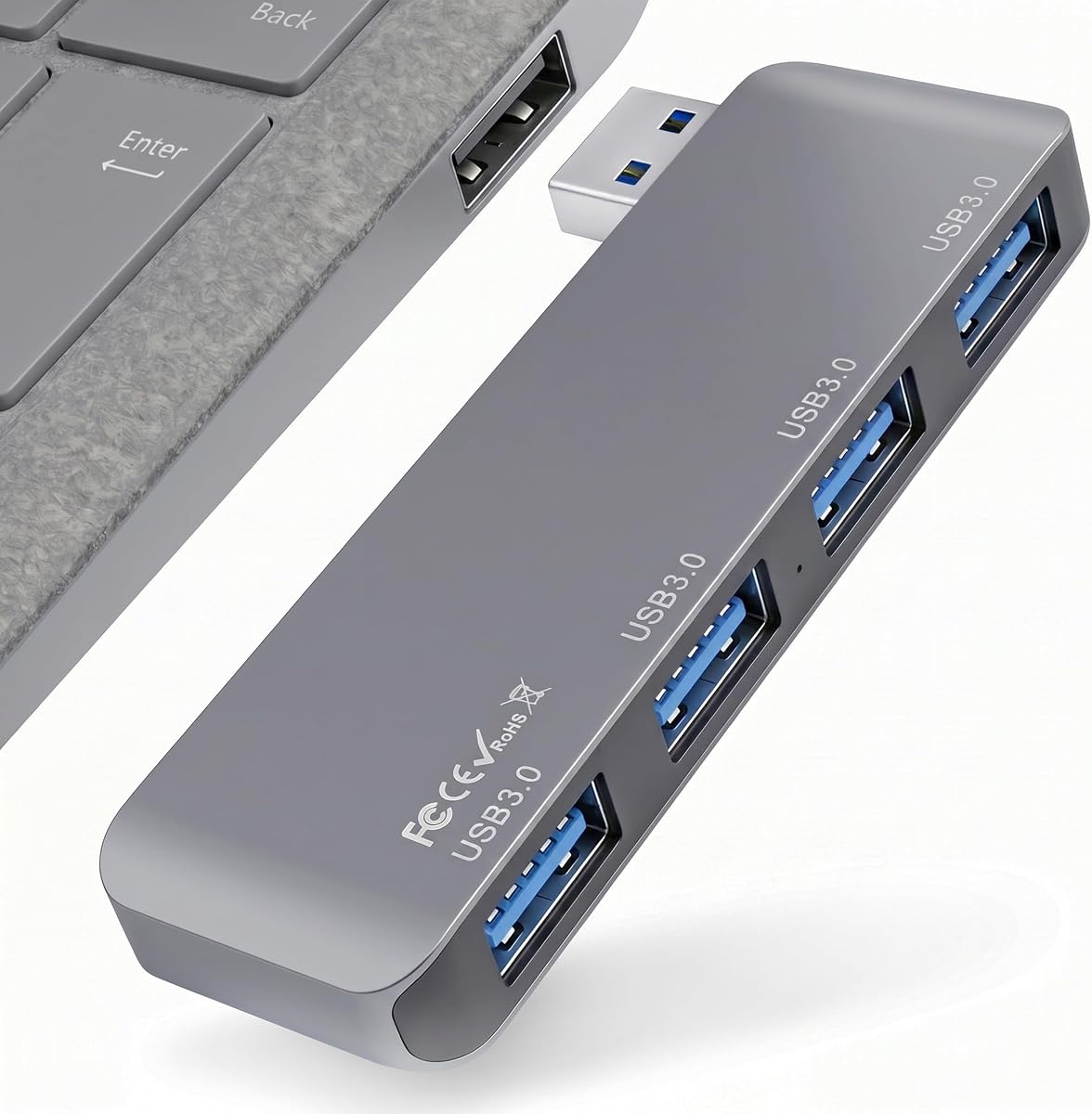
The Portable 4-Port USB 3.0 Hub has a 4.8 rating, the highest among the ten products featured, and stands out for its unusually clean direct-plug design. Rather than attaching a short cable to the hub body, it places a straight USB-A male connector on one end. That makes it especially convenient for modern laptops that still have full-size USB-A ports.
We may earn a commission when you buy through this link, at no additional cost to you.
Its four USB 3.0 ports support a theoretical transfer rate of up to 5Gbps and can handle flash drives, external hard drives, mice, keyboards, card readers, and fans at the same time. Backward compatibility with USB 2.0 and USB 1.1 protocols broadens the range of accessories it can support. The stated dimensions are 3.35 by 1.06 by 0.4 inches, so the hub occupies little space in a laptop bag.
The direct connector reduces cable clutter, but it also creates a firm dependency on a USB-A host. The hub does not add video output, accept charging, or provide a separate way to connect a USB-C computer. Its aluminum-alloy shell is designed for heat dissipation and scratch resistance, but users should still avoid leaving the adapter projecting from a laptop where it could be struck.
This is a strong general recommendation for a USB-A laptop that feels short on ports, especially for frequent travelers who prefer a minimal accessory. It offers one of the strongest customer ratings in the group, a generous four-port layout, and a secure, compact form. It is not suited to a USB-C-only setup or a workflow requiring an external display.
The direct plug sits flush against many laptops and avoids a short cable bending around the connector. That makes the hub easy to connect with one hand, carry in a pocket, and keep attached during a short trip.
Four full-size USB-A ports leave room for a mouse, keyboard, storage drive, and card reader simultaneously. USB 3.0 speed is particularly useful when moving files to and from a flash drive or external hard drive.
We may earn a commission when you buy through this link, at no additional cost to you.
The UGREEN USB 3.0 Hub earns a 4.7 rating and is an appealing straightforward expansion option. It converts one USB-A port into four USB-A ports and supports transfer speeds of up to 5Gbps. For anyone carrying a mouse, keyboard, flash drive, and card reader, it delivers the essential functionality without introducing a complicated display or charging dock.
We may earn a commission when you buy through this link, at no additional cost to you.
Portability is the central advantage. The hub is listed as only 0.4 inches thick and 33g in weight, while its attached cable is half a foot long. That short lead provides enough flexibility for many laptop positions without adding the clutter associated with a full-length cable. It also works with Windows, macOS, Linux, and Chrome OS without additional drivers.
The principal limitations are easy to understand: this is a USB-A device, and it has no USB-C host connection, HDMI output, or charging pass-through. Compatibility with other USB-A devices, including current game consoles and certain car systems, makes it more versatile than a laptop-only accessory, though users should still check whether the target device provides enough bus power for every connected accessory.
This hub is a compelling recommendation for a budget-conscious user who wants a simple four-port USB-A expander. It combines an excellent customer rating, a very small profile, and 5Gbps performance. Choose it for peripheral expansion and file transfer rather than for charging, video output, or connecting a modern USB-C-only computer.
A thickness of 0.4 inches and weight of 33g make this one of the easiest hubs in the guide to carry. The half-foot cable is long enough for practical positioning but short enough to avoid becoming a loose loop in a bag.
The 5Gbps USB 3.0 specification makes the hub appropriate for flash drives, external storage, and routine file movement. Plug-and-play support across major desktop and mobile operating systems also simplifies setup.
We may earn a commission when you buy through this link, at no additional cost to you.
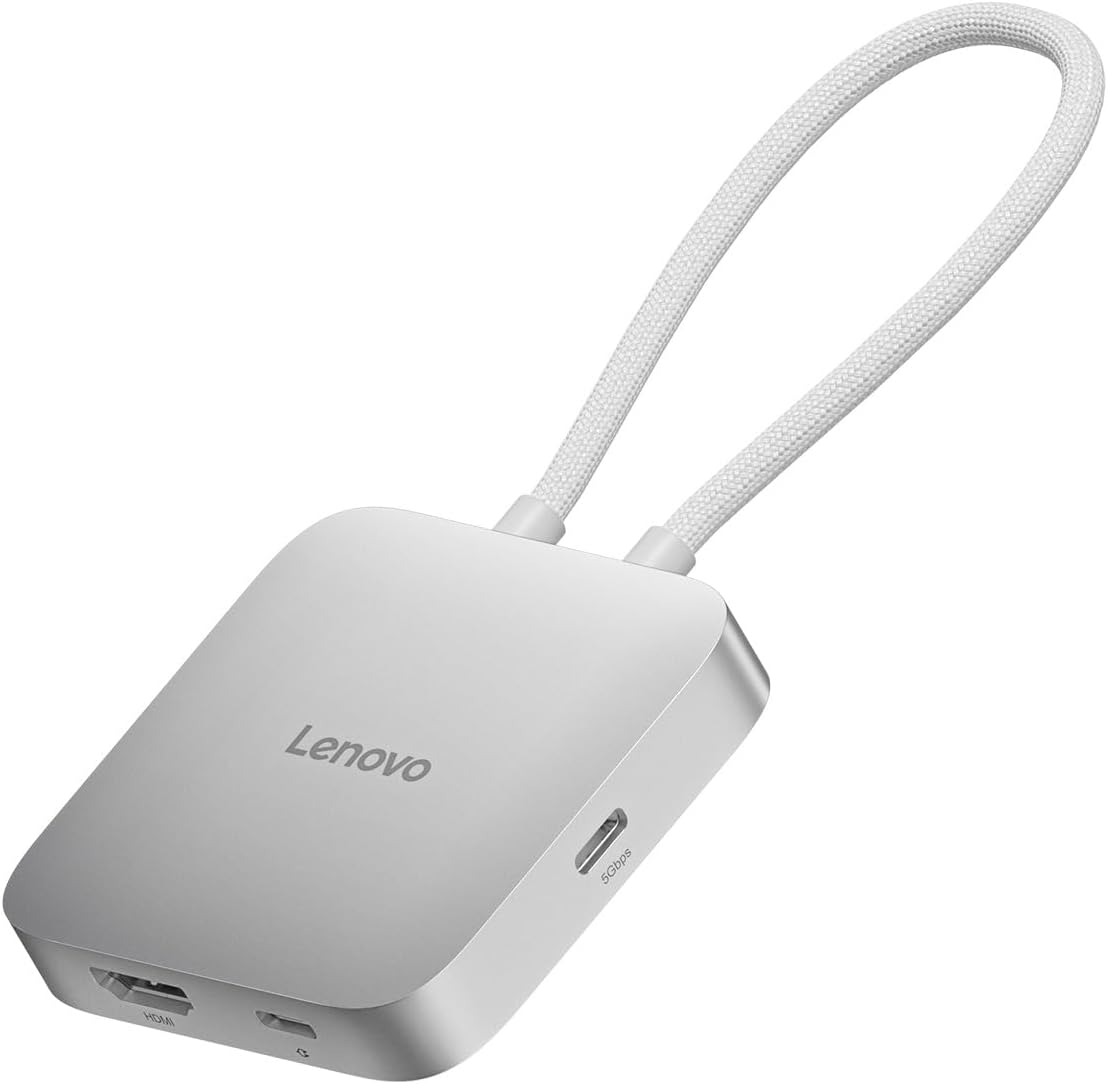
The Lenovo USB-C 5-in-1 Travel Hub combines five connection functions in a compact silver-grey enclosure and carries a 4.5 rating. Its principal attraction is the balance between peripheral connectivity, external-display support, and laptop charging. A USB-C traveler can connect accessories, send video to a larger screen, and maintain power without assembling several separate adapters.
We may earn a commission when you buy through this link, at no additional cost to you.
The hub includes two USB-C ports, two USB-A ports, and an HDMI output. Power Delivery pass-through reaches up to 90W, which is relevant for demanding notebooks used with the hub as the only everyday dock. Its HDMI output supports 4K resolution at 60Hz, a more demanding display target than many compact alternatives in this guide.
Some details remain unspecified in the available product information, particularly the data-transfer rates of the individual USB ports. Buyers using high-speed external storage should therefore confirm the detailed specifications with the manufacturer. The 90W figure is also a maximum capability rather than a guarantee that every device will negotiate the same level of power, and the host computer must support the required USB-C, DisplayPort Alt Mode, and Power Delivery features.
This is the best premium option for frequent business travelers who need a real travel dock rather than a basic port expander. It is especially attractive to owners of a compatible USB-C laptop who regularly use an external 4K display. If your needs are limited to mice, keyboards, and flash drives, a simpler hub may offer a more compact and less demanding solution.
The combination of charging, four data ports, and HDMI turns the hub into a compact workstation for compatible laptops. It can reduce the need to reconnect several accessories every time the user sits down at a temporary desk.
HDMI support up to 4K at 60Hz is the standout display specification. It suits presentation, editing, and productivity setups where a smoother external image and more responsive display experience are important.
We may earn a commission when you buy through this link, at no additional cost to you.
The Acer USB Hub 4 Ports carries a 4.6 rating and focuses on a four-port USB 3.0 layout with a two-foot cable. Its most useful feature for demanding peripherals is a USB-C power input. The manufacturer specifically recommends powering the hub through that port when connecting hard drives for faster, more stable file transfers.
We may earn a commission when you buy through this link, at no additional cost to you.
Four USB 3.0 ports can operate simultaneously at speeds of up to 5Gbps. A built-in GL3510 chip and the stated thermal design are intended to support stable operation, while an LED makes it easy to tell whether the hub is active. The enclosure is described as slim, lightweight, and suitable for a laptop bag, business trip, or briefcase.
The USB-C connector is a power-only input. It cannot carry data and cannot charge phones, tablets, or other devices, so buyers should not mistake it for a general-purpose USB-C port. The host connection is also USB-A rather than USB-C, and the two-foot cable may be less compact than the half-foot lead on the UGREEN model. Compatibility includes Acer and XPS systems, PS4, Xbox, laptops, macOS, Windows, ChromeOS, and Linux.
This is a good pick for a USB-A laptop that regularly uses external storage or several powered peripherals. The dedicated power input adds stability that basic bus-powered hubs cannot offer, making the Acer model more appropriate for intensive storage work. It is less suitable for a USB-C-only user or anyone expecting display output or device charging.
The dedicated USB-C power input can help an external hard drive receive dependable power during large transfers. This is a meaningful advantage when moving files rather than merely using a mouse or keyboard.
The four USB-A ports accommodate common accessories, and the operating-system list is broad. The included LED also provides a quick visual check that the hub is receiving power.
We may earn a commission when you buy through this link, at no additional cost to you.
The Anker USB C Hub is a five-in-one desktop-style adapter rated 4.4 by customers. It combines an HDMI output, a 5Gbps USB-C data port, two 5Gbps USB-A ports, and a USB-C power input. This is a broader feature set than a basic expander and gives compatible laptops a convenient single-cable desk setup.
We may earn a commission when you buy through this link, at no additional cost to you.
The HDMI output can mirror or stream content to an external monitor at up to 4K and 30Hz. Data transfers through the USB-C and USB-A connections run at up to 5Gbps. Meanwhile, the dedicated charging input can pass through up to 85W to the connected laptop, allowing a charger to remain attached while peripherals and a display are in use.
There are important restrictions. The USB-C power port is charging-only and cannot connect headphones, speakers, or another data device. The USB-C data port does not carry video, so the HDMI port is the sole display route. Linux is not supported, and the product requires a host with USB-C, USB4, or Thunderbolt plus the appropriate DisplayPort Alt Mode and Power Delivery features.
The Anker hub is a strong fit for a MacBook, Windows 10 or 11 computer, or ChromeOS device used at a fixed desk. It is less attractive for Linux users and for anyone who needs a 4K display at 60Hz. It also includes more functionality than a traveler may need, making a smaller travel adapter preferable in that situation.
Display, charging, and four data connections make it possible to organize a workstation around one USB-C link. The separate data and charging roles keep each function on a clearly defined port.
Both the USB-C and USB-A data ports support speeds of up to 5Gbps. That makes the hub practical for external storage and routine file movement in addition to keyboards and mice.
We may earn a commission when you buy through this link, at no additional cost to you.
The VIENON 4-Port USB 3.0 Hub has a 4.2 rating and distinguishes itself with a rotating connector and mixed port layout. It can be positioned at either 90 or 180 degrees, making it easier to use where a straight adapter would be awkward, such as against a laptop edge or inside a vehicle.
We may earn a commission when you buy through this link, at no additional cost to you.
Although the product is presented as a four-port hub, the detailed layout is more nuanced. It has one USB 3.0 port rated at up to 5Gbps, two USB 2.0 ports rated at 480Mbps, and one USB-C female port. That USB-C port can both supply 5V power to the hub and carry data, giving it more flexibility than a simple power-only input.
The video and audio limitations are significant. The hub does not support audio or video transfer and is not compatible with sound devices, so its car application is limited to suitable data accessories. The mixture of port speeds also means users should reserve the single USB 3.0 port for storage when speed matters and use the USB 2.0 connections for mice, keyboards, and printers.
This is a practical choice for a user who needs both USB-A and USB-C connectivity and values a rotatable design. It works with numerous Mac systems and other compatible USB-C equipment, while plug-and-play support covers several major operating systems. It is not the right choice for external monitors, audio, or a workflow requiring every port to deliver USB 3.0 speed.
A 90- or 180-degree rotating connector can reduce strain and make the hub easier to position. The adjustment is especially relevant in vehicles and on desks where the usable space around a port is limited.
The USB-C female port supports both 5V power input and data transfer. That lets the hub connect suitable phones, mobile hard drives, and other Type-C devices while also providing a path to auxiliary power.
We may earn a commission when you buy through this link, at no additional cost to you.
The ANYPLUS USB 3.0 Hub has a 4.6 rating and is built around a simple four-port USB-A layout. It supports transfer speeds up to 5Gbps and works with USB 2.0 and USB 1.1 equipment, giving it broad utility for storage, input devices, printers, cameras, consoles, and other USB peripherals.
We may earn a commission when you buy through this link, at no additional cost to you.
Its compatibility list is extensive, covering Windows versions from 7 through 10, macOS X, Linux, and Chrome OS. The product description also names laptops, desktop towers, Xbox and PS4 systems, flash drives, card readers, hard drives, phones in OTG mode, keyboards, printers, fans, and cameras. Plug-and-play operation removes the need to install additional software.
The most important limitation is its 900mA maximum output current. The hub is intended primarily for data transfer and peripheral connections, not charging. Some external hard drives demand more current than the hub can supply and therefore require an external power adapter. A user who expects the four ports to charge several devices would be disappointed, but one using standard accessories can still benefit from the broad port support.
This is a good general-purpose choice for a USB-A computer that needs to connect several older and newer peripherals. It combines a strong customer rating with fast data support and a wide device list. Choose an alternative with a dedicated power input if your main goal is stabilizing multiple demanding storage devices.
The hub's compatibility with input devices, storage, printers, consoles, cameras, and card readers makes it useful beyond a laptop-only setup. Backward protocol support also allows older USB accessories to remain connected.
The 900mA ceiling applies across the hub's output. Standard mice and keyboards are generally simple use cases, while power-hungry hard drives may need their own external supply for dependable operation.
We may earn a commission when you buy through this link, at no additional cost to you.
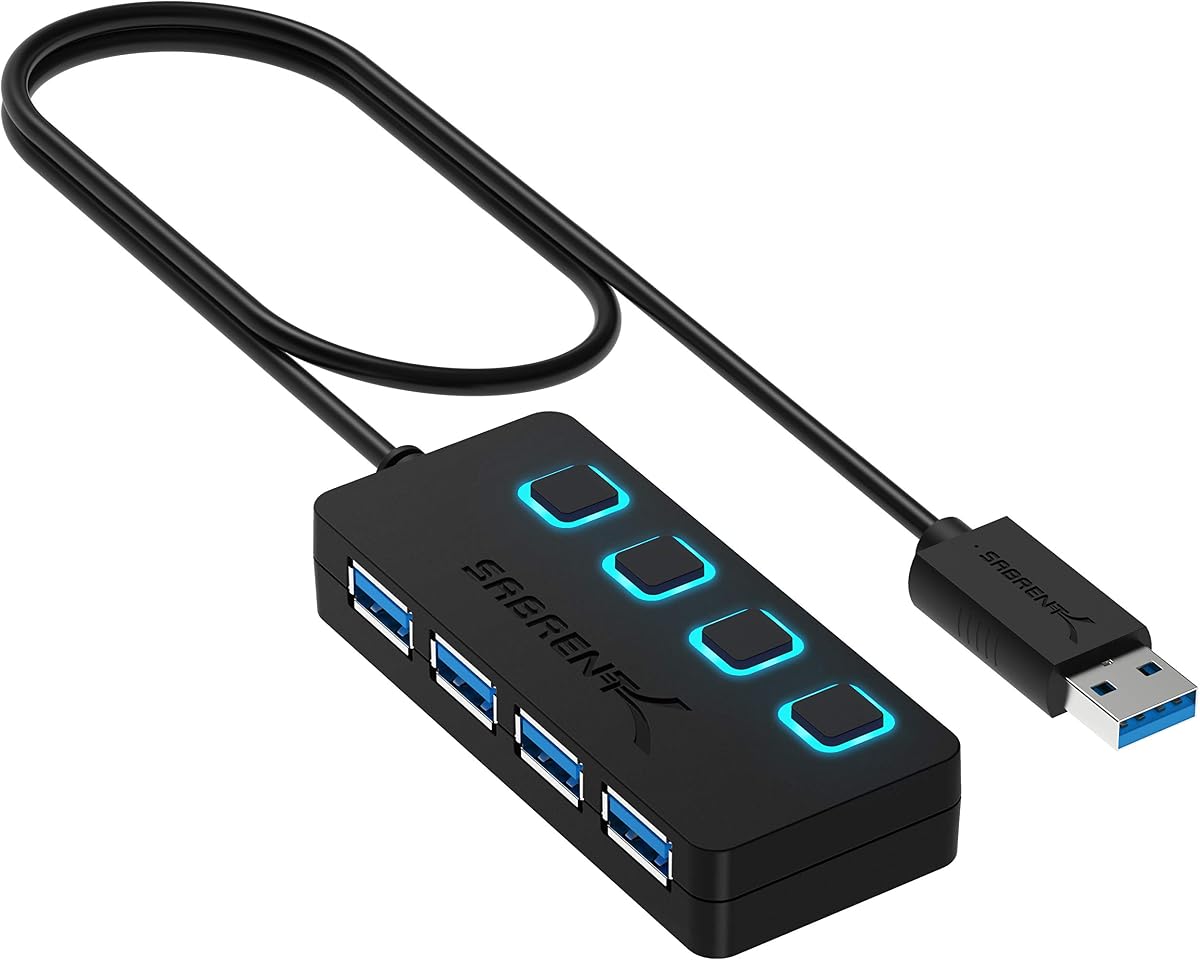
The SABRENT 4-Port USB 3.0 Hub earns a 4.6 rating and is the clearest choice in the guide for users who want direct control over individual connections. Every port has its own on/off switch, allowing a mouse, storage device, keyboard, or other accessory to be disconnected without removing the entire hub.
We may earn a commission when you buy through this link, at no additional cost to you.
The four USB 3.0 ports support speeds of up to 5Gbps, with backward compatibility for USB 2.0 and USB 1.1 devices. Individual LEDs show the power status of each port, providing an immediate visual indication of active connections. The two-foot cable is long enough to position the hub comfortably while remaining shorter than many full-length desktop leads.
The hub is explicitly not designed for charging, so its USB-A ports should be treated as data connections only. Hot-swappable support is convenient for peripherals that do not require a complete system restart when connected. Its four switches and status lights also make the body less streamlined than a minimalist travel model, although that is a minor concern for a permanent desk accessory.
The SABRENT is best for a fixed workstation shared by several devices or for a user who frequently changes peripherals. Its per-port controls offer a level of convenience that basic four-port hubs cannot match. It is less attractive for minimal travel kits, and anyone with USB-C-only hardware will need an appropriate host adapter.
Individual switches let a user isolate one port without disrupting the others. This is useful when a device is idle, when troubleshooting a connection, or when a setup uses several frequently exchanged accessories.
Separate LEDs make it easy to see which ports are powered. The indicators reduce the need to reconnect equipment merely to determine whether a port is active.
We may earn a commission when you buy through this link, at no additional cost to you.
The BERLAT 7-in-1 USB C Hub has a 3.9 rating and offers the broadest physical port count in this guide. Its compact aluminum enclosure combines one USB-A 3.0 port, four USB-A 2.0 ports, and two USB-C 2.0 ports behind a single USB-C host connection. That makes it useful for users whose peripherals still use a mixture of connector styles.
We may earn a commission when you buy through this link, at no additional cost to you.
The dedicated USB 3.0 port operates at up to 5Gbps, while the four USB 2.0 ports operate at 480Mbps. That division of labor is sensible: a flash drive or external storage device can use the faster port, while keyboards, mice, printers, cameras, card readers, and similar accessories use the other four. The compact, lightweight aluminum design is positioned for both travel and regular desk use.
The drawback is that only one of the USB-A ports offers USB 3.0 performance. A user moving large files across several drives would have to share that single fast connection. The two USB-C ports are listed as USB 2.0, and there is no HDMI output, power-delivery specification, or stated charging function. Buyers should therefore not treat the port count as a direct measure of capability.
This model is best for a USB-C laptop that needs many low-speed accessories plus a few modern Type-C peripherals. Its variety of connectors is the primary attraction, although the 3.9 rating and limited high-speed capacity should be considered. Users whose priorities are fast storage, external displays, or laptop charging are better served by one of the more specialized USB-C docks.
Two USB-C and five USB-A connections cover a broad range of older and newer accessories. The arrangement is useful when a user wants to leave several low-bandwidth devices connected at once.
The single USB 3.0 connection provides up to 5Gbps for a flash drive or external hard drive. The remaining USB 2.0 ports are better reserved for mice, keyboards, and other everyday peripherals.
We may earn a commission when you buy through this link, at no additional cost to you.
The Lexar Go Portable Hub carries a 4.6 rating and is designed around a specialized portable-storage workflow. It integrates naturally with the Lexar Professional Go Portable SSD and provides four Type-C ports, allowing a creator to consolidate compatible storage, cameras, microphones, lights, and other accessories into a compact setup.
We may earn a commission when you buy through this link, at no additional cost to you.
Its USB 3.2 Gen 2 technology supports transfer speeds of up to 10Gbps, making it the fastest data specification in this roundup. The package also includes a USB-C male-to-male adapter and a USB-C cold-shoe adapter cable. Those accessories support more flexible camera-rig and portable-storage arrangements than a standard hub with only USB-A ports.
Its specialized nature is also a limitation. There are no USB-A ports, so legacy flash drives, mice, or other conventional peripherals require compatible adapters. The listed compatibility includes smartphones, computers, portable SSDs, lighting, power banks, and microphones, but the hub is clearly optimized for modern Type-C equipment rather than general office expansion.
This is the most specialized recommendation in the guide and the strongest fit for content creators or field teams that already use compatible portable storage. Its combination of four Type-C ports, high transfer speed, and included adapters reduces cable clutter in a shooting or travel kit. For ordinary laptop peripheral expansion, however, a multi-port USB-A or USB-C travel hub will be more immediately useful.
The hub was designed around use with the Lexar Professional Go Portable SSD. Its matching Type-C layout allows portable drives and other compatible accessories to be organized with fewer adapter changes.
Up to 10Gbps gives the hub an advantage when handling compatible high-speed storage. The included cold-shoe cable also makes it more relevant to camera and production setups than a conventional desktop expander.
We may earn a commission when you buy through this link, at no additional cost to you.
The best portable USB hub depends less on the number printed on the package than on the actual devices you need to connect. Consider connector direction, port speed, physical size, display requirements, power behavior, and supported operating systems before making a choice.
The host connector must physically match the port on your computer. A USB-A hub connects to a full-size USB-A socket, while a USB-C hub requires a compatible USB-C port and may also need appropriate video and power protocols. Connector direction also affects handling: a direct-plug model projects directly from the laptop, a short attached cable offers modest positioning freedom, and a rotating adapter can fit tighter spaces.
The USB generation determines the maximum theoretical transfer rate. Most general-purpose hubs in this guide support up to 5Gbps over USB 3.0, while the Lexar Go Portable Hub supports up to 10Gbps through USB 3.2 Gen 2. Speed is shared according to the hub design and connected devices, so the headline number does not guarantee every port operates independently at full speed.
Four USB-A ports sound generous, but their capabilities may differ. A hub with four 5Gbps ports offers more consistent performance than one with a single 5Gbps port and several slower USB 2.0 connections. Count the peripherals you expect to connect permanently, such as a keyboard, mouse, storage drive, webcam, and card reader, then leave room for temporary accessories.
A portable USB hub is not automatically an external display adapter. Products with HDMI, such as the Anker and Lenovo models, can mirror or stream video, but they require the host to support DisplayPort Alt Mode and usually have specific refresh-rate limits. The Lenovo supports up to 4K at 60Hz, while the Anker supports up to 4K at 30Hz. The VIENON explicitly does not support audio or video transfer.
Power behavior varies significantly across the guide. The Acer has a USB-C input intended to stabilize hard-drive transfers, the Anker offers up to 85W pass-through charging, and the Lenovo supports up to 90W. Basic hubs such as the ANYPLUS have a 900mA output ceiling and should not be used as chargers. A dedicated power input is useful, but it may also mean carrying an additional cable.
For travel, total bulk includes the hub and its attached lead. The UGREEN is listed at 0.4 inches thick and 33g, while the direct-plug model measures 3.35 by 1.06 by 0.4 inches. Aluminum housings are promoted for heat dissipation and durability, but a direct-plug design can be more exposed to impacts than one with a flexible cable.
Most products in the guide support Windows, macOS, and Linux, often with ChromeOS support as well. Exceptions matter. The Anker hub is not compatible with Linux, while the VIENON lists older Windows and Mac OS releases alongside modern systems. Console, camera, car, smartphone, and tablet compatibility also depends on the host providing the expected USB connection and adequate power.
Some hubs include adapters that improve their real-world usefulness. The Lexar Go includes a male-to-male USB-C adapter and a cold-shoe cable for portable storage and production workflows. The VIENON's rotating design and combined USB-C data and power input support different positioning needs. These extras are valuable only when they match the intended setup, so they should not outweigh basic connector compatibility.
Before connecting the hub, inspect the host and device ports for debris and confirm that the connector orientation matches. Install any storage or accessory software first, then connect the hub directly to the computer rather than through another unpowered hub. For a USB-C model, attach the required display or charging cables only to ports that support those functions.
After the hub is recognized, connect only the peripherals that you intend to use and begin with essential accessories such as a keyboard, mouse, and storage drive. Add high-draw equipment gradually, particularly if the hub relies on bus power. If a hard drive behaves inconsistently, use the Acer's dedicated USB-C power input or the external power recommended by the drive manufacturer.
When carrying a hub, coil long cables loosely, protect direct-plug models from pressure against the laptop body, and avoid exposing any hub to moisture or extreme heat. Disconnect external storage safely before moving it, and do not use a basic USB-A hub as a charger. Periodically inspect connectors for bent pins, check that ports fit firmly, and keep the housing away from obstructed ventilation areas.
A USB-A hub connects to a full-size rectangular USB port and generally includes several USB-A device ports. A USB-C hub connects to a smaller reversible connector and may add USB-C peripherals, HDMI output, or power delivery. The most important check is whether your computer has the matching host port and supports any video or charging functions the hub claims.
Not necessarily. Some four-port hubs assign 5Gbps to every port, while others provide one fast port and slower USB 2.0 connections. The VIENON and BERLAT are examples of mixed-speed designs. Check the individual port specifications and connect demanding storage to the fastest available port.
Only hubs with explicit power delivery or charging output can do so. The Anker supports up to 85W pass-through charging, and the Lenovo supports up to 90W, but the Acer's USB-C port is input power for the hub only. Basic hubs such as the SABRENT and ANYPLUS are not charging hubs.
You need a hub with an explicit video output and a compatible host connection. The Anker supports up to 4K at 30Hz, while the Lenovo supports up to 4K at 60Hz. Your computer must support the required DisplayPort Alt Mode and USB-C features, and the VIENON cannot transfer video or audio.
A direct-plug design is more compact and avoids a loose cable, making it convenient for travel. A short cable provides more positioning freedom and can put less pressure on a laptop's USB socket. The best choice depends on the port location, available space, and how often the hub will remain connected.
Some hard drives need more current than the hub can provide, especially when several accessories are connected. The Acer includes a USB-C power input intended to improve stability with storage transfers, while the ANYPLUS specifically notes that some drives require an external power adapter. Connecting fewer devices can also reduce total power demand.
They can, but the device must support USB host or OTG functionality and provide enough power. The BERLAT lists Android compatibility, and the VIENON describes data connections to compatible Type-C phones. Not every phone or tablet will power a hub or support every attached peripheral, so compatibility should be checked for the exact device.
The UGREEN is among the smallest and lightest conventional choices, while the direct-plug model avoids a dangling lead. The Lenovo is better for travelers who also need external-display and charging functions. The best fit depends on whether portability means simple peripheral expansion or a complete temporary workstation.
The direct-plug four-port hub is the strongest all-around option for USB-A users because it combines the highest customer rating, four 5Gbps ports, and a compact aluminum design without a dangling lead. The UGREEN is the best budget-oriented simple expander, offering four fast USB-A ports in a particularly thin and light form.
The Lenovo travel hub stands apart for users who need more than basic expansion, combining 90W power pass-through, 4K 60Hz HDMI, and four data ports. Prioritize connector compatibility first, then match speed, video, and power functions to your actual accessories. A larger port count is useful only when the ports provide the speed and features your devices require.
Specifications, ratings, availability, and prices can change over time, so confirm the current listing and host requirements before purchasing. Check the port labels, supported operating systems, display specifications, and power limitations, then choose the hub that best supports the setup you carry and use most often.