
UGREEN SD Card Reader USB C
4.6Editor score
Dual USB-C and USB-A
Simultaneous SD and microSD
Up to 5Gbps transfer
Discover the best SD card reader for travel by comparing compatibility, speed, portability, card storage, protection, and everyday convenience.
An SD card reader for travel should be small enough to pack without fuss, dependable enough to handle files from cameras and action cameras, and compatible with the devices used along the way. The best choice depends on card formats, connector types, transfer speed, and whether you also need secure card storage.
This guide compares ten travel-oriented readers across USB-C and USB-A connectivity, supported SD and microSD standards, simultaneous card access, storage capacity, portability, and device compatibility. The selection includes basic adapters, multi-slot readers, and combined reader-and-holder designs for different trip styles.
Each review explains the strongest reasons to choose a model, along with limitations worth considering before buying. The badges identify only three standout options, while the full list covers the range from budget-friendly dual-interface readers to premium organizers built for demanding photography trips. Prices and availability can change.
4.6Editor score
4.6Editor score

4.3Editor score
The comparison below highlights the practical differences among ten travel card readers, including connector style, card formats, maximum stated speed, storage function, and protection.


The UGREEN SD Card Reader USB C, USB 3.0 Micro SD Card Reader combines a compact adapter with unusually broad travel utility. It carries a 4.6 rating and stands out for offering both USB-C and USB-A connections in one body, allowing it to fit modern laptops, tablets, phones, and older USB-equipped travel devices with fewer accessory requirements.
We may earn a commission when you buy through this link, at no additional cost to you.
Its strongest feature is the combination of simultaneous SD and microSD reading with a stated transfer rate of up to 5Gbps. This is particularly helpful after a long shooting day, when a camera's full-size card and an action camera's smaller card both need to be offloaded. The reader supports common SD, SDHC, SDXC, MMC, RS-MMC, and their microSD equivalents.
The slim, lightweight design is easy to place in a camera bag, laptop sleeve, or small day pack. Plug-and-play operation means no drivers or external power are needed, while compatibility extends across Windows, macOS, and most Android devices. The trade-off is that it organizes no cards itself, so you still need a separate case if keeping spare media is a priority.
This is an excellent choice for travelers who want one uncomplicated adapter for many devices. It is particularly attractive when carrying both a laptop and a phone, because the integrated USB-C and USB-A interfaces reduce the chance of leaving the wrong cable behind. For anyone prioritizing portability, affordability, and broad compatibility over integrated storage, it is the strongest overall value in this list.
The combined USB-C and USB-A design is particularly useful on trips where laptop ports vary. A USB-C phone or tablet can use the modern connector directly, while a USB-A computer can use the other interface without requiring a separate travel adapter.
Up to 5Gbps makes this reader suitable for substantial photo and video transfers. Actual results also depend on the memory cards, source device, and destination, but the stated interface speed provides a useful margin over basic USB 2.0 readers.
We may earn a commission when you buy through this link, at no additional cost to you.
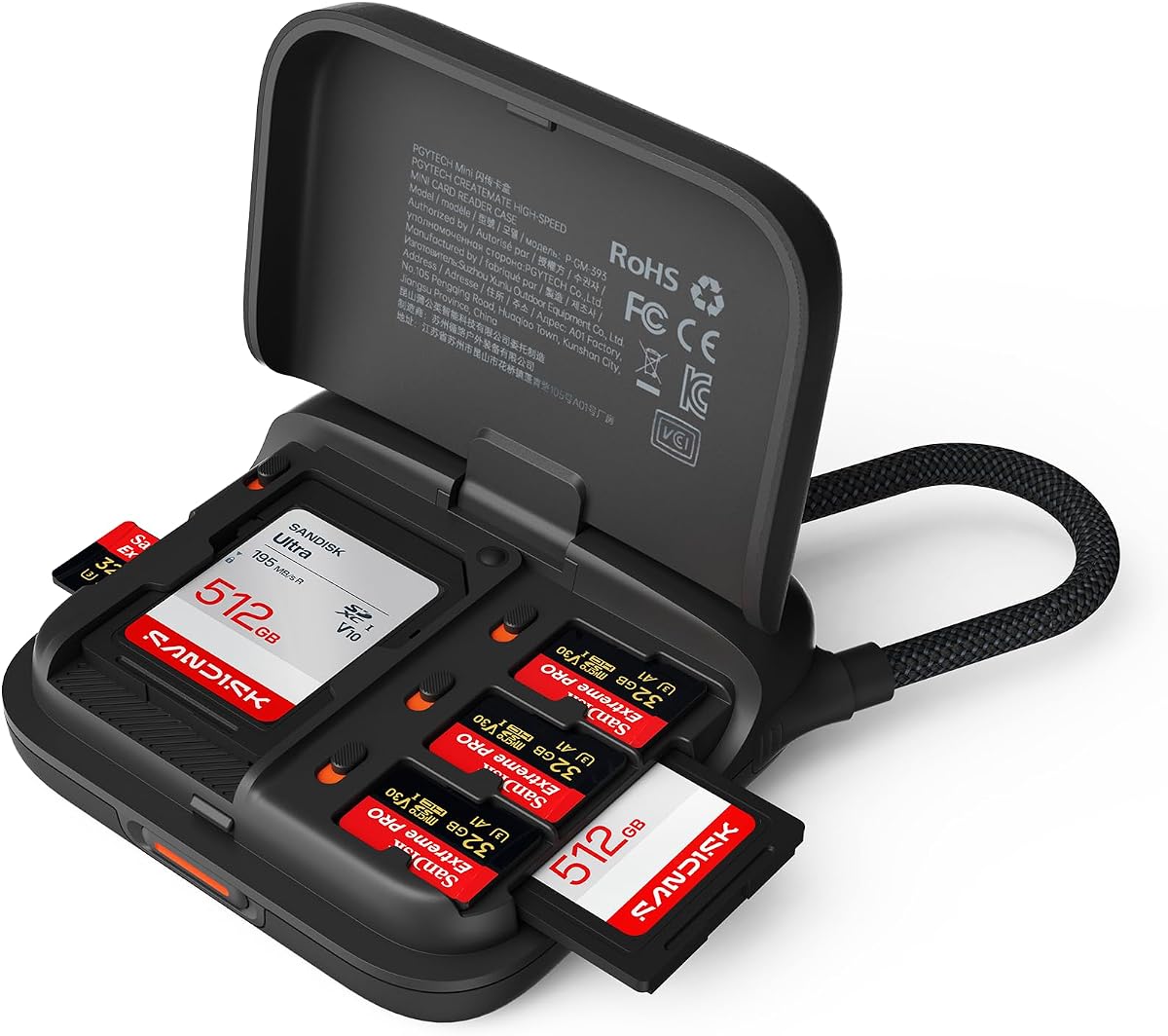
The PGYTECH Mini SD Card Reader Case is a polished all-in-one option for travelers who carry several memory cards. Its 4.6 rating reflects a useful combination of high-speed reading and compact storage. The palm-sized body holds two SD and four microSD cards, reducing the number of separate card cases needed in a carry-on or camera bag.
We may earn a commission when you buy through this link, at no additional cost to you.
Transfer performance is listed at up to 312MB/s, with simultaneous reading from SD and microSD slots. UHS-I and UHS-II support makes it suitable for modern high-speed cards, while support for cameras, drones, action cameras, Windows, macOS, Linux, Android, and iPadOS broadens its appeal across common travel workflows.
Its built-in braided cable serves as a carry strap and detaches through a push-to-unlock snap, helping prevent loose cable tangles around camera equipment. The Type-C interface also supports hot-swapping, so one card can potentially be exchanged without closing down the workflow. It is not as universally connector-ready as the top-ranked UGREEN, since it relies on USB-C.
This is the pick for a traveler who regularly changes cards, carries a mix of full-size and microSD media, and wants a more organized kit. It removes the need to pair a conventional reader with a separate holder while preserving a compact footprint. For active photographers or content creators, the balance of storage, speed, and portability is particularly compelling.
Dedicated slots for two SD and four microSD cards keep the most common travel media together. Card status markers help distinguish used from unused cards, which is useful after an extended shoot or when several travelers are sharing a workspace.
The detachable braided cable reduces dependence on a separate short tether. When the reader is packed, the cable can hold it in place and help protect the connectors from pulling against one another inside a bag.
We may earn a commission when you buy through this link, at no additional cost to you.
The SmartQ C368 USB 3.0 Card Reader is the most accommodating choice for someone who may still encounter older memory cards. It carries a 4.6 rating and supports Micro SD, SD, MS, and CF formats, covering a broader mix of legacy media than most travel readers that focus exclusively on SD and microSD.
We may earn a commission when you buy through this link, at no additional cost to you.
Its four-in-one design reads the different formats independently, which can be invaluable when traveling with an older compact camera, a newer mirrorless camera, or media from several generations of devices. A stated transfer rate of up to 5Gbps is supported through USB 3.0, and backward compatibility with USB 2.0 makes it usable on more computers.
The reader works with Windows, macOS, and Linux without additional drivers. A blue LED clearly indicates when it is powered, and the supplied cable organizer helps prevent a loose lead from becoming tangled. The main limitation is its USB-A-oriented design, which may need an adapter for a modern USB-C-only laptop.
Choose this model if your travel kit includes Memory Stick or CompactFlash media, or if you want a simple USB-A reader with broad operating-system support. It is less elegant for a minimalist phone-first trip, but it offers practical flexibility for photographers moving between generations of equipment.
MS and CF support sets the SmartQ C368 apart from most modern adapters. That makes it a practical bridge for travelers who carry an older camera alongside a newer device that uses SD or microSD cards.
Driver-free operation keeps setup straightforward, while the blue LED gives immediate confirmation that the reader has power. The included organizer is a small but thoughtful travel accessory for keeping the connection lead manageable.
We may earn a commission when you buy through this link, at no additional cost to you.
The PGYTECH UHS-II SD4.0/Micro SD Card Reader Holder is a sturdy organizer with genuine travel value. It holds two nano SIM cards, four SD cards, four TF cards, and an eject pin, while its aluminum-alloy shell and rubber case provide IP54-level protection against dust and water splashes.
We may earn a commission when you buy through this link, at no additional cost to you.
The built-in USB 3.1 chip supports transfer rates stated to reach 312MB/s with compatible SD 4.0 cards. Its SD and TF slots can transfer data at the same time, helping photographers offload footage and photographs without repeatedly moving one card at a time. Broad support includes UHS-II and UHS-I SD, SDXC, SDHC, microSD, and microSDXC formats.
The protective design is a meaningful advantage in places where cards might be carried near damp luggage or dusty equipment. The included rubber case, carabiner, and eject pin create a more complete kit, although a Type-C-to-USB-A adapter is required for some desktop connections. Mobile transfers also depend on the phone or tablet supporting OTG.
This reader is a strong match for photography-focused trips where many cards, SIM cards, and an eject tool need to stay organized. It is less minimalist than a small dual-interface adapter, but its combination of storage, impact-conscious construction, and high-speed dual-card reading is difficult to match.
The aluminum-alloy exterior and rubber case help shield the card compartments from splashes and dust. That makes the unit more reassuring for beach trips, outdoor shoots, and travel through environments where loose cards could otherwise be exposed.
Eight card positions plus two nano SIM positions keep more than just the current working card together. The included eject pin also reduces the temptation to use a sharp improvised tool when removing memory cards.
We may earn a commission when you buy through this link, at no additional cost to you.
The SmartQ Micro SD Card Reader USB C is a compact, uncomplicated adapter for moving between computers, tablets, and phones. Its 4.5 rating reflects a straightforward design that supports both SD and microSD cards through built-in USB-A and USB-C connectors, with no driver installation required.
We may earn a commission when you buy through this link, at no additional cost to you.
The USB 3.0 interface is listed at up to 5Gbps, allowing quick access to photos, videos, and other files. Compatibility with Windows PCs, Macs, Android devices, and iPads makes it versatile for a trip that includes several types of hardware. It is also specifically listed for devices such as the Samsung Galaxy S22 Ultra, iPad Pro, and MacBook.
Its lightweight, portable form makes it easy to keep in a camera pouch or everyday tech organizer. The main compromise is that it is only a reader: it does not keep spare cards protected or provide a cable, card markers, or a locking storage system. Some newer USB-C phones also require device support for direct card access.
This is a sensible choice for a traveler who wants a small adapter with both modern and legacy connectors and does not need to transport a larger card organizer. It works particularly well for quick uploads from a phone, while photographers carrying multiple spare cards may prefer one of the combined reader-and-case designs.
Direct USB-C access suits travelers who want to move images from a microSD card to a compatible phone or tablet without first returning to a laptop. The stated 5Gbps speed helps keep large transfers from becoming the bottleneck.
The small body and integrated connectors avoid the need to carry two separate readers. That simplicity is valuable when every gram and accessory in a day pack is being considered.
We may earn a commission when you buy through this link, at no additional cost to you.
The Dockteck USB A/C to Micro SD Memory Card Adapter is a versatile travel reader built around three card slots. It has a 4.6 rating, supports SD and TF cards simultaneously, and adds a third slot for another common card type, offering more flexibility than a basic two-slot design.
We may earn a commission when you buy through this link, at no additional cost to you.
Its USB 3.0 connection is advertised at up to 5Gbps, while both slots are listed at up to 104MB/s. The reader supports UHS-I SDXC, SDHC, SD, MMC, RS-MMC, and microSD formats commonly found in cameras, GoPro devices, dash cams, and surveillance cameras.
Protective covers at both ends help keep liquid and dust away from the card openings, and the slim profile is intended for camera bags and backpacks. OTG support allows direct connection to compatible external devices. Its USB-A-based design means that a USB-C-only computer may require a suitable adapter.
This is a good option for road-trippers or travel videographers who use more than one memory-card standard and want some physical protection around the slots. It offers broad compatibility and three-card convenience without the larger footprint of a full card-storage case.
The three-slot layout provides room to work with different media without swapping readers. This is useful when a phone uses microSD while a camera uses SD, or when action-camera media and conventional camera cards are both part of the same travel kit.
Protective end covers are especially relevant for dusty roads and sandy outdoor locations. They reduce direct exposure of the slots during transport, although the covers should not be treated as waterproof protection.
We may earn a commission when you buy through this link, at no additional cost to you.
The ULANZI CR2 is the most comprehensive travel organizer in this roundup. It combines a high-speed SD and TF reader with storage for up to 12 cards, two nano SIM positions, and an eject-pin slot. Its 4.3 rating is the lowest shown, but the feature set makes it a premium option for organized, high-volume travel.
We may earn a commission when you buy through this link, at no additional cost to you.
The USB 3.1 interface supports UHS-II SD and TF 4.0 cards with stated performance of up to 312MB/s. Fully recessed storage slots keep cards separated and protected, while the side reading slots permit simultaneous SD and TF access. A built-in cable includes USB and Type-C connectors, and a C-to-A adapter broadens desktop compatibility.
Its sealed pull-out design and impact-resistant silicone cover provide IP54 protection against dust and water splashes. That rating means it can resist rain and spills but should not be submerged. The range of operating systems is broad, including Windows, Linux, macOS, iOS, and Android, subject to compatible ports and OTG support.
Choose the CR2 when you carry numerous cards, travel internationally with nano SIMs, or want a single unit for reading, storing, and protecting media. It is overkill for a casual vacation with one card, but for a photography trip it may prevent several accessories from competing for bag space. Its protection and organization justify the premium positioning.
The large number of dedicated slots makes the CR2 useful for extended shoots or trips with multiple cameras. Recessed placement keeps cards from rubbing together and helps prevent accidental loss when the case is moved.
IP54 protection is helpful against dust and splashes during everyday travel. It offers reassurance in poor weather, but the stated limitation remains important: this reader is not designed for immersion.
We may earn a commission when you buy through this link, at no additional cost to you.
The UGREEN USB C SD 4.0 Card Reader UHS-II Micro SD Card Reader is built for travelers who want fast transfers and a durable metal body. It has a 4.6 rating and supports SD 4.0 UHS-II media at speeds stated to reach 312MB/s, making it well suited to 4K movies, photographs, and video logs.
We may earn a commission when you buy through this link, at no additional cost to you.
Both the SD and TF slots support UHS-II, and the reader can read, write, and copy files between two cards simultaneously. Its broad card support includes UHS-II and UHS-I SD, SDHC, SDXC, microSD, microSDHC, microSDXC, MMC, and RS-MMC formats. Plug-and-play operation removes the need for drivers on most systems.
The aluminum-alloy case feels more substantial than a typical plastic adapter, while the braided cable adds durability at the point where bending often occurs. A limitation is that it does not store spare cards, so it should be paired with a separate holder if organization is important. Mobile use depends on OTG support.
This is a strong recommendation for a photographer or videographer who wants a dedicated high-speed reader rather than a combined organizer. Its durability, dual-card operation, and support for current high-speed card standards make it especially relevant for trips that involve frequent offloading and editing.
UHS-II support across both slots is the defining feature. It helps travelers take advantage of fast SD 4.0 cards when transferring large video files, provided the host device and card itself can sustain the stated performance.
The aluminum housing resists the wear associated with daily bag use, while the braided cable protects a frequently stressed connection area. These are practical advantages for a reader that stays in a camera bag throughout a trip.
We may earn a commission when you buy through this link, at no additional cost to you.
The llano Micro SD Card Reader Case balances card storage with high-speed reading in a lightweight travel format. Its 4.5 rating accompanies support for UHS-II SD and TF 4.0 cards, with a stated maximum transfer rate of 312MB/s and independent SD and TF interfaces.
We may earn a commission when you buy through this link, at no additional cost to you.
The case can hold two SD and four microSD cards, helping keep essential media together without adding a large organizer. It also reads and writes two cards simultaneously, which makes it useful when moving files from one card to another or offloading separate camera and action-camera media.
The nylon-braided cable is designed to resist corrosion and is stated to withstand more than 10,000 bends and twists. An ABS composite shell supports heat dissipation, and the reader is compatible with Mac, Windows, Android, and Linux. Unlike several premium organizer models, it does not state an IP protection rating.
This is a good middle ground for a traveler who wants some card storage and a durable USB-C cable without carrying a full metal-and-silicone organizer. It works particularly well for macOS and Windows users who routinely handle UHS-II media and want a compact two-card transfer workflow.
Six dedicated positions give the reader enough capacity for common travel arrangements. The approach remains slimmer than a large photo-organizer case while still reducing the chance of leaving loose cards at a hotel or rental location.
A braided cable is especially helpful for a device that is packed and unpacked frequently. Its stated bend resistance is intended to reduce cable fatigue without adding the bulk of a permanently attached adapter.
We may earn a commission when you buy through this link, at no additional cost to you.
The PGYTECH SD Card Reader USB 3.1 Micro SD 4.0 Card Case combines a high-speed reader with a protected organizer. It has a 4.6 rating and is designed for travel, daily work, and photography, with room for four SD cards, four TF cards, two nano SIM cards, and an eject pin.
We may earn a commission when you buy through this link, at no additional cost to you.
A built-in USB 3.1 chip is stated to reach 312MB/s with compatible SD 4.0 cards. Its SD and TF slots support simultaneous transfers, while the card compatibility list includes UHS-II and UHS-I SD, SDXC, SDHC, microSD, microSDHC, and microSDXC formats. It is compatible with Windows, macOS, Linux, Android, and iPadOS.
An aluminum-alloy shell and included rubber case provide IP54 protection against water splashes and dust. The carabiner makes it easier to attach the unit to a backpack, while the eject pin provides a dedicated way to remove cards safely. Some desktop users will need a Type-C-to-USB-A adapter, and phone transfers require OTG compatibility.
This model is a compelling choice for travelers who prioritize both organization and physical protection. It provides many of the same premium benefits as the larger CR2 but holds fewer cards and does not include a C-to-A adapter. For an overseas trip involving cameras and multiple SIM cards, that combination can still deliver substantial value.
Holding eight cards and two nano SIMs in a protected shell is useful on trips where media changes frequently. The rubber outer case adds a layer of protection when the organizer is set down near cameras, luggage, or travel equipment.
Reading SD and TF cards at the same time is a meaningful efficiency gain after filming or photographing. The reader supports current high-speed card standards, although actual throughput depends on the cards and connected device.
We may earn a commission when you buy through this link, at no additional cost to you.
A useful travel card reader balances device compatibility, card support, transfer speed, physical size, and protection. The best choice depends on the equipment you carry, the number of cards you use, and whether storage and reading must be handled by one device.
Start with the ports available on the devices you expect to use. USB-C is essential for many modern phones, tablets, and thin laptops, while USB-A remains common on older computers and some travel accessories. A reader with both connectors, such as the top-ranked UGREEN model, can reduce the need to carry a separate adapter and make it easier to switch between a phone and a laptop.
A USB-C-only reader is usually cleaner and more contemporary, but travelers should verify whether their computer has a full USB-C data port. Mobile connections can also require OTG support, and desktop use with a USB-C reader may need a Type-C-to-USB-A adapter. Choose the connector arrangement that matches the actual trip kit rather than assuming every modern port supports the same accessories.
Every travel kit should include the formats used by its cameras, phones, drones, and action cameras. Most modern readers cover SD, SDHC, SDXC, microSD, microSDHC, and microSDXC. UHS-I and UHS-II support becomes more important when using newer, faster cards or transferring large 4K video files.
Older or mixed equipment may call for MS or CF support, as offered by the SmartQ C368. Verify the exact card standard rather than relying on the broad word SD. Also distinguish between a card reader and a storage device: the former connects to a host device, while the latter can keep media physically organized and protected.
Transfer speed matters most when moving large video files or emptying several high-resolution cards after a full day of shooting. Readers with USB 3.0 or USB 3.1 interfaces and stated speeds of up to 5Gbps or 312MB/s provide a faster path than basic USB 2.0 adapters. However, the card itself, host device, cable, and operating system can limit the result.
UHS-II support is worth prioritizing if your cards support it. Readers with one UHS-II slot may be sufficient when working with a single card type, while dual UHS-II slots can improve flexibility for SD and microSD workflows. Treat maximum transfer figures as capabilities rather than guaranteed real-time results for every file.
A separate reader is lighter and simpler, but a reader-and-case design keeps spare cards together and lowers the chance of leaving media behind. The PGYTECH Mini Reader Case stores two SD and four microSD cards, while larger premium models accommodate up to 12 cards. Some organizers also include spaces for nano SIM cards and an eject pin.
Consider how many cards you realistically carry. A six-position holder is useful for a mixed camera kit, while a larger organizer benefits extended trips and frequent shooting. Markers for used and unused cards can prevent confusion, and individually recessed slots are preferable to loose storage where cards may rub together or fall out.
Travel exposes accessories to impact, dust, moisture, and constant movement. A metal shell can improve durability, while a rubber outer case provides a softer outer barrier. IP54 protection, offered by several premium options, indicates resistance to dust and water splashes, but it does not mean the product can be submerged.
Protective end covers are also useful for narrow readers with exposed slots. If your itinerary includes beaches, rain, or dusty locations, prioritize sealed or covered card openings and a case that can attach to a bag. For ordinary city travel, a slim reader with a durable body may be sufficient without paying for a larger protective organizer.
The best travel reader is one you will actually carry. Slim dual-interface adapters take minimal space and can sit in a camera pouch or laptop sleeve. Combination readers are slightly bulkier, but they can replace a separate card holder and may ultimately save space. Weight matters for day packs and carry-ons, while cable management matters for camera bags full of loose accessories.
Look for a compact, palm-sized form, a detachable or built-in cable, and a way to keep the device attached to other gear. The PGYTECH Mini Reader Case uses its braided cable as a carry strap, while the ULANZI CR2 and PGYTECH holder include carabiners. Choose based on your packing system rather than on the largest advertised card count.
Plug-and-play is convenient, but compatibility still varies by device. Most readers support Windows, macOS, and Linux, while mobile access usually requires an OTG-capable USB-C port. Some product descriptions also list iPadOS and iOS support, but the exact behavior can depend on the reader, device generation, and card format.
Look for a driver-free design when moving between unfamiliar computers. Avoid assuming that a USB-C port automatically supports external storage, particularly on an older phone or tablet. If your workflow includes editing on a phone, verify both OTG support and the card types you intend to use before packing the reader.
Dual-slot readers allow an SD card and microSD card to be handled at the same time. That saves repeated unplugging when two cameras use different formats and makes copying between cards more convenient. Some high-end models support independent reading and writing, while others simply offer simultaneous transfer.
Simultaneous access is most useful for active photographers, travel videographers, and anyone moving between a conventional camera and an action camera. A standard two-slot reader still covers the common case well. More slots only add value if you regularly work with several different card formats or need quick access to multiple cards.
Before leaving, confirm that the reader supports the capacity and format of every card you plan to use. Format memory cards in the device that will use them, then insert the card into the appropriate labeled slot. Connect the reader directly to the destination device and wait for the operating system to recognize the drive or card before opening files.
Copy important files rather than moving them until the originals are safely present in two separate locations. Check that the transfer has completed, confirm that photos and videos open correctly, and then format the card for reuse. Avoid pulling the card out while data is being transferred, and do not remove the reader before the system reports that it is safe to do so.
To care for the reader, keep slots covered when it is not in use, avoid moisture and extreme heat, and do not bend the connector or cable sharply. If the reader includes a rubber case, use it during transport. Store cards in a dry place, remove them from the device after a trip, and periodically check stored media for corruption, especially after humid or physically demanding journeys.
A slim reader with both USB-C and USB-A connectors is often the easiest to carry because it works with many modern and older travel devices. A reader with a small card-storage case can be more organized, although it will usually be slightly bulkier. Choose based on whether you carry one card or several, as well as the ports available on your laptop and phone.
You can use one with a compatible phone that supports USB-C OTG or the required connection method. Android compatibility is commonly listed for these readers, while support for iPhones depends on the model and connector arrangement. Always verify the phone's specifications and the reader's compatibility notes before relying on mobile transfers.
Only if your memory cards are UHS-II and you regularly transfer large photo or video files. UHS-II readers can take advantage of faster cards, but performance also depends on the host device, cable, and card itself. For ordinary photo backups, a compatible UHS-I reader may be sufficient.
A combined case is useful when you carry several spare cards because it keeps them together and reduces the chance of leaving them behind. It can also include protection, SIM-card storage, and a card eject pin. A simple single reader is lighter and may be more appropriate for a short trip involving only one or two cards.
IP54 indicates resistance to dust and water splashes under the stated testing conditions. It makes a reader more suitable for rain, sandy locations, and crowded travel environments, but it does not mean the device can be submerged. The product should still be dried carefully if it gets wet and kept away from prolonged direct exposure.
OTG allows compatible phones and tablets to act as USB hosts, enabling a card reader to appear as external storage. If a device does not support OTG, a reader alone will not create that capability. Check the device specifications and the reader instructions before planning to transfer files without a computer.
Readers with dual-card or independent card interfaces may support reading and writing across two cards, depending on the model. The UGREEN UHS-II reader, llano reader, and several PGYTECH models specifically describe dual-card operations. Confirm that both cards and the connected device are supported before starting an important copy.
Memory cards themselves are generally permitted in carry-on and checked luggage, but airline and destination rules can vary. Keep the cards in your personal possession rather than in checked baggage when possible. A protected card case helps prevent damage and keeps the media organized during inspection, transfers, and the journey home.
The UGREEN Dual-Interface Reader is the most straightforward all-around choice for many trips because it combines USB-C and USB-A connectivity, simultaneous SD and microSD reading, broad card support, and a compact body. The PGYTECH Mini Reader Case is a stronger option for photographers who want fast transfers and organized storage in one compact unit, while the ULANZI CR2 stands out for extensive card capacity and IP54 protection.
Prioritize the connector used by your main travel device, the exact memory card formats you carry, and the number of spare cards that need to remain protected. High-speed USB 3.0 or 3.1 performance matters most for large video workflows, while a simpler dual-interface reader is often enough for everyday travel. A combined reader and organizer can be worthwhile when reducing the number of loose accessories is the main goal.
Before purchasing, confirm the latest compatibility details, included accessories, and current price directly from the product listing. Hardware revisions, host-device support, and market conditions can change, so the final choice should reflect both the reader's published specifications and the devices you will actually carry on your next journey.
