
Steam Deck Cooling Fan, 3 Speed Adjustable Fan Cooler for ROG Ally X
5.0Editor score
Two 45mm fans
Three selectable fan speeds
USB-C and USB-A power
Our Steam Deck Cooling Fan guide compares ten coolers for airflow, noise, power, mounting, portability, and compatibility to help you choose your ideal model.
A Steam Deck cooling fan can improve airflow around the handheld’s intake and vents, reduce heat buildup, and make extended gaming sessions more comfortable. The best accessory depends on airflow design, fan controls, power requirements, mounting method, noise, and whether you also want a stand or charging function.
This guide compares ten cooling fans and cooler stands using the supplied specifications, compatibility information, ratings, and design details. It covers models made specifically for the Steam Deck as well as accessories that also support other handheld gaming systems, with particular attention to practical setup and everyday use.
The list reveals that the most useful cooler is not always the one with the most elaborate feature set. Some products prioritize focused airflow, others add a kickstand, magnetic mounting, adjustable speeds, or USB-C charging, and a few combine cooling with broader device compatibility. Prices and availability can change, so compare current listings carefully before purchasing.
5.0Editor score
4.7Editor score

4.8Editor score
The comparison below highlights the cooling method, controls, power arrangement, mounting style, and device support of every featured Steam Deck cooling fan.


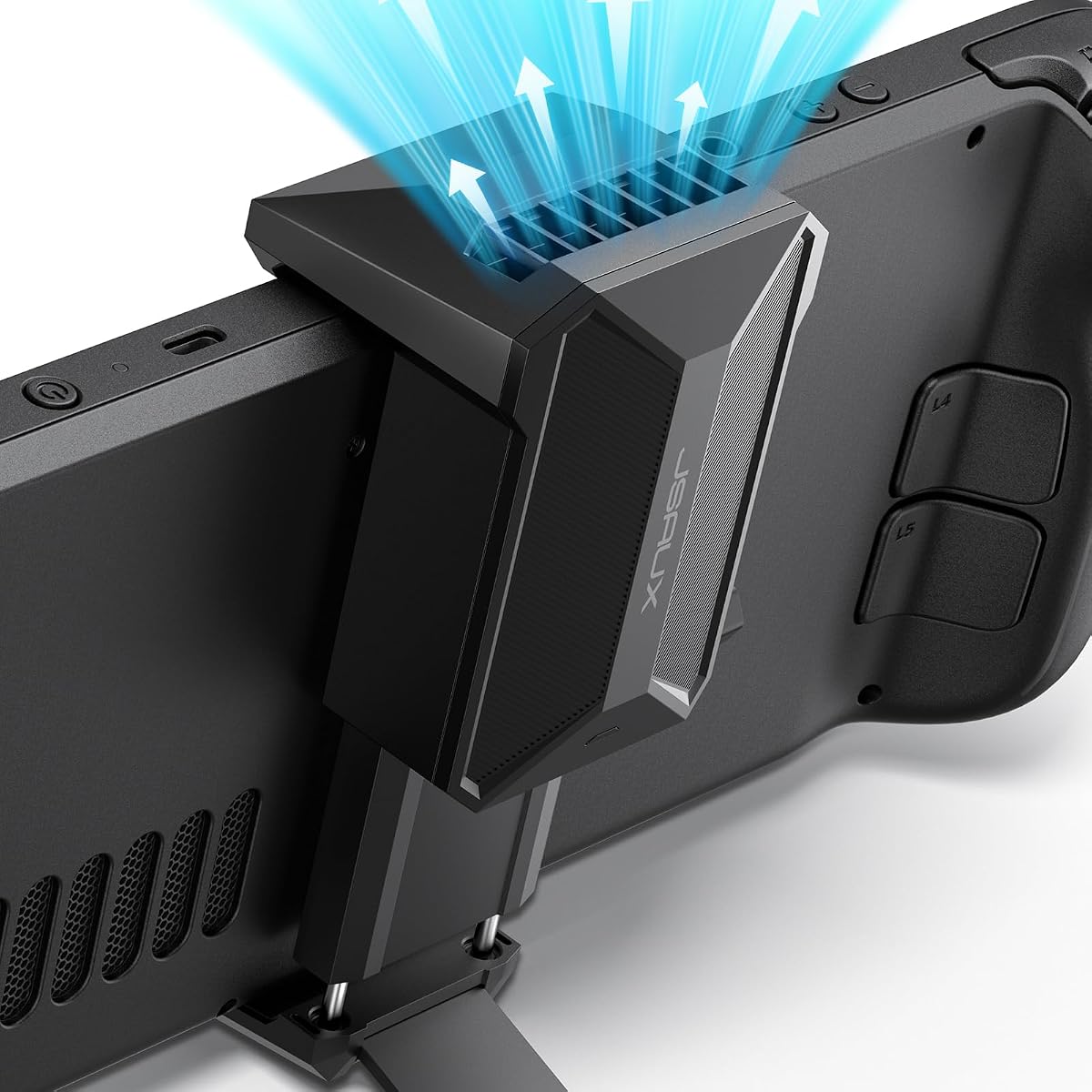
The JSAUX Cooling Fan for Steam Deck and Steam Deck OLED combines directed ventilation with an integrated stand, making it a strong all-around choice for players who want both cooling and hands-free play. It carries a 4.7 rating, and its most notable feature is the broad 0–100% speed adjustment, which provides far more control than a simple low-and-high switch.
We may earn a commission when you buy through this link, at no additional cost to you.
The fan is designed to direct air toward the Steam Deck’s vents to encourage internal circulation. Its stand supports the console during tabletop use, adding functional value without requiring a separate accessory. According to the supplied product information, the device can reduce console temperature by 8–15 degrees Celsius after four to eight minutes under its described operating conditions, although actual results vary with ambient temperature, game demand, and setup.
A knob provides straightforward speed adjustment, and the stated maximum operating duration is more than three hours at full speed or as much as five hours at the minimum setting. The principal trade-off is noise: the manufacturer notes that stronger wind speed will be louder. Users who want quiet late-night gaming should therefore start at a lower setting and increase airflow only when the console is working harder.
This is the best general recommendation for a Steam Deck owner who wants meaningful cooling, tabletop support, and broad control in one accessory. It is particularly attractive for Steam Deck OLED users because both versions are explicitly supported. Those who plan to use the cooler for the entire duration of a very long session should verify the available power source and the stated runtime at their preferred fan speed.
The combination of vent-directed airflow and a built-in stand is the product’s defining advantage. It makes the accessory useful for ordinary handheld play while also providing a practical way to position the Steam Deck for desktop-style sessions.
A continuous 0–100% adjustment is more versatile than three fixed levels because it lets the user balance cooling demand against noise. The stated runtime also varies with speed, making the control useful for extending sessions at a quieter setting.
We may earn a commission when you buy through this link, at no additional cost to you.
The Three-Speed Dual Fan is a compact airflow accessory with a 5.0 rating, the highest listed score in this guide. It uses two 45mm fans that can spin as fast as 6,000 RPM and are stated to deliver 10–16 CFM of airflow, making it a focused choice for users who prioritize cooling performance and portability over a built-in kickstand.
We may earn a commission when you buy through this link, at no additional cost to you.
Three selectable speed levels let the user match fan output to the handheld’s workload. Low and middle settings can be useful when the console is not under heavy pressure, while the highest level is intended for demanding games. The product description says this helps preserve steady performance by reducing the likelihood of frame drops and thermal throttling associated with overheating.
Power flexibility is another strength. Included USB-C and USB-A cables allow the fan to operate from the handheld’s USB-C port or from a compatible power bank or wall adapter. That makes the cooler easier to deploy at home or outdoors, although users who need simultaneous charging and cooling should verify whether their available port and cable arrangement permit both at once.
The broad compatibility list includes Steam Deck, Legion Go, MSI Claw, Nintendo Switch 1 and 2, ROG Ally, and ROG Ally X. It is therefore a sensible pick for a shared-gaming household or anyone who owns more than one supported handheld. Its main limitation is that it does not offer the kickstand or case-level protection found in some competing designs.
The two-fan configuration concentrates airflow while the slim housing remains easy to carry. That balance makes this model useful for travel and gaming marathons when every extra piece of equipment needs to earn its place.
Compatibility with several current handheld systems extends the practical value of the accessory. A buyer can use the same cooler across different consoles instead of limiting it to one specific device.
We may earn a commission when you buy through this link, at no additional cost to you.
The Dual Fan Cooling Stand is one of the more straightforward Steam Deck cooler stands, pairing two fans with an integrated tabletop kickstand. Its 3.8 rating is the lowest among the rated products, but the design remains appealing for buyers who prioritize a simple cooling-and-stand combination over temperature displays, semiconductor modules, or a more elaborate enclosure.
We may earn a commission when you buy through this link, at no additional cost to you.
The product is designed specifically for the Steam Deck and should be aligned with the rear vent area for best results. Two fans are intended to reduce heat buildup during extended play, though the supplied information appropriately notes that performance can vary with room temperature, game load, and placement. Correct positioning is therefore more important than simply attaching the accessory.
Speed adjustment allows the owner to choose a balance between cooling and quieter operation, and a blue LED indicates that the fan is running. That light is functional rather than decorative, as the product is not described as an RGB system. The integrated stand supports desktop and tabletop gaming, reducing the need for a separate holder.
This model requires a reliable USB-C power source and is not itself a charger or power bank. It is best suited to a buyer who wants a straightforward stand with dual-fan cooling and is comfortable arranging it at the rear vent. The lower rating and explicit dependence on placement mean careful setup and realistic expectations are essential.
The rear-vent alignment requirement is central to using this cooler correctly. A secure, unobstructed position allows the two fans to move air into the intake area without wasting airflow around the console.
The integrated stand makes the accessory more useful for tabletop play, watching, or cooling without a separate support. It is a simple feature, but one that directly addresses a common Steam Deck setup need.
We may earn a commission when you buy through this link, at no additional cost to you.
The JSAUX ModCase Cooler Set is the most complete accessory package in the guide, pairing a cooling fan with a protective modular case, front cover, metal bracket, and strap. Its 4.8 rating reflects a strong overall proposition for a buyer who wants cooling, protection, and tabletop support rather than a fan alone.
We may earn a commission when you buy through this link, at no additional cost to you.
At the center of the set is the JSAUX GP0200 cooling fan, designed to increase airflow and reduce temperatures during gaming. The case itself uses PC-ABS and silicone to help protect the Steam Deck from scratches and cracks. Its modular design allows the user to organize or remove components according to whether the console is being carried, played handheld, or placed on a supported surface.
The product is designed for the Valve Steam Deck released in 2022, with cutouts aligned to the console’s ports. That specificity gives it a more finished appearance than a universal add-on, but buyers should verify the intended Steam Deck model and their preferred case configuration before purchasing. The included metal bracket and strap round out the package for storage and handling.
This is the recommendation for a Steam Deck owner seeking the most polished, multifunctional setup. The cooling function is joined by meaningful physical protection and modular accessories, making the set a premium alternative to assembling a cooler, case, stand, and carrying solution separately. It is less appropriate for buyers who only want a lightweight fan and value minimal bulk above all else.
The case protects the console while the included fan increases airflow. Combining those roles can simplify setup and reduce the number of separate accessories needed for regular use.
The rear cover, front cover, metal bracket, and strap can be arranged around the user’s habits. A removable modular arrangement also makes it easier to change between protected carry and active gaming configurations.
We may earn a commission when you buy through this link, at no additional cost to you.
The Magnetic Dual Turbine Fan stands out for a compact rear-mounted design and a clear set of three performance levels. It has no listed customer rating, so the supplied specifications and design details are the best basis for judging it. The cooling hardware consists of two 45mm turbine fans capable of reaching 6,000 RPM and producing 10–16 CFM of airflow.
We may earn a commission when you buy through this link, at no additional cost to you.
Adhesive magnetic mounting pads attach the unit to the rear shell of a compatible handheld, allowing it to be installed or removed without a complicated bracket. The stated dimensions are 129×52×20mm and the listed weight is 45 grams, helping preserve portability. Users should nevertheless account for the added thickness when placing the console in a case or resting it in a constrained space.
The three modes are defined as 4,000 RPM for a gentle breeze, 5,000 RPM for strong airflow, and 6,000 RPM for turbo output. This gives a clear way to adjust the cooling-to-noise balance. The product description also states that, under a 25°C ambient environment after two hours of heavy gaming, operating temperature may decrease by 6–10°C.
Power can come through a 30cm USB-C cable or a 100cm braided USB-A cable, allowing direct handheld power or connection to a power bank or wall adapter. Compatibility includes Steam Deck, ROG Ally X, and Legion Go. It is a good option for mobile players who value magnetic removal and a slim profile, though the lack of a listed rating and stand function narrows its appeal compared with the more complete JSAUX set.
The magnetic mounting pads simplify attachment and removal compared with a fixed bracket. This makes it convenient to cool the console during demanding play and take the accessory off before compact storage.
Named speed levels make the adjustment process straightforward. The user can begin with quieter airflow and move toward turbo output when a demanding game creates greater heat.
We may earn a commission when you buy through this link, at no additional cost to you.
The BINBOKPLAY V1 is built around a high-speed turbine, an integrated metal bracket, and a rechargeable power system. Its 4.3 rating places it among the stronger-reviewed dedicated Steam Deck coolers, while its claimed 8–15°C temperature reduction provides a clear performance target when the device is correctly positioned and used without conflicting accessories.
We may earn a commission when you buy through this link, at no additional cost to you.
Unlike a simple fan that merely circulates room air across the shell, this model is presented as an exhaust-oriented cooling system intended to remove heat generated by the CPU. The accompanying metal bracket also functions as a docking support, allowing the Steam Deck to be used in desktop mode while the cooling system is active.
Its internal battery supports up to seven hours of continuous operation after a stated four-hour charging period. That makes the fan less dependent on a nearby outlet or power bank, particularly useful during travel. A rotating switch provides straightforward control of fan speed, and an LED indicator communicates the unit’s operating state.
Compatibility is the principal caveat. The product information explicitly says it cannot be used on a Steam Deck with protective covers or stickers, so users who rely on a case, skin, or other surface layer may need another model. Subject to those restrictions, it is a strong choice for mobile gaming and desktop-style use with a rechargeable, dock-integrated cooler.
The rechargeable design provides a stated seven hours of continuous use. That operating time gives the cooler more freedom at travel sessions where immediate access to an outlet or external power source may be limited.
The metal bracket does more than secure the accessory. Its docking function supports desktop-mode positioning, combining cooling and a stable setup for longer or more stationary sessions.
We may earn a commission when you buy through this link, at no additional cost to you.
The Semiconductor Heatsink Cooler uses semiconductor cooling technology together with a nine-blade fan, offering a different approach from conventional vent-directed accessories. It has a 4.1 rating and is designed to counter the rapid backplane heating that can contribute to crashes, frame jamming, and reduced performance during demanding Steam Deck play.
We may earn a commission when you buy through this link, at no additional cost to you.
Magnets located within the cooler allow it to attach to the back of the Steam Deck and be removed when cooling is unnecessary. The product also offers RGB lighting effects for a more decorative appearance, while the semiconductor radiator and nine-blade fan form its primary cooling system. The supplied information describes noise-reduction design intended to support a quieter gaming experience.
A built-in charging cable allows the console to receive power while the cooler operates, which is a valuable feature for extended sessions. The system should be installed before starting a game, as the manufacturer recommends allowing the cooler to operate without a direct hot-and-cold transition at the beginning of play. Proper setup helps the cooling approach work as intended.
This accessory is a good fit for a player who values a magnetic form, integrated charging, and a more technological visual design. It is less convenient for anyone who needs a simple universal fan, because the semiconductor module, built-in cable, and magnetic plate create a more specialized setup. Actual cooling performance will depend on correct installation and sustained use.
Combining a semiconductor module with a nine-blade fan creates a more involved cooling system than a standard air mover. The intention is to address heat generated around the console during sustained, demanding use.
Rear magnets make the unit easy to add or remove, while the built-in cable supports continued power. Together they reduce the need to rearrange separate cooling and charging accessories.
We may earn a commission when you buy through this link, at no additional cost to you.
The DEVASO Semiconductor Cooler differentiates itself with a live LED temperature display, seven-color lighting cycle, and a semiconductor cooling chip. Its 4.3 rating is solid, and the display is especially useful for buyers who want immediate feedback about the console’s thermal condition instead of relying entirely on occasional system notifications.
We may earn a commission when you buy through this link, at no additional cost to you.
A seven-blade fan works with the semiconductor module to cover a large cooling area. The supplied product information describes a nine-centimeter cooling module intended to protect the Steam Deck battery and APU while helping maintain smooth game performance. Two fan speed settings provide a simple choice between lower and higher output, while the noise-reduction design is stated to remain below 24dB.
The cooler attaches magnetically and is listed as compatible with Steam Deck OLED, PlayStation Portal, ASUS ROG Ally, and Nintendo Switch. The manufacturer advises installing it before play begins to avoid a hot-and-cold conflict. It also notes that the original charging cable should be used, and the listed input requirement is 9V and 3A.
The standout reason to choose this model is the combination of temperature feedback and quiet operation. It suits players who want the console to remain visibly cool while using a dark or minimalist setup, and the magnetic design makes it easy to share across compatible devices. Prospective buyers should treat the dramatic temperature figures in the listing as product-specific claims rather than guaranteed outcomes.
The live temperature display gives immediate visual information about the cooling system’s effect. It is especially helpful when testing different games, fan settings, room temperatures, or positioning choices.
A stated noise level below 24dB and a seven-color cycle combine practical and visual qualities. Magnetic mounting and support for several handhelds broaden compatibility beyond the standard Steam Deck.
We may earn a commission when you buy through this link, at no additional cost to you.
The MoKo Dual Fan Stand combines two cooling fans, three speed settings, a built-in kickstand, and a blue LED design. It carries a 4.1 rating and is compatible with the Steam Deck and Nintendo Switch models, including the Switch OLED. The console itself is not included, so the listing should be understood as a cooling and support accessory.
We may earn a commission when you buy through this link, at no additional cost to you.
Low, medium, and high fan settings allow the user to vary output according to game intensity and noise tolerance. The two quiet fans are intended to disperse heat around the console’s central area during long gaming sessions. The kickstand makes it easy to move between handheld and desktop-style play while keeping the console supported.
A 90-degree one-to-two Type-C expansion adapter is an important part of the setup. It allows one connection to be used for cooling and the other for charging, enabling both functions during play. The package includes the cooling fan with kickstand, the dual-port adapter, and a power cable, so users should confirm that their console has the required port configuration before installation.
At 160 grams, the accessory is light enough to remain portable while offering a more complete desktop setup than a fan alone. It is a strong choice for owners of multiple supported handhelds, particularly those who regularly switch between handheld and tabletop play. The reliance on the included adapter means correct setup and port awareness are essential.
The kickstand creates a ready-to-use tabletop arrangement without requiring another support. That makes the accessory practical for long sessions or any setup where hands-free positioning is preferred.
The right-angle one-to-two Type-C adapter reserves separate paths for cooling and charging. This is the key convenience for sustained play, provided the user has the required port and the supplied components are used correctly.
We may earn a commission when you buy through this link, at no additional cost to you.
The Mviioe Portable Cooler is a compact cooling accessory listed for Steam Deck OLED users, with a 4.2 rating. Its product title emphasizes compatibility with Steam Deck cases, which is an important practical consideration because many rear-mounted accessories can conflict with a fitted protective shell.
We may earn a commission when you buy through this link, at no additional cost to you.
The available product data is limited, so a responsible comparison should focus on the confirmed elements rather than infer unsupported specifications. It is identified as a portable Steam Deck cooling fan, and the title specifically identifies Steam Deck OLED support and case compatibility. No supplied details confirm its fan count, speed controls, noise level, power connection, mounting mechanism, or exact thermal performance.
That limited information makes the Mviioe a more speculative recommendation than the other products. A buyer should examine the current listing for those missing details, particularly how the fan is positioned relative to the intake, how it is powered, whether it can operate while charging, and whether the included arrangement is compatible with the user’s specific case.
The case-related design may nevertheless make this a useful pick for owners who prioritize a small accessory that can accompany a protected Steam Deck OLED. It is best suited to buyers willing to verify the live product page and installation requirements, rather than those who need comprehensive specifications before buying. Its 4.2 rating provides some customer feedback, but the missing technical information limits deeper comparison.
Coolers attached near the rear of a handheld can conflict with a thick protective case. The product title specifically emphasizes case support, making that compatibility the most important point to confirm before buying.
The product is presented as portable and intended for efficient Steam Deck OLED use, but the supplied information does not include detailed controls or power specifications. Buyers should check the current listing to confirm those elements.
We may earn a commission when you buy through this link, at no additional cost to you.
The right Steam Deck cooling fan depends on how you play, where you use the handheld, which model you own, and whether cooling must share a charging port with the console.
Airflow only works effectively when it reaches the Steam Deck’s intake area and supports the path through the console. Some products use a conventional fan aimed at the rear vent, while others describe a turbine or exhaust-oriented system. A dedicated Steam Deck design should make the intended mounting position clear, and buyers should check whether the accessory requires alignment with the rear vents for its best results.
Choose a cooler that directs air into the intake without blocking openings. Confirm that the supplied setup works with the Steam Deck model and any case you use.
Cooling accessories in this guide range from dual-fan airflow units to semiconductor modules paired with fans. Conventional fan performance is described through fan size, rotational speed, and airflow, while semiconductor products add a cooling plate intended to transfer heat away from the device. The supplied temperature-reduction figures are not directly interchangeable because room temperature, game load, positioning, and testing duration can affect outcomes.
Look for credible performance specifications such as CFM, RPM, fan size, and cooling area. Treat dramatic temperature claims as design targets rather than guarantees for every session.
Power management can determine whether a cooler works during the entire session. Options include direct USB-C power, USB-A power from a wall adapter or power bank, a rechargeable internal battery, and a one-to-two Type-C adapter. A cooler that needs the Steam Deck’s USB-C port may prevent simultaneous charging unless an appropriate adapter is included.
Decide whether portability, uninterrupted power, or charging while cooling matters most. Verify the included cables, adapter requirements, battery runtime, and any original-cable recommendations.
The most convenient cooling system is one that can be positioned without conflicting with the Steam Deck’s body or a protective case. Kickstand-style accessories support tabletop play, magnetic units attach to the rear shell, and bracket systems may provide a more integrated dock arrangement. Case thickness, rear contours, and surface materials can all affect the fit.
Confirm the exact Steam Deck model and check whether your case permits the advertised placement. Account for added thickness when choosing a storage pouch or travel setup.
Cooling output and noise are closely connected. Products with multiple speeds let the user select stronger airflow for demanding games and a quieter level for lighter workloads. Some provide three named levels, while the JSAUX stand cooler offers continuous adjustment from 0–100%. A stated noise level can help when the console will be used close to other people.
Choose a control scheme that matches your tolerance for sound. Test conservatively in a quiet room and increase fan output only when additional cooling is worthwhile.
A portable cooler should add useful cooling without creating an awkward or fragile setup. The featured products range from slim magnetic models measuring 129×52×20mm and weighing 45 grams to a modular protective case with a larger component set. Weight, dimensions, cable length, and the presence of a kickstand all affect whether an accessory is convenient for travel.
For commuting or gaming away from home, favor a compact unit, manageable cables, and secure attachment. For primarily stationary use, a heavier stand or complete modular set may be more valuable.
Not every accessory has the same level of device support. Several products explicitly support both the standard Steam Deck and Steam Deck OLED, while others are tailored to one version. Broad-compatibility products may also work with the ROG Ally, ROG Ally X, Legion Go, MSI Claw, Nintendo Switch, and PlayStation Portal, but that support does not necessarily imply identical performance.
Check the exact device list and model wording. Treat OLED support as a confirmed feature only when the manufacturer or supplied listing states it directly.
A built-in stand can make tabletop sessions more comfortable by supporting the console and freeing the player’s hands. Dock-like brackets add value when the user wants the Steam Deck positioned like a small display console, while a case can protect the device during travel. These features do not necessarily improve cooling by themselves, but they determine how comfortably the cooling system can be used.
Prioritize a stand or dock if desktop play is common. Choose a pure fan when handheld portability and minimal bulk matter more than stationary support.
Begin by reading the included instructions and identifying the product’s power, mounting, and airflow requirements. Clean the Steam Deck’s intake and exhaust openings before attaching a cooler. If the accessory is magnetic, place each pad on a clean, dry, flat area of the rear shell; if it uses a stand or bracket, align the fan with the designated vent area and avoid obstructing any opening.
Connect the specified USB-C or USB-A cable, or charge the unit first if it has an internal battery. Start the fan at its lowest setting and confirm that airflow reaches the intake without causing the cable to pull against the console. Semiconductor models should generally be installed before play begins, and products that cannot be used with covers or stickers should be checked against the current console configuration.
Raise the fan speed when a demanding game produces greater heat, then lower it for quieter play. Keep cables clear of the kickstand, do not block vents, and avoid using the cooler in a wet environment. During storage, disconnect external power, remove magnetic accessories if they could mark other surfaces, and pack the unit in a way that does not bend its cables or place pressure on the fan.
A properly positioned cooling fan can improve airflow around the Steam Deck and help reduce heat buildup during demanding games. The amount of cooling depends on the fan design, room temperature, game load, and how closely the unit directs air into the intake. Claimed reductions such as 6–10°C or 8–15°C are product-specific and should not be treated as guaranteed results.
It depends on the cooler’s power arrangement and the available ports. A USB-C cooler connected directly to the handheld may occupy the charging port, while one-to-two Type-C adapters can preserve separate paths for cooling and charging. Rechargeable models can also provide cooling without drawing power from the console, subject to their battery runtime.
Some magnetic coolers and kickstand designs fit over or around a case, while others require a bare console. The BINBOKPLAY V1 is explicitly unsuitable for use with protective covers or stickers, and other products make case compatibility part of their design. Check the model, case thickness, and mounting method before ordering to avoid an obstructed setup.
Many fans support both the original Steam Deck and Steam Deck OLED because their cooling and mounting areas remain similar. However, not every accessory is compatible with both versions, and the JSAUX ModCase is specifically described as designed for the Valve Steam Deck released in 2022. Confirm the exact model wording in the product listing before purchasing.
More fans can create stronger or more concentrated airflow, but overall performance still depends on placement, power, vent alignment, and the fan control design. A well-aligned single-fan cooler may be easier to position, while a dual-fan model can be valuable when it directs enough air into the intake and offers suitable speed controls.
Start with a moderate or medium setting and increase it if heat or fan noise indicates that greater airflow is needed. Running the maximum continuously may create more noise and, according to some product guidance, shorten the usable operating time at full output. Lower settings are generally better suited to lighter games or shared spaces.
Several models list compatibility with the ROG Ally, ROG Ally X, Legion Go, MSI Claw, Nintendo Switch, PlayStation Portal, or other handhelds. Compatibility does not mean every model receives identical cooling performance, because body shape, intake placement, and power ports vary. Always verify both the device model and the physical attachment requirements.
Disconnect power before cleaning and use a soft, dry cloth to remove dust from the housing and accessible fan areas. Avoid pushing debris into the fan with compressed air, and prevent moisture from entering the electronics. Keep the Steam Deck’s vents clear and make sure the cable or mounting pads do not block airflow.
The JSAUX Stand Cooler is the strongest overall choice because it combines directed airflow, fine speed adjustment, broad Steam Deck compatibility, and a useful integrated stand. The Three-Speed Dual Fan offers excellent value with its 5.0 rating, dual 45mm fans, flexible power options, and support for several handhelds, while the JSAUX ModCase Cooler Set is the premium option for buyers who want cooling, protection, and a complete modular bundle.
Prioritize the details that match your setup rather than choosing only on the largest claimed temperature reduction. Vent alignment, power access, charging needs, case compatibility, and noise tolerance determine whether a cooler will be useful in daily play. A simple fan with reliable placement may suit more people than an elaborate semiconductor system, while a rechargeable or multi-port design becomes valuable during long or mobile sessions.
Finally, check the current listing, included components, supported model, and availability before buying. Product features, ratings, and prices can change over time, and a cooler’s result depends on the game, room conditions, and setup. A short compatibility check now can prevent blocked vents, unavailable power, or an unsuitable case fit later.