
TP-Link Nano AC600
4.5Editor score
Compact dual-band AC600 design
Up to 433Mbps on 5GHz
Windows and limited Mac support
This 5GHz WiFi Dongle guide compares 10 dual-band adapters for speed, range, USB design, features, compatibility, and everyday use.
A 5GHz WiFi dongle can give a compatible desktop or laptop a faster, more reliable wireless connection without requiring a full internal network card replacement. The best choice depends on your router, USB ports, operating system, desk space, and whether you need a compact dongle or an adjustable high-gain antenna.
We compared all 10 adapters using their published specifications, supported wireless standards, stated band speeds, antenna designs, USB connections, operating-system compatibility, and practical features such as AP mode. The list covers AC600, AC1300, AX900, and AX1800 options, making it useful for both budget upgrades and newer WiFi 6 networks.
Each review explains where the adapter stands out, where its specifications invite caution, and which type of user it suits best. Ratings and product details reflect the supplied listings, while real-world results can vary with router capability, signal conditions, distance, interference, and the computer's internal wireless hardware. Prices and promotions change frequently.
4.5Editor score

4.2Editor score

4.1Editor score
The comparison below organizes all 10 dongles by wireless generation, maximum stated 5GHz and 2.4GHz speeds, antenna or form factor, and operating-system support, making it easier to match an adapter to your computer and router.


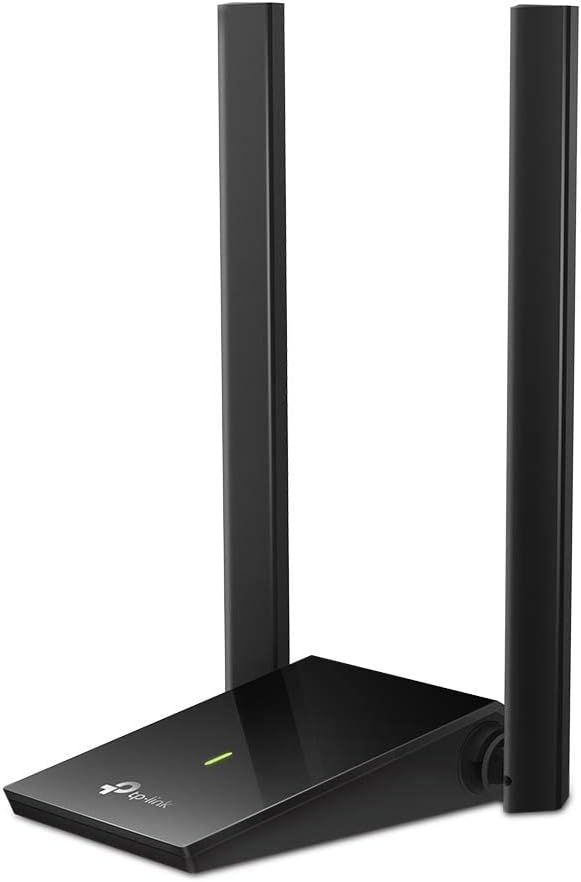


The TP-Link AC600 USB WiFi Adapter for Desktop PC is a straightforward dual-band upgrade with a 4.4 rating. Its standout feature is the adjustable, multi-directional high-gain antenna, which adds useful positioning flexibility without turning the adapter into a large desktop unit. It is a strong general-purpose choice for bringing 5GHz connectivity to an older PC.
We may earn a commission when you buy through this link, at no additional cost to you.
The adapter supports speeds up to 433Mbps on the 5GHz band and 200Mbps on 2.4GHz, allowing users to select the faster band for nearby traffic or the longer-reaching band for coverage. Its 802.11ac capability offers a meaningful improvement over wireless-N equipment, while the rotatable antenna can be aimed toward a router or access point.
The main limitation is its Windows-only support, and its AC600 ceiling trails faster dual-band models. Actual throughput will also depend on the computer, router, USB connection, and nearby interference. Even so, the T2U Plus offers a practical mix of compactness, antenna adjustability, and dual-band capability for basic browsing, streaming, and online communication.
Choose this adapter if you need an affordable 5GHz upgrade, use Windows, and value the ability to reposition the antenna. It is less suitable for demanding high-throughput applications or systems requiring macOS support. For most users seeking a balanced first upgrade, it remains an easy recommendation.
The multi-directional antenna can be rotated toward the router, which is useful when a computer sits behind furniture, near a metal object, or on the edge of a room. That physical positioning control can improve the chance of a stable connection without requiring a larger external antenna.
The 2.4GHz band offers the longer-reaching option, while the 5GHz band provides more headroom for nearby high-demand traffic. Users can let the system choose a band or connect directly when they need to prioritize speed over reach.
We may earn a commission when you buy through this link, at no additional cost to you.
The TP-Link Nano AC600 combines a 4.5 rating with a miniature design that can remain plugged into a computer without getting in the way. It provides dual-band 5GHz and 2.4GHz connectivity, making it a convenient option for users who want a less noticeable upgrade than a full-size adapter with an external antenna.
We may earn a commission when you buy through this link, at no additional cost to you.
Its stated maximum 5GHz speed is 433Mbps, while the 2.4GHz side supports up to 200Mbps. That is sufficient for everyday web use, video calls, and moderate streaming, provided the router and local conditions are favorable. The tiny footprint is particularly valuable on laptops and tightly arranged desktops with limited USB space.
Compatibility extends across multiple Windows releases and Mac OS X 10.9 through 10.14, although current driver installation is required according to the listing. The modest AC600 speed also means it will not exploit the full potential of a WiFi 6 router. Its strongest advantage remains portability rather than maximum performance.
This is a strong pick for a compact general-purpose dongle, especially if you want a device that can stay installed and does not need frequent antenna adjustment. Choose a faster AC1300 or AX model for busy networks, large file transfers, or demanding online gaming.
The nano enclosure keeps the adapter visually and physically unobtrusive, making it convenient for borrowed laptops, office computers, and minimalist desk setups. It is also easy to carry without protecting a large antenna assembly.
Despite its small size, the adapter supports both 2.4GHz and 5GHz bands. This lets users benefit from the faster 5GHz option in suitable conditions while retaining access to the more forgiving 2.4GHz network for range or compatibility.
We may earn a commission when you buy through this link, at no additional cost to you.
The TP-Link AC1300 Archer T3U pairs a 4.4 rating with a higher theoretical performance tier than the AC600 adapters. It supports up to 867Mbps on 5GHz and 400Mbps on 2.4GHz, making it a more convincing fit for streaming, online gaming, downloads, and busy wireless environments.
We may earn a commission when you buy through this link, at no additional cost to you.
MU-MIMO and beamforming are the notable technical additions. MU-MIMO allows the adapter to work more efficiently with multiple transmissions, while beamforming directs a stronger signal toward the connected client. A USB 3.0 interface also helps ensure that the connection between the adapter and computer is not the limiting factor.
The trade-off is that the T3U lacks the T2U Plus's adjustable high-gain antenna, so it may be less adaptable to awkward placements or weak signals. Its maximum figures are theoretical and require a compatible router, adequate signal quality, and a USB 3.0 port. The listed operating-system support is broad, including Windows and older Mac OS X versions.
Choose the Archer T3U when you want more speed than an AC600 adapter but prefer a compact dongle over a desktop model with a large antenna. It is a balanced recommendation for users with a reasonably placed router and a modern computer.
MU-MIMO can improve efficiency when several compatible wireless clients are active. It is particularly relevant in a home or office where streaming devices, phones, and computers are sharing the same router.
Using USB 3.0 reduces the risk that the computer's USB interface will bottleneck a high-speed wireless connection. It is a meaningful advantage over adapters limited to USB 2.0, particularly for transfers and heavier network traffic.
We may earn a commission when you buy through this link, at no additional cost to you.
The Nineplus AC1300 is built for users who want more control over signal reception. It has a 4.3 rating, dual-band AC1300 performance, and two external 5dBi high-gain antennas that can be adjusted to suit the computer's location and the router's position.
We may earn a commission when you buy through this link, at no additional cost to you.
The adapter supports up to 867Mbps on 5GHz and 400Mbps on 2.4GHz. Its USB 3.0 connection offers faster data transfer and is backward compatible with USB 2.0, which adds flexibility across different desktop and laptop systems. The antenna pair may help with walls, floors, and longer room-to-router distances.
Its larger external hardware is less attractive for frequent travel, and the listing explicitly excludes Mac, Chromebook, and Linux support. Driver installation is automatic on many Windows 11 and 10 systems but requires manual attention on older systems such as Windows 7. The 5dBi figures also do not guarantee a faster connection in every environment.
Buy this model when signal positioning is a priority and you want AC1300 speed without moving the computer next to the router. It is less suitable for a compact workstation or a non-Windows setup. For a stationary desktop in a challenging wireless location, the dual antennas are the main attraction.
Separate high-gain antennas can be oriented independently, which is useful when the router is off to one side or partially obstructed. This gives a stationary computer more options than a fixed internal antenna.
With a stated 867Mbps 5GHz maximum, the adapter is well suited to high-bandwidth wireless routers. Users can select 5GHz for nearby demanding traffic and 2.4GHz for broader range or crowded-network resilience.
We may earn a commission when you buy through this link, at no additional cost to you.
The UGREEN AX900 USB WiFi 6 Adapter is a modern take on the dual-band dongle, with a 4.2 rating and support for 5GHz speeds up to 600Mbps. It is especially attractive to Windows 10 and 11 users who want a newer wireless standard without navigating a disc-based installation.
We may earn a commission when you buy through this link, at no additional cost to you.
Its AX900 designation combines a stated 600Mbps 5GHz rate with up to 287Mbps on 2.4GHz. The listing emphasizes that a WiFi 6 router is needed to achieve the stated AX900 performance. Built-in drivers support CD-free installation on Windows systems using X86 or X64 architecture, simplifying setup considerably.
Compatibility is the primary limitation: the adapter does not support macOS, Linux, or older Windows versions. The listing also recommends keeping the adapter within 30 feet of the router and supports both receiving and transmitting functions, allowing a networked computer to share connectivity with other devices.
This is an attractive choice for a recent Windows desktop that needs inexpensive WiFi 6 capability, particularly if its router is also WiFi 6. If you need broader operating-system support or maximum 5GHz speed, a different adapter may be a better fit.
The built-in driver removes the need to locate and install software from a CD. This is helpful for new Windows computers, particularly those without an optical drive or for users who want a straightforward plug-in setup.
Beyond connecting a PC to a wireless network, the receive-and-transmit function can let that computer share its connection with other devices. This expands the adapter's utility beyond a simple client connection.
We may earn a commission when you buy through this link, at no additional cost to you.
The Tenda AX900 U11Pro combines a 4.3 rating with an external 6dBi high-gain antenna and WiFi 6 dual-band capability. Its 5GHz maximum of 600Mbps positions it between basic AC600 adapters and higher-tier AC1300 or AX1800 models, while the antenna provides useful adjustment for weak-signal environments.
We may earn a commission when you buy through this link, at no additional cost to you.
The antenna supports multidimensional rotation and is intended to improve reception in places with significant interference. Preloaded drivers simplify setup on Windows 11, 10, and 7. AP mode can turn the PC into a WiFi hotspot for up to eight connected devices, although the listing specifies that this mode works only on the 5GHz band.
WiFi 6 performance depends on a compatible router, and the adapter is restricted to the listed Windows versions. The external antenna also makes it less convenient for frequent travel. Its speed claims are most relevant when connected to a WiFi 6 network rather than an older dual-band router.
Choose the U11Pro for a Windows user who values both modern dual-band performance and an easy-to-position antenna. It is a sensible middle option for desktops located away from the router, provided you value hotspot functionality and 5GHz-focused use.
The external omnidirectional antenna can be rotated in multiple dimensions, helping users optimize it toward the router. This is particularly valuable in offices or rooms where a fixed internal antenna would be less adaptable.
AP mode can turn a connected PC into a hotspot for as many as eight devices. Because it operates only on 5GHz, it is better suited to nearby compatible clients than a conventional 2.4GHz mobile hotspot.
We may earn a commission when you buy through this link, at no additional cost to you.
The BrosTrend AX1800 is the most feature-oriented premium entry in this guide. It has a 4.1 rating and a stated 5GHz maximum of 1201Mbps, making it the highest theoretical 5GHz figure among the listed products. Its dual external antennas and included USB 3.0 extension cable make it especially suitable for a stationary desktop.
We may earn a commission when you buy through this link, at no additional cost to you.
Two 5dBi high-gain antennas are designed to improve reception through walls and floors. Beamforming, OFDMA, and MU-MIMO support are central to its WiFi 6 feature set. The three-and-a-half-foot extension cable allows the main adapter body to be placed near the router's signal while the USB connector remains accessible at the computer.
The product supports only Windows 11 and 10, and Linux is explicitly unsupported. Its desktop-style design is less convenient for travel, while the headline speed requires compatible WiFi 6 infrastructure and favorable conditions. These are meaningful constraints, but they are understandable for a premium model aimed at performance and range.
This is the pick for a Windows desktop with a WiFi 6 router, USB 3.0 connectivity, and a placement challenge that benefits from external antennas. Choose it when the higher potential bandwidth justifies the larger setup and stricter operating-system requirement.
The combination of dual 5dBi antennas and an extension cable provides exceptional placement flexibility. You can position the radio body closer to a clear path to the router instead of constraining it to the computer's USB port.
A stated 1201Mbps 5GHz maximum offers considerable headroom for modern routers. OFDMA and MU-MIMO also improve efficiency in networks with several active clients, although the final experience depends on the router and internet service.
We may earn a commission when you buy through this link, at no additional cost to you.
The TP-Link AC1300 USB WiFi Adapter for Desktop PC has a 4.4 rating and a clear focus on reception and placement. Its two adjustable high-gain antennas can be aimed independently, giving it an advantage over compact fixed-antenna dongles when the router is not directly beside the computer.
We may earn a commission when you buy through this link, at no additional cost to you.
The adapter supports up to 867Mbps on 5GHz and 400Mbps on 2.4GHz, with a SuperSpeed USB 3.0 port to reduce interface bottlenecks. The flexible desktop design allows the antennas and radio body to be positioned for better signal quality, which can be more useful in practice than a small number of additional advertised megabits per second.
Compatibility includes Windows 11 and 10 plus macOS X 10.9 through 10.14, but it does not cover current macOS releases according to the supplied listing. The size and exposed antennas also make it less appropriate for frequent travel. Its AC1300 specification also trails the newest AX1800 options.
Buy this model for a Windows or listed older macOS desktop that needs strong 5GHz performance and flexible antenna positioning. It is particularly sensible for a fixed workstation near a weak-signal corner rather than a laptop used on the move.
Each antenna can be oriented toward the router, which may help a desktop behind a monitor, cabinet, or partition. The approach is more adaptable than relying on a fixed internal antenna in a difficult room.
The 867Mbps 5GHz maximum and USB 3.0 interface provide a sound balance for a permanent computer. It handles modern dual-band routers well without requiring the larger footprint and cost tier of the AX1800 models.
We may earn a commission when you buy through this link, at no additional cost to you.
The UGREEN AX1800 WiFi Adapter for Desktop PC is a feature-rich Windows option with a 4.1 rating. It reaches a stated 1201Mbps on 5GHz and 574Mbps on 2.4GHz, combining high dual-band ceilings with WiFi 6 efficiency features such as MU-MIMO and OFDMA.
We may earn a commission when you buy through this link, at no additional cost to you.
Its built-in driver supports quick installation on Windows 10 and 11 systems using X86 or X64 architecture. USB 3.0 provides a faster data path, while AP mode lets a connected computer share its internet connection as a mobile hotspot. WPA3-SAE encryption support is a welcome addition for compatible wireless networks.
The compatibility limits are significant: there is no support for macOS, Linux, or older Windows releases. The product's headline speeds also require a suitable WiFi 6 router and good conditions. Rear ventilation holes are designed to dissipate heat during long sessions, which is sensible for a device expected to remain plugged in.
Choose this adapter for a recent Windows desktop that values a mix of speed, security, and sharing functions. It is especially attractive if you want AX1800 capability without a pair of large external antennas.
MU-MIMO and OFDMA help the adapter manage simultaneous wireless activity more efficiently. These features can be particularly helpful in crowded homes or offices, though their benefit depends on the router and network configuration.
WPA3-SAE support adds a modern encryption option, while AP mode extends the adapter's role beyond connecting the PC. It can serve nearby compatible devices when a temporary hotspot is needed.
We may earn a commission when you buy through this link, at no additional cost to you.
The BrosTrend AX900 Mini is designed for users who want modern WiFi 6 in a small package. It has a 4.2 rating, supports up to 600Mbps on 5GHz and 286Mbps on 2.4GHz, and measures 1.4 by 0.7 by 0.3 inches for a tidy desktop or laptop setup.
We may earn a commission when you buy through this link, at no additional cost to you.
OFDMA, MU-MIMO, and 1024-QAM provide the core WiFi 6 improvements, while a preloaded driver simplifies installation on Windows 11, 10, and 7. The listing recommends a WiFi 6 router for optimal performance and describes straightforward plug-and-install operation.
Its USB 2.0 connection is the critical compromise. Although the wireless specification is modern, the older USB interface has less data headroom than USB 3.0, so it may not realize the full benefit of a very fast network under demanding transfer conditions. Mac and Linux are also unsupported.
Choose this dongle for a compact, portable upgrade on a supported Windows system where USB 2.0 is the available port. For a permanent high-throughput desktop, an AX1800 model with USB 3.0 would be a more logical match.
The mini body preserves the key benefits of a larger adapter without requiring external antennas. It is easy to carry, leaves USB ports visually tidy, and can remain connected without taking up much space.
USB 2.0 is sufficient for many everyday tasks, but it offers less interface bandwidth than USB 3.0. Check whether your computer has a faster USB port available before expecting the adapter's maximum wireless figures to translate into heavy-transfer performance.
We may earn a commission when you buy through this link, at no additional cost to you.
A useful 5GHz WiFi dongle should match your router generation, operating system, USB hardware, and physical environment. The most important considerations are 5GHz speed, antenna flexibility, installation convenience, and whether the advertised standard is actually supported by your network.
WiFi 5, commonly represented by AC-rated adapters such as AC600 and AC1300, remains suitable for many basic networks. WiFi 6 adapters use AX ratings and offer newer efficiency technologies, but they need a WiFi 6 router to unlock their intended benefits. Do not select an AX900 or AX1800 dongle solely for its label if your router only offers older dual-band or single-band WiFi.
A combined rating such as AC1300 or AX1800 represents a class of theoretical wireless capability, not the speed you will consistently receive. The more useful figure is the stated maximum on the 5GHz band, but internet speed, signal quality, router processing, and the computer all impose real limits. For basic browsing, even a 433Mbps 5GHz ceiling may be sufficient.
A compact internal antenna works well when the computer is near the router and has an unobstructed path. Adjustable or external high-gain antennas are more useful behind monitors, inside offices, or in homes with multiple walls and floors. Their gain specification does not create speed by itself, but better positioning can improve signal quality and stability.
USB 3.0 and USB 3.2 Gen 1 provide more interface headroom than USB 2.0, making them preferable for high-speed wireless classes and large transfers. USB 2.0 can still support many routine tasks, but it may limit the practical benefit of a very fast adapter. Confirm the physical USB port on the computer, not merely the adapter's stated protocol.
Windows support is broad among the listed products, but macOS and Linux support is inconsistent. Some models list only older Mac OS X versions, while several newer AX adapters exclude macOS and Linux entirely. Also check the processor architecture requirement for built-in-driver products. Confirm both the operating-system version and the correct driver before ordering.
Nano and mini adapters suit laptops, travel, and clean desk setups because they can stay plugged in with little visual impact. Desktop-style adapters with external antennas take more space but offer better positioning and, in many cases, stronger reception. Consider whether the adapter will travel with the computer or remain in one fixed location near a monitor.
AP mode can turn a connected PC into a hotspot, which is useful when sharing an Ethernet connection or creating a temporary local network. Built-in or preloaded drivers make installation easier, especially on a new Windows system. Security support also matters, so check whether the adapter supports the encryption type used by your router, such as WPA2 or WPA3.
Begin by confirming the adapter's operating-system support and locating the current manufacturer driver if one is not built in. Connect the dongle to a direct USB port on the computer, install the required driver, and restart the system if the setup instructions recommend it. For desktop-style models, connect the extension cable or position the antennas before selecting a network.
Open the computer's WiFi settings, choose the desired 2.4GHz or 5GHz network, and enter the correct password. Use 5GHz when the computer is near the router and you want more bandwidth for streaming, gaming, video calls, or transfers. Use 2.4GHz when distance, walls, or network congestion make the faster band less reliable. If the network offers both bands, avoid connecting to the same router twice simultaneously.
For best results, place the adapter or its antennas with a clear line toward the router, keep the USB dongle away from metal objects and enclosed cabinets, and avoid leaving a large external antenna compressed against a monitor. Do not repeatedly unplug the adapter while transferring large files. Update drivers when the manufacturer provides a stable release, and follow the manufacturer's instructions for supported security modes and hotspot functions.
It can be, but the adapter's generation and your computer's original hardware both matter. A newer WiFi 6 dongle may outperform an older or weak internal card, while an AC600 dongle may offer little advantage over a modern built-in WiFi 5 or WiFi 6 radio. The router, antenna position, interference, and USB connection also influence the result.
A compatible 5GHz dongle can usually connect to a router that broadcasts 5GHz WiFi, but its best features depend on the router's standard. WiFi 6 adapters need a WiFi 6 router to deliver their intended maximum performance. A dual-band adapter also offers more flexibility because it can connect on either 2.4GHz or 5GHz.
It can, especially if the computer's original antenna is obstructed or located in an inconvenient position. An external high-gain adapter with adjustable antennas gives you more freedom to find a stronger signal. However, antenna gain does not remove interference, and a distant or poorly configured router can still limit performance.
It is helpful when the adapter supports high wireless speed classes because USB 3.0 provides more data bandwidth than USB 2.0. The difference may not be noticeable during ordinary web browsing, but it becomes more relevant during large transfers or sustained high-throughput activity. Use the fastest compatible USB port available.
Some models can, including the Tenda U11Pro and UGREEN AX1800 listed here. The adapter must first connect to an existing network, and then AP mode can share that connection with nearby devices. Limits may apply to the number of clients or available bands, so check the product's specific instructions.
Advertised speed is the maximum supported by the wireless class under ideal conditions. Your router may use a lower standard, the 5GHz signal may be weak, walls may obstruct it, or neighboring networks may create interference. USB port speed, driver quality, the internet connection, and router processing can also limit the result.
Disabling it can prevent the computer from switching between two connections unexpectedly, but it is not always necessary. You can leave it enabled and manually choose the USB adapter's network. If the system repeatedly selects the weaker adapter, temporarily disabling the internal radio makes troubleshooting and network selection more predictable.
The TP-Link Nano AC600 and BrosTrend AX900 Mini are the most compact options in this list. The Nano favors simplicity and broad legacy support, while the Mini offers a modern WiFi 6 standard with a small footprint. Check operating-system support carefully and keep a wired or built-in connection as a backup when traveling.
The TP-Link Nano AC600 is a compact, affordable choice for basic 5GHz connectivity, while the Archer T2U Plus adds a useful adjustable antenna. The UGREEN AX900 is a strong modern pick for Windows 10 and 11 systems that want WiFi 6 without dealing with disc-based installation. For premium performance and placement flexibility, the BrosTrend AX1800 leads with dual 5dBi antennas and a USB 3.0 extension cable.
Prioritize the adapter that matches your router and computer rather than selecting solely by the largest speed number. A new AX adapter will not reach AX maximums on an older router, an external antenna is unnecessary when the signal path is clear, and a USB 2.0 connection may not exploit the full potential of a high-speed wireless class. Verify operating-system and driver support before ordering.
Product ratings, promotions, and prices can change, so review the current listing and recent customer feedback at the time of purchase. Compare the adapter's 5GHz capability, physical design, security features, and compatibility with your existing equipment. That focused approach is more likely to produce a satisfying long-term upgrade than chasing a headline number alone.