
GameSir Tarantula 8K PC
4.7Editor score
8000Hz wired polling rate
Dual-mode trigger stops
Lockable rear-button macros
TMR anti-drift thumbsticks
Discover the 10 best controller with back paddles for PC gaming, comparing connectivity, remapping, trigger stops, drift resistance, comfort, and customization.
A PC controller with back paddles can turn familiar inputs into a more competitive control scheme by moving actions to buttons your fingers can reach while both thumbs remain on the sticks. The strongest options combine fast inputs, dependable sticks, useful remapping, comfortable grips, and connectivity options suited to competitive or mixed-platform play.
This guide compares ten controllers using the specifications supplied for each product, including rear-button layouts, trigger behavior, stick technology, connection methods, customization tools, platform support, and feedback features. It covers premium performance models, wireless and wired designs, and more affordable options for players who want useful extras without every advanced feature.
The ranking shows what each controller is best positioned to offer: the Xbox Elite Series 2 is a deeply configurable all-around option, the SCUF models cater to PC-focused players, the HyperX Clutch Gladiate delivers essential performance features, and the GameSir Tarantula 8K emphasizes polling speed. Availability and pricing can change, so compare current listings before purchasing.
4.7Editor score
4.3Editor score

4.3Editor score
The comparison below highlights the major differences among all ten controllers, including their rear-button counts, connectivity, stick technology, trigger options, and platform focus. These features help determine which model best matches your preferred games, setup, and level of customization.


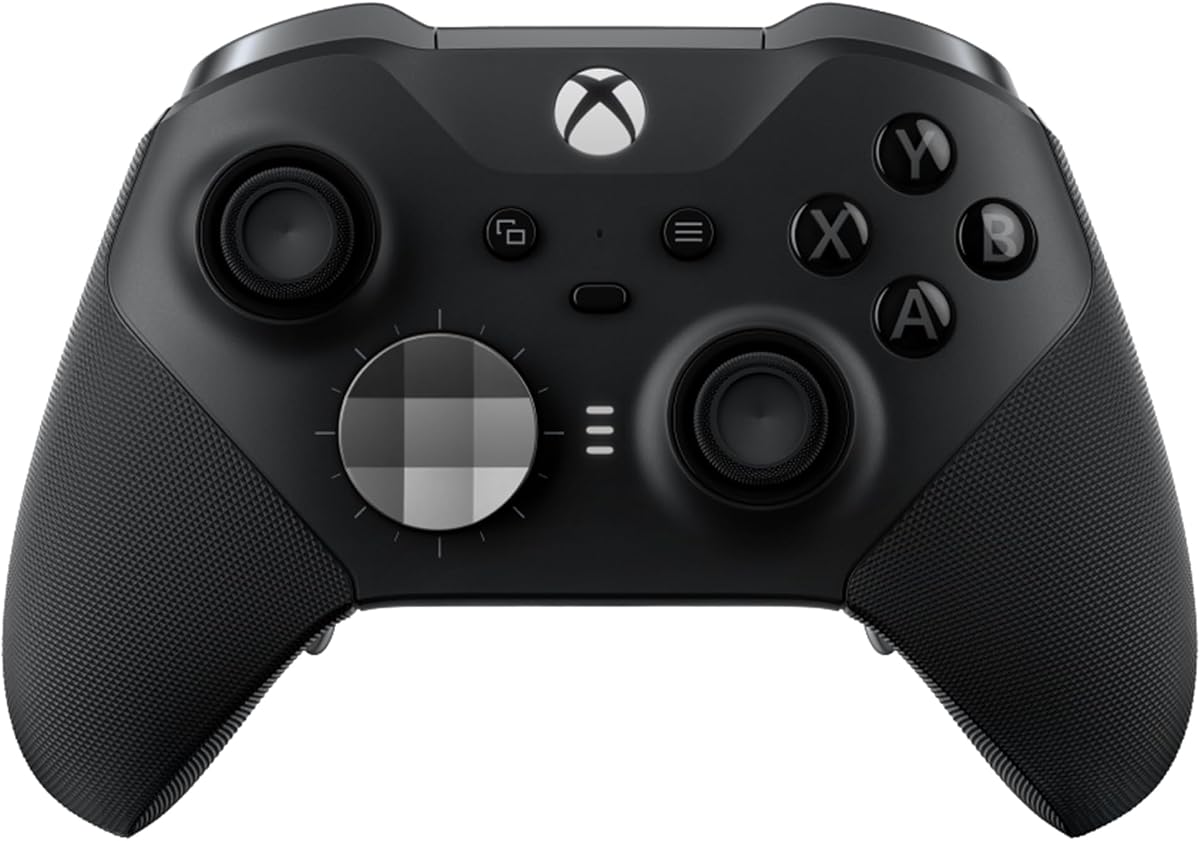
The Xbox Elite Wireless Gaming Controller Series 2 earns the top position because it combines four interchangeable rear paddles with unusually broad control over the sticks, triggers, grips, and button assignments. Its 4.3 rating reflects a strong feature set, but the more important distinction is flexibility: players can alter the physical shape of the controller as well as remap supported functions. That makes it a natural fit for players who regularly change genres or share a setup between console and PC gaming.
We may earn a commission when you buy through this link, at no additional cost to you.
Its adjustable-tension thumbsticks are among the most useful features for aiming. Rather than accepting one fixed resistance level, a player can tune the sticks toward a lighter, faster response or a firmer, steadier feel. The shorter hair trigger locks provide three resistance stages, allowing the same triggers to serve different roles. Four paddles can be swapped for alternate shapes, while the included D-pads and thumbstick toppers broaden the available layouts further.
The controller also supports three saved profiles and broad remapping tools through the Xbox Accessories app on Windows PCs. It works through Xbox Wireless, Bluetooth, or the included USB-C cable, and the 3.5 mm headset connection adds another layer of everyday convenience. The trade-offs are that it sits at the premium end of the category, and some remapping features depend on game support. Players who want a simple plug-and-play controller may not use every option, but competitive PC gamers are likely to appreciate the ability to refine nearly every input.
This is the strongest recommendation for someone who wants rear paddles without giving up cross-platform play, adjustable stick tension, replaceable components, and extensive customization. It is especially appealing to players who want one controller for supported PC games, Xbox consoles, cloud gaming, and compatible mobile devices. Those who prioritize a dedicated PC-only design, very high polling rate, or simple affordability may find a more specialized option elsewhere in this list.
The four rear paddles keep common actions available without moving the thumbsticks off the analog controls. Interchangeable paddle shapes let you experiment with reach and feel, while saved profiles make it easier to retain separate configurations for shooters, racing games, and other genres.
Adjustable-tension thumbsticks and three-step trigger locks provide direct control over the feel of two of the controller's most sensitive inputs. These settings are especially useful when you want quick aiming in one game and gradual braking or throttle adjustment in another.
We may earn a commission when you buy through this link, at no additional cost to you.
The SCUF Envision Pro Wireless V2 is a PC-only controller built around a generous competitive layout. Its 3.8 rating is lower than that of several alternatives, but the supplied features show why it remains relevant: four rear paddles, five fully remappable G-Keys, two side-mounted SAX buttons, Hall effect thumbsticks, and Omron mechanical switches. It is designed for players who want abundant rear access and direct input customization rather than console compatibility.
We may earn a commission when you buy through this link, at no additional cost to you.
The rear paddles are intended to keep both thumbs on the sticks while additional actions are accessed from the index fingers. Five remappable G-Keys extend that layout, while the SAX buttons add more configurability in positions selected to fit natural finger placement. Corsair iCUE integration supports deeper setup, and the Omron switches are specified to feel immediate and click-like rather than soft or rubbery.
Anti-drift Hall effect thumbsticks are another major selling point because they avoid the physical contact mechanism associated with conventional potentiometer sticks. That can be valuable for long sessions and for players who are especially concerned about stick drift. The main compromise is platform focus: this model is explicitly presented as PC only, so it makes less sense for someone who regularly switches to an Xbox console. Its software and configuration process also favors players willing to invest time in a personalized setup.
Choose the Envision Pro V2 if you want a wireless controller created specifically for PC and want many remappable inputs in a familiar competitive form. It suits dedicated PC gamers who value paddles, macro potential, and mechanical button response. Those who need broad console support or a simple, app-light experience may prefer the Xbox Elite Series 2 instead.
Four paddles, five G-Keys, and two SAX buttons create one of the most configurable layouts in the group. This arrangement gives competitive players room to separate movement, aiming, actions, and less frequent commands without crowding the front face of the controller.
The wireless format and PC-only design make this controller most appropriate for a gaming desk or dedicated computer setup. Hall effect sticks and mechanical switches reinforce its focus on durable, responsive input rather than all-purpose console use.
We may earn a commission when you buy through this link, at no additional cost to you.
The AceGamer Hypershadow D4 stands out for combining four macro back paddles with support for PC, PS4, Switch, iOS, Android, and Steam Deck. Its 4.1 rating and extensive feature list make it a flexible choice for mixed-device setups. Connectivity options include Bluetooth, a wired connection, and a 2.4G receiver, although there are important limitations in how the receiver is used.
We may earn a commission when you buy through this link, at no additional cost to you.
The custom TMR joysticks are specified with 4,096-level sampling, a low-power design, and a lifespan of up to five million operations. They are presented as a way to avoid drift while maintaining smooth, stable movement. The face buttons use micro-switches, and the trigger system can switch between short-travel micro-switch behavior and a smoother Hall effect linear mode. That choice allows a player to favor rapid actions in shooters or fine throttle control in racing games.
The M1 through M4 paddles support macros of up to 24 inputs. Players can hold a macro button, tap a sequence involving triggers, bumpers, face buttons, or stick clicks, and replay the complete sequence with one press. Turbo functions include manual and automatic modes with adjustable speed. These are powerful tools, but beginners should set up and test sequences gradually because aggressive macros can affect how a game interprets input. The controller also adds trigger and grip vibration, with trigger feedback particularly relevant to racing and action games.
The Hypershadow D4 is a compelling choice if you need rear paddles but do not want to limit the controller to one platform. It is less suitable for Xbox users, and the first-use lock mode requires a wired charge before normal operation. The PS4's 2.4G receiver behavior is also unusual, so check current setup instructions carefully. For a PC player who also owns compatible Nintendo, PlayStation, or mobile devices, however, its feature density is difficult to ignore.
The four M1-M4 paddles can store sequences of up to 24 inputs each. This makes them useful for recurring combinations in supported games, although thoughtful binding is important so that a convenient macro does not interfere with a core action.
Bluetooth, wired operation, and 2.4G wireless support give the controller flexibility across PCs, supported Switch hardware, mobile devices, and Steam Deck. The initial lock-mode requirement and platform-specific receiver note should be reviewed before purchase.
We may earn a commission when you buy through this link, at no additional cost to you.
The SCUF Valor Pro is a wireless performance controller designed for Xbox Series X|S, Xbox One, and Windows PC. Its 3.8 rating is among the lower scores in this group, but the hardware remains well matched to the core needs of the category. Four rear paddles, instant triggers, anti-drift TMR thumbsticks, and several connection options cover the essentials competitive players look for.
We may earn a commission when you buy through this link, at no additional cost to you.
The controller supports low-latency wireless, Bluetooth, and wired operation. On PC, its listed one-kilohertz polling rate can provide faster input reporting when the game and connection conditions support it. Four rear paddles allow common actions to be accessed with the index fingers, while the instant triggers are designed to reduce travel. The performance grip and extended wraparound bumpers are intended to improve stability and make directional inputs easier to execute.
Audio controls can be adjusted without leaving the game, and a physical switch allows the player to move among up to three saved remapping configurations. Swappable faceplates, thumbsticks, colors, and designs add visual personalization, but the real value lies in the ability to change stick behavior alongside button layouts. This is a more specialized design than a conventional all-purpose controller, and its strongest appeal is to players who already value SCUF-style rear controls.
The Valor Pro is best for a gamer who wants one device across modern Xbox consoles and Windows but prefers a performance-oriented layout. It offers less direct stick-tension control than the Xbox Elite Series 2 and a lower listed polling rate than the GameSir Tarantula 8K. Its three saved profiles, instant triggers, and customizable paddles still make it a flexible middle ground for PC and Xbox play.
The four paddles give index-finger access to frequently assigned actions while the thumbs remain positioned on the analog sticks. This arrangement is useful for movement-heavy games where repeatedly shifting a thumb between the stick and face buttons can disrupt aiming.
Three saved remapping configurations can be selected with a physical switch. This lets a player maintain separate bindings for shooters, racing games, or other genres without rebuilding the entire layout every time the session changes.
We may earn a commission when you buy through this link, at no additional cost to you.
The SCUF Envision Wired V2 is a PC-only controller that focuses on a consistent wired connection and a broad competitive layout. Its 3.9 rating sits in the middle of the group, while four remappable paddles, five G-Keys, two SAX buttons, and anti-drift Hall effect thumbsticks make it a capable option for dedicated PC players.
We may earn a commission when you buy through this link, at no additional cost to you.
A wired design has obvious appeal for competitive setups because it removes wireless pairing from the equation and provides a direct path to the computer. The five fully remappable G-Keys and four rear paddles offer plenty of separate inputs for aiming, movement actions, communication commands, and other functions. The SAX buttons add further configurability in a natural finger position, while Omron mechanical switches are specified for instant, click-like activation.
Hall effect thumbsticks help address a common source of long-term frustration. Instead of relying on physical contact within a conventional stick assembly, the magnetic sensing approach is designed to reduce drift and maintain consistent behavior. This does not make the controller appropriate for every situation, however. The PC-only designation and wired-only format rule out console use and may be inconvenient for players who move regularly between a desk and a couch.
Choose the Envision Wired V2 when your primary system is a PC, you want a large bank of remappable rear controls, and you prefer not to manage wireless connections. It is a straightforward alternative to the Envision Pro V2 for players who do not need wireless operation. If cross-platform use, battery convenience, or a wider range of connection methods matters more, look to the Xbox Elite Series 2 or SCUF Valor Pro instead.
Wired operation is well suited to a fixed gaming desk and avoids the need to pair a receiver or manage wireless interference. The direct connection also complements a controller whose feature set is specifically tuned for PC competition.
Four paddles, five G-Keys, and two SAX buttons create several layers of configurable input. With suitable software, that allows common commands to be placed where they are easiest to access without crowding the main face buttons.
We may earn a commission when you buy through this link, at no additional cost to you.
The white SCUF Envision Pro Wireless V2 combines the core competitive layout of the Envision Pro family with a PC-only wireless design. Its 3.9 rating reflects a balanced set of features: four remappable rear paddles, five fully remappable G-Keys, two SAX buttons, Hall effect thumbsticks, and Omron mechanical switches. It is a strong option for a dedicated gaming setup where color coordination also matters.
We may earn a commission when you buy through this link, at no additional cost to you.
The rear controls are the defining feature. Four paddles keep frequently used actions available to the index fingers, while the G-Keys provide another bank of customizable commands. Corsair iCUE integration allows these controls to be integrated with the wider software environment, and the SAX buttons offer additional placement options. Mechanical switches add a crisp activation, while Hall effect sticks are designed to minimize drift and provide consistent movement over time.
The white finish distinguishes this model from the light-gray and black versions without altering the stated control features. That makes the choice primarily aesthetic among otherwise similar Envision Pro V2 configurations. It is important not to confuse appearance with platform flexibility: the product is still positioned for PC rather than Xbox, PlayStation, or Switch use. Players who need one controller across multiple systems should examine the Xbox Elite Series 2 or Valor Pro.
This Envision Pro V2 is recommended for PC gamers who want wireless convenience, a large set of remappable inputs, anti-drift sticks, and a clean white appearance. It is particularly suitable for players willing to learn the remapping software and build bindings suited to their games. Those who only need a simple controller or want broad hardware compatibility will find fewer reasons to pay for its specialized competitive layout.
Wireless operation makes the controller easier to use around a PC without requiring a permanent cable. At the same time, its four paddles, five G-Keys, and SAX buttons preserve the input density expected from a performance-focused design.
The white finish gives the controller a distinctive look for a desk setup. Underneath the appearance, the Hall effect sticks, mechanical switches, and remappable controls match the core Envision Pro feature set.
We may earn a commission when you buy through this link, at no additional cost to you.
The SCUF Envision V1 remains a credible PC gaming option because it combines four remappable rear paddles, five G-Keys, two SAX buttons, and mechanical switches with a wired connection. Its 3.9 rating indicates a balanced competitive package, and the integrated RGB light strip adds visual appeal to a controller that was designed for extensive PC customization.
We may earn a commission when you buy through this link, at no additional cost to you.
Corsair iCUE integration is central to the experience. It supports remapping for the rear paddles, G-Keys, and other controls, while the RGB strip can coordinate the controller with the rest of a gaming setup. The product information notes that iCUE is required during initial setup, after which it can run in the background or be closed. Omron mechanical switches provide a quick, click-like response, and the SAX buttons add another pair of configurable inputs beyond the main rear controls.
As a wired PC controller, the Envision V1 offers a straightforward connection path and avoids battery management. Its principal limitation is age relative to the newer Envision V2 and Envision Pro V2 options. The original design does not carry the same stated Hall effect anti-drift specification, so buyers particularly concerned about stick technology should examine the newer models carefully. Likewise, an RGB strip and established layout do not substitute for the higher polling rate offered by the Tarantula 8K.
The Envision V1 is a sensible choice for a PC gamer who wants a mature, highly remappable wired controller with visual customization. It is a good fit for players already comfortable with Corsair software and interested in a traditional SCUF competitive layout. New buyers who prioritize the newest stick technology or maximum input polling may prefer the SCUF Envision Wired V2 or GameSir Tarantula 8K.
The integrated RGB strip can coordinate with other iCUE-compatible equipment, making the controller visually consistent with a PC gaming station. The lighting is supplementary, but it helps the Envision V1 feel integrated with a carefully arranged desk rather than simply functional.
The combination of paddles, G-Keys, SAX buttons, and mechanical switches creates a flexible competitive layout. Initial iCUE configuration is the main setup step, after which the controller can be used with or without the software running.
We may earn a commission when you buy through this link, at no additional cost to you.
The HyperX Clutch Gladiate is the most straightforward answer for a PC gamer who wants back buttons, adjustable trigger pulls, and solid everyday compatibility. Its 4.3 rating matches the Xbox Elite Series 2 in this group. The Gludiate is officially licensed for Xbox One, Xbox Series X|S, and PC, giving it broader platform appeal than the PC-only SCUF models without offering every advanced feature found in premium competition controllers.
We may earn a commission when you buy through this link, at no additional cost to you.
Its rear buttons are programmable and can be configured for actions such as thumbstick clicks, providing useful access to inputs that are otherwise inconvenient to reach. Dual trigger locks allow the player to choose a shorter pull for rapid actions or retain longer travel for actions that require finesse. This two-position system is less granular than the Elite Series 2's three-step hair trigger locks, but it captures much of the same practical benefit.
Dual rumble motors provide basic haptic feedback for shots, impacts, and engine sounds. Textured grips improve security during longer sessions, while the 3.5 mm stereo headset port allows a compatible headset to connect directly. A detachable USB-C cable reduces the risk of cable damage when the controller is pulled, and the Share button adds convenience for supported games. The wired design is a limitation for players who prefer freedom from a cable, but it is predictable and easy to use.
The Clutch Gladiate is the best value-oriented recommendation for players who need the core back-button experience without a large learning curve. It lacks extensive profiles, stick-tension adjustment, Hall effect specifications, and advanced macro tools, but the features it does include are easy to appreciate. It is ideal for a mixed PC-and-Xbox household and for anyone who wants trigger locks and programmable rear inputs in a familiar controller shape.
Programmable rear buttons can be assigned to actions such as stick clicks, moving less common commands away from the crowded front face. This creates a meaningful advantage without requiring the more complex configuration systems found on premium models.
Textured grips, dual rumble motors, a 3.5 mm headset connection, and a detachable USB-C cable cover the practical needs of many gaming sessions. The wired format is especially suitable for fixed PC desks and avoids charging and pairing.
We may earn a commission when you buy through this link, at no additional cost to you.
The SCUF Envision Pro Wireless V1 is a 2023 PC controller that retains the core features sought by competitive players. Its 4.0 rating reflects a solid, focused package: four remappable paddles, five G-Keys, two side-mounted SAX buttons, instant triggers, and Corsair SlipStream wireless connectivity. It remains particularly relevant for players who prefer the Envision Pro layout but do not need the newest generation's stated hardware specifications.
We may earn a commission when you buy through this link, at no additional cost to you.
The rear paddles support the central goal of the category by making extra actions available while the thumbs remain on the sticks. Five fully remappable G-Keys create a second layer of controls, and the SAX buttons add further placement options. Instant triggers reduce pull distance for fast responses, while Omron mechanical switches are specified for immediate activation. Corsair iCUE integration handles configuration and broader setup needs.
SlipStream wireless connectivity provides freedom from a fixed cable during PC sessions. That makes this controller convenient for a living-room PC, television, or a desk where a wired path would be inconvenient. The trade-off is that the Envision Pro V1 is identified as PC only, so it does not offer the cross-console compatibility of the Xbox Elite Series 2, Valor Pro, or HyperX Clutch Gladiate.
Buyers should compare this older wireless model carefully with the Envision Pro Wireless V2. The newer version explicitly highlights Hall effect anti-drift sticks, which may be preferable for players concerned about stick drift. Still, the V1 provides a proven remapping layout, instant triggers, and established wireless convenience at a product generation that may appeal to value-conscious PC shoppers.
The combination of four paddles, five G-Keys, and two SAX buttons gives players room to distribute commands across the controller. This makes the model particularly suitable for games in which movement, aiming, and secondary actions all benefit from dedicated inputs.
Corsair SlipStream wireless connectivity removes cable management from the setup and is useful for flexible gaming locations. Players who regularly use Xbox consoles should instead consider a controller with official cross-platform support.
We may earn a commission when you buy through this link, at no additional cost to you.
The GameSir Tarantula 8K is the specialist choice for a Windows PC gamer who prioritizes polling speed, trigger options, and competitive customization. Its 4.7 rating is the highest supplied among these products. The controller's 8,000 Hz wired polling rate, Gen-2 TMR sticks, dual-mode trigger stops, gyro, and macro-capable rear controls place it squarely in the esports-oriented portion of the market.
We may earn a commission when you buy through this link, at no additional cost to you.
The polling rate is the headline feature, providing a much higher stated input-reporting frequency than the other controllers in the comparison. The second-generation TMR sticks use magnetic technology to avoid physical contact, intended to deliver anti-drift reliability, smoother linear movement, and low power consumption. A built-in six-axis gyroscope adds another aiming tool for compatible games, although gyroscope support varies by title and configuration.
Trigger behavior can be changed between Hall effect analog triggers and micro-switch triggers. The analog mode offers smooth, linear travel for precise control, while the clicky mode is positioned for immediate response. Two lockable back buttons, two mini bumpers, and five extra front buttons can each record macros with as many as 32 steps. GameSir Connect software handles button mapping, macro creation, and performance adjustments across the broader control set.
The Tarantula 8K is recommended for competitive Windows players who want the highest listed polling rate and flexible trigger behavior. Its wired design and Windows focus mean it is not the natural choice for console users or anyone seeking wireless freedom. Even so, for a fixed PC gaming station where latency-related specifications are the priority, it provides a compelling and highly specialized feature set.
The 8,000 Hz wired polling specification makes this controller particularly relevant to competitive players who want frequent input reporting. Actual in-game responsiveness also depends on the game, system, and other hardware in the setup.
Switching between Hall effect analog triggers and micro-switch triggers allows the player to choose between gradual precision and immediate activation. Gen-2 TMR sticks complement those options with magnetic sensing intended to reduce drift and maintain linear control.
We may earn a commission when you buy through this link, at no additional cost to you.
The most useful controller is not necessarily the one with the longest feature list. Your decision should begin with the games you play, the control layout you understand, and the kind of connection your PC setup supports. From there, compare stick reliability, trigger stops, remapping depth, comfort, feedback, and platform compatibility.
Prioritize a comfortable physical design and a mapping system you understand. Consider the paddles' reach relative to your index fingers and whether you can activate them without shifting the entire controller. Remapping access is equally important, as it lets you test several positions without committing to one permanently. A controller with a large selection of programmable inputs usually provides more room to build a layout around your preferred grip.
Think about stick feel as well as longevity. Some players prefer the gradual resistance of a traditional analog stick, while others favor a lighter movement for rapid corrections. Choose a controller whose stick characteristics suit the games and your preferred input style, and make any tension or dead-zone adjustments in software with enough time to adapt.
Do not assume a trigger stop improves every game. A short pull is useful when speed matters, but long or adjustable travel can be better when precision and proportional input are more important. Select the option that matches the dominant genre and verify that the game reads the controller correctly before committing to a new layout.
Avoid creating long or overlapping macros until you understand the game's input system. Start with a small set of assignments, test them in training modes, and expand only when the base layout feels natural. Profiles are useful when you play several genres, but a complicated setup can be a liability if you have to rebuild it every session.
For competitive desktop play, the highest-priority feature may be a dependable direct connection, but wireless convenience can be valuable in a living-room setup. Check receiver requirements, charging procedures, and battery life. A wired model may also be preferable for anyone who dislikes maintaining another software component just to manage the connection.
Prioritize polling when you are building a competitive PC setup and value a specialized esports feature set. For general gaming or mixed use, adjustable sticks, remapping, and dependable connectivity may provide a more noticeable benefit than the headline input frequency.
Check the operating system, game, and intended hardware before buying. A controller can be physically capable of connecting to a platform without offering the same remapping, profile, or trigger behavior there. Choose the model whose supported ecosystem matches the devices you already use and the configuration tools you are willing to maintain.
Choose a layout that feels natural in your hands, then allow time to adapt. The best controller is the one whose features you can use comfortably, not merely the one with the most buttons. Keep finger placement consistent and test the rear controls before entering an important match.
Begin by connecting the controller with its intended method and confirming that Windows recognizes it. For a wired model, connect the cable before launching the game. For a wireless model, complete the required pairing, charging, or receiver installation, and verify the correct gamepad appears in Windows settings. Open the associated configuration software and update the controller if an update is offered.
Assign rear buttons gradually. Begin with one or two actions, such as a communication command or a frequently used ability, and test them in a practice environment. Add stick clicks, vehicle controls, or macros only after the basic layout feels natural. If the controller supports multiple profiles, save separate configurations for different genres and use the physical profile control when needed.
For long-term care, keep the controller away from moisture, dust, and direct heat, and avoid yanking the cable. Detachable USB-C cables should be removed by gripping the connector rather than pulling the wire. Clean the grips, buttons, and joystick tops with a soft dry cloth, and periodically check for loose parts or reduced stick response. Wireless controllers should be charged as directed, while the Hypershadow D4's first-use lock mode requires an initial wired charge before normal operation.
Back buttons can be better when they provide access to actions that are difficult to reach while maintaining a steady grip on the sticks. They are especially useful in competitive shooters, action games, and other titles with several frequently used commands. Their value depends on a comfortable layout and sensible assignments, so players should test different positions before building a complete configuration.
No. Macros can be convenient for repeated sequences, but they are not required for competitive play and may be restricted or discouraged by some games. The Xbox Elite Series 2, several SCUF controllers, the Hypershadow D4, and the Tarantula 8K support advanced assignment features. Players should follow each game's rules and avoid relying on a sequence that could interfere with normal input.
They are designed to reduce physical wear and drift, which can be valuable during extended play, but they are not automatically the right choice for every player. Some users prefer the feel of a conventional analog stick, while others value adjustable tension, as found on the Xbox Elite Series 2. The best choice depends on feel, reliability, and the games you play.
It depends on your priorities. The GameSir Tarantula 8K's 8,000 Hz wired polling rate is designed for competitive responsiveness, while adjustable trigger stops on the Xbox Elite Series 2, SCUF Valor Pro, Hypershadow D4, and Tarantula 8K can change how quickly actions are registered. A comfortable, reliable setup with a trigger mode suited to your games is generally more useful than chasing a single specification.
The Xbox Elite Series 2, SCUF Valor Pro, and HyperX Clutch Gladiate support both Windows PC and Xbox systems, although their customization options can differ by platform. The Hypershadow D4 supports PC and several other platforms but not Xbox. PC-only controllers such as the SCUF Envision models and GameSir Tarantula 8K are less convenient if console gaming is part of your routine.
Most standard PC games recognize a controller through the usual XInput or DirectInput-compatible connection, but the game must support controller input. Advanced remapping, trigger stops, profiles, and macros also depend on the game and the controller's configuration software. Test the required functions in a practice environment because not every title exposes the same controls.
Wired models are straightforward, dependable, and easy to use at a fixed desk, while wireless models offer more freedom around a room. The GameSir Tarantula 8K, SCUF Envision Wired V2, and HyperX Clutch Gladiate are wired, whereas the Xbox Elite Series 2, SCUF Valor Pro, and Envision Pro wireless versions support cable-free play. Consider receiver setup, charging, software, and how you use your gaming space.
Two well-placed rear buttons can be enough for a simple competitive layout, while four or more provide more room for separate actions and custom assignments. The best count is the one you can activate comfortably without moving the thumbs away from the sticks. Try a small set of bindings first rather than filling every available button immediately.
The Xbox Elite Series 2 is the strongest all-around recommendation because it combines four interchangeable paddles, adjustable-tension sticks, staged trigger locks, three profiles, and broad console and PC compatibility. The GameSir Tarantula 8K is the specialized premium pick for a fixed Windows setup that prioritizes an 8,000 Hz polling rate, trigger modes, and extensive macros. The HyperX Clutch Gladiate provides the most approachable combination of programmable rear buttons, trigger locks, and cross-platform support.
Your priorities should determine the rest of the shortlist. Choose a dedicated PC controller if portability and input customization matter most, a wired model if dependable desk use is your goal, and a multi-platform design if the controller will also operate an Xbox system. Pay particular attention to stick technology, trigger feel, and the maturity of the remapping software, because those factors affect daily use more than the number of buttons alone.
Before making a final purchase, verify the current platform support, connection process, software requirements, and included accessories. Product listings, availability, and pricing can change over time, so checking the current listing and recent customer feedback is sensible before ordering. Whichever controller you choose, begin with a simple rear-button layout, test it in a practice mode, and expand the configuration only after the physical controls feel comfortable.