
GoodBaby 5-inch No-WiFi Monitor
4.5Editor score
Large five-inch LCD display
No-WiFi FHSS connection
Two-way talk and lullabies
An elderly monitor with camera and audio combines video monitoring, two-way communication, and accessible call controls in one caregiving setup. A useful model should be easy to operate, provide dependable night viewing, and let a senior contact a caregiver without navigating a smartphone. Features such as reminders, room-temperature alerts, and privacy controls can make daily supervision more practical.
The products in this guide were compared using their stated specifications and customer ratings, with particular attention to connection security, camera coverage, audio quality, call-button access, display size, range, power options, and elderly-specific alerts. The list includes dedicated senior monitors, caregiver systems, and adaptable baby monitors that can also be positioned for an adult needing supervision.
Each review explains who the product appears best suited for, along with its strongest benefits and practical limitations. The top three picks represent the strongest combinations of value, feature depth, and specialized functionality. Product ratings and availability can change, and prices also fluctuate, so shoppers should confirm the current listing and specifications before buying.
4.5Editor score
4.4Editor score

3.6Editor score
As an Amazon Associate we earn from qualifying purchases.
This side-by-side comparison highlights the most important differences in connectivity, caregiver communication, call-button support, image coverage, and portability, making it easier to match a monitor to a senior's routines and the caregiver's location.


The CallToU Baby Monitor for Elderly Monitor with Camera and Audio Call Button has a 3.9 customer rating and presents a purpose-built combination of monitoring, communication, and daily-care prompts. Its strongest feature is the one-press SOS control, supplemented by alerts for drinking water, movement, toilet visits, and general help. This makes the system more senior-focused than a conventional indoor security camera.
We may earn a commission when you buy through this link, at no additional cost to you.
Communication happens over a secure 2.4GHz FHSS connection without requiring WiFi or an internet service. The camera supports live two-way audio and video, while infrared night vision is intended to preserve visibility in dark rooms. A 720P display with 4x zoom allows closer inspection, and a temperature sensor can alert the household when room conditions move outside a chosen range.
The 2.8-inch receiver is small enough to fit in a pocket, giving a caregiver flexibility to move through the home rather than remain beside the camera. Its dedicated care alerts and portable format are genuine advantages over many fixed security cameras. The trade-offs are the modest 720P resolution and compact screen, which are less impressive for close visual examination than larger or higher-resolution alternatives.
This model is best for families wanting a private, no-subscription system with a direct call button and several routine prompts. It suits households that value straightforward operation and caregiver mobility more than a large display or sophisticated phone-based tracking. For those priorities, it is a well-rounded choice, although shoppers with advanced fall detection needs should examine systems specifically designed to distinguish distress sounds from ordinary activity.
The no-WiFi FHSS connection can be appealing in a private bedroom or areas where an internet-dependent camera would be inconvenient. Because the receiver and camera communicate directly over a dedicated frequency, the system also avoids the need for app setup and monthly service fees.
The separate help prompts turn the system into more than a passive camera. A senior can request assistance or receive reminders for common daily needs without learning a complex mobile interface, which may be especially useful for users with reduced dexterity or limited technical confidence.
We may earn a commission when you buy through this link, at no additional cost to you.
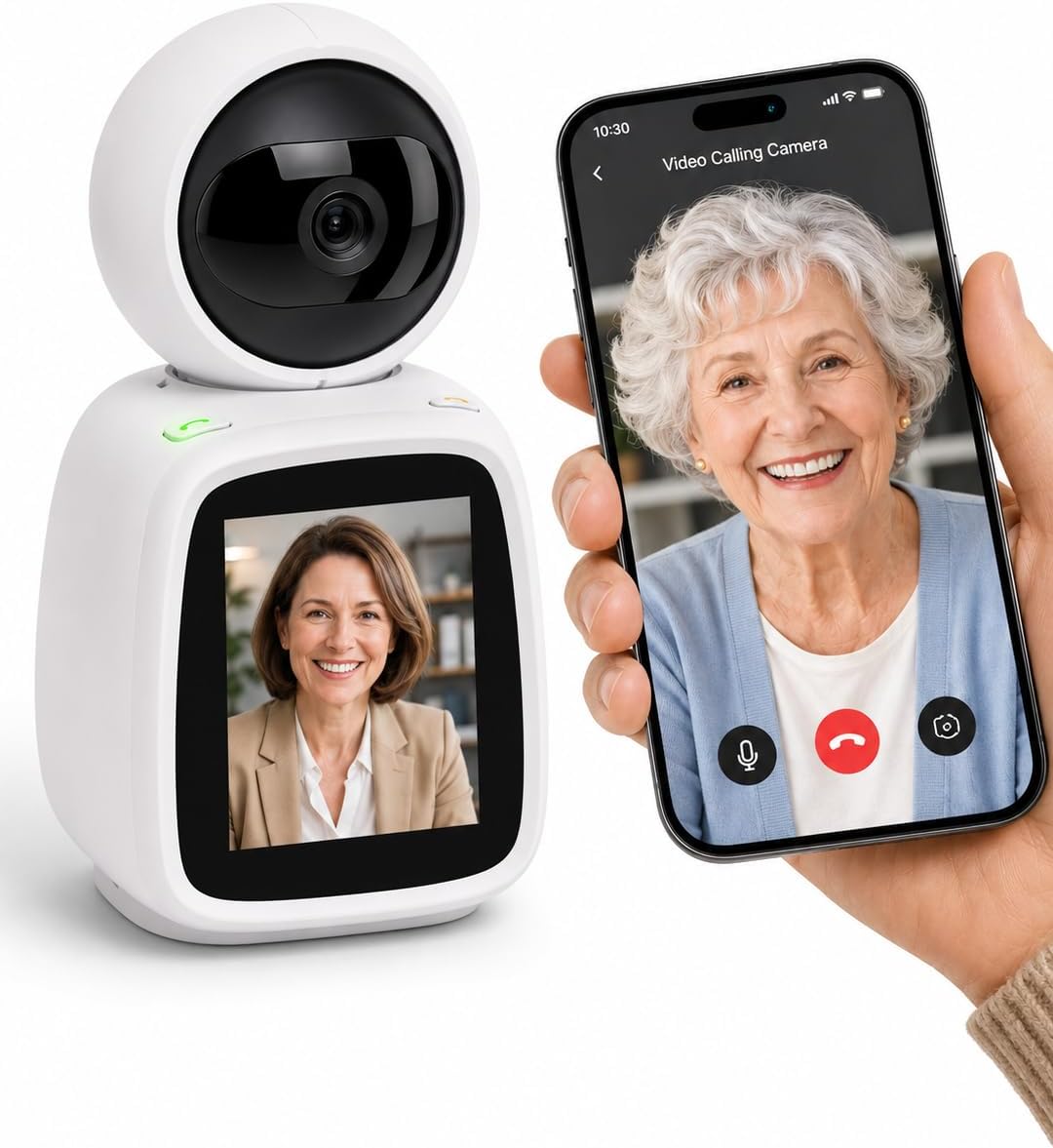
The SYMYNELEC Elderly Monitoring Camera with Screen, One-Touch Video Calling carries a 4.4 rating, placing it among the strongest options in this comparison. Its defining feature is one-touch video calling: a parent can see a family member on the 2.8-inch screen without needing a smartphone, app, or complicated sequence of controls.
We may earn a commission when you buy through this link, at no additional cost to you.
When the call button is pressed, all bound family phones ring simultaneously, and the first person to answer connects. The system also detects loud crashes, falls, and cries for help, sending alerts to family phones. A 1080P pan-tilt-zoom camera with auto-tracking is designed to keep an active parent in view, reducing the need for manual adjustment.
Privacy receives unusually careful attention. A physical mechanism rotates the lens backward and displays a privacy-mode message, while timers can automatically turn the camera on or off. Local continuous recording and replay are available through a memory card up to 128GB without subscription fees. The trade-off is that this is a WiFi-dependent design, so the associated app and network setup are more involved than with a no-WiFi system.
This is the pick for families that want phone-based notifications, shared monitoring, video calling, and thoughtful physical privacy. It is particularly suitable when several relatives want to check in or respond to alerts. Buyers should confirm that their home's 2.4GHz WiFi is dependable and should plan for a separate memory card if they intend to use local recording.
A dedicated call button is easier to understand than a typical smart-home app. The simultaneous ringing of family phones also reduces the chance that an urgent request will sit unanswered on one caregiver's device while another family member is unaware of it.
Mechanically turning the lens away provides a more visible privacy guarantee than relying only on software controls. Scheduled operation adds another layer, allowing the family to define when monitoring is appropriate for a private adult bedroom.
We may earn a commission when you buy through this link, at no additional cost to you.
The Elderly Monitor with Camera and Audio, 2-Way Talk/Call Button/Pan-Tilt-Zoom has a 4.1 rating and is one of the most explicitly designed for daily senior routines. Its one-touch call button can trigger different alert sounds for SOS, movement, toilet use, water, or general help, allowing caregivers to understand the type of request before responding.
We may earn a commission when you buy through this link, at no additional cost to you.
Medication and meal reminders can be scheduled at half-hour intervals through four-hour periods. A room temperature sensor reports when conditions fall outside a selected range, while infrared night vision allows nighttime observation. The system also includes eight soothing melodies, two-way talk, and a VOX mode that sleeps the screen during quiet periods and wakes when sound exceeds the set threshold.
Its 2.4GHz FHSS system operates without WiFi, monthly fees, or internet-based data, which is valuable for households seeking a private and uncomplicated setup. A stated range of up to 1,000 feet and a 2,000mAh receiver battery support use across the home. The limited 2.8-inch display and relatively modest battery specification are less desirable for prolonged viewing than the larger screens and longer stated battery durations on some competitors.
Families supporting someone with dementia, poor memory, or a need for regular prompting will find the reminder system especially valuable. It is a good match for caregivers who want the camera, call button, environmental sensor, and scheduled prompts in one package. It is less oriented toward remote family members on different networks, as its communication is based on the local no-WiFi system.
The adjustable reminders are more useful for ongoing care than a simple clock because they can be aligned with medication and meal intervals. Distinct alert types also help a caregiver distinguish a routine request such as water or toilet assistance from an urgent SOS.
The display can remain asleep in a quiet room and activate when the room becomes active. Caregivers who prefer uninterrupted viewing can disable VOX, while others can reduce unnecessary screen use without giving up audio awareness.
We may earn a commission when you buy through this link, at no additional cost to you.
The No-WiFi Senior Video Monitor for Seniors has a 4.3 rating and is particularly relevant to large homes, multi-room arrangements, and nursing-home-style caregiving. Its camera rotates through 355 degrees horizontally and 90 degrees vertically, helping a caregiver cover more of a room without constantly asking the senior to reposition the unit.
We may earn a commission when you buy through this link, at no additional cost to you.
The camera includes infrared night vision, two-way communication, a one-touch SOS button, and customizable reminders for hydration, activity, and bathroom visits. Medication reminders support users with cognitive impairment, while eight white-noise options may help create a more restful environment. A high-precision temperature sensor and 4x digital zoom help the caregiver evaluate both the room and the resident.
The no-WiFi 2.4GHz FHSS connection supports a private, internet-free setup, and the stated reach is 1,000 feet outdoors or 500 feet indoors. A 2,000mAh battery and plug-and-play design simplify daily operation. The main limitations are the compact 2.8-inch display and the use of digital rather than optical magnification, which may limit fine visual inspection.
This monitor is a strong candidate for facilities, relatives responsible for multiple rooms, and caregivers who value pan-and-tilt coverage. Its complete kit includes the camera, portable receiver, emergency button, and power adapter. Buyers should map the intended placement carefully, since very large properties may still be affected by walls and other obstructions despite the stated range.
The near-full horizontal rotation reduces the need for a second camera in many ordinary rooms. Vertical movement can be adjusted to check a bed, doorway, or seating area, making the unit more adaptable than a fixed-view monitor.
Medication prompts, routine reminders, and simple call categories create structure for a resident who may not consistently remember to request help. The accessible button and straightforward receiver also reduce the need for complex device interaction.
We may earn a commission when you buy through this link, at no additional cost to you.
The GoodBaby 5-inch Baby Monitor with Camera and Audio No WiFi has the highest customer rating in the group at 4.5. Although marketed as a baby monitor, its large display, no-WiFi connection, two-way talk, night vision, and temperature monitoring make it a credible option for checking on an adult who does not require a dedicated SOS button.
We may earn a commission when you buy through this link, at no additional cost to you.
The five-inch HD screen is the largest among the products reviewed, making details easier to observe from across a room. Remote 355-degree pan, 120-degree tilt, and 2x zoom improve coverage. Its 3,500mAh battery is stated to deliver up to 30 hours in VOX mode or 10 hours with the screen continuously on, offering useful flexibility for overnight monitoring.
Audio can operate independently, and VOX wakes the display when a sound is detected. Eight built-in lullabies, a room-temperature sensor, and a feeding timer are nursery-oriented features, but some may still be useful for routine reassurance or scheduling. The main limitation is the absence of a wearable or tabletop call button, so it is best for observation rather than summoning help.
This is the strongest value-oriented choice for a caregiver who wants a large, private display and dependable local operation. It can work well for an elderly parent, relative, or pet without requiring app setup. It is not the first recommendation for someone who needs a single easy-to-reach assistance button or advanced family-call notifications.
The five-inch display gives a caregiver a more comfortable view than the compact 2.8-inch screens used by many dedicated senior systems. That advantage can be significant when checking room conditions, posture, or a wider area without leaning close to the receiver.
VOX mode can preserve battery life during quiet periods while still waking the screen for sound. Continuous viewing remains available when a caregiver wants the display to stay active throughout the night.
We may earn a commission when you buy through this link, at no additional cost to you.
The Smart Caregiver Video Monitor for Elderly Care and Caregivers has a 3.6 rating but offers a thoughtfully portable approach to senior monitoring. The camera includes a rechargeable battery, allowing it to move around the home during the day and connect to power for continuous overnight use, while the 2.8-inch receiver can be carried with its belt clip.
We may earn a commission when you buy through this link, at no additional cost to you.
The wireless caregiver remote is one of the most useful elements for elder-specific use. Its five buttons cover general assistance, bathroom help, water, help with moving, and urgent SOS. A senior can keep this remote near the camera and use the labeled options to communicate a need. Two-way audio provides push-to-talk communication from the receiver, while the camera microphone remains always on.
The system uses a secure no-WiFi connection and includes infrared night vision for low-light monitoring. It works without an app or internet service, which supports simple setup. Its limitations include the relatively low 3.6 customer rating, small screen, and lack of stated pan, tilt, zoom, or family-wide alert functionality. It is therefore more of a focused caregiver tool than a comprehensive senior communications hub.
This monitor is best for a caregiver who moves between rooms and wants the older adult to have labeled help buttons. It can also function as a baby monitor, but its caregiver accessories make it more relevant to adult supervision. Buyers who need remote access for relatives in different locations should choose a WiFi model instead.
The integrated camera battery removes the need to keep the camera permanently connected during daytime movement. A family can relocate it to a living area in the morning and a bedroom at night, then leave it plugged in for continuous evening monitoring.
Five dedicated request categories are more useful to a caregiver than one undifferentiated help signal. The remote can communicate common needs immediately, helping a senior ask for water or movement assistance without trying to explain the situation over two-way audio.
We may earn a commission when you buy through this link, at no additional cost to you.
The Baby Monitor 1300ft Range, 1080P HD, Pan-Tilt-Zoom has a 4.3 rating and stands out for its combination of two cameras, a large IPS display, and long stated range. Although its title refers to a baby monitor, the product details explicitly mention elderly use, making it relevant to caregivers who want to observe separate rooms.
We may earn a commission when you buy through this link, at no additional cost to you.
Its 1080P camera supports 350-degree pan, 108-degree tilt, and zoom, helping a caregiver inspect a room without relying on the senior to move into view. A large five-inch IPS screen presents the selected feed clearly. The dual-camera arrangement allows one receiver to monitor two rooms with automatic or one-tap switching, which can suit a bedroom and nearby sitting area.
VOX mode puts the receiver into a low-power standby state and wakes the display when a sound occurs. The stated battery duration in this mode reaches 20 hours, while two-way talk, temperature monitoring, and four lullabies round out the feature set. The no-WiFi encrypted link avoids app setup. However, the single-view design means it does not split both feeds simultaneously, and it lacks a dedicated senior call button.
This is a strong choice for a caregiver monitoring two areas, particularly when long-range transmission is important. It may also appeal to families seeking a private system with a larger screen than most dedicated senior monitors. It is best suited to observation and communication from within the home rather than alerting relatives across different locations.
A family can place one camera near a bed and another near a common room, then switch views from the single receiver. This is useful when a senior moves between spaces but does not require simultaneous split-screen observation.
The stated 1,300-foot outdoor reach is the highest figure listed in this comparison, although actual performance varies with walls, floors, and interference. The private no-WiFi connection remains useful in larger homes, outbuildings, and properties where reliable WiFi coverage may be uneven.
We may earn a commission when you buy through this link, at no additional cost to you.
The CIAJIE Two Way Video Camera has a 4.3 rating and is the most conventional security-camera-style option in the list. Its 4.3-inch screen, dual-band 5GHz and 2.4GHz WiFi support, and phone-app compatibility make it useful for families that want remote access rather than a dedicated local monitor alone.
We may earn a commission when you buy through this link, at no additional cost to you.
A major elderly-care advantage is device-initiated calling. A senior can press the camera's button to call a family smartphone, enabling two-way video and audio without navigating contacts or a conventional phone keypad. The camera can also make calls between devices, while shared access can be granted to as many as ten family members for live monitoring.
The camera provides a wide-angle, 360-degree view, motion detection, and night vision. An alarm can remind an older adult to take medication or create a prompt for children studying, although the product is not designed exclusively for senior care. Its principal drawbacks are dependence on WiFi and app configuration, along with the absence of a clearly stated mechanical lens-covering feature.
This is the best match for a geographically distributed family that wants to check in from smartphones and share monitoring access. It is also suitable for a senior who prefers pushing one physical button to initiate a video conversation. Caregivers who prioritize a private no-WiFi connection or a wearable call remote should compare it with the dedicated senior-monitor alternatives.
Phone-based access means an adult child can check in from work or travel rather than needing a dedicated receiver nearby. Sharing access with several relatives can distribute monitoring responsibilities and reduce the chance that no one notices an alert.
The device-initiated call removes most of the complexity involved in launching an app and selecting a contact. For an older adult, that direct interaction can be much easier than managing a smartphone, particularly when the goal is simply to see and speak with a family member.
We may earn a commission when you buy through this link, at no additional cost to you.
The CallToU 2-Way Talk Baby Monitors for Elderly has a 3.6 rating but is one of the most explicitly senior-oriented products in the comparison. The supplied features center on a one-press SOS button, prompts for water, movement, toilet visits, and help, plus a portable receiver designed to let a caregiver check in while moving around the home.
We may earn a commission when you buy through this link, at no additional cost to you.
Its 2.4GHz FHSS connection operates without an internet connection and is described as private and FCC certified. Live two-way audio and video support direct communication, while infrared night vision allows a caregiver to view a dark room. A 720P screen includes 4x zoom, and a temperature sensor can provide room-condition alerts.
The design is well matched to a caregiver who wants a local, dedicated system rather than a general security camera. The button categories make it easier to communicate a routine need or an emergency. On the other hand, the 2.8-inch display and 720P image are not as refined as the five-inch 1080P alternatives, and the 3.6 rating suggests that some buyers may have encountered shortcomings.
Choose this product when direct senior access, a simple call button, and a no-WiFi connection matter more than maximum display quality. It is particularly useful in private rooms or homes where relatives do not want to depend on internet-based cameras. Shoppers should confirm their required alert functions and understand that it is designed for local caregiver communication rather than off-site family access.
The specific prompts for drinking water, moving, toileting, and general help reflect a caregiving approach rather than a generic security-camera design. These categories can make a senior's request more specific and help a nearby caregiver respond appropriately.
The compact receiver can be carried in a pocket while the camera remains in the room. A caregiver can move through the home, maintain a local view, and communicate without requiring a smartphone, an app, or an internet connection.
We may earn a commission when you buy through this link, at no additional cost to you.
The Smart Caregiver Video Monitor for Elderly Care and Caregivers has a 4.2 rating and focuses on uncomplicated observation, rechargeable power, and efficient use. It can function as an elderly monitor or a baby monitor, while its 2.8-inch receiver, belt clip, and infrared night vision suit a caregiver who wants a compact local unit.
We may earn a commission when you buy through this link, at no additional cost to you.
VOX mode activates the receiver when sound is detected, conserving battery during quiet periods. The monitor is rechargeable using the included USB-C cords, while the camera connects by USB-C for power. Two-way audio is available through a push-to-talk button on the monitor, and the camera microphone is described as always on for ambient audio awareness.
The no-WiFi secure connection offers a private, interference-resistant alternative to internet-dependent cameras, and the system is ready to use without apps. It can help a caregiver check whether a loved one needs assistance at night. Its limitations are the lack of a dedicated senior call button, no stated pan-tilt-zoom, and the small display, which places it closer to a basic observation tool than a complete care platform.
This is a good pick for families wanting a simple and rechargeable monitor without smartphone or app dependence. It is particularly useful for checking on a resting parent during the night or for a caregiver who wants ambient sound alerts without keeping the screen active continuously. Those needing direct assistance buttons should look to one of the dedicated senior-monitor kits.
VOX mode is useful when the goal is awareness rather than continuous screen viewing. The receiver can remain asleep in a quiet room and activate when environmental sound indicates that attention may be required.
The small receiver, belt clip, and limited number of visible controls reduce the learning curve for an older adult who may interact with it directly. A caregiver can also place it on a table or bedside stand when continuous viewing is more important than portability.
We may earn a commission when you buy through this link, at no additional cost to you.
The right monitor depends on where the senior lives, who needs to receive alerts, how independently the older adult can operate controls, and whether remote internet access is necessary. Comparing these practical requirements is more useful than focusing on a single specification.
A no-WiFi monitor sends video and audio over a dedicated local connection, making it simple to operate without an account, app, or reliable internet service. This is often the easiest option when the caregiver lives in the same home and wants the senior to be able to press a physical call button. A WiFi camera, however, may be preferable when relatives need to view the camera from another location or share access with several family members.
A dedicated call button is one of the most important features for an elderly monitor with camera and audio. Look for a large, clearly labeled control that can be kept beside a bed, chair, or other regularly used location. Products differ in whether they provide one SOS button or several choices for water, movement, bathroom help, and general assistance, so the number of buttons should reflect the type of support the caregiver expects to provide.
Resolution influences how much useful detail a caregiver can see, while pan, tilt, and zoom determine whether the camera can follow activity without manual repositioning. A 1080P camera with auto-tracking or broad rotation offers more flexible coverage than a fixed camera. A 720P system can still be adequate for general observation, particularly with a wide-angle lens and 4x digital zoom, but buyers should not expect close-up detail comparable to a higher-resolution model.
A small 2.8-inch receiver is easy to carry and can sit beside a caregiver without taking much space, but it is less comfortable for prolonged viewing. Five-inch screens are more suitable for a fixed bedside or kitchen station. Caregivers should consider both where the receiver will usually live and whether it needs to travel through the home during check-ins.
Infrared night vision is essential for bedrooms and other low-light spaces. It should be supported by a sensitive microphone and clear two-way communication, since a senior may need to hear a caregiver or call for help during the night. Push-to-talk, always-on microphone, and VOX behavior differ among models, so compare whether the screen stays active, wakes with sound, or requires a button to speak.
Medication prompts, meal reminders, hydration alerts, and routine movement cues can support a senior who has memory difficulties. A temperature sensor adds another layer by flagging an uncomfortably hot or cold room. These features do not replace medical care or professional monitoring, but they can help caregivers maintain awareness and reinforce a daily schedule.
Signal range is particularly important in homes with several floors, thick walls, or a camera placed far from the receiver. No-WiFi systems state ranges of roughly 500 to 1,000 feet in many configurations, while some long-range baby-monitor models claim more. Stated maximum figures are best treated as comparative guidelines because walls, furniture, floors, and competing radio equipment can reduce real-world performance.
Rechargeable receivers offer convenience but may require planning for overnight charging, while continuously powered receivers avoid battery dead anxiety. VOX can extend runtime by keeping the display asleep until sound is detected, and a camera with its own rechargeable battery can be moved between rooms during the day. Compare stated battery durations with the mode that matches your intended use.
Begin by choosing the camera location before turning on the system. Place it where it can observe the bed, chair, or main walking area without pointing directly at a private space, and keep the call button within the senior's reach. Charge or connect both units as instructed, then pair them according to the included guide. Test the live view, two-way audio, night vision, and every alert category before relying on the monitor for daily supervision.
Introduce the controls in short, practical sessions. Show the senior exactly which button requests general help, how to use two-way audio, and what will happen after pressing a button. Keep frequently used options simple, avoid changing the layout unnecessarily, and establish a routine for checking the screen. For WiFi models, confirm that the app remains accessible to all authorized caregivers and that a secondary family member understands the alert process.
Maintain the equipment by cleaning the camera lens, charging the receiver regularly, and checking that the camera remains connected during overnight use. Review privacy settings and schedules periodically, especially if the system includes a physical privacy mode. Test the call button and alert notifications periodically, and replace the system promptly if the image, audio, charging, or button response becomes unreliable.
The easiest setup is usually one with a dedicated physical call button and a local no-WiFi connection. A senior can press the button without opening an app, entering a password, or selecting a contact. The GoodBaby model has a larger display but no senior call button, while several dedicated elderly monitors provide one-touch assistance controls. The right choice depends on whether the senior needs to initiate calls or simply be watched and heard.
A no-WiFi system keeps its camera-to-receiver link on a dedicated local connection and does not depend on an internet account or cloud-based app. This can reduce exposure to internet-related access and removes WiFi outages as a potential interruption. It is not automatically a guarantee against every possible security issue, so buyers should still protect account credentials on any connected devices, use strong WiFi passwords, and keep firmware current.
Yes, because many baby monitors include the same basic features useful for adult monitoring: a camera, infrared night vision, two-way audio, temperature alerts, and a portable receiver. The GoodBaby, Smart Caregiver, and 1300-foot PTZ options in this guide are examples. A dedicated senior system may offer a more accessible call button, clearly labeled assistance requests, or stronger privacy controls, so the senior's independence should guide the decision.
No. These products can support communication, observation, reminders, and caregiver response, but they are not medical devices and cannot guarantee that an emergency will be noticed or addressed. Many families use them as one layer within a broader safety plan that includes appropriate medical alerts, emergency contacts, regular visits, fall prevention, and professional advice based on the senior's health needs.
A larger display is usually easier for a caregiver to inspect from a distance and can make the system more comfortable for prolonged use. However, screen size does not improve the camera's underlying resolution or make the call button easier to reach. Consider the whole setup, including button placement, viewing distance, portability, night performance, and whether the senior or caregiver is the primary user.
VOX mode lets the receiver remain asleep in a quiet room and wake when it detects sound. It can conserve battery while still providing event-driven awareness. Continuous screen use provides a constant picture but may use more power. Caregivers should test the activation level in the real room, since background sounds can cause the screen to wake more often than expected.
Local no-WiFi monitoring is usually simpler when one caregiver lives in the same home and wants a dependable system that does not depend on internet service. Remote monitoring through an app is more valuable when relatives live elsewhere, travel frequently, or need shared access to live video. Remote systems also require reliable WiFi, correct app permissions, and regular charging of the caregiver's phone.
Position the camera to cover only the area needed for observation, avoid pointing it toward unnecessarily private spaces, and use a scheduled or physical privacy mode when one is available. Review shared access and notification settings, use a strong WiFi password for connected models, and remove former users' app access. Privacy planning should be discussed with the senior whenever possible so monitoring remains respectful and transparent.
The GoodBaby 5-inch monitor stands out for its large display, 4.5 rating, no-WiFi operation, and useful VOX battery management. The SYMYNELEC camera is the strongest connected choice, combining one-touch family calls, simultaneous phone alerts, automatic tracking, and a physical privacy mechanism. For a dedicated local senior system with a prominent help button and portable receiver, the CallToU 2-Way Talk monitor offers a well-targeted feature set.
When choosing, prioritize the senior's ability to use the available controls, the distance between caregiver and camera, and whether relatives need remote access. A simple local system can be more dependable and less intimidating than a feature-heavy app, while a WiFi camera may be necessary for a distributed family. Match night vision, display size, reminders, and range to the actual care environment rather than choosing on specification count alone.
Before purchasing, confirm the current product details, included accessories, supported devices, and availability of any required memory card. Customer ratings and prices can change over time, and real-world range depends on the home's walls and layout. Comparing the final listing with the senior's daily routine is the best way to select a monitor that is comfortable, private, and genuinely useful.