
AceGamer Aurora II
4.2Editor score
2.4G and Bluetooth wireless
Hall Effect joysticks
Programmable back buttons
Our Gaming Controller for Arc Raiders guide compares ten top controllers for PC, examining latency, stick precision, triggers, wireless support, battery life
A good controller can give you more precise aiming, faster movement, and better control during the tense encounters that define ARC Raiders. The right choice depends on your PC setup, preferred grip, tolerance for cable or wireless play, and whether you value competitive features or broad device compatibility.
We compared ten controllers using the specifications supplied for each model, focusing on PC compatibility, polling rate, stick technology, trigger behavior, remapping options, wireless connectivity, battery life, and included accessories. The list covers premium esports models, flexible multi-platform pads, and more affordable alternatives.
Each review explains who the controller is best suited for and where its compromises may matter. Ratings and feature details reflect the supplied product information, while availability and pricing can change, so check the current listing before choosing your ideal setup for ARC Raiders.
4.2Editor score

4.5Editor score
3.9Editor score
The comparison below highlights the distinctions that matter most for PC play: input speed, stick technology, trigger response, connection methods, customization, and platform flexibility. Use it as a quick map of the ten options before reading the detailed reviews.




The Razer Wolverine V3 Pro is built specifically for Windows 11 PCs and stands out with a true 8000Hz polling rate in both wired and wireless modes. Its 4.1 rating reflects a highly specialized design rather than broad console support. For players who want every competitive advantage available in PC input hardware, its speed-focused specification sheet is compelling.
We may earn a commission when you buy through this link, at no additional cost to you.
TMR thumbsticks use magnetic sensing to resist drift while preserving the familiar feel of analog sticks. Four mouse-click buttons sit on the rear grips, while two additional claw-grip bumpers can be remapped to useful actions. Pro HyperTriggers can change between fast digital clicks and full analog pulls, and the controller can store up to four onboard profiles with remapping and sensitivity adjustments.
The main trade-off is platform rigidity. It cannot be used with Xbox consoles, PlayStation consoles, macOS, or mobile devices, and its Windows 11 and USB-A requirements may limit casual appeal. Some players may also question whether the extraordinary polling figure offers a meaningful advantage in ordinary play, particularly over a stable wired connection.
This is an excellent choice for a PC-only gaming setup that emphasizes rapid response, configurable rear controls, and a lightweight competitive form. If you only use one computer and regularly play demanding PC games, the Wolverine V3 Pro offers a more specialized and feature-rich package than most general-purpose controllers.
The headline 8000Hz polling rate is the main reason to consider this model. It is available in either wired or wireless mode, giving competitive players flexibility while keeping input polling exceptionally frequent.
Four rear mouse-click buttons, two claw-grip bumpers, swappable stick caps, and switchable Pro HyperTriggers provide numerous ways to tune movement, aiming, and action commands for individual play styles.
We may earn a commission when you buy through this link, at no additional cost to you.
The AceGamer Aurora II earns a 4.2 rating by combining useful features with broad compatibility. It supports PC, Android, Switch, iOS, Switch 2, and Steam Deck through 2.4G or Bluetooth, although it is not compatible with Xbox systems. That makes it one of the most flexible choices for players who move between devices.
We may earn a commission when you buy through this link, at no additional cost to you.
Its upgraded receiver and encryption dongle are designed for stable, interference-resistant 2.4G communication, while the Hall Effect joysticks are intended to provide more consistent input detection. Two rear buttons can be programmed for trigger combinations or other shortcuts, and back-button switches allow the player to disable them when they might be pressed accidentally.
A 1000mAh battery supports extended wireless sessions, and the controller automatically enters sleep mode after five minutes of inactivity. The trade-off is that the listing does not specify a numerical polling rate, so it does not offer the same clear competitive benchmark as several higher-end options. RGB lighting and additional features may also be more than some players need.
The Aurora II is a practical choice for PC players who want wireless freedom, programmable controls, and one controller for several types of hardware. For dedicated PC gaming without an Xbox requirement, it provides a generous feature set and may be especially attractive for Steam Deck and Android use.
Support for Windows, Android, Switch, iOS, Switch 2, and Steam Deck gives the Aurora II unusual versatility. Bluetooth and 2.4G options also let you choose between a dedicated receiver and direct wireless pairing.
The upgraded 2.4G receiver, encryption dongle, and 1000mAh battery create a practical wireless package. A five-minute inactivity sleep function helps conserve power between play sessions.
We may earn a commission when you buy through this link, at no additional cost to you.
The Cosmic Red PlayStation DualSense carries a 4.6 rating and brings a more console-inspired control experience to PC gaming. Its defining strengths are physical haptics, adaptive triggers, a built-in microphone, and a 3.5mm headset connection. These features can make weapon handling and environmental interaction feel more tangible in ARC Raiders.
We may earn a commission when you buy through this link, at no additional cost to you.
Adaptive triggers vary the amount of force and tension under your fingertips, while haptic feedback communicates in-game actions physically. The controller connects to Windows PCs and Mac computers through USB Type-C or Bluetooth, and it also supports Android and iOS. A dedicated mute button provides straightforward control over voice capture.
Its limitations are most noticeable for competitive PC players. The supplied information does not list a numerical polling rate, rear buttons, or extensive remapping tools. Some purists may also prefer the more conventional layout of an Xbox-style controller over the DualSense arrangement.
Choose the DualSense when immersive feedback matters more than competitive hardware specifications. It is especially attractive for PS5 owners who want one controller for console and PC play, provided its layout and feature set suit your preferred aiming style.
Haptic feedback and variable trigger tension provide physical cues that can deepen the sense of impact. These features distinguish the DualSense from controllers focused almost entirely on input speed.
USB Type-C, Bluetooth, and a 3.5mm headset jack make the controller convenient across PCs, Macs, mobile devices, and PS5. The built-in microphone adds another option for communication.
We may earn a commission when you buy through this link, at no additional cost to you.
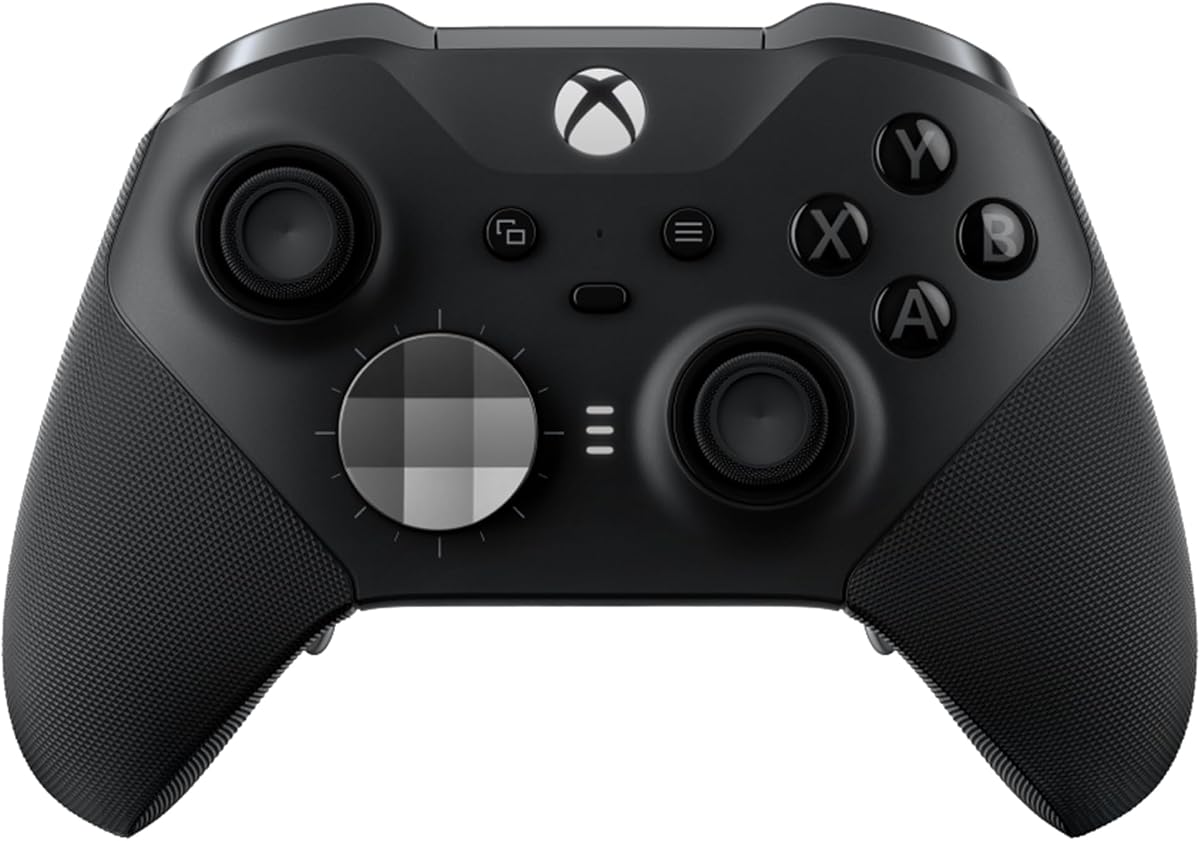
The Xbox Elite Wireless Controller Series 2 is a refined choice for players who want to shape every part of their control setup. It has a 4.3 rating and supports more than 30 ways to customize play. Adjustable-tension thumbsticks, interchangeable D-pads, and multiple paddle options make it particularly attractive for dedicated PC players.
We may earn a commission when you buy through this link, at no additional cost to you.
Three-step hair trigger locks reduce trigger pull distance for rapid actions, while the included set of six thumbsticks, four paddles, and two D-pads allows for considerable personalization. The controller can save three custom profiles, and the Xbox Accessories app supports button mapping, dead-zone adjustment, and keyboard remapping for supported games.
Up to 40 hours of rechargeable battery life, wrap-around rubberized grips, a carrying case, and a charging dock create a complete package. However, the supplied features do not advertise a high polling rate, so it may not appeal as strongly to players who prioritize benchmarked competitive response over physical customization.
This Elite model is best for a long-term PC or Xbox setup where comfort, interchangeable parts, trigger stops, and profile management are priorities. It is a particularly strong recommendation for players willing to tune the controller carefully rather than relying only on default settings.
Swappable thumbstick tops, D-pads, and paddles let you alter both feel and layout. Three onboard profiles make it simple to move between settings for exploration, aiming, and rapid combat.
Rubberized wrap-around grips support long play sessions, while the rechargeable design can provide up to 40 hours of use. The included dock and carrying case complete the premium package.
We may earn a commission when you buy through this link, at no additional cost to you.
The 8Bitdo Ultimate 2 Wireless is one of the strongest all-around choices in this guide, carrying a 4.5 rating. It combines TMR joysticks, a 1000Hz polling rate for 2.4G and wired PC connections, a generous set of rear controls, and support for PC, Apple, Steam, and Android.
We may earn a commission when you buy through this link, at no additional cost to you.
TMR sticks are presented as providing higher sensitivity, greater precision, and improved durability. The trigger mode switch lets players move between linear Hall Effect triggers and non-linear tactile triggers, allowing the same controller to suit different aiming styles. Two pro paddle buttons, extra R4 and L4 bumpers, tactile bumpers, and a responsive D-pad expand the available commands.
Its 2.4G connection is advertised as stable, resistant to interference, capable of a 10-meter range, and able to operate with under 1ms latency. A 1000Hz polling rate is also available in wired mode, giving competitive PC players two strong low-latency options. Customizable six-axis motion control, turbo, rumble, and Ultimate Software V2 support add further depth.
The controller includes a multifunction charging dock and USB-C adapter, making it a particularly complete option for PC play. The absence of Xbox compatibility in the supplied description may be a drawback for console users, but PC-focused players get an excellent blend of precision, response, and customization.
A 1000Hz polling rate is available through both 2.4G wireless and wired connections. This gives you flexibility to move around your desk without sacrificing the controller's competitive input specification.
The physical trigger mode switch alternates between linear Hall Effect behavior and non-linear tactile response. That makes it easy to choose a consistent pull for precise aiming or a more physically responsive pull for action-heavy encounters.
We may earn a commission when you buy through this link, at no additional cost to you.
The GameSir G7 Pro Wired has a 4.3 rating and blends Xbox-style familiarity with extensive PC customization. It supports wired Xbox play, 2.4G and wired PC modes, and Bluetooth for Android, using a physical switch to move between connection methods. This makes it adaptable without sacrificing a wired option for PC.
We may earn a commission when you buy through this link, at no additional cost to you.
Mag-Res TMR sticks are designed to combine the accuracy of traditional potentiometer sticks with Hall Effect durability and minimal drift. Hall Effect analog triggers deliver smooth linear input, while clicky microswitch trigger stops can provide a shorter, more pronounced action. A 1000Hz PC polling rate is available over both wired and 2.4G connections.
The GameSir Nexus app adds gyro settings, stick curve adjustments, and button-to-mouse mapping. A PC-only gyroscope can map to sticks, buttons, or mouse, and four customizable buttons include L5 and R5 bumpers plus lockable rear buttons. These are valuable features for players who want to experiment with aim and control styles.
The included charging station and built-in 1200mAh battery add convenience, though the controller's name emphasizes its wired mode rather than wireless-first use. It is a strong fit for PC players who want extensive tuning, stable 1000Hz response, and a familiar layout without giving up cross-device support.
The Nexus app supports stick curves, gyro configuration, and button-to-mouse mapping. These tools let you adapt the controller rather than accepting a single default control scheme.
TMR sticks are intended to limit drift, while Hall Effect triggers provide linear analog control. Removable trigger stops let you choose between a full pull and a shorter, quicker action.
We may earn a commission when you buy through this link, at no additional cost to you.
The wireless GameSir G7 Pro combines an official Xbox license with a 4.4 rating and a strong feature set for Windows. It supports Xbox Series X|S, Xbox One, and PC, using its 2.4G connection for console play and up to a 1000Hz polling rate for PC through wired or wireless modes.
We may earn a commission when you buy through this link, at no additional cost to you.
Mag-Res TMR joysticks are designed for precise movement with virtually no drift. The triggers can switch between Hall Effect analog operation and micro triggers, while optical ABXY switches and a mechanical D-pad emphasize crisp feedback. Four remappable controls include mini bumpers and lockable back buttons, providing additional shortcuts without changing the main face layout.
Its Zenless Zone Zero edition includes a three-part magnetic faceplate and two extra D-pads, allowing visual and functional customization. The built-in 1200mAh battery and smart auto start-stop charging station make charging more convenient, while GameSir Nexus software adds gyro settings, stick curve adjustment, and mouse mapping.
The 1000Hz rate is explicitly a PC feature, and the console experience is optimized for stable wireless performance. Compared with the wired G7 Pro, this model also does not list gyro aiming. Even so, it is a well-rounded recommendation for Xbox and PC players who want a modern wireless pad with extensive controls.
Official Xbox licensing supports Series X|S and Xbox One, while Windows support makes the controller useful for PC gaming. The same familiar layout works across both types of hardware.
A magnetic three-part faceplate and alternate D-pads let you alter appearance and control style. Four extra remappable buttons support additional actions, while trigger stops offer a choice of input behavior.
We may earn a commission when you buy through this link, at no additional cost to you.
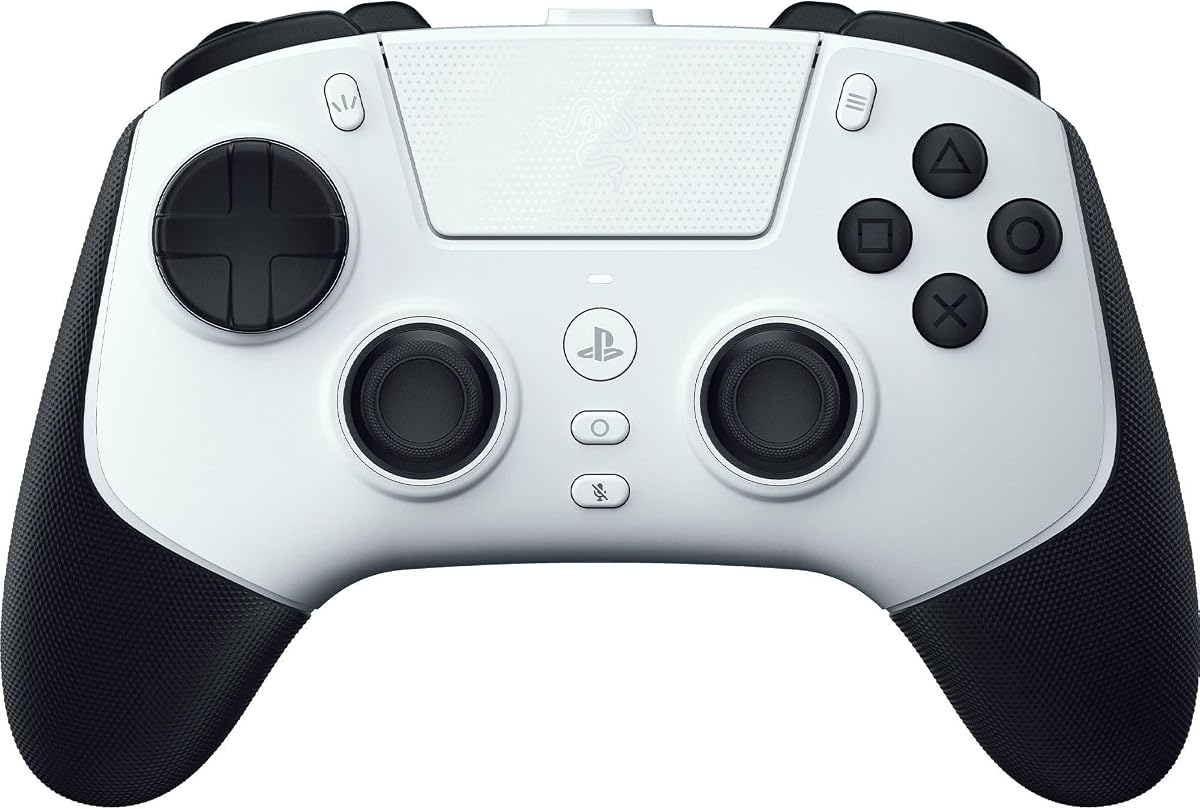
The Razer Raiju V3 Pro is a premium, officially licensed controller for PlayStation 5 and PC. Its 3.9 rating is the lowest among the products in this roundup, but the hardware targets a specific player who values low-latency input, symmetrical sticks, and tournament-oriented rear controls.
We may earn a commission when you buy through this link, at no additional cost to you.
Four removable mouse-click back buttons and two claw-grip bumpers can be remapped for faster reactions. Symmetrical magnetic TMR thumbsticks offer anti-drift consistency, with swappable caps allowing a change in feel. Pro HyperTriggers switch between rapid mouse-click actuation and full analog pulls, making the controller useful for both precision aiming and more analog-intensive play.
HyperSpeed 2.4GHz wireless supports low-latency PS5 play, while the wired PC connection reaches a 2000Hz polling rate. The controller can also save four onboard profiles and supports thumbstick sensitivity, trigger calibration, and button remapping through the Razer Mobile App or Razer Synapse 4. Included accessories include a carrying case, cable, spare caps, and a back-button removal toolkit.
The premium cost and specialized feature set may be difficult to justify for casual PC play, and the 3.9 rating suggests some buyers may have mixed experiences. For a serious PS5 or PC competitive setup, however, the combination of symmetric layout, remappable rear controls, and tournament accessories is difficult to overlook.
The wired PC mode supports a 2000Hz polling rate, while HyperSpeed wireless targets low-latency PS5 and PC use. This gives competitive players several ways to optimize their connection.
Mouse-click rear buttons, claw-grip bumpers, symmetrical TMR sticks, and switchable Pro HyperTriggers provide multiple rapid-input options. Remapping lets you assign those controls to suit your own combat habits.
We may earn a commission when you buy through this link, at no additional cost to you.
The ASUS ROG Raikiri II is a tri-mode PC and Xbox controller with a 3.9 rating. It supports low-latency 2.4GHz RF, Bluetooth, and wired USB-C, while certification allows it to work with Xbox systems through USB-C or 2.4GHz. That connection flexibility makes it useful for players who alternate between platforms.
We may earn a commission when you buy through this link, at no additional cost to you.
Its 1000Hz polling rate applies to both wired and 2.4GHz PC modes, with ROG SpeedNova Wireless technology intended to minimize latency. TMR joysticks prioritize accurate input and reduced power consumption compared with Hall Effect designs, and four fully programmable rear buttons provide additional commands for movement, abilities, or communication shortcuts.
Dual-mode triggers can switch between short-travel microswitch operation and full-travel TMR sensor behavior. The D-pad, ABXY buttons, rear buttons, and bumpers all use microswitches for tactile feedback. The supplied battery estimate is at least 30 hours of 2.4GHz play with RGB lighting, audio, and vibration disabled, so real-world duration may be shorter when those features are active.
The premium accessories include a protective case that can charge the controller while enclosed, a charging stand, and two detachable stick caps. It is a sensible option for PC and Xbox users who want rear controls and high polling without giving up several connection methods.
Low-latency 2.4GHz, Bluetooth, and wired USB-C cover gaming, convenience, and stable desktop play. Xbox certification broadens compatibility for console-focused setups.
Dual-mode triggers alternate between short-travel microswitches and full-travel TMR sensing. This lets you choose between a fast action and a more controlled analog-style pull.
We may earn a commission when you buy through this link, at no additional cost to you.
The Xbox Storm Breaker Special Edition has a 4.6 rating and delivers a refined, familiar Xbox experience for PC and console play. Its classic gray, black, and white design is more understated than some special editions, while textured triggers and rubberized rear grips prioritize handling during long sessions.
We may earn a commission when you buy through this link, at no additional cost to you.
Xbox Wireless and Bluetooth support the controller across Xbox consoles, PC, mobile devices, gaming handhelds, Smart TVs, and supported VR headsets through Xbox Cloud Gaming. USB-C provides a direct wired connection, and a 3.5mm audio jack provides another way to connect a compatible headset. A dedicated Share button supports capturing and sharing content.
The controller can be customized through the Xbox Accessories app, including button mapping and personalized profiles. The supplied specifications do not highlight a high polling rate, rear buttons, advanced stick sensors, or trigger-stop options, making this more of an accessible all-purpose option than a tournament-focused peripheral.
Up to 40 hours of advertised battery life makes the Storm Breaker appealing for players who rotate between devices and prefer not to recharge frequently. It is a strong recommendation for general ARC Raiders sessions, especially if you already favor the standard Xbox layout and want a comfortable, straightforward controller.
Textured triggers and rubberized grips improve grip and reduce the need to squeeze tightly. These physical details are valuable during extended play, even without advanced competitive components.
Xbox Wireless, Bluetooth, and USB-C let you move among consoles, PCs, handhelds, and other supported devices. The Share button and 3.5mm headset connection round out the everyday feature set.
We may earn a commission when you buy through this link, at no additional cost to you.
The most useful controller is the one that matches your platform, preferred aiming style, and desired level of customization. For PC-focused ARC Raiders sessions, consider latency, stick consistency, trigger behavior, remapping tools, battery life, and connection stability before making a choice.
Polling rate describes how frequently the controller checks with the PC for new input, while latency covers the broader delay between your physical action and the game receiving it. A higher rate can make rapid inputs register more consistently, although real-world advantage also depends on the PC, display, connection, and game. The Razer Wolverine V3 Pro leads this list with 8000Hz support, the Raiju V3 Pro reaches 2000Hz in wired PC mode, and several alternatives provide 1000Hz performance.
Prioritize a high polling rate for competitive sessions, but also favor a stable wireless implementation or dependable wired connection. A very high number does not replace good ergonomics or precise sticks, so balance speed with the rest of the control experience.
Analog stick drift can gradually distort aiming and movement. TMR and Hall Effect sensors are designed to reduce unwanted movement and can be preferable when consistency is important over a long period of use. The Wolverine V3 Pro and Raiju V3 Pro use magnetic TMR sticks, while the 8Bitdo Ultimate 2, GameSir G7 Pro models, and ROG Raikiri II also use TMR sensing. The Aurora II uses Hall Effect joysticks.
Choose TMR when drift resistance is a priority and you value stable analog behavior. If you prefer a familiar controller with adjustable physical resistance, the Xbox Elite Series 2 offers another route through interchangeable stick components.
Analog triggers allow different pull distances to represent different actions, while digital trigger modes can register earlier and create shorter, more rapid commands. PC shooters often benefit from either smooth linear control or an adjustable stop depending on personal preference. The GameSir G7 Pro and ROG Raikiri II can switch between sensor-based and microswitch-style triggers, while Razer Pro HyperTriggers offer mouse-click and analog modes.
Test both a short digital pull and a full analog pull if possible. A stop that feels crisp to one player may feel abrupt to another, so the best trigger is the one that supports consistent aiming without accidental actions.
Back buttons can bind sprinting, crouching, abilities, communication commands, or other actions to convenient fingers. The Razer controllers lead with four mouse-click rear inputs, while the 8Bitdo Ultimate 2, ROG Raikiri II, and GameSir models add varying combinations of bumpers and rear buttons. The Xbox Accessories app and GameSir Nexus also support remapping, but software access and game compatibility should be checked.
Look for at least two remappable rear controls if you use a claw grip. Also confirm whether mappings can be stored on the controller, because onboard profiles remain useful when launching games without immediately opening a companion app.
Wired connections are dependable and eliminate wireless interference concerns, while 2.4GHz receivers generally offer low latency across a room. Bluetooth is convenient for PC and mobile use but may not be the first choice for the most competitive sessions. The Xbox Elite Series 2, Storm Breaker, DualSense, 8Bitdo Ultimate 2, and ROG Raikiri II each support several methods, giving you flexibility.
Choose wired mode when consistency matters most and reserve wireless for mobility. If you prefer a cable-free desk, verify the included receiver and confirm that the stated low-latency performance applies to the specific connection method and platform you intend to use.
Wireless play is more convenient when the battery can survive multiple sessions. The Xbox Elite Series 2 and Storm Breaker advertise up to 40 hours, the ROG Raikiri II lists at least 30 hours under specified conditions, and the Aurora II includes a 1000mAh battery. The GameSir G7 Pro Wireless has a 1200mAh battery and an auto start-stop charging station, while the 8Bitdo Ultimate 2 includes a multifunction dock.
Compare battery estimates carefully because lighting, vibration, audio, and wireless mode can change power consumption. A charging dock or case that supports charging is useful, but a long battery estimate still matters if you game away from your desk.
A PC-only controller can provide specialized features without console clutter, but multi-platform support is convenient if you also play on a handheld, console, or mobile device. The Aurora II supports PC, Android, Switch, iOS, Switch 2, and Steam Deck. The DualSense works with PS5, PC, Mac, and mobile, while the Xbox Elite and Storm Breaker cover Xbox, Windows, and cloud-connected devices.
Check the current game and application requirements before buying. Confirm that the relevant app supports your operating system, that remapping works with the titles you play, and that any console license or connection adapter is included if you plan to switch platforms.
A controller that feels good during a short menu visit may become uncomfortable during a long extraction run. Consider grip shape, weight distribution, button placement, and whether you prefer symmetrical sticks, offset sticks, or smaller triggers. The Razer Raiju V3 Pro emphasizes a symmetrical layout, while many Xbox-style controllers use offset sticks. Rubberized grips, swappable caps, and alternate D-pads can improve long-term comfort.
Choose a shape that matches your hands and grip rather than relying on visual style. If possible, compare several models in person, particularly if you are choosing between conventional, asymmetrical, and symmetrical designs.
Begin by confirming that ARC Raiders is running on a compatible Windows PC and that the controller has been updated, paired, or connected using the method you intend to use. Wired USB-C or USB-A models should be recognized directly, while 2.4GHz controllers generally require their receiver to be inserted before the controller is powered on. Bluetooth models should be paired through Windows or the instructions supplied with the controller.
Before a competitive session, test every stick direction, face button, bumper, trigger, and rear button. Apply the desired dead zone, sensitivity, trigger curve, or button mapping in the appropriate companion software, then save the profile to the controller when that option is supported. Avoid making major changes immediately before a match, because unfamiliar sensitivity or trigger behavior can temporarily reduce accuracy.
To maintain the controller, keep it away from moisture, excessive heat, dust, and sharply impactive surfaces. Clean the grips and buttons with a soft dry cloth, and do not pour liquid into the ports. Charge a wireless controller on its supplied dock or with a suitable USB cable, and periodically check the battery, stick response, and firmware updates so that a worn component or outdated software does not interrupt play.
The best controller depends on your priorities. The 8Bitdo Ultimate 2 Wireless is a balanced choice because it combines 1000Hz polling, TMR sticks, multiple trigger modes, and cross-platform support. The Razer Wolverine V3 Pro is better suited to a dedicated Windows competitive setup, while the Xbox Elite Series 2 emphasizes physical customization and comfort.
A 1000Hz polling rate can benefit fast input registration, but it is not the only factor that determines how a controller feels. Stick precision, trigger behavior, wireless stability, and comfort also influence performance. If your setup and budget align, the feature is useful, but a stable controller with a lower listed rate can still be a strong choice.
TMR and Hall Effect joysticks are both designed to reduce drift compared with conventional sensing approaches. TMR may appeal to players seeking the advertised precision and lower power consumption of newer magnetic sensing, while Hall Effect remains a proven alternative. The best choice also depends on stick feel, calibration, and the controller's overall build.
Yes, the Xbox Elite Wireless Series 2, ROG Raikiri II, and Xbox Storm Breaker all support Windows PC according to the supplied product information. You can generally use the appropriate wireless connection or a USB-C cable. For remapping and profile features, check that the Xbox Accessories app and the specific game support the functions you want.
Wired mode is a straightforward choice when you want the most consistent physical connection and do not need to move around your desk. Wireless mode offers more freedom, and controllers with 2.4GHz receivers are designed for low-latency play. Use the connection mode that feels most reliable in your room and verify that it is recognized correctly before entering a session.
Analog triggers can provide finer control because different pull distances can represent different in-game inputs. They can also be useful for gradual actions such as charging, aiming, or interacting. Players who prefer a faster trigger response may choose a model with switchable microswitch or digital modes instead.
Back buttons can reduce the need to move your thumb away from the aiming stick, making frequently used commands easier to access. They can be assigned to sprinting, crouching, communication, weapon functions, or other supported actions. Remap them only after confirming that ARC Raiders recognizes the chosen inputs, and begin with a simple layout.
Start with a controller that uses TMR or Hall Effect sticks, then use the available calibration or dead-zone tools to define the center position. Keep the controller and firmware updated, and check that a physical problem is not being mistaken for software drift. If movement remains irregular, contact the manufacturer or consider replacement rather than repeatedly increasing dead zones.
The 8Bitdo Ultimate 2 Wireless stands out as the most balanced recommendation, pairing a 4.5 rating with 1000Hz PC polling, TMR sticks, switchable triggers, and useful rear controls. The AceGamer Aurora II is the value-oriented choice for broad multi-platform wireless use, while the Razer Raiju V3 Pro offers premium tournament features for PS5 and PC players.
Prioritize the factors you can feel during play. Competitive users should examine polling rate, stick consistency, trigger travel, and remapping, while general players may place more importance on comfort, battery life, device switching, and a familiar shape. Avoid choosing solely on the largest specification number, because stable software, usable controls, and a comfortable grip influence long-session performance just as much.
Ratings, product availability, and pricing can change over time, so review the current listing and accessory details before buying. Confirm the controller's platform support, connection requirements, and latest firmware information, then choose the model that best matches how you actually play ARC Raiders.