
EMEET NOVA 4K Webcam for PC
4.5Editor score
True 4K at 30 fps
PDAF autofocus system
Dual omnidirectional microphones
This 4K Webcams for Live Streaming guide compares ten leading models across image quality, autofocus, audio, tracking, privacy, compatibility, and setup ease.
A strong live-streaming webcam should deliver sharp video, responsive autofocus, clear voice capture, and dependable framing without turning a simple setup into a complicated production project. Resolution matters, but sensor size, lighting controls, microphone design, and software compatibility often make a more meaningful difference in everyday broadcasts.
This guide compares ten 4K webcams using their supplied specifications, focusing on image quality, focus behavior, field of view, audio, privacy features, mounting options, and major streaming-platform support. It covers options for beginners, creators who need automated tracking, and streamers who want fine control over framing or color settings.
Each review explains the features that distinguish its webcam, along with practical limitations and the type of creator it suits best. The top choices balance capability, simplicity, and specialized functionality, while prices and availability can change at any time, so readers should confirm current listings before purchasing.
4.5Editor score

4.4Editor score

4.6Editor score
The comparison below highlights each webcam's most important imaging, audio, framing, and privacy features. It is designed to make the differences between simple 4K webcams, AI-tracking cameras, dual-camera systems, and premium manual-control models easy to understand.



The EMEET S600 is a practical 4K webcam for streamers who want a capable Sony sensor, modern autofocus, and useful framing controls without moving to a specialized production camera. Its 4.4 rating reflects a strong balance of image quality, audio features, flexible positioning, and plug-and-play operation. It is particularly appealing because the field of view can narrow at 1080p or widen for a more open composition.
We may earn a commission when you buy through this link, at no additional cost to you.
Its 1/2.55-inch Sony sensor supports 4K at 30 frames per second and 1080p at 60 frames per second. That gives creators a practical choice between detailed 4K output and smoother high-frame-rate capture. PDAF autofocus is designed to deliver faster and more stable focusing than conventional webcam systems, while automatic light adjustment helps balance shadows and highlights. At 1080p, the field of view ranges from 40 to 73 degrees; at 4K, it is fixed at 73 degrees.
Audio is handled by microphones using a proprietary noise-filtering algorithm. Noise cancellation is enabled by default and can be disabled through EMEETLINK when a more natural sound is preferred. The built-in privacy cover is unusually reassuring because it physically blocks the lens without relying solely on software. The main limitation is that 4K does not automatically begin after connection; the resolution must be selected in compatible camera software such as OBS or PotPlayer.
This webcam is a strong recommendation for a first serious streaming setup, a home office, or a creator who wants control over framing but does not need automated subject tracking. The EMEETLINK software expands its usefulness with image and sound adjustments, while its flexible mount helps place the camera accurately. For buyers prioritizing a capable sensor, clean privacy design, and adaptable field of view, the S600 is an accomplished everyday choice.
The adjustable 40-to-73-degree field of view gives the S600 more compositional flexibility than most fixed-FOV webcams. You can tighten the image for face-focused commentary at 1080p or retain a wider view for demonstrations and multi-person scenes.
The integrated lens cover provides a straightforward way to prevent unwanted recording, while rotation and tilting adjustments help the camera remain securely positioned after finding the ideal angle.
We may earn a commission when you buy through this link, at no additional cost to you.
The EMEET NOVA is an approachable 4K webcam with a 4.5 rating, phase-detection autofocus, dual omnidirectional microphones, and broad operating-system support. It covers the essentials a new streamer needs without requiring a complicated hardware workflow. Its 73-degree field of view is designed to keep the presenter prominent while retaining enough context to avoid an overly cropped image.
We may earn a commission when you buy through this link, at no additional cost to you.
The CMOS camera can produce 4K at 30 frames per second, although its default output is 1080p. Streamers using OBS or PotPlayer can select 4K manually after connection. PDAF autofocus operates within a specified range of 7.9 to 118 inches, which suits normal desk and room positions. EMEETLINK adds control over brightness, contrast, saturation, and backlight compensation, but facial tracking, disabling autofocus, and FOV adjustment are not supported.
Two built-in microphones are designed to capture voices clearly from up to eight feet away. EMEET recommends keeping the microphones unobstructed, positioning the webcam near the speaker, and using the device in a reasonably quiet room. The USB 2.0 Type-A connection, physical privacy cover, and absence of Wi-Fi, Bluetooth, or cloud storage make the NOVA appealing for straightforward, locally connected use.
The NOVA is a compelling recommendation for first-time streamers, remote professionals, and educators who want a dependable webcam that works across major meeting and broadcasting platforms. Its limitations are meaningful for advanced creators: there is no manual focus, the field of view stays fixed, and there is no intelligent subject tracking. Even so, the combination of clear audio, fast autofocus, privacy, and easy setup makes it one of the most approachable picks in this guide.
The NOVA defaults to 1080p for compatibility, then allows users to select true 4K through compatible camera software. That approach makes it easy to begin broadcasting without overlooking the required output setting.
A wired USB connection, local operation without required cloud storage, and a physical lens cover create a controlled setup for users who value straightforward privacy and predictable connectivity.
We may earn a commission when you buy through this link, at no additional cost to you.
The Logitech MX Brio combines a sophisticated sensor, refined image processing, flexible manual controls, and polished workplace features. Its 4.4 rating and broad certification list make it a strong all-around choice for streamers who want a camera that can transition between broadcasts, meetings, and collaborative work. It supports 4K at 30 frames per second and 1080p at 60 frames per second.
We may earn a commission when you buy through this link, at no additional cost to you.
Logitech states that its newest webcam sensor uses 70% larger pixels, while AI-enhanced processing improves face visibility in difficult lighting. Auto-exposure, auto white balance, noise reduction, and autofocus handle routine conditions automatically. Creators who want more control can adjust ISO, shutter speed, tint, and vibrance, or allow Auto mode to make those decisions. Dual beamforming microphones use AI to reduce background noise and keep speech clear.
The camera adds features not commonly found in basic streaming webcams. Show Mode tilts the camera downward to share notes or sketches on a desk, which makes the Brio useful for tutorials and collaborative sessions. A rotating built-in cover physically blocks the lens between meetings. It works with Windows, macOS, Chrome OS, and Linux and is certified for Zoom, Microsoft Teams, Chromebook, Google Meet, and Streamlabs. It also supports Nintendo Switch 2's GameChat mode.
The Brio is recommended for professionals who want strong image quality, refined controls, and seamless movement between streaming and collaboration. Its USB-C connection may be an important compatibility consideration for builders using older USB-A equipment, while Show Mode requires the webcam to be angled so the desk is visible. For a polished, versatile camera that can serve as the centerpiece of a modern creative workspace, the MX Brio remains an excellent premium selection.
Automatic exposure, white balance, noise reduction, and focus make the Brio approachable, while ISO, shutter speed, tint, and vibrance give experienced creators room to shape the image.
Show Mode, broad platform certification, and a rotating privacy cover make this webcam especially useful for creators who regularly move between live broadcasts, meetings, teaching, and desk demonstrations.
We may earn a commission when you buy through this link, at no additional cost to you.
The YOLOLIV YoloCam S3 has the highest rating in this guide at 4.6 and is built for creators who want more direct control over their stream image. Its 1/1.3-inch CMOS sensor is unusually large for a webcam, providing 4K at 30 frames per second and 1080p at 60 frames per second. An 82-degree field of view keeps the framing broad without sacrificing detail.
We may earn a commission when you buy through this link, at no additional cost to you.
Fast PDAF autofocus is designed to produce instant, zero-lag focus and crisp close-ups. AI-enhanced imaging combines smart exposure, white balance, HDR, and face optimization, with the supplied information indicating improved clarity in low light. Creators can fine-tune contrast, sharpness, saturation, exposure, white balance, autofocus, and color. Picasso Resolve adds a dedicated YOLOLIV color-grading engine with a simpler interface than many professional grading tools.
The S3 supports four-times digital zoom while maintaining a 1080p image, a useful feature for reaching into a product demonstration or repositioning within a scene. Its all-aluminum body is designed to dissipate heat and support stable, continuous streaming. USB 3.0 connectivity, a foldable magnetic mount, and an integrated 1/4-inch thread make installation flexible on PCs and Macs. One limitation is that Picasso Resolve is currently available for Windows, with Mac support listed as coming soon.
This webcam is ideal for a creator who wants manual exposure and color control without moving to a interchangeable-lens camera. It may be unnecessary for a simple talking-head broadcast, but it provides a more deliberate production workflow for editing, demonstrations, and image-conscious live content. For serious manual control and a large sensor in a compact streaming package, the YoloCam S3 is a standout.
The 1/1.3-inch sensor is the centerpiece of the S3, supporting the kind of detail and exposure flexibility that makes a webcam suitable for deliberate color and sharpness adjustments.
Picasso Resolve and the broad manual settings let creators develop a distinctive look without requiring the complexity of an interchangeable-lens camera and separate computer-capture workflow.
We may earn a commission when you buy through this link, at no additional cost to you.
The EMEET C60E stands apart with two cameras sharing a 1/2.8-inch CMOS sensor. The left camera provides a wide view for the presenter and surroundings, while the right telephoto camera is intended for detailed close-ups. This dual-camera arrangement makes the C60E particularly interesting for product demonstrations, remote teaching, and streams that alternate between a full scene and a tighter composition.
We may earn a commission when you buy through this link, at no additional cost to you.
Hybrid zoom extends from 1X to 11X, with intermediate settings for smooth transitions between wide and close views. PDAF autofocus helps maintain stability as the framing changes, and remote or EMEET STUDIO control allows adjustments without physically moving the webcam. Zoom is not available in 4K, 60 frames per second, or YUY2 modes, which is an important limitation for creators who want simultaneous maximum resolution and magnification.
The design incorporates red, green, and blue RGB lighting that also serves as a visible status indicator. Its dual omnidirectional microphones are specified to capture natural sound within a 9.8-foot radius. Plug-and-play USB 2.0 Type-A connectivity, broad Windows and macOS support, compatibility with OBS, Twitch, YouTube, and Facebook, and a 1/4-inch tripod mount make it fit naturally into a conventional streaming setup.
The C60E is best for creators who need to alternate between scene coverage and close-up detail without juggling separate cameras. It is less attractive for a single, fixed talking-head format because its most distinctive abilities are specialized. Even so, the dual-view design, remote operation, hybrid zoom, PDAF focus, and expressive lighting give it a clear identity and a strong place in a creative production lineup.
The wide camera keeps people and background context visible, while the telephoto camera offers a tighter perspective for details. That combination reduces the need for multiple camera bodies in certain workflows.
Control through the remote or EMEET STUDIO allows zoom and color adjustments while the camera stays mounted, making it easier to respond to a live demonstration without interrupting the presentation.
We may earn a commission when you buy through this link, at no additional cost to you.
The EMEET PIXY is built around automated framing, combining a 4K main camera with an auxiliary AI camera that detects face position. Its three-chip architecture separates imaging, AI assistance, and motorized pan-and-tilt control. With a 4.3 rating, it stands out for creators who need the camera to follow movement rather than remaining fixed during a broadcast.
We may earn a commission when you buy through this link, at no additional cost to you.
The main camera uses a 1/2.55-inch sensor and PDAF focus, while the AI camera helps optimize focus and exposure. According to the supplied specifications, the combined system can focus in 0.2 seconds. The PTZ mechanism provides 310 degrees of pan and 180 degrees of tilt, and an open-palm gesture held in front of the camera for two seconds activates gesture control. EMEET STUDIO adds preset positions, whiteboard mode, privacy activation, field-of-view controls, and AI-generated shot lists and movements.
Audio is unusually versatile. A three-microphone array supports Live Mode for steady noise such as fans and air conditioning, Noise Canceling Mode for both steady and sudden sounds such as keyboard clicks or door slams, and Original Sound Mode for preserving ambience in music or singing. The camera can also use a separately sold remote. Field of view is adjustable at 1080p and 2K 30 frames per second but locked at 4K 30 frames per second and 1080p 60 frames per second.
PIXY is a strong recommendation for fitness streams, teaching, beauty content, product demonstrations, and scenes involving substantial movement. It is less ideal for a creator who wants a minimal webcam with no motorized movement or software dependency, especially because some advanced functions require EMEET STUDIO. For its audience, however, the combination of tracking, PTZ, audio modes, privacy controls, and broad streaming compatibility makes it a remarkably capable all-in-one camera.
Face detection, AI-assisted focus, and motorized pan-and-tilt movement let the camera keep a moving presenter centered, reducing the need to manually correct framing during demonstrations.
Live Mode handles continuous mechanical noise, Noise Canceling Mode targets a broader range of interference, and Original Sound Mode retains more environmental detail for music-oriented content.
We may earn a commission when you buy through this link, at no additional cost to you.
The EMEET C960 is a clear, practical webcam for online meetings, remote teaching, and straightforward live streams. Its 4.5 rating reflects a strong combination of true 4K support, phase-detection autofocus, automatic light adjustment, dual microphones, and broad compatibility. The fixed 73-degree field of view is intended to frame the user clearly without excessively narrowing the scene.
We may earn a commission when you buy through this link, at no additional cost to you.
The C960 supports 4K through compatible software and defaults to 1080p after connection. PDAF autofocus is intended to remain stable across common meeting and lecture scenarios, while automatic light adjustment helps maintain visibility in over-exposed or low-light rooms. EMEETLINK provides additional image settings, but the webcam does not need cloud storage, Wi-Fi, or Bluetooth to function.
The dual omnidirectional microphones are designed for clear, natural conference-call audio. Users should select the C960 as the default microphone in their operating system and streaming application. USB-A plug-and-play operation makes setup uncomplicated, and a physical privacy cover blocks the lens. The mount supports 360 degrees of horizontal rotation, 15 degrees of vertical adjustment, and a standard 1/4-inch tripod thread.
The C960 is a good fit for office workers, educators, and streamers who value a recognizable webcam workflow more than advanced tracking or cinematic controls. Its lack of automated subject tracking means it works best with the user remaining in a stable position, but that is also what keeps the setup understandable. For true 4K clarity, clear voice capture, and compatibility with major services, the C960 is a confident midrange recommendation.
The 4K CMOS sensor captures enough detail for presentations, teaching, and conversations where clear facial rendering and image sharpness are more important than tracking effects.
Support for Windows, macOS, Linux, Android TV, Zoom, Teams, Skype, and other common services allows the same webcam to move naturally between work and streaming environments.
We may earn a commission when you buy through this link, at no additional cost to you.
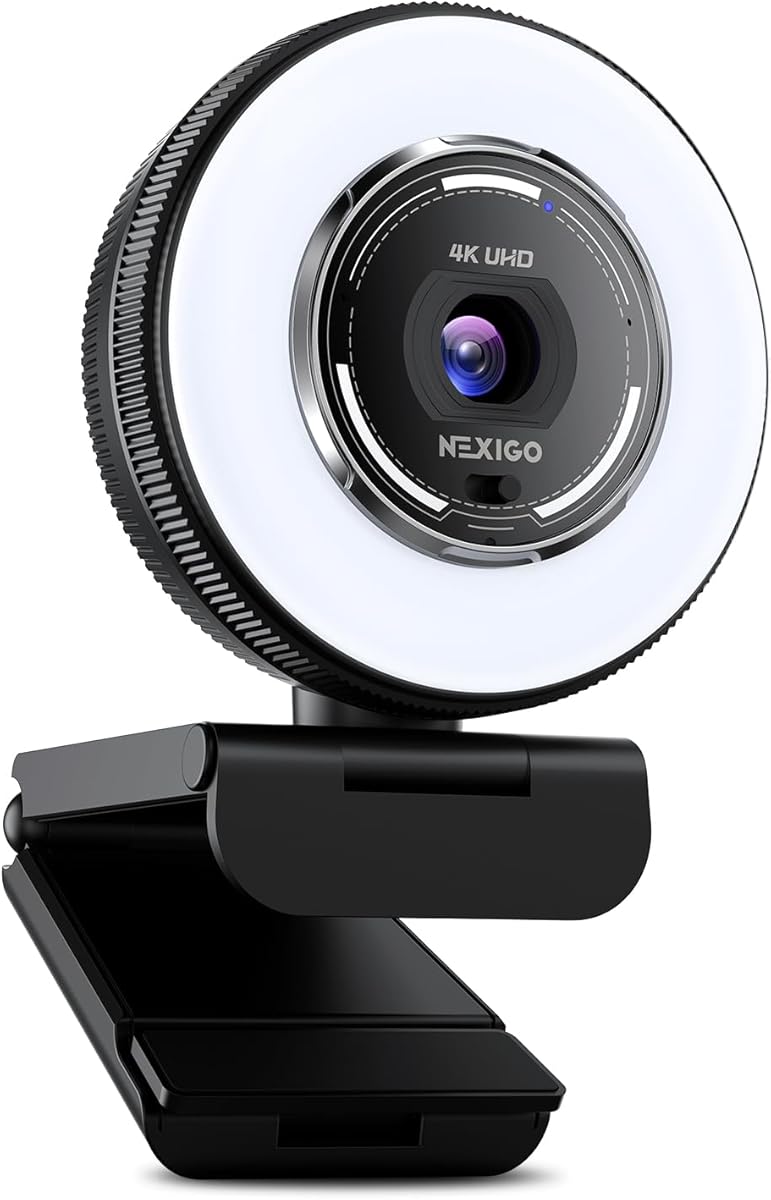
The NexiGo N680E Pro combines a 1/2.5-inch Sony sensor with a built-in ring light, making it a distinctive option for streamers who want more illumination without adding a separate accessory. Its 4.5 rating reflects a strong balance of image hardware, autofocus, audio, privacy, and everyday compatibility. It supports 4K at 30 frames per second and 1080p at 60 frames per second.
We may earn a commission when you buy through this link, at no additional cost to you.
The ring light offers three color-temperature modes, while its outer dial steplessly adjusts brightness. That gives creators a quick way to soften or brighten their setup without repositioning a separate lamp. The coated lens is designed to improve light transmission and reduce reflections. PDAF autofocus supports quicker, more stable focusing, while dual noise-reducing microphones help keep voice prominent over background sound.
Output resolution depends on the software used, with OBS and PotPlayer listed as examples. The 80-degree field of view is wider than many fixed-angle options, and the flexible clip supports rotation and tilting. A standard 1/4-inch mount allows use with a tripod. The physical privacy shutter blocks the lens directly, and USB-A plug-and-play operation avoids the need for drivers, Wi-Fi, or Bluetooth.
The N680E Pro is recommended for creators working in dim rooms, home studios, or setups where a separate light would otherwise be necessary. Compatibility includes Windows, macOS, Chrome OS, Zoom, Teams, Skype, Twitch, and Google Meet, with Switch 2 support through a USB-C-to-USB-A adapter. The ring light will not suit every environment or aesthetic, but as an integrated tool it makes the webcam especially convenient.
Three color-temperature modes and stepless brightness control make the ring light useful for quickly adapting a dim room without adding another device to the desk.
The 80-degree field of view gives the presenter room to move while remaining broad enough for demonstrations, and the adjustable clip helps optimize the final composition.
We may earn a commission when you buy through this link, at no additional cost to you.
The OBSBOT Tiny 2 Lite is designed for creators who want the camera to follow their movement and support changing presentation angles. It carries a 4.3 rating and combines a 1/2-inch CMOS sensor, 4K resolution, AI tracking, and motorized PTZ. The camera can also be used without downloading an app, making it accessible to new users while retaining deeper controls for experienced operators.
We may earn a commission when you buy through this link, at no additional cost to you.
Tracking modes include upper-body and hand tracking, and creators can define custom tracking and non-tracking areas. Upgraded preset positions allow different framing and camera parameters to be stored for separate scenes, reducing repeated adjustments when moving between layouts. Gesture control supports locking a portrait target with an open-hand gesture and controlling zoom with an upward-pointing finger, providing an alternative to physical interaction with the camera.
Horizontal, portrait, and upside-down shooting modes allow the image to adapt to the computer's placement. Professional users can access SDK, OSC, Stream Deck, and Global Hotkey support for deeper workflow integration. The Lite version streamlines some features from the broader product family, including whiteboard mode and voice control, to emphasize teaching and meeting use. As a result, buyers seeking every advanced mode should not assume the Lite designation includes every function of more specialized models.
The Tiny 2 Lite is a strong choice for teachers, presenters, remote workers, and streamers who frequently change position or need hands-free framing. It is less compelling for creators who want extensive manual color control, because its most prominent advantages concern tracking, presets, and orientation. For automated movement and adaptable presentation workflows, however, it remains one of the most interesting options in the guide.
Creators can select different tracking modes and define where the camera should follow or ignore, allowing automated framing to better match a specific presentation space.
Each preset can carry separate parameters and tracking modes, making transitions between desk views, portrait framing, and other recurring layouts more efficient.
We may earn a commission when you buy through this link, at no additional cost to you.
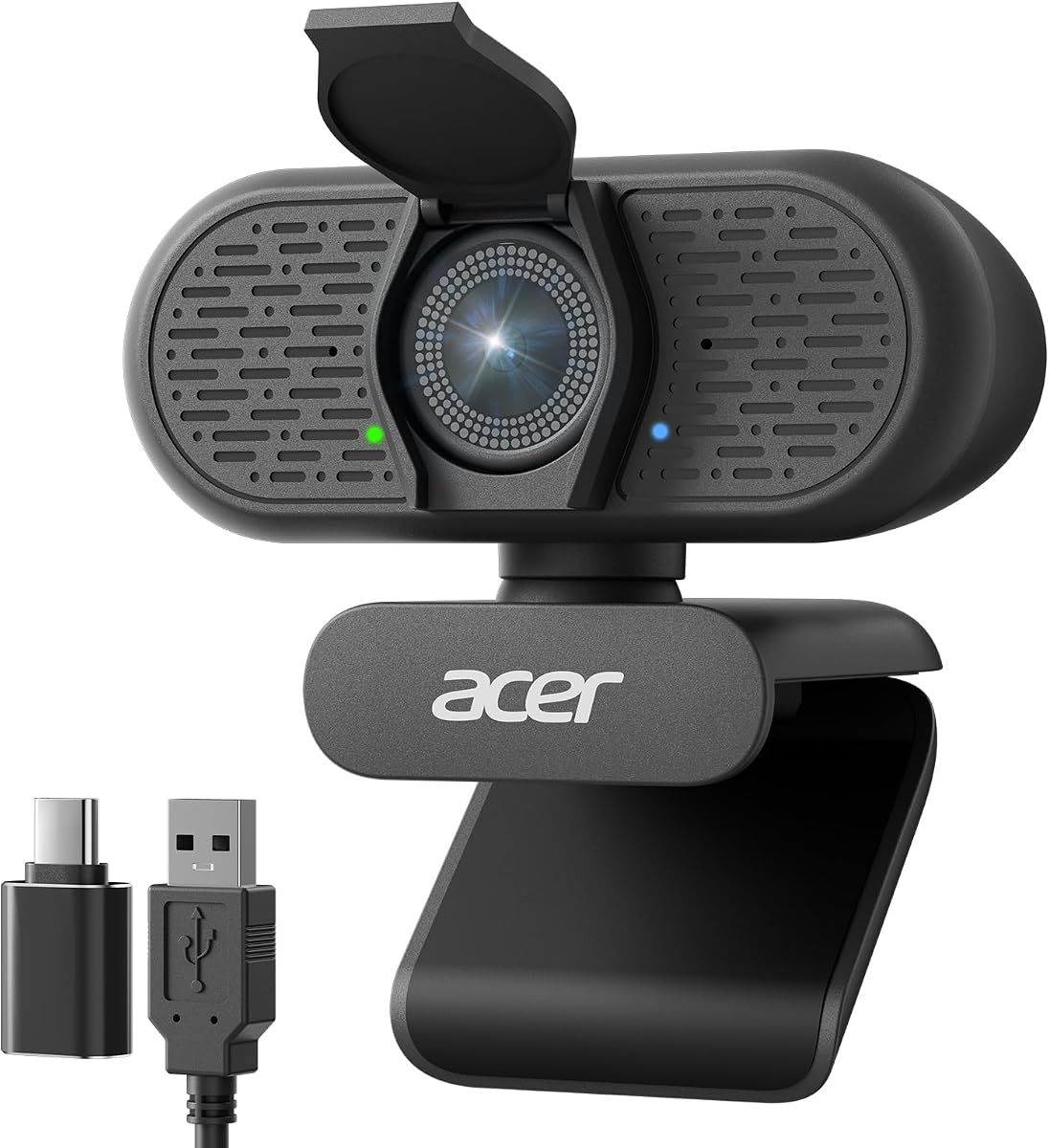
The Acer A640 is a direct, practical 4K webcam for streamers, meeting participants, and remote workers who want a familiar computer-camera experience. Its 4.5 rating is supported by a genuine Sony 1/2.8-inch sensor, phase-detection autofocus, 4K at 30 frames per second, AI microphone noise cancellation, automatic low-light correction, and a physical privacy shutter.
We may earn a commission when you buy through this link, at no additional cost to you.
Besides 4K at 30 frames per second, the camera supports 2K and 1080p at 60 frames per second, allowing creators to choose smoother output when detailed 4K is not essential. PDAF is intended to eliminate the focus hunting associated with conventional webcams. Automatic exposure correction helps the presenter remain visible in dim conditions, reducing the need for continuous manual image adjustments.
The A640 connects through USB-A with a USB-C adapter included for use across different devices. It works natively without additional software or drivers, although users must select it as the default microphone in both system settings and the relevant application. AI noise cancellation filters distracting background sound, and microphone permissions must be enabled for it to work as intended. The webcam does not include speakers, so audio playback still requires separate equipment.
This camera is a good recommendation for anyone seeking a simple, credible 4K upgrade over a basic built-in laptop camera. It supports mainstream environments such as Microsoft Teams, Zoom, Twitch, and Switch 2, while its physical shutter provides visible privacy. It lacks the advanced tracking, motorized framing, and extensive color controls found in higher-end models, but those omissions are reasonable for a straightforward webcam that prioritizes clear video, clean voice capture, and effortless setup.
The Sony 1/2.8-inch sensor provides 4K detail, while 2K and 1080p 60-fps options give streamers a path to smoother output when their computer or platform requires it.
AI noise cancellation reduces distracting environmental sound, while the sliding physical shutter offers a clear and immediate way to block the lens.
We may earn a commission when you buy through this link, at no additional cost to you.
The right 4K webcam depends on more than headline resolution. Sensor quality, autofocus, frame rate, audio, field of view, tracking, privacy, and software support should be matched to the kind of content you intend to broadcast.
Prioritize a capable sensor and good light gathering rather than relying on the 4K label alone.
Choose 4K for detail and 1080p at 60 fps for smoother motion, then confirm how the output mode is activated.
Use PDAF for ordinary movement and AI tracking when the camera should actively reframe the subject.
Match the angle to your content, not just the specification sheet, and check whether it can be adjusted after installation.
Built-in microphones are convenient, but a quiet room and unobstructed placement remain essential for clear voice capture.
Verify operating-system, application, cable, and software compatibility before purchasing, especially if you rely on specialized controls.
Choose a physical shutter or cover if you share a room or want an unmistakable visual confirmation that the camera is off.
Verify connector type, mount security, tripod support, and room for adjustment before committing to a model.
Begin by positioning the webcam at eye level or slightly above it, with the lens facing the intended background and your face centered within the frame. Check the field of view before recording so that gestures, product surfaces, and nearby objects are not cut off. Connect the supplied cable, open the streaming or conferencing application, choose the camera and microphone, and confirm that the desired resolution and frame rate are active.
Next, optimize the image in actual streaming software. Select 4K for detail or 1080p at 60 frames per second for smoother motion, then adjust exposure, white balance, brightness, focus, and framing as needed. Use the camera's dedicated software when it offers controls that the broadcasting platform does not expose. If a privacy cover or shutter is present, close it whenever the camera is not actively being used.
For care, clean the lens gently with a suitable soft cloth and keep the glass free of fingerprints or dust. Avoid placing the camera near direct heat, moisture, or crowded cables. Check the mount periodically so it does not loosen, and keep the cable free from sharp bends. When using an external light or ring light, allow it to warm naturally, and clean the illuminated surface to prevent glare and reflections from reducing image clarity.
A 4K webcam is useful when your production resolution is 4K or when you want room to crop the captured image without losing detail. It matters less if the platform compresses the final stream heavily or if you mainly broadcast at 1080p. In that case, autofocus, microphone quality, lighting, and a stable connection may affect the viewer experience more than the resolution label.
Neither mode is universally better. 4K at 30 frames per second provides more spatial detail and is well suited to teaching, presentations, demonstrations, and relatively static talking-head content. 1080p at 60 frames per second creates smoother motion, which can be preferable for gaming, fitness, fast demonstrations, or any scene with frequent movement.
Start by improving the room lighting so the camera is not forced to compensate for extreme brightness differences. Place the lens near eye level, keep the background tidy, and select the correct resolution in the streaming application. Then adjust exposure, white balance, focus, and field of view using the webcam software or your broadcasting platform.
AI tracking is valuable if you frequently move around, teach, perform, or demonstrate a product and want the camera to maintain your position in the frame. It may add little for a creator who remains seated at a fixed workstation. Models such as OBSBOT Tiny 2 Lite and EMEET PIXY offer the most sophisticated movement, while other webcams focus on faster conventional autofocus.
Most models in this guide support major streaming applications, including OBS, Twitch, YouTube, and Streamlabs, although compatibility should be confirmed for the specific model and operating system. Remember that a 4K webcam does not automatically mean the broadcast is being sent in 4K. The output resolution must also be selected and supported by the platform, computer, and network connection.
Built-in microphones can handle calls and close-range streaming when the room is quiet and the microphones remain unobstructed. A dedicated microphone usually offers more control over voice placement, gain, and background-noise reduction. Models with beamforming or AI noise cancellation can improve results, but they cannot fully overcome echo, a very noisy room, or excessive distance from the speaker.
Both physically block the lens, but their designs differ. A cover may rotate or slide over the front of the webcam, while a shutter may move across the lens opening. Either approach provides a visible, mechanical barrier to imaging, which can be preferable to a software-only privacy mode when the camera is stored in a shared or frequently accessed space.
A larger sensor can improve light gathering and provide a better basis for image quality, but it is not the only factor. Lens design, autofocus, image processing, lighting, software, and compression all influence the final result. A smaller sensor paired with effective processing may still look excellent in a properly lit scene, while a large sensor benefits more visibly when lighting is challenging.
The three leading recommendations serve different needs. The EMEET NOVA is the most approachable starting point, combining 4K, PDAF autofocus, clear microphones, and simple physical controls. The Logitech MX Brio is the most polished general-purpose option, with refined image processing, manual settings, AI-enhanced microphones, and a rotating privacy cover. The YOLOLIV YoloCam S3 is the premium choice for creators who prioritize a large sensor and extensive manual and color controls.
For a fixed talking-head stream, focus on stable focus, accurate exposure, microphone placement, and a comfortable field of view. For a moving presenter, consider the EMEET PIXY or OBSBOT Tiny 2 Lite, both of which add intelligent or motorized framing. The EMEET C60E makes sense when switching between wide scenes and telephoto details is central, while the NexiGo N680E Pro is convenient for creators who want integrated lighting.
Always confirm the current listing, connector, software support, and output settings before purchasing. Prices and availability change, and platform requirements can evolve, so checking the latest product details and compatibility information helps ensure that the chosen 4K webcam integrates cleanly with the intended streaming setup.