
APTGAME Switch Arcade Stick Cabinet, Voice Version
4.9Editor score
Wired zero-lag design
Programmable arcade buttons
Twelve game-card slots
Our Nintendo Switch arcade stick guide compares 10 fight sticks for compatibility, wireless options, button customization, portability, setup, and competitive
A Nintendo Switch arcade stick replaces the small Joy-Con with full-size joystick and arcade buttons, giving fighting games and classic arcade titles a more familiar control layout. The best model combines accurate controls, dependable connection options, useful customization, and a design that suits your play space.
We compared all ten products by examining console and computer compatibility, connection methods, button configuration, programmability, control surface, portability, and practical features such as macro buttons, turbo functions, and game-card storage. The list covers wireless fight sticks, wired cabinets, and models designed for extensive customization.
Each review identifies the product's strongest qualities and trade-offs, while the top picks show the most balanced choices for different needs. Product availability, firmware support, and configurations can change, so shoppers should confirm current details and console requirements before ordering.
4.9Editor score
4.7Editor score

4.6Editor score
This side-by-side comparison covers ten Nintendo Switch-compatible arcade sticks, highlighting platform support, connection choices, control customization, portability, and the features that distinguish wireless fight sticks from portable cabinet-style controllers.



The 8Bitdo Arcade Stick for Switch & Windows is a versatile fighting-game controller with a 4.6 rating. Its strongest combination is broad connectivity, software-based button mapping, and a universal joystick mounting plate, making it suitable for players who want wireless freedom without giving up the option of a wired connection.
We may earn a commission when you buy through this link, at no additional cost to you.
Bluetooth, 2.4G wireless, and wired USB-C cover the three connection styles most players need. The included 2.4G receiver has a dedicated hidden compartment, which is a thoughtful detail for travel and storage. Dynamic button layouts adjust when the controller changes modes, reducing the chance of pressing the wrong function while moving between Switch and PC layouts.
Ultimate Software supports customized mappings, macros, and mode-specific control changes, while the universal mounting plate is designed to accept Sanwa arcade sticks. These are meaningful advantages for competitive players who regularly adjust controls or want a future path toward a more specialized joystick. The main drawback is that Switch 2 is not explicitly listed, so buyers owning that console should confirm support before purchasing.
This is a strong recommendation for Switch and Windows players who want three connection methods and a moddable control center. It is less suitable for someone whose priority is documented Switch 2 compatibility or a clearly stated battery runtime. For those needs, the newer 8Bitdo models in this guide provide more explicit support.
Bluetooth, 2.4G, and wired USB-C let you choose between convenient wireless play and a stable wired setup. The receiver storage compartment also helps keep the controller ready to travel.
Ultimate Software expands the controller beyond its default layout with remapping, macros, and dynamic mode indicators. The universal joystick plate also creates a path for personalized components.
We may earn a commission when you buy through this link, at no additional cost to you.
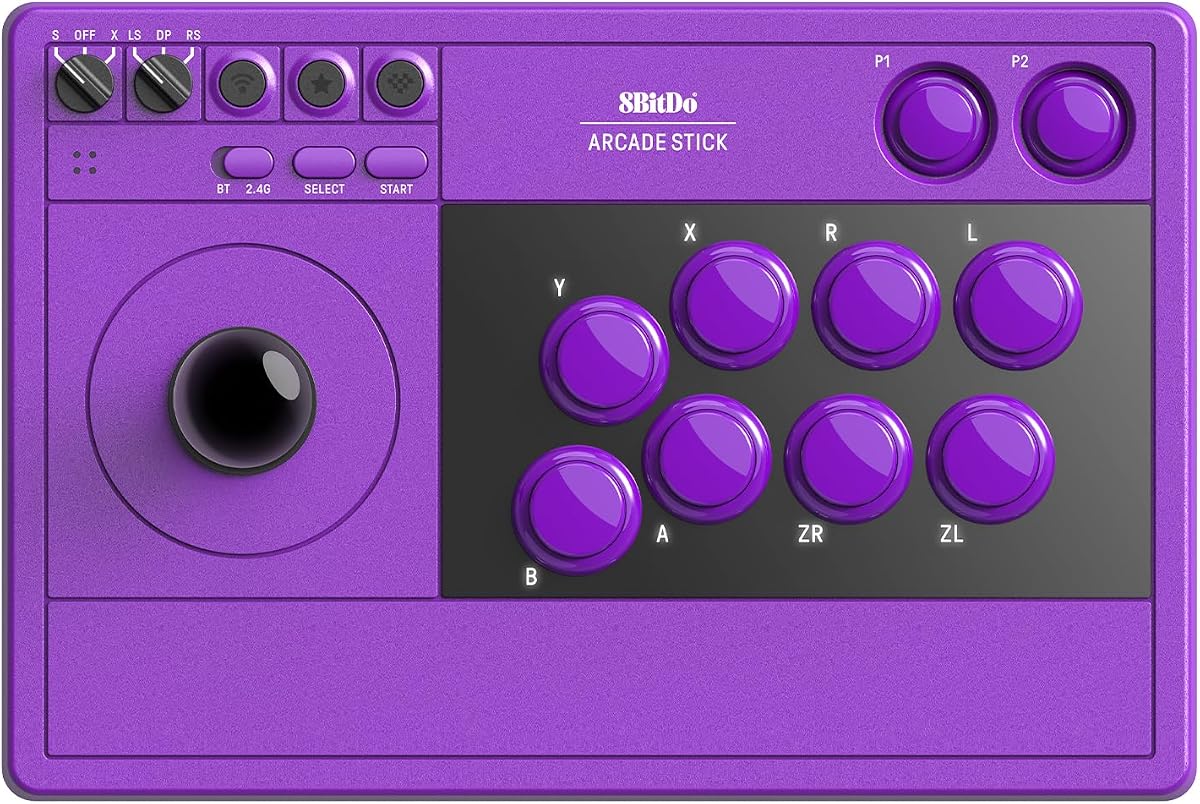
The 8Bitdo Arcade Stick for Switch 2, Switch and Windows PC, Purple earns a 4.7 rating and stands out as the most balanced option in the guide. It explicitly supports current Switch hardware and PC while adding wireless flexibility, dynamic controls, macro access, and a polished faceplate.
We may earn a commission when you buy through this link, at no additional cost to you.
Three connection methods—Bluetooth, 2.4G, and wired USB-C—allow the controller to serve different play situations. Two dedicated macro buttons provide quicker access to programmed sequences, and Ultimate Software can save profiles for different games. When switching between Switch and PC X-Input modes, the physical button layout changes visually, helping the player maintain a clear understanding of each input.
The tempered glass faceplate adds a refined look and a smooth surface, while the stowed 2.4G adapter avoids the need to carry a loose receiver. Turbo functionality is also included, though the product details do not explain its settings as thoroughly as some competing specifications do. Setup of mappings and macros takes some intentional configuration, but those who want that control should find the software worthwhile.
This is our top overall recommendation for a player who wants one arcade stick across Switch, Switch 2, and Windows without giving up wireless play. It also works well for players who regularly travel between docked and handheld sessions. Those wanting a portable cabinet or a stick with clearly documented Sanwa compatibility should examine the MAYFLASH alternatives instead.
The dynamic button layout changes when moving between Switch and PC X-Input modes. This visual guidance helps reduce confusion while preserving familiar arcade control positions.
Two dedicated P1 and P2 macro buttons give programmed combinations a direct physical trigger. Ultimate Software also supports remapping and saved profiles for different games and play styles.
We may earn a commission when you buy through this link, at no additional cost to you.
The MAYFLASH Arcade Stick F700 is the premium selection for buyers who want extensive platform support and serious control customization. Its 4.6 rating reflects a capable fighting-game stick designed for users who may play across Nintendo Switch, Switch 2, PlayStation, PC, Apple devices, Android, and other supported hardware.
We may earn a commission when you buy through this link, at no additional cost to you.
Compatibility with Sanwa Denshi buttons and joysticks makes this one of the most appealing choices for enthusiasts who intend to personalize the stick. Bluetooth, 2.4G, and wired USB provide flexible connection choices, while the hidden receiver compartment keeps the adapter secure. Turbo functions offer multiple speed settings, and supported PS5, PS4, and PC X-Input setups can route wired headset audio for music and chat.
There are important boundaries. The F700 is not compatible with Xbox Series S/X or Xbox One, and it is intended for fighting games rather than general-purpose gaming. Switch 2 use over Bluetooth requires updating to the latest firmware. These limitations are understandable for a specialized stick but matter to anyone searching for one controller that serves every console family.
The F700 is an excellent premium recommendation for dedicated fighting-game players, particularly those who value Sanwa component compatibility or use several non-Xbox platforms. It is less suitable for general gaming, Xbox owners, or shoppers who want a controller that works without firmware updates. Those situations are better served by the more focused 8Bitdo models.
The F700 supports an unusually broad collection of fighting-oriented systems, including Switch, Switch 2, PlayStation, Windows, Apple, Android, and selected mini consoles. It is designed specifically for games such as Street Fighter 6, Tekken 8, and Mortal Kombat rather than general gaming.
Support for Sanwa Denshi buttons and joysticks gives dedicated players a direct path to personalized components. The result is better suited to enthusiasts than buyers who simply want a fixed controller.
We may earn a commission when you buy through this link, at no additional cost to you.
The 8Bitdo Retro Wireless Arcade Fight Stick for Switch/Switch 2, PC Windows combines a 4.6 rating with unusually accessible internal customization. It is especially appealing if you want to replace its 30mm or 24mm buttons or install a different joystick on the universal mounting plate.
We may earn a commission when you buy through this link, at no additional cost to you.
The product title mentions Switch 2, while the detailed compatibility bullet specifically lists Switch and Windows, so buyers should confirm the exact current console support before ordering. Other capabilities are clear: three connection methods, dynamic button layouts, dedicated P1 and P2 macro buttons, saved profiles, a button-swap function, a control-stick switch, turbo functionality, and firmware updating.
Battery information is one of its useful distinctions, with a stated 40 hours of play over 2.4G and 30 hours over Bluetooth, followed by a four-hour charging time. The only major ambiguity is that the summarized feature list does not independently state the Bluetooth runtime even though the title and software capabilities suggest broader platform use.
This recommendation is strongest for a hands-on enthusiast who values replaceable components and long wireless sessions. It is a good Nintendo Switch fight stick for macro-driven training and profile switching. Casual players can also benefit from the dynamic layout, but those who only need a fixed, straightforward controller may prefer a simpler cabinet-style design.
Swappable 30mm and 24mm arcade buttons and a universal joystick mounting plate make internal modifications approachable. The plate is designed to support established arcade stick standards such as Sanwa JLF.
A stated 40-hour runtime over 2.4G is useful for extended sessions. Bluetooth is also available, and the included receiver can be stored in the built-in compartment.
We may earn a commission when you buy through this link, at no additional cost to you.
The 8Bitdo Retro Wireless Arcade Fight Stick for Switch/Switch 2, PC – Purple is a refined take on the Retro Wireless platform. It retains the 4.6-rated model's practical feature set while adding a tempered glass faceplate for a smoother appearance and durable surface.
We may earn a commission when you buy through this link, at no additional cost to you.
Ultimate Software provides button remapping, macros, and profile management, with dedicated P1 and P2 macro buttons for direct access. The dynamic button layout changes between Switch and PC X-Input modes, while Bluetooth, 2.4G, and wired USB-C offer flexible connection choices. The receiver has a built-in hidden storage area.
The stated battery figures reach 40 hours on 2.4G and 30 hours on Bluetooth, with a four-hour charging period. Additional conveniences include button swapping, a control-stick switch, turbo functionality, and firmware updating. The main point to verify is console compatibility: the product title includes Switch 2, while the detailed bullet identifies Switch and Windows.
This is an attractive choice for players who enjoy the customizable layout of the Retro Wireless family and want a more polished faceplate. It suits casual fighting-game nights as well as dedicated training sessions. Those expecting the Sanwa joystick support highlighted by other models should look more closely at the MAYFLASH options.
The tempered glass faceplate provides a smooth finish and a durable alternative to an exposed control surface. Its purple styling also gives the controller a distinctive look.
Ultimate Software can store separate controller profiles and combine button mapping with programmable macros. This makes it easier to move between games without repeatedly changing every input.
We may earn a commission when you buy through this link, at no additional cost to you.
The 8Bitdo Arcade Stick for Switch/Windows, Wireless Fight Stick, V3 Edition is a feature-rich wireless controller aimed at fighting-game players. No numerical customer rating was supplied for this listing, but its documented capabilities make it a strong option for anyone who values current console support and customization.
We may earn a commission when you buy through this link, at no additional cost to you.
Compatibility is listed for Nintendo Switch, Switch 2, and Windows PC. Dynamic button layouts update when switching between Switch and PC X-Input modes, while 8Bitdo Ultimate Software handles mapping, macros, and profiles. Two dedicated P1 and P2 buttons provide immediate access to programmed inputs.
Bluetooth and 2.4G adapter modes offer wireless play, while wired USB-C is positioned as the low-latency option. The stated battery figures are 30 hours over Bluetooth and 40 hours over 2.4G. A 1,000mAh rechargeable Li-ion battery, tempered glass faceplate, turbo function, firmware updates, and a stowing compartment for the 2.4G adapter complete the feature set.
The lack of a published numerical rating means it is impossible to compare customer feedback directly with the rated models. Within the guide, however, the V3 offers one of the clearest combinations of explicit Switch 2 support, wireless flexibility, and software control. It is a good recommendation for a player who wants a modern wireless stick and does not need Sanwa component compatibility.
Explicit support for Switch, Switch 2, and Windows makes the V3 straightforward for owners of current Nintendo hardware. PC X-Input mode broadens its use beyond the console.
The 1,000mAh battery is rated for 30 hours over Bluetooth and 40 hours over 2.4G. For players who prefer wireless freedom, these are meaningful endurance figures.
We may earn a commission when you buy through this link, at no additional cost to you.
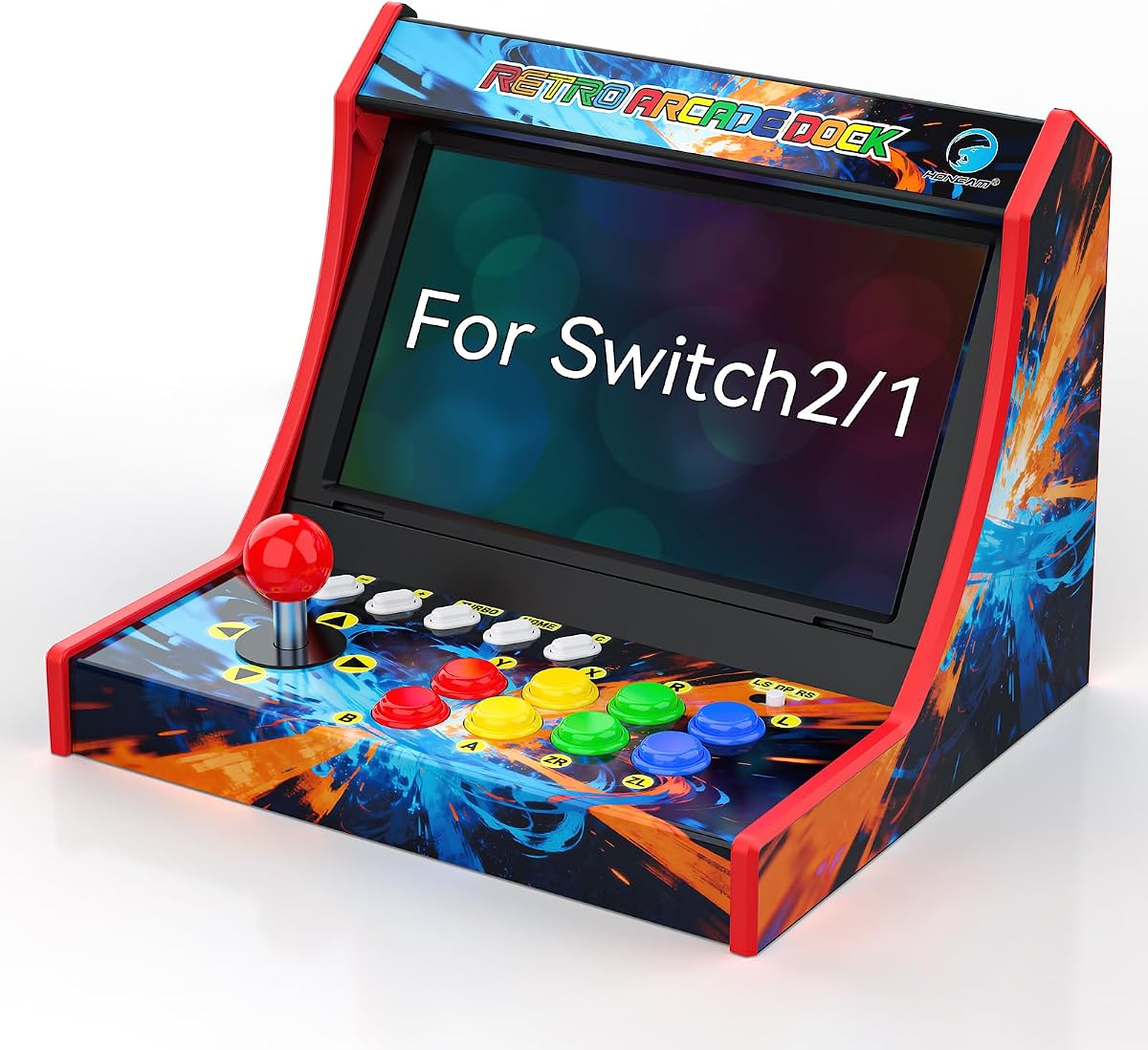
The Retro Arcade Stick for Switch 2/1/OLED, Mini Arcade Machine Cabinet in Neon offers a different approach from desktop fight sticks. Its 4.6 rating and portable cabinet format make it appealing to players who want the visual character of a miniature arcade machine.
We may earn a commission when you buy through this link, at no additional cost to you.
The unit is listed as compatible with Nintendo Switch, Switch OLED, and Switch 2. Twelve built-in slots organize physical game cards, and a turbo function supports A, B, X, Y, R, L, ZR, and ZL inputs. A dedicated C button is included for Switch 2 online communication, a useful addition for players who regularly connect with teammates.
Its biggest distinction is portability. The compact design is intended for trips, parties, and family gatherings, and it can play while charging. The supplied information does not describe wireless connectivity, remapping software, or a battery runtime, so the product is better understood as a portable console-integrated arcade cabinet than a fully programmable wireless fight stick.
This is a good recommendation for families, casual players, and retro-arcade fans who value game-card storage and a self-contained cabinet design. Serious tournament players who need macros, interchangeable Sanwa parts, or explicit low-latency wireless options should choose a dedicated fight stick instead.
Twelve built-in slots keep Switch game cards visible and organized. That makes the cabinet more practical for a permanent gaming setup than a loose collection of cards.
The compact cabinet format is easier to move between parties, trips, and family gatherings. Play-while-charging support also helps extend a session when the battery becomes a concern.
We may earn a commission when you buy through this link, at no additional cost to you.
The MAYFLASH F300 Arcade Fight Stick is a 4.5-rated option whose main strength is broad platform coverage. It supports Switch, Switch 2, PS4, PS3, Xbox Series S/X, Xbox One, Xbox 360, Windows, macOS, Steam Deck, and Android, giving it broad appeal to players who move between console generations.
We may earn a commission when you buy through this link, at no additional cost to you.
The F300 supports Sanwa Denshi buttons and joysticks, allowing control customization. On PC, it handles both XInput and DInput, and its turbo function includes different speed settings. These are useful features for fighting-game players who need dependable input behavior across multiple systems.
PS5 support requires a MAYFLASH Magic-S Ultimate adapter or MagicBoots-S5 Converter, so it is not a completely direct solution for that console. The supplied details also do not highlight wireless connectivity, making this more of a platform-flexible wired fight stick than a travel-oriented wireless controller.
The F300 is a strong recommendation for buyers who want one physical style of control across Nintendo, PlayStation, Xbox, PC, macOS, Steam Deck, and Android. It is less suitable for someone requiring direct PS5 operation or a listed wireless mode. Shoppers should confirm the relevant adapter and current platform behavior before making a final choice.
Support for current and older console families reduces the need to learn a new control surface when moving between systems. The familiar arcade layout can remain consistent across games.
Both XInput and DInput modes improve PC flexibility, while Sanwa compatibility supports personalized buttons and joysticks. Turbo speed settings add another layer of control.
We may earn a commission when you buy through this link, at no additional cost to you.
The APTGAME Switch Arcade Stick Cabinet, Voice Version has the highest listed customer rating in this roundup at 4.9. It combines a compact retro cabinet, programmable arcade controls, a direct wired connection, and twelve game-card slots, making it a compelling budget-oriented choice.
We may earn a commission when you buy through this link, at no additional cost to you.
Compatibility covers Nintendo Switch, Switch OLED, and Switch 2. The wired setup requires enabling the console's Pro Controller Wired Connection option, after which the cabinet can operate without wireless interference. A five-step installation process, dedicated system controls, and a reset button simplify setup and troubleshooting.
The joystick can switch among Left Stick, D-pad, and Right Stick functions, while eight programmable buttons include LED indicators. Turbo functionality and twelve physical game-card slots add arcade-specific conveniences. The screen is not included, so this is a controller cabinet rather than a self-contained display unit, and no wireless connection is stated.
This is the best budget recommendation for buyers who want a dedicated arcade-style stick without paying for wireless convenience. It is especially useful for Switch living-room setups where the console remains docked and a direct cable is manageable. Players who need portability, Bluetooth, or extensive macro software should favor an 8Bitdo or MAYFLASH wireless model.
The wired design is intended to minimize input lag for precision fighting and arcade games. Enabling Pro Controller Wired Connection in system settings creates a straightforward console connection.
Twelve game-card slots keep a physical library organized around the cabinet. The eight programmable buttons and multi-mode joystick expand control options without a computer-based setup.
We may earn a commission when you buy through this link, at no additional cost to you.
The 8Bitdo Arcade Stick for Switch/Windows, Wireless Fight Stick, Purple is a stylish V3-style option for players who want a tempered glass finish, explicit Switch 2 compatibility, and extensive software configuration. No numerical customer rating was supplied for this particular listing.
We may earn a commission when you buy through this link, at no additional cost to you.
The controller works with Nintendo Switch, Switch 2, and Windows PC. Its dynamic button layout changes when moving between Switch and PC X-Input modes, while 8Bitdo Ultimate Software supports button mapping, macros, and saved profiles. Dedicated P1 and P2 macro buttons make stored sequences easier to trigger during play.
Bluetooth and 2.4G connections provide wireless options, with stated runtimes of 30 and 40 hours respectively. Wired USB-C is available for low-latency play. A 1,000mAh rechargeable battery, tempered glass faceplate, turbo function, firmware updates, and a compartment for storing the 2.4G adapter round out the documented features.
This is a worthy choice for buyers who prioritize aesthetics, current console compatibility, and programmable controls. It is particularly useful for players who move between handheld and docked sessions. The missing rating makes customer-satisfaction comparison difficult, but the documented feature set closely matches the other well-equipped 8Bitdo V3 offering.
The purple housing and tempered glass faceplate create a more decorative appearance. The glass surface is designed to remain smooth and scratch-resistant through regular use.
Explicit support for Switch, Switch 2, and Windows allows the controller to serve several systems. Dynamic layouts help keep the on-face labels relevant as modes change.
We may earn a commission when you buy through this link, at no additional cost to you.
The right Nintendo Switch arcade stick depends on how you play, where you use it, and how much control customization you need. Compare compatibility, connection methods, control layout, and portability before choosing a model.
Start with the exact console and software you plan to use. Some products explicitly list Switch, Switch 2, and the Switch OLED, while others mention only Switch and Windows in their detailed specifications. Fighting-game sticks can also carry platform-specific limitations: the MAYFLASH F700 does not support Xbox Series or Xbox One, while the F300 reaches PS5 through a separate adapter. The supplied information also distinguishes general use from sticks designed specifically for fighting games. Checking the compatibility language before buying prevents an otherwise capable controller from becoming an expensive paperweight.
Confirm both console support and game compatibility before buying, paying close attention to any model-specific exclusions.
Wired connections offer a straightforward path with no pairing process and are well suited to a fixed gaming station. Wireless designs provide greater freedom, but the connection method matters: Bluetooth is convenient, while a dedicated 2.4G receiver can offer a more direct alternative and commonly provides longer stated battery runtime. Several 8Bitdo sticks support Bluetooth, 2.4G, and wired USB-C, and many include a compartment for storing the receiver. The APTGAME cabinet focuses on a direct wired setup. Choose according to your tolerance for cables, need for portability, and preference for a consistently simple installation.
Use wired mode for simplicity, but consider 2.4G or Bluetooth when portability and cable-free play matter more.
A good fight stick should feel comfortable during long sessions and suit the way you play. Some 8Bitdo models support swappable 30mm and 24mm arcade buttons, a universal joystick mounting plate, a button-swap function, and a control-stick switch. The MAYFLASH F300 and F700 support Sanwa Denshi buttons and joysticks, making them attractive for enthusiasts. Fixed-layout products can still be excellent, but they offer less room for personal tuning. Consider button size, lever feel, mounting security, and whether you plan to change components as your skills and preferred games evolve.
Choose modifiable controls if personalization matters; otherwise prioritize a comfortable, securely mounted layout.
Software control is especially valuable for players who switch among games, use uncommon control schemes, or want repeatable sequences. 8Bitdo Ultimate Software supports button mapping, macros, and saved controller profiles, and compatible models add dedicated P1 and P2 macro buttons. Dynamic layouts also update the visible button arrangement when changing between Switch and PC modes. This convenience comes with a setup cost: you need to install and configure the software correctly. Buy a programmable model if you value these tools, but favor a simpler cabinet if you want the controls ready with minimal configuration.
Programmable models suit dedicated players; simple cabinets suit anyone who wants to plug in and play.
Turbo functions can help with repeated inputs in appropriate games, but their usefulness varies by title and play style. Several products include the feature, and the MAYFLASH models provide different speed settings. Headset routing is another distinction: the F700 supports wired headsets for background music and online chat on PS5, PS4, and PC X-Input. Do not buy a stick primarily for a general-purpose headset feature unless the listed platforms match your setup. For most players, the joystick, action buttons, connection reliability, and game compatibility should remain the higher priorities.
Treat turbo and headset tools as secondary features, and verify that each works with your game and platform.
A portable arcade stick should be easy to move without compromising the controls. The compact Neon cabinet includes twelve game-card slots, supports play while charging, and is aimed at travel, parties, and family gatherings. Wireless fight sticks avoid a cable but still have a substantial desktop form factor. Models with a hidden receiver compartment are easier to pack because the small 2.4G adapter will not become loose in a bag. The APTGAME Voice Arcade Cabinet is portable enough to travel, but its wired connection and requirement to remove the Switch case make setup more deliberate. Compare room size, carrying needs, and storage before deciding.
For travel, favor a compact wireless design or a cabinet with organized game-card storage.
Arcade sticks receive repeated inputs and often see more physical contact than standard controllers. Look for a stable joystick mounting system, firmly seated buttons, and a control surface that resists sliding. Tempered glass faceplates appear on several 8Bitdo models and offer a smooth, durable finish. A universal mounting plate is valuable only if it holds your chosen joystick firmly and consistently. Since specifications rarely describe every material or internal detail, check the product listing for the current build information and read recent customer feedback when available before finalizing your choice.
Prioritize stable mounts, solid buttons, and durable surfaces over decorative features alone.
Firmware can determine whether a controller recognizes a console, switches input modes correctly, or gains compatibility with newer hardware. The MAYFLASH F700 requires the latest firmware for Switch 2 use over Bluetooth, while several 8Bitdo products provide firmware updates and software support. This matters when you own current hardware or expect to use the stick for a long time. Check the manufacturer's support resources and setup instructions before first use, and keep software current after setup. A well-supported platform is especially valuable for a wireless stick with mapping, macros, and multiple operating modes.
Review setup guides, install required firmware, and keep control software updated for dependable operation.
Begin with the console's controller settings and the manufacturer's setup guide. Depending on the connection method, you may need to enter pairing mode for Bluetooth, connect the included 2.4G receiver, or enable Pro Controller Wired Connection in the Switch menu. For PC use, select the appropriate X-Input or D-Input mode where applicable. Confirm that the stick appears as a controller before launching a game.
If the product supports remapping, macros, profiles, or a dynamic layout, install the stated software and configure it before a serious session. Test every action button, the joystick directions, turbo, macro buttons, and the control-stick switch in a practice environment. For the APTGAME cabinet, follow the five-step installation process and use the dedicated system controls or reset button if the console does not recognize the connection.
For care, keep the joystick and buttons free of sticky liquids, dust, and debris, and avoid pulling cables at an angle. Store the 2.4G receiver in its compartment when it is not in use. Periodically check button seating and joystick mounting, especially on modifiable models, and update firmware or mapping software as directed. Store portable cabinets securely, especially when physical game cards are inserted.
They are generally better for players who prefer a full-size joystick, larger action buttons, and an arcade-style layout. Individual buttons are also easier to identify by touch, which can make execution more consistent. The right stick is not automatically better for every player, however, because portability, wireless flexibility, and the learning curve should also be considered.
Many of the included models support both Nintendo Switch and Windows PC, and several explicitly include Switch 2. Connection methods vary by product, with Bluetooth, 2.4G, and wired options available across the 8Bitdo range. Check the detailed compatibility list rather than relying only on the product title, especially if you plan to use PlayStation, Xbox, Apple, or Android devices.
A traditional arcade stick is a flat control deck with a joystick and action buttons. A cabinet-style controller wraps those controls into a small upright housing and may include features such as game-card storage or a voice version. The APTGAME and Neon products in this guide are cabinet-style options, while most of the 8Bitdo and MAYFLASH models use a flat fight-stick format.
No, but wireless can make a dedicated gaming setup more flexible. Wired mode is simple and consistent, while Bluetooth or 2.4G lets you move around or use the controller with a docked and handheld setup. If you travel or dislike cables, prioritize a model with wireless support and a compartment for storing its receiver.
Some models are specifically designed for customization. The listed 8Bitdo Retro Wireless supports swappable 30mm and 24mm buttons and a universal joystick mounting plate, while the MAYFLASH F300 and F700 support Sanwa Denshi buttons and joysticks. Check the current product description for the exact components because modding capability differs across models.
Rules vary by game and tournament, and a programmable feature does not automatically mean it is permitted. A macro can help you store a sequence, but online play may treat programmed inputs differently from manual execution. Check the current rules of the game or event before relying on macros in competition.
Most compatible sticks register as standard controllers and can support the same online functions available to the console, but the details vary by product and mode. The Neon Mini Arcade Cabinet specifically includes a C button for Switch 2 communication. Make sure the selected input mode is correct and confirm the game recognizes the arcade stick as a valid controller.
A wired stick removes wireless pairing concerns and can be ideal when the console stays in one location. A 2.4G stick offers wireless freedom and several 8Bitdo models list longer battery runtimes over 2.4G than Bluetooth. Whichever you choose, test the stick in the same setup you will use during a match and update its firmware beforehand.
The 8Bitdo Arcade Stick for Switch 2, Switch and Windows PC, Purple is the most balanced overall recommendation because it combines explicit current-console support, three connection methods, dynamic layouts, macros, profiles, and a polished faceplate. The APTGAME Voice Arcade Cabinet is the best budget-oriented choice for a fixed, wired arcade setup, while the MAYFLASH F700 serves premium buyers who want extensive platform coverage and Sanwa component customization.
Prioritize the features that affect your actual sessions. Fighting-game competitors may care most about a secure joystick, responsive controls, macros, and low-latency connectivity. Enthusiasts should examine swappable buttons, mounting systems, and software support. Travelers will place more weight on wireless modes, battery life, receiver storage, and the size of the controller.
Finally, verify current product details before ordering, particularly console compatibility, connection methods, firmware requirements, and included accessories. Listings and manufacturer support information can change over time, and checking the current manual will help ensure the selected arcade stick is ready for your console, preferred games, and play style.