
Thrustmaster T-Flight Hotas X
4.5Editor score
Twelve programmable action buttons
Detachable real-size throttle
Five independently programmable axes
Adjustable stick resistance
Profile-switching preset button
Hotas buying guide comparing ten HOTAS flight controllers for precision, comfort, programmability, compatibility, realism, and every type of pilot setup.
A HOTAS flight controller combines a joystick and throttle so your hands can remain on the primary controls throughout a flight simulation session. The best models offer precise axis tracking, well-placed switches, comfortable ergonomics, extensive programmability, and enough hardware options to suit combat, civil, and space simulators.
We compared these ten HOTAS systems by considering their control layouts, sensor technology, axis support, button counts, adjustment options, platform compatibility, throttle design, and suitability for different simulation styles. The list includes standalone flight systems, complete bundles, a licensed combat controller, and a universal desk-mounted platform.
Each pick highlights a distinct approach to realistic flight control, from the accessible and configurable T-Flight Hotas X to the highly specialized Warthog and Sol-R4 systems. Ratings and availability can change over time, as can retailer pricing, so confirm the latest product details and configuration requirements before purchasing.
4.5Editor score

4.3Editor score

4.3Editor score
The following side-by-side comparison highlights the major differences in control density, sensor technology, platform support, adjustability, and overall physical design. It is intended to make the most meaningful differences easier to understand before choosing a HOTAS system.



The Logitech G X56 is a substantial HOTAS system for PC flight simulators, carrying a 4.0 rating and a strong emphasis on precise adjustment. Its most distinguishing feature is the four-spring mechanism, which lets pilots tune the feel of the main stick rather than accepting one fixed resistance. Hall-effect sensors, a separate mini analog stick, twin throttles, and extensive programmable controls support both military and civil simulation styles.
We may earn a commission when you buy through this link, at no additional cost to you.
The control arrangement rewards pilots who want aircraft functions close at hand. Aileron and elevator use 16-bit Hall-effect sensing, while the mini stick can represent pitch, roll, yaw, directional inputs, or independently controlled weapons. The throttle section includes a friction adjuster and a lock, making it possible to move power smoothly and keep a setting in place. RGB backlighting adds visual coordination with a PC gaming setup without changing the core control behavior.
The trade-off is size and complexity. A controller with this many inputs and two USB connections occupies more desk space than a compact stick, and the four-spring configuration is likely to involve some experimentation. Compatibility is also limited to Windows systems using the specified USB requirements. Those constraints make it less convenient for console or Mac users, but they are reasonable for a dedicated PC simulator station.
The X56 is a compelling recommendation for anyone who values fine physical control and extensive customization more than compactness. It suits intermediate and advanced pilots who want to experiment with spring tension, throttle friction, and multifunction stick inputs. For beginners, the broad feature set can feel imposing, but it provides a capable platform that can grow with the pilot's skills.
The four-spring system is the X56's most useful differentiator for advanced users. Changing the stick response lets a pilot create a setup that better reflects personal preference or a simulated aircraft, while the miniature analog stick makes it possible to retain a secondary control input without moving the hands away from the main grip.
Twin throttles support aircraft with separate engine controls and provide more usable travel than a basic single lever. The included friction adjuster and throttle lock help a pilot dial in the power-management feel needed for taxiing, sustained flight, rapid acceleration, and combat maneuvers.
We may earn a commission when you buy through this link, at no additional cost to you.
The Thrustmaster T-Flight Hotas X is a straightforward PC flight-control package with a 4.5 rating, the highest listed score among the products in this guide. It combines a joystick, a real-size detachable throttle, twelve programmable buttons, five programmable axes, and a preset-switching button. That combination makes it an approachable option for pilots who want the layout benefits of a HOTAS without navigating a large, specialized cockpit controller.
We may earn a commission when you buy through this link, at no additional cost to you.
Its installation philosophy is notably friendly. The system is designed for plug-and-play operation, includes preconfigured controls, and retains custom programming in built-in memory. A dedicated mapping button can switch between configurations while a session is underway, which is useful when moving between aircraft or simulation genres. The adjustable resistance dial also allows the pilot to tune stick tension, while handle rotation and a progressive tilting lever provide rudder control.
The main limitation is its age and comparatively modest control layout. Twelve buttons and five axes cover many standard flight simulation needs, but they cannot match the dense programming options of newer premium systems. The fixed throttle arrangement and older industrial design also lack some of the illuminated, modular, or display-based features found on recent hardware.
Even so, the T-Flight Hotas X remains a strong general recommendation for PC pilots who prioritize straightforward operation, comfort, and useful programmability at a moderate cost. It is especially attractive to newcomers moving beyond a basic flight stick, while experienced users can appreciate its stable base, configurable resistance, and easily detached throttle.
The preset button, preconfigured setup, and internal memory remove much of the initial configuration burden associated with advanced flight hardware. A pilot can begin flying, then tailor the available inputs as familiarity grows, making this an effective bridge from a simple joystick to a dedicated HOTAS arrangement.
The full-size throttle can remain attached for a compact setup or detach for a cockpit-style arrangement. Combined with the wide hand rest and weighted base, this flexibility allows the controller to suit different desk sizes and preferred flying postures.
We may earn a commission when you buy through this link, at no additional cost to you.
The Hikig 2 Set Desk Mount is an accessory rather than a flight controller, but it solves a problem many HOTAS users encounter: keeping a stick and throttle stable on a normal desk. It carries a 4.1 rating and provides two mounting positions with a clamping system, adjustable height, and forward-back positioning. The package is aimed at creating a more organized and comfortable simulator station without building a permanent cockpit.
We may earn a commission when you buy through this link, at no additional cost to you.
Compatibility is broad across recognizable flight hardware, including Logitech X56, X55, X52, and X52 Pro controllers, as well as Thrustmaster T-Flight HOTAS, T.16000M, and TCA products. The description also lists several other common flight sticks and throttles. Its 91 N.m clamp provides a firm attachment point, while the adjustment range allows the pilot to establish a more natural hand and arm position.
This is not a substitute for a HOTAS, and it cannot improve sensor precision, button programmability, or stick feel by itself. The value comes entirely from stability and ergonomics. A controller that slides across the desk or sits at an uncomfortable height can undermine an otherwise capable setup, so the mount is most useful for pilots who already own compatible equipment or intend to combine it with one of the flight systems in this guide.
The Hikig mount is best recommended for PC pilots building a dedicated flight station on a desk. It is especially helpful when the chosen HOTAS separates into a stick and throttle, because both components can be positioned independently. Buyers should verify the dimensions and confirm compatibility with their exact controller before ordering.
Height and fore-aft adjustment make it possible to align the stick and throttle with the pilot rather than forcing the arms to reach awkward positions. Independent placement can also reduce edge interference during aggressive maneuvering.
Clamping the controller to the desk reduces unwanted movement and keeps the setup consistent between sessions. The firm 91 N.m clamp is designed to retain the mount under the forces generated during detailed flight-simulator inputs.
We may earn a commission when you buy through this link, at no additional cost to you.
The Thrustmaster HOTAS Warthog MKII is an elaborate PC flight-control system built around officially licensed U.S. Air Force replicas. It includes a redesigned base, an A-10C Warthog throttle and control panel, and a 1:1-scale VIPER flightstick grip. The supplied 1.0 rating is notably lower than those of the other products, so although the hardware is compelling for the right audience, the user feedback signal warrants caution.
We may earn a commission when you buy through this link, at no additional cost to you.
The physical ambition is immediately evident. The flightstick grip includes 19 action buttons, a two-step trigger, and an eight-way point-of-view hat, while the throttle provides 17 action buttons, a mouse-hat slew control, and another eight-way hat. Hall-effect technology, a metal base, and the modernized six-pin connector reinforce the premium construction. The electronic design supports up to 128 buttons and eight axes across compatible Thrustmaster grips.
That density and authenticity create trade-offs. The full system requires desk space, and the replica-style layout may feel more elaborate than necessary for a casual simulator user. The current rating may also reflect early customer experiences, software recognition issues, or dissatisfaction with the specific package, but the supplied information does not identify the cause. Prospective buyers should check recent owner feedback and current game compatibility for their preferred simulator.
The Warthog MKII is most appropriate for a dedicated enthusiast who values replica design, abundant physical controls, and the feeling of operating a military-style cockpit. It may be the most visually and functionally ambitious package here, but its low rating prevents it from being the universal recommendation. Consider it a specialist platform rather than a risk-free first HOTAS purchase.
The 1:1-scale VIPER grip and officially styled A-10C throttle provide a level of visual specificity that ordinary generic flight hardware cannot match. That realism can make a virtual cockpit feel more convincing, particularly in military combat simulations.
The six-pin electronic connection supports compatibility with Thrustmaster grips and a substantial maximum configuration of 128 buttons and eight axes. The redesigned metal base and smoother movement system are intended to improve both durability and control consistency.
We may earn a commission when you buy through this link, at no additional cost to you.
The Thrustmaster Sol-R4 HOTAS is a PC-focused combat and space-flight controller with a 4.3 rating. It places 58 programmable action buttons across a substantial cockpit-style system, making it one of the most control-dense conventional packages in the guide. Its three-axis stick uses 16-bit Hall-effect sensing, while the grip adds triggers, hat switches, a mini stick, and a thumbwheel for aircraft and weapons functions.
We may earn a commission when you buy through this link, at no additional cost to you.
The base expands the experience beyond the flightstick. Onboard switches, directional pads, a selector, a mini throttle, and customizable RGB lighting provide numerous options for secondary commands. The main throttle offers 3.1 inches of travel and a repositionable detent, allowing the pilot to establish a tactile reference for a condition such as idle, afterburner, or reverse thrust. The grip's 21 action buttons are distributed for ambidextrous access.
The obvious trade-off is complexity. A large number of switches can be useful in a carefully configured simulator, yet it also creates a substantial learning curve and visual density. The cockpit-style footprint needs adequate desk space, and pilots who only use a handful of commands may never need the full range of inputs. Hall-effect sensing is a clear strength, but the design remains aimed at enthusiasts who value breadth over simplicity.
The Sol-R4 is a strong recommendation for space combat, detailed military simulation, and users who want most controls without reaching for a keyboard. It is particularly attractive for pilots who plan to use a mouse for navigation and need many dedicated commands. A first-time pilot may prefer a smaller system, but experienced users will find the high button count and onboard controls more useful.
The 58-button configuration allows critical aircraft, weapons, navigation, and countermeasure commands to be assigned directly to the controller. This reduces keyboard interruptions and supports faster transitions between flight management and combat tasks.
The 16-bit Hall-effect system is designed to deliver smooth, consistent control without the wear associated with potentiometer-based sensing. It is particularly relevant to space and combat simulations where small axis corrections and precise attitude changes matter.
We may earn a commission when you buy through this link, at no additional cost to you.
The Thrustmaster T16000M FCS HOTAS is a PC flight controller with a 4.2 rating and a long-established reputation for precise Hall-effect sensing. It provides four independent axes, including a twist rudder, and carries 16 action buttons with braille-style physical identification. Its compact stick-centered design differs from the larger joystick-and-throttle packages elsewhere in this list.
We may earn a commission when you buy through this link, at no additional cost to you.
The primary advantage is straightforward, dependable input. Magnetic sensors support smooth three-axis movement, while rotation of the grip adds another controllable dimension. The button layout can be learned through its raised tactile markers, reducing the need to look down during a maneuver. Additional controls include two four-way switches, three buttons, a two-position slider, a push mini-stick, and an eight-way point-of-view hat.
The supplied information presents the controller as compatible with Windows PCs through USB in both 32-bit and 64-bit environments. It does not list an integrated throttle, so calling it a HOTAS should not be taken to mean that every component of a hands-on throttle-and-stick system is included. It is also an older design, and buyers wanting modern RGB lighting, detachable throttles, or a large display will find more contemporary options here.
The T16000M is best for PC pilots who prioritize reliable axis tracking, tactile controls, and a compact arrangement over extensive accessory functions. It works particularly well for simulators where stick-centered control and twist rudder input are familiar. Those wanting a complete throttle package should verify exactly which components are included before purchase.
The three-axis stick handles conventional attitude and movement input, while twist rudder adds a dedicated yaw control. This gives pilots more axis options without requiring another peripheral for every maneuver.
Braille-style physical markings help pilots locate particular switches without visually checking the grip. The result is a more immediate control experience during fast combat sequences or visually complex cockpit procedures.
We may earn a commission when you buy through this link, at no additional cost to you.
The Thrustmaster T-Flight Full Kit HOTAS is a broad flight-simulator package for Xbox Series X|S and PC. It has a 4.3 rating and includes a hands-on joystick-and-throttle system plus rudder pedals, making it one of the more complete setups in the guide. The package offers five responsive axes, 14 programmable buttons, a rapid-fire trigger, a multidirectional hat, and a large detachable throttle quadrant.
We may earn a commission when you buy through this link, at no additional cost to you.
One major advantage is console integration. Dedicated Guide, View, and Menu buttons let Xbox users move between the game and system interface without reaching for a separate controller. For PC pilots, the package provides a more comprehensive desktop arrangement than a standalone stick. The detachable throttle can be positioned to suit available space, while the included pedals add dedicated yaw control.
The pedal system uses Thrustmaster's S.M.A.R.T. slide rail approach to promote smooth movement. Each pedal supports the full foot, and removable heel rests allow the pilot to choose a more relaxed position during long sessions. The trade-off is the footprint. A stick, throttle, and floor-mounted or extended pedal system takes more room than a compact HOTAS, and console compatibility ultimately depends on the individual game recognizing the controller.
This kit is a strong fit for console players who want a genuine flight-control setup and for PC pilots seeking a complete package. It is less suitable for a small desk or a user who already owns quality rudder pedals. As a one-stop hardware bundle, however, it covers the principal flight inputs with a comfortable, coherent design.
The integrated Xbox menu controls are especially useful because system navigation can otherwise break immersion. Buyers should still check the requirements of their preferred games, since hardware support varies across simulation titles and platforms.
Full-foot support, smooth rail movement, and removable heel rests address common sources of fatigue and abrupt pedal input. These details can be valuable during long flights because the pilot can maintain a steadier and more natural lower-body position.
We may earn a commission when you buy through this link, at no additional cost to you.
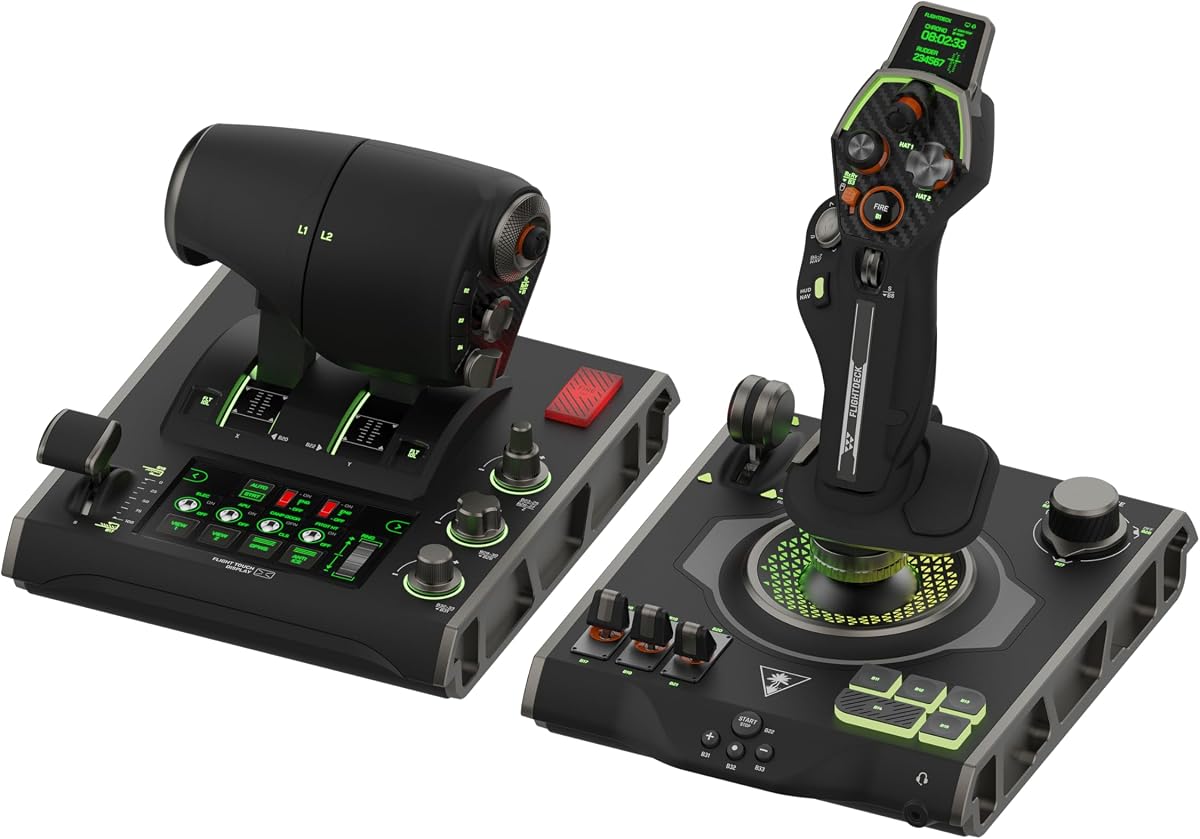
The Turtle Beach VelocityOne Flightdeck is a modern PC HOTAS concept centered on a universal platform and a flight touch display. It carries a 3.0 rating, making it the least favorably rated product among the specialist flight controllers in this guide. Even so, its feature set is distinctive, including a customizable OLED head-up display, contactless Hall-effect controls, 139 programmable buttons, adjustable stick height, and configurable RGB zones.
We may earn a commission when you buy through this link, at no additional cost to you.
The stick module places a gear lever, three-position rotary dial, and 39 buttons within the primary grip. Its height can be adjusted to accommodate different hand sizes, while the contactless controls are intended to provide durable, precise input. The throttle offers adjustable haptic detent response, and onboard audio enhancements work with a connected 3.5 mm headset. A Flight Hangar desktop application handles product customization.
The biggest question is whether the extra complexity improves a particular pilot's experience. A 139-button system can absorb a huge number of commands, but it may also feel cluttered, and the touch display adds a separate visual and configuration layer. The 3.0 rating indicates that the current user experience is less convincing than the specification sheet might suggest. Prospective buyers should investigate recent reviews, software behavior, and simulator recognition before committing.
The Flightdeck is best recommended to technically curious PC pilots who want a high-control-count, display-equipped setup and are prepared to spend time configuring it. It may excel for users who want nearly every function in one peripheral, but the low rating makes it less suitable as a risk-free recommendation. Waiting for a stronger software and ownership history may benefit cautious buyers.
Instead of treating a display as an accessory, the Flightdeck integrates a customizable OLED into the HOTAS itself. That design can surface information near the hands, although pilots should verify that their simulator and preferred instruments can be configured effectively through the desktop application.
The 139 programmable buttons greatly exceed the needs of many casual simulator pilots. For enthusiasts who assign nearly every function across multiple aircraft and gameplay modes, the density could reduce reliance on the keyboard and provide a more permanent cockpit layout.
We may earn a commission when you buy through this link, at no additional cost to you.
The Thrustmaster T.FLIGHT HOTAS NEO ACE COMBAT 8 WINGS OF THEVE Edition is an officially licensed flight-and-throttle package for PS5, PS4, and PC. The supplied data does not include a numerical rating, so the evaluation must focus on its documented features: 16-bit control technology, seven axes, 16 action buttons, a rapid-fire trigger, a multidirectional hat, vibration feedback, and a detachable throttle.
We may earn a commission when you buy through this link, at no additional cost to you.
The licensed presentation distinguishes it from generic flight hardware and makes it an immediately recognizable option for Ace Combat fans. The vibration motor in the grip adds a physical feedback layer for weapon fire, impacts, and turbulence as described by the manufacturer. Detaching the throttle allows the pilot to place the grip on the lap or use the throttle independently on a desk, which adds some layout flexibility.
The dual rudder system provides two options: the joystick's Z-axis or a tilting lever on the detachable throttle. The resistance can also be customized to suit different aircraft and missions. As a licensed edition, however, its visual identity is tailored to one game universe, and PC pilots may prefer a more neutral appearance. The absence of a supplied rating also makes it harder to compare long-term owner satisfaction with the established products in the list.
This is a well-matched controller for Ace Combat players on supported platforms, especially those who value vibration feedback and a licensed replica-style presentation. It can also work on PC as a general flight setup, subject to game support. Buyers seeking a universal modern HOTAS with a larger button matrix may find other options more flexible, but this package delivers a focused console-combat experience.
The integrated grip vibration provides an additional sensory channel for combat events. It cannot reproduce every physical force of an aircraft, but it can make impacts, bursts, and turbulence feel more present than a purely visual control experience.
The detachable throttle lets console players keep the stick close while repositioning the throttle unit. That flexibility is useful for living-room setups where a full cockpit is not practical, and the tilting lever provides an alternative to Z-axis rudder input.
We may earn a commission when you buy through this link, at no additional cost to you.
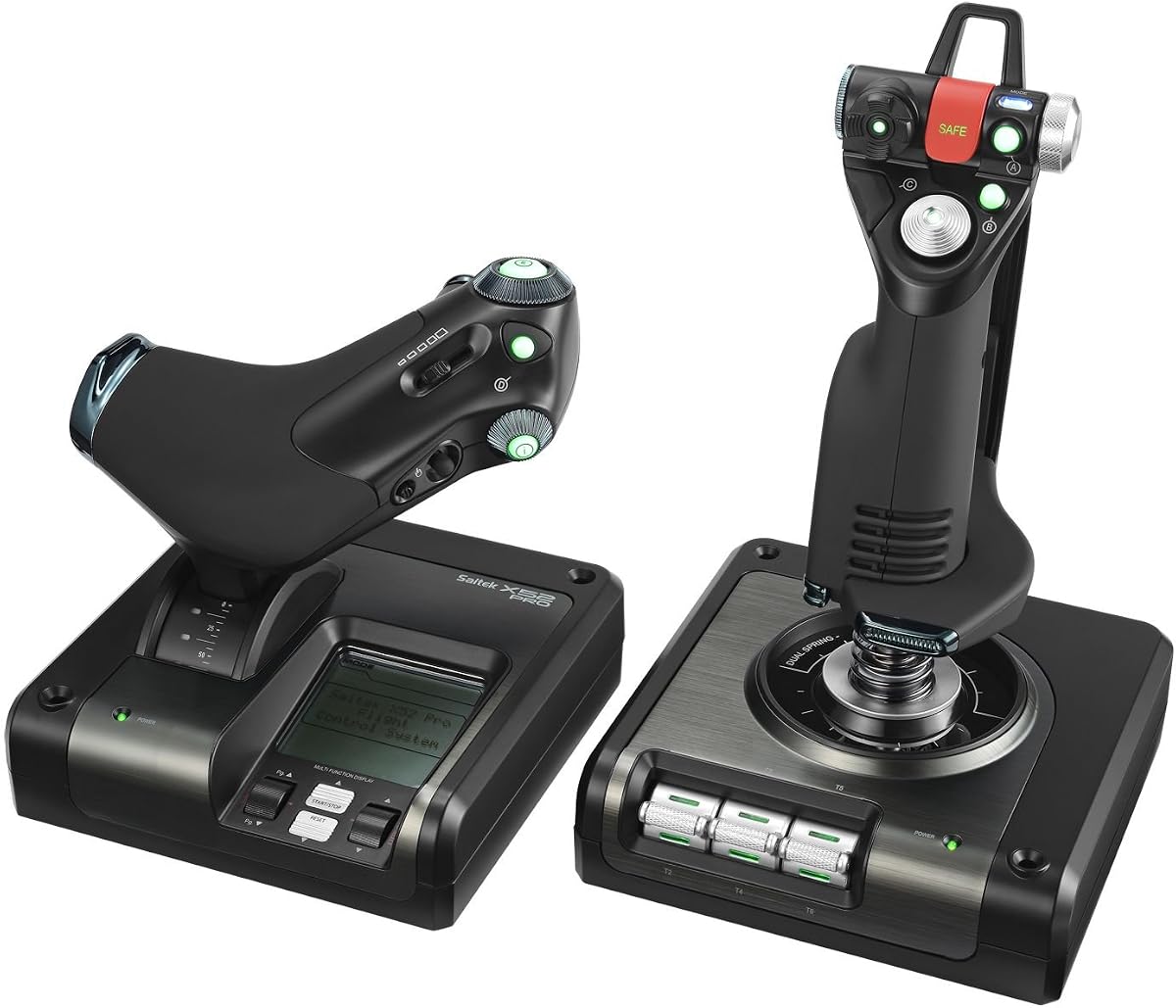
The Logitech G Saitek X52 Pro is a classic PC flight-control system carrying a 3.9 rating. It combines a joystick, progressive throttle, illuminated buttons, and a multi-function LCD in a familiar all-in-one layout. Its most user-friendly features include a five-position handle adjustment system, a soft-touch contoured grip, and a throttle that offers adjustable resistance with dedicated detents for idle and afterburner.
We may earn a commission when you buy through this link, at no additional cost to you.
The non-contact sensing on the X and Y axes is intended to improve durability and reduce the wear associated with older contact-based mechanisms. A centering mechanism and constant spring force help provide a consistent return and grip feel. The LCD gives pilots an immediate place to view information, while the illuminated buttons make the layout easier to identify in a dim room. Software can be used to program the controller for different games.
The system's primary limitation is its age. The listed requirements cover Windows 10, Windows 8.1, and Windows 7, and an internet connection is needed for the optional software download. Its fixed grip and throttle design also offer less modularity than newer systems, while newer competitors provide denser button layouts, more advanced touch displays, or broader physical adjustment. The 3.9 rating places it behind the better-rated options but does not indicate a fundamentally unusable design.
The X52 Pro remains a sensible choice for a PC pilot who values a recognizable traditional layout, an integrated display, and a throttle with clear detents. It is especially approachable for civil and military simulation because the display and illuminated controls make the cockpit-style interface easier to understand. Prospective buyers should confirm current operating-system and software support before installation.
Five handle positions allow the grip to be positioned more closely to a pilot's hand and wrist. A contoured soft-touch surface adds comfort, which is useful during longer sessions and helps keep the controls aligned with natural hand placement.
Adjustable resistance and distinct idle and afterburner detents make the throttle easier to operate by feel. A pilot can feel important power changes without watching the control, which is particularly useful during visually demanding maneuvers.
We may earn a commission when you buy through this link, at no additional cost to you.
A good HOTAS should fit your simulator habits, desk space, platform, and preferred level of realism. The most important decision is not simply the number of buttons, but whether the control layout, adjustment range, software, and included hardware support the way you actually fly.
A true HOTAS keeps the stick and throttle close enough for one hand to move between them with minimal repositioning. Some systems use a detachable throttle, while others offer a fixed, full-size quadrant. A detachable design is easier to transport and can accommodate a small desk, but a fixed arrangement may feel more cohesive and cockpit-like. Examine the included components carefully, because some products marketed as flight systems combine a stick with a separate throttle, and others provide only a stick or a smaller auxiliary control.
Three axes cover conventional pitch, roll, and yaw behavior, but additional axes can represent twist rudder, throttle, and other functions. A larger axis count gives more freedom for advanced aircraft and unconventional control schemes. Sensor resolution and consistency are just as important as the headline number. Hall-effect systems are designed to avoid the mechanical wear associated with potentiometers, making them attractive for long-term precision use.
Programmable buttons let you place frequently used commands under your fingers and reduce keyboard interruptions. Look for a high total button count, clearly identified controls, and the ability to save several profiles. Profile switching is particularly valuable for pilots who fly multiple aircraft or simulation genres. A dedicated mapping button that can change configurations during play is more convenient than repeatedly opening software and rebuilding assignments.
A controller that feels uncomfortable can undermine precision even when its specifications are impressive. Look for stick-force adjustment, throttle friction, usable detents, grip-position choices, and a layout that keeps frequently used switches within easy reach. Wider hand rests, contoured grips, removable heel rests, and adjustable pedals can reduce fatigue. For desks, check the full footprint before buying and consider a compatible mount when stability is a concern.
PC flight simulators often offer the broadest support for detailed HOTAS configurations, but individual titles can impose their own control limits. Console systems have fewer compatible games, and licensed editions may optimize one franchise while remaining functional in others. Check operating-system requirements, USB connection needs, console generation, game-specific support, and whether the product is recognized automatically or requires companion software. A highly capable controller is only useful if your chosen simulator can use it properly.
Throttle design determines how smoothly you can manage power, speed, and engine systems. Useful features include adjustable resistance, idle and afterburner detents, reverse-thrust references, and enough travel for gradual changes. A repositionable or haptic detent can provide a tactile reference without requiring the pilot to watch the lever. If you use two engines, a secondary lever or proportional controls may be more important than extra buttons elsewhere.
A HOTAS experiences repeated stick movement, trigger pulls, lever travel, and button pressure. Metal components and a substantial base can improve long-term durability, while non-contact or Hall-effect sensing can reduce sensor wear. Check whether the product includes a weighted base, how the throttle connects, and whether the grip uses a standard or proprietary connector. A stable setup also benefits from a controller mount or a desk with sufficient clearance.
An LCD, OLED, or touch display can show navigation, engine, and weapon information, but only if the relevant software supports the chosen simulator. RGB lighting adds visual appeal and may improve button identification in low-light environments. Audio enhancement and headset features can be useful, although they should not outweigh stick and throttle performance. Pedals are another important extra because dedicated yaw input can feel more natural than rotating a compact grip.
Begin by installing the controller on a clear, stable part of the desk and allowing enough space for the full range of stick and throttle movement. Connect every required USB or console cable before launching a simulator, then open the supplied or recommended configuration software. Confirm that the game recognizes the device, and begin with the default profile rather than immediately mapping every available button.
Next, adjust the controls in stages. Set stick resistance or spring tension, throttle friction, detent positions, and grip height before assigning complex commands. Move each axis through its full range to check for interference, binding, or unwanted inputs. Program essential actions such as views, landing gear, brakes, weapons, and navigation first, then create a separate profile for other aircraft or game modes. Save each profile and learn a dedicated shortcut for switching between them.
For maintenance, keep the controller away from dust, spilled liquids, direct heat, and cables under tension. Use a soft dry cloth to clean grips and bases, and avoid aggressive chemicals that could damage plastic or printed markings. Check the USB, console, and pedal connections periodically, especially if an axis becomes intermittent. Do not force a stiff stick, throttle, trigger, or detent; unusual resistance can indicate an alignment issue or mechanical problem that should be addressed before the next flight.
HOTAS stands for Hands On Throttle And Stick. It describes a control arrangement that places flight inputs such as the joystick, throttle, and buttons in one reachable cockpit-style system. The goal is to reduce hand movement between separate controls and allow commands to be assigned directly to physical switches. Some products labeled as HOTAS include only a flight stick, so buyers should check the complete hardware package.
A HOTAS can be better for pilots who want a compact, organized setup with many controls close at hand. It is particularly useful in combat simulations where weapon, view, and flight commands need to be accessed quickly. A separate joystick and throttle may suit someone who already has a preferred throttle or needs specialized aircraft controls. The best choice depends on ergonomics, available desk space, and the features each component provides.
Pedals are not always required because many HOTAS products provide rudder control through a twist axis, tilting lever, or other input. Dedicated pedals can feel more realistic and may be easier to coordinate during taxi, landing, and combat. The Thrustmaster T-Flight Full Kit includes a pedal system, while several other options rely on the included stick and throttle controls. Check the product specifications before planning a complete setup.
Four axes generally provide three movement axes plus throttle, while eight axes offer additional control channels for rudder, sliders, and specialty functions. More axes can improve flexibility but do not automatically produce a better experience. The controller's software, physical levers, and supported simulator must align correctly. For most flight tasks, a well-configured four-axis system is sufficient, while dense combat and military setups may benefit from additional channels.
Hall-effect controls can offer smooth, consistent sensing without the mechanical wear associated with potentiometer-based sticks. That makes them attractive for pilots who want reliable precision over long-term use. Sensor type alone does not determine overall quality; ergonomics, resolution, software, and build construction also matter. It is still important to keep the stick within its intended range and handle it carefully.
Only if the console game and platform recognize the specific controller. Some products include console buttons and explicit Xbox or PlayStation support, while generic PC flight hardware may not be accepted. License, connection type, and button-mapping support can all matter. Check the product listing and the game requirements, particularly if you expect to play without a keyboard or standard gamepad.
A mount is useful when the controller lacks sufficient desk stability or when the stick and throttle sit at an uncomfortable height. Products such as the Hikig dual mount support many common flight controllers and allow height and fore-aft adjustment. It does not add precision or functions, so it is a secondary purchase. Confirm the model, dimensions, and clamp clearance before ordering.
Most pilots can manage standard views, flaps, landing gear, brakes, and basic weapons with 12 to 16 buttons. Dense combat layouts benefit from 30 or more programmable actions because they reduce keyboard use and support aircraft-specific functions. Button count should match your play style rather than a maximum specification. A clear and learnable layout is more valuable than an intimidating number of unlabeled switches.
The Thrustmaster T-Flight Hotas X is the most accessible recommendation, combining a 4.5 rating with a detachable throttle, programmable axes, adjustable resistance, and straightforward setup. The Thrustmaster Sol-R4 HOTAS is the strongest choice for control density and modern combat-focused features, while the Thrustmaster T-Flight Full Kit HOTAS offers the broadest console and PC package with included pedals.
Prioritize the fundamentals before comparing feature totals: ensure the controller suits your platform and games, fits your desk, offers the axis and rudder control you need, and feels comfortable. Advanced pilots may prioritize Hall-effect precision, extensive programming, physical detents, and quick profile switching. Beginners should often favor fewer moving parts, clear layouts, and support that allows the configuration to grow over time.
Ratings, software compatibility, product availability, and retailer pricing can change, so confirm the latest details before buying. Review the included stick, throttle, pedal, cable, and mounting components carefully, and check whether your preferred flight simulator recognizes every advertised function. The right HOTAS is ultimately the one that feels natural in your hands and remains practical in your preferred cockpit layout.

