
Wireless Headset with Mic for Work, USB A/C Dongle, Bluetooth 6.0
5.0Editor score
Bluetooth 6.0 connectivity
AI noise-cancelling microphone
65-hour rated battery life
USB-A and USB-C adapters
This guide compares Bluetooth Headset for Teams options across noise cancellation, connectivity, comfort, battery life, mute controls, and platform fit.
A Bluetooth headset for Teams should make conversations clear, private, and comfortable without turning setup into a daily obstacle. The right model combines effective microphone noise control, dependable computer connectivity, accessible mute controls, long battery life, and a fit that remains comfortable through back-to-back meetings.
We compared ten headsets using the specifications and feature information supplied for each product. The list covers on-ear, over-ear, and single-ear designs with Bluetooth, USB receiver, multipoint, active noise cancellation, environmental noise cancellation, and Teams-oriented certification, while also noting platform restrictions.
Each review explains the headset's strongest benefits, practical compromises, and ideal working environment. Ratings reflect the supplied customer feedback rather than personal testing, and product details can change, so readers should verify current compatibility, included accessories, and pricing before purchasing.
5.0Editor score

4.2Editor score

4.0Editor score
The table below compares the ten headsets by design, connection method, voice-control features, battery endurance, and practical Microsoft Teams fit.

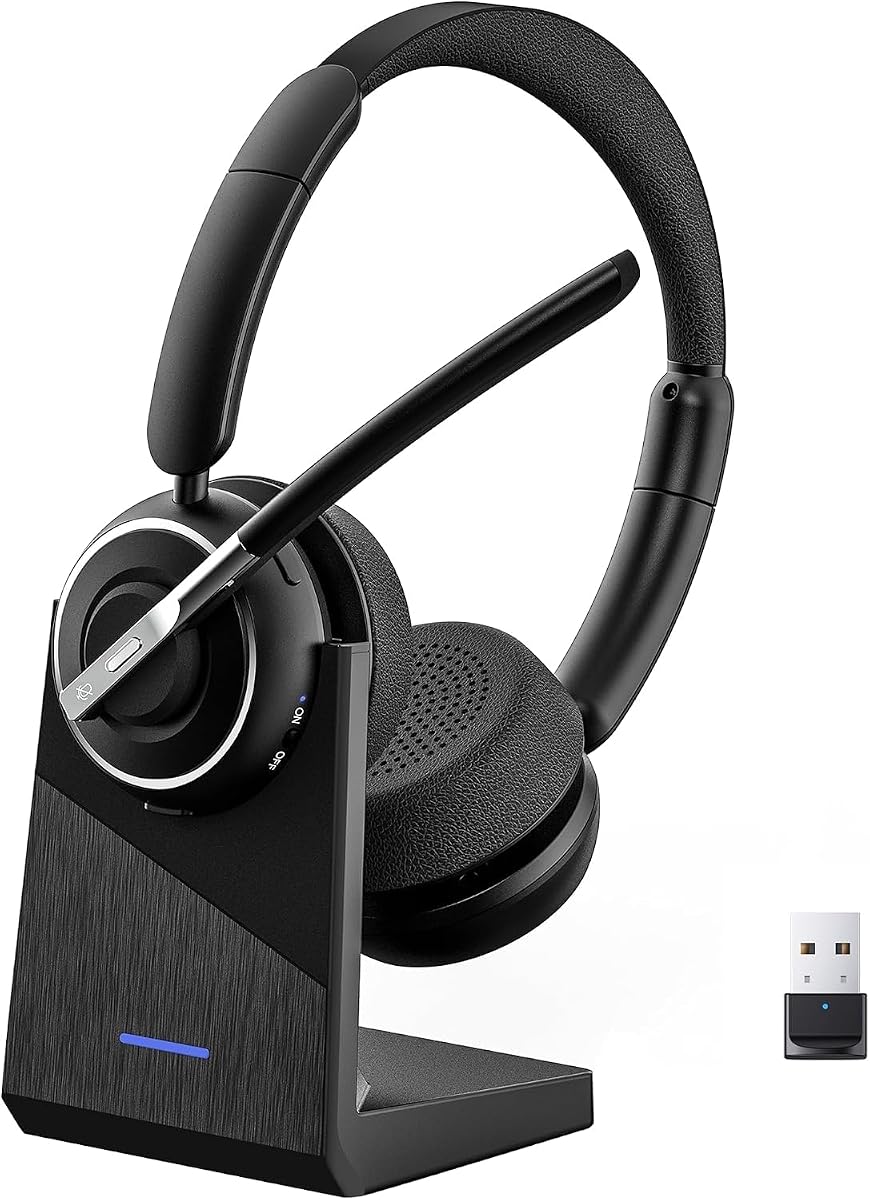


This wireless work headset combines Bluetooth 6.0, a noise-cancelling microphone, one-touch mute, and an unusually long stated operating duration. Its supplied rating is 5.0, giving it the strongest customer-feedback figure in this guide. It is designed for people who move among a Teams computer, laptop, tablet, and phone without wanting to rebuild their audio setup each time.
We may earn a commission when you buy through this link, at no additional cost to you.
Connection flexibility is its defining strength. Bluetooth provides the wireless route, while the included USB-A and USB-C adapters broaden compatibility with computers that may lack convenient Bluetooth support. The 40mm drivers are intended to provide clear speech and fuller sound, and the listed 65-hour figure covers extended meetings and workdays. A quick five-minute charge is said to supply up to two hours of use, which can be valuable when a meeting begins before a normal recharge is finished.
The AI noise-cancelling microphone is claimed to reduce ambient noise by up to 97 percent, making it relevant to noisy offices, call centers, and shared home workspaces. A physical mute control provides a straightforward privacy mechanism. The trade-offs are that the product information does not identify formal Microsoft Teams certification, and the included receiver-oriented design is less relevant to users who depend exclusively on landline desk phones.
This is a strong choice for hybrid workers, students, and support professionals seeking a broad connection kit and long battery life. It may be the best value-oriented option for Teams when formal certification is not a procurement requirement. Buyers should still verify application-specific controls, included adapter details, and their organization's device policy before purchasing.
Bluetooth, USB-A, and USB-C options let the headset follow a user between a mobile device and a computer-based meeting. This makes it useful for teams that mix office desktops, home laptops, and shared meeting-room equipment.
The stated 65-hour operating time and short charging boost reduce the likelihood of battery interruption. Breathable pads, an adjustable headband, and easy-access controls also support the headset's focus on extended professional use.
We may earn a commission when you buy through this link, at no additional cost to you.
The Lenovo Wireless VoIP Headset is explicitly Microsoft Teams Certified and optimized for unified communications, giving it the clearest platform-specific positioning in the group. Its supplied rating is 4.2. For organizations that standardize on Teams, formal certification and USB-A receiver operation can be more useful than a long list of generalized compatibility claims.
We may earn a commission when you buy through this link, at no additional cost to you.
Bluetooth 5.3 multipoint allows the headset to remain associated with two devices, while the USB-A receiver offers a more direct route into a computer-based meeting. The product information notes that the receiver is required for all Microsoft Teams functionality. A three-microphone noise-suppression system is included to reduce distractions, and the listed 31-hour talk time gives the headset reasonable endurance for normal working days.
Its strongest differentiator is weight: at 140 grams, the over-ear headset is designed to minimize fatigue while retaining a more traditional, focused design than a single-ear model. Adjustable memory-foam earcups and a flexible headband support that goal. Replaceable earcups are also helpful for long-term hygiene and maintenance, though the 31-hour talk-time figure is lower than the 40- to 80-hour claims made by several other picks.
This Lenovo model is our Editor's Choice because Teams-specific operation is part of the stated design rather than an assumed benefit. It is best for corporate users, help desks, and remote teams that want a certified USB workflow and comfortable over-ear construction. Confirm that the required receiver works with your organization's computers before ordering.
Microsoft Teams Open Office certification and UC optimization distinguish this model from headsets that merely list Teams as a supported application. The required USB-A receiver provides a consistent computer-oriented route for business calls.
At 140 grams, the headset combines an adjustable headband with memory-foam earcups. Replaceable cushions make it easier to maintain the fit and condition over extended periods of daily use.
We may earn a commission when you buy through this link, at no additional cost to you.
PrancyBt's wireless headset is built around voice clarity, a one-click mute, and the flexibility to wear it with either ear. Its supplied rating of 4.8 places it among the most favorably reviewed models here. It supports Bluetooth and USB-dongle connections, making it relevant to Teams users who alternate between computers, phones, and shared spaces.
We may earn a commission when you buy through this link, at no additional cost to you.
The microphone uses advanced environmental noise reduction, with the supplied information claiming filtering of up to 99.9 percent of surrounding interference. That figure should be understood as a product claim rather than an independently verified result. A built-in mute offers immediate control during active calls, while the stated 35-hour operating time targets consecutive meetings and extended shifts. Fast charging is also included to reduce downtime between sessions.
Comfort and adaptability are notable strengths. The adjustable headband, soft protein-foam pads, lightweight construction, and 270-degree rotating earcups allow the headset to be worn on either side. The 33-foot range provides practical mobility around a desk or home workspace. Important limitations are that the USB dongle is designed for Windows rather than macOS, the headset is not compatible with desk or landline phones, and mute is only active during calls or meetings.
This model is well suited to Windows-based remote workers and call-center users who prioritize microphone noise filtering, quick mute access, and flexible wearing. It is less attractive for organizations that need a macOS dongle or landline telephone support. Confirm operating-system requirements and call-state behavior before committing.
Environmental filtering targets keyboard noise, traffic, office movement, and other background interference. It is particularly relevant for users who regularly take calls from cafés, shared homes, or active workspaces.
Rotating earcups let users alternate the headset between ears, while the adjustable headband and soft protein-foam pads contribute to a lighter wearing experience during long sessions.
We may earn a commission when you buy through this link, at no additional cost to you.
The Logitech Zone Vibe 100 is a lightweight over-ear headset intended to bridge professional meetings, home use, and entertainment. Its supplied rating of 3.8 is the lowest among these ten products, although rating alone does not determine suitability. The headset offers multipoint Bluetooth, beamforming microphone technology, digital signal processing, and compatibility with Microsoft Teams, Google Meet, and Zoom.
We may earn a commission when you buy through this link, at no additional cost to you.
Audio is handled by 40mm speakers, with the product information describing deep bass, crisp high frequencies, and low distortion. That makes it a more music-capable option than many headsets designed primarily around voice communication. The microphone beam can be flipped away to mute it, offering an intuitive physical privacy action without navigating application menus.
Comfort is supported by a lightweight design and memory-foam earpads. Multipoint allows users to move between devices for calls and media, while the stated 18-hour talk time is the main endurance limitation. A cable is not included, which reinforces the wireless focus but leaves owners dependent on battery power and compatible wireless connections.
The Zone Vibe 100 is most appropriate for hybrid workers who want one headset for Teams meetings, music, and casual use and value simple physical mute operation. It may be less appealing for intensive call-center employees who need all-day endurance. Buyers should consider the relatively modest talk-time claim and confirm that their devices support the required Bluetooth profiles.
Full-range 40mm drivers give the Zone Vibe 100 more scope than a typical voice-only headset. That balance suits users who switch between Teams calls, focused work, and music during breaks.
The flip-to-mute boom provides a visible way to silence the microphone. The tucked-away microphone also leaves the headset in a cleaner office configuration between conversations.
We may earn a commission when you buy through this link, at no additional cost to you.
This wireless work headset is a light single-ear option with a supplied rating of 4.7. It weighs 102 grams, uses AI-powered environmental noise cancellation, and includes a 270-degree rotating microphone. Those characteristics make it suitable for users who need to remain aware of colleagues and office activity while handling Teams meetings or customer calls.
We may earn a commission when you buy through this link, at no additional cost to you.
The included USB dongle provides driver-free connectivity to computers and provides fuller PC mute control than the Bluetooth route. The microphone boom also includes a dedicated one-touch mute button with spoken status prompts. This makes the headset useful in places where accidental audio is embarrassing or where privacy matters, such as open-plan offices, reception areas, and shared homes.
Battery life is stated at up to 40 hours of talk time. The package includes a charging base that stores the dongle, a USB-C cable, and a manual, while the headset can also be charged by USB-C. A multi-function button can activate a smartphone voice assistant. The single-ear format keeps the opposite ear open, but it also provides less acoustic isolation than the over-ear alternatives in this roundup.
This headset is a strong match for receptionists, drivers, teachers, online tutors, warehouse staff, and other heavy call users who value situational awareness. The single-ear form may be less suitable for people in extremely noisy environments or those who prefer full stereo isolation. Confirm that the USB receiver supports your computer and that the applications used support the stated mute behavior.
The single-ear configuration lets users hear nearby conversations, announcements, or environmental cues. Cushioned support on both sides of the headset improves comfort without converting it into a fully enclosing design.
The included charging stand helps maintain a dedicated place for the headset and USB dongle. Dedicated mute control, status prompts, and automatic reconnection simplify repeated call handling.
We may earn a commission when you buy through this link, at no additional cost to you.
The Upgrade ANC and ENC headset combines active noise cancellation with environmental noise control through the microphone. Its supplied rating is 4.3. Rather than focusing only on keeping the caller's voice clear, it also offers three ANC modes intended to reduce distracting environmental sound during work.
We may earn a commission when you buy through this link, at no additional cost to you.
A dedicated Qualcomm USB-A dongle is included for PC and Mac use, providing a direct low-latency connection for computers without convenient Bluetooth support. Bluetooth 5.4 and a stated 33-foot range support wireless mobility, while the headset can maintain connections through the adapter and Bluetooth simultaneously. That makes it well suited to users who handle both desktop meetings and mobile calls.
The boom microphone flips to mute, giving users a physical and visually obvious privacy control. Leather ear cushions, an adjustable headband, and a 270-degree rotating microphone support comfort and flexible positioning. The stated endurance is 35 hours of talk time or 50 hours of music after a two-hour charge. Important restrictions include no support for landline, desk, or VoIP phones, and the multifunction button is limited to answering and ending cellular calls.
This headset is a compelling option for people working in consistently distracting environments who want both incoming-audio reduction and clearer microphone pickup. It is less suitable for traditional telephone support or users expecting every button to control Teams directly. The dongle, Bluetooth pairing, and ANC mode behavior should be tested within the user's normal computer setup.
Hybrid ANC reduces unwanted sound arriving at the listener, while ENC helps separate the user's voice from background noise during transmission. The combination is useful in noisy offices and shared homes.
The Qualcomm receiver offers a straightforward wired-to-wireless path into a computer, while Bluetooth 5.4 supports mobile use. Simultaneous adapter and Bluetooth connectivity enables smoother transitions between devices.
We may earn a commission when you buy through this link, at no additional cost to you.
The Wireless ENC Headset is designed around long working days, convenient charging, and clear microphone pickup. Its supplied rating is 4.6. The environmental noise-cancelling microphone targets keyboard typing, traffic, air conditioning, and similar distractions, while a one-key mute provides immediate privacy without requiring software.
We may earn a commission when you buy through this link, at no additional cost to you.
Battery endurance is the model's headline specification: up to 50 hours of talk time at 50 percent volume, 80 hours of music playback, and 80 days of standby. It can be charged through USB-C or a wireless charging base that also stores the dongle. Bluetooth 5.3, dual-device pairing, and automatic reconnection further streamline daily use.
The headset's single-ear form includes soft breathable cushions, an adjustable headband, and 270-degree rotating microphone and earcups. That allows it to be worn on either side and provides some awareness of the surrounding workspace. The primary compromise is that the multifunction button supports only answering mobile phone calls. It does not provide the same level of computer application control as models with dedicated PC mute behavior.
This model fits frequent remote workers, reception staff, and call-center users who value battery life above full isolation. It is also useful for travelers who want a headset that can remain connected to a computer and phone. For corporate Teams deployments, verify the USB receiver and mute behavior in advance because some controls are designed for mobile calls rather than desktop meetings.
The included base supports wireless charging and provides a storage slot for the USB dongle. This helps keep the headset ready and reduces the chance that small accessories will be misplaced.
Both the microphone and earcups rotate through 270 degrees, supporting right- or left-ear wear. The breathable cushions and adjustable headband are designed to reduce pressure during long shifts.
We may earn a commission when you buy through this link, at no additional cost to you.
This wireless headset combines environmental noise cancellation, dual-device pairing, and a 40-hour stated talk time. Its supplied rating is 4.6. It is aimed at offices and home workspaces where distractions from pets, children, traffic, and general activity can otherwise enter Teams conversations.
We may earn a commission when you buy through this link, at no additional cost to you.
Bluetooth 5.3 offers low-latency audio and a stated 33-foot operating range. The headset can be connected to a laptop and phone at the same time, allowing users to switch between conference calls and mobile conversations. A USB-A adapter is included for Windows computers without suitable Bluetooth connectivity, while the mute button is positioned for immediate access during active calls.
The adjustable headband, memory-foam earcups, and breathable protein-leather cushions are intended for extended wear. A flexible boom mic supports voice positioning, and the multifunction button can access Siri or Google on a smartphone. The headset can be used while charging, although powering it off during charging is recommended for battery longevity and safety.
This model is a practical choice for hybrid employees who need to alternate between a computer and phone while working in a noisy environment. Its limitations are meaningful: the mute button activates only during calls, and the supplied USB receiver is specified for Windows. It is better suited to personal productivity than tightly managed deployments where every control must be validated in advance.
Dual pairing lets the headset remain connected to a work computer and personal phone. This supports Teams schedules that also include customer calls, messaging, or travel communication.
Memory foam and breathable protein-leather cushions support longer sessions, while the included stand offers a dedicated charging location. The option to operate while charging adds flexibility for demanding schedules.
We may earn a commission when you buy through this link, at no additional cost to you.
The EKVANBEL A6L-style wireless earpiece is the smallest and most compact option in this guide. Its supplied rating is 4.2. Built around a Qualcomm QCC3040 chip and AI environmental-noise microphones, it targets clear communication for office workers, truckers, travelers, and other users who prefer a discreet single-ear form.
We may earn a commission when you buy through this link, at no additional cost to you.
The earpiece itself contains a 150mAh battery rated for 25 hours at 50 percent volume and takes about three hours to recharge. Its supplied 1000mAh charging case includes an LED digital display for the remaining case charge, making it easier to judge travel readiness. A USB dongle supports desktop computers, while Bluetooth 5.3 allows pairing with two devices at once.
Independent mute buttons and voice prompts provide clear call-state feedback, and double-pressing the silver button activates a voice assistant. Six ear tips in three sizes help establish a secure fit for different ear shapes. The main compromises are structural: the earpiece cannot be used while charging, and its single-ear format provides less ambient-noise isolation than an over-ear headset.
This model is best for people who value portability and minimal bulk over full isolation. Drivers, field workers, travelers, and mobile-first office employees may appreciate the compact case and dual-device support. For a fixed desk used exclusively for Teams, an over-ear model may offer a more conventional and potentially more comfortable long-session experience.
The large charging case extends time away from a wall outlet, and its digital display gives a quick indication of remaining capacity. This makes the earpiece easier to manage for mobile work and travel.
The compact in-ear design leaves most of the head uncovered and allows awareness of the environment. Adjustable ear tips in several sizes help maintain a secure and stable fit during movement.
We may earn a commission when you buy through this link, at no additional cost to you.
The Poly Voyager Legend 50 UC is a premium unified-communications headset emphasizing microphone intelligence and mobility. Its supplied rating is 4.0. Four noise-canceling microphones work with HP Poly NoiseBlockAI and WindSmart technology to reduce background sounds and wind, making it a strong candidate for calls taken indoors, outdoors, and in transitional workspaces.
We may earn a commission when you buy through this link, at no additional cost to you.
The headset is designed to move between home, office, and on-the-go work through flexible Bluetooth connectivity. Smart call controls simplify common phone actions, while the included pocket-friendly Qi wireless charging case provides vertical docking. The charging case can extend the stated talk time from 10 hours up to 30 hours, depending on the described usage configuration.
Poly emphasizes all-day comfort and a rigorous quality-testing approach. That focus is sensible for a premium headset expected to handle frequent calls, but the supplied feature information is less detailed about mechanical controls, platform certification, and exact connection modes than some competing listings. The 30-hour extended talk-time claim also trails several lower-cost models with longer stated endurance.
The Voyager Legend 50 UC is best for professionals who place a premium on microphone noise control, wireless charging, and a mobile-oriented unified-communications design. It is especially compelling for users who regularly take calls outdoors or travel between working environments. Teams users should verify certification, application controls, and device support before purchasing.
NoiseBlockAI and WindSmart work with four microphones to suppress distractions that can undermine professional calls. The combination is especially relevant in cafés, outdoor areas, and locations with changing background noise.
The Qi-compatible vertical charging case keeps the headset powered while reducing desk clutter. Its pocket-friendly format supports an active work style that moves between office and home.
We may earn a commission when you buy through this link, at no additional cost to you.
The right headset depends on how you work, which devices you use, and how much privacy and awareness you need. Evaluate platform support, connection reliability, microphone performance, comfort, battery claims, and physical controls before choosing.
Teams compatibility involves more than seeing the application's name in a product listing. Some headsets are certified and optimized for unified communications, while others are simply described as compatible. A certified model may provide a more predictable route into meetings, but users should still check whether the USB receiver, Bluetooth profile, and physical controls work with their specific operating system.
Prioritize official certification when an employer manages large deployments, support desks, or regulated environments. For personal use, broad Teams compatibility may be sufficient if installation and mute behavior meet your needs.
Consider whether you need Bluetooth alone, a dedicated USB receiver, or both. Bluetooth is convenient for switching between a laptop and phone, while a USB dongle can provide a more direct and stable route into a computer that lacks convenient Bluetooth support. Some included receivers are limited to Windows, so operating-system compatibility is an essential check.
Choose multipoint if you regularly move between two devices. Otherwise, prioritize the connection method you use most often and verify that the supplied receiver is compatible with every required computer.
Environmental noise cancellation helps isolate your voice from keyboard noise, traffic, household activity, and office conversations. Active noise cancellation can also reduce incoming distraction, but it is a different function and should not be treated as a substitute for microphone quality. Models with multiple microphones or beamforming may perform better in consistently noisy locations.
Choose ENC or beamforming for clearer calls in distracting spaces. If background sound is severe, combine it with a design that offers active listening-side cancellation and a well-positioned boom microphone.
Over-ear headsets often provide stronger isolation and a more conventional full-headset experience. Single-ear and compact earpiece designs are lighter, preserve awareness of nearby activity, and may suit reception desks or mobile work. The trade-off is less passive isolation, which can matter in loud offices, vehicles, or homes with children and pets.
Choose over-ear for focus and fuller listening. Choose single-ear or an earpiece when awareness, portability, and minimal weight matter more than complete environmental isolation.
Battery claims should be compared carefully because some list talk time, some list music playback, and others describe standby time. A headset rated for 50 hours of talk time may still require regular charging if you also use it for media. Look for fast charging, a dock, or a wireless charging case if your schedule is unpredictable.
Prioritize endurance that comfortably covers a working week. For travel, a charging case adds value; for a fixed desk, a simple charging stand is usually the most convenient option.
Physical mute controls reduce the need to search through Teams menus during a sensitive conversation. Some use a dedicated button, some flip the boom away, and others rely on a multifunction control. Important limitations include mute working only during active calls or controls operating only with mobile phones rather than desktop applications.
Choose a dedicated or clearly visible mute mechanism and confirm whether it works through Bluetooth, the USB receiver, or both. Voice prompts can be valuable for confirming status in noisy workspaces.
A headset that sounds good but becomes tiring can still undermine a long workday. Weight, padding, headband flexibility, boom positioning, and the option to wear the earpiece on either side all affect comfort. Replaceable earcups can extend useful life, while breathable materials may be preferable in warm environments.
For all-day use, favor a lightweight design with adjustable supports and soft cushions. Try the fit if possible, and consider whether your usual environment is cool, warm, quiet, or noisy.
Check what is included before shopping. Some models add USB-A and USB-C adapters, while others provide a charging stand, a dongle-storage slot, a carrying case, or a wireless charging base. Also confirm whether the headset supports desk phones, landlines, mobile devices, tablets, and computers, because many USB-focused models exclude telephone hardware.
Create a short list of every device and platform you must support. Treat the included accessories and stated exclusions as essential requirements rather than minor details.
Begin by charging the headset fully and installing any USB receiver before pairing it in Teams. Connect the receiver to a compatible computer, allow the computer to recognize it, and then complete the headset's Bluetooth pairing procedure. Test both the microphone and speakers in a short Teams call before relying on the headset for an important meeting.
Pair only the devices you routinely need and use multipoint deliberately to prevent unwanted switching. Learn the physical mute control, volume buttons, call-answer controls, and voice prompts. Some listed buttons work only with mobile calls, so use the Teams mute control as a backup and confirm the hardware mute state whenever privacy is important.
Store the headset in a dry place, protect the ear cushions and microphone from damage, and clean removable surfaces according to the manufacturer's guidance. Charge the headset before long shifts, empty the charging case when travel is finished, and follow any model-specific instructions about operating while charging, powering off before charging, or resetting a disconnected earpiece.
The Lenovo Wireless VoIP Headset is the clearest Teams-specific recommendation because it is described as Microsoft Teams Certified and requires its USB-A receiver for full Teams functionality. The right choice still depends on device compatibility, comfort, and noise-control needs. Confirm the receiver works with your computer before buying.
Yes, if the headset includes a compatible USB receiver or dongle. Several models provide a receiver designed for computers without native Bluetooth, but some are restricted to Windows and may not work with macOS. Test the connection and verify that the headset's mute controls work through the receiver.
A USB dongle can offer a more direct and stable computer connection while also exposing full PC mute controls on supported models. Bluetooth offers greater convenience and easier switching between a computer and phone. The best setup depends on whether you prioritize reliable desktop operation or multi-device mobility.
ANC, or active noise cancellation, reduces incoming sound so the user hears less background noise. ENC, or environmental noise cancellation, processes microphone audio so the user's voice is clearer to listeners. A headset offering both can improve focus and call clarity, but performance varies with the environment.
Over-ear headsets usually offer better isolation and fuller listening, making them suitable for private offices or noisy call-center environments. Single-ear designs are lighter and preserve awareness of nearby people and announcements. Choose based on your work environment, comfort preferences, and need for environmental awareness.
A battery rated for at least one full workday is convenient, while longer claims are useful for travel or heavy calling schedules. Compare talk-time ratings rather than music playback or standby figures, and consider whether fast charging or a desktop dock is included. Actual runtime varies with volume, connection method, and use.
The control may operate only during active calls, only with mobile phones, or only through the USB dongle rather than Bluetooth. Teams also has its own microphone-selection and mute settings. Test the hardware control in a live call, inspect the selected microphone in Teams, and confirm that the USB receiver is the active audio route.
Several products explicitly state that they do not support landlines, desk phones, or VoIP telephone systems. Their USB receivers are intended for computers and mobile connectivity rather than traditional telephone bases. If desk-phone support is essential, verify compatibility separately before purchasing.
The Lenovo Wireless VoIP Headset stands out for Microsoft Teams certification, multipoint Bluetooth, replaceable cushions, and a lightweight over-ear design. The Bluetooth 6.0 headset offers the broadest value-oriented connection package and longest stated endurance, while the Poly Voyager Legend 50 UC leads in premium noise control and wireless charging.
Prioritize the features your workday actually demands. Teams-certified operation matters for managed deployments, USB receivers matter for computers without Bluetooth, ENC matters in noisy locations, and single-ear or compact designs matter when awareness and mobility are more important than isolation.
Before buying, confirm the operating-system requirements, receiver compatibility, mute behavior, included accessories, and fit for your devices. Product specifications, bundle contents, and prices can change, so check the current listing before making a final purchasing decision.


