
ASUS A31 ATX Mid-Tower PC Case
4.7Editor score
Hidden BTF connector design
Dual-sided tempered glass
Up to 360mm AIO support
Angled airflow base
Discover the best PC case with cable routing in our expert comparison of ten models, covering airflow, compatibility, compartments, front I/O, and cleaner
A PC case with cable routing should make the build process cleaner, not merely provide a place to tuck wires behind the motherboard tray. The best models combine dedicated routing space, useful covers, accessible fasteners, and airflow paths that work with the hardware inside. They should also suit your case size, cooling plan, and preferred motherboard connection style.
We compared these ten cases using the supplied specifications, focusing on cable-management provisions, motherboard and graphics-card compatibility, cooling capacity, included fans, removable panels, front I/O, and the visual effect of their internal layouts. The list includes ATX, E-ATX, Micro-ATX, and compact models for different build requirements.
Each pick highlights a distinct approach to organizing a PC, from dual-chamber designs and dedicated PSU positioning to removable side panels and back-connect motherboard support. Ratings reflect the supplied customer feedback, while availability and prices can change, so confirm the current listing and full component details before purchasing.
4.7Editor score

4.8Editor score

4.7Editor score
The comparison below highlights each case's form factor, included cooling, cable-management strategy, and key compatibility features. It is designed to help you narrow the field before considering the more detailed individual reviews.
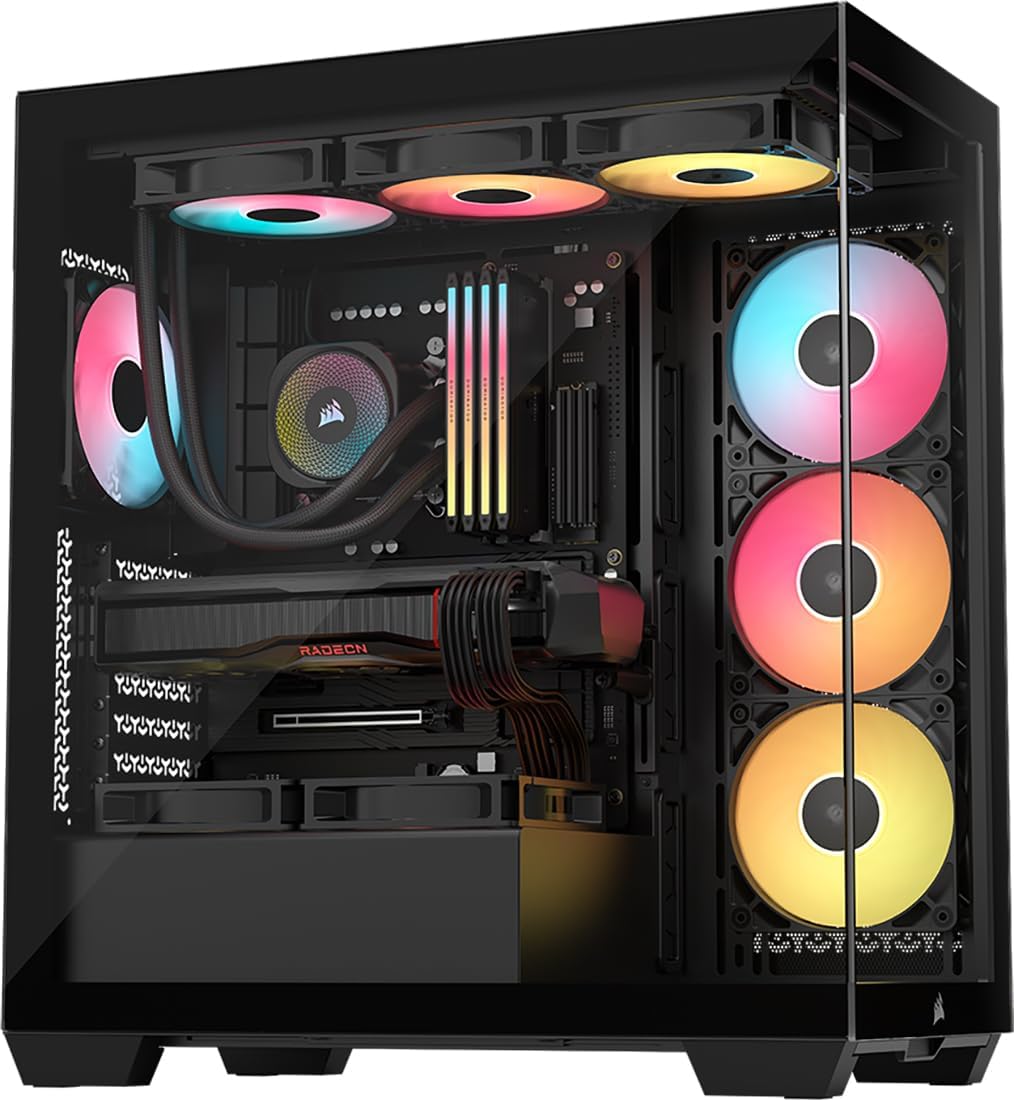


The CORSAIR 3500X RS ARGB in black earns a 4.6 rating and stands out as a polished option for builders who want a clean display case without sacrificing motherboard support or cooling flexibility. Its wraparound glass, removable panels, and support for reverse-connection motherboards combine presentation with practical access during assembly.
We may earn a commission when you buy through this link, at no additional cost to you.
Cable management benefits from the case's broad motherboard support, which reaches from Mini-ITX through EATX, and its validated use with ASUS BTF, MSI Project Zero, and Gigabyte Project Stealth boards. When using one of these motherboards, the main power and other rear-mounted connections can remain out of the main viewing area rather than crossing the visible chamber.
The tradeoff is that the case includes only three RS120-R ARGB fans despite its visual presentation, and the package does not include the other components shown in promotional imagery. It does, however, support up to ten 120mm fans across the side, roof, and PSU positions, giving buyers room to build a more substantial cooling arrangement.
This is a strong recommendation for someone choosing a mid-tower for a visually organized build, especially if they use a back-connect motherboard or expect to add fans later. The removable front and side glass also make it easier to route and secure cables during the initial build rather than treating cleanup as a final-stage task.
Reverse-connection motherboards keep the visible side of the board cleaner by relocating the primary cable connections to the rear. The 3500X RS has been validated for three named motherboard ecosystems, making it a practical fit for builders seeking to minimize exposed wiring.
Although only three fans are pre-installed, mounting points for up to ten 120mm fans create considerable room for upgrades. That makes the case suitable for builds where the initial configuration is modest but future cooling or radiator plans are more ambitious.
We may earn a commission when you buy through this link, at no additional cost to you.
The white version of the CORSAIR 3500X RS ARGB provides the same 4.6-rated foundation as the black model, with a finish suited to light-colored desks, coordinated components, and all-white RGB builds. It combines a wraparound glass design with practical routing features rather than treating cable visibility as something to conceal at the expense of component space.
We may earn a commission when you buy through this link, at no additional cost to you.
Its support for Mini-ITX, Micro-ATX, ATX, and EATX motherboards makes it a flexible mid-tower, while the back-connect motherboard compatibility allows builders using ASUS BTF, MSI Project Zero, or Gigabyte Project Stealth designs to keep more connections behind the motherboard tray. That is particularly useful when a panoramic glass panel makes every visible cable more noticeable.
The principal limitation is the same as on the black edition: only three RS120-R ARGB fans are included, and other components depicted in the listing are not supplied. Its support for up to ten 120mm fans means it can accommodate a larger cooling configuration, but additional fans may be needed for a full custom setup.
Choose this edition if you want the 3500X RS platform in white or plan a coordinated light-themed system. It is particularly appealing to builders who want a clear view of the components, organized wiring around a modern motherboard, and the freedom to increase fan count as the system evolves.
A white case looks best when the internal palette is coordinated and dust is kept away from large visible surfaces. The removable panels help during installation, while careful cable placement prevents dark cable bundles from interrupting the lighter visual theme.
The white model preserves the same motherboard, fan, glass-panel, and reverse-connection features as the black edition. It is therefore an aesthetic choice rather than a change in the underlying platform's core capabilities.
We may earn a commission when you buy through this link, at no additional cost to you.
The Lian Li LANCOOL 217 has a 4.8 rating and offers one of the most thoughtful routing packages in this comparison. Dual PSU mounting options, back-connect motherboard support, and a structure designed to conceal cables make it especially appealing for builders who want visible hardware without visible wiring.
We may earn a commission when you buy through this link, at no additional cost to you.
Its most important cable-management advantage is PSU flexibility. The power supply can face forward or be rotated, accommodating units up to 220mm long and allowing builders to choose a configuration that better suits the motherboard and the direction of the power leads. Support for back-connect motherboards further reduces visible cable congestion around the processor area.
The included cooling is substantial, with five pre-installed fans: two 170x30mm front fans, two 120mm reversed-blade fans, and a 140mm rear fan. Toolless mounting and flexible fan locations add build flexibility, although the case is centered on ATX rather than extending the same compatibility envelope to E-ATX.
The LANCOOL 217 is our leading choice for an enthusiast who prioritizes organized wiring alongside a polished, distinctive appearance. Its walnut accents, dual power buttons, and included fan array add convenience, while the two PSU orientations and hidden-cable focus make it a strong all-around recommendation for a new ATX build.
Rotating the PSU is useful when the cable exits or installation access would otherwise be awkward. Buyers should compare their power supply dimensions with the stated 220mm limit and consider the direction of the modular cable sockets before finalizing the layout.
Keeping cables out of the airflow path is part of effective thermal design. The LANCOOL 217's hidden layout and flexible fan positioning allow the builder to preserve intake and exhaust routes while also keeping the central viewing area uncluttered.
We may earn a commission when you buy through this link, at no additional cost to you.
The MONTECH AIR 903 MAX carries a 4.8 rating and combines a spacious E-ATX chassis with ventilation-first construction. Its perforated mesh front, four included 140mm fans, and radiator mounting at both the front and top make it a strong choice for powerful components that benefit from unrestricted airflow.
We may earn a commission when you buy through this link, at no additional cost to you.
Cable routing is supported by the case's spacious interior and dedicated routing space, which helps keep the installation organized without requiring the builder to sacrifice component clearance. The dimensions leave room for demanding hardware, and the case supports E-ATX, ATX, Micro-ATX, and Mini-ITX motherboards as well as graphics cards up to 400mm long.
The main consideration is the density of the cooling configuration. Three front and one rear 140mm fan create an immediately usable airflow arrangement, but radiator support requires careful planning around the available mounting locations. Buyers also need to verify exact radiator and fan dimensions for their chosen liquid-cooling hardware.
This case is recommended for a gaming or performance PC where graphics-card clearance, cooling options, and a broad motherboard range matter most. Its front I/O includes USB Type-C, two USB 3.0 ports, microphone and audio jacks, plus power, reset, and LED controls, making it a modern, practical foundation for a clean build.
A radiator occupying the front or roof consumes several mounting positions, so it can change the number of fans that can remain installed. Comparing the radiator's thickness with the available depth before ordering reduces the chance of a conflict.
Support for graphics cards up to 400mm makes this chassis more accommodating than many compact mid-towers. That extra room is useful for large graphics cards while leaving space to route power leads around, rather than directly across, the card.
We may earn a commission when you buy through this link, at no additional cost to you.
The CORSAIR 4000D RS ARGB has a 4.7 rating and stands apart through its modular FRAME system. Instead of treating the interior as a fixed arrangement, it allows the motherboard tray and front I/O area to be changed, making it a flexible option for builders who want to evolve the case over time.
We may earn a commission when you buy through this link, at no additional cost to you.
Cable management is handled by an internal side panel beside the motherboard tray that can serve as a cable cover. Removing that panel also creates an opportunity to mount side fans, letting the owner trade a cleaner view for additional cooling. This conversion is particularly useful when a build changes or when hidden storage needs are added.
Three CORSAIR RS ARGB PWM fans are pre-installed at the front. They support daisy-chained four-pin PWM connections, Zero RPM behavior at low loads, and motherboard-controlled five-volt ARGB lighting. The InfiniRail steel mounting system provides additional flexibility for larger front fans and roof-mounted 140mm options.
The 4000D RS is a good recommendation for an enthusiast who wants visible cable organization with the option to remove the cover later. The FRAME concept adds complexity compared with a conventional fixed chassis, but it rewards builders who value configurable layouts, upgrade paths, and an uncluttered default presentation.
The side panel conceals wiring when a clean look is the priority. If the system needs more cooling, removing it converts the same area into a side-fan mounting position, giving builders a meaningful choice without changing the rest of the chassis.
The FRAME system allows future changes to components such as the motherboard tray and front I/O panel. This makes the case relevant to builders who expect regular upgrades rather than those who only want a fixed display case.
We may earn a commission when you buy through this link, at no additional cost to you.
The Cooler Master Q300L V1 has a 4.5 rating and offers a straightforward route to a compact build with visible components. It supports Micro-ATX and Mini-ITX motherboards, and its perforated construction emphasizes airflow over a completely closed or heavily filtered enclosure.
We may earn a commission when you buy through this link, at no additional cost to you.
Its routing approach is relatively simple. The open frame and perforated panels make it easy to reach cables, but the case does not offer the dedicated chambers, deep back-side spaces, or elaborate covers found in the more premium models. The repositionable I/O panel is a practical feature because it allows the builder to place the controls where they remain accessible after installation.
Component clearances include CPU coolers up to 159mm, graphics cards up to 360mm, and power supplies up to 160mm. Cooling flexibility is better than the compact dimensions might initially suggest, with support for a 240mm liquid cooler and up to five fans. Exact radiator placement should be checked against the mounting options shown in the product listing.
The Q300L V1 is best for a budget-conscious compact PC where Micro-ATX or Mini-ITX is acceptable and open airflow is the priority. It will not suit a full ATX build, and buyers should expect to manage cables more actively rather than hiding them in a spacious dedicated compartment.
The case is designed around Micro-ATX and Mini-ITX motherboards, so checking the board form factor before buying is essential. It is a sensible fit for compact gaming systems and office-style builds that do not require a full-size ATX motherboard.
The modular I/O panel can sit at the front, top, or bottom on either side. Deciding on its position early makes it easier to route the small front-panel wires without creating sharp bends or unnecessary slack.
We may earn a commission when you buy through this link, at no additional cost to you.
The Lian Li O11D Mini V2 has a 4.7 rating and delivers a compact, display-focused ATX layout without adopting a conventional tower silhouette. Pillar-less tempered glass, a slanted base, and dedicated GPU support brackets create a distinctive build presentation that remains practical for standard ATX motherboards.
We may earn a commission when you buy through this link, at no additional cost to you.
Cable organization is supported by the case's compatibility with ATX back-connect motherboards and by a special bracket for the 24-pin motherboard cable. The latter helps maintain a tidy layout by securing a traditionally conspicuous connection. The compact dimensions are managed without abandoning full-size ATX power supply support.
The most important caveat is that no fans are included. Buyers must plan and purchase the entire cooling solution, adding both cost and assembly responsibility. The slanted bottom and mesh side design are intended to promote cold-air intake and improve GPU cooling, but their effectiveness still depends on the selected fans and their placement.
The O11D Mini V2 is an excellent recommendation for a builder who prioritizes a clean panoramic presentation, compact footprint, and vertical graphics-card arrangement. It is best suited to experienced builders who already know their cooling requirements or who want full control over every installed fan.
Because the package contains no fans, the builder should design the airflow path before assembling the system. Fan size, thickness, radiator position, and the orientation of the slanted intake all affect which components can be installed without blocking the intended route.
Horizontal and vertical anti-sag brackets help support heavy graphics cards and reduce strain on the motherboard. These brackets also free the builder to choose a layout that makes the card and surrounding cable paths look intentional.
We may earn a commission when you buy through this link, at no additional cost to you.
The Asiahorse Scutum has a 4.5 rating and distinguishes itself with genuine ash wood trim, broad tempered-glass visibility, and a dual-chamber approach to cable routing. The separate chamber provides 100mm of routing depth, giving power, fan, and liquid-cooling tubes a defined place away from the displayed components.
We may earn a commission when you buy through this link, at no additional cost to you.
Support for ATX and Micro-ATX BTF back-plug motherboards can further improve the visible chamber by concealing modular connections behind the board. Included cable ties, mounting brackets, and wiring guidance help keep the layout orderly and reduce the chance of bent GPU cables or interference with fans.
The case also supports a 360mm top radiator, graphics cards up to 410mm long, CPU air coolers up to 160mm, and power supplies up to 240mm. The stated dimensions and component limits are broad, but buyers should still verify the exact configuration, particularly when choosing the Standard or Ultra version.
The Scutum is a compelling recommendation for a builder who wants a professional-looking interior and meaningful hidden space rather than a minimal cover. It is especially well suited to home offices, creator studios, and displays where ash wood can soften the appearance of a conventional black or all-metal gaming chassis.
The 100mm routing depth can accommodate bundled power leads and cooling tubes more comfortably than a thin gap behind a tray. This creates a clearer main chamber and gives cables enough room to bend without being forced into tight, damaging curves.
The Standard Edition is an empty chassis for builders with existing cooling equipment, while the Ultra Edition includes six NYOTA Pro reverse ARGB fans and an Umbra RGB hub. The distinction should be checked carefully because it changes the cooling and lighting package.
We may earn a commission when you buy through this link, at no additional cost to you.
The ASUS A31 carries a 4.7 rating and offers one of the cleanest cable-management concepts at a mainstream ATX level. Its BTF hidden connector design places modular cables behind the motherboard, while the pillar-free dual tempered-glass panels leave the main hardware chamber free of visual obstructions.
We may earn a commission when you buy through this link, at no additional cost to you.
The eight-degree angled base is intended to improve airflow while also giving the build a more dramatic viewing angle. Cooling support includes AIO configurations up to 360mm, and the case is intended to accommodate demanding ATX graphics cards such as the RTX 5090 and RTX 4090 families mentioned in the supplied product information.
Its main limitation is that the supplied information does not specify a set of pre-installed fans. Buyers should therefore plan the cooling configuration and confirm the current package contents. The liquid-cooling claim and motherboard support are useful, but exact radiator depth and other clearance details should be verified before committing to hardware.
The A31 is a strong recommendation for a builder using a back-connect motherboard who wants a minimalist, modern case without paying for the most elaborate premium designs. It is particularly compelling for a display-oriented build where hidden wiring and unobstructed glass take priority over bundled fans.
A back-connect or BTF motherboard relocates the major power connections to the rear of the board. Combined with the A31's hidden-connector design, this can leave the visible chamber almost free of the cables that usually dominate the area above and beside the motherboard.
The sloped base is part of the case's airflow and visual design. A builder should confirm the available radiator placement and account for the angle when positioning tubes and fittings, particularly in a large custom loop.
We may earn a commission when you buy through this link, at no additional cost to you.
The HYTE Y70 Touch Infinite has a 4.7 rating and transforms the cable-managed PC case into an integrated entertainment and display platform. Its 14.9-inch touchscreen, dual-chamber interior, panoramic glass, and included PCIe 4.0 riser make it the most feature-oriented option in this guide.
We may earn a commission when you buy through this link, at no additional cost to you.
The dual-chamber structure creates a dedicated area for cables and components, helping separate the vertical graphics-card presentation from the wiring required by the rest of the system. A color-matched riser supports a four-slot vertical graphics arrangement, while special routing and chamber separation maintain a unified appearance around the display.
Cooling capacity is substantial, with support for up to ten fans. The case accommodates a 360mm radiator on the side with a stated thickness of 125mm, an adjustable top radiator position for up to 68mm thickness, and a cold-floor area for either three 120mm or two 140mm fans up to 32mm thick. These dimensions require careful planning.
The Y70 Touch Infinite is our premium recommendation for a builder who wants a dramatic centerpiece, integrated monitoring or customization, and vertical GPU presentation in a highly organized chassis. It is less appropriate for a compact or simple build, but for a dedicated showpiece system, the integrated display and separated chambers deliver a distinctive combination of function and presentation.
The integrated 14.9-inch panel offers a 682 by 2560 resolution, 60Hz refresh rate, and ten-point multitouch. Combined with HTYE Nexus software, it adds a customizable visual surface that can turn the case into more than a conventional enclosure.
The dual-chamber interior is valuable in a case with a large screen, riser, extensive radiator options, and numerous fan connections. It gives the builder distinct areas for display hardware, cooling hardware, and cable runs, making the overall design more coherent despite its feature set.
We may earn a commission when you buy through this link, at no additional cost to you.
The right cable-managed case should match your motherboard, cooling hardware, and tolerance for visual complexity. Focus first on the components you already own, then compare routing space, accessibility, airflow, and the appearance of the finished build.
Begin with the motherboard's form factor and where its cables connect. Standard ATX, Micro-ATX, and Mini-ITX boards generally require cables to run to the visible side, while BTF or reverse-connection boards place the principal connections on the rear. The CORSAIR 3500X RS, Lian Li LANCOOL 217, Lian Li O11D Mini V2, Asiahorse Scutum, and ASUS A31 are explicitly described as supporting back-connect motherboards, which can substantially reduce visible clutter.
The best cases make the motherboard type easy to accommodate, but marketing language should be checked carefully against the exact board being used. Confirm both the form factor and connection position before buying, especially when mixing a back-connect board with specific cable-management accessories.
Routing space is the measurable region behind the motherboard tray or in a separate chamber where excess leads can be hidden. The Asiahorse Scutum specifies 100mm of routing depth, while the Lian Li LANCOOL 217 separates the PSU and supports back-connect boards. A deeper space is valuable for large modular power-supply cables, multiple fan hubs, and liquid-cooling tubes because it reduces sharp bends and crowded bundles.
Prefer a case with enough room for your planned components, not merely a thin opening. Also check whether the cover or panel is removable, because a fixed cover can be frustrating during first-time assembly.
Cable organization is less useful if the case cannot accommodate your hardware. The MONTECH AIR 903 MAX supports E-ATX boards and graphics cards up to 400mm, the Asiahorse Scutum lists graphics-card support up to 410mm, and the Lian Li O11D Mini V2 retains full-size ATX power-supply support in a compact chassis. Compare these limits with the dimensions of your current components and likely upgrades.
Allow some tolerance for differently shaped aftermarket parts. Account for radiator thickness, power-supply length, CPU-cooler height, and the space needed to bend and connect cables rather than checking only the headline component maximum.
A tidy case should not obstruct the path from cool intake to hot exhaust. The MONTECH AIR 903 MAX uses a ventilated mesh front and supports radiators at the front and top. The CORSAIR 4000D RS lets builders remove its cable cover to create a side-fan position, while the HYTE Y70 Touch Infinite supports multiple radiators and as many as ten fans. Check whether fans and radiators occupy the same mounting points and whether the stated thickness allowances suit your cooler.
Plan the airflow and cable paths together. A power lead should not be forced across a fan, and a radiator should not block the case's main intake. The supplied fan count is also a practical factor: three fans in the CORSAIR cases, five in the LANCOOL 217, four in the MONTECH, and none in the Lian Li O11D Mini V2.
Back-connect or BTF motherboards move connectors behind the board, so they naturally complement hidden-cable cases. Support can include full board support, a specific motherboard validation, or both. The CORSAIR 3500X RS names ASUS BTF, MSI Project Zero, and Gigabyte Project Stealth, while the ASUS A31, LANCOOL 217, O11D Mini V2, and Asiahorse Scutum also advertise compatibility with back-connect designs.
Even with a back-connect board, verify that the case's rear cable passages accommodate the connectors and that the motherboard's I/O layout matches. The feature reduces clutter most effectively when combined with dedicated routing space and a cover.
The best time to arrange cables is during the initial build, which means panels and fasteners need to be accessible. The CORSAIR 3500X RS has removable front and side tempered-glass panels, the Cooler Master Q300L V1 uses an open design, and the LANCOOL 217 uses toolless fan mounting. These traits can make it easier to reach the motherboard tray and route leads before the final panels are attached.
Check whether the design requires removing multiple parts to gain access to a connection. A case that looks clean but is difficult to assemble may encourage rushed routing and poor cable placement.
Front I/O should match how you use the PC. The MONTECH AIR 903 MAX provides one USB Type-C port, two USB 3.0 ports, microphone and audio jacks, and power, reset, and LED buttons. The Asiahorse Scutum includes a front 20Gbps USB-C port. Other cases may prioritize visual minimalism or provide different connectivity, so compare the panel with the devices you expect to connect regularly.
Also consider button placement and visibility. The LANCOOL 217 includes two power buttons for easier access in different placements, while adjustable I/O positioning on the Q300L V1 gives the builder control over where the controls appear.
A clean interior is only one part of the desired presentation. The Lian Li LANCOOL 217 uses walnut wood accents, the Asiahorse Scutum uses solid ash trim, and the HYTE Y70 Touch Infinite adds a large integrated touchscreen. Conversely, the ASUS A31 and both CORSAIR 3500X RS versions favor glass and lighting, with the white edition targeting coordinated light builds.
Choose a finish that suits the room as well as the hardware. Glass showcases components and lighting but reveals cable imperfections, wood creates a more natural appearance, and a screen-led design becomes the center of attention. Consider how the case will look with the final component palette, not only with a fully populated promotional system.
Install the motherboard, power supply, and storage before permanently securing cables. Connect the short front-panel wires first, followed by the motherboard power lead, fans, storage data cables, and front I/O. Route each group through the nearest designated opening and use the included ties or clips to maintain deliberate paths. Avoid pulling tightly on connectors or creating a sharp bend immediately after a plug.
After routing is complete, check that the motherboard does not sag or press against the side panel, fans spin freely, and cables do not interfere with drive cages or radiators. Connect the front I/O after the main internal wiring, using the case manual to identify each header. Once the system is stable, inspect the interior under different lighting angles and refine bundles that remain visually distracting.
For ongoing care, dust filters and intake surfaces should be cleaned according to the manufacturer's instructions, and removable panels should be handled by their edges. Keep liquids away from the open chassis during cleaning, disconnect power before servicing internal components, and avoid resting heavy tools or components on tempered-glass panels. Periodically verify that tied cables have not become overly tight or begun pressing against a connector.
The most important feature is sufficient routing space combined with access to the relevant connections. A cover alone cannot solve poor planning, so confirm that the case supports your motherboard, CPU cooler, graphics card, power supply, and radiator dimensions. Back-connect motherboard support is also valuable because it removes the largest visible cable bundle at its source.
No. A conventional motherboard can still look tidy in a case with a deep routing chamber, removable covers, and adequate cable ties. Back-connect boards simply move the main connections behind the motherboard, reducing clutter before the remaining leads are hidden. Choose the motherboard and case independently, then confirm that the board's connector arrangement fits the case.
It depends on the selected model and cooling plan. The CORSAIR 3500X RS and 4000D RS include three fans, the LANCOOL 217 includes five, the MONTECH AIR 903 MAX includes four, and the Lian Li O11D Mini V2 includes none. Confirm the current package contents and compare the mounting positions with the radiator or additional fans you intend to use.
More space is generally better because it allows power cables and liquid-cooling tubes to bend without being compressed. A thin gap may work for a simple build, but a deeper chamber is preferable when using a modular power supply, several fan hubs, or a custom loop. Cases such as the Asiahorse Scutum explicitly provide 100mm of routing depth.
Yes, when cables are kept out of intake and exhaust paths. Bundles near fans can restrict airflow or interfere with rotating blades, while loose leads can make it harder to install radiators and large graphics cards. The goal is not merely to conceal wires, but to arrange them so cooling equipment and airflow channels remain unobstructed.
Removable panels are useful because they provide better access during installation and later maintenance. They can make front I/O, fan, radiator, and motherboard connections easier to reach than a fixed frame. The CORSAIR 3500X RS explicitly includes removable front and side glass, and open-frame designs such as the Q300L V1 provide similarly accessible routing paths.
They are best when paired with deliberate cable placement and a coordinated internal design. A panoramic panel can make a tidy layout look excellent, but it also highlights stray leads, visible dust, and mismatched components. Consider removable panels and an understated finish if you want a polished appearance without maintaining every visible surface.
Check the motherboard form factor, graphics-card length, CPU-cooler height, power-supply length, radiator size, and fan thickness. Compact cases often use shared mounting locations, so installing a large radiator may prevent the included fans from remaining in place. The Lian Li O11D Mini V2, for example, supports standard ATX boards and full-size ATX power supplies but does not include fans.
The Lian Li LANCOOL 217 is the strongest all-around recommendation because its flexible PSU orientation, back-connect motherboard support, five included fans, and 4.8 rating cover the essential needs of a polished ATX build. For a more budget-conscious route to a clean layout, the ASUS A31 combines hidden-connector support with a 4.7 rating, while the HYTE Y70 Touch Infinite leads the premium category with its integrated display and dual-chamber design.
Prioritize the case that matches your motherboard and cooling plan before focusing on decorative details. Deep routing space, accessible covers, back-connect support, and removable panels usually have a greater effect on the build experience than color or glass alone. If your system already includes large or unusual components, verify every stated clearance rather than assuming that all ATX cases are interchangeable.
Finally, review the current listing before purchasing because included components, availability, and prices can change. Check the package contents, manufacturer diagrams, and compatibility notes against your exact hardware. The right case should make wiring easier, preserve airflow, and leave you with a finished PC that you can maintain and enjoy.