
ASRock PG 1600G
4.4Editor score
Dual native 12V-2×6 cables
Gold and Platinum efficiency
Fully modular sleeved design
Explore the best 1500W PSU options for demanding gaming PCs and workstations, comparing efficiency, connectivity, noise, protection, and build fit.
A 1500W PSU provides substantial power for high-end graphics cards, fast processors, extensive memory, storage, and demanding accessories. Choosing the right unit requires more than checking wattage: connector compatibility, transient-load handling, efficiency, thermal design, dimensions, and case clearance all influence the result.
This guide compares ten high-capacity power supplies rated from 1500W to 1600W. The analysis covers ATX and PCIe standards, native 12V-2×6 connections, modular cabling, fan behavior, efficiency certifications, component quality, protection features, and practical considerations for workstations, enthusiasts, and AI-oriented systems.
Each selection highlights a different reason to consider a high-output PSU, from software-controlled Corsair models to exceptionally quiet Seasonic and be quiet! designs. Ratings reflect the supplied customer feedback, while prices and availability can change, so shoppers should verify current listings and fit before purchasing.
4.4Editor score

4.5Editor score

4.7Editor score
The comparison below places all ten high-output power supplies side by side, emphasizing the standards, connectivity, cooling approach, and efficiency features that distinguish modern 1500W-class units.


The CORSAIR HX1500i (2025) is a 1500W ATX 3.1 power supply that combines current platform support with the convenience of full modular cabling. Its 4.5 customer rating reflects a favorable reception, while the combination of PCIe 5.1 readiness, Zero RPM operation, and iCUE configuration makes it a well-rounded choice for enthusiast systems.
We may earn a commission when you buy through this link, at no additional cost to you.
The most important strength is its foundation for modern, power-hungry hardware. ATX 3.1 certification supports the PCIe Gen 5 platform and resistance to transient power spikes, which matters when high-end graphics cards and processors change demand rapidly. The fully modular design removes unused cables, improving airflow and making a large PSU easier to route inside a spacious chassis.
Corsair's 140mm Fluid Dynamic Bearing fan provides cooling without requiring constant rotation. At low and medium loads, Zero RPM Fan Mode stops the fan entirely, making the unit particularly appropriate for work, browsing, and lightly loaded gaming. iCUE adds fan curves, power monitoring, and the ability to switch between single-rail and multi-rail overcurrent protection without rebuilding the system.
This is not a compact unit, and buyers should confirm PSU clearance before ordering. Users who dislike ecosystem software may find manual controls more familiar. Even so, the balance of modern standards, quiet behavior, modularity, monitoring, and flexible protection makes the 2025 HX1500i our most broadly convincing 1500W recommendation for a high-end build.
Choose it when you want a capable 1500W platform without moving into the more specialized design territory of a 1600W workstation model. It is especially well suited to advanced gaming PCs, content-creation systems, and heavily equipped creator workstations that benefit from clean cabling and configurable operation.
The ATX 3.1 platform is the central reason to favor this revision over older high-wattage units. It is designed around modern transient-load behavior and high-bandwidth graphics hardware, giving the system a standards-focused foundation for future component upgrades.
Zero RPM mode removes fan noise during lighter workloads, while iCUE lets users tailor the curve and inspect power settings. That combination is useful for a large enthusiast PC that may alternate between productivity, gaming, and rendering workloads.
We may earn a commission when you buy through this link, at no additional cost to you.
The ASRock PG 1600G delivers 1600W of continuous power and earns a 4.4 customer rating. It is a compelling feature set for builders who want more capacity than a nominal 1500W unit, particularly when the system includes a high-end graphics card, an overclocked CPU, and several powered accessories.
We may earn a commission when you buy through this link, at no additional cost to you.
Its headline specifications are unusually comprehensive. The unit is ATX 3.1 and PCIe 5.1 compliant, designed to handle power excursions up to 220 percent, and supplies dual native 12V-2×6 connectors. Those connectors incorporate TempGuard technology to monitor temperature at the terminal point, a useful safety-oriented feature for high-power graphics cards.
Efficiency is certified at 80 PLUS Gold and Cybenetics Platinum, with efficiency stated at up to 90 percent and a Cybenetics Lambda A noise rating. The 135mm striped axial FDB fan and iCool mode support quiet operation, while a physical switch offers continuous cooling when desired. Japanese capacitors, a fully modular sleeved cable set, and numerous legacy connectors broaden practical compatibility.
The significant compromise is size. At 180mm deep, the PG 1600G may not fit cases designed around more compact power supplies. Its 5V BOOST control, 12V rail configuration, and 1600W output may also be unnecessary for many builds. Even so, these features represent good value when case space is available and the goal is a flexible high-output platform.
This is a strong selection for a large workstation, multi-GPU configuration, or enthusiast PC where native high-power graphics connections and abundant output matter. Verify clearance first, confirm your hardware does not require more power than expected, and make sure the case provides suitable airflow around the PSU.
Two native 12V-2×6 cables remove the need to rely on multiple adapters for one high-end graphics card. TempGuard adds another layer of awareness by monitoring temperature at the connector terminal, complementing the unit's broader protection design.
A 12V output of 133.3A and 1600W continuous capacity suit multi-GPU systems, extreme overclocking, and professional workstations. The extensive selection of EPS, PCIe, SATA, and peripheral connectors also makes the PG 1600G practical for complex internal configurations.
We may earn a commission when you buy through this link, at no additional cost to you.
The NZXT C1500 Platinum is a 1500W ATX 3.1 unit built for current and future high-performance platforms. It carries a 4.1 customer rating and distinguishes itself through digital power delivery, two PCIe 5.1 cables, and a claimed 94 percent efficiency backed by Cybenetics Titanium certification.
We may earn a commission when you buy through this link, at no additional cost to you.
Two 16-pin 12V-2×6 PCIe 5.1 cables can each deliver more than 600 watts, giving modern graphics cards direct high-power connections. Digital control supports precise voltage regulation, which is intended to improve efficiency and reduce ripple noise. Those characteristics make the unit attractive for users who place system stability and electrical behavior ahead of software monitoring.
Cooling comes from a 140mm magnetic levitation fan using air-suspended blades. The zero-fan approach reduces noise when possible, while the efficient design should also limit waste heat. Fully modular cabling, 100 percent Japanese capacitors, and the understated black finish make it easy to integrate into a clean, modern gaming build.
The product information is less explicit about individual protection circuitry and offers less control information than some competing models. Its 4.1 rating is respectable but trails the strongest customer feedback in this list. Those factors may lead cautious buyers to investigate detailed platform documentation and warranty terms before committing.
The C1500 Platinum is a good match for a modern gaming PC with one exceptionally powerful graphics card, especially for buyers who prioritize efficiency, direct 12V-2×6 connectivity, and a simple integrated fan design. It is less obviously aimed at users seeking elaborate monitoring or unusually deep 1600W workstation headroom.
Digital voltage regulation is the defining feature of this design. It is intended to provide precise rail control and lower ripple, useful qualities in a high-output system where clean and stable power is essential.
The stated 94 percent efficiency and Cybenetics Titanium rating reduce conversion losses and heat. Combined with a magnetic levitation fan, that approach supports a system that remains cooler and quieter than a conventional high-capacity unit under appropriate operating conditions.
We may earn a commission when you buy through this link, at no additional cost to you.
The Seasonic Prime TX-1600 Noctua Edition is a 1600W power supply focused on exceptional electrical performance and acoustics. Its 4.7 rating is the highest among these products, making the enthusiast's Noctua fan and custom grill stand out in a category where noise can be a meaningful performance concern.
We may earn a commission when you buy through this link, at no additional cost to you.
Seasonic describes the unit as delivering ultra-tight voltage regulation for high-performance workstations and gaming PCs. The 140mm fan position is occupied by the renowned NF-A12x25, while the custom grille is optimized for airflow. It holds Cybenetics Lambda A++ certification and is stated to be approximately 8–10dB(A) quieter than the regular Prime TX-1600.
Semi-passive operation allows the fan to remain off until 50 percent load when ambient temperature is up to 25°C. Beyond that threshold, it ramps gradually, preserving low noise without compromising cooling. Titanium efficiency, including 94 percent at 50 percent load, further reduces waste heat and helps the acoustic design perform well.
The model provides ATX 3.1 and PCIe 5.1 compliance with a 12V-2×6 connection for high-end graphics cards, and it remains backward compatible with ATX 3.0 and PCIe 5.0. The trade-offs are its premium positioning and the fact that the supplied details list one 12V-2×6 connector rather than the dual arrangement seen on several rivals.
This is the option to consider when silence is a core requirement and the system is expected to spend substantial time at moderate loads. It also makes sense for premium workstations where clean power, tight regulation, and enduring component quality justify a specialized fan package. Confirm that the case accommodates the unit and that one native high-power connector matches your graphics card's needs.
The NF-A12x25 is combined with an optimized intake grille to maintain airflow while limiting audible output. Semi-passive behavior then removes fan noise entirely during qualifying lighter and moderate workloads.
A stated 94 percent efficiency at 50 percent load means less energy is lost as heat. That supports lower internal temperatures and complements the premium fan strategy when a workstation or gaming system operates near its intended operating range.
We may earn a commission when you buy through this link, at no additional cost to you.
The be quiet! Dark Power Pro 13 offers 1600W, 80 PLUS Titanium efficiency, and a distinctive overclocking key that changes its output configuration. Its 4.3 customer rating places it comfortably among the stronger-reviewed options, while the full mesh front and quiet-brand identity target discerning workstation and enthusiast builds.
We may earn a commission when you buy through this link, at no additional cost to you.
The special feature is rail flexibility. A physical overclocking key switches between six separate 12V rails and one large 12V rail. Multi-rail operation can provide finer overcurrent partitioning for compatible hardware, while single-rail mode simplifies power delivery for modern graphics cards and CPUs. This flexibility may be useful to advanced builders, although changing modes requires deliberate setup rather than casual adjustment.
Full digital control and full bridge LLC technology underpin the unit's signal stability. Efficiency can reach 94.5 percent, helping limit heat and fan activity. The funnel-shaped full mesh intake supports unrestricted airflow, and compatibility includes ATX 3.0 with PCIe 5.0 graphics support and GPUs using 6+2-pin connectors.
One point to clarify is that the supplied product information describes ATX 3.0 and PCIe 5.0 rather than the newer ATX 3.1 and PCIe 5.1 naming used by most contemporary competitors. It also does not specify native 12V-2×6 details in the provided facts. Buyers who require those exact current connectors should verify the cable configuration directly with the manufacturer or retailer.
Choose this model for an enthusiast who values acoustic restraint, high efficiency, and unusual configuration flexibility. It is particularly relevant to advanced multi-GPU or overclocked systems where carefully partitioned rails are useful, provided the selected cables and compatibility are confirmed before assembly.
The overclocking key gives users meaningful control over power distribution. Single-rail operation simplifies high-current graphics use, while six-rail mode offers granular overcurrent segmentation for specialized hardware.
An efficiency figure of up to 94.5 percent reduces conversion heat, while the funnel-shaped full mesh front provides a broad intake path. The combination supports the quiet operation expected from a premium high-output design.
We may earn a commission when you buy through this link, at no additional cost to you.
The original listing for the Corsair HX1500i combines 1500W capacity with ATX 3.1 and PCIe 5.1 compliance. Its 4.7 customer rating is among the highest in the group, reflecting a model that has already established a strong reputation for modularity, low noise, and digital monitoring.
We may earn a commission when you buy through this link, at no additional cost to you.
The 140mm Fluid Dynamic Bearing fan supports the unit's ultra-low-noise positioning, while Zero RPM Fan Mode stops rotation at low and medium loads. Corsair iCUE lets users create custom fan curves, monitor power settings, and toggle single-rail or multi-rail overcurrent protection on demand. These are useful controls for a high-output system that may see sharply changing loads.
Full modular cabling means builders only install the leads they need. This reduces clutter behind the motherboard tray and can improve airflow inside already crowded cases. ATX 3.1 certification and transient-spike resistance provide a more contemporary foundation than units designed exclusively around older graphics connectors.
The central difficulty is distinguishing this model from the newer 2025 HX1500i, which occupies a similar position in the lineup. Buyers should compare the exact connector list, included accessories, warranty, and listing details. The additional iCUE dependency may also be unnecessary for users who prefer a fixed, simple power supply.
This HX1500i remains an attractive pick when a buyer finds a particularly suitable listing and values Corsair's established platform. It is a natural fit for a premium gaming PC that needs high headroom, clean cabling, modern transient handling, and software-assisted monitoring.
iCUE turns the PSU into a managed component of the build rather than a passive box. Custom curves, power settings, and protection modes make it easier to adapt behavior to different hardware and workload patterns.
The fully modular system is especially valuable in cases where every cable affects visibility and airflow. Leaving disconnected leads out of the chassis can make high-wattage builds easier to organize and service.
We may earn a commission when you buy through this link, at no additional cost to you.
The HXi Series Corsair HX1500i is a fully modular, digitally controlled 1500W unit with an emphasis on quiet operation. It holds a 4.6 customer rating and includes three EPS12V connectors, a useful detail for compatible motherboards that require more than the usual pair of CPU power leads.
We may earn a commission when you buy through this link, at no additional cost to you.
Its 140mm Fluid Dynamic Bearing fan and Zero RPM mode reduce acoustic output under light and medium loads. The iCUE platform allows custom fan curves, monitoring, and switching between single- and multi-rail overcurrent protection. Fully modular sleeved cabling helps users maintain a tidy installation and use only the connectors required by their components.
The platform is older than the ATX 3.1 versions in this comparison, and the provided information does not explicitly claim ATX 3.1 or PCIe 5.1 support. Native 16-pin graphics connectivity also is not clearly described. That distinction is important for builders considering a new high-end GPU that benefits from a direct 12V-2×6 connection.
Triple EPS12V support can make the HXi appealing for specialized motherboards and multi-CPU-oriented accessories, although a high-end consumer board usually needs only two. Buyers should not assume that a broad connector count alone is better; standards support and cable suitability for the graphics card may matter more.
This model makes sense for an established platform where the required CPU connectors are known, the graphics card uses conventional PCIe power, and the buyer values Corsair's digital controls. For a brand-new build centered on the latest GPU, a newer ATX 3.1 model is generally the safer comparison point.
Three EPS12V connectors provide extra flexibility for compatible boards. The feature differentiates the HXi for specialized motherboard layouts, though users should verify that their board actually uses all three.
Digital monitoring and configurable fan behavior give users meaningful control over a 1500W platform. The Zero RPM range can keep the power supply silent during everyday tasks and lighter games.
We may earn a commission when you buy through this link, at no additional cost to you.
The Seasonic Prime TX-1600 offers 1600W with ATX 3.1 and PCIe 5.1 readiness. It carries a 4.5 customer rating and targets demanding systems that need efficient power delivery, with the supplied information specifically identifying AI workstations as an ideal use case.
We may earn a commission when you buy through this link, at no additional cost to you.
Dual native 12V-2×6 connectors provide direct high-current connections for contemporary graphics hardware. Japanese capacitors support long-term stability, and hybrid fan control with a 135mm Fluid Dynamic Bearing fan balances cooling demand against noise. The unit is certified by 80 PLUS and Cybenetics at Titanium A level, a strong efficiency profile for sustained high-output operation.
This is a practical alternative to the Prime TX-1600 Noctua Edition for buyers who prioritize current connector support and workstation capability more than a specialized acoustic package. A single Seasonic platform can therefore appeal to users who recognize the brand's established engineering and want contemporary power standards.
The standard Prime TX-1600 is not described with the Noctua Edition's Lambda A++ certification or roughly 8–10dB(A) reduction in noise. Buyers who are especially sensitive to sound should account for that difference. As with any 1600W unit, they must also confirm the case has enough PSU clearance and suitable airflow.
Choose the regular Prime TX-1600 for an AI workstation, multi-GPU system, or advanced gaming PC that needs two native high-power GPU connections and top-tier efficiency. It is particularly compelling for builders who value the Seasonic platform but do not require the Noctua Edition's enhanced fan specification.
Two native 12V-2×6 connectors simplify cable arrangements around demanding graphics cards. Native connections also avoid relying on multiple legacy plugs for a single high-power device.
Titanium A certification is valuable in systems that operate near high utilization for extended periods. Lower conversion losses mean less waste heat, helping the internal cooling system maintain quiet and stable operation.
We may earn a commission when you buy through this link, at no additional cost to you.
The EVGA SuperNOVA 1600 T2 is an established 1600W design with 80 PLUS Titanium certification, full modularity, and an extensive protection package. Its 4.6 customer rating indicates strong user satisfaction, while the long-established platform appeals to builders seeking a high-output unit with a long-term support identity.
We may earn a commission when you buy through this link, at no additional cost to you.
Efficiency reaches 94 percent at 115V AC and 96 percent at 220–240V AC under typical loads according to the supplied data. A 140mm double ball-bearing fan supports durability, and the 100,000-hour MTBF specification provides a useful indication of the manufacturer's expected reliability. These characteristics suit systems expected to run near substantial output for extended periods.
Protection is comprehensive, covering overvoltage, undervoltage, overcurrent, overpower, short-circuit, and overtemperature conditions. That broad coverage is reassuring for an expensive high-output build. ECO mode and full modular cabling further improve usability by reducing unnecessary power use and cable clutter.
The central drawback is age relative to ATX 3.1 competitors. The product information does not identify PCIe 5.1 readiness or a native 12V-2×6 connector. Modern graphics cards may therefore require an appropriate adapter, and buyers should ensure adapter use is permitted and correctly implemented. Legacy platform naming also means it should not be assumed to meet newer transient requirements.
This model is worth considering for a build that prioritizes efficiency, modularity, and a mature high-capacity design over the newest connector standard. It is particularly relevant to multi-GPU systems using supported conventional PCIe connectors, provided the required power cables and adapter configuration are confirmed in advance.
Six named protection mechanisms guard the system against multiple electrical and thermal fault conditions. The comprehensive approach is reassuring for a power supply intended to support costly workstation or multi-GPU hardware.
Titanium-level efficiency reduces heat, while a double ball-bearing fan emphasizes longevity. Together, they form a solid foundation for a high-output system that may operate under sustained load.
We may earn a commission when you buy through this link, at no additional cost to you.
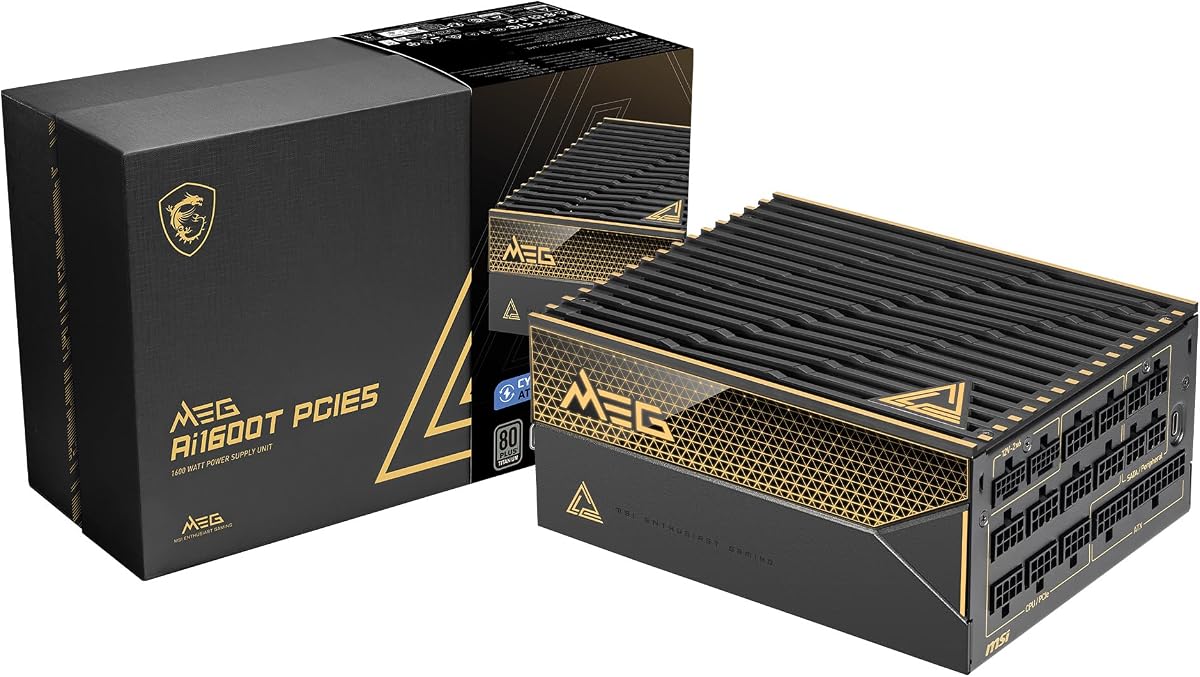
The MSI MEG Ai1600T PCIE5 combines 1600W output with ATX 3.1 and PCIe 5.1 readiness. Its 4.5 customer rating reflects a favorable reception, and the combination of dual native 12V-2×6 connectors, Japanese capacitors, and a 12-year warranty targets buyers seeking a long-term high-output platform.
We may earn a commission when you buy through this link, at no additional cost to you.
The unit's strongest feature is its protection roster. It includes overcurrent, overtemperature, overpower, short-circuit, overvoltage, undervoltage, surge, and no-load operation protections, plus PPLP certification. The supplied information also identifies 80 PLUS, Cybenetics, and PPLP as a triple-certification arrangement, emphasizing both efficiency and operational safeguards.
Two native 12V-2×6 cables accommodate demanding graphics hardware without multiple legacy adapters. Braided, fully modular leads preserve a clean appearance and can be routed out of the way once connected. The use of 105°C Japanese capacitors supports confidence in component quality for a power supply intended to operate under demanding conditions.
Cooling details are comparatively limited in the provided information, and no fan dimensions or specific noise certification are listed. A large power supply also requires an appropriately spacious chassis. Buyers who make acoustic comfort a priority should seek complete manufacturer documentation and consider real-world noise characteristics before finalizing the choice.
This MSI is a strong fit for advanced gaming rigs and AI or professional workstations that need ample power, modern connectors, and extensive safeguards. Its long stated warranty adds another point in its favor, particularly for builders who intend to retain the system for several upgrade cycles.
The broad protection suite goes beyond the common overvoltage and overcurrent basics. Short-circuit, undervoltage, surge, no-load, and thermal safeguards make the unit well suited to costly, densely equipped systems.
Using 105°C Japanese capacitors supports stability in a high-output design where internal heat is unavoidable. The specification is particularly reassuring for workstations expected to sustain demanding workloads rather than remain lightly loaded.
We may earn a commission when you buy through this link, at no additional cost to you.
A high-wattage PSU should be selected by matching real hardware needs to modern electrical standards, appropriate connectors, case dimensions, efficiency, and thermal behavior. Capacity alone does not guarantee a better system.
ATX 3.1 is the most relevant standard for a new high-end build in this category. It was designed to address current-generation CPUs and graphics cards, including difficult transient-load behavior that older units may handle less effectively. A unit that explicitly claims ATX 3.1 certification and PCIe 5.1 readiness provides a clearer foundation than a listing that only specifies high wattage. For a newly assembled system using an exceptionally powerful GPU, choosing a current standard reduces uncertainty about connector, spike, and power-delivery compatibility.
The 16-pin 12V-2×6 connection supplies high power to current graphics cards through fewer, higher-capacity cables. Native support is more convenient than combining several 6+2-pin connectors and can reduce cable bulk around the GPU. Some PSUs provide one native connection, while others include two, which is useful for boards, power adapters, or future expansion. Buyers should also ensure the socket is fully seated, avoid sharply bending the cable near the connector, and follow the graphics-card manufacturer's routing guidance.
Efficiency determines how much incoming energy becomes usable DC power and how much becomes heat. Gold, Platinum, and Titanium ratings all indicate progressively higher efficiency, while Cybenetics can provide a more granular independent view. Efficiency matters most in systems that draw a substantial sustained load because less waste heat can mean lower fan speeds and a smaller cooling burden. Certification also reduces the amount of heat entering the case, leaving more of the chassis's airflow capacity available for processors and graphics cards.
A 1500W or 1600W PSU often has a longer enclosure than a mainstream unit. The ASRock PG 1600G, for example, has a stated depth of 180mm, so it will not fit every chassis. Compare the PSU's exact dimensions with the case's clearance specification, and leave room for the modular connector housing and cable bend. A power supply also needs intake from the case's filtered or mesh rear or bottom area. Restricted airflow can make an otherwise quiet design audible and elevate internal temperatures.
High-output power supplies are often near the CPU, motherboard, and graphics card, so fan noise can be more noticeable than expected. A zero-RPM or semi-passive mode keeps the fan stopped at low or moderate loads, while a high-quality fluid dynamic or magnetic levitation fan handles heavier demand more quietly. Compare stated noise certifications such as Cybenetics Lambda where available. Remember that exact sound depends on the case, fan configuration, load, and how close the PSU sits to the listener, so manufacturer claims should guide rather than guarantee the final acoustic result.
A fully modular PSU allows unused cables to remain in the box, reducing clutter and improving airflow. This is particularly helpful in a large chassis where the power supply already occupies substantial space. It can also make service work easier because fewer permanent cables obscure component access. Buyers should still verify the complete connector inventory, including motherboard, CPU, graphics, SATA, and peripheral leads. A generous set of legacy connectors can be valuable, but it should complement—not replace—native support for the current graphics card.
Modern graphics cards generally work well with a large 12V rail, but some builders appreciate selectable single-rail and multi-rail modes. Multi-rail configurations provide per-connector overcurrent limits, which can improve fault isolation on complex systems. The be quiet! Dark Power Pro 13 makes this choice especially explicit. Also examine the unit's protection suite for overvoltage, undervoltage, overcurrent, overpower, short-circuit, overtemperature, surge, and no-load safeguards. Strong protection is especially valuable in a workstation containing costly, difficult-to-replace components.
Japanese capacitors, reputable fan bearings, and a meaningful warranty are useful indicators of a design intended for sustained service. The included power cord and regional compatibility also matter, as do any required hardware or software. A long warranty does not replace correct installation, but it can provide confidence in a high-output component expected to remain in service through several PC upgrades. Review the manufacturer's documentation and the exact retail listing because revised hardware can carry similar model names with different cable bundles or regional specifications.
Before installation, switch off and unplug the system, discharge the PSU according to the manufacturer instructions, and compare the unit's dimensions and mounting holes with the chassis. Connect the motherboard and CPU power cables directly to the PSU before arranging them behind the tray. Use only the modular cables supplied for that specific model, as visually similar connectors from other units may have different pinouts.
Connect graphics power with the native 12V-2×6 lead when the card supports it. Fully seat the connector without forcing it, and keep the cable's first section relatively straight before allowing it to bend. Route high-power cables away from sharp metal edges and ensure they do not impede fans, drives, or airflow. Keep the PSU's intake and exhaust openings clear, and avoid placing the unit beneath a cable bundle that blocks the fan grille.
For initial startup, use the hardware's built-in monitoring and observe temperatures, fan behavior, and any warning messages under realistic load. Software such as iCUE can adjust compatible Corsair models, while other manufacturers may provide their own monitoring utilities. Do not change rail modes while the system is running, and avoid repeated switching without following the manual. Periodic visual inspections, careful cleaning of accumulated dust, and prompt replacement of damaged cables help preserve safe, stable operation.
A 1500W PSU is suitable for many high-end gaming PCs, particularly those combining a demanding graphics card with a powerful processor. Actual requirements depend on the exact components and their power consumption. Use a reputable power calculator, consider transient loads, and leave sensible headroom rather than selecting solely by the advertised wattage.
Choose 1600W when your hardware may approach the upper end of a 1500W unit's practical range or when you want added expansion headroom. A 1500W model can be more appropriate for a single high-end GPU system with moderate accessory load. Check case clearance, because the extra capacity may come with a larger physical enclosure.
ATX 3.1 builds on ATX 3.0 with provisions relevant to current and future high-power components, including updated requirements for transient loads and 16-pin graphics power. A PSU can still be powerful and efficient without the newer designation, but ATX 3.1 is the clearer choice for a new build using the latest graphics hardware.
Native cables are strongly preferable for graphics cards designed around the 16-pin 12V-2×6 connection. They reduce adapter use and cable bulk while providing a more direct power path. If a manufacturer-supplied adapter is necessary, follow its routing instructions and avoid tightly bending the connector area.
It can, because a more efficient unit wastes less energy as heat and may require less fan activity. Actual noise also depends on fan design, load, case acoustics, and listener distance. A PSU with a stopped-fan range and a strong noise certification is usually a better acoustic choice than efficiency rating alone.
No. Modular cables can use different pin assignments even when the connectors look identical, and an incorrect cable can damage components or create a safety hazard. Use only the cable set supplied with the exact PSU model. If a cable is missing, obtain a verified compatible replacement from the manufacturer rather than relying on visually matching leads.
Headroom is useful for transient behavior, overclocking, future upgrades, and sustained component loads. The ideal margin depends on the build and cannot be determined from graphics-card wattage alone. Review the full system, avoid operating continuously at maximum capacity, and select a reputable unit with protections and strong efficiency.
No. High-output units are often longer than ordinary PSUs, and some require 180mm or more of depth. Check the chassis specification, the PSU dimensions, and the space needed for modular plugs and cable bends. Large cases that support high-end graphics cards are usually generous, but compatibility should never be assumed.
The CORSAIR HX1500i (2025) is the most balanced overall recommendation because it combines ATX 3.1 support, modular cabling, quiet fan behavior, and useful iCUE controls. The ASRock PG 1600G stands out for high capacity and extensive native connectivity, while the Seasonic Prime TX-1600 Noctua Edition leads for buyers who place exceptional acoustics and premium electrical performance first.
Whichever model you choose, prioritize the standards, connectors, dimensions, and protections that match your actual hardware. Efficiency and noise deserve close attention for sustained workloads, but case fit and correct cable selection remain essential. A smaller, perfectly matched unit can be a better purchase than a larger model whose connectors, length, or operating behavior does not suit the build.
Product listings, configurations, and prices can change, so verify the current specification, included cable inventory, warranty, and regional details before ordering. Also recheck graphics-card power requirements during a planned upgrade, because a PSU chosen for today's components may need to support different transient and connector demands in the future.