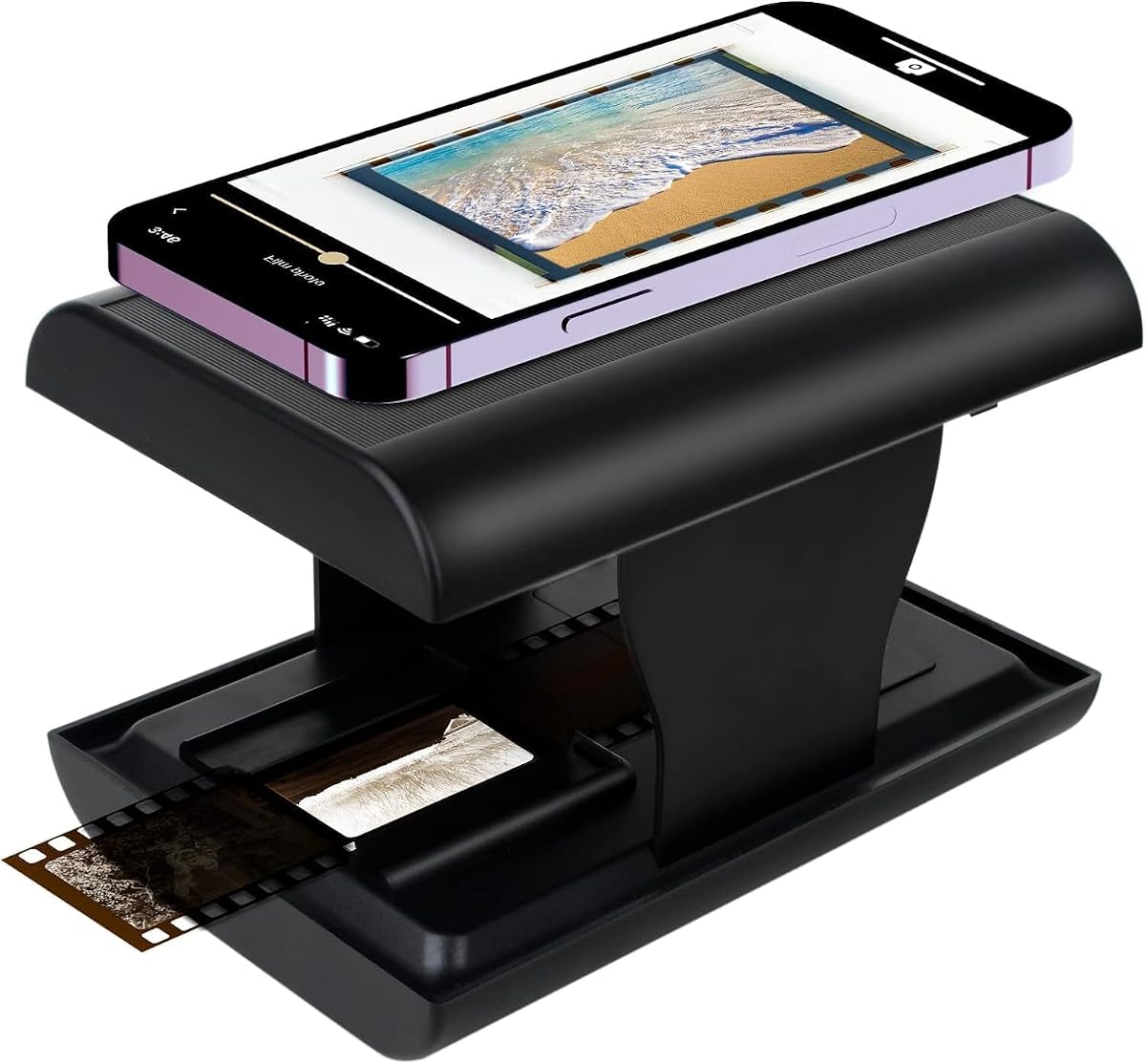
TCNEWCL 35mm Negative Slide Scanner
4.3Editor score
Smartphone-assisted 35mm scanning
Built-in LED backlight
Foldable travel-friendly design
A black and white negative scanner turns historic monochrome film into reusable digital photographs while preserving the tonal detail, contrast, and texture that make original prints distinctive. A worthwhile scanner should be accurate, intuitive, compatible with the film formats in your collection, and capable of producing files that remain easy to organize, edit, back up, and share.
This guide compares dedicated scanners, multi-format units, and smartphone-assisted tools based on the supplied specifications, supported media, resolution, editing features, storage method, portability, and standalone workflow. It also distinguishes scanners intended for negatives alone from devices that also accept slides, color film, and other common formats.
Each review shows which product fits a particular need, from compact digitization to larger-screen and computer-free operation. Ratings and specifications reflect the available product information, while some listings provide too little detail for a complete assessment. The final cost and availability of every product can change, so confirm current listing details before purchasing.
4.3Editor score

4.2Editor score
4.3Editor score
As an Amazon Associate we earn from qualifying purchases.
The comparison below places each available scanner by media support, resolution, output method, display design, and portability. Four listings lack enough supplied information for meaningful feature evaluation, so their entries are clearly marked rather than filled with unsupported assumptions.


The BEONEGLOBAL ClearScan MINI is a compact standalone film digitizer rated 4.2 by customers. Its most appealing combination is a 16MP CMOS sensor, a 2.31-inch LCD, direct SD card saving, and support for both 35mm/135 and 126 film. That makes it a practical choice for someone who wants to convert a mixed collection of negatives and slides without routing every image through a computer.
We may earn a commission when you buy through this link, at no additional cost to you.
The scanner's front-facing controls sit below the display, which supports a natural operating position while reviewing images. Built-in editing options include brightness and color adjustments, along with rotation and flipping before saving. Those controls are particularly useful for monochrome film because they offer a quick way to correct orientation, contrast, and brightness before transferring the image to a larger display or editing program.
The main limitation is its media support. Although it handles 35mm/135 and 126 material, the supplied specifications do not list 110mm film, Super 8, or any broader multi-format capabilities. A 32GB SD card is also not included, and the LCD is smaller than those found on larger scanners. Those constraints are reasonable for a compact unit, but buyers with varied archives should verify every holder and film type in advance.
This is a strong recommendation for beginners, travelers, and households wanting a simple standalone conversion process. Choose it when portability, direct card saving, and a small display matter more than a large preview screen or the broadest possible format support. For a similarly simple workflow with more formats and a larger interface, the KODAK Slide N Scan Max is the stronger alternative.
Direct SD card saving removes the computer from the basic scanning workflow. The scanner can capture images, make quick adjustments, and store them on a card up to 32GB, although an appropriate card must be purchased separately.
The lightweight, compact body and front-facing buttons make the ClearScan MINI convenient to use away from a desk. Its 2.31-inch screen is sufficient for basic previewing, although serious archive work may favor a larger display.
We may earn a commission when you buy through this link, at no additional cost to you.
The KODAK Slide N Scan Max carries a 4.2 customer rating and offers one of the broadest documented format combinations in this guide. It handles 135mm, 110mm, and 126mm film, along with slides and both color and black-and-white negatives. This makes it a strong middle ground for households with more than one traditional film format and no desire to connect every scan to a computer.
We may earn a commission when you buy through this link, at no additional cost to you.
Its 13MP CMOS sensor produces images up to 4208 by 3120, while the stated 22MP interpolation creates larger files. Interpolation does not add new photographic detail, so buyers should distinguish native capture resolution from the advertised maximum output. The practical benefits remain compelling: the smooth-moving tray simplifies feeding, and direct saving to SD or SDHC cards keeps the workflow independent of a desktop.
One-touch editing tools can resize, convert, and adjust images without navigating complicated menus. The trade-off is that a 13MP native sensor is lower than the stated output of the ClearScan MINI and Magnasonic FS71. Buyers who expect the largest files or a large on-device preview should examine those alternatives, especially if fine print and subtle monochrome tones are the main priority.
Overall, the Slide N Scan Max is the most balanced pick for general-purpose home archiving. It is particularly suitable for families converting mixed negatives, 110mm film, 126 film, and slides. It may not be the first choice for highly compact storage or extremely high native resolution, but its format flexibility and computer-free workflow make it broadly useful.
Support for 135mm, 110mm, and 126mm reduces the need to buy several specialized devices. Buyers should still check holder dimensions and confirm that their particular strips, rolls, or mounted slides are supported.
The one-touch editing interface keeps resizing, conversion, and adjustment simple. This is valuable during initial triage, when users need to correct orientation and generate usable files before moving them into a fuller editing workflow.
We may earn a commission when you buy through this link, at no additional cost to you.
The TCNEWCL 35mm Negative Slide Scanner has a 4.3 rating and offers a radically different approach from dedicated electronic scanners. Rather than capturing images with a built-in sensor, it uses a smartphone camera. The film or slide is inserted into a foldable shell, the built-in LED is switched on, and the phone's lens is positioned over the opening to record the image.
We may earn a commission when you buy through this link, at no additional cost to you.
This arrangement can be an excellent budget solution for a small collection of 35mm material. The phone-based approach avoids the need for a scanner with its own large sensor, and the foldable body is easy to store or carry while traveling. A free app supports capture, rotation, cropping, filtering, color adjustment, contrast changes, and sharing, with Snapseed recommended by the manufacturer.
The important limitation is that final quality depends on the resolution and image quality of the user's smartphone. The supplied information explicitly states this dependency, so this should not be expected to match a dedicated high-resolution sensor automatically. Alignment, reflections, camera stability, and the phone camera's treatment of the negative can also influence consistency.
The TCNEWCL is best for beginners, casual users, and travelers who want a simple way to rescue a limited number of 35mm negatives and slides. It is less suitable for large professional archives where repeatable native resolution, direct card storage, and a standardized standalone workflow are priorities. For those needs, a dedicated scanner such as the KODAK or HP model is more appropriate.
The device turns an ordinary phone camera into a capture tool. This eliminates a separate display, card reader, and desktop connection from the basic process, although image quality and consistency remain closely tied to the phone.
The integrated LED backlight helps illuminate a slide or negative during phone capture. Users still need to position the phone carefully to avoid glare, unwanted shadows, and skewed framing.
We may earn a commission when you buy through this link, at no additional cost to you.
The Magnasonic FS71 is rated 4.3 and stands out for the breadth of its documented media support. It scans 35mm, 110mm, 126mm, and Super 8 negatives, plus 135mm, 126mm, and 110mm slides. For an archive containing several formats, including small-gauge motion-picture film, this combination is more expansive than the support listed for the other fully documented scanners.
We may earn a commission when you buy through this link, at no additional cost to you.
Its large five-inch LCD provides a comfortable way to review negatives and slides before saving. An HDMI connection can also send the image or gallery to a television or monitor, although the cable is not included. Images save directly to an SD card supporting up to 128GB, providing considerable storage flexibility for an extensive collection, though a card must be supplied separately.
The listed 24MP output is the highest figure among the documented models, but the supplied material does not clearly separate native sensor resolution from interpolation. Buyers should therefore avoid assuming that every file contains 24MP of unique optical detail. The scanner also includes direct brightness, RGB color correction, flip, and mirror controls, reducing reliance on desktop editing for basic corrections.
The FS71 is the most compelling choice for collectors with Super 8 material or a varied archive that includes several slide and negative formats. Its trade-off is greater bulk and more features than a simple compact unit needs. Those who only have 35mm negatives and want minimal equipment can find a more focused solution elsewhere on this list.
The inclusion of Super 8 alongside three still-film formats makes the FS71 unusual in this comparison. It is particularly relevant for families preserving motion-picture film alongside conventional negatives and mounted slides.
A five-inch screen supports more comfortable framing and image checks than a compact display. HDMI viewing adds a convenient way to present a gallery on a larger screen, though the required cable is not included.
We may earn a commission when you buy through this link, at no additional cost to you.
The product associated with ASIN B0FDGB41MQ has no usable title, rating, image, or specification in the supplied source. It appears in the list through its direct Amazon identifier, but there is not enough documented information to establish whether it is a dedicated negative scanner, a slide scanner, or a multi-format device.
We may earn a commission when you buy through this link, at no additional cost to you.
A buyer should treat this listing as unverified rather than assuming that it supports 35mm, 126mm, 110mm, mounted slides, or black-and-white negatives. Resolution, sensor type, storage method, computer requirements, and editing capabilities are also unknown. Those omissions are important because they determine both the quality and convenience of a digitizing workflow.
The safest approach is to open the current listing and verify the supported film holders, native output resolution, included accessories, storage requirements, and return terms. Reviews can also reveal whether the scanner handles 35mm strips, mounted 35mm slides, boxed negatives, or only one specific format. Independent editor comments are especially useful for determining whether black-and-white tonal rendering is acceptable.
No recommendation can responsibly be made from the available data. This entry is retained to provide a complete ten-product comparison and to keep the list transparent. Consider this option only after confirming that its present specifications meet your archive, and favor one of the fully documented models if dependable compatibility information is a priority.
Check the live product page for native resolution, media support, included holders, output format, and storage requirements. A clear return policy is also valuable when a scanner's real-world performance differs from its listing.
Do not assume this device can scan every common film format merely because it appears in a negative-scanner roundup. Its capabilities must be confirmed directly from current documentation and customer feedback.
We may earn a commission when you buy through this link, at no additional cost to you.
ASIN B0FPMR96X6 is associated with an Amazon listing, but the supplied product record contains no name, description, rating, image, or technical data. There is therefore no factual basis for describing the device's sensor, supported formats, display, or storage capabilities.
We may earn a commission when you buy through this link, at no additional cost to you.
Negative scanning can look deceptively simple, yet the differences between useful products are substantial. A scanner may accept only mounted 35mm slides, require 35mm film strips, or support several negative and slide formats. Output may be limited by the native sensor, artificially increased through interpolation, or captured entirely through a phone.
Before considering this option, verify whether it works without a computer, what media holders are included, and where the resulting files are stored. Also check the maximum supported card capacity if an SD card is used, along with the inclusion of cables, cleaning tools, and a manual. These details reveal whether the product fits a quick personal project or a larger archive.
This listing cannot be endorsed or dismissed from the supplied information. Its inclusion in the roundup is transparent but inconclusive. If the verified listing demonstrates broad format support, dependable resolution, and a simple workflow, it may be worth comparing against the documented scanners in this guide. Until then, the lack of essential specifications is the decisive drawback.
Open the listing and confirm the manufacturer, model name, product type, and included components. The ASIN alone is not enough to establish compatibility or performance.
Determine whether capture, editing, and saving happen on the device or require a computer, phone, application, or separate storage. The intended workflow should suit the buyer's comfort and available equipment.
We may earn a commission when you buy through this link, at no additional cost to you.
The product at ASIN B0B2HWY1L5 cannot be evaluated reliably because its supplied record contains only an identifier and link. No title, rating, description, image, or feature information is available, leaving its scanning resolution, media compatibility, and operation method entirely undefined.
We may earn a commission when you buy through this link, at no additional cost to you.
A useful negative-scanner purchase decision depends on more than whether a device can illuminate a strip of film. Buyers need to know whether the scanner handles the actual arrangement of their negatives, whether it saves files without a computer, and whether its monochrome rendering preserves subtle density and contrast. None of those points can be confirmed here.
The current listing should be reviewed for the manufacturer and model, a clear format-compatibility chart, native sensor resolution, storage requirements, and included film holders. Customer feedback may help identify recurring problems such as focus issues, uneven illumination, inaccurate negative orientation, or software limitations. The availability of accessories should also be checked before making a final decision.
This entry remains in the guide because the requested comparison contains ten products, but it does not merit a badge or a positive performance claim. A shopper with a small archive may find a basic phone-assisted scanner more straightforward, while a collector should favor a model with fully documented format support. This option is best considered only after direct verification.
Look for explicit references to 35mm negatives, 126mm or 110mm formats, and mounted slides. A general claim about scanning film or photos is not enough to establish that the correct holder is supported.
Separate the native sensor resolution from any interpolated maximum. If detailed claims are absent, search for independent user examples that show whether monochrome gradation remains smooth.
We may earn a commission when you buy through this link, at no additional cost to you.
The listing associated with ASIN B07MTKNTPK contains no usable product information in the supplied dataset. It is not possible to determine whether this is a conventional film scanner, a phone-based accessory, or a unit aimed primarily at positive slides rather than black-and-white negatives.
We may earn a commission when you buy through this link, at no additional cost to you.
That uncertainty matters because negative and positive materials have different tonal characteristics. A negative contains darker and lighter areas that must be interpreted correctly to reproduce the original scene. A device marketed for slides may still capture negatives, but the supplied evidence does not establish whether this one includes suitable holders, illumination, or processing.
The live product page should be checked for the model identity, exact film types, output resolution, display and storage design, required software, and included accessories. Users should also determine whether saving to a computer is optional or mandatory and whether editing is automatic or manual. These points determine whether the product can handle a large archive efficiently.
Because no factual performance details are supplied, this option cannot fairly receive an award or be recommended for a particular use. It may prove useful after verification, but a buyer should compare it with the fully documented options in this roundup. If the listing lacks clear negative-scanning instructions, choosing a dedicated and fully specified model would be the lower-risk decision.
Check whether the device explicitly scans black-and-white negatives rather than only color slides or photographs. Confirm that the necessary film carrier or holder is included.
Establish the file format, storage destination, and whether the scanner can operate independently. These requirements affect long-term organization, editing, and backup of a digital archive.
We may earn a commission when you buy through this link, at no additional cost to you.
The Memory Vault Box Negative Scanner has a 3.4 customer rating, the lowest documented score among the products with meaningful details. Its appeal lies in a straightforward home-preservation kit that converts 135mm film and slides into digital JPEG files while providing a built-in LCD and simple buttons.
We may earn a commission when you buy through this link, at no additional cost to you.
Automatic enhancement is designed to improve brightness, natural color, and image detail, which can help with faded negatives. The included kit contains the scanner unit, slide holder, film holder, cleaning brush, USB cable, AV cable, and manual. That broad accessory bundle makes it more convenient for a first-time archivist, while direct JPEG output simplifies later viewing and sharing.
The main drawback is its lower rating, which may reflect unresolved concerns about reliability, image consistency, or ease of use. The supplied data does not specify native resolution, so buyers cannot compare its detail capture with the 16MP ClearScan MINI, 13MP KODAK sensor, or 24MP stated output of the FS71. No SD card is included either, and the exact role of the USB and AV cables in the saving process is not fully explained.
This scanner is most appropriate for someone who values a simple, guided kit and wants to convert a limited collection of 135mm negatives and slides at home. It is less convincing for a large archive or a buyer whose priority is a known native resolution. In those situations, one of the higher-rated documented models offers greater specification transparency and a clearer feature set.
The included holders, cleaning brush, cables, and manual reduce the number of separate accessories a beginner must identify. The simple controls and preview display support a less technical workflow.
Automatic brightness, color, and detail adjustments can make faded material easier to view immediately. The results should still be checked carefully because automatic enhancement can alter the character of a monochrome image.
We may earn a commission when you buy through this link, at no additional cost to you.
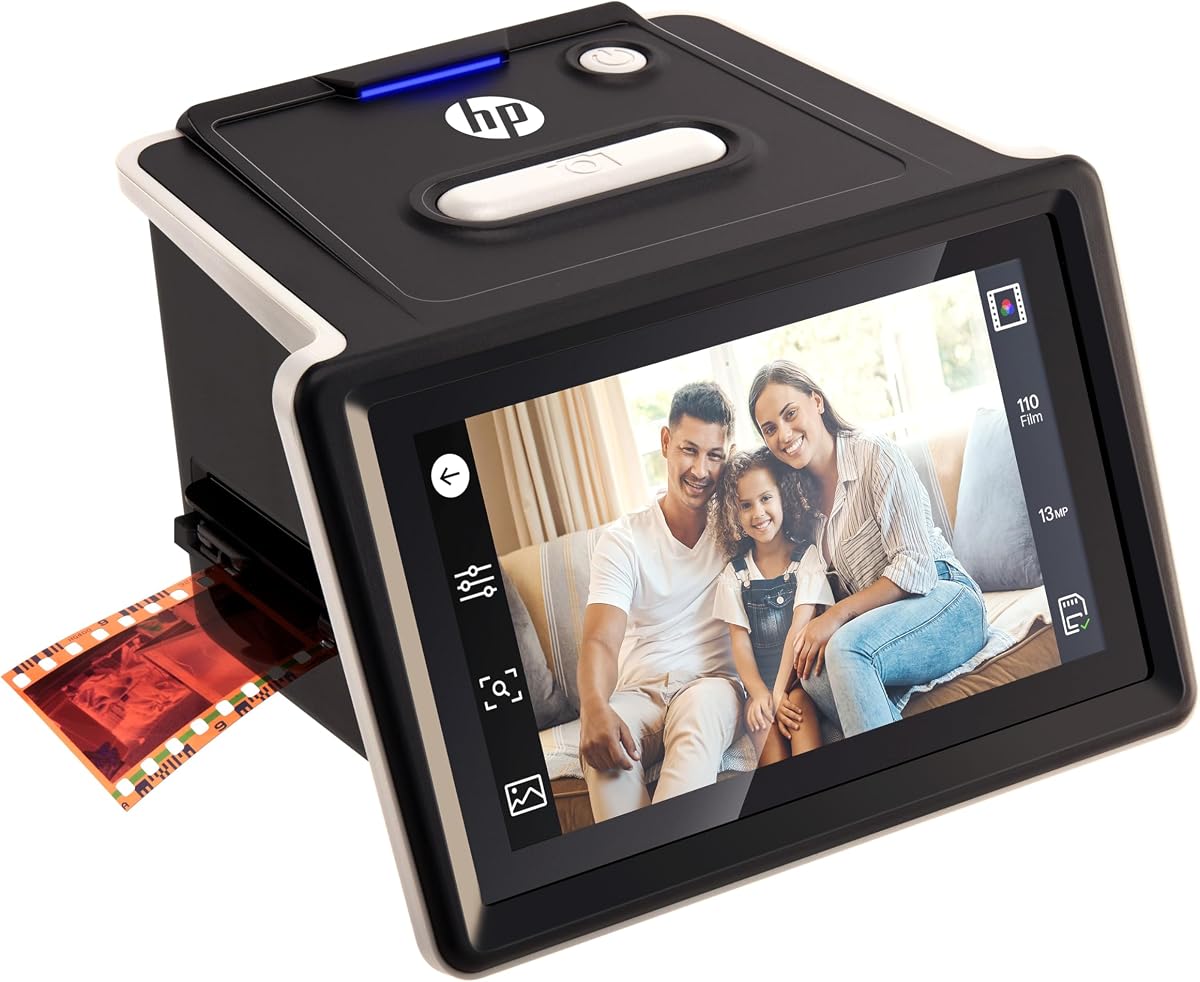
The HP FilmScan 5 Touch Screen is rated 4.3 and delivers the most modern interface among the documented standalone scanners. Its five-inch all-angle LCD touchscreen allows direct previewing and editing, while gallery mode turns the device into a digital picture frame for recently scanned photographs.
We may earn a commission when you buy through this link, at no additional cost to you.
A 13MP CMOS sensor handles color and black-and-white film, with 22MP interpolation listed as the maximum output. The quick-load tray supports 135, 126, and 110mm negative strips as well as positive slides. Importantly, scanning can be performed without a computer, and images save directly to an SD card, preserving a straightforward path from film to organized digital files.
The device can operate from a PC USB connection or an external 5V adapter through USB Type-C. That flexibility is helpful for a permanent desk setup or a more mobile arrangement, although buyers should verify which power sources and adapters are included. As with the KODAK scanner, the 22MP figure is interpolated and should not be confused with 22MP of native optical detail.
The HP model is the premium choice for users who prioritize a large touchscreen, polished on-device interaction, picture-frame capability, and convenient power options. It is less necessary for someone who only wants a basic conversion tool, but it offers the most engaging standalone experience in the documented group. Its 4.3 rating and broad format support make it a particularly well-rounded option.
The five-inch all-angle screen supports direct previewing and editing without navigating a small embedded display. It is especially useful for comparing negatives, checking orientation, and presenting a gallery in picture-frame mode.
USB-C operation from a PC or external 5V adapter provides useful placement flexibility. Direct SD card saving completes the standalone workflow, although a suitable card is not indicated as included.
We may earn a commission when you buy through this link, at no additional cost to you.
The best scanner is the one that supports your actual film, produces images you are satisfied with, and fits a workflow you will continue to use. Compatibility, native resolution, tonal handling, storage, and ease of use should be weighed together rather than judged from a single headline specification.
Start by identifying every format in your collection. Common 35mm negatives may appear as individual strips, longer roll segments, or mounted frames, while 126, 110, Super 8, and other formats require different carriers. The KODAK supports 135mm, 110mm, and 126mm; the Magnasonic adds Super 8; the BEONEGLOBAL lists 35mm/135 and 126mm; and the HP supports 135, 126, and 110mm. The TCNEWCL is documented for 35mm slides and film, but its phone-based design may not accommodate every strip arrangement. Always verify compatibility before buying, particularly for boxed negatives or unusual film gauges.
Native sensor resolution determines how much original detail the device can capture. The BEONEGLOBAL offers up to 16MP, the KODAK and HP use 13MP sensors, and the Magnasonic lists output up to 24MP. The KODAK and HP additionally specify 22MP interpolation, which enlarges files but does not create additional photographic detail. For black-and-white material, resolution is only one part of quality; focus, even illumination, stable optics, and faithful tonal rendering may affect the final result more than a nominal difference of a few megapixels.
Black-and-white negatives can contain smooth gradations, dense shadows, and bright highlights that a scanner must interpret accurately. A built-in color sensor can render these tones, but automatic color correction may reduce the neutral character of monochrome images. Look for manual brightness, contrast, and color controls, along with the ability to flip, rotate, and mirror images. The BEONEGLOBAL, Magnasonic, Memory Vault Box, and HP all describe built-in adjustments, although their available control depth differs. A user who values precise black-and-white editing should retain the original scan and make tonal corrections in a capable editing program.
A scanner that saves directly to an SD card can simplify the first stages of digitization. The BEONEGLOBAL, KODAK, Magnasonic, Memory Vault Box, and HP all describe direct saving or a standalone workflow. That convenience does not eliminate the need for a good backup system, but it allows users to capture and review files before transferring them to a computer, cloud service, or external drive. The TCNEWCL is also largely computer-free, but it depends on a smartphone for capture and app-based editing. Consider which device you already use comfortably and how you intend to organize the resulting files.
The display determines how comfortably you can frame negatives, inspect focus, and judge monochrome density. The BEONEGLOBAL uses a compact 2.31-inch LCD, while the Magnasonic and HP provide five-inch screens. The Magnasonic adds HDMI viewing, and the HP introduces touch interaction and a picture-frame gallery. Smaller screens are adequate for basic previews and save desk space, while larger displays help users work through a sizable archive with fewer framing errors. Touchscreens can feel intuitive, although they are not automatically better for every user, and a clearly labeled physical-button layout may be easier for some individuals.
Portability matters when digitizing is part of a family visit, travel project, or temporary change of location. The TCNEWCL folds to a compact size and uses the phone already in your pocket. The BEONEGLOBAL is described as lightweight and portable, while the Magnasonic's larger screen and broader media support make it more of a home archiving station. Storage capacity also matters: documented standalone devices use SD, SDHC, or compatible cards, with limits ranging from 32GB on the BEONEGLOBAL and KODAK to 128GB on the Magnasonic. Cards are generally not included, so choose a reputable card with enough capacity for the expected archive.
Built-in editing is useful for basic orientation, exposure, and color correction, but it should not replace a proper archival workflow. Look for controls that can flip, rotate, mirror, resize, and adjust brightness without repeatedly returning to a computer. The KODAK emphasizes one-touch editing, the Magnasonic provides brightness and RGB correction, the HP supports touchscreen editing, and the TCNEWCL uses an app for crop, rotation, filtering, color, and contrast changes. Whichever device you choose, retain untouched originals, apply corrections to copies, and use clear filenames so that a large digital collection remains searchable and understandable.
Before scanning, organize the film by format and handle it by the edges. Work in a clean, dry space with a soft surface, avoid touching the emulsion or slide surfaces, and inspect each negative for dirt, tears, mildew, or sticky emulsion. Use the supplied cleaning brush where appropriate and avoid applying household cleaners directly to film. For smartphone-assisted scanning, use a clean, evenly lit workspace and make sure the phone camera is focused before capturing the first frame.
Load the film into the correct holder and confirm that it sits flat without bending. Follow the device's instructions for tray direction, holder placement, and negative orientation. Dedicated scanners should be allowed to warm up briefly if required, while the TCNEWCL's LED should be switched on before the phone is positioned. Review the preview for focus, framing, glare, and orientation before saving; repeat the capture when shadows, reflections, or uneven illumination are visible.
Save each scan in a consistent format and naming structure, then copy the files from the card or phone to at least one separate drive or backup service. Check a sample of the images against the original negatives or slides. Keep the card safely stored after transfer, retain the original film in labeled archival sleeves, and clean the scanner's glass or imaging surface with the manufacturer's recommended method. Periodic backups and careful handling are what turn a short scanning session into a durable digital archive.
Yes, provided the scanner supports the relevant negative format and captures the image with suitable lighting, focus, and tonal processing. Look for adjustable brightness and contrast controls, and compare samples with the original print if one is available. Keep the original scan so any correction can be repeated later without losing additional detail.
A phone-assisted scanner can be useful for occasional conversions and travel, especially when the built-in LED provides even illumination. Final quality depends on the phone's camera, alignment, lighting, and stability. For a large archive, a dedicated scanner with a fixed sensor and repeatable controls generally offers greater consistency.
Native resolution is the detail the sensor can record during capture. Interpolation estimates additional pixel values to create a larger file, but it does not reveal detail that was never recorded. When comparing scanners, consider the native figure first and use interpolated output as a secondary specification.
Many models in this guide can scan and save directly to an SD card without a computer. A computer or other device is still useful for intensive editing, detailed organization, creating additional backups, and long-term storage. Phone-based scanners require a compatible smartphone, while some dedicated models may also offer computer-connected workflows.
Based on the supplied specifications, the Magnasonic FS71 has the broadest documented coverage, supporting 35mm, 126mm, 110mm, and Super 8 negatives along with several slide formats. The KODAK supports 135mm, 110mm, and 126mm, while the HP supports 135, 126, and 110mm. Confirm exact media dimensions before making a purchase.
Storage requirements depend on image dimensions, file format, compression, and the number of frames. A larger scanner capacity can accommodate more files before transfers are needed, but the appropriate card is usually not included. Keep at least two copies of every scan and avoid treating the scanner's card as the only storage location.
Gently removing loose dust can help, but old or damaged film should be handled conservatively. Do not use ordinary cleaning sprays or household products on the emulsion. For sticky, torn, moldy, or fragile material, consult film-preservation guidance and avoid forceful cleaning or loading techniques that could cause further damage.
The BEONEGLOBAL ClearScan MINI offers a compact standalone option with a 16MP sensor and direct SD saving for 35mm and 126mm material. The TCNEWCL is the more affordable and portable choice for a small collection. The KODAK and HP offer more feature control, while the Magnasonic is appropriate when the archive includes additional formats such as 110mm or Super 8.
The KODAK Slide N Scan Max is the most balanced general-purpose choice, combining support for 135mm, 110mm, and 126mm media with direct card saving and simple editing. The HP FilmScan 5 offers the most polished large-screen experience, while the TCNEWCL provides the most affordable and portable phone-assisted approach. The BEONEGLOBAL ClearScan MINI is a compact standalone option, and the Magnasonic FS71 covers the broadest documented range of media.
Prioritize compatibility with the film you actually own, then examine native resolution, monochrome tonal quality, storage, and workflow. A large display helps with framing, direct saving reduces steps, and a phone-based tool can be sufficient for occasional use. The four listings without supplied specifications should remain unverified until their current descriptions, included accessories, and customer feedback have been reviewed.
Before ordering, check the live listing for the exact model, supported holders, native resolution, storage requirements, included cables or cards, warranty information, and current cost. Product availability and commercial terms can change, but a careful compatibility check will help prevent an unsuitable purchase and keep the digitalization project moving smoothly.
