
BENFEI 2.5 Inch SATA to USB Tool Free External Hard Drive Enclosure
4.6Editor score
Up to 6 Gbps interface
SATA I, II, and III support
Type-C and Type-A cable
A SATA hard drive enclosure turns a bare internal drive into a portable, connected storage device without requiring a permanent installation in a desktop. A worthwhile model should fit the intended SATA drive, connect to the available USB ports, move data reliably, and provide adequate protection and heat management for the way you use it.
This guide compares ten options ranging from compact 2.5-inch adapters to larger 3.5-inch docks and a two-bay system. We evaluated drive compatibility, connector types, transfer protocols, power requirements, installation methods, cooling provisions, operating-system support, and practical portability rather than relying on interface speed alone.
The recommendations show which products suit everyday file transfers, drive cloning, gaming-library storage, old-system recovery, and multi-drive workspaces. Ratings and specifications are based on the supplied product information, while prices and availability can change, so readers should confirm current listing details before purchasing.
4.6Editor score

4.6Editor score

4.3Editor score
As an Amazon Associate we earn from qualifying purchases.
The comparison covers single-bay portable adapters, powered docks, larger 2.5-inch and 3.5-inch enclosures, and a two-bay direct-attachment system, with particular attention to the drive sizes, connectors, power arrangements, and transfer features each model provides.



The SABRENT EC-UASP is a 2.5-inch SATA enclosure that combines tool-free installation with a straightforward USB 3.0-to-SATA design. It carries a 4.6 rating and stands out as a versatile option for turning a compatible HDD or SSD into external storage. The enclosure supports standard 2.5-inch SATA and SATA II hard drives while also being optimized for SATA III SSDs.
We may earn a commission when you buy through this link, at no additional cost to you.
Its tool-free, hot-swappable arrangement reduces the amount of work involved in installing a bare drive. No drivers are required, and the listed compatibility extends across Windows and macOS, including older Windows versions and Mac OS X. When connected to USB 3.0, the enclosure advertises transfer rates up to 5 Gbps; the supplied information also identifies 480 Mbps performance over USB 2.0.
The main limitation is its focus on 2.5-inch drives. It cannot accommodate a 3.5-inch desktop hard drive, and older USB 2.0 systems will operate at the lower advertised rate. Nevertheless, those constraints are logical for a compact portable enclosure, and the combination of broad drive support, simple construction, and broad platform compatibility makes it easy to recommend.
This is the strongest general-purpose choice for someone who regularly moves a 2.5-inch drive between computers, needs a simple recovery tool for an old laptop drive, or wants inexpensive external storage without complicated assembly. It is particularly useful when convenience and broad compatibility matter more than supporting several drives at once.
The push-open, tool-free design makes installation and removal more approachable than a screw-secured case. Hot-swapping also allows a compatible drive to be changed without rebooting the host computer, provided the drive has first been ejected safely.
Rather than limiting the enclosure to solid-state drives, it supports standard 2.5-inch SATA hard drives as well. That flexibility makes it useful for storage expansion, file transfers, backups, and recovering information from a retired internal drive.
We may earn a commission when you buy through this link, at no additional cost to you.
The BENFEI 6Gbps enclosure is a cost-conscious 2.5-inch adapter with a strong feature set. Its 4.6 rating reflects a well-regarded combination of tool-free installation, UASP support, and a supplied USB Type-C/Type-A cable. It can connect SATA I, II, and III hard drives or SSDs to PCs, laptops, and a PS4.
We may earn a commission when you buy through this link, at no additional cost to you.
The JMS580 bridge and advertised 6 Gbps interface rate make the specification sheet appealing for an SSD. UASP can improve command overhead compared with traditional USB 3.0, although the result still depends on the SSD, host controller, file sizes, and whether the computer supports the protocol. Backward compatibility with USB 2.0 and USB 1.1 broadens the range of usable systems.
The installation process is notably simple: open the cover, connect the drive, close the cover, and use the enclosure. It is hot-swappable and requires no driver. The stated 7mm and 9.5mm thickness support covers common 2.5-inch formats, while the listed drive limit reaches 6TB. As with any enclosure, real-world transfer speed will not necessarily equal the headline interface rate.
This is a compelling pick for buyers who want a modern adapter without paying for a dock or a multi-bay system. It works well for backup storage, transferring files between computers, reviving an old 2.5-inch drive, or giving a compatible game console access to a SATA SSD. The included cable and broad compatibility make it particularly convenient.
A 6 Gbps interface gives the enclosure a high ceiling for compatible SATA SSDs, while UASP can make routine transfers more responsive. The important distinction is that this is an interface rating, not a promise that every drive will achieve the same speed.
The included Type-C/Type-A cable reduces the need to find a separate lead for different computers. That makes the enclosure easier to carry between a modern USB-C laptop, a traditional USB-A desktop, and other supported devices.
We may earn a commission when you buy through this link, at no additional cost to you.
The SABRENT EC-DFLT is a desktop-oriented docking station for bare 2.5-inch and 3.5-inch SATA drives. It has a 4.4 rating and differentiates itself by accommodating both notebook and desktop hard drives without a separate adapter. It also includes the external power needed to operate a 3.5-inch drive reliably.
We may earn a commission when you buy through this link, at no additional cost to you.
The dock works with SATA I, II, and III hard drives and SSDs, while explicitly excluding IDE/PATA, SAS, M.2 NVMe, and M.2 SATA formats. Its UASP-capable USB 3.0 interface can provide practical advantages for SSDs, although mechanical hard drives are usually limited by their own sustained transfer rate. A status LED communicates power and activity.
The Type-A host cable is a notable constraint for modern computers that expose only USB-C ports, and a suitable adapter is not included. The supplied guidance also recommends connecting directly to the computer because hubs and USB 2.0 connections can contribute to intermittent disconnections. The included 12V/2A adapter is essential for dependable 3.5-inch operation.
Choose this dock when working with a mixed collection of 2.5-inch and 3.5-inch SATA drives, especially if you want to swap disks between a laptop and a desktop. It is less attractive for highly mobile use, but at a desk it offers a straightforward way to test drives, move data, and keep large bare disks accessible.
Supporting both 2.5-inch and 3.5-inch SATA devices makes the dock useful for older desktops as well as laptop drives. The wide SATA connector in the lay-flat bay accepts bare drives without tools or complicated mounting hardware.
The included 12V/2A adapter prevents the startup and dropout problems that can occur when a 3.5-inch disk receives insufficient bus power. It also provides a more stable option for 2.5-inch mechanical drives, although the enclosure is not designed for portable use.
We may earn a commission when you buy through this link, at no additional cost to you.
The SABRENT EC-KSL3 is a sturdier alternative to the EC-DFLT, with an aluminum shell and an internal shock-absorbing tray. Its 4.4 rating and support for both 2.5-inch and 3.5-inch SATA drives make it appealing for a fixed workstation where physical protection and flexible drive testing are priorities.
We may earn a commission when you buy through this link, at no additional cost to you.
Setup remains tool-free, allowing drives to be inserted, secured, and replaced quickly. The enclosure supports UASP over USB 3.0 and lists a theoretical maximum of 625 MB/s, with expected real-world ranges of approximately 100–180 MB/s for HDDs and up to 400–500 MB/s for SSDs. Actual results depend on the drive, file pattern, host, and source device.
A 12V/2A adapter is included because the enclosure is not bus-powered. That requirement makes it better suited to a desk than to travel. Buyers should also check the physical dimensions of larger 3.5-inch drives because some models with nonstandard PCB heights may not seat correctly. As with the EC-DFLT, the host connection is USB Type-A.
The EC-KSL3 is a good choice for users who want a durable, cool-running desktop enclosure and frequently work with bare SATA disks. It suits data recovery work, system-building tasks, and temporary desktop storage. It is less suitable for users who require a USB-C native host connection or an enclosure powered entirely by the computer.
The aluminum exterior helps with heat dissipation, while the internal ABS tray is intended to absorb shocks. These physical features make more sense for a stationary enclosure than for a lightweight pocket adapter.
UASP and a 625 MB/s theoretical ceiling provide a useful pathway for SATA SSDs. Mechanical disks remain slower because of their internal media and mechanics, so choosing the enclosure does not remove the performance limit of the installed drive.
We may earn a commission when you buy through this link, at no additional cost to you.
The UGREEN 5Gbps adapter is a portable 2.5-inch enclosure that places a strong emphasis on both physical protection and practical compatibility. It has a 4.6 rating and supports both SATA hard drives and SATA SSDs up to 6TB. The housing is designed to shield the drive from scratches and shocks while remaining convenient enough to carry between computers.
We may earn a commission when you buy through this link, at no additional cost to you.
An EVA foam layer surrounds the installed drive, while electronic protection is listed for short circuits, over-current, and related risks. The detachable 12-inch cable provides some flexibility in positioning the enclosure. UASP and TRIM support can improve transfer behavior when the host and drive support those functions, and the USB 3.0 interface is rated up to 5 Gbps.
One installation detail deserves attention: screws fitted to a hard drive may have to be removed before it can fit inside the enclosure. The design also supports only 2.5-inch SATA devices, not desktop hard drives or M.2 modules. Interface rates remain conditional on the host, with older USB connections substantially reducing performance.
This enclosure suits someone who frequently carries a 2.5-inch drive and values physical cushioning more than a native USB-C connector. It is appropriate for backups, transfers, recovering files from an older computer, or connecting a drive to a supported game console. The broad brand compatibility list also makes it useful when the exact drive manufacturer is not known in advance.
The internal EVA foam gives a portable drive more support than many minimalist cases. It is especially relevant for a frequently used enclosure that may be moved between a home computer, an office machine, and a travel kit.
Support for common 7mm and 9.5mm SATA drives up to 6TB covers a wide range of laptops, upgraded desktop drives, and older SATA SSDs. Buyers should still check the enclosure's dimensions and the physical form of their specific drive before installation.
We may earn a commission when you buy through this link, at no additional cost to you.
The CENMATE 2 Bay DAS is the most advanced enclosure in this group, offering two hot-swappable bays, active cooling, and room for both laptop and desktop SATA drives. Its 4.3 rating reflects a feature-rich design for users who need more than a single-drive adapter. Each bay supports up to 20TB according to the supplied information.
We may earn a commission when you buy through this link, at no additional cost to you.
The aluminum-alloy structure and built-in two-inch fan are intended to control heat during sustained transfers. The fan operates at approximately 40–50 decibels, which may be noticeable in a quiet room. USB 3.0 output is rated up to 5 Gbps, and the included USB-A/USB-C cable supports connection methods that suit both newer and older computers.
Tool-free trays can be removed and replaced without shutting down the enclosure, and a host port permits daisy-chaining additional devices. The stated configuration supports expansion to three devices and up to 120TB combined. Despite those network-like conveniences, it is a direct-attachment storage device: it does not provide RAID or NAS functionality.
This is the recommended choice for users building a compact, expandable desktop storage hub around bare SATA drives. It works well for large archives, multi-drive backups, and projects that involve frequent drive swaps. The fan noise and larger footprint make it less appropriate for a minimalist laptop setup or a noise-sensitive workspace.
A dedicated fan gives the two-bay system more thermal management than a small passive shell. That is valuable with 3.5-inch mechanical drives or during repeated large transfers, although the stated 40–50-decibel operating noise should be considered.
Two bays allow one drive to remain connected while another is copied or replaced. The USB host port also supports daisy chaining, although users should understand that the product is direct-attachment storage rather than a combined RAID or NAS system.
We may earn a commission when you buy through this link, at no additional cost to you.
The BENFEI Type-C enclosure is a 2.5-inch SATA adapter designed around flexible host connectivity. It has a 4.6 rating, supports UASP over USB 3.0, and uses a plug arrangement that accommodates both USB Type-C and USB Type-A systems. That makes it a natural fit for buyers who move between different types of computers.
We may earn a commission when you buy through this link, at no additional cost to you.
It handles SATA I, II, and III hard drives and SSDs in 7mm and 9.5mm formats up to 6TB. The advertised transfer ceiling is 5 Gbps, with backward compatibility for USB 2.0 and USB 1.1. UASP can improve throughput on compatible SSDs, although older ports and slower drives will limit the final transfer rate.
Installation requires only opening the cover, connecting the drive, and closing it again. No tools, drivers, or external power supply are needed, and the enclosure is hot-swappable. These details make it convenient for transporting a drive or using it as a temporary external volume on a PC, laptop, or PS4.
The BENFEI is most appropriate for users who need a compact SATA adapter and do not want to carry separate cables for USB-C and USB-A devices. It is less suitable for 3.5-inch desktop disks, and buyers with a USB-A-only host should confirm that the enclosure's plug and cable arrangement accommodates their available port.
The Type-C/Type-A design reduces port friction when a drive moves between a contemporary laptop and an older desktop. This connector flexibility is a practical benefit even when the enclosure's storage interface remains the same.
Because the enclosure draws power from its USB connection and requires no separate adapter, it is easy to deploy. Users should still avoid connecting high-draw devices through unpowered hubs when stability matters.
We may earn a commission when you buy through this link, at no additional cost to you.
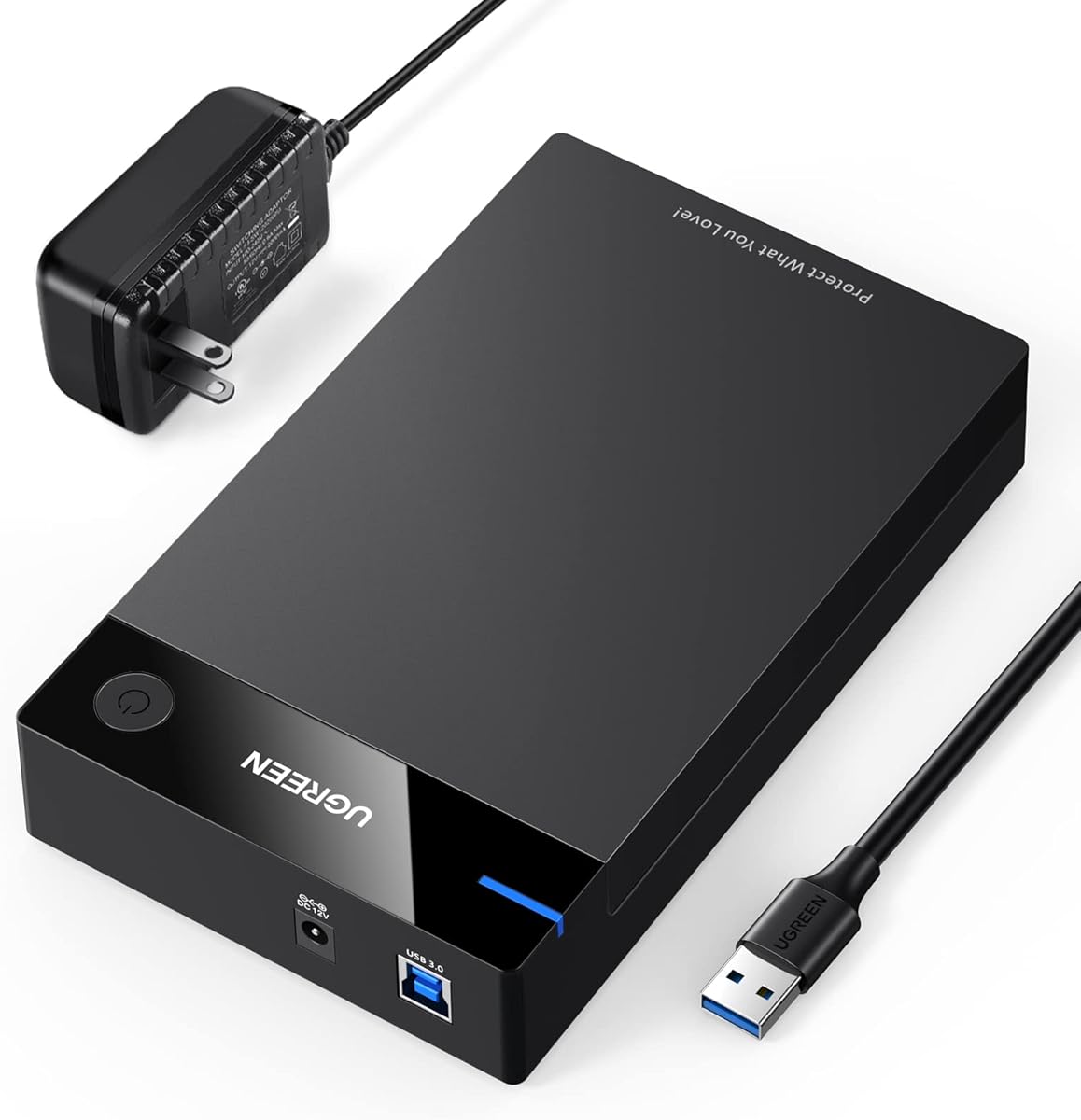
The UGREEN 2.5/3.5-inch enclosure combines broad drive compatibility with a 5Gbps UASP interface. Its 4.5 rating and listed support for SATA I, II, and III hard drives and SSDs up to 20TB make it useful for both large desktop disks and smaller portable drives.
We may earn a commission when you buy through this link, at no additional cost to you.
The enclosure uses an internal intelligent chip, an ABS structure, and soft rubber strips to hold the drive securely and reduce shock. Preset ventilation openings are intended to improve heat dissipation. Installation is tool-free, and the device works without additional drivers across listed versions of Windows, Linux, and macOS.
The product information also identifies use with several gaming systems, including PS5, PS4, PS4 Pro, PS3, Xbox One, and Xbox 360. Compatibility with a console does not mean every drive, file system, or feature will work identically, so the host's own requirements should be verified before making a purchase.
This enclosure is a strong all-rounder for a desk where users switch between 2.5-inch and 3.5-inch devices. It can serve as additional storage, a temporary transfer dock, or a way to access older drives. Its larger supported format reduces portability compared with a slim 2.5-inch adapter, but broadens its role significantly.
The stated 20TB maximum opens the enclosure to large SATA hard drives as well as common SSDs. Checking the physical drive dimensions and connector remains necessary because advertised capacity alone does not guarantee perfect mechanical clearance in every model.
Rubber strips help restrain the drive, while the housing's ventilation openings provide a passive means of heat dissipation. These features make it better suited to sustained desktop use than to an enclosure designed mainly for a pocket.
We may earn a commission when you buy through this link, at no additional cost to you.
The SABRENT EC-OCUB distinguishes itself with a transparent enclosure that makes the installed 2.5-inch drive visible. It has a 4.6 rating, supports SATA hard drives and SSDs, and uses a USB 3.0 interface with UASP and an advertised rate of up to 5 Gbps.
We may earn a commission when you buy through this link, at no additional cost to you.
The clear housing is more than a cosmetic feature for some buyers. It allows the drive, connector, and general installation to be inspected, which can be reassuring during setup or troubleshooting. The enclosure is tool-free and hot-swappable, and it supports both 7mm and 9.5mm drive thicknesses.
A free downloadable copy of Acronis True Image for SABRENT is included for cloning tasks, adding a software angle that many basic adapters do not provide. No drivers are required, and backward compatibility with USB 2.0 and USB 1.1 allows use with older systems. The drive itself is not included.
The EC-OCUB is well suited to users who want to see the hardware in operation or use an enclosure as part of a cloning workflow. It remains a compact, 2.5-inch-only product, so anyone with a 3.5-inch desktop drive should choose a larger dock or multi-bay system instead.
The transparent shell provides a clear view of the drive after installation. It is especially useful for buyers learning how a bare SATA drive fits into an enclosure and for visually checking alignment before closing the cover.
The included Acronis True Image download can assist with cloning a drive to a compatible SSD. Software availability and operating-system support should be confirmed before relying on it for a critical migration.
We may earn a commission when you buy through this link, at no additional cost to you.
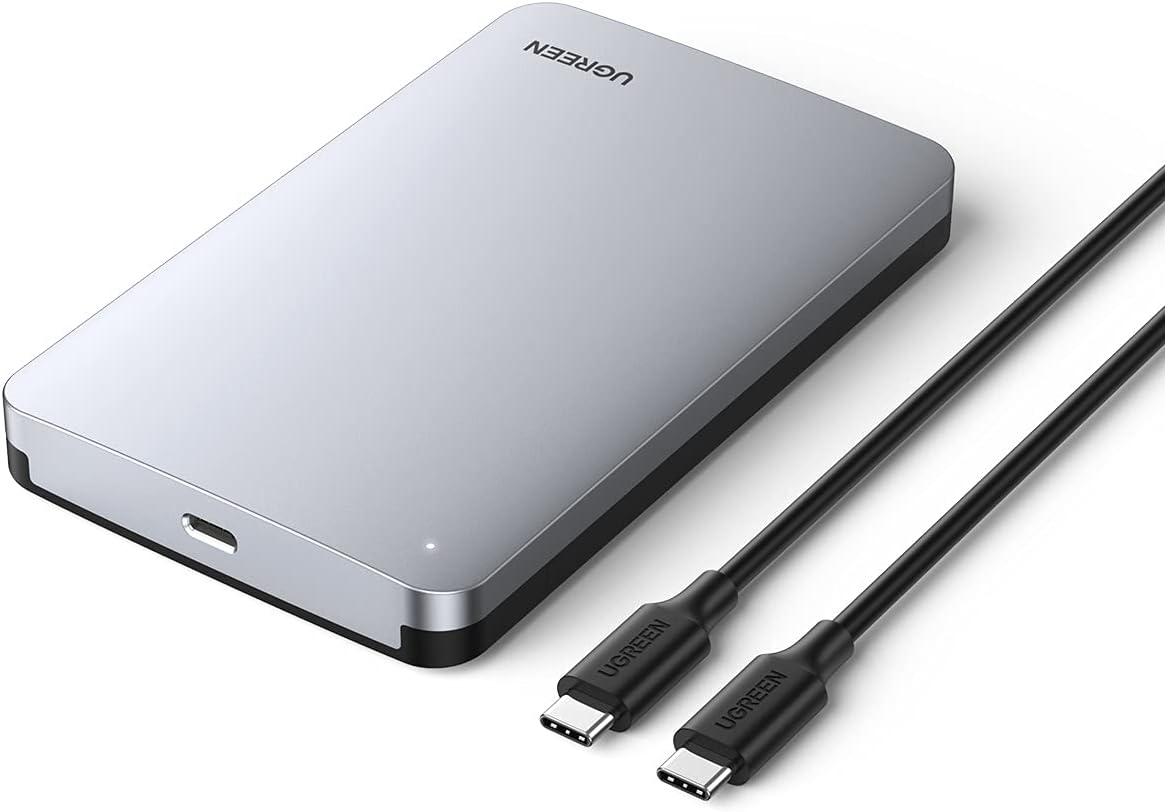
The UGREEN USB-C Aluminum enclosure combines a metal housing with a modern host connection. It has a 4.5 rating and accepts 2.5-inch SATA I, II, and III hard drives and SSDs. The included USB-C-to-USB-C cable and native USB-C port make it particularly convenient for modern laptops and other compatible equipment.
We may earn a commission when you buy through this link, at no additional cost to you.
Its ASM235CM chipset and UASP support target efficient SSD transfers. The product information lists a 6 Gbps maximum for the SATA side and identifies the USB-C connection as USB 3.1 Gen 2 with a 10 Gbps interface capability. These are different limits, so users should not mistake the 10 Gbps host rating for guaranteed SATA-drive throughput.
The aluminum alloy construction is intended to resist scratches and dissipate heat without a cooling fan. Installation is tool-free, no driver is required, and no external power supply is needed. The enclosure works across Windows, macOS, and Linux, with additional use listed for game consoles, smart TVs, and routers that meet the relevant connection requirements.
This is a good choice for a portable, modern workstation built around USB-C. It is particularly useful for upgrading a laptop with an external SATA SSD, backing up files, or recovering information from a compatible 2.5-inch drive. Users of USB-A-only systems will need an appropriate cable or adapter, and 3.5-inch drives remain out of scope.
A native USB-C host connection simplifies use with current laptops that lack USB-A ports. The included USB-C-to-USB-C cable makes the enclosure ready for a modern computer, though USB-A-only users will need another appropriate cable.
The aluminum housing is intended to provide effective passive heat dissipation without the noise of a powered fan. That balance makes the enclosure attractive for a quiet desk, provided the selected SSD remains within its intended workload.
We may earn a commission when you buy through this link, at no additional cost to you.
The best SATA drive enclosure is the one that physically fits the intended disk, matches the computer's connectors, supplies sufficient power, and remains stable under the expected workload. Interface speed matters, but compatibility, thermal design, and intended use should guide the decision first.
Choose a 2.5-inch-only case for a compact SSD or laptop hard drive, and select a model that accepts 3.5-inch drives when working with desktop-capacity disks. Also check physical thickness, PCB height, and any unusual connector geometry before ordering.
Match the enclosure's physical connector to your computer before considering transfer speed. If the required adapter or cable is not included, account for that extra item when comparing convenience.
Prioritize UASP and a modern host interface for SSD workloads, but judge real-world speed by the installed drive. A slower HDD cannot exceed its own sustained transfer rate inside a faster enclosure.
Portable users should favor bus-powered 2.5-inch designs. Desktop users working with 3.5-inch drives should verify that the required external adapter and a suitable wall outlet are available.
Choose passive aluminum cooling for a quiet single-drive setup. Choose active cooling for sustained multi-drive work when acceptable fan noise and greater power use are not concerns.
Frequent drive swapping favors tool-free hot-swap access. For occasional use, simpler assembly may be sufficient, but a secure fit remains important for portable storage.
Choose one bay for simplicity and portability. Choose multiple bays when concurrent access, larger archives, easier copying, or frequent disk changes justify the added size and power.
Confirm operating-system and console support before buying, and treat bundled software as a convenience rather than a substitute for a proper backup strategy.
Before installing a drive, confirm that its interface and physical dimensions are compatible with the enclosure. For any bare disk, back up important data first, note the capacity and model, and use a proper sector-level cloning or migration tool if the goal is to preserve an entire installation. Hold the enclosure securely, open its cover or tray, align the SATA connector, and seat the drive without forcing it.
Connect the enclosure directly to the computer before adding a drive, especially with 3.5-inch models. Once the system detects the enclosure, format a newly purchased drive for the intended operating system and workload. Create backups, eject the volume through the operating system before unplugging it, and avoid pulling a cable from a spinning drive. Hot-swapping is convenient, but the operating system's safe-removal procedure still applies.
For long-term care, keep the enclosure on a stable, ventilated surface and avoid stacking equipment that blocks its cooling openings. Protect portable cases from impact and moisture, and do not move a mechanical drive while it is actively reading or writing. Periodically check cables and connectors for damage, keep the enclosure away from moisture and extreme heat, and maintain separate backups rather than treating the enclosure itself as the only copy of important data.
Only if it is specifically designed for that M.2 form factor and protocol. The products in this guide are conventional SATA enclosures for 2.5-inch or 3.5-inch drives with broad SATA connectors. Most M.2 modules use a different shape and may use either SATA or NVMe, neither of which should be forced into a standard 2.5-inch SATA enclosure.
Most 3.5-inch mechanical hard drives require more power than a standard USB port can provide. Use the enclosure's specified external power adapter, confirm that it is connected to a working outlet, and try a direct USB port rather than an unpowered hub. If the drive still fails to spin up, test it with another known-good enclosure and power arrangement to determine whether the issue lies with the disk or the setup.
No. Those figures describe interface or link capabilities, not guaranteed application throughput. The installed drive, host controller, UASP support, file sizes, source device, and thermal conditions all affect results. A mechanical hard drive usually remains much slower than the enclosure's headline limit, while a compatible SATA SSD may approach the practical performance ceiling of the connection.
Compatibility depends on both the enclosure and the host. A native USB-C enclosure works directly with a USB-C port, while a USB-A host cable requires an available USB-A port or a suitable adapter. Some products include a cable with both ends, making them convenient across several devices. Also verify that the USB generation on the computer supports the intended transfer rate.
You can use the same enclosure with compatible HDDs and SSDs because both use the SATA data and power interface, but you normally install one drive at a time. A multi-bay model can hold both simultaneously. An SSD will generally respond more quickly and benefit more from UASP, while a mechanical HDD may need more power and will be limited by its own transfer rate.
An enclosure provides a connection method and some physical protection, but it does not replace a backup. Hard drives and SSDs can still fail because of manufacturing defects, age, impact, power problems, or filesystem errors. Keep important data on at least one separate copy, and use the enclosure's software or a dedicated backup application for cloning and scheduled backups where appropriate.
Often, yes, provided the disk is a compatible 2.5-inch SATA drive and has not suffered physical damage. Connect it through a suitable enclosure, allow the operating system to detect it, and use a recovery application to copy essential files to healthy storage. If the filesystem is damaged, work from a copy of the disk image and avoid writing new data to the original until recovery is complete.
Not necessarily. A two-bay direct-attachment system can hold two drives and may permit swapping or daisy chaining, but that does not automatically mean the drives are combined as RAID 0, RAID 1, or a network share. Check the product name and documentation for explicit RAID or NAS functionality before assuming either feature is present.
The SABRENT EC-UASP is the strongest all-around recommendation for a portable 2.5-inch drive, combining a 4.6 rating, tool-free installation, broad operating-system support, and UASP capability. The BENFEI 6Gbps enclosure is an excellent budget-focused alternative with a 6 Gbps interface, UASP, and both Type-C and Type-A connectivity.
For larger or more specialized storage needs, the SABRENT docks support 3.5-inch drives and external power, while the CENMATE two-bay system is the premium option for active cooling, hot-swappable bays, and daisy-chain expansion. Prioritize exact drive fit, correct connectors, adequate power, and cooling before focusing on the largest advertised speed figure.
Finally, confirm the current listing, included accessories, warranty, and price before purchasing, since both product details and market conditions can change. A reliable enclosure should make the drive easy to connect, protect it reasonably well, and provide a stable connection for transfers, backups, storage expansion, or data recovery.