
Amicool External DVD Drive USB 3.0 USB C
4.2Editor score
Dual USB and Type-C interfaces
Integrated portable cable
Eight-times DVD read speed
Compare the 10 best external optical drives for Windows 11, covering connectors, disc support, portability, performance, software, and compatibility.
External optical drives give Windows 11 computers a practical way to read and write CDs and DVDs when no internal drive is installed. The right model should combine dependable disc handling, a connector arrangement suited to your computer, quiet operation, and software support that matches how you plan to use physical media.
This guide compares ten external DVD burners and CD/DVD combo drives using the supplied specifications, compatibility information, design details, and customer ratings. It covers slim USB models, dual-interface options, slim business drives, M-Disc support, bundled software, protective cases, and the features that matter for everyday Windows 11 use.
Each review explains who the drive is best suited for, along with the most important strengths and limitations. Ratings reflect the supplied marketplace feedback rather than personal testing, and product availability, software behavior, and pricing can change, so readers should confirm current details before purchasing.
4.2Editor score

4.5Editor score
4.3Editor score
The comparison below highlights the principal differences in connector support, disc capabilities, portability, and included software. These factors matter more than headline specifications when selecting a drive for a modern Windows 11 desktop, laptop, or all-in-one system.


The Amicool External DVD Drive combines broad Windows 11 compatibility, USB 3.0 performance, and a genuinely useful dual-interface design. Its 4.2 rating reflects solid marketplace feedback, while the inclusion of both USB and Type-C connections makes it adaptable to a wide range of modern laptops and desktops without requiring a separate adapter.
We may earn a commission when you buy through this link, at no additional cost to you.
Its strongest feature is the integrated cable system, which provides USB and Type-C options while reducing the chance of leaving an essential cable behind. The drive supports up to 5Gbps data transfer, DVD reads as fast as 8x, and CD reads and writes as fast as 24x. Common formats include DVD+R, DVD-R, CD-R, and CD-RW, and the unit can read, write, and burn discs.
There are important boundaries. It does not support Blu-ray, DVD-RAM, or every proprietary format, so it is better viewed as a flexible CD and DVD burner than a universal archival machine. The manufacturer also recommends connecting directly to a computer, using a rear motherboard port for desktops and avoiding unpowered hubs or extension cables. Mac users may also need extra power for some M1, M2, or M3 systems.
This is a strong general recommendation for a Windows 11 user who wants an inexpensive, compact drive for installing software, playing conventional DVDs, creating CDs, or backing up files. Its broad operating-system support and connector flexibility outweigh the lack of advanced disc formats, especially when the main goal is straightforward everyday optical media support.
The built-in USB and Type-C cable arrangements are particularly useful for people who alternate between desktop towers and modern laptops. A direct connection also tends to provide more stable power than an unpowered hub, although buyers should still follow the guidance to attach the drive directly whenever possible.
Eight-times DVD reads and twenty-four-times CD read and write speeds cover the most common tasks involving conventional discs. The drive does not expand into Blu-ray or DVD-RAM territory, but it remains appropriate for software installation, music discs, standard movie DVDs, and routine data burning.
We may earn a commission when you buy through this link, at no additional cost to you.
The Dell DW316 is a polished external DVD rewriter for people who want a straightforward, business-like optical drive without a complicated setup. It carries a 4.5 rating, powers through a computer's USB port, and measures just 14mm thick with a weight of approximately 200g, making it easy to carry between a home desk, office, or shared workspace.
We may earn a commission when you buy through this link, at no additional cost to you.
The included CyberLink Media Suite is a meaningful advantage for users who want help playing or burning DVDs and CDs. The drive supports disc-based program installation as well as standard media work, while its streamlined black enclosure is designed to blend into a contemporary notebook setup. No batteries or additional power cable are required.
The main consideration is that this is a conventional USB design rather than one of the newer dual USB-C products. That is not a meaningful drawback for a desktop with standard USB-A ports, and a suitable adapter may handle a Type-C-only computer if needed. Its software-forward approach also means the drive should be judged as a complete media solution rather than purely as a disc mechanism.
Choose the Dell DW316 when presentation, portability, and a simple supported-software experience matter. It is particularly appropriate for office users, students, and Windows 11 computer owners who play DVDs, install legacy software, or need reliable CD and DVD rewriting without a permanent internal drive.
At 14mm thick and 200g, the DW316 has a professional low-profile shape without feeling like a bulky legacy component. Its simple USB-powered design also reduces desk clutter, making it a natural fit for temporary optical access on a laptop or compact workspace.
CyberLink Media Suite supports common playback, burning, and disc installation tasks, reducing the need to hunt for separate utilities immediately after setup. Buyers who prefer other software can still use the drive with compatible disc applications, but the bundled suite makes the package more self-contained.
We may earn a commission when you buy through this link, at no additional cost to you.
The HP Inc. USB External DVDRW Drive is a compact external DVD rewriter with a 4.5 customer rating. Its simple premise is easy to understand: add optical media capability to a computer that no longer includes an internal drive, without making optical hardware a permanent part of the setup.
We may earn a commission when you buy through this link, at no additional cost to you.
HP is a familiar name in PC accessories, and the drive is designed as an external computer peripheral rather than a general-purpose media player. That focus makes it relevant to users who need to read or write CDs and DVDs on a desktop or laptop. Because the supplied information does not list exact speed, cable, or format details, potential buyers should verify those specifications against the current product listing.
The limited published feature set also means there is less basis for comparing this model with richly specified alternatives. It does not provide an explicit Type-C description, bundled carrying case, or detailed disc-format list in the supplied data. Those omissions should not be treated as definite incompatibilities, but they make careful listing review especially important.
This HP drive remains a sensible option for someone who values a recognized computer brand and a straightforward external DVD writer. It is especially useful as a temporary optical solution for software installation, legacy discs, or routine file burning, provided the buyer confirms the current connector and operating-system details before purchase.
The DWDRW is built around a clear function: providing disc reading and rewriting through a USB connection. That makes it a practical accessory for Windows 11 systems that lack a built-in optical drive and for users who need physical media only occasionally.
Because the supplied details are limited, buyers should confirm connector type, supported formats, dimensions, and current compatibility before ordering. This careful check is especially important for newer laptops that may prioritize USB-C over USB-A.
We may earn a commission when you buy through this link, at no additional cost to you.
The ROOFULL ECD829-Y combines explicit Windows 11 compatibility, USB 3.0 and Type-C connectivity, and an included protective sleeve. Its 4.4 rating and long product history add confidence for a peripheral that is often carried between locations rather than left permanently attached to one computer.
We may earn a commission when you buy through this link, at no additional cost to you.
The built-in cable provides both USB-A and Type-C ends, making it convenient for recent laptops as well as traditional desktops. It supports up to 5Gbps transfer rates, 8x DVD reading, and 24x CD reading and writing. Typical tasks include playing movie DVDs, listening to music CDs, burning data, viewing photo CDs, installing software, and archiving files.
Its restrictions should be understood before buying. It does not support Blu-ray, 4K discs, Chromebooks, tablets, phones, televisions, projectors, or game consoles. On a Mac, the tray button may not eject a disc because of system restrictions, and a disc icon may not appear until the disc has been read successfully. Software is also still required for playing and burning.
This is an attractive pick for a Windows 11 user who values portability, modern connector options, and a protective case. The included sleeve is a practical addition for commuters, students, and anyone moving between office, school, and home, while the broad system support makes it more versatile than a narrowly targeted drive.
The included extra-thick sleeve helps protect the slim drive from dust, scratches, and the minor impacts associated with daily transport. Together with the integrated cable, it reduces the number of separate items a user must carry.
The drive handles conventional media playback, disc-based installation, file burning, and ripping into digital formats. It supports everyday CD and DVD formats, but its lack of Blu-ray and 4K support keeps it focused on standard optical media.
We may earn a commission when you buy through this link, at no additional cost to you.
The ORIGBELIE External CD DVD Drive stands out for its compact 13mm profile and broad disc-format list. Its 4.2 rating reflects positive customer feedback, and the integrated USB-A and Type-C cable makes it well suited to modern Windows 11 laptops that need a portable optical drive.
We may earn a commission when you buy through this link, at no additional cost to you.
Data transfer is listed at up to 5Gbps, with maximum 8x DVD read and write speeds and 24x CD read and write speeds. Unlike several conventional slim drives, the supported format list includes CD±R/RW, CD-ROM, DVD±R/RW, DVD-ROM, DVD-RAM, DVD+R DL, DVD-R DL, VCD, and SVCD. That variety supports music, movies, data backup, software installation, and operating-system disc use.
Compatibility has clear boundaries. The drive is not designed for cars, televisions, tablets, phones, iPads, PlayStation, Xbox, Nintendo Switch, projectors, Chromebooks, some Surface models, Ubuntu systems, or Blu-ray discs. A USB-A-to-5V charging cable is included for computers that cannot provide enough power from a single connection.
The drive is a good recommendation for a compact, format-flexible workstation or travel accessory. Buyers who routinely work with DVD-RAM, dual-layer DVD media, or older disc formats receive more flexibility than they would get from a simpler burner, provided their devices are within the stated compatibility range.
DVD-RAM and dual-layer DVD support distinguish this model from many entry-level slim drives. That makes it useful for users who handle varied legacy media, although Blu-ray remains outside its supported format list.
The integrated connector cable and anti-skid bottom support convenient everyday use. An included auxiliary power cable provides a useful fallback for computers with marginal USB power, while the storage bag helps protect the unit during travel.
We may earn a commission when you buy through this link, at no additional cost to you.
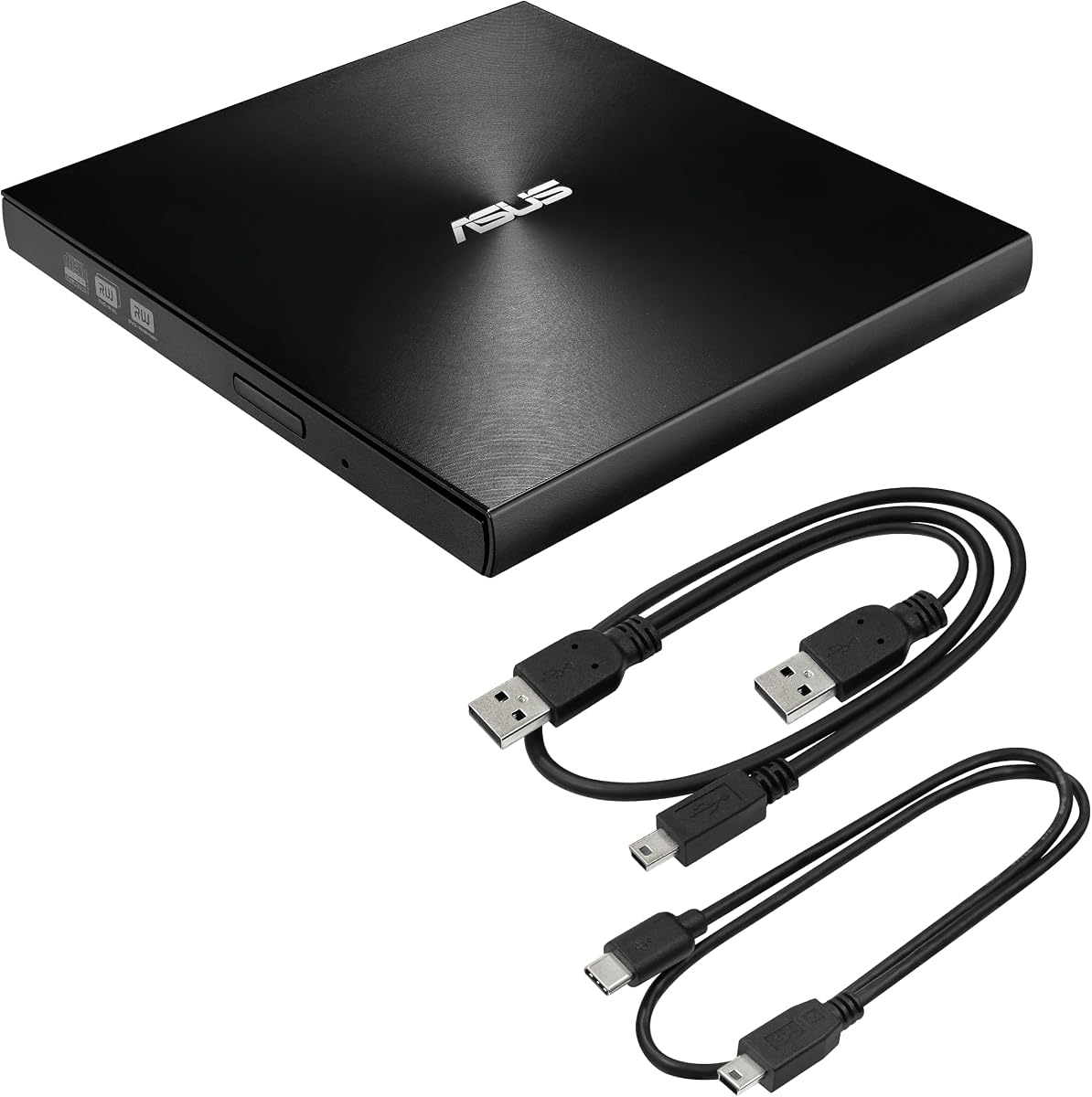
The ASUS ZenDrive Black is the most feature-oriented premium choice in this group, combining a 13mm body, M-Disc support, encryption tools, and both Mac and Windows compatibility. Its 4.3 rating reflects solid marketplace feedback, while the inclusion of separate USB 2.0 and Type-C cables gives users more choice in how the drive connects.
We may earn a commission when you buy through this link, at no additional cost to you.
M-Disc support is the defining feature for buyers who want a dedicated option for longer-term optical storage. The drive can also handle conventional DVD and CD media, and its eight-times DVD specification suits everyday playback and burning. DISC Encryption II adds password-controlled and hidden-file functionality, making the enclosure useful beyond simple disc reading.
The principal compromise is its USB 2.0 interface. That provides sufficient bandwidth for many optical tasks, but it does not match the USB 3.0 specifications advertised by several newer competitors. The Type-C cable helps with modern port shapes, yet it does not make the underlying connection faster than its stated USB 2.0 standard.
This model is best for users who prioritize archiving, security, and a recognizable slim design over the newest interface speed. It is also a strong option for Mac users and for anyone who wants to back up selected files onto M-Disc media in addition to handling ordinary CDs and DVDs.
M-Disc support makes this drive more compelling for users who want an optical medium designed around long-term retention. It complements, rather than replaces, the ability to use standard CD and DVD media for conventional backups and media tasks.
DISC Encryption II enables password controls and hidden-file functionality, adding a security layer beyond a basic burner. The 13mm profile and dual included cables preserve portability for work, travel, and shared computers.
We may earn a commission when you buy through this link, at no additional cost to you.
The Portable External USB DVD Drive is a straightforward, widely compatible burner with a 4.4 rating. It is designed for computers without internal optical drives and supports Windows 11 alongside a range of older Windows releases, Linux, and Mac OS, giving it broad appeal across mixed-device environments.
We may earn a commission when you buy through this link, at no additional cost to you.
Its embedded cable and slim enclosure make it useful for travel, while the claim of no external power or driver requirement keeps setup simple. Speed specifications are 24x for CD reads and writes, 8x for DVD reads and DVD+R writes, 6x for DVD±R DL writes and DVD-RW rewrites, 8x for DVD+RW rewrites, and 5x for DVD-RAM rewriting.
The included format coverage extends to DVD+R, DVD-R, CD-ROM, DVD-ROM, CD-R, and CD-RW. However, the supplied information does not list a Type-C connector, so users with USB-C-only laptops may need an appropriate adapter. The claims of pure-copper wiring and shielding are useful design details, but they should not substitute for checking the enclosure's dimensions and port arrangement against a specific computer.
This is a good value-oriented recommendation for a user who needs reliable rewriting, software installation, and backup discs on multiple operating systems. It is especially helpful for a household or small office containing a mix of Windows 11, older Windows, Linux, and Mac systems.
Support across Windows, Linux, and Mac systems reduces the need to maintain separate optical accessories for different devices. The embedded cable also simplifies packing and reduces cable loss, making the drive convenient for shared workspaces.
The drive provides clear speed figures for common CD, DVD, dual-layer, and DVD-RAM operations. These details make it easier to compare the model with alternatives and set realistic expectations for disc-burning tasks.
We may earn a commission when you buy through this link, at no additional cost to you.
The HP DVD-RW Drive F2B56AA is a compact external optical drive intended to add CD and DVD functionality only when needed. Its 4.5 rating is among the strongest in the group, and the USB-powered design keeps the setup straightforward for desktop and notebook users.
We may earn a commission when you buy through this link, at no additional cost to you.
The listed capabilities cover data backup, file transfer, multimedia use, and reading or writing both CDs and DVDs. Because it can be placed on a desk and disconnected after use, it helps maintain a tidy workspace while preserving access to legacy software, music, movies, and offline media.
Compatibility is the main point to verify. The supplied operating-system list names Windows 10, Windows 8, Windows 7, Windows Vista, Windows XP, Windows 2008, Windows 2003, and Mac OS X, but it does not explicitly mention Windows 11. Because Windows 11 replaced earlier Windows releases, users should review the current listing and seller support information before purchase.
This drive is best for an existing Windows or Mac setup that clearly needs a traditional external DVD rewriter and where the buyer wants a recognizable HP accessory. Its compact form, USB power, and read/write functions are useful, but explicit Windows 11 confirmation should be the deciding factor.
The external format allows a computer without an internal bay to gain CD and DVD support temporarily. Users can keep the drive in a drawer or bag and connect it only for installations, backups, or media tasks.
The supplied system list is dated and does not explicitly state Windows 11 support. Checking the present product page, interface details, and manufacturer guidance can prevent a mismatch with newer system requirements.
We may earn a commission when you buy through this link, at no additional cost to you.
The HP F6V97AA is described as a USB external DVD-writer and CD/DVD combo drive. Its 4.4 rating indicates generally favorable customer feedback, and the no-fuss product positioning makes it relevant for desktop users who need optical media access without rebuilding or permanently installing an internal drive.
We may earn a commission when you buy through this link, at no additional cost to you.
The combo-drive format means one device can handle both CDs and DVDs, reducing the need to maintain separate media accessories. Its USB connection supports the straightforward workflow of attaching the drive to a computer, loading a disc, and using compatible software for the required task. It is a natural fit for a home or office tower that lacks an optical bay.
Details are sparse in the supplied product information. There is no explicit connector shape, reading or writing speed, disc-format list, cable description, or Windows 11 statement. Consequently, this model requires more careful pre-purchase verification than models with complete specifications. The listing's description is enough to establish its core function, but not enough to promise particular technical features.
The HP F6V97AA is worth considering when brand familiarity and a basic CD/DVD combo drive are the priorities. It is best for a desktop owner who can verify current specifications, needs occasional software installation or disc burning, and prefers a simple external peripheral over a feature-packed portable model.
A CD/DVD combo device provides the core functions most users need from optical hardware: reading conventional media and writing compatible discs. Its external design makes it convenient for desktops built without a traditional drive bay.
Current interface, speed, disc compatibility, and operating-system details should be confirmed on the live listing. Those checks are particularly important for a Windows 11 buyer whose computer may use a modern port arrangement.
We may earn a commission when you buy through this link, at no additional cost to you.
The LG GP60NS50 combines a slim enclosure, USB 3.0 compatibility, M-Disc support, and broad operating-system compatibility. Its 4.4 rating and distinctive mix of archival and standard disc features make it a compelling option for users who want more than a basic CD burner.
We may earn a commission when you buy through this link, at no additional cost to you.
Maximum DVD-R writing speed is listed at 8x, and M-Disc support adds value for long-term storage. The drive is described as compatible with Windows, Linux, and Mac OS, with explicit references to Surface Pro 3 and 4. Its super-multi DVD and DVD rewriting functions suit a broad mix of conventional media tasks, while the slim silver body suits travel.
As with several established models in this category, the supplied compatibility information names Windows 10 but not Windows 11. A Windows 11 buyer should confirm the present product documentation and current listing before purchase. TV connectivity is also listed, although computer-focused use remains the clearest application for a model aimed at Windows, Linux, and Mac systems.
This LG is a strong final recommendation for a buyer who values M-Disc, USB 3.0, and cross-platform flexibility in a portable package. It is especially useful to users with mixed Windows and Mac devices who want one slim drive for standard optical tasks and selective archival media.
M-Disc support extends the drive beyond ordinary CD and DVD storage, while USB 3.0 compatibility provides a more modern interface than older USB 2.0 designs. Together, they balance long-term media use with efficient everyday transfers.
Windows, Linux, and Mac OS support makes the GP60NS50 useful for mixed personal or work environments. Its ultra-slim form and portable construction complement that cross-platform positioning.
We may earn a commission when you buy through this link, at no additional cost to you.
The best external optical drive is the one that matches your computer's connections, the media you use, and the tasks you expect to perform. Paying attention to interface speed, disc formats, power requirements, enclosure design, and software prevents most common buying disappointments.
Start by examining the ports available on your Windows 11 computer. A drive with both USB-A and Type-C is more adaptable, particularly if you move between a desktop tower and a newer laptop. USB 3.0 models offer a higher stated transfer rate, while USB 2.0 can still be adequate for many conventional optical tasks. Check whether the connector is built into the drive, whether an adapter is supplied, and whether the included cable is long enough for your workspace.
Do not assume that every external drive supports every disc. Several highly rated models handle common CD and DVD formats but exclude Blu-ray, 4K UHD discs, DVD-RAM, or proprietary formats. M-Disc support is valuable for long-term archival work, while DVD-RAM support may matter to users restoring old data. Make a list of the formats in your collection and verify that each one appears in the current product specifications before ordering.
An external DVD player may only read discs, whereas a DVD rewriter can also create media. A CD/DVD combo drive generally supports reading, burning, and rewriting standard CD and DVD media. Review the specific operation speeds, including separate figures for CD, DVD, dual-layer DVD, and DVD-RAM when available. Faster ratings are most useful for larger disc collections or frequent backups, while occasional installers and music tasks place less pressure on maximum speed.
A drive can be electrically compatible with Windows 11 while still relying on separate software for playback, ripping, or burning. Some models include utilities such as CyberLink Media Suite, while others expect you to use an application already installed on the computer. Confirm that the product is explicitly compatible with Windows 11, determine whether additional software is necessary, and review any requirements for the playback codec. Optical hardware alone does not guarantee that every commercially produced DVD will play.
Most slim external optical drives draw power from USB, but some laptops and desktops may not provide enough current for reliable tray movement, reading, or writing. The manufacturer may recommend plugging into a rear desktop port, avoiding hubs and extension cables, keeping the laptop connected to power, or using an auxiliary five-volt power cable. If your computer has limited USB power or frequently disconnects devices, a powered hub or extra power option may be more dependable than the smallest possible enclosure.
For frequent travel, compare thickness, weight, cable storage, and the presence of a protective sleeve. Drives around 13mm or 14mm are especially easy to place in a laptop bag, while integrated cables reduce loose accessories. Look for an anti-skid base, a durable enclosure, and a tray or slot design that suits your storage preferences. A bundled case is a meaningful advantage if the drive will be carried between home, school, or an office.
M-Disc support is worth prioritizing when your goal is archival storage rather than temporary playback. The ASUS ZenDrive and LG GP60NS50 explicitly list it, giving them an advantage for preserving selected files on specialized optical media. An M-Disc-capable drive can still handle conventional discs, but it should not be confused with a Blu-ray writer. Consider the full workflow, including compatible blank media, storage conditions, and periodic verification of important files.
Established brands can provide a clearer support path and more familiar replacement or warranty arrangements. The Dell DW316 includes a one-year limited hardware warranty, while the ROOFULL listing describes two years of service, and the ORIGBELIE package includes a 90-day warranty. Compare the actual coverage and included items rather than assuming every drive comes with the same accessories. Software, a power cable, a storage bag, and both USB connector styles can materially improve the package.
Begin by connecting the drive directly to a USB port on the computer. For a desktop, a rear motherboard port is often the most stable option. Turn the computer on, insert a compatible disc, and wait for Windows to recognize the optical drive. If the tray does not open or the disc icon does not appear, restart the computer, try another port, and avoid an unpowered hub or extension cable before attempting more involved troubleshooting.
Use the appropriate software for the task. A compatible disc utility is required to burn files, rewrite rewritable media, rip audio or video, or install disc-based software. For DVD playback, the computer also needs the necessary codec support. macOS users should insert the disc first and use the system's media application, while some Windows 11 installations may prompt for a player or codec when a commercial disc is opened.
Handle the drive and discs carefully. Keep the enclosure away from moisture, excessive heat, impact, and dust, and do not move the drive while a disc is being read or written. Press the tray eject control or use the operating system's eject command before removing media. Store records in a cool, dry place, handle them by the edges, and periodically verify important archival files rather than assuming a disc will remain readable indefinitely.
Yes, Windows 11 can use a compatible external DVD or CD drive through USB. The drive should appear as an optical disc in File Explorer after it is connected and a supported disc is inserted.
You will still need suitable software for burning, rewriting, or ripping discs, and DVD playback may require an appropriate codec. Confirm that the drive's current specifications explicitly include Windows 11 compatibility.
An external drive is the most direct way to add physical media support to a modern laptop that lacks an internal optical drive. It is useful for legacy software, music CDs, movie DVDs, and offline backups.
A USB-A model may require an adapter on a USB-C-only laptop, so a dual USB-A and Type-C model can be more convenient. A slim drive with a protective case is also useful for frequent travel.
USB 3.0 is helpful for faster data transfer and is a good choice for modern computers, but many standard optical tasks can also be handled over USB 2.0. The drive must use the faster interface when both the computer and drive support it.
A USB 2.0 model may still be ideal for occasional use or when a slower maximum specification does not affect your workflow. Connector availability should remain a higher priority than headline transfer speed.
A DVD reader can read compatible discs, while a DVD rewriter can also write and rewrite supported media. A CD/DVD combo drive adds CD reading and writing functions.
If you only watch DVDs, a reader may be sufficient, but a rewriter provides more flexibility for installing software, creating music discs, and making backups. Confirm the exact CD and DVD formats before purchase.
Insufficient USB power, an indirect hub connection, a faulty cable, or a missing disc can all prevent normal recognition. Connect the drive directly to the computer, try another port, insert a standard CD or DVD, and restart Windows.
For a desktop, try a rear USB port. If the drive's indicator light is on but no icon appears, the manufacturer recommends checking power delivery, keeping the laptop plugged in, and avoiding extension cables.
Only a model specifically designed and licensed for Blu-ray can read those discs. Several slim CD and DVD drives in this guide explicitly exclude Blu-ray, while the listed standard DVD and CD functions do not imply Blu-ray support.
If Blu-ray is important, look for a clearly identified external Blu-ray drive and confirm that your playback software includes the required codec. Do not rely on a Super Multi or DVD+/-RW label as evidence of Blu-ray capability.
M-Disc support is valuable when you want an optical medium intended for long-term retention. The ASUS ZenDrive and LG GP60NS50 include this capability, which is a clear advantage over drives limited to ordinary recordable media.
You still need compatible blank discs, sensible storage conditions, and a habit of checking important files periodically. M-Disc should be one element of a backup plan rather than the only copy of irreplaceable data.
Most USB-powered external optical drives draw all necessary power from the computer, so a separate supply is not normally required. Some low-power or compact systems may not deliver enough current, particularly when the drive is connected through a hub.
Direct connection is the best first approach. If problems continue, try a rear desktop USB port, keep the laptop on external power, or use the five-volt auxiliary cable included with certain models.
The Amicool External DVD Drive is the strongest all-around option for buyers who want explicit Windows 11 support, USB 3.0, and a built-in Type-C connection. The Dell DW316 stands out for its refined 14mm design and CyberLink software, while the ASUS ZenDrive Black is the premium choice for M-Disc archiving, encryption, and a highly compact enclosure.
Prioritize the features your daily work requires. Direct Type-C support matters for newer laptops, standard disc compatibility matters for music and DVDs, DVD-RAM support matters for older collections, and M-Disc matters for long-term retention. Also account for power delivery, included software, and whether a carrying case is worth having.
Finally, check the current product listing before ordering. Product specifications, operating-system support, accessories, ratings, and prices can change, and the information in this guide reflects the supplied product data at the time of writing. A quick final review helps ensure the selected drive is compatible with your computer and suitable for your collection.

