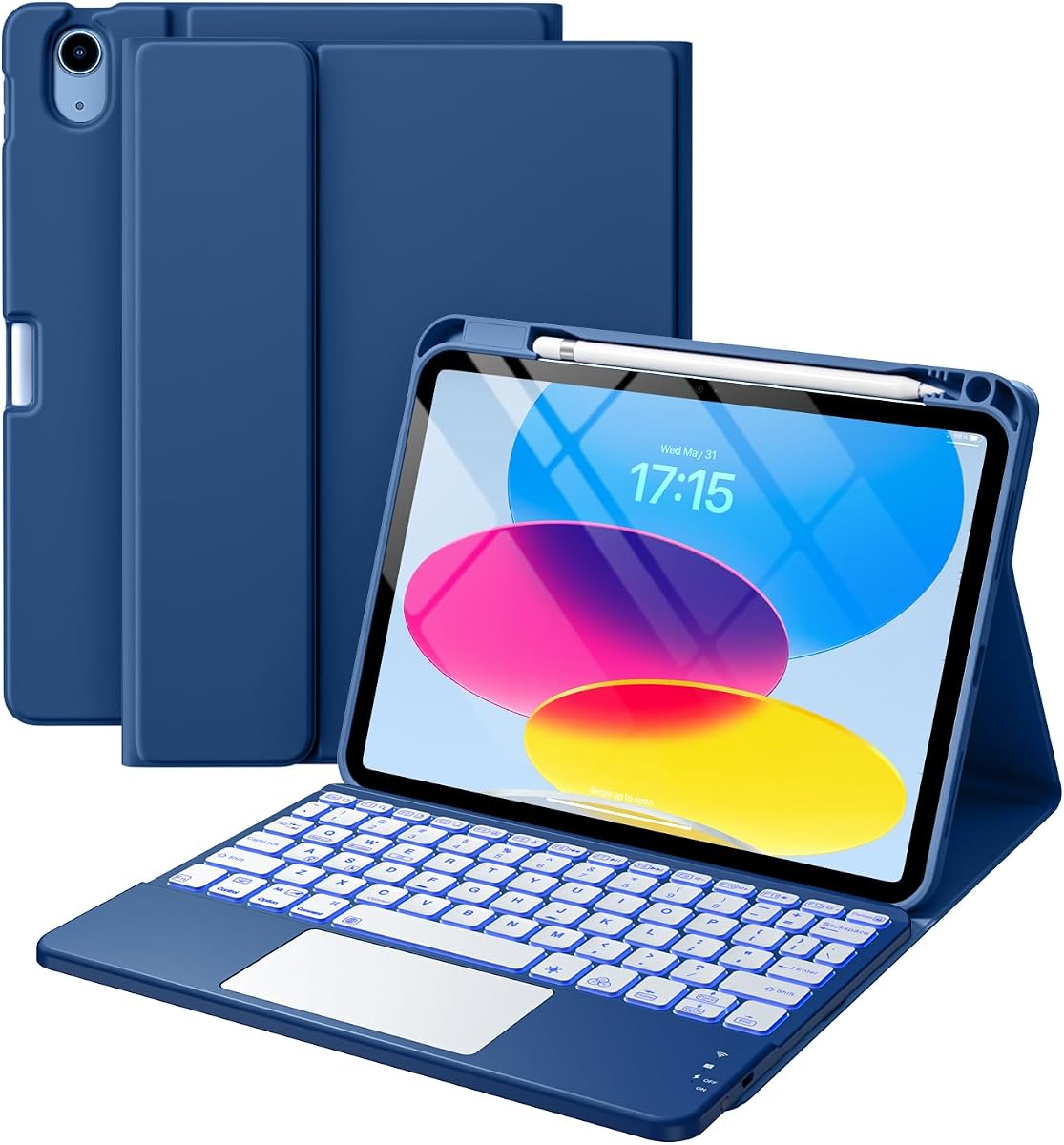
Harvopu Keyboard Case
4.3Editor score
Detachable magnetic Bluetooth keyboard
Multi-finger trackpad gestures
Seven-color adjustable backlight
A keyboard for iPad A16 can turn a tablet into a more practical productivity tool, but the best model depends on how you type, work, and travel. The strongest choices combine familiar laptop-style keys, responsive touch controls, a stable viewing position, and dependable protection for the iPad A16 or 10th generation.
This guide compares ten compatible keyboard cases based on their published features, including keyboard layout, trackpad capabilities, connection method, backlighting, viewing angles, battery design, stylus storage, and overall portability. It covers magnetic Smart Connector models as well as rechargeable Bluetooth options for people who want more layout flexibility.
Each pick highlights a different use case, from budget-friendly productivity to premium Apple integration and rugged protection. Ratings provide a useful snapshot of customer feedback, while the feature details help explain why each product may or may not fit your routine. Product availability and prices can change, so confirm the current listing before buying.
4.3Editor score

4.5Editor score
4.4Editor score
As an Amazon Associate we earn from qualifying purchases.
The comparison below highlights the major differences among these keyboard cases, including compatibility, controls, viewing design, lighting, charging, and protection. It is designed to help readers identify the most suitable option without overlooking practical details such as model fit or stylus storage.


The Harvopu Keyboard Case is a feature-rich folio option for people who want a keyboard and protective cover without moving into premium accessory territory. It holds a 4.3 customer rating and is designed specifically for the 11-inch iPad A16 and 10.9-inch iPad 10th generation. Its most appealing combination is a detachable keyboard, touchpad, backlighting, and adjustable viewing support in one package.
We may earn a commission when you buy through this link, at no additional cost to you.
The magnetic keyboard can remain attached for concentrated work or detach for lighter tablet use. Its trackpad handles taps, swipes, scrolling, and app switching, while the full row of iPadOS shortcuts provides direct access to common tablet functions. Seven RGB backlight colors and three brightness levels make the keyboard adaptable to dim rooms, and the 420mAh rechargeable battery adds the benefit of a conventional wireless design.
The trade-offs come from its Bluetooth approach. Unlike Smart Connector keyboards, the Harvopu model must be paired through the iPad settings and recharged by USB-C. Buyers who value a simple, dependable connection with no separate charging may prefer another option, while those who want portability and broad viewing flexibility will find the detachable arrangement more useful.
This is a practical recommendation for students, commuters, and light office users who want a keyboard case for either supported iPad generation. Confirm that the model number on the back of the tablet begins with one of the listed identifiers before ordering, and expect the strongest value when you value multiple functions more than a seamless connection.
Because the keyboard detaches from the folio, you can keep the case around the iPad for protection and remove only the typing component. This makes the product easier to carry than a permanently attached keyboard case and gives it a distinct advantage for reading, sketching, and video viewing.
The adjustable RGB backlight is helpful for travel, evening study, and low-light workspaces. Dedicated iPadOS shortcut keys reduce the need to reach toward the screen, while the gesture trackpad adds a more conventional computer interface.
We may earn a commission when you buy through this link, at no additional cost to you.
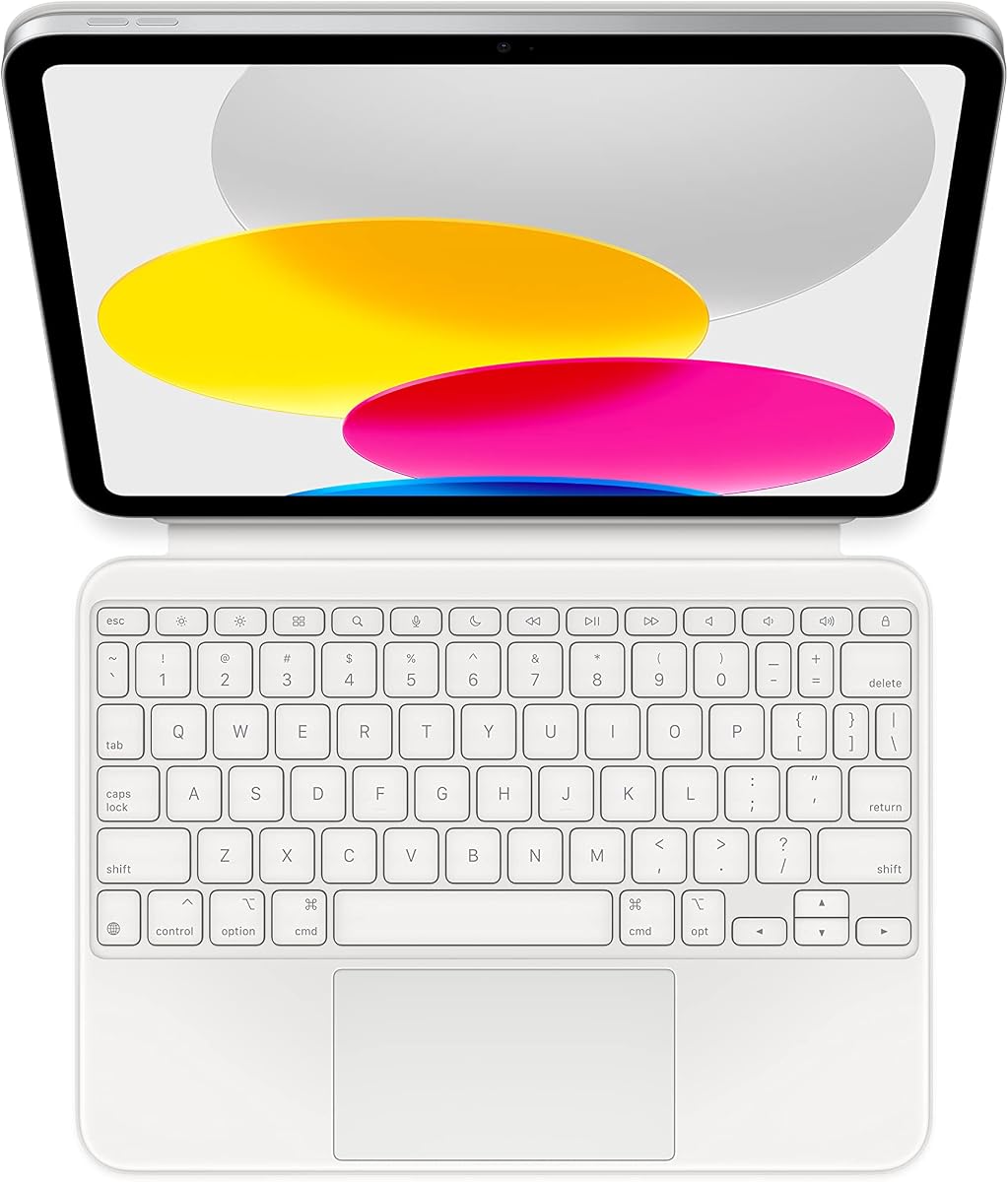
Apple Magic Keyboard Folio is the premium pick in this guide because it offers the most direct, integrated approach to using an iPad as a computer. It carries a 4.4 customer rating and supports both the iPad A16 and 10th generation. The keyboard and protective back panel attach magnetically, creating a laptop-like arrangement without a separate pairing or charging routine.
We may earn a commission when you buy through this link, at no additional cost to you.
Its large click-anywhere trackpad supports multi-touch gestures and cursor control, offering a generous surface for editing, scrolling, and navigating iPadOS. The keyboard includes a 14-key function row, while the back panel's adjustable stand provides a smooth, continuous viewing angle. Together, the two pieces also protect the front and back of the tablet during use and transport.
The most important limitation is structural simplicity. Unlike products with full-size rows of function keys, this design offers a more compact 14-key row, and the keyboard is not intended for people who need a traditional laptop layout. The listed configuration is also US English, so buyers who require another language or a different physical layout should check the available options carefully.
Choose the Magic Keyboard Folio when seamless setup, polished construction, a large trackpad, and minimal maintenance are the priorities. It is particularly attractive for owners who want the most integrated iPad experience and do not want to manage a separate rechargeable keyboard or Bluetooth connection.
The magnetic attachment also handles power and communication, so there is no battery-management routine or device-pairing process. That simplicity is a major advantage for users who move between the iPad and a conventional computer throughout the day.
The click-anywhere trackpad offers more surface area than many compact keyboard cases and supports common multi-touch gestures. It is especially useful for document editing, presentation work, browsing, and cursor-based applications.
We may earn a commission when you buy through this link, at no additional cost to you.
typecase Edge is built for users who want their iPad to look and operate more like a laptop while retaining a floating screen position. It has a 4.4 customer rating and is compatible with the iPad A16 11-inch and iPad 10th generation. The magnetic floating stand elevates the display above the keyboard, creating a familiar workspace for typing, study, calls, and travel.
We may earn a commission when you buy through this link, at no additional cost to you.
Its precision multi-touch trackpad supports scrolling, swiping, editing, browsing, and multitasking, with palm rejection designed to reduce accidental cursor movement during typing. The keyboard adds 11 backlight colors, three brightness levels, and a full row of iPadOS shortcuts. The case also incorporates vegan leather, a secure magnetic closure, and an Apple Pencil holder.
As with other rechargeable Bluetooth models, users must pair the keyboard and manage its charge separately. The floating structure may also take more room than a flat folio when used on a small table. Even so, the product is better suited to buyers who prioritize screen height, gesture navigation, and a broad selection of controls over completely cable-free operation.
The Edge is a strong recommendation for remote workers, students, and frequent travelers who want a capable mobile workstation. It suits both target iPad models particularly well when the user works primarily in landscape orientation and values a trackpad large enough for frequent navigation.
The floating magnetic stand raises the display instead of leaving it flat against the keyboard. That extra separation can make external typing, browsing, and video calls feel more natural, particularly on a desk where the iPad would otherwise sit low.
The trackpad's palm-rejection behavior helps keep the cursor steady when hands rest near the control surface. It is a useful refinement for people who alternate frequently between typing and trackpad navigation.
We may earn a commission when you buy through this link, at no additional cost to you.
typecase Touch distinguishes itself with a 360-degree rotating hinge and a wide selection of viewing positions. The product has a 4.4 rating and supports the iPad A16 11-inch and iPad 10th generation. It can move among typing, reading, sketch, presentation, video-call, and tablet-oriented positions, making it one of the more adaptable cases in the group.
We may earn a commission when you buy through this link, at no additional cost to you.
The keyboard includes laptop-style keys, a complete row of iPadOS shortcuts, and adjustable 11-color RGB lighting. A multi-touch trackpad supports document editing, web browsing, schoolwork, and presentation creation. The thin hard-shell case adds protection, auto sleep and wake behavior, and an Apple Pencil holder, while its rechargeable USB-C battery avoids disposable battery replacements.
The rotating mechanism necessarily makes the overall accessory larger and somewhat more complex than a standard folio. Some users may also prefer a thinner, less structured case for maximum portability. These drawbacks are reasonable for people who value the ability to reposition the iPad quickly across many tasks.
This model makes the most sense for users who alternate between writing, reading, drawing, presenting, and joining calls. If a single fixed laptop angle is enough, a floating or conventional folio may be simpler, but the Touch is a capable choice when position flexibility is a central requirement.
The rotating hinge allows the iPad to move from landscape typing to portrait reading and other supported arrangements. This is useful for students and professionals who do not keep the tablet in one location or orientation for long stretches.
The thin hard shell surrounds the tablet and provides added protection against everyday knocks and scratches. Auto sleep and wake further reduce unnecessary screen activity when the user changes positions.
We may earn a commission when you buy through this link, at no additional cost to you.
Logitech Combo Touch is the strongest all-around choice in this roundup, combining a 4.5 customer rating with a mature set of productivity features. It supports the iPad A16, the 10th generation, and the listed model variants for both. Its detachable keyboard, precision trackpad, backlit layout, and protective case offer a balanced experience for work, study, and travel.
We may earn a commission when you buy through this link, at no additional cost to you.
The Smart Connector draws power directly from the iPad, eliminating both battery charging and Bluetooth pairing. Well-spaced backlit keys include a full row of iPadOS shortcuts, including Screenshot and Dictation controls. The multi-gesture trackpad supports precise editing, app navigation, and presentation work, while the kickstand provides 50 degrees of tilt across Type, Read, Sketch, and View modes.
The main compromise is that the detachable keyboard is not an independent Bluetooth keyboard; it depends on the physical Smart Connector connection. Some users may also want more explicit backlight controls, although the product description confirms illumination without detailing those settings. Compared with a compact premium folio, the Combo Touch offers a more familiar full-size keyboard.
This is the recommendation for most buyers who want an established laptop-style experience without a separate charging routine. It works particularly well for users who alternate between typing, reading, drawing, and viewing and who value a full shortcut row, a capable trackpad, and straightforward magnetic attachment.
The keyboard provides well-spaced keys and dedicated iPadOS controls, reducing on-screen navigation for common tasks. Screenshot and Dictation keys are particularly convenient for frequent study, communication, and content-capture workflows.
Because the keyboard receives power directly from the iPad, there is no separate battery to charge and no pairing process to repeat. The magnetic connection makes docking and undocking simple enough for the keyboard to be detached when it is not needed.
We may earn a commission when you buy through this link, at no additional cost to you.
runelk Keyboard Case offers a floating, laptop-inspired setup with a particularly substantial 750mAh rechargeable battery. It has a 4.4 customer rating and supports both the iPad A16 11-inch and iPad 10th generation. The magnetic keyboard and cantilever stand create a workstation-like position with one smooth setup motion.
We may earn a commission when you buy through this link, at no additional cost to you.
A built-in multi-touch trackpad supports gestures for editing documents, building presentations, and browsing the web. The full row of iPadOS shortcuts provides quick access to brightness, volume, and media functions. The sturdy keyboard base and vegan leather case are intended to protect the iPad during travel, school, business, and other everyday environments.
The rechargeable approach creates more freedom than a Smart Connector keyboard because the keyboard can be used separately, but it also adds a charging and pairing routine. The floating structure may occupy more desk space than a flat case. These are modest compromises for buyers who value the large battery and elevated display position.
The runelk case is a strong fit for frequent travelers, students, and business users who want a portable workstation with generous battery capacity. It is particularly compelling for people who expect to type away from a desk and want the keyboard separated from the tablet when carrying it.
The 750mAh battery is designed for extended mobile use and supports quick recharging through USB-C. This makes the keyboard practical for users who cannot rely on a charger being available throughout the day.
The magnetic rear case and cantilever stand let the iPad move into a raised typing position in one motion. The result resembles a conventional laptop without requiring a separate support accessory.
We may earn a commission when you buy through this link, at no additional cost to you.
Logitech Slim Folio is a straightforward wireless keyboard case for people who want a full-size layout without a trackpad. It has a 4.1 customer rating and supports the iPad A16 and 10th generation. The edge-to-edge keys and iPadOS shortcut row create a familiar layout, while Type, Sketch, and Read modes cover the main everyday positions.
We may earn a commission when you buy through this link, at no additional cost to you.
Its defining advantage is battery longevity. Two replaceable coin-cell batteries and a smart-power management system are stated to provide up to three years of battery life. Bluetooth Low Energy supplies a reliable, energy-efficient connection, and the soft technical-fabric exterior is designed to resist bumps, scratches, and normal wear.
The absence of a trackpad is the clearest limitation for users accustomed to cursor control. Backlighting is also not specified for this model, so buyers who regularly type in dark conditions should verify that feature before purchasing. The integrated folio format is less flexible than a floating or rotating design when changing orientation.
The Slim Folio is an excellent choice for writers, students, and travelers who mainly need fast text entry. Its replaceable batteries and low-power wireless design minimize charging interruptions, while the stylus holder keeps an Apple Pencil or Logitech Crayon accessible.
The replaceable coin-cell setup avoids frequent charging and allows the case to remain ready for work or classes. It is particularly useful for people who travel with limited access to power outlets.
Large, well-spaced keys stretch across the case and include dedicated controls for common media and iPadOS functions. The result is a practical alternative to a trackpad for users whose main task is writing.
We may earn a commission when you buy through this link, at no additional cost to you.
typecase Air Keyboard is the most model-flexible product in the guide, supporting the iPad A16, iPad 10th generation, and several 11-inch iPad Air generations. It carries a 4.4 rating and uses a detachable magnetic keyboard that can be removed while the protective case stays on the tablet. This makes it a practical option for households or users who may move between several supported iPads.
We may earn a commission when you buy through this link, at no additional cost to you.
A spacious multi-touch trackpad handles clicking, scrolling, swiping, and app switching, while a full row of iPadOS shortcuts assists with editing, searching, volume, note-taking, and multitasking. The adjustable kickstand supports portrait, landscape, viewing, calling, typing, sketching, and reading positions. Its 11 backlight colors and three brightness levels also make low-light use more comfortable.
The case weighs about 535 grams, or 1.18 pounds, so it is less ultralight than minimalist folio designs. The keyboard is also rechargeable and needs a separate charging routine. Even so, the broad compatibility and ability to detach only the keyboard create flexibility that many fixed-layout alternatives cannot match.
The Air Keyboard is a good choice for users who own more than one compatible iPad, appreciate a case that remains on during tablet use, or want adjustable positioning without a rotating hinge. It is best suited to people who value versatility, lighting, and trackpad control over minimum weight.
Support for the A16, 10th generation, and multiple 11-inch iPad Air models gives the accessory broader household utility. Buyers should still verify the exact model number before ordering because case fit is not interchangeable across every device.
The keyboard can be removed while the case, kickstand, and Pencil holder stay attached. This approach preserves basic coverage during reading or sketching and makes it less disruptive to switch between workstation and tablet modes.
We may earn a commission when you buy through this link, at no additional cost to you.
ESR Ultra-Light Case focuses on portability and clean design. It has a 4.4 customer rating and is made for the iPad A16 11-inch and iPad 10th generation. At 6.9 millimeters thick, it is among the slimmer options listed, while the magnetic keyboard can be detached for tablet use or positioned remotely for typing.
We may earn a commission when you buy through this link, at no additional cost to you.
Its standout interface is the extra-large precision trackpad, described as 65 percent larger than those on regular keyboards. It supports one-finger dragging and three-finger scrolling for browsing, editing, and app switching. The triangular support holds the tablet at either 65 degrees for working and viewing or 20 degrees for sketching and writing.
There is no keyboard backlight, which may be significant for night typing. Limiting the case to two viewing angles also gives it less flexibility than rotating or floating designs. Nevertheless, ESR offsets those limitations with a very slim form, a large touch surface, reinforced corners, and access to buttons, ports, and speakers without removing the cover.
This case is best for commuters, students, and creative users who value a small footprint and a detachable typing accessory. It is particularly attractive for people who alternate between a protected tablet setup and a keyboard without carrying a larger rigid case.
The case keeps its slim profile while providing a trackpad larger than the one found on many standard accessories. That balance makes it useful for people who want cursor-based work without accepting the depth of a full laptop-style folio.
The steeper angle supports browsing, calls, and ordinary desk work, while the shallower position provides a more natural surface for writing and sketching. The triangular support is designed to remain steady at each option.
We may earn a commission when you buy through this link, at no additional cost to you.
ZAGG Rugged Book is built for users who prioritize physical protection over a lightweight profile. It has a 4.1 customer rating and supports the 11-inch iPad A16 and 10.9-inch 10th generation. Its durable construction is stated to withstand drops up to 6.6 feet, making it the most explicitly rugged option in the roundup.
We may earn a commission when you buy through this link, at no additional cost to you.
The detachable wireless keyboard can be used as a standalone accessory or combined with the protective case. Versatile multi-device pairing allows the user to switch between the iPad and another compatible device, while the magnetic hinge provides multiple viewing angles. Laptop-style keys have seven backlight colors for improved visibility in low-light conditions.
The rugged design adds bulk compared with minimalist folios, and the supplied information does not specify the keyboard's charging method or battery arrangement. Buyers who need the most compact possible accessory may find the protection excessive, while people working in demanding environments may consider it worthwhile.
Choose the Rugged Book for field work, frequent travel, construction sites, classrooms, or any situation where drops and impacts are a concern. It is also appealing to owners who want one wireless keyboard to move between multiple devices while retaining a protective cover for the iPad.
The stated 6.6-foot drop capability sets this case apart from slim folios designed mainly for everyday scratches and knocks. It gives travelers, field workers, and active users more confidence when the iPad is carried through less controlled settings.
Multi-device pairing expands the value of the removable keyboard beyond the iPad. Users can switch between their tablet and another compatible device without treating the keyboard as an iPad-only accessory.
We may earn a commission when you buy through this link, at no additional cost to you.
The best keyboard for iPad A16 depends on connection style, typing habits, protection, portability, and the way you use the display. Comparing these factors before shopping helps prevent an otherwise capable case from being inconvenient in your normal routine.
Check the model number before ordering and compare the full list of supported identifiers. Do not assume that every keyboard case for a 10th-generation iPad also fits the A16 version.
Choose Smart Connector for simplicity and predictable power. Choose Bluetooth when independent keyboard use, flexible storage, or a detachable design matters more.
Choose a larger multi-touch trackpad for editing, spreadsheets, presentations, and desktop-style browsing. Skip the trackpad if your main tasks are writing and keyboard shortcuts.
Choose rotation for maximum positioning freedom, a floating stand for laptop-style work, and a simple kickstand for an uncomplicated folio design.
Prioritize familiar key spacing and dedicated shortcuts. Verify backlighting specifically if you expect to type in dim environments.
Choose a slim folio for commuting and frequent travel. Choose a rotating or rugged case when protection and support outweigh compactness.
Compare charging demands, battery endurance, stylus storage, and sleep functions. These convenience features can matter as much as the keyboard layout for daily use.
Before using a Bluetooth keyboard, fully charge it through its charging connection, switch it on, and open the iPad's Bluetooth settings. For the Harvopu model, hold the Fn+C combination for approximately three seconds, find Bluetooth Keyboard in the available-device list, and select it. Once paired, the keyboard should reconnect automatically when powered on. Smart Connector models require only magnetic attachment to the appropriate iPad keyboard connector.
Position the tablet securely before beginning a typing session. Use the case's stand or hinge to create a stable viewing angle, keep the keyboard flat, and avoid placing heavy objects on the trackpad or screen. A raised or floating setup can reduce screen glare and make the keyboard more comfortable, while a lower angle may be preferable for handwriting and marking up documents.
Care for the accessory by keeping the keys and trackpad free of dust, crumbs, liquids, and sticky residue. Use a soft dry cloth for the case and a lightly damp cloth for the outer surface when appropriate, avoiding harsh chemicals and moisture around openings. Rechargeable models should be topped up periodically, while coin-cell models require replacement when the battery runs low. Store the case in a dry place and avoid leaving the iPad exposed to excessive heat, direct sunlight, or crushing pressure.
Not every keyboard case is cross-compatible, even when the devices have similar screen dimensions. The iPad A16 uses model numbers A3354, A3355, or A3356, while common 10th-generation models are A2696, A2757, and A2777. Use only a case whose listing explicitly includes your exact model number, as connector placement and physical dimensions can differ.
Most do, although the charging method and battery interval vary by model. The Harvopu, typecase, and runelk products use rechargeable batteries and charge through USB-C, while the Logitech Slim Folio uses replaceable coin-cell batteries. Check the included accessories and manufacturer instructions before your first session so the keyboard is ready to pair and use.
It depends on your work. A trackpad is highly useful for editing documents, moving cursors, managing spreadsheets, browsing with a pointer, and using presentation software. For email, note-taking, and ordinary text entry, a well-spaced keyboard may be enough. The Logitech Slim Folio is the main keyboard-focused option in this guide without a trackpad.
No. Smart Connector models use the iPad's physical keyboard connector for both power and communication. The Apple Magic Keyboard Folio, Logitech Combo Touch, and Logitech Slim Folio are listed as compatible with the target devices and avoid the conventional Bluetooth pairing process, although the Slim Folio still uses Bluetooth for its wireless keyboard connection.
The ESR Ultra-Light Case is specifically designed around a 6.9-millimeter profile, while the Logitech Slim Folio is also intended as a compact integrated cover. Detachable keyboard designs are also easier to carry because the typing component can be removed. Travelers who need maximum impact protection may prefer the larger ZAGG Rugged Book instead.
Many of the cases include a dedicated Apple Pencil holder, including the typecase Edge, typecase Touch, typecase Air, and ZAGG Rugged Book. The Logitech Slim Folio includes storage for a Logitech Crayon or Apple Pencil. A stylus is not necessarily included with every product, so check the package contents and confirm the holder's location before relying on it.
Confirm that the keyboard has backlighting, then look for multiple colors and brightness levels if you want flexibility. The Harvopu offers seven RGB colors and three brightness levels, while the typecase products provide eleven-color backlighting. The ZAGG Rugged Book offers seven colors, and the ESR model explicitly has no backlight.
Use a raised or laptop-like angle for typing, browsing, and video calls, and a shallower position for writing or sketching. Rotating cases are useful when you need portrait reading as well as landscape typing. Floating stands create more separation between the screen and keys, while fixed kickstands are generally simpler and more compact.
The Logitech Combo Touch stands out as the best overall choice because it combines the highest customer rating in the group with a capable backlit keyboard, precision trackpad, flexible viewing modes, and Smart Connector power. The Apple Magic Keyboard Folio is the premium alternative for buyers who prioritize effortless attachment, a large trackpad, and an integrated two-piece design without separate charging.
The Harvopu Keyboard Case offers the most compelling budget-oriented feature combination, including a detachable Bluetooth keyboard, gesture trackpad, RGB lighting, and multiple viewing positions. Buyers should prioritize exact model compatibility first, then choose between Smart Connector simplicity and Bluetooth freedom. Trackpad size, keyboard layout, stand style, protection, and low-light lighting should be matched to the tasks you expect to perform most often.
Before ordering, verify the model number printed on the back of the iPad and review the current listing for layout, language, accessories, and compatibility details. Product availability and prices change over time, so checking the live listing and comparing the final features with your workflow can prevent surprises and help you select the right accessory for your iPad A16 or 10th generation.