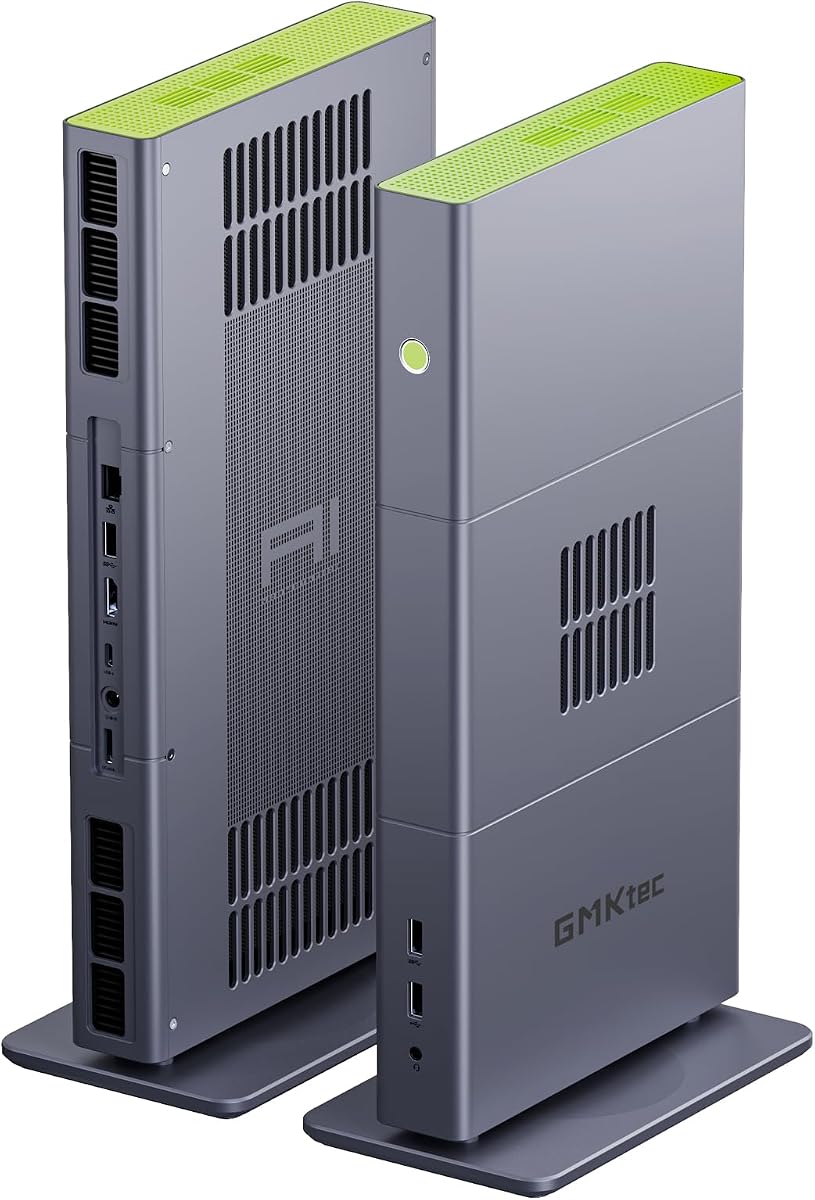
GMKtec EVO-X3
4.1Editor score
128GB high-bandwidth memory
126 TOPS total AI compute
Radeon 8060S integrated graphics
PCIe 4.0 OCuLink expansion
Compare the best Mini Pcs for Local Llm by memory, AI performance, graphics, storage, networking, expansion, and overall value.
Running large language models on your own hardware offers faster access to private, offline AI without sending prompts and files to a cloud service. The right mini PC depends on model size, available unified memory, processor power, graphics capability, cooling, and how much room you need for storage and expansion.
We compared all ten systems using their supplied specifications, focusing on processor architecture, AI compute, usable memory, integrated graphics, storage options, networking, display support, cooling, and upgradeability. The list covers both affordable general-purpose mini PCs and high-memory machines intended for demanding local inference.
Each review explains where a product fits, what its specifications make possible, and which compromises deserve attention. Ratings and configurations can change over time, while retailer availability and prices fluctuate, so verify the current listing and hardware configuration before buying.
4.1Editor score

4.6Editor score

5.0Editor score
The table below compares the ten mini PCs by processor, memory, AI hardware, and storage so readers can identify the most appropriate system for their preferred models and workloads.


The GEEKOM A9 Mega is the most compelling all-around choice for someone who wants serious local AI capability in a compact enclosure. It carries a 4.6 rating and pairs the Ryzen AI Max+ 395 with 128GB of LPDDR5X memory, 2TB of PCIe Gen4 storage, and the Radeon 8060S integrated GPU. Those specifications make it unusually well suited to large quantized language models while also retaining enough conventional performance for development, office work, media tasks, and demanding multitasking.
We may earn a commission when you buy through this link, at no additional cost to you.
Its major advantage is unified memory. The supplied specifications state that as much as 96GB can be allocated to the Radeon 8060S when supported settings permit. That is especially valuable for inference because a model must fit within the memory pool available to the processor and graphics system. The 126 TOPS figure combines CPU, GPU, and NPU capabilities, while the dedicated XDNA 2 NPU handles supported AI operations. A 2TB NVMe drive also gives model files, datasets, and projects useful local capacity without requiring immediate storage expansion.
The compromises are mostly associated with a high-end configuration. Its 128GB LPDDR5X is soldered to the board, so buyers cannot replace it with ordinary DIMMs. Supported 128-billion-parameter models are limited to select 4-bit quantization and require compatible drivers and inference software, which makes the claim meaningful but not universal. The system also needs sufficient cooling and power delivery for prolonged inference workloads, making sustained thermal performance worth considering alongside the headline specifications.
This is the ideal choice for developers, researchers, privacy-conscious professionals, and advanced creators who want the headroom to experiment with large local models instead of limiting themselves to small quantized applications. It is also compelling for users who may eventually connect an external GPU through OCuLink. For those priorities, the A9 Mega offers the strongest balance of memory capacity, graphics capability, networking, storage, and future expansion in the list.
The 128GB unified-memory pool is the A9 Mega's defining feature. It creates enough room for larger quantized models, and the GPU can access a substantial share of that memory when the operating system and inference backend support the allocation.
The 2TB PCIe Gen4 SSD keeps model weights and datasets on a fast local drive, while dual 10GbE networking is useful for transferring large files to a NAS or moving between workstations without relying solely on consumer Wi-Fi.
We may earn a commission when you buy through this link, at no additional cost to you.
The BOSGAME VTA-439 is a flexible option for developers who want modern Ryzen AI hardware without starting with 128GB of soldered memory. Its 4.6 rating reflects a strong supplied specification set: a Ryzen AI 9 HX 470 with 12 cores and 24 threads, 86 total TOPS of AI performance, 32GB of DDR5-5600 memory, and a 1TB PCIe 4.0 NVMe SSD. It is especially appealing to buyers who expect their storage and memory needs to grow.
We may earn a commission when you buy through this link, at no additional cost to you.
The system supports up to 256GB of DDR5 according to its supplied details, and three PCIe Gen4 M.2 slots provide room for additional high-speed storage. That makes it suitable for keeping multiple model collections, container images, virtual machines, and project datasets on hand. Radeon 890M graphics add useful general acceleration, while the PCIe 4.0 x4 OCuLink interface can add a discrete graphics solution for more demanding visual or AI workloads.
Its principal limitation for local LLM use is the initial 32GB memory configuration. That is sufficient for many 7B-class models, quantized 14B models, assistants, coding tools, and retrieval workflows, but it is considerably less accommodating than the 128GB systems in this guide. Users running larger parameter counts should account for both the model weights and operating-system overhead, and may need to upgrade memory before proceeding. The integrated GPU also does not share one universal pool in the same way as the Ryzen AI Max+ 395 family.
The VTA-439 is best for someone who values upgradeability, networking, and a strong processor at a more moderate configuration level. Its three storage slots, dual 2.5GbE ports, four-display support, and OCuLink expansion make it particularly flexible for development, virtualized experimentation, or a combined local AI and productivity workstation.
Unlike systems with permanently attached high-capacity memory, the VTA-439 uses DDR5 modules and provides multiple M.2 positions. Buyers can therefore tailor capacity over time instead of accepting the factory configuration indefinitely.
Windows 11 Pro, Ubuntu compatibility, dual 2.5GbE connections, and support for up to four displays make this more than a simple inference box. It can serve as a development system with local models running alongside ordinary office applications.
We may earn a commission when you buy through this link, at no additional cost to you.
The ACEMAGIC FOCUX Series stands out as the strongest Intel option and the system with the highest stated total AI performance in this roundup. Its 4.4 rating accompanies 180 TOPS across the CPU, GPU, and NPU, including a dedicated NPU 5 capable of 50 TOPS. The supplied specifications specifically position it for running 7B- to 14B-parameter language models offline, making it a practical choice for private coding, summarization, and content-generation workflows.
We may earn a commission when you buy through this link, at no additional cost to you.
Its Intel Arc B390 Xe3 graphics are designed for more than basic display output. The supplied data supports four simultaneous displays through USB4, DisplayPort 2.1, and HDMI, including high-resolution configurations. Dual 2.5GbE LAN ports provide wired redundancy and rapid access to network storage, while WiFi 7 and Bluetooth 5.4 cover wireless peripherals and flexible placement.
The principal limitation is memory capacity. Although 32GB of LPDDR5X at 7467 MT/s is fast, it is not enough for many of the larger quantized models highlighted by other products in this guide. It also cannot be replaced with standard DDR5 modules. The 180 TOPS headline combines different types of compute, so it should not be treated as a direct measure of language-model tokens per second; real inference performance depends on the backend, quantization, prompt length, and how effectively the workload uses the available engines.
This mini PC suits buyers who want an Intel platform, strong stated AI compute, discreet sustained operation, and local inference for small to medium-sized models. It is particularly relevant for developers working with Windows applications that use Intel's NPU and for users who need multiple high-resolution displays alongside a private AI assistant.
A high-static-pressure fan, dual heat pipes, and segmented fins are designed to sustain 65W operation without turning a compact office into a noisy environment. That matters when a model server remains active during calls, editing sessions, or overnight experimentation.
The combination of CPU, integrated GPU, and NPU can distribute supported workloads intelligently. For users testing applications that rely on Windows AI features, the dedicated NPU may be as valuable as raw model size.
We may earn a commission when you buy through this link, at no additional cost to you.
The GEEKOM IT13 MAX is less focused on maximum model capacity and more useful as a compact general-purpose machine that can handle modest local AI tasks. It has a 4.3 rating and combines an Intel Core Ultra 9 185H with 24GB of LPDDR5 memory, a 500GB PCIe 4.0 SSD, and Intel Arc Graphics. The built-in NPU supports compatible AI applications while the main processor handles general computing.
We may earn a commission when you buy through this link, at no additional cost to you.
Its 24GB memory configuration can run smaller quantized language models and everyday assistants, and the Core Ultra 9 provides ample CPU performance for development and productivity tasks. Storage is more limited initially, but the supplied specifications mention M.2 2242 and SATA or HDD expansion up to 4TB, plus an SD card reader supporting up to 2TB. That gives users several ways to expand beyond the included drive.
There are clear limitations for high-end local inference. The 24GB pool limits the size and quantization choices of models, and LPDDR5 is not user-replaceable in the same manner as ordinary DIMMs. Unlike several Ryzen AI Max systems, this listing does not emphasize a large unified memory allocation for the GPU. Users expecting to run 30B, 70B, or larger quantized models should not choose it without confirming that their target model and backend can operate within the available capacity.
The IT13 MAX is best for developers, students, and office users who want a capable everyday mini PC with local AI acceleration, strong connectivity, and future storage expansion. Its three-year support and easy-access chassis are also useful for long-term ownership and routine maintenance.
The Core Ultra 9 185H and NPU can accelerate supported assistants, creative applications, and local model tools. This makes the IT13 MAX appropriate when privacy and offline access matter more than hosting the largest possible model.
Four accessible Phillips screws provide a straightforward route to internal components without removing adhesive feet or Wi-Fi antenna cables. That is a practical advantage for users who want to add storage or service the machine.
We may earn a commission when you buy through this link, at no additional cost to you.
The GMKtec X3 AI delivers the same fundamental high-memory concept as other Ryzen AI Max+ 395 systems but adds a clear emphasis on expansion. It carries a 4.1 rating and combines 16 cores, 32 threads, 128GB of LPDDR5X, and a 2TB PCIe 4.0 SSD. The supplied specifications also highlight 126 TOPS of total AI performance and support for large quantized models such as a 70B-class Q8 configuration.
We may earn a commission when you buy through this link, at no additional cost to you.
The Radeon 8060S with 40 compute units is unusually capable for integrated graphics. More importantly, its unified architecture allows CPU and GPU workloads to draw from the same 128GB memory pool. This makes the system a strong candidate for local assistants, private knowledge-base applications, image generation, code models, and research involving larger quantized language models.
The major strength beyond raw memory is OCuLink. Its PCIe 4.0 x4 connection provides a dedicated pathway for an external GPU, which can be valuable when a particular software stack demands CUDA, additional graphics memory, or a vendor-specific accelerator. This gives the mini PC a useful route toward a hybrid workstation design without replacing the internal processor entirely.
The main trade-off is straightforward: this is a premium configuration aimed at users who need its capacity. Buyers running only modest 7B or 8B models will not use most of the 128GB memory. Also, memory is onboard and cannot be replaced with standard modules. Within that context, the X3 AI is compelling for buyers who want a compact local AI system with unusually strong graphics, memory headroom, and external expansion.
CPU and GPU can share the high-bandwidth LPDDR5X pool, which helps when model loading and inference exceed the capacity of a conventional discrete GPU configuration. The supplied data also highlights the memory's suitability for large quantized models.
OCuLink avoids relying on a general-purpose USB connection for external graphics. Users can attach a suitable dock and desktop GPU when a model, visualization workload, or software environment benefits from dedicated acceleration.
We may earn a commission when you buy through this link, at no additional cost to you.
The BOSGAME M5 AI is a high-memory system designed to handle demanding local AI while also functioning as a capable creative workstation. Its 4.3 rating and supplied specifications center on the Ryzen AI Max+ 395, 128GB of LPDDR5X at 8000 MT/s, and a 2TB PCIe 4.0 SSD. Its Radeon 8060S graphics and 126 TOPS total AI compute create a strong foundation for inference, AI image generation, video work, and general productivity.
We may earn a commission when you buy through this link, at no additional cost to you.
The supplied feature list says the Radeon 8060S can access as much as 96GB of the unified pool, a particularly important detail for local LLMs. It also advertises support for 70B-plus models, 8K display output, dual USB4 with 40Gbps bandwidth, and a second M.2 storage position. These details make it attractive to users who want a single compact system for model development, media projects, and high-resolution displays.
As with other high-memory Ryzen AI Max systems, model support depends on software, quantization, and driver compatibility. The 128GB memory is soldered to the motherboard, so it cannot be reduced if a particular workflow requires less. Sustained inference and rendering also place a greater thermal demand on the chassis than light office use. Buyers should leave adequate ventilation around the unit and expect its cooling system to manage a meaningful sustained workload.
The M5 AI makes the most sense for creators and developers who will use its graphics and memory beyond a single chat application. It is a strong choice for local image generation, coding assistants, large-model research, 8K creative workflows, and private AI installations. Users who only need modest model capacity should consider a less elaborate system.
Sharing memory between the Radeon GPU and CPU allows unusually large working sets without requiring a separate multi-gigabyte graphics card. That is especially helpful for local model inference and unified-memory creative applications.
Four 8K-capable outputs and dual USB4 ports make the M5 AI useful for complex monitor arrangements. The system can serve as an AI development machine, editing workstation, and display hub at the same time.
We may earn a commission when you buy through this link, at no additional cost to you.
The Reatan X8 occupies a useful middle ground between compact 32GB systems and 128GB unified-memory workstations. It has a 4.3 rating and pairs the Ryzen AI 9 HX 470 with 48GB of Crucial DDR5 memory, a 1TB Crucial PCIe 4.0 NVMe SSD, Radeon 890M graphics, and 86 TOPS of total AI performance. That combination suits developers who want a generous starting memory capacity without paying for the highest unified-memory configuration.
We may earn a commission when you buy through this link, at no additional cost to you.
Unlike onboard LPDDR5 solutions, its DDR5 memory is removable and upgradeable. The supplied specifications list two SODIMM slots supporting up to 96GB, along with dual M.2 positions supporting up to 8TB of storage. This is a meaningful advantage for owners who expect to move from smaller models to more demanding quantizations over time or need separate capacity for virtual machines and datasets.
The OCuLink interface remains one of the system's most attractive features. It provides a PCIe 4.0 x4 connection with up to 64Gbps theoretical bandwidth, allowing an external desktop graphics card to supplement Radeon 890M graphics. This can improve workloads that benefit from dedicated VRAM or a specific accelerator ecosystem. The system also supports four displays at up to 8K, includes 2.5GbE networking, and offers WiFi 7.
The Reatan X8 is a strong recommendation for software developers, technical creators, and home-lab users who prioritize replaceable components. It is less suitable than the 128GB systems for the largest quantized models, and an external GPU adds another component to purchase and power. Even so, it offers one of the clearest long-term upgrade paths in this roundup.
Replaceable SODIMMs and M.2 drives let the system evolve without replacing the entire computer. A user can begin with a modest model and increase memory or storage when the workload becomes more demanding.
OCuLink gives the X8 access to a desktop-class graphics card when integrated performance is insufficient. It is especially useful for local image generation, CUDA-oriented applications, and multi-monitor creative work.
We may earn a commission when you buy through this link, at no additional cost to you.
The GMKtec EVO-X3 is another Ryzen AI Max+ 395 system, but its defining feature is control over performance and energy use. It has 16 cores, 32 threads, 128GB of LPDDR5X, a 2TB PCIe 4.0 SSD, Radeon 8060S graphics, and a stated 126 TOPS of total AI performance. It is a strong technical fit for local inference, with the same large unified-memory advantage seen in other Ryzen AI Max+ 395 designs.
We may earn a commission when you buy through this link, at no additional cost to you.
Three operating modes—Silent at 54W, Balanced at 85W, and Performance at up to 140W—let users tune the system for quiet background operation or maximum throughput. A three-pipe thermal design and three-fan cooling system are intended to sustain demanding AI and rendering tasks. This flexibility is particularly useful for developers who alternate between long inference sessions, interactive coding, and quieter office work.
The product has no supplied Amazon rating, so it should be evaluated on specifications rather than customer sentiment. Its onboard 128GB memory cannot be replaced, and its high-power modes may create more heat and fan noise than a standard office mini PC. OCuLink is available, but the unit should be powered off before connecting or removing a device because hot plugging is not supported.
This EVO-X3 is best for performance-oriented users who want a high-memory local AI machine with adjustable power modes. It suits advanced developers, AI researchers, creators, and technical enthusiasts who understand the importance of cooling and are willing to tune the hardware for their workload.
Silent and Balanced modes help reduce unnecessary power and noise, while Performance mode unlocks the system's highest sustained capability. This makes the EVO-X3 adaptable to interactive and background inference situations.
Three copper pipes and three fans provide more cooling headroom than a basic consumer mini PC. That headroom is valuable when large model loading, compilation, rendering, and inference run concurrently.
We may earn a commission when you buy through this link, at no additional cost to you.
The GMKtec M6 Ultra is the most approachable entry in the roundup for users who want to experiment with local AI without purchasing a high-memory AI workstation. Its 4.2 rating and supplied specifications center on the Ryzen 5 7640HS, 32GB of dual-channel DDR5, and a 1TB M.2 PCIe 3.0 SSD. Radeon 760M integrated graphics provide display output and hardware media functions.
We may earn a commission when you buy through this link, at no additional cost to you.
For smaller quantized language models, local assistants, and basic text-generation tasks, 32GB of RAM is a workable starting point. The processor's six Zen 4 cores and 12 threads can also handle ordinary productivity applications and development workflows. Dual 2.5GbE ports are unusually helpful for a compact system, offering fast wired networking and the option to build small server or NAS-oriented configurations.
The limitations are substantial for more advanced local AI. The Ryzen 7640HS lacks the emphasized XDNA AI compute of the Ryzen AI processors in the higher-ranked products, and 32GB limits the model sizes that can fit. The included PCIe 3.0 SSD is adequate for general use, while the machine's gaming capability is described as moderate rather than enthusiast-focused. Storage can be expanded, and RAM can reach 128GB according to the supplied details, but the processor remains the defining ceiling.
The M6 Ultra is a sensible beginner's mini PC for private assistants, lightweight local models, coding tools, and users who want a capable everyday machine with good networking. It can also work as an inexpensive inference endpoint for a larger host. Buyers should move to a newer AI processor and more memory if their goal is to run larger 14B, 30B, or 70B-class models.
Thirty-two gigabytes is enough for many small and medium quantized models, making the M6 Ultra useful for learning LM Studio, Ollama, and other local inference workflows without requiring the highest-tier hardware.
Two 2.5GbE connections make this mini PC practical for direct network access, file transfer, remote management, and small home-server roles. The included WiFi 6 and Bluetooth 5.2 cover wireless peripherals.
We may earn a commission when you buy through this link, at no additional cost to you.
The ASUS NUC 14 Pro is the polished business-oriented alternative in this guide. Its 5.0 rating is the highest listed among the ten products, and the Core Ultra 7 155H provides 16 cores, 22 threads, Intel Arc graphics, and a dedicated NPU. With 32GB of DDR5, a 1TB PCIe Gen4 SSD, Windows 11 Pro, and support for models up to 20 billion parameters, it is well suited to business productivity with moderate local AI capability.
We may earn a commission when you buy through this link, at no additional cost to you.
The NUC platform emphasizes practical connectivity and expandability. It includes Thunderbolt 4, HDMI 2.1, USB ports, and 2.5GbE Ethernet, with support for 8K or up to four 4K displays. Memory configurations range from 16GB to 64GB in the broader product family and can expand to 96GB, while storage can be configured in different capacities and augmented with a separately sold SATA drive.
For local LLM work, 32GB provides enough room for many 7B and 14B quantized models, but it will not accommodate the largest configurations highlighted elsewhere. The supplied description specifically cites offline models supporting up to 20 billion parameters, making this a workstation for private assistants, coding help, meeting transcription, and document workflows rather than frontier-scale local research. Its business features also make it potentially overpowered for someone who only needs a simple chat interface.
The ASUS NUC 14 Pro is an excellent choice for offices, developers, and professionals who value a recognized compact platform, quiet operation, polished connectivity, and Windows support. It stands out as a balanced local AI computer when the target model is moderate in size and the system must also handle mainstream business software.
Windows 11 Pro, AI Ready, AI Boost, and the integrated NPU make the NUC convenient for organizations exploring private AI tools. Local models can support sensitive workflows without requiring every operation to reach a cloud service.
Aluminum heat dissipation, dual copper contact, side air inlets, and a rear turbo fan support sustained use. Thunderbolt 4 and 2.5GbE Ethernet provide fast peripherals and network transfers.
We may earn a commission when you buy through this link, at no additional cost to you.
A useful local AI mini PC must balance model-fit memory, processor efficiency, graphics support, cooling, storage, and connectivity. The most important decision is how large a model you need to run and how quickly you want it to respond.
Model size is usually expressed in billions of parameters, but the amount of memory required also depends on quantization, context length, runtime overhead, and whether the GPU can access the same memory pool as the processor. A 7B or 8B model can fit comfortably in many 32GB systems, while 14B models generally benefit from more memory. Models in the 30B, 70B, and 128B classes usually require 48GB, 96GB, or 128GB systems, especially when using higher-precision quantization.
Unified-memory systems allow the CPU and integrated GPU to share a larger pool, making them especially attractive for local inference because model weights do not need to fit within a small dedicated VRAM allocation. The Ryzen AI Max+ 395 systems in this guide provide 128GB LPDDR5X, with the supplied specifications indicating that as much as 96GB may be assigned to the Radeon 8060S in supported configurations. This is a major advantage for larger models and mixed CPU-GPU inference.
AI TOPS figures describe theoretical operations across the CPU, GPU, and NPU, but they are not identical to language-model tokens per second. Performance depends heavily on software support, precision, quantization, memory bandwidth, prompt length, context size, and how well the inference engine distributes work. Ryzen AI Max+ 395 systems list 126 TOPS, the ACEMAGIC lists 180 total TOPS, and Ryzen AI 9 HX 470 systems list 86 TOPS. These numbers show architectural potential, not directly comparable application benchmarks.
Fast memory helps model loading and token generation, especially when the GPU shares the same pool. LPDDR5X configurations provide high bandwidth in a compact design but are normally soldered to the motherboard. DDR5 SODIMM systems such as the BOSGAME VTA-439 and Reatan X8 can be upgraded, making them more flexible over time. Consider the maximum supported capacity, whether memory operates in dual-channel mode, and how much capacity remains available after the operating system and other applications.
Integrated graphics can accelerate local inference when the backend supports the vendor's GPU compute path. The Radeon 8060S, Radeon 890M, Radeon 760M, Intel Arc B390, and Intel Arc Graphics each provide different levels of capability. OCuLink is valuable when the built-in GPU is insufficient because it permits a dedicated desktop graphics card with more VRAM. Ensure the chosen external GPU, enclosure, power supply, and inference software are compatible.
LLM files, embeddings, fine-tuning datasets, caches, and development environments can consume substantial storage. A 1TB SSD is a practical starting point, while 2TB is more comfortable for multiple quantizations and larger projects. Pay attention to M.2 slot count, generation, and available SATA options. Users running virtual machines or large datasets may also need external storage, but model loading benefits from keeping active files on fast local NVMe media.
Local inference is sustained work, and compact systems can throttle if their cooling design cannot remove heat from the processor, GPU, and memory efficiently. Look for substantial heat pipes, multiple fans, selectable power profiles, and adequate clearance around the chassis. Systems advertised for sustained wattage and quiet cooling are particularly attractive for overnight tasks. Compare noise expectations as well as thermal design, because the highest performance mode is not always appropriate for a shared office.
Fast networking matters when downloading model files, connecting to a NAS, or exposing an inference server to other devices. Dual 2.5GbE and dual 10GbE options provide greater flexibility than a single wired port, while WiFi 7 and WiFi 6 cover wireless placement. Display support matters if you want to run a local chat interface, monitor logs, or connect multiple development screens. USB4 and Thunderbolt 4 can support high-speed storage and external docks, but display capabilities should be verified for the exact configuration.
Begin by choosing an inference application or development framework that supports your processor and operating system. Install the current chipset, graphics, and AI accelerator drivers, then select a model whose quantized file fits comfortably within available memory. Download models to the internal NVMe drive, start with a short prompt, and monitor system memory, CPU, GPU, storage, and temperatures before attempting long documents or large context windows.
Keep the system unobstructed and use the provided performance modes appropriately. Silent or Balanced modes are useful during interactive work, while a higher-performance mode may accelerate batch generation. Do not connect or remove an OCuLink device while the computer is running; the supplied GMKtec guidance specifically warns that OCuLink does not support hot plugging. Back up model files and important configurations, and avoid placing the mini PC in a closed cabinet during sustained inference.
Treat the machine like a workstation rather than an appliance. Update the operating system and inference software regularly, periodically clear temporary caches, and monitor available disk space. If performance drops unexpectedly, check whether the system is thermally constrained, whether memory is nearly full, and whether the selected quantization or context length is unusually demanding. For privacy-sensitive use, disable cloud-backed features within applications and keep the operating system and model runtime updated.
For 7B and 8B models, 32GB of system memory is generally a practical starting point. A 14B model benefits from 32GB or more, while 30B-class models may require 48GB to 64GB depending on quantization and context. Models from 70B upward generally need 96GB or 128GB. Always leave additional memory for the operating system, runtime, and longer context.
It can be, particularly for larger models and GPU-accelerated inference. Unified memory lets the processor and GPU work with a shared pool, potentially allowing much of a model to remain in high-speed memory. Conventional 64GB DDR5 may be more expandable, but an integrated GPU might have access to only a smaller shared portion. Compare usable allocation and backend support rather than capacity alone.
No. Modern AMD and Intel mini PCs can run many local models using CPU, integrated GPU, or NPU acceleration, although speed and software compatibility vary. An external NVIDIA GPU through OCuLink can provide more VRAM and broad CUDA support, but it adds cost, power draw, heat, and complexity. Choose a discrete GPU when your specific backend or model clearly benefits from it.
Offline operation depends on the model, quantization, runtime, and available memory. Small and medium quantized models can run on 32GB systems, while larger models require substantially more memory. The supplied GEEKOM and GMKtec configurations support select large quantized models, but even those claims require compatible drivers and inference software. Plan for the full working set rather than the downloaded model size alone.
It helps when loading large model files, importing datasets, and managing multiple quantizations, although processor and memory performance often have a greater effect during generation. A PCIe 3.0 drive can still run smaller models, but slower storage makes setup and model switching less convenient. For a new local AI system, 1TB or 2TB of NVMe storage is generally more useful than excess capacity in slower media.
Many can, especially when using lower power modes and smaller models. Sustained large-model inference generates more heat, so fans may become audible regardless of the chassis design. The ACEMAGIC emphasizes quiet sustained 65W operation, while the GMKtec EVO-X3 offers Silent, Balanced, and Performance modes. Choose a profile that fits the room and consider normal background noise.
LPDDR5X offers high bandwidth and low power in a compact form factor, which is valuable for GPU-sharing AI systems. DDR5 SODIMM is easier to replace and upgrade, making it attractive for buyers expecting changing workloads. Check the maximum supported capacity, channel configuration, and whether the memory is soldered. For the largest models, capacity usually matters more than a modest difference in speed.
No. Several products in this guide support Windows, and the BOSGAME VTA-439 is supplied with Windows 11 Pro and is also described as compatible with Ubuntu. Linux can offer convenient command-line tools and broad support for open-source inference engines, while Windows is often easier for office productivity and applications with a graphical interface. Choose the operating system that best fits your software workflow.
The GEEKOM A9 Mega is the strongest all-around option for buyers who want large-model headroom, high-bandwidth unified memory, fast networking, and future graphics expansion. The ASUS NUC 14 Pro offers a more business-focused and polished alternative for moderate local models, while the GMKtec X3 AI stands out as a premium high-memory system with flexible OCuLink expansion and strong integrated graphics.
Prioritize the model size you actually want to run, followed by usable memory and GPU-sharing capability. Higher TOPS figures are useful for comparing architecture but cannot replace a test with your chosen model. Also account for cooling, expansion, networking, operating-system preferences, and the size of model files you plan to keep locally before choosing a configuration.
Finally, verify the current product listing, exact memory configuration, operating-system details, and available accessories before purchasing. Retailer prices, promotions, inventory, and customer ratings can change, so the current listing should remain the source of truth for availability and specifications.