
BENFEI 5-in-1 USB-C Hub
4.6Editor score
Compact 20-centimeter cable
4K HDMI display support
Up to 90W pass-through charging
Our Power Delivery Hub guide compares charging, display, data transfer, port layouts, compatibility, and portability to help you find the right fit.
A Power Delivery Hub can turn a single USB-C connection into a more capable workstation, while keeping a compatible laptop or tablet powered during use. The best model depends on your ports, display needs, charging demands, and whether you prefer a compact travel accessory or a desktop hub with independent controls.
We compared all ten featured hubs using the information supplied for each product, focusing on meaningful differences such as USB-C and USB-A port counts, supported data speeds, HDMI resolution, maximum charging output, included power adapters, and host compatibility. The guide includes compact adapters, multiport models, and powered desktop-style options.
Each recommendation shows which setup is most likely to suit a particular user, from a budget mobile-workstation adapter to a broad-powered hub for numerous peripherals. Ratings reflect the supplied customer feedback, while features and limitations are based on the stated specifications. Product availability and prices change frequently.
4.6Editor score

4.4Editor score

4.5Editor score
The table below compares the ten featured hubs by their core role, charging capability, display support, data speed, and port expansion, making it easier to identify the right model before buying.



The UGREEN Revodok Pro is the most complete general-purpose choice in this guide, combining two USB-C data ports, two USB-A data ports, 4K 60Hz HDMI, and 100W power delivery in one hub. Its 4.4 rating reflects generally favorable customer feedback, while the specification mix makes it especially relevant to laptop users who need more than simple data expansion.
We may earn a commission when you buy through this link, at no additional cost to you.
Its strongest advantage is balance. The four data ports support speeds up to 10Gbps, so external storage, flash drives, and other fast peripherals have room to perform. HDMI supports 4K at 60Hz rather than only 30Hz, making it a stronger option for a laptop-based desktop arrangement. The USB-C power-delivery connection can pass through up to 85W to the host while other functions remain active.
There are trade-offs. The supplied information does not state that a wall charger or host cable is included, so buyers may need existing accessories. Display output also depends on the computer's USB-C port supporting the required video mode. Some laptops, particularly those with limited port selection, may also restrict simultaneous functionality, making the host-device specifications worth checking before purchase.
This is the best recommendation for a user who wants charging, fast data transfer, and a sharp external display through one compact connection. It is especially attractive for creative work, productivity setups, and frequent transitions between desk and travel. If the computer lacks native HDMI or requires a particular charging protocol, verify both details first; otherwise, it offers one of the strongest feature combinations in the category.
The mix of four high-speed data ports and 4K 60Hz video makes this suitable for a desk that needs storage, input devices, charging, and a monitor at the same time. Its aluminum alloy housing also gives it a more permanent-workstation feel than a basic travel dongle.
The 100W USB-C power-delivery input can provide up to 85W of pass-through power to the host. This helps preserve battery life during a full workday, although the host must support compatible USB-C charging and the necessary power source may need to be purchased separately.
We may earn a commission when you buy through this link, at no additional cost to you.
The UGREEN 4-Port Hub is a compact data-expansion solution for users whose peripherals already use USB-C. It has a 4.3 rating, an aluminum enclosure, four USB-C 3.2 data ports, and a separate USB-C PD connection that can deliver up to 95W to a host device. The stated dimensions are 4.1 by 1.5 by 0.5 inches, with a weight of 50 grams.
We may earn a commission when you buy through this link, at no additional cost to you.
Its all-USB-C layout is clean and useful for modern ecosystems. Two USB-C data ports can handle up to 10Gbps, making them suitable for fast storage and accessories such as a USB-C flash drive. Plug-and-play support across major desktop and mobile operating systems reduces setup friction, while the broad device list suggests it can serve many laptops, tablets, and compatible phones.
The limitations are important. This model has no HDMI port, so it cannot provide an external display in the way the Revodok Pro can. Its USB-C data ports also do not support video transfer or power delivery to peripherals. In addition, the charger and charging cable are not included, which may make the total setup less convenient than it initially appears.
Choose this model when you mainly need to replace missing USB-C data ports and keep the host charged. It is well suited to travel and shared workspaces because it is light and easy to carry. Users who need a monitor, mixed USB-A accessories, or powered external devices should choose a broader multiport hub instead.
With four USB-C data connections, the hub avoids visual and physical clutter for users who have standardized on USB-C peripherals. It is a natural fit for a minimal desk where the main goal is quick file movement and host charging rather than display support.
At 50 grams and less than two inches across its longest listed dimension, this is one of the more travel-conscious options. Its small footprint also makes it suitable for office hot desks where carrying a full docking station would be inconvenient.
We may earn a commission when you buy through this link, at no additional cost to you.
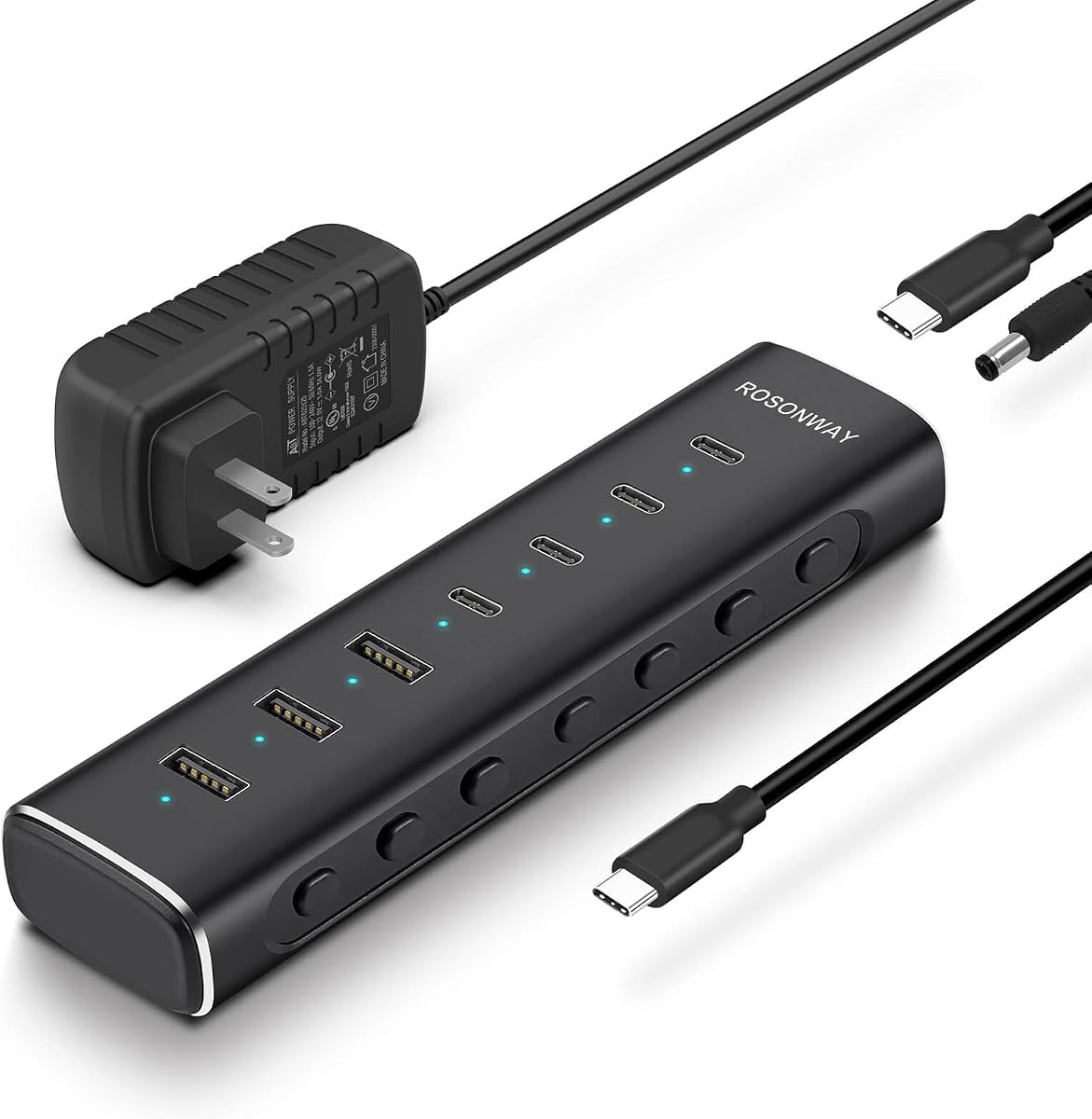
The Rosonway RSH-H7C4 is built for broad peripheral expansion, with four USB-C 3.2 ports and three USB-A 3.2 ports. It has a 4.4 rating and comes with a detachable 3.3-foot host cable and a 36W power adapter. The included power supply and individual port controls make it feel more like a compact desktop hub than a simple travel adapter.
We may earn a commission when you buy through this link, at no additional cost to you.
All seven ports are described as supporting data speeds up to 10Gbps, giving unusual flexibility when a workspace contains both modern and legacy storage, input, and accessory devices. Individual electronic switches and blue status LEDs let the user control each connection without unplugging everything. The aluminum construction assists with heat dissipation, while surge, overvoltage, and overcurrent protection adds a layer of safety for a multi-device setup.
The principal compromise is the absence of video output. The USB-C connections support data transfer and standard 1.5A charging only, not DisplayPort Alt Mode. The hub also does not provide PD charging to the host, so it cannot take over the laptop-charging role in a one-cable workstation. A powered desktop with separate charging may suit this design perfectly, but mobile users should not mistake it for an all-in-one travel solution.
This is the right recommendation for a desk that needs numerous USB ports, particularly when both USB-C and USB-A devices are in daily use. The removable cable improves packing and setup flexibility. Choose it when data expansion and per-port control matter more than external-monitor support or laptop pass-through charging.
Seven data ports cover a wide mix of controllers, drives, and accessories, while individual switches make it easy to isolate devices. The blue LEDs provide immediate confirmation of each port's status without requiring users to guess whether a connection is active.
The included 36W adapter supplies dedicated power to the hub, which is useful when several high-bandwidth devices are connected. The detachable 3.3-foot host cable also allows the hub to sit farther from the computer or be stored separately from the cable.
We may earn a commission when you buy through this link, at no additional cost to you.
The Satechi 4-in-1 emphasizes a polished, compact design and four modern USB-C connections. Its 4.1 rating is solid, and the supplied specifications identify USB-C 3.2 Gen 2 data support up to 10Gbps plus up to 100W of power delivery. The enclosure is only 6 centimeters by 6 centimeters by 1.05 centimeters, making it simple to carry.
We may earn a commission when you buy through this link, at no additional cost to you.
The hub can support demanding peripherals and professional-grade devices according to the product information while also offering a clean way to preserve host charging. A reinforced braided cable and chamfered aluminum edges reinforce the premium construction. Compatibility is broad across MacBook, iPad, Surface, XPS, Pixelbook, HP, Razer, and other USB-C systems.
The lack of HDMI means this is primarily a charging and data solution. A buyer who expects a single adapter to drive a monitor may find that the listed four-port design is insufficient. Host behavior can also vary by operating system and device, so the compatibility list should be checked rather than treated as an unconditional guarantee.
Satechi is a strong choice for a minimalist setup built around USB-C accessories. The combination of 100W charging, fast data, a premium enclosure, and a two-year limited warranty gives it a well-rounded package. Choose it when portability and refined construction matter and you do not need video output.
The square aluminum body occupies little desk space and coordinates well with premium laptops. Chamfered edges, a reinforced cable neck, and a braided cable give the unit a more durable and considered appearance than a basic plastic adapter.
Four USB-C 3.2 Gen 2 ports provide fast file transfer, while the PD capability supports charging demands associated with professional devices. It is a focused option for users who prioritize charging and data rather than adding a second screen.
We may earn a commission when you buy through this link, at no additional cost to you.
The Belkin 4-Port Hub is a modern all-USB-C expansion adapter for laptops, iPads, and PCs. It carries a 4.2 rating and supplies four USB-C 3.2 Gen 2 data ports with transfer speeds up to 10Gbps. Pass-through charging supports up to 100W, making it useful for preserving a connected computer's battery during extended work sessions.
We may earn a commission when you buy through this link, at no additional cost to you.
Audio support is a notable feature that distinguishes it from many data-only hubs. Headphones, speakers, and audio interfaces can be connected through the hub, which is useful for a cleaner desk or a more flexible workstation. Fast Role Swap is intended to prevent data loss or interruption when a USB power source is added or removed, adding convenience for users who reconfigure their setup.
The product information does not list an HDMI connection, so it is not the right choice for users requiring external display output. Although each port is described as capable of 10Gbps, real-world results depend on the attached drives, host controller, and workload. A four-port design may also be restrictive compared with the seven- and fifteen-port options in this guide.
Choose the Belkin for a streamlined USB-C setup that values fast data, charging, and audio accessory support. It is a particularly sensible fit for users who have already moved to USB-C keyboards, mice, storage, and audio equipment. If video is important, use the UGREEN Revodok Pro or Belkin 5-Port Hub instead.
Four USB-C ports provide room for external storage, an input device, a webcam, and a charging-oriented connection without mixing connector types. This makes the adapter especially straightforward for streamlined modern workspaces.
Built-in audio support can reduce the need for a separate desktop adapter, while 100W pass-through keeps the host powered. Fast Role Swap adds another layer of convenience when power connections change during the workday.
We may earn a commission when you buy through this link, at no additional cost to you.
The SABRENT HB-3A4C is a powered seven-port hub with three USB-A and four USB-C connections, all described as 5Gbps USB 3.2 Gen 1×1 ports. Its 4.1 rating reflects a practical balance of features, while the included 48W power adapter and dedicated switches distinguish it from basic unpowered splitters.
We may earn a commission when you buy through this link, at no additional cost to you.
Each port has an individual on/off switch and a white LED indicator, giving users direct control over attached devices. Three USB-C ports deliver 5V and 900mA, while the fourth supports up to 20W PD for suitable accessories or charging. The heat-dissipating aluminum housing is designed to support steadier operation when multiple devices are active.
The principal limitation is speed. A maximum of 5Gbps across the ports is still practical for everyday accessories, but it is less appropriate for maximizing the performance of high-end external storage than a 10Gbps model. There is also no display output, and the 48W adapter is intended for the hub and connected accessories rather than high-power laptop pass-through charging.
This hub is best for a fixed desk that already has too few USB ports. It is particularly attractive for users who appreciate being able to disconnect one peripheral without affecting the rest. Consider it for a Mac, PC, Steam Deck, or ROG Ally setup that needs many wired accessories but does not require external-monitor support.
Dedicated switches make it easy to stop a device from drawing power or communicating with the host. The illuminated indicators also reduce the need to unplug cables merely to check whether a port is active.
The included 48W power adapter provides dedicated power that can be useful with several devices operating at once. The aluminum housing is also designed to dissipate heat and maintain stable performance as the number of active connections rises.
We may earn a commission when you buy through this link, at no additional cost to you.
The Gitfos C1 is the most expansive hub in the guide, offering 15 connections and a 4.4 rating. It is intended for busy desks containing many accessories and includes a 65W DC adapter, a 3.3-foot USB-C host cable, and a user manual. Its port selection includes a 100W USB-C PD connection, two USB-C charging ports, high-speed data ports, and numerous USB-A data or charging connections.
We may earn a commission when you buy through this link, at no additional cost to you.
The hub supports up to 10Gbps on designated USB-C and USB-A 3.2 data ports, while five USB-A 3.0 data ports and two configurable USB-A ports provide additional capacity. A USB-C charging port can provide up to 45W when used alone, with a maximum of 20W across two ports. That makes it useful for tablets, phones, watches, earbuds, speakers, and other smaller accessories.
This is not a simple plug-and-play adapter despite the absence of required drivers. The supplied information explicitly states that the 65W power adapter must be connected or the hub will not operate. It also lacks video output and warns that its high-power USB-C charging ports are not recommended for computers. Host compatibility is broad, though macOS 12 or later and USB-C or modern Thunderbolt systems are specified.
Choose the C1 when your setup has many peripherals and limited desk space for several separate adapters. It is a strong option for IT stations, creative desks, and shared workstations, but it is unnecessarily large for routine travel. Confirm that the host and peripherals fit the port roles before ordering, especially if you expect to charge a computer through one of the secondary USB-C ports.
Fifteen connections create room for numerous storage drives, input devices, networking equipment, and charging accessories. Consolidating these functions behind one host connection can simplify a desk where several small adapters would otherwise compete for space.
The angled trapezoidal aluminum body keeps connections visible and accessible while encouraging heat dissipation. Non-slip feet help it remain stable, making the design more suitable for a permanent desk than for a pocketable mobile accessory.
We may earn a commission when you buy through this link, at no additional cost to you.
The UGREEN 5-in-1 Hub is a straightforward display-and-charging adapter with a 4.6 rating. It combines a 4K HDMI port, a 100W USB-C power-delivery port, one 5Gbps USB-A data port, and two 480Mbps USB-A ports. That mix closely matches the needs of a typical laptop user who wants a monitor, a mouse, and a keyboard without carrying several separate accessories.
We may earn a commission when you buy through this link, at no additional cost to you.
The 4K HDMI output is the central attraction, allowing a compatible USB-C laptop to use a larger display. The PD connection can keep the computer powered, while the 5Gbps USB-A port serves fast storage or accessories and the two lower-speed USB-A ports are suited to keyboards, mice, and similar devices. It therefore offers a useful division between performance and basic connectivity.
Its limitations are significant for power users. Only one USB-A port offers the full 5Gbps rate, and the remaining two are limited to 480Mbps. There is no USB-C data port, no physical port controls, and no external power adapter is mentioned. Users who require multiple fast storage devices or a more advanced workstation connection should look to the Revodok Pro or Gitfos C1.
This UGREEN is a compelling pick for a simple office, travel, or study setup centered on an external monitor. Its 4.6 rating is among the highest in the guide, while the combination of HDMI, charging, and three USB-A ports covers common daily needs. It is best when a few well-chosen peripherals are preferable to dozens of connections.
One cable to the host can provide display, power, and three familiar USB-A connections. This is enough for many office tasks and avoids the complexity of a permanently powered docking station.
The 5Gbps port is the logical choice for fast storage, while the two 480Mbps connections are appropriate for basic input devices. Understanding that distinction helps buyers avoid expecting high-speed performance from every USB-A socket.
We may earn a commission when you buy through this link, at no additional cost to you.
The BENFEI 5-in-1 combines a 4.6 rating, a compact aluminum case, 4K HDMI, 100W power delivery, and three USB-A data ports. It is a particularly useful budget-oriented choice for a laptop user who needs a display, charging, and basic peripherals in a portable format. The stated compatibility list covers several popular Mac, iPad, iPhone, XPS, and ThinkPad models.
We may earn a commission when you buy through this link, at no additional cost to you.
Its 20-centimeter silicone woven cable is designed to remain soft and resistant to knotting, while the product information cites testing of more than 25,000 cable cycles. The primary USB-A 3.2 port supports data transfer up to 10Gbps, and the two additional USB-A 2.0 ports are intended for keyboards and mice. Up to 90W of pass-through power can reach the host, with 10W reserved for hub operations.
The display limitation is that HDMI supports up to 4K at 30Hz rather than 60Hz. That can be adequate for document work and general productivity, though it may not satisfy users who want smoother high-resolution motion or gaming. Host video support is also required. As with other adapters, the connected computer must have a compatible USB-C port for charging and display functions.
This is the best budget recommendation for students, travelers, and office users who need a capable mobile adapter without a large docking station. The high rating, sturdy presentation, fast primary USB-A port, and soft cable make it especially convenient. For demanding visual work, consider a 4K 60Hz model such as the UGREEN Revodok Pro.
The short, flexible cable is easy to coil without sharp bends, and the compact aluminum case should fit comfortably into a laptop sleeve. These details matter when a hub is used in coffee shops, classrooms, and temporary workspaces.
One 10Gbps USB-A port handles large files, while the two 480Mbps ports support slower peripherals such as keyboards and mice. This approach preserves the fast connection for tasks that benefit from it instead of applying the same performance level to every device.
We may earn a commission when you buy through this link, at no additional cost to you.
The Belkin 5-Port Hub is a polished all-in-one adapter for users who want external video, fast data, and host charging. Its 4.5 rating is among the strongest in the guide, and the feature set covers an HDMI 2.0 connection with 4K 60Hz output, 100W power delivery, and transfer speeds up to 10Gbps. The five-port arrangement gives a display and several peripheral connections room to coexist.
We may earn a commission when you buy through this link, at no additional cost to you.
Its dedicated two-in-one USB-C port can charge the host and transfer data at the same time. The product information notes that 12W is shared among the USB-C ports, a detail that matters if several high-draw USB-C accessories are connected. A five-point safety system covers overload, overcurrent, over-temperature, short-circuit protection, and fire-resistant materials, adding confidence for sustained desk use.
The housing is made with 75% post-consumer recycled materials, and Belkin provides two-year coverage. A host cable is not specifically identified as included in the supplied information, so buyers should check the package contents and ensure their computer includes the necessary USB-C connection. Display and charging behavior also depend on host-device support.
Choose this model for a polished travel or desk setup where 4K at 60Hz matters and a 100W charging budget is required. It is a particularly strong option for creative professionals, students, and office users who want a single connection for video, data, and power. Its safety system and warranty further support long-term use.
4K 60Hz support is more demanding than the 4K 30Hz offered by the BENFEI hub. It is a better match for detailed interfaces, high-resolution media, and users who want a smoother visual experience from a laptop-driven workspace.
The five-point protection system addresses several common electrical and thermal risks, while recycled-material housing suits buyers who value environmental design. Two-year coverage provides additional reassurance for a frequently used desk accessory.
We may earn a commission when you buy through this link, at no additional cost to you.
The right Power Delivery Hub depends less on the number of ports alone than on matching charging, display, data, and compatibility requirements to the host device and daily workflow.
Start by listing the peripherals you expect to connect, including storage, input devices, webcams, audio equipment, displays, and chargers. A modern hub may offer only USB-C data ports, while a mixed setup often needs USB-A for older drives, keyboards, and mice. Counting connection types is more useful than focusing on the advertised total because some ports handle charging, some handle data, and some do neither simultaneously.
Power delivery is not uniform across a hub's ports. The host input may provide 100W or a stated maximum while reserving some power for hub operation, while secondary charging ports may have much lower limits or only standard USB-A output. The Rosonway and Gitfos models do not provide host pass-through charging, whereas the UGREEN, Satechi, Belkin, and BENFEI options explicitly include PD charging.
An HDMI port does not automatically guarantee the desired display experience. The UGREEN Revodok Pro and Belkin 5-Port Hub support 4K at 60Hz, while the UGREEN 5-in-1 lists 4K without a specific refresh rate and the BENFEI model specifies 4K 30Hz. Powered data-only models have no video output at all. The host's USB-C port must support DisplayPort Alt Mode, and the operating system must also recognize the external display.
A 10Gbps port is preferable for fast external SSDs, large media files, and regular backups because it can handle twice the theoretical data rate of a 5Gbps connection. The SABRENT HB-3A4C and the UGREEN 5-in-1's lower-speed USB-A connections are still suitable for keyboards, mice, and less demanding accessories. In the BENFEI 5-in-1, only the main USB-A 3.2 port offers the full 10Gbps rate.
A USB-C connector does not guarantee that every feature will work. Power delivery depends on the host accepting the offered wattage and protocol, while HDMI requires video support on the host. Some hubs also specify minimum operating-system versions or exclude older Thunderbolt generations. The Gitfos C1, for example, lists macOS 12 and later and excludes older USB-A-only or Thunderbolt 2 Macs.
Powered hubs are useful when several devices need a stable power source, and they are common choices for fixed desks. The Rosonway includes a 36W adapter, the SABRENT includes 48W, and the Gitfos includes 65W. The Gitfos requires its adapter to operate. A compact adapter may be more convenient for travel, but it may provide less dedicated power to connected accessories.
More connectivity is not always better if it creates a bulky, powered device that will remain at home. The UGREEN 4-Port Hub weighs 50 grams, while the Gitfos C1 is explicitly designed as an angled desktop unit. Think about where the hub will live, how often it will travel, and whether a detachable host cable or fixed short cable better fits your routine.
Aluminum housings appear throughout the guide and can assist with heat dissipation, while reinforced or braided cables add durability. For shared or complex desks, individual switches are particularly useful. The Rosonway and SABRENT provide dedicated controls, allowing users to turn individual ports off without unplugging every device and potentially reducing unnecessary power draw.
Begin by confirming that the host device supports the functions you intend to use. Plug the hub into a compatible USB-C port, connect the appropriate power adapter when the model requires one, and allow the operating system to recognize the new connections. For a powered model such as the Gitfos C1, attach the included DC adapter before attempting to use the hub.
Connect the host charging cable first when pass-through power is needed, then attach the display and peripherals. Avoid forcing USB-C connectors, route the cable without creating a tight bend, and keep exposed ports free from dust. If performance seems inconsistent, reconnect the host cable or power supply and confirm that the computer recognizes the device in its system settings.
When traveling, wind the cable loosely and avoid creating a knot around the connector neck. Do not leave a hub connected to an unattended computer as a routine charging method, and follow the host manufacturer's guidance for heat and battery care. Periodically inspect the housing, cable, and contacts for damage, particularly after frequent transport or use with demanding peripherals.
A Power Delivery Hub combines USB expansion with USB-C power delivery, allowing a compatible host to receive charging, data connections, and sometimes display output through one hub. It is especially useful for laptops that have too few built-in ports. Not every hub supports every function, so the port labels and host requirements should be checked carefully.
No. The stated maximum is the hub's capability, not a guarantee that the host will accept the full amount. A device may draw less based on its charging protocol, power requirements, operating state, and the wall adapter used. The host must also support USB-C Power Delivery for pass-through charging to work.
No. Models such as the Rosonway RSH-H7C4, SABRENT HB-3A4C, Gitfos C1, UGREEN 4-Port Hub, and Satechi 4-in-1 do not list video output. For an external display, choose a model with an explicitly stated HDMI function and verify that the computer's USB-C port supports DisplayPort Alt Mode.
No. The host, hub controller, connected drive, cable, and file type all influence results. A slow USB 2.0 flash drive cannot benefit from a 10Gbps port, and some devices negotiate lower speeds. Higher bandwidth is most meaningful with compatible fast storage, large transfers, and appropriate host controllers.
A powered hub can draw more energy from its wall adapter because it supplies power to attached devices, although actual consumption depends on what is connected and whether a port is switched on. Models with individual port controls, including the Rosonway and SABRENT, can help reduce unnecessary consumption by disabling unused connections.
The computer may not support video over USB-C, the adapter may lack a video-output port, or the display input and resolution settings may be mismatched. A 4K 30Hz adapter may also behave differently from a 4K 60Hz model. Check the host specifications, update the display configuration, and select the correct input source.
It depends on the model and how the ports are assigned. Some hubs devote one USB-C input to host charging while offering separate lower-wattage outputs for accessories. The Gitfos C1 has several charging-oriented ports, but its secondary USB-C charging ports are not recommended for computers, and the 100W PD input should be used with the original host adapter.
Check whether the device has a USB-C port that supports the required functions, then compare its power and video capabilities with the hub's specifications. Also review any operating-system restrictions and confirm the connector type of every peripheral. Compatibility lists are useful, but the host computer's technical specifications remain the most important guide.
The UGREEN Revodok Pro is the strongest all-around recommendation because it combines fast data, 4K 60Hz video, 100W-class charging, and a useful mix of connector types. The BENFEI 5-in-1 stands out as a budget-friendly mobile option with a high rating and a flexible short cable, while the Belkin 5-Port Hub offers a premium combination of 4K 60Hz output, 100W host charging, fast data, and extensive safety features.
Prioritize the function that cannot be changed later. Display users should focus on resolution, refresh rate, and host video support; storage users should favor 10Gbps ports; permanent desks may benefit from a powered model with individual switches; and travelers should consider size, weight, and cable flexibility. A model with many ports is not necessarily the best fit if most of those connections will remain unused.
Finally, check the current product listing, package contents, host compatibility, and latest customer feedback before purchasing. Hub specifications and pricing can change, and accessories such as wall chargers or host cables may not be included in every package. The link associated with each recommendation can help verify the current configuration and availability.