
BRILA Ergonomic Memory Foam Mouse Wrist Rest
4.5Editor score
Slow-rebound memory foam
Massage-hole wrist groove
Non-slip rubber base
Our expert guide compares the best mouse wrist rests for comfort, stability, materials, and desk fit, helping you choose the right support for your setup.
Mouse wrist rests can make long work sessions more comfortable by supporting the hand and reducing pressure around the wrists. The right model depends on cushioning preference, mouse height, desk space, and whether you need a standalone pad or a combined keyboard-and-mouse setup.
We compared ten popular options using their stated materials, dimensions, support structures, grip systems, and intended uses. The list covers memory foam, gel, bead-filled, cooling, and contoured designs, giving desktop, laptop, gaming, and right-handed users practical options.
Each pick highlights a different reason to choose a wrist rest, from compact affordability to full ergonomic support. Ratings and availability can change over time, and current prices fluctuate, so compare the features and dimensions with your own mouse, keyboard, and working habits before buying.
4.5Editor score

4.7Editor score
4.1Editor score
This side-by-side comparison organizes every wrist rest by cushioning, dimensions, grip, and standout functionality, making it easier to identify the model that matches your desk and mouse setup.
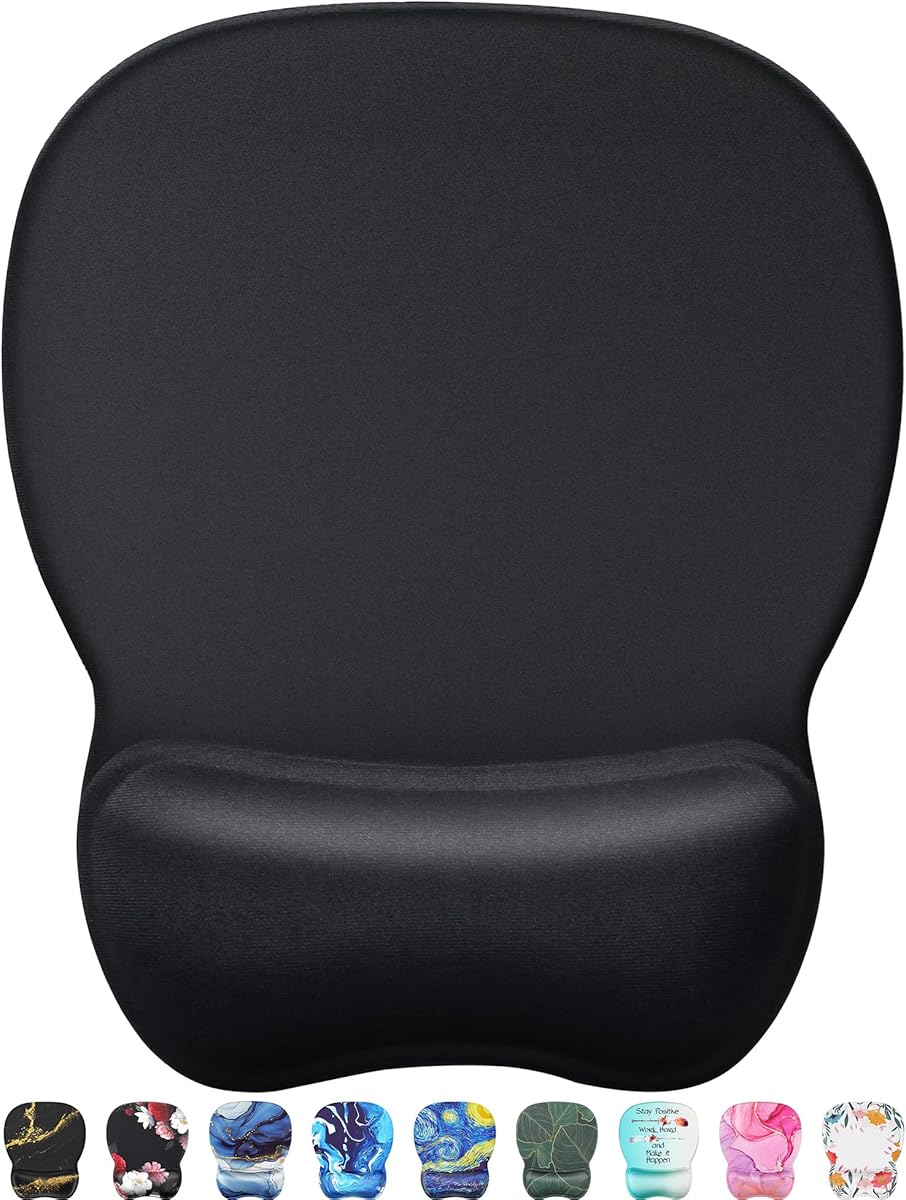


The BRILA Ergonomic Memory Foam Mouse Wrist Rest is a compact, affordable way to add support during mouse work. Its 4.5 rating reflects a generally favorable reception, and the standout qualities are a wrist-shaped groove, slow-rebound memory foam, and a grippy PU base. The 5.1-by-3.1-inch footprint keeps it from taking over a compact desk.
We may earn a commission when you buy through this link, at no additional cost to you.
Its interior uses premium medical-grade slow-bounce-back memory foam covered with smooth LYCRA fabric. Rather than simply presenting a flat cushion, the design incorporates massage holes and a curved support area intended to fit the wrist and palm. The rubber base helps the pad remain stable during repeated mouse movements, while the stated dimensions suit many office and gaming mice.
The main limitation is its single-purpose format. There is no matching keyboard rest, and the support height is not adjustable, so people who use very low-profile mice or prefer a softer, moldable surface may find less flexibility. It also offers no active cooling feature. Even so, the relatively simple design is dependable for users who mainly want a compact place to rest the mouse hand.
This is the best budget-oriented recommendation for students, office workers, and casual gamers who want a dedicated mouse pad with more support than a flat surface. Choose it when desk space is limited and you prefer a conventional memory foam cushion with a defined wrist groove. Its straightforward construction makes it a practical starting point without a large commitment.
The curved groove and massage openings distinguish this model from a basic foam block. They create a more intentional resting position for the wrist and palm while the mouse remains accessible.
Its small footprint suits smaller workspaces, and the non-slip PU base is intended to reduce sliding. This makes it convenient for laptop-based work, shared desks, and travel setups.
We may earn a commission when you buy through this link, at no additional cost to you.
The MROCO Ergonomic Mouse Pad with Gel Wrist Rest combines a tracking surface with a built-in cushion, making it a strong choice for users who want one accessory instead of a separate mouse pad and wrist rest. It carries a 4.6 rating, and its appeal lies in the broad 9.4-by-8.1-inch surface, smooth Lycra cover, and low-friction gel support.
We may earn a commission when you buy through this link, at no additional cost to you.
The finely textured cloth is designed to preserve cursor control with wired, wireless, optical, and mechanical mice. Soft gel is encased beneath the surface to support the wrist, while a non-skid PU base keeps the entire unit from shifting. Reinforced edges are intended to resist fraying, making the combined format more practical for everyday mouse movement than a tiny standalone cushion.
The obvious trade-off is footprint. At 9.4 by 8.1 inches, it takes up considerably more room than the miniature alternatives in this guide and may crowd a compact desk. The gel is also fixed rather than adjustable, and the product does not include a keyboard rest. Users who already have a large, smooth desk and want a unified mouse surface will find those limitations less important.
Choose the MROCO pad for office work, study, or gaming if you prefer a conventional mouse pad with integrated palm support. It is especially suitable for people who frequently reach for a separate conventional pad and find that their hand needs more cushioning. The result is a versatile, straightforward desktop surface with fewer accessories competing for space.
A dedicated pad often provides a more consistent surface for cursor movement than using a wrist rest directly on a desk. MROCO integrates that function with a gel-supported edge.
The textured Lycra surface is stated to work with wired, wireless, optical, and mechanical mice. That makes the model a versatile choice for mixed equipment and changing workspaces.
We may earn a commission when you buy through this link, at no additional cost to you.
The Large Mouse Wrist Rest Bean Bag is a flexible option for people who dislike the feel of fixed foam or gel. It has a 4.6 rating and uses ergo beads inside a soft polar-fleece shell. Its most useful feature is the invisible zipper, which allows the filling to be adjusted to better match the height and shape of a particular mouse.
We may earn a commission when you buy through this link, at no additional cost to you.
The stated dimensions are 6.1 by 4.3 by 1.57 inches, giving it substantially more volume than most conventional mouse rests. It can sit beside a separate mouse pad or function on its own, and the broad shape is also described as usable for elbows, forearms, palms, or hands. That versatility makes it interesting for writers, editors, designers, and students who alternate between typing and pointing.
Bean-bag products naturally have a different feel from resilient memory foam. The beads can redistribute as the hand moves, which some people enjoy and others may find less consistent. The polar fleece is soft and warm rather than explicitly engineered for cooling, and the relatively large profile is less convenient to carry between locations. Over time, redistributed filling may require adjustment.
This model is best for users who want to tune the support themselves or use one cushion in several positions. It is a particularly good match for people with different mouse heights or a preference for a soft, yielding surface. Those who need a very compact, structured, or cool wrist rest should look elsewhere.
The concealed zipper lets users add, remove, or redistribute the ergo beads. That adjustability can produce a closer match between the wrist rest and the mouse in use.
The bean bag is marketed for elbows, arms, palms, and hands as well as mouse use. Its broad, yielding form gives it a different role from a rigid keyboard pad.
We may earn a commission when you buy through this link, at no additional cost to you.
The GORILLA GRIP Memory Foam Wrist Rest set is built for people who want substantial support during both typing and mouse use. Its 4.4 rating is supported by a 1.2-inch memory foam interior, a separate 17-by-3.5-inch keyboard rest, and a 6-by-3.3-inch mouse rest. The result is a coordinated two-piece set rather than a single-purpose cushion.
We may earn a commission when you buy through this link, at no additional cost to you.
Its three-layer construction places a durable rubber bottom beneath thick memory foam and a soft spandex top. The slow rebound is designed to resist prolonged compression, while the raised profile elevates the wrists to reduce the sensation of resting them directly on the desk edge. A slip-resistant base helps each piece remain in place on most surfaces.
The top fabric is described as water and stain resistant, with cleaning performed by wiping it with a damp cloth and allowing it to air-dry. That maintenance advantage is useful in offices and homes where drinks or snacks are common. The trade-off is the substantial height, which could feel steep for users accustomed to low-profile keyboards or mice, and the keyboard rest requires adequate desk width.
Buy this set if you spend substantial time typing and mousing and prefer a pronounced cushion. It is a good fit for home offices, study areas, and creative workstations that can accommodate both pieces. The combination creates a consistent support system rather than solving mouse discomfort alone, making it especially appealing to users who want their entire desk setup to feel more cohesive.
The nearly 1.2-inch foam interior is considerably thicker than many compact wrist rests. Users who prefer a pronounced lift may find this more supportive than a low-profile option.
The water- and stain-resistant spandex layer can be wiped with a damp cloth and left to air-dry. This simplifies care in busy or shared workspaces.
We may earn a commission when you buy through this link, at no additional cost to you.
The MEKASS Ergonomic Wrist Rest for Keyboard and Mouse is the most complete all-around choice in this guide. It has a 4.7 rating, the highest listed among these products, and pairs two slow-rebound memory foam supports with smooth LYCRA covers. The keyboard and mouse combination creates a consistent ergonomic setup rather than treating each activity separately.
We may earn a commission when you buy through this link, at no additional cost to you.
A distinctive massage pattern is integrated into the surface to encourage hand relaxation and pressure relief. The keyboard rest measures 17.32 by 3.15 by 0.79 inches, while the mouse rest measures 6.23 by 3.54 by 0.79 inches. A non-slip silicone base grips metal, wood, glass, and plastic desktops, addressing the movement that can undermine an otherwise comfortable support.
Because the pieces are relatively long, users with a compact desk may need to arrange them carefully. The surface pattern is fixed, so it is not adjustable in the way the bean-bag model is, and the raised memory foam may not suit every mouse or typing posture. These are modest limitations compared with the convenience of receiving both supports as a coordinated set.
This is the strongest recommendation for office workers, students, and gamers who split their attention between typing and mouse use. It is particularly appropriate when a desk can accommodate a full-width keyboard rest and a separate mouse cushion. The high rating, practical sizing, strong base, and matching materials make it the most versatile package in the comparison.
Matching keyboard and mouse supports eliminate the mismatch created by using one padded wrist rest with a bare keyboard. Both pieces use the same foam, fabric, height, and base material.
The silicone base is stated to grip metal, wood, glass, and plastic. Secure placement helps preserve the support angle while the mouse or keyboard remains in use.
We may earn a commission when you buy through this link, at no additional cost to you.
The HyperX Wrist Rest for Mouse is designed for people who want a dedicated place for the mouse hand without moving the mouse far away. It has a 4.6 rating, and its defining feature is gel-infused memory foam intended to keep the hand cooler during extended use. It combines this cushioning with a textured natural-rubber underside.
We may earn a commission when you buy through this link, at no additional cost to you.
Anti-fray stitching around the edges supports longevity, while the mouse-specific form keeps the support close to the device without requiring a full keyboard pad. The cooling gel and foam combine a soft landing with gradual compression, making the product appealing to frequent mouse users who work or play for extended periods.
The fixed profile cannot be adjusted, so people who use unusually tall mice or prefer a nearly flat surface may need to test the height carefully. The model is also limited to mouse use and does not address keyboard pressure. Its cooling effect is a built-in material feature rather than an active temperature-control system, so individual comfort may vary with room temperature and usage intensity.
Choose the HyperX model for desktop gaming, creative work, and everyday productivity when cooling gel is a priority. It is a good middle ground between a minimalist foam rest and a large bean-bag cushion. The anti-slip base and stitched edge are also useful features for a frequently used permanent desktop accessory.
Gel-infused memory foam is the defining advantage here, especially for long mouse sessions. It provides a soft contact surface while helping manage heat around the resting hand.
Anti-fray stitching protects vulnerable seams, while the textured rubber underside helps keep the rest from moving during active pointing.
We may earn a commission when you buy through this link, at no additional cost to you.
The MXCOIRTP Mini Memory Foam Wrist Rest prioritizes portability and compact use. Its 4.2 rating is the second-lowest in this list, but the product addresses a clear need: adding wrist support without claiming much desk space. At 5.5 by 3.15 by 0.9 inches, it can move easily between a home desk, laptop setup, or coffee shop.
We may earn a commission when you buy through this link, at no additional cost to you.
The interior is a soft, slow-bounce-back memory foam that is intended to resist deformation, while the outer surface is described as smooth, breathable, lightweight, and skin friendly. An ergonomic wrist shape and a non-skid rubber base complete the design. These characteristics make it a sensible option for students, travelers, and frequent laptop users who work in changing locations.
Compact dimensions also mean less contact area than the larger MROCO, GORILLA GRIP, and bean-bag options. The 0.9-inch height may be more pronounced than some users expect, and there is no keyboard companion or adjustable filling. Its 4.2 rating suggests that while the basic design is convenient, it may not offer the same refinement as the more highly rated options.
Buy the MXCOIRTP if your strongest requirement is portability. It is well suited to small desks, shared workspaces, and travel where carrying a large pad would be inconvenient. For a permanent office setup with extensive typing and mouse use, a coordinated set may provide broader support.
The mini footprint preserves usable desk area while still providing a defined resting zone. It can sit close to a compact mouse without dominating the work surface.
Its light, portable form works well for users who alternate between home, office, and temporary setups. The non-skid base also helps it remain useful on different surfaces.
We may earn a commission when you buy through this link, at no additional cost to you.
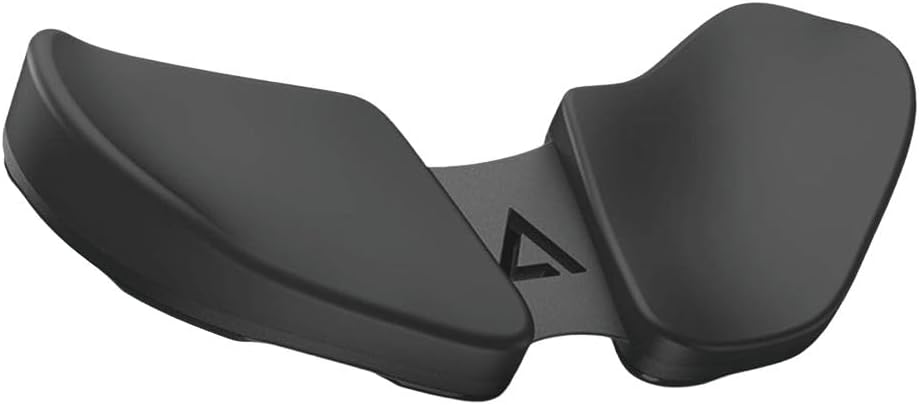
The DELTAHUB Carpio 2.0 is the most specialized ergonomic design in this guide. Its 4.1 rating is the lowest listed here, but the product is not trying to be a conventional foam block. It uses a sculpted, right-handed form intended to limit harmful wrist extension while allowing the hand to move naturally across a mouse and keyboard.
We may earn a commission when you buy through this link, at no additional cost to you.
The shape was developed with a team of medical experts specializing in reconstructive surgery. PTFE feet are used to let the support glide without constraining wrist motion, while silicone pads balance comfort and stability. The large black model is designed for right-handed users and can support the wrist during work, gaming, browsing, or general computer use.
Specialization is its main trade-off. This specific listing is for right-handed users and the large size, so it will not suit left-handed users or anyone seeking a small, conventional pad. The design also costs more conceptually because it occupies substantial desk space and changes how the mouse is approached. Its 4.1 rating suggests that some buyers may prefer the familiarity of standard foam or gel.
Choose Carpio 2.0 when wrist extension and mouse-hand fatigue are your primary concerns, particularly if you work for long hours and are willing to adapt to a contoured platform. It is a premium ergonomic option for right-handed users who want wrist support to integrate with keyboard and mouse movement rather than simply sit beneath the mouse.
The sculpted profile is intended to reduce wrist extension rather than merely add padding. That makes it a more specialized alternative to conventional mouse rests.
PTFE feet allow the support to move with the hand, while silicone contact areas contribute stability. This approach supports both keyboard positioning and continuous mouse movement.
We may earn a commission when you buy through this link, at no additional cost to you.
The Kensington ErgoSoft Wrist Rest is a refined, low-profile option for standard mice. It carries a 4.6 rating and combines a premium exterior with gel-cushioned padding. Its curved shape and tailored dimensions are designed to promote proper alignment while preserving a clean, functional appearance on the desk.
We may earn a commission when you buy through this link, at no additional cost to you.
The non-skid rubber backing helps prevent movement during work or gaming, and the 2.9-by-0.7-by-6-inch dimensions keep the profile relatively slim. Ergonomist approval adds design credibility, and the soft gel surface is intended to offer a comfortable resting area without the large height or broad footprint of a full ergonomic platform.
The most important compatibility note is height. The product is specifically described as ideal for a mouse higher than 1 inch, so it may not provide the correct relationship between hand and device with a very low-profile mouse. It also includes no keyboard rest, meaning users who spend more time typing will not receive the same support as those choosing a two-piece set.
This Kensington model is a strong option for professionals who want subtle desk styling, a conventional mouse-pad footprint, and dependable gel cushioning. It suits users with a standard-height mouse who spend more time pointing than typing. The low profile also makes it easier to combine with other desk accessories without creating a large elevated platform.
The slim, curved profile adds support without dominating the desk. It is designed to blend into a professional workspace while maintaining proper wrist alignment.
The stated suitability for mice higher than 1 inch is an important fit detail. Checking mouse height first can prevent an uncomfortable angle when the hand reaches the device.
We may earn a commission when you buy through this link, at no additional cost to you.
The Gimars Upgrade Enlarge Keyboard and Mouse Wrist Rest Set is a substantial, coordinated support system. It has a 4.5 rating and uses 1.2-inch memory foam beneath a soft, breathable spandex layer. Both the keyboard and mouse pieces are included, creating a matched surface for extended typing and pointing.
We may earn a commission when you buy through this link, at no additional cost to you.
The three-layer construction combines a non-slip natural-rubber base, thick memory foam, and a skin-friendly spandex top. The keyboard rest measures 17 by 3.5 by 1.2 inches, and the mouse rest measures 6.3 by 3.3 by 1.2 inches. Grooves are incorporated to fit the wrists, while included stickers provide additional protection against sliding.
The generous height is the main consideration. Some users will appreciate the pronounced elevation, but those accustomed to low-profile keyboards may find the angle too steep. The long keyboard pad also requires desk width, and the complete set may be unnecessary for people who use a mouse exclusively. On the positive side, the top fabric is water and stain resistant and can be wiped with a damp cloth.
Choose the Gimars set for dedicated computer users who split their day between typing and mouse work and want substantial cushioning in both areas. It is a practical alternative to the similarly coordinated GORILLA GRIP and MEKASS sets, with especially notable extra anti-slip stickers and a high, supportive foam profile.
Matching pieces keep the typing and mouse areas visually consistent and physically supported. This is useful for users who spend hours moving between the keyboard and mouse.
The spandex top is described as water and stain resistant, while the three-layer build protects the foam and base. A damp cloth and air-drying are sufficient for routine care.
We may earn a commission when you buy through this link, at no additional cost to you.
The most useful wrist rest matches your mouse height, preferred cushioning, and available desk space. Reviewing support shape, base grip, surface material, and cleaning needs will narrow the field before you make a purchase.
Aim for a support height that feels level with the rear of your mouse and keeps the wrist neutral. Comfort is more important than simply choosing the thickest cushion.
Try foam for structured support, gel for smooth cooling, and beads for adjustable conformity. Choose the texture you are most likely to use comfortably for hours.
Choose a mouse-only design for focused pointing or limited space. Pick a two-piece set when typing and mouse use are equally important to your setup.
Favor a non-slip base appropriate for your desk material. Stability prevents the rest from shifting while your hand changes position during active work.
Measure before ordering, especially for long keyboard rests and large contoured platforms. A small footprint preserves flexibility and makes the support easier to carry.
Choose a smooth surface for easy maintenance and a plush one for softness. Confirm stain and water resistance before using the rest in a busy eating area.
Confirm handedness before buying a contoured platform. Standard foam and gel rests are generally more flexible for users who switch hands.
Prioritize stable bases, resilient foam, reinforced seams, and wipeable covers. These features better predict how the rest will perform after regular use.
Begin by placing the wrist rest where your hand naturally reaches the mouse rather than positioning it solely for visual symmetry. Keep the mouse near the back edge of the tracking area, and let the heel of the palm or the wrist contact the raised support without sharply bending the hand. For a two-piece set, align the keyboard rest with the front of the keyboard and adjust both pieces until the forearms approach the surface at a comfortable angle.
Use the mouse with a light, relaxed grip. The wrist rest is intended to support a neutral hand, not to immobilize the wrist or serve as a resting platform during every movement. For a bean-bag model, open the concealed zipper and adjust the ergo beads until the support height feels level with the mouse. Adjustable supports should be checked periodically because the filling can shift with regular use.
Care for the product according to its stated materials. Wipe foam, gel, Lycra, or spandex surfaces with a lightly damp cloth and allow them to air-dry fully. Avoid soaking the cushion, exposing it to high heat, or using harsh chemical cleaners, since these actions may damage the foam, fabric, gel enclosure, or adhesive base. Keep the underside free of dust and debris, and check that the rest remains stable after cleaning or moving to another desk.
Yes, provided the rest is stable and the mouse can still be moved freely. Gaming mice that are taller or wider may require more clearance than a compact pad, while cooling gel or adjustable bean-bag options can help maintain comfort during long sessions. Players who use very fast sensitivity settings should ensure that the cushion does not interfere with the mouse's available movement area.
The best material depends on personal preference. Memory foam provides structured cushioning, gel offers a smooth and often cooler contact, and ergo beads create a yielding surface that can be adjusted. Consider how the rest feels during long sessions, how much your hand moves, and whether portability or a consistent shape matters more to you.
A wrist rest can also be used while typing, but it should be positioned so the palms rest lightly at the keyboard edge rather than pressing the wrists sharply upward. Keyboard-specific rests are usually shaped and sized for that purpose. If typing causes most of your discomfort, a two-piece set may be more useful than a mouse-only cushion.
Your hand should reach the mouse without bending upward, downward, or sharply to one side. The upper surface of the mouse and the top of the wrist rest should feel broadly compatible with your normal forearm level. A rest that is too high can elevate the hand, while one that is too low may leave the wrist unsupported, so checking mouse height is an essential first step.
Yes, and compact models are especially convenient for laptop setups. Since a laptop keyboard and mouse are usually separate, a two-piece set can create a more consistent support arrangement. For travel, choose a small and light option such as the MXCOIRTP rest, and make sure the non-slip base can grip the surface where the laptop will be used.
No product can guarantee prevention of carpal tunnel syndrome or other medical conditions. A wrist rest may improve comfort and encourage a more neutral hand position, but it should be combined with varied tasks, regular breaks, proper mouse technique, and an ergonomic workstation. Seek qualified medical advice if you experience persistent numbness, tingling, weakness, or pain.
Check the manufacturer's instructions first, but many fabric-covered models can be wiped with a lightly damp cloth and left to air-dry. Do not saturate the memory foam, machine-wash it unless specifically permitted, or apply harsh cleaners. If liquid reaches the interior, allow the pad to dry fully before using it to prevent odor and material damage.
An integrated model is convenient because it combines tracking and support in one footprint, making the MROCO option appealing for standard setups. A separate rest lets you use a preferred mouse surface and move the cushion independently, which can be helpful with large or specialized gaming mats. The better option depends on your available space and whether your mouse fits comfortably on the integrated surface.
The MEKASS set is the strongest overall choice because it coordinates keyboard and mouse support with slow-rebound foam, a grippy silicone base, and a 4.7 rating. The BRILA model stands out as a compact budget option, while the DELTAHUB Carpio 2.0 offers the most specialized and premium contoured experience for right-handed users.
Prioritize the factors that affect your daily comfort most: mouse height, cushioning feel, footprint, grip, and whether typing needs support. A thick keyboard-and-mouse set is ideal for a permanent workstation, a compact foam rest suits limited spaces, and cooling gel or adjustable beads may better match long gaming sessions. Read the stated dimensions and intended mouse compatibility before ordering.
Ratings, product availability, and prices can change, so check the current listing before making a final decision. Compare the latest customer feedback and confirm that the selected model still provides the support type and dimensions that fit your desk, mouse, and working style.