
HUANUO FlowLift Pro Monitor Arm
4.5Editor score
Mechanical spring construction
Tool-free VESA attachment
13-to-32-inch compatibility
15.4-pound load capacity
Visible tension adjustment window
A PC desk arm can transform a crowded gaming station by lifting compatible monitors into position while creating room for your keyboard, mouse, and accessories. The best setup balances screen size, weight, VESA support, desk thickness, smooth movement, cable routing, and a construction that remains stable during long sessions.
We compared ten products using the specifications and feature information supplied for each listing. The selection covers single and multi-monitor mounts, mechanical spring and gas-style configurations, tool-free VESA plates, flexible viewing ranges, and two arm-support accessories that can complement a gaming desk.
Each pick highlights the configuration most useful to a particular gamer or workstation, along with its important limitations. Ratings and product details reflect the supplied listings, while availability and pricing can change, so confirm current specifications and your monitor's mounting requirements before buying.
4.5Editor score

4.6Editor score

4.6Editor score
As an Amazon Associate we earn from qualifying purchases.
The table below compares monitor capacity, mounting options, articulation, and the most relevant design feature of every listed product, including two arm-support accessories that may complement a monitor-mounted gaming setup.


The HUANUO FlowLift Dual Monitor Stand receives a 4.6 rating and is the most complete option in this guide for gamers who want two elevated screens. It supports displays from 13 to 32 inches, with each arm rated for monitors weighing 4.4 to 19.8 pounds. Its dual-arm design is especially useful for pairing a primary gaming display with a secondary screen for chat, streaming controls, system monitoring, or a game guide.
We may earn a commission when you buy through this link, at no additional cost to you.
The standout feature is the range of positioning available. Each screen can tilt from negative 50 degrees to positive 85 degrees, swivel through 90 degrees in either direction, rotate a full 360 degrees, and rise as high as 15.75 inches. That flexibility allows a gamer to bring a secondary display closer, rotate a portrait-oriented screen, align two panels at different heights, or move both screens back when more desk depth is needed. Cable management guides along the arms help keep wiring controlled while the screens are elevated.
Installation offers a C-clamp or grommet base, giving buyers two paths for attaching the stand. The clamp system is reinforced with a larger platform and dual clamping structure for stability, while the grommet option can be preferable when a desk already has a suitable cable pass-through. Compatibility is not universal, however. The supplied guidance recommends a wooden desk between 0.59 and 3.54 inches thick, with no crossbeam or panel directly beneath the mounting point. Both monitors also need compatible 75x75mm or 100x100mm VESA holes.
This is the strongest general recommendation for a dual-screen gaming station because it combines wide size support, useful height travel, extensive articulation, and two installation methods. It is best for players willing to verify their desk structure and monitor measurements before ordering. Those with one screen do not need its dual-arm complexity, while those with three displays should consider the dedicated triple-monitor alternative farther down the list.
One-handed movement makes the stand practical when a game, call, or design task requires the display layout to change. The combination of lift, swivel, tilt, and rotation also makes it easier to bring a screen into a natural viewing position without pushing the entire setup toward the desk edge.
Elevating two monitors recovers substantial surface area for a keyboard, mouse, headset, or streaming controls. Integrated cable guides help preserve that clearer surface, although buyers should still plan how power and video cables will travel behind the desk.
We may earn a commission when you buy through this link, at no additional cost to you.
The HUANUO FlowLift Pro Monitor Arm carries a 4.5 rating and provides a convincing balance of adjustability, installation convenience, and mechanical support. It is designed for one monitor between 13 and 32 inches, with a supported weight range of 4.4 to 15.4 pounds. That makes it suitable for many popular gaming displays, although heavier or ultrawide models may exceed its stated limit.
We may earn a commission when you buy through this link, at no additional cost to you.
Its MechaSpring system is the central differentiator. Rather than relying on gas pressure, the arm uses a mechanical spring designed to remain consistent over time and resist droop. The listing states that it is made from 90-percent professional-grade metal and is TÜV Rheinland certified and tested at three times its rated load. A PrecisionView window displays a yellow indicator as tension is adjusted, reducing the guesswork involved in matching the spring mechanism to a particular monitor.
The tool-free VESA plate makes screen attachment unusually approachable. Instead of holding a display while trying to align screws, the user snaps the plate into place after connecting the arm to the desk. Tilt, swivel, and rotation adjustments allow the screen to be repositioned for gaming, work, coding, or screen sharing. The LockSteady system is intended to resist droop and support controlled movement with a single finger, which is useful for setups that are repositioned throughout the day.
This arm is a strong value recommendation for a one-screen gaming desk, particularly when quick installation and a tension system that does not depend on gas pressure are priorities. Its 15.4-pound limit is the most important compromise, so users should check the actual weight of their monitor rather than relying on screen size alone. It is also recommended primarily for wooden desks from 0.59 to 3.54 inches thick without an interfering underside structure.
The mechanical spring is intended to retain consistent support and reduce the droop that can affect some gas-spring arms over time. For a gaming setup, that means the display is more likely to remain where it is placed after repeated adjustments or long periods of use.
The snap-in VESA plate removes much of the difficulty from connecting a heavy monitor to a conventional plate. It is especially helpful for users who expect to change displays, reposition their setup, or want an installation process that does not require repeatedly aligning small screws.
We may earn a commission when you buy through this link, at no additional cost to you.
The HUANUO FlowLift Single Monitor Mount has a 4.6 rating and stands out as a polished option for one elevated gaming display. It accommodates 13-to-32-inch LCD monitors weighing from 4.4 to 19.8 pounds and accepts both 75x75mm and 100x100mm VESA mounting patterns. Its generous weight capacity gives it broader scope than several spring-arm competitors in the guide.
We may earn a commission when you buy through this link, at no additional cost to you.
Positioning is exceptionally flexible for a single-screen mount. The display can tilt from negative 50 degrees to positive 85 degrees, swivel through 90 degrees in both directions, rotate 360 degrees, and rise up to 15.75 inches above the desktop. The arm is designed to remain stable at any adjusted angle without requiring the user to revisit multiple tension screws, allowing a gamer to move the display with one hand as viewing needs change.
Durability is emphasized through automotive-grade components and a claimed 20,000 motion tests. Installation is described as taking about three minutes: secure the base to the table, attach the monitor to the VESA plate, and adjust tension for the display's weight. Buyers may choose a C-clamp or grommet base, both of which are designed for wooden tabletops between 0.59 and 3.54 inches thick. The underside should be free from beams or panels that would obstruct the mount.
This is the best fit for a focused single-monitor gaming station where weight capacity and broad articulation matter more than managing multiple screens. It creates useful desk space without adding another arm to the footprint, and its movement range supports both conventional landscape viewing and less common portrait arrangements. Gamers should confirm VESA compatibility and desk clearance before installation, but otherwise it offers a strong balance of movement, stability, and reach.
A 15.75-inch rise helps bring a display closer to eye level while preserving space underneath. The broad movement envelope also makes it possible to slide the monitor aside when using a laptop, reaching for accessories, or arranging a temporary second-device setup.
The 20,000-motion-test claim and stable-angle design suggest an emphasis on repeated daily use. This is particularly relevant for a gaming arm that may be moved for different titles, seated and standing sessions, streaming layouts, or occasional console use.
We may earn a commission when you buy through this link, at no additional cost to you.
The ErGear Single Monitor Arm earns a 4.4 rating and is a practical choice for gamers using a larger display. It supports flat or curved screens from 13 to 34 inches, handles up to 19.8 pounds, and accepts the common 75x75mm and 100x100mm VESA patterns. The upper size limit makes it one of the more accommodating single arms in this selection.
We may earn a commission when you buy through this link, at no additional cost to you.
Its movement range gives users considerable freedom. The screen can rise up to 17.5 inches and extend as far as 18.1 inches, while positive 80-degree and negative 50-degree tilt, 90-degree swivel in either direction, and full 360-degree rotation cover the major viewing adjustments. A wider VESA head and a tighter-fitting VESA panel are intended to improve stability, and the durable core is described as having passed more than 20,000 adjustment cycles.
Installation is streamlined with a tool-free VESA plate and two base options. The C-clamp suits desks from 0.39 to 2.56 inches thick, while the grommet base supports desks from 0.39 to 2.95 inches. Openable cable clips simplify routing without requiring tools. These details make the arm appealing to gamers who want a larger screen, frequent position changes, and a cleaner desk without a complicated setup.
The main trade-off is that it does not introduce a distinct mechanism comparable to the mechanical springs in the HUANUO Pro or NB SmooVex. Its strongest advantages instead come from screen-size range, reach, and installation convenience. It is a strong recommendation for a player with a 32-inch or 34-inch display who values reach and straightforward attachment, provided the chosen desk is within the specified thickness range.
The stated 34-inch ceiling expands compatibility beyond the most common arm limit in this group. Because screen dimensions do not always correspond directly to weight, gamers should still verify both the monitor weight and its VESA pattern before installation.
An 18.1-inch reach lets a user pull the display forward for focused viewing or push it back to open the work surface. That makes the arm useful in mixed gaming and productivity setups, including desks shared between a PC and laptop.
We may earn a commission when you buy through this link, at no additional cost to you.
The NB SmooVex Monitor Arm holds a 4.5 rating and offers a straightforward mechanical-spring alternative for a compact gaming desk. It is designed for flat and curved monitors up to 32 inches with either 75x75mm or 100x100mm VESA mounting holes. Its mechanical spring is designed to move smoothly, remain stable, and avoid the leakage and progressive sagging concerns sometimes associated with gas-spring systems.
We may earn a commission when you buy through this link, at no additional cost to you.
The slim arm profile helps conserve space and reduces the chance that the mechanism will interfere with nearby objects or a wall behind the desk. Adjustment includes 90-degree rotation in either direction, a tilt range from negative 25 degrees to positive 90 degrees, swivel movement, and 230 millimeters of height travel. These settings cover common gaming and productivity positions while allowing a display to be turned, tilted, or raised into a more comfortable line of sight.
A three-step installation process and the inclusion of both C-clamp and grommet options simplify initial setup. The product is presented as appropriate for most desks, making it a useful alternative for buyers who cannot confidently choose between clamp and grommet mounting until they inspect their workspace. The black Model-A5 design is intended to blend into a typical gaming or office arrangement.
The central compromise is that the supplied listing does not state a specific maximum monitor weight. That makes weight verification especially important, and a display should be checked against any load information included with the package. The 32-inch ceiling is also smaller than the ErGear and WALI options. Even so, the mechanical design, compact shape, and broad articulation make this arm appealing for standard gaming monitors where efficient use of desk space is a priority.
Using a precision mechanical spring separates this model from many conventional gas-spring arms. The design focuses on smooth movement and stable support while preserving a narrow profile that suits smaller or more crowded gaming desks.
The broad 90-degree tilt range can help accommodate seated play, taller displays, and closer or more angled viewing. A gamer can also use swivel and rotation to bring a side screen into view or move the primary display without shifting its base.
We may earn a commission when you buy through this link, at no additional cost to you.
The WALI Adjustable Single Monitor Arm has a 4.3 rating and distinguishes itself with the highest stated flat-screen capacity in this guide. It accommodates screens from 13 to 34 inches and supports up to 26.4 pounds for flat LCD or LED models. Curved displays are also supported, although their stated maximum load is lower at 19.8 pounds. Standard 75x75mm and 100x100mm VESA patterns are accepted.
We may earn a commission when you buy through this link, at no additional cost to you.
Adjustment is extensive. The arm extends up to 19.3 inches, raises the display as much as 17.3 inches above the desktop, swivels through 180 degrees in either direction, tilts from negative 45 degrees to positive 70 degrees, and rotates 360 degrees. These ranges provide enough freedom to align a large display, reposition it for different seating positions, or share the desk with other tasks without moving the base.
The product includes built-in cable management to keep cords guided along the arm and away from the desktop. Its wider VESA head and tighter panel fit are intended to improve stability, while the durable core is described as having passed more than 20,000 movement cycles. Installation can use a C-clamp or grommet base, each specified for desktop thicknesses from 0.39 to 2.76 inches.
This is the most appropriate recommendation for gamers with a particularly heavy flat monitor or a larger screen that sits near the upper limits of other arms. The limitation is that curved monitors have a lower maximum load, so buyers should identify their display type before assuming the headline flat-screen capacity applies. WALI recommends a wooden desk, preferably without a crossbeam blocking the underside, which should also be checked before ordering.
The 26.4-pound flat-screen limit offers extra margin for a substantial gaming panel. It does not change the need to match VESA dimensions and desk thickness, but it reduces the chance that a heavier monitor will exceed the arm's stated capacity.
A 19.3-inch extension gives large displays room to move closer for immersive play and farther away when desk access is needed. The large swivel range is also useful when the screen must be shared across different seating positions.
We may earn a commission when you buy through this link, at no additional cost to you.
The HUANUO Triple Monitor Mount earns a 4.5 rating and serves gamers who want a complete multi-screen command center. It supports up to three 13-to-27-inch displays, with each arm rated to hold 19.8 pounds. All monitors must use compatible 75x75mm or 100x100mm VESA mounting holes. The three-screen arrangement can place a game in the center with separate displays for chat, performance tools, video, or reference material.
We may earn a commission when you buy through this link, at no additional cost to you.
Its aerospace-grade aluminum construction and robust arms are designed to prevent sag or wobble, while each arm is said to have endured 20,000 lift cycles. Each display can rotate 360 degrees, swivel through 90 degrees in either direction, tilt through 45 degrees, and move vertically by 12.2 inches. A tilt-lock bolt and tension adjustment allow each screen to be positioned securely within the intended viewing arrangement.
The mount accommodates desks from 0.39 to 3.15 inches thick. Built-in cable clips help route wiring, which is particularly valuable when three displays introduce multiple video and power connections. Elevating the screens also creates a cleaner surface for a keyboard, mouse, and gaming accessories while encouraging the displays to sit closer to eye level.
This is the most specialized option in the guide because it prioritizes three screens rather than a broad mix of display sizes. The 27-inch ceiling makes it better suited to compact monitors than to larger ultrawide panels. Desk width, clamp clearance, and overall footprint should be checked carefully, but for a gamer who already uses three smaller displays, it offers a cleaner and more adjustable alternative to three separate stands.
A shared three-arm base gives each display independent movement while keeping the overall arrangement visually coordinated. It is particularly useful for simulators, strategy games, streaming, and multitasking workflows that benefit from persistent auxiliary information.
Each arm is specified to support 19.8 pounds and has undergone repeated lift-cycle testing. The stated aluminum construction and locking hardware aim to prevent individual screens from drifting out of position during an extended session.
We may earn a commission when you buy through this link, at no additional cost to you.
The MEKASS L-Shaped Desk Elbow Pad is not a monitor arm, but it is a relevant accessory for gaming setups built around an L-shaped desk. It has a 4.4 rating and includes two matching pads that wrap around desk edges to cushion the forearms and elbows. Each piece measures 11.8 by 4.3 by 0.78 inches and can be positioned to create a comfortable supported zone.
We may earn a commission when you buy through this link, at no additional cost to you.
The pads combine slow-rebound memory foam with a textured Lycra surface. Their L-shaped profile is intended to fit around a corner where the arm or elbow would otherwise rest against a hard edge. The breathable texture helps manage heat during prolonged use, while the rubberized base is designed to resist sliding during fast typing, mouse movement, or intense gaming.
The two-piece format gives users some control over spacing and orientation. This makes it possible to adapt the support to different chair positions or to leave more room for a keyboard at the corner. The smooth, stain-resistant cover can be wiped with a damp cloth, simplifying care after long sessions. It can also provide useful relief for users who alternate between gaming, general desk work, and longer study sessions.
This accessory is best considered alongside, rather than instead of, a monitor arm. A mounted display can improve screen height and desk organization, while an elbow cushion addresses a different ergonomic issue: the hard contact point created when the forearm rests at the desk edge. It is most useful on L-shaped gaming furniture and less relevant to a straight desk where a conventional forearm support or wrist rest may be a better match.
The L-shaped geometry follows the intersection of two desk edges, where the forearm is often positioned during mouse use. Filling that corner with foam distributes pressure more evenly than resting directly against the hard frame.
The rubberized underside helps the pads remain in place when the arm moves abruptly. The wipe-clean Lycra cover also suits a high-use gaming environment where drinks, snacks, and long sessions can quickly expose surfaces to wear.
We may earn a commission when you buy through this link, at no additional cost to you.
The VIVO Dual Monitor Stand has a 4.5 rating and delivers a familiar mechanical-arm approach for two-screen gaming setups. It supports most flat and curved monitors from 17 to 32 inches, with each display weighing between 4.4 and 19.8 pounds. Compatibility requires standard 75x75mm or 100x100mm VESA mounting holes, making it broadly compatible with mainstream gaming panels.
We may earn a commission when you buy through this link, at no additional cost to you.
Both arms use mechanical spring adjustment for counterbalanced movement. Tool-free screen placement is supported by open-top VESA plates, which slide onto compatible mounting hardware. The brackets offer positive 90-degree to negative 90-degree tilt, 180-degree swivel, and 360-degree rotation. That gives users enough control to bring two displays closer, separate their viewing angles, or move a side panel without relocating the entire stand.
The stand can be secured with a heavy-duty C-clamp for desktops up to 3.1 inches thick or an optional bolt-through grommet mount for desktops up to 1.9 inches. Hardware and step-by-step instructions are included. Once both screens are elevated, the shared base opens up meaningful desk space for the keyboard, mouse, and other gaming equipment.
One installation detail deserves attention: the listing notes that the backs of the arms extend past the edge of the desk. That is typical of a dual-arm layout but needs consideration when positioning the clamp near a rear crossbeam or wall. Compared with the HUANUO dual mount, this model has a narrower minimum screen size, though its long-established mechanical format and open-top plates make it a solid choice for conventional dual-screen gaming.
Mechanical springs in both arms allow each screen to be repositioned while maintaining a controlled feel. The system is suited to users who prefer a traditional counterbalanced design and want independent movement on both sides of the desk.
Open-top VESA plates make it easier to slide a monitor into position than aligning screws against a fixed plate. The supplied hardware and instructions also reduce the need to source additional components before assembly.
We may earn a commission when you buy through this link, at no additional cost to you.
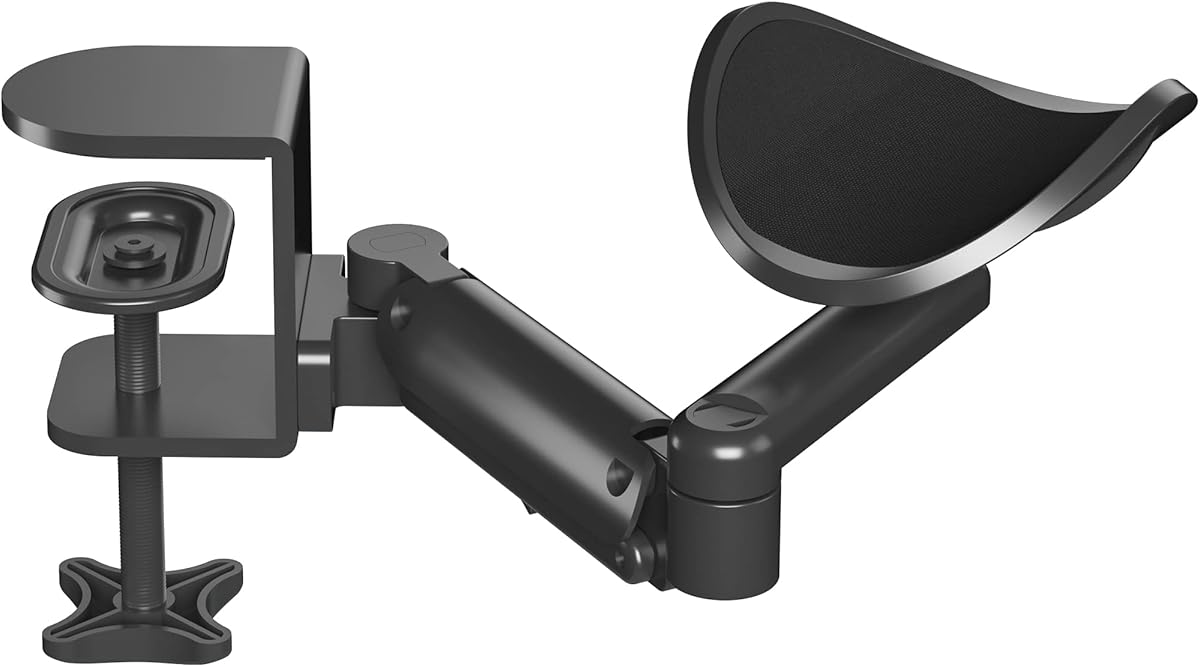
The BONTEC Adjustable Arm Rest earns a 4.4 rating and is an ergonomic accessory rather than a monitor mount. It provides a movable cradle for the arm and elbow, allowing the supported limb to follow the user's position rather than remaining fixed at one desk location. The cradle rotates 360 degrees and extends up to 13 inches, making it useful for reaching across a wide desk or moving between different workstations.
We may earn a commission when you buy through this link, at no additional cost to you.
Height adjustment spans 2.4 to 5.3 inches above the desktop. The manufacturer recommends setting the support approximately 2.8 inches above the desk to promote a more natural alignment, and the design can accommodate both seated and standing positions. It is intended for both left- and right-handed users, while the aluminum structure and ABS cradle provide a stable base with a stated load capacity of 26.5 pounds.
Installation is designed to be simple and suitable for most flat-edged desks. A significant limitation is that the support is not compatible with sloped edges, raised decorative strips, or other irregular desk profiles. It is also explicitly an arm rest rather than a wrist rest, which is important for gamers who may otherwise prefer a padded surface for the hands while typing or using a mouse.
This product is worth considering alongside a PC desk arm because the two solve different parts of the gaming-station problem. A monitor arm elevates and positions the display, while the BONTEC cradle supports the forearm and elbow. It is especially relevant for a broad or deep desk where reaching the keyboard or mouse without leaning is difficult, or for users who alternate between sitting and standing during extended sessions.
The rotating, extendable cradle moves with the arm instead of forcing the user into a fixed position. This is particularly useful on deep desks where the keyboard and mouse sit farther away than an unsupported forearm can comfortably reach.
The broad height range allows the support to be aligned with different working positions. It can be a helpful addition to a gaming desk that is used for both competitive sessions and normal computer tasks.
We may earn a commission when you buy through this link, at no additional cost to you.
Choose a gaming monitor arm by matching its mounting pattern, weight limit, and desk requirements to your hardware, then consider the movement, installation method, cable handling, and how many screens you actually need.
Begin with the number and size of displays you plan to support. Single arms are simpler, use less space, and usually provide a larger weight allowance for one panel. Dual arms are valuable for combining a main game with chat, a second game, streaming tools, or system information. A triple mount is best for dedicated simulators, strategy titles, and multitasking, but the smaller maximum screen size on the HUANUO triple model must be checked against your displays.
Choose based on your actual layout rather than on the number of outputs your graphics card or console supports. A single high-refresh display may provide a cleaner and more immersive experience than several low-resolution panels, while a dual setup can prevent secondary applications from obscuring the game. Match the arm configuration to how you expect to play.
VESA compatibility is the most important technical requirement. The monitor arms in this guide use the common 75x75mm and 100x100mm hole patterns, but a display must have the corresponding mounting interface and the arm's plate must physically fit. Some curved, ultra-light, or specialty monitors may use different patterns. Check the rear of the display, its manual, or its product specifications before ordering.
Also confirm whether the mounting hardware is included or must be supplied separately. VESA compatibility is only one part of a secure installation; screen weight and desk construction still determine whether the arm can be mounted safely and will remain stable.
Every monitor arm has a stated maximum load, and screen size alone does not determine whether a display is suitable. The dual HUANUO, ErGear, and VIVO options support up to 19.8 pounds per screen, while the HUANUO Pro supports 15.4 pounds. The WALI mount reaches 26.4 pounds for flat screens and 19.8 pounds for curved screens. The NB SmooVex listing does not provide a specific maximum weight, so additional verification is essential.
Use the manufacturer's weight figure rather than estimating from diagonal screen size. Ultralight gaming panels may sit comfortably within a lower limit, while a large display with dense internal components can be heavier than expected. Staying comfortably within the rating also gives the mount and fasteners a better margin for long-term use.
Desk thickness is a frequent compatibility surprise. The listed arms have different limits for clamp and grommet installation, and several explicitly recommend wooden tabletops. The underside must also provide enough clearance for the clamp hardware. Crossbeams, support panels, drawer rails, and irregular edges can prevent the base from sitting flat or keep the clamp from tightening properly.
Measure both the top thickness and the free space below the intended mounting area before buying. If using a grommet mount, verify the hole diameter and the material around the opening. A clear, sturdy mounting point is more important than the simplicity of the advertised installation.
Gas-spring arms use pressurized movement, while mechanical-spring arms use a mechanical counterbalance. The HUANUO Pro, NB SmooVex, and VIVO models use mechanical systems in their supplied descriptions, with the HUANUO Pro emphasizing long service life, resistance to droop, and visible tension feedback. Mechanical designs can be appealing to users concerned about gas leakage or gradual pressure loss, although they should still be calibrated to the display's weight.
Beyond the internal mechanism, examine usable height travel, extension, swivel, tilt, and rotation. The WALI offers 19.3 inches of extension and the ErGear 18.1 inches, while the HUANUO single provides up to 15.75 inches of height adjustment. Choose the range that suits your seating position, monitor size, and desk depth rather than relying on a single motion specification.
Tool-free VESA plates can substantially simplify attaching a display. The HUANUO Pro snaps into its plate, while the ErGear uses a tool-free design, and the VIVO uses open-top plates that slide onto the monitor. These features are useful because a large screen is awkward to hold while small screws are aligned. They also make future display changes easier.
Desk attachment is a separate step. C-clamp installation avoids drilling a hole, while a grommet base may be better when a desk already has a pass-through and sufficient clearance. Review the included hardware, instructions, and desk limits before installation. A tool-free VESA plate does not mean the entire setup is tool-free, because the base itself may require a hex key or other hardware.
Raising a monitor creates additional hanging cable length, so cable routing deserves attention. The HUANUO dual and triple mounts, the ErGear arm, and the WALI arm feature built-in clips or guides. The HUANUO Pro is also described as helping hide messy wires as part of its minimalist installation approach. Cable guides can keep video and power lines close to the arm, but they may not be large enough for every connector.
Plan the route before mounting the display. Leave enough slack for full movement without creating loops on the desk, and confirm that the monitor's ports remain accessible. Extra cable ties or an under-desk raceway may still be useful even when the arm includes clips.
A monitor arm improves screen position and opens desk space, but it does not support the arms, elbows, or wrists by itself. The MEKASS elbow pads suit L-shaped desk corners, while the BONTEC arm rest provides a rotating and extendable cradle for flat-edged desks. Both can complement a gaming station, though neither mounts a display or replaces a suitable chair, keyboard, or mouse position.
Evaluate the whole workstation rather than adjusting only the screen. The display should be reachable without leaning, the keyboard and mouse should remain close, and the forearms should not rest against a sharp desk edge. A mount that creates more usable space is valuable only if the resulting layout remains comfortable.
Begin by checking the monitor's VESA pattern, weight, and dimensions against the arm's stated limits. Measure the desk thickness and inspect the area beneath the desktop for beams, panels, drawers, or uneven edges. Choose the C-clamp or grommet method according to those findings, and assemble the base before attaching the display.
Install the VESA plate to the back of the monitor while the screen is safely supported on the desk. Connect the necessary video and power cables before lifting the display into its final position. Secure the arm to the desk, adjust its tension to the monitor's weight, and then move it slowly through the intended range to confirm that it holds steady without drifting.
For daily care, wipe the arm and joint surfaces with a soft, dry cloth and keep the mechanism free of dust or sticky residue. Do not pour cleaning fluid directly onto the arm. Check the clamp and tension periodically, especially after moving the desk or changing the display, and keep cables from being pinched or pulled beyond the arm's intended movement.
Most arms in this guide support both 75x75mm and 100x100mm VESA mounting patterns. Check the four holes on the back of your monitor and compare their spacing with the specification of the arm you are considering. If the monitor uses another pattern or lacks a VESA interface, it may require a separate adapter that is not included.
A dual arm is useful when you want the main game in the center and chat, video, performance tools, or another game on a side display. It can also improve multitasking by keeping separate applications visible. A single ultrawide may still provide a cleaner and more immersive experience, so choose based on your preferred layout rather than screen count alone.
Mechanical spring arms can appeal to users who want to avoid concerns about gas leakage or changing spring pressure over time. The products in this guide describe their mechanical systems as providing smooth movement and stable support. Either mechanism can work well when properly tensioned, so the more important factors are load rating, construction, and fit.
No. The products reviewed have specific limits for desktop thickness, mounting style, and underside clearance. Several recommend wooden desks, and crossbeams or panels can prevent a clamp from tightening or contacting the surface properly. Measure the desk and inspect the underside before ordering, especially if your gaming furniture has a metal frame or built-in accessories.
The amount saved depends on the display footprint, the arm's reach, and what you move into the reclaimed area. Elevating a monitor can free room for a keyboard, mouse mat, headset, charging dock, or streaming controls. The VIVO dual stand specifically notes that the backs of its arms extend beyond the rear edge of the desk, so rear clearance should also be considered.
They can help when they allow a display to be positioned closer to eye level and reduce the need to lean or hunch. However, an arm cannot correct an unsuitable chair, poor keyboard placement, or prolonged awkward posture. It works best as one part of a broader ergonomic setup, alongside arm support such as the MEKASS pads or BONTEC cradle when appropriate.
Set the arm's tension using the specified procedure and make sure the monitor weight falls within its supported range. Mechanical spring models may require visible or physical tension calibration, while other arms use their own adjustment mechanism. Do not compensate for an incompatible weight by forcing the tension setting; choose an arm rated for the display instead.
A C-clamp is generally the less invasive option because it attaches to the edge of the desk without requiring a permanent hole. A grommet base can look cleaner when the desk already has a suitable opening and enough surrounding material. Compare each method's stated thickness limit and inspect the underside before choosing.
The HUANUO FlowLift Dual is the strongest all-around choice for a two-screen gaming station, offering broad monitor support, extensive articulation, and both clamp and grommet installation. The HUANUO FlowLift Pro is a compelling single-screen value pick with a mechanical spring, tool-free VESA plate, and visible tension feedback, while the HUANUO FlowLift Single provides the most refined single-monitor experience with a high weight capacity and generous height range.
Prioritize compatibility before features. Confirm your monitor's VESA holes, actual weight, desk thickness, and available underside clearance before selecting an arm. From there, choose the screen configuration that matches your games, the mechanism and movement range that suit your routine, and cable management that supports a clean, stable workstation.
Ratings, product details, and availability can change, so confirm the current listing and specifications before purchasing. Comparing the monitor with the arm at the time of purchase is especially important because even small differences in weight, VESA pattern, or desk construction can determine whether an installation is secure and comfortable.