
Lamicall Aluminum Laptop Stand
4.7Editor score
Supports laptops up to 17.3 inches
Large aluminum base improves stability
Multiple ventilation holes
Folds for convenient transport
A portable laptop riser can transform a temporary workspace by lifting the screen, improving airflow, and making a notebook more comfortable to view. The best models combine useful height adjustment with a stable base, protective contact points, and a folding design that is easy to carry between home, office, café, and travel environments.
We compared ten stands across the factors that matter most in daily use: adjustment range, stability, cooling design, folded size, weight, laptop compatibility, and useful extras. The guide includes budget plastic designs, aluminum models, a rotating stand, and a compact option that adds a magnetic phone holder.
Each ranked review explains the stand's strongest qualities, practical limitations, and ideal user profile. Ratings reflect the supplied customer feedback, while specifications come from the listed product information. Availability and prices can change, so confirm current details on the retailer page before purchasing.
4.7Editor score

4.7Editor score

4.5Editor score
As an Amazon Associate we earn from qualifying purchases.
The comparison below highlights the most important differences among all ten stands, including construction, adjustment range, portability, cooling, and supported device sizes.


The Nulaxy Ergonomic Adjustable Laptop Stand combines a strong customer rating with a thoughtful dual-support design, making it the strongest all-around choice in this guide. Its most important feature is the dual-rod mechanism, which distributes the laptop's weight across two points and is intended to limit the wobbling associated with simpler single-hinge stands.
We may earn a commission when you buy through this link, at no additional cost to you.
The upper panel uses a geometric heat-vent pattern to promote airflow, while anti-slip silicone pads grip the laptop and help protect its finish. The listed compatibility range covers devices from 10 to 16 inches, including MacBook Pro and Air models, Dell XPS systems, HP notebooks, Lenovo devices, ASUS computers, Chromebooks, and larger gaming laptops. A listed load capacity of 22 pounds also distinguishes it from many lightweight risers.
Adjustment raises the display for more comfortable viewing and can help reduce the need to hunch over a flat screen. The dual-foldable structure collapses for transport, which makes it practical for business trips, cafés, and hybrid work arrangements. The trade-off is that its multi-piece construction is less minimalist than a single ultra-slim platform, and users who type intensively may still prefer an external keyboard for the best ergonomics.
This is the stand to choose when stability, broad compatibility, cooling, and travel readiness matter more than finding the absolute thinnest accessory. It suits students, professionals, and anyone using a larger or heavier laptop. The combination of a 4.7 rating, substantial support structure, vented platform, and complete folding capability makes it our Editor's Choice.
The dual-rod arrangement is the defining feature. By supporting the computer at two separate points, it creates a more controlled typing surface than a minimal one-panel riser and feels especially useful with larger notebooks.
The vented upper surface keeps the platform open to airflow while preserving the raised viewing position. This is a useful balance for long work sessions or demanding applications that generate additional heat.
We may earn a commission when you buy through this link, at no additional cost to you.
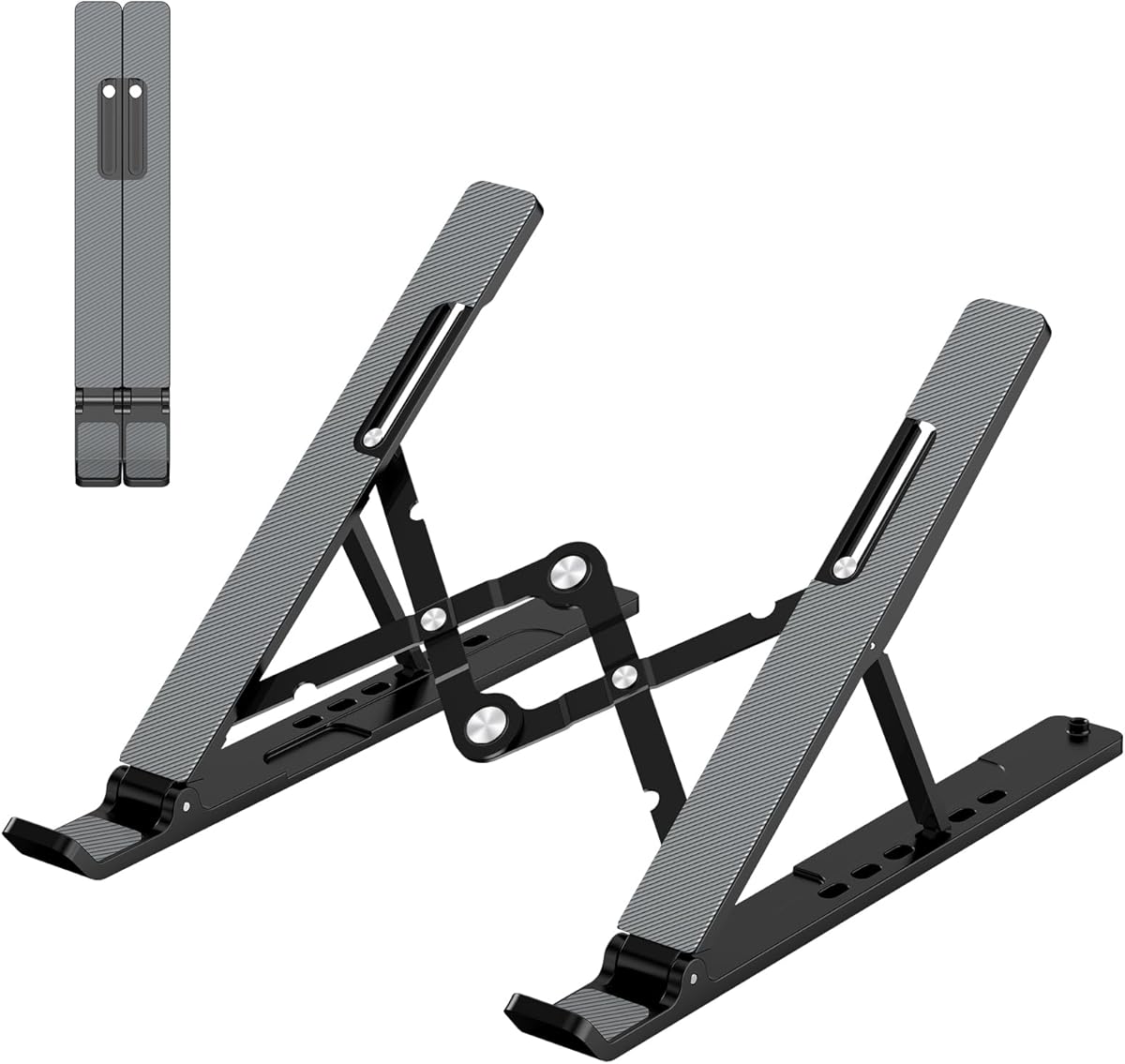
The Lamicall Aluminum Laptop Stand earns the premium recommendation because it combines a 4.7 rating, a broad 10-to-17.3-inch compatibility range, and a notably substantial base. The larger, heavier aluminum construction is designed to resist shaking, sliding, and falling while the laptop is being used.
We may earn a commission when you buy through this link, at no additional cost to you.
Height and angle can be adjusted to suit the user, while multiple ventilation holes promote airflow beneath the computer. Anti-skid silicone at the contact points helps prevent movement and scratches, and smooth edges make the platform more comfortable to handle. Compatibility extends across MacBook, MacBook Air, MacBook Pro, Surface Laptop, Dell XPS, Google Pixelbook, HP, ASUS, Acer, Chromebook, and Alienware devices.
Its primary disadvantage is its size relative to minimalist alternatives. A broad, weighted base provides reassuring stability, but it is less convenient for people who want the smallest possible item in a laptop sleeve. The premium material and construction may also be unnecessary for a casual user who only occasionally raises a screen. Even so, the listed 17.3-inch support makes this one of the broadest choices for different notebook sizes.
Choose the Lamicall stand for a permanent desk setup, a shared office, or a traveler who carries a larger laptop and prioritizes stability. It is especially compelling for users who dislike the springy feel of a very lightweight stand. With its polished aluminum design, generous compatibility, and strong rating, it is the most refined premium model in the group.
The upgraded large base is more substantial than the narrow legs found on many folding stands. That additional mass helps keep the computer settled during typing, while the raised profile leaves room for ventilation below the device.
Supporting up to 17.3 inches gives the stand broader appeal than models limited to 15.6 inches. It is a practical choice for users who alternate between compact notebooks, full-size work laptops, and larger premium computers.
We may earn a commission when you buy through this link, at no additional cost to you.
The Tonmom Laptop Stand for Desk is a practical budget choice for users who want reliable elevation, several height settings, and a low weight without paying for a metal frame. It carries a 4.5 customer rating and uses a straightforward triangular support layout that can be folded for storage or travel.
We may earn a commission when you buy through this link, at no additional cost to you.
Seven adjustment levels raise the laptop from 2.78 to 6.5 inches, offering more vertical choices than many similarly compact models. The forward-tilted, open design encourages air to circulate around the computer rather than trapping it against a solid tabletop. A large anti-slip silicone pad helps reduce sliding and protect the laptop's underside.
The main limitation is the basic plastic construction. It does not have the refined appearance or substantial base of an aluminum stand, and the supplied information does not list a specific load capacity. It also lacks extras such as rotation, a storage pouch, or a phone holder. Even so, its 0.53-pound weight and folded dimensions of 10.5 by 1.96 by 0.68 inches make it easy to carry.
This model best suits students, remote workers, and frequent travelers who need a dependable riser for ordinary 10-to-15.6-inch laptops. It is also a sensible first purchase for anyone experimenting with a raised-screen setup. The combination of seven levels, effective open-frame cooling, and low weight gives it strong everyday utility.
The adjustment range makes it easy to move between a modest elevation and a higher screen position. Users can select a height suited to their seating, desk depth, and viewing preferences without relying on separate risers.
At 0.53 pounds, the stand is light enough for daily commuting. Its narrow folded profile fits more readily than broad aluminum models, making it useful for hybrid workers who change locations throughout the week.
We may earn a commission when you buy through this link, at no additional cost to you.
The Adjustable Laptop Stand for Desk, Metal Laptop Riser Holder is a solid choice for buyers who value metal construction and a high listed load capacity. Its 4.6 rating reflects positive customer feedback, and the stand's support capacity of 17.6 pounds makes it suitable for many mainstream and larger laptops.
We may earn a commission when you buy through this link, at no additional cost to you.
The height and angle can be adjusted according to the user's needs, allowing the screen to reach a more comfortable position. Two rubber mats on the hooks and anti-skid silicone pads on the upper and lower surfaces help keep the laptop and stand secure. Multiple ventilation holes in the top allow more airflow than a solid platform would provide.
Its foldable construction is a clear advantage for commuters, although the supplied information does not state the exact folded measurements or weight. Metal can also feel heavier in a bag than plastic, but that may be an acceptable trade for users who prefer a rigid support. The listed compatibility covers laptops from 10 to 15.6 inches.
Choose this model if durability and support capacity are priorities, especially for a fixed office or shared workspace. It is less compelling for a traveler optimizing every gram, but the adjustable platform, vented top, and protective pads make it a balanced daily accessory. It stands out as one of the stronger metal alternatives without the bulk of a rotating frame.
A listed capacity of 17.6 pounds gives users confidence that the platform can handle more than a basic ultrabook. The rigid metal construction also maintains a consistent support shape as the height and viewing angle are adjusted.
Rubber hooks help retain the laptop, while silicone pads limit sliding and protect both the computer and desk surface. These details are particularly useful when the screen is raised for extended viewing.
We may earn a commission when you buy through this link, at no additional cost to you.
The Amazon Basics Sturdy and Portable Ergonomic Laptop Stand offers a balanced mix of adjustment, construction, and storage-friendly design. Its 4.6 customer rating places it among the well-regarded options here, while the aluminum frame provides a more substantial feel than a simple plastic platform.
We may earn a commission when you buy through this link, at no additional cost to you.
Height adjustment extends up to seven inches, giving users a generous range for aligning the display more closely with eye level. The stand supports laptops and tablets from 10 to 15.6 inches and has an 11-pound load capacity. Protective hooks and non-slip silicone pads secure the device, although the product guidance recommends using it on a flat, solid surface.
The open hollow construction promotes airflow and heat dissipation without a large solid panel blocking the computer's underside. It folds flat to 10 by 8.7 by 1.8 inches, but its 1.7-pound weight is greater than the lightest models. This means it is portable in a bag but not as discreet as an ultra-slim platform.
This stand is a good general recommendation for home-office users, students, and professionals who want a noticeable screen lift with a reputable straightforward design. It is less suitable for people carrying a 17-inch computer or seeking the smallest possible travel accessory. Its broad adjustment range and ventilated aluminum frame make it particularly useful for full-time desk work.
The generous vertical range allows the display to move from a modest incline to a much higher position. That flexibility makes the stand useful across different chairs, desks, and sitting positions.
At 1.7 pounds, the aluminum stand offers a durable structure with a compact folded shape. Travelers should account for the extra weight, while hybrid workers can easily leave it in a larger laptop bag.
We may earn a commission when you buy through this link, at no additional cost to you.
The SODI Ultra Compact Foldable and Portable Laptop Stand is built around travel convenience, and its 4.8 rating is the highest among the listed products. At 185 grams, it is exceptionally light, while the folded dimensions of 12.7 by 4.4 by 2 centimeters make it easy to place in a backpack or pocket.
We may earn a commission when you buy through this link, at no additional cost to you.
The spring-loaded adjustable arm can be repositioned into six height settings, allowing the screen to move toward eye level without a separate hinge adjustment. Its H-frame design uses aluminum alloy and provides open airflow around the computer. Silicone pads cover the contact areas to resist slipping and protect the laptop's finish.
Compatibility extends across 10-to-16-inch devices, including MacBook, Surface, iPad Pro, Sony, HP, Kindle, and MateBook models listed by the manufacturer. A velvet storage bag and user manual are included. The tradeoff is that such an ultralight, compact structure may feel less substantial than a broad aluminum base, and the spring mechanism may require a preferred tension to work best for the user.
This is the strongest pick for frequent travelers, students moving between classrooms and libraries, and anyone who values low carried weight. It also works well for tablet use because the listed compatibility extends beyond laptops. For those willing to trade some base size for a remarkably compact package, the SODI stand offers an unusually attractive balance of portability, adjustment, and customer satisfaction.
The 185-gram platform and small folded dimensions are the stand's defining advantages. It is easy to carry between temporary workspaces, which makes screen elevation available without relying on a café or office to provide one.
The spring-loaded arm moves quickly between six positions. This design reduces the number of separate parts and allows the user to raise or lower the display with a simple pull or push.
We may earn a commission when you buy through this link, at no additional cost to you.
The Viozon Portable Laptop Stand is the most multifunctional model in the guide because it combines a raised laptop platform with a built-in magnetic phone holder. Its 4.6 rating and eight adjustment levels make it a strong all-around option for desks where both a notebook and a phone need convenient positioning.
We may earn a commission when you buy through this link, at no additional cost to you.
The laptop riser adjusts from 1.89 to 5.11 inches across eight levels, allowing the screen to be positioned closer to eye level. The built-in N52 magnets provide a hands-free location for compatible phones and some larger tablets. The product information lists laptop compatibility from 10 to 16 inches and phone or tablet use from 4 to 13 inches.
Constructed from aluminum alloy, the stand offers stable desk support and heat dissipation, while silicone pads help protect the computer and desktop. It folds to 2.28 by 7.12 by 0.73 inches and includes a storage pouch. The magnetic holder is clearly differentiated from a universal clamp, so it is most useful with compatible devices and may offer little value to someone who never uses a phone beside a computer.
Choose the Viozon stand for video calls, messaging workflows, study sessions, or shared workspaces where a second-screen-style phone position is helpful. It balances portability, sturdy materials, and useful adjustment without becoming excessively large. The integrated holder makes it particularly attractive for desk-focused users who want more than a simple laptop elevator.
The magnetic attachment keeps a compatible phone visible without requiring a separate desktop stand. It is useful for incoming messages, meeting references, recording, or following a lesson while the laptop remains in the primary viewing position.
The generous number of positions helps users find a comfortable screen angle across different environments. The aluminum structure folds into a narrow package and the included pouch keeps it organized during transport.
We may earn a commission when you buy through this link, at no additional cost to you.
The OMOTON LA10 stands apart with smooth 360-degree rotation, a feature that makes it useful for presentations, collaboration, and video calls. Its 4.6 customer rating reflects a strong balance of features, while the X-shaped frame provides a low center of gravity as the display turns.
We may earn a commission when you buy through this link, at no additional cost to you.
Users can rotate the screen to face a colleague without rearranging the entire stand. Friction-tight aluminum joints allow the height and tilt to be set with a firm push or pull, with no screws, tools, or assembly required. The display can rise from 1.8 to 10.4 inches, which is a notably broad range for a portable model.
The trade-off is weight and bulk. At 840 grams, it is heavier than most compact competitors, and the folded size of 11.4 by 1.7 inches is not especially small. The product guidance also recommends removing the laptop or tablet before changing height or angle. While the X-frame encourages airflow and the aluminum body conducts heat away, the rotating mechanism adds complexity compared with a simple folding platform.
This stand is a strong match for office workers, presenters, and shared-space users who regularly turn their screen. It is less suitable for ultralight travel, where a smaller 185-gram design would be more convenient. For its specialized rotation and wide adjustment range, the LA10 is one of the most purpose-built choices in this roundup.
The 360-degree swivel makes it easy to turn a presentation toward another person. Click-style feedback at each position helps provide a light detent without requiring the user to hold the screen in place.
The 1.8-to-10.4-inch range supports dramatically different viewing positions. Users can keep the display low for a compact setup or raise it close to eye level for prolonged desk work.
We may earn a commission when you buy through this link, at no additional cost to you.
The OMOTON Portable Laptop Stand focuses on a remarkably thin folded profile, making it a straightforward option for people who want to carry a riser without noticeably filling a bag. It has a 4.5 customer rating, an adjustable height range of 0.79 to 4.72 inches, and compatibility with common 10-to-15.6-inch laptops.
We may earn a commission when you buy through this link, at no additional cost to you.
The platform can be adjusted to bring the display closer to eye level, supporting a more upright viewing position. A breathable surface allows air to circulate underneath the computer, while soft silicone pads on the platform and base help reduce sliding and protect the laptop and desk from scratches.
Its ultra-slim construction is the main advantage, with a folded thickness of 0.7 inches that is easy to slide into a briefcase, tote, or backpack. The trade-off is that it does not offer the wide vertical travel or rotating flexibility of more specialized stands. The listed 4-kilogram capacity is suitable for many mainstream notebooks, but an external keyboard is recommended during intensive typing to avoid pushing down on an elevated platform.
Choose this model for commuting, café work, classroom note-taking, and anyone prioritizing a low-profile accessory over maximum height or special features. It also works for entertainment setups where a modest screen lift improves visibility. Its simple adjustment, cooling platform, and slim construction make it an uncomplicated daily riser.
A folded thickness of 0.7 inches makes the stand easy to place beside a notebook or laptop sleeve. It is particularly attractive for people who switch between temporary workspaces and do not want to carry a bulky accessory.
The ventilated platform keeps the underside from sitting flush against a solid desk. This supports passive cooling while retaining a clean, minimal appearance that works in both home and professional spaces.
We may earn a commission when you buy through this link, at no additional cost to you.
The Adjustable Laptop Stand, Portable Laptop Riser for Desk is a lightweight, uncomplicated choice with a 4.5 customer rating. Its triangular support design, open frame, and large anti-slip silicone pad provide the basic benefits sought from a portable riser without adding complicated moving parts.
We may earn a commission when you buy through this link, at no additional cost to you.
Six height levels raise the laptop from 4.34 to 6.59 inches, providing meaningful screen elevation for home, office, and outdoor workspaces. The forward-tilted open design promotes airflow around the computer, while smooth edges help protect the user's hands. Compatibility covers 10-to-15.6-inch laptops from many major brands, including MacBook, Dell, HP, ASUS, Google Pixelbook, Lenovo, Acer, Chromebook, and Microsoft Surface models.
At only 0.49 pounds, this is one of the lightest models in the guide. It folds to 9.96 by 1.98 by 0.68 inches, making it suitable for a business bag. The most important operating detail is that the two support bars must be inserted at matching levels to preserve balance. This makes the adjustment less forgiving than a single continuous hinge.
This stand is ideal for a traveler, student, or office worker who wants an inexpensive way to improve screen height. It does not offer a phone holder, rotation, or premium metal construction, but it covers the essential needs with little added weight. The compact design and low carry burden make it a practical final selection for a portable laptop riser roundup.
The 0.49-pound weight is easy to overlook in a laptop bag. Combined with the narrow folded profile, it helps the stand remain practical for people who move between desks or work from different locations.
Because two separate support bars determine the height, both should be set to the same level. Checking this before placing a laptop on the stand reduces the chance of uneven support.
We may earn a commission when you buy through this link, at no additional cost to you.
A useful portable laptop riser should balance screen height, stability, cooling, device fit, and packed size. The best choice depends on whether it will live mainly on one desk, travel in a laptop bag, support a large computer, or provide extra functions such as rotation or a phone mount.
Height adjustment determines how easily the screen can reach a comfortable viewing position. Options in this roundup range from roughly 1.8 inches at the lowest to 10.4 inches at the highest, while some models concentrate on a more modest raised range. More levels can make it easier to match a stand to different chairs, desks, and sitting habits, but height alone does not guarantee a good angle. Users who type extensively may also need an external keyboard and mouse so the raised screen does not force the wrists upward.
A portable riser must remain still when the laptop is typed on, touched, or viewed. Dual support rods, a broad aluminum base, and a rigid metal frame can feel more settled than a narrow, lightweight platform. Listed load capacities range from 4 kilograms to 22 pounds, but the shape and width of the support also influence stability. A smaller or lighter device generally places less demand on the frame, while a large workstation may benefit from a wider base and stronger retention hooks.
Raising a laptop can improve passive cooling, but the stand's surface still affects airflow. Open triangular frames, hollow geometric structures, and platforms with multiple ventilation holes avoid blocking the computer's underside as effectively as a large solid sheet. This matters most for lengthy work sessions, gaming, video editing, or other demanding tasks. No riser can replace a laptop's internal cooling system, so the stand should be positioned so the device's intake and exhaust paths remain unobstructed.
Portable only matters if the stand is convenient to carry. The lightest model here weighs 185 grams and folds to a very compact shape, while the rotating OMOTON design weighs 840 grams. Weight is not the only consideration: a long folded package can be harder to fit in a slim sleeve, whereas a broad base may be easier to carry in a roomy laptop bag. Frequent travelers should consider both packed dimensions and how often the stand needs to move between a home desk, office, school, café, and other temporary workspace.
Most stands in this guide accommodate laptops from 10 to 15.6 inches, but a few extend to 16 or 17.3 inches. Compatibility should be checked against both screen size and the laptop's physical footprint, including its base depth. The listed device examples include popular MacBook, Dell, HP, ASUS, Lenovo, Acer, Google Pixelbook, Microsoft Surface, and Chromebook models. Some stands also support tablets, which can be useful for reading, note-taking, or presenting alongside a larger computer.
Plastic stands are usually lighter and less expensive, while aluminum offers a more refined appearance and often a more substantial base. Regardless of material, silicone contact pads are important because they reduce sliding and help protect the laptop's finish. Rubber hooks or upper lips provide additional retention. Smooth edges make the riser safer to handle, and silicone feet on the base help prevent the stand itself from moving on the desk. Users should still avoid excessive downward force on an elevated keyboard.
Some users need more than vertical elevation. A 360-degree rotating stand is valuable for presentations, collaboration, and video calls because the display can turn toward another person without moving the entire base. A magnetic phone holder adds a convenient second position for notifications, meeting references, or recording. These features are useful but not universal, and they can add bulk or make the device less suitable for users who prefer a minimal setup. Choose extras only when they solve a recurring workflow.
A raised screen can encourage a more upright posture, but the complete workstation still determines comfort. The display should sit near eye level, the laptop should be far enough away to view without leaning, and the elbows should remain relaxed. When the screen is elevated, pair the riser with an external keyboard and mouse to prevent awkward wrist angles. Take regular movement breaks and adjust the setup as needed, because no stand can correct a poorly arranged chair, desk, or prolonged static posture by itself.
Start by placing the riser on a flat, solid surface and opening it until the support structure is fully stable. If the model uses separate support bars, set both to the same height before adding the laptop. If it uses a hinge, spring, or continuous adjustment mechanism, move it slowly until the screen reaches a comfortable position. Make sure the device is centered and that the retention hooks or upper pads contact the laptop securely.
Place the computer on the protective surface and check that it does not slide when lightly touched. For regular typing, connect an external keyboard and mouse so the raised display does not force the hands into an upward angle. Keep the laptop's vents unobstructed, and avoid pressing down hard on the keyboard while the device is elevated. A brief adjustment period is normal as the user becomes accustomed to the new screen height.
Before folding, remove the laptop and any attached accessories. Clean the stand with a soft, dry or lightly damp cloth, avoiding harsh chemicals and excessive moisture that could affect the finish or slip pads. Allow any damp area to dry before storing the device. Keep the folded stand away from sharp objects, and use its storage pouch when one is included. Periodically check the hinges, springs, support bars, pads, and hooks for looseness or damage.
The best height places the top of the screen near eye level when you sit upright with relaxed shoulders. Because eye position and desk height vary, look for a stand with several adjustment levels rather than relying on a single fixed height. You may need more elevation on a low desk and less on a high desk. External input devices can also help you find a comfortable position without placing the laptop directly on the raised platform.
A riser can support passive cooling by keeping the laptop from sitting flat against a surface and allowing more air to circulate around its underside. It does not add processing power or replace internal cooling, fans, or thermal maintenance. Users performing sustained demanding tasks should still follow the computer manufacturer's guidance, keep the intake and exhaust vents clear, and monitor for abnormal heat or performance changes.
Yes, and it is usually the preferred setup for prolonged typing. Raising the display while leaving the built-in keyboard on the riser can bend the wrists upward. A separate keyboard and mouse let you position the screen near eye level and the input devices at a comfortable height. If you type briefly without peripherals, use gentle pressure and avoid leaning heavily on the elevated keyboard.
Check the listed screen-size range, but also consider the computer's base dimensions, weight, and any ports that must remain accessible. Most models here support 10-to-15.6-inch laptops, while several accommodate 16-inch and 17.3-inch devices. A larger laptop may also require a stand with a broader base or greater load capacity. Consult the product's compatibility notes before ordering if your model is unusual.
Aluminum models generally provide a more substantial appearance, a firmer platform, and effective heat conduction, but they often weigh more. Plastic stands are usually lighter, easier to carry, and adequate for mainstream notebooks. The better choice depends on whether portability or maximum desk stability matters more. Look beyond the material and consider adjustment, base width, contact pads, ventilation, and the weight of your specific laptop.
Use a stand with silicone contact pads, rubber hooks, and a stable upper ledge, and center the computer carefully on the platform. Clean both the underside of the laptop and the pad if dust or debris has accumulated. Avoid setting the computer down at an angle before it is fully seated, and do not apply excessive downward pressure. If the laptop still moves, the fit may be too loose for its base.
Rotation is most valuable during presentations, collaborative work, and video calls because the screen can turn toward another person without relocating the entire riser. For solo travel, a lighter non-rotating stand may be more convenient. A rotating model can still work in temporary spaces, provided the surface is flat and the device is removed before the height or angle is adjusted.
Remove the laptop first, fold the stand according to its design, and place it in a sleeve or the included pouch. Keep it away from sharp tools that could scratch the surface or catch the hinges. Check that it is dry before packing, and avoid placing heavy objects on top of the folded platform. Periodically inspect the locking points and silicone pads for looseness, cracks, or loss of grip.
The Nulaxy Ergonomic Stand is the strongest all-around selection because its dual-rod support, vented upper panel, 10-to-16-inch compatibility, and folding design cover the essential needs of most users. The Lamicall Aluminum Stand is the premium option for anyone who values a weighted base and support for laptops as large as 17.3 inches, while the Tonmom stand delivers a useful seven-level adjustment and low weight at a budget-friendly level.
Travelers should pay particular attention to folded dimensions and carried weight, making the SODI Ultra Compact Stand worth considering. Users who share screens benefit from the OMOTON LA10's 360-degree rotation, and those who want a phone beside a notebook can prefer the Viozon model. Otherwise, prioritize stable support, adequate height adjustment, ventilation, device fit, and a comfortable complete workstation over optional extras.
Product details, availability, customer feedback, and prices can change, so verify the current listing before making a final decision. Compare the stand's dimensions with your laptop and desk, review the current compatibility guidance, and consider whether you will use an external keyboard. With those checks in place, you can choose a portable laptop riser that improves comfort and remains practical wherever work takes you.