
Magewell Pro Capture Quad HDMI 11100
4.4Editor score
Four independent HDMI inputs
Onboard FPGA processing
Multi-card system support
This Quad HDMI Capture Card guide compares ten options for simultaneous video capture, streaming, recording, resolution, latency, software, and system
A quad HDMI capture card lets a production computer ingest several video sources through one internal device, making it useful for multicamera streaming, live events, presentations, gaming, and surveillance-style monitoring. The best model balances input count, resolution, latency, software support, heat management, and compatibility with the rest of your computer.
This guide compares the ten products using their stated specifications, including HDMI or SDI connectivity, simultaneous channel count, maximum resolution, interface type, operating-system support, hardware processing, and major streaming applications. The list covers true four-channel cards along with several single-input devices that may still deserve consideration for simpler workflows.
Each review explains the strongest reason to choose a particular card, its practical limitations, and the kind of user it suits best. Product ratings and availability can change over time, and pricing also varies between retailers, so compare current specifications and seller listings before making a final purchase decision.
4.4Editor score

4.4Editor score

4.3Editor score
The comparison highlights the major differences among four-input PCIe cards, professional SDI hardware, and single-input USB alternatives. Pay close attention to channel count, interface, supported resolutions, and operating-system requirements rather than treating every HDMI capture device as interchangeable.






The Blackmagic Design DeckLink Quad HDMI earns the Editor's Choice position because it combines four independent HDMI 2.0b inputs with a professional feature set and a 4.4 rating. Its headline capability is simultaneous four-source capture, while the stated support for 8, 10, and 12-bit RGB 4:4:4 makes it relevant to users who need more control than a basic webcam-style converter provides.
We may earn a commission when you buy through this link, at no additional cost to you.
The card supports a wide range of SD, HD, and 4K standards, including Deep Color and HDR. It also recognizes Rec. 601, Rec. 709, and Rec. 2020 color spaces and can capture eight channels of embedded 24-bit, 48 kHz audio. A high-speed PCIe Gen3 x8 connection provides a more appropriate foundation for sustained multi-stream transfer than a casual USB converter, while the full x8 requirement should be checked against the target computer.
There are important boundaries. The four inputs cannot capture copy-protected HDMI content, which is normal for many capture devices but important for users planning to record commercial streaming services. The card also relies on a desktop expansion slot and compatible host system, making it less convenient than a USB device for laptops or compact production machines.
This is the strongest general choice for users who genuinely need four HDMI sources, broad format support, and dependable integration with OBS, vMix, Wirecast, or Blackmagic Media Express. It is particularly appropriate for multicamera events, presentation switching, live production, and professional monitoring rigs where multiple independent sources matter more than a simple single-camera workflow.
Unlike single-input alternatives, the DeckLink Quad HDMI can ingest four sources concurrently, allowing software to treat each feed as a separate scene or camera. That makes it much more useful for live switching, simultaneous presenters, multi-angle event coverage, and monitoring several devices from one workstation.
Support for deep color, HDR, multiple color spaces, and eight-channel embedded audio gives post-production and live operators more options than a basic compressed capture path. Hardware suitability still depends on the exact source format, computer configuration, and chosen software.
We may earn a commission when you buy through this link, at no additional cost to you.
The Magewell Pro Capture Quad HDMI 11100 is the premium selection for demanding live-production environments. It carries a 4.4 rating and offers four independent HDMI inputs with embedded audio, an input ceiling of 2048×2160, and frame rates stated as high as 144 fps where system bandwidth permits. The distinguishing feature is its onboard FPGA video processor.
We may earn a commission when you buy through this link, at no additional cost to you.
The FPGA can perform cropping, scaling, de-interlacing, aspect-ratio conversion, color-format conversion, and on-screen display composition. Moving these operations away from the host CPU can improve efficiency in complex software workflows. The card also supports 8-, 10-, and 12-bit color, RGB and YCbCr sampling, and as many as eight audio channels per input.
Professional capacity brings requirements. The stated low latency can reach 64 video lines, but total responsiveness still depends on the source, software, system, and display path. Maximum resolution and frame rate are also bandwidth-dependent, while multi-card installations demand careful motherboard and lane allocation.
Despite that complexity, the card is a strong fit for broadcasters, event operators, switcher users, and studios that value hardware processing and dependable 24/7 construction. For a professional multi-source rig, it offers a compelling combination of input count, processing, audio, color, and system expansion that simpler four-input cards may not match.
Onboard cropping, scaling, de-interlacing, color conversion, and OSD work can reduce the processing burden placed on the host CPU. This is particularly valuable when several inputs are already active in a live switching or monitoring application.
Rotary switch IDs and support for multiple cards in one system make it possible to expand beyond four sources. Installation should account for PCIe lane availability, thermal clearance, driver support, and whether the application can reliably handle the resulting number of streams.
We may earn a commission when you buy through this link, at no additional cost to you.
The ACASIS 4-HDMI PCIe Capture Card is the budget-focused way to build a genuine four-source capture system. Its 4.3 rating reflects a useful mix of features, including four-way 1080p60 HDMI capture, uncompressed operation, an internal PCIe design, and compatibility with several widely used broadcasting applications.
We may earn a commission when you buy through this link, at no additional cost to you.
Its built-in fan is one of the more distinctive features. The card uses downward-directed airflow to dissipate heat, a consideration when all four inputs are active for long periods. A PCIe 2.0 connection is sufficient for its stated 1080p60 target, and compatibility with x4, x8, and x16 slots provides more installation flexibility than a card requiring a specific full-length slot arrangement.
The primary limitation is resolution. Although the listing includes 4K in the product description, the clearly stated simultaneous capture target is 1080p60, making it less appropriate for users who need four native 4K feeds. The operating-system list is also narrower than those of some professional alternatives, with Windows XP through 10 and Linux mentioned but no current macOS support stated.
For teachers, conference operators, streamers, and small production teams that need four 1080p sources without a premium broadcast budget, this is a practical choice. Its active cooling, software compatibility, and low-latency design are meaningful advantages, provided the operator does not require high-resolution 4K capture across all four channels.
A built-in fan helps move heat away from the capture hardware during sustained use. Users should still ensure that the card has adequate clearance and that the host computer's intake and exhaust airflow is not obstructed.
Support for OBS, vMix, Wirecast, VLC, Windows Media Encoder, Adobe Flash Media Live Encoder, and Real Producer Plus gives the card a familiar place in common production workflows. Exact behavior still depends on the chosen application and system configuration.
We may earn a commission when you buy through this link, at no additional cost to you.
This Quad HDMI PCIe Video Capture Card is a straightforward option for users who need four simultaneous 1080p60 feeds and work primarily on Windows 11 or Linux. Its 4.0 rating places it below the more established four-input products, but the core feature set is clearly aimed at live streaming, recording, and multi-source monitoring.
We may earn a commission when you buy through this link, at no additional cost to you.
The four HDMI inputs allow cameras, game consoles, media players, and other sources to be connected at the same time. A PCIe x4 interface supports high-speed transfer with minimal latency, while listed compatibility with OBS, vMix, QuickTime, VJ, Zoom, and VLC makes it possible to use the card in several different applications.
The most significant drawback is the driver process. The listing instructs buyers to contact the seller for the driver download link, which adds an avoidable step and may make troubleshooting harder. Compatibility is explicitly limited to Linux and Win11 in the supplied information, and the card does not offer the deeper color, audio, or hardware-processing details presented by professional alternatives.
This card suits cost-conscious builders who already know their operating system and software requirements and are comfortable obtaining support from the seller. It is less attractive for production teams that value detailed specifications, broad operating-system support, straightforward driver distribution, or advanced onboard processing.
Four inputs provide enough capacity for several cameras, a console, and a presentation source without requiring multiple single-input devices. This makes the card relevant to compact live-production rigs and multi-angle recording setups.
Obtaining the driver through the seller can make installation less convenient than a product with clearly listed downloads. Confirm that the required driver is available for the intended operating-system version before ordering.
We may earn a commission when you buy through this link, at no additional cost to you.
The Four-Channel 3G-SDI HDMI Video Capture PCIeX4 Card is a useful alternative for broadcast-style camera chains. With a 4.2 rating, it focuses on capturing and recording as many as four 1080p60 SDI sources simultaneously, supporting Linux and Win11 systems rather than the more consumer-oriented ecosystem of typical HDMI cards.
We may earn a commission when you buy through this link, at no additional cost to you.
Its strongest feature is expansion. The card can reportedly operate alongside as many as four cards in one PC, allowing a technician to build a larger multi-camera ingestion system. Compatibility with OBS, vMix, QuickTime, VJ, Zoom, and VLC broadens its application beyond traditional broadcast software.
This is not a straightforward HDMI equivalent to the four-input HDMI cards in the list. The stated connectivity centers on 3G-SDI, and the product title itself combines SDI and HDMI terminology. Buyers therefore need to verify the physical connectors and workflow rather than assuming that it accepts four consumer HDMI sources.
Choose it when the source equipment already produces SDI and reliable long-distance camera connections matter. Its channel count, support for multiple cards, and common software compatibility make it a good fit for multi-camera event work, while buyers starting with laptops, consoles, and consumer electronics will find a conventional HDMI card more direct.
SDI is commonly used for professional camera, switcher, and production connections. When the source equipment already uses SDI, this card can avoid the expense and signal-conversion complexity of an HDMI-centered system.
Support for up to four cards in one computer creates a path to larger channel counts. The host system must have enough PCIe lanes, bandwidth, processing power, storage throughput, and thermal capacity to handle the intended configuration.
We may earn a commission when you buy through this link, at no additional cost to you.
The Elgato 4K X Capture Card is not a four-channel device, but it is one of the strongest choices for a high-quality single-source workflow. Its 4.5 rating, HDMI 2.1 support, 4K144 capture capability, and 1080p240 passthrough make it especially relevant to modern gaming and high-refresh production.
We may earn a commission when you buy through this link, at no additional cost to you.
USB 3.2 Gen 2 provides a convenient connection to a PC, while VRR passthrough helps preserve a smooth gameplay experience. The card is stated to work with OBS, Streamlabs, Twitch Studio, Restream, Zoom, Teams, and major streaming destinations, reducing friction for creators who already use these applications.
The central limitation is channel count. It has one HDMI input, so it cannot natively serve as a four-source switcher or multicamera interface. Its impressive frame-rate claims also apply to specific resolutions and source configurations rather than every combination, and the host computer must be able to process and encode the selected format without introducing dropped frames.
For a gamer or creator capturing one console or PC at high frame rates, it offers capabilities that most four-channel 1080p cards do not. It is a strong alternative for a one-camera, one-console production desk, but it does not answer the core requirement of simultaneous four-channel HDMI capture.
Capture up to 4K144 and passthrough as high as 1080p240 address demanding gaming displays and fast action. Source, display, software, and computer support must all align to realize these formats reliably.
A single USB connection makes setup easier than installing an internal PCIe card. It also allows a capable laptop to serve as the recording computer, provided the port, host bandwidth, and thermal performance are adequate.
We may earn a commission when you buy through this link, at no additional cost to you.
The Blackmagic Design DeckLink Quad 2 is the broadcast-focused alternative in this roundup. It has eight independent bidirectional 3G-SDI connections and can capture and play back up to four streams at resolutions as high as 1080p60. Its 4.3 rating reflects a mature, professional card with a strong set of synchronization and format features.
We may earn a commission when you buy through this link, at no additional cost to you.
Support for 720p, 1080i, and 1080p, along with 4:2:2 and 4:4:4 sampling, makes the card appropriate for conventional broadcast production. Rec. 601, Rec. 709, and Rec. 2020 color-space support helps maintain consistent output, while a reference input accepts blackburst and tri-sync signals for external genlock in multi-camera environments.
The card requires a PCIe Gen2 x8 slot and compatible computer hardware. More importantly, it is centered on Mini-BNC SDI connections rather than HDMI, so cameras, switchers, and playback equipment must support the appropriate signal path. Existing HDMI-only installations may need converters that introduce additional cost and complexity.
This is the right choice for broadcast facilities, synchronized multi-camera stages, and production teams that already work in SDI. It provides broader bidirectional connectivity than a typical HDMI capture card, but those advantages come at the cost of needing suitable professional equipment and understanding the card's Mini-BNC-based workflow.
The reference input can accept blackburst or tri-sync signals from an external source. This is valuable when several cameras or recording devices must operate from a shared timing reference.
Eight Mini-BNC connections allow compatible equipment to send video into the card and receive playback output. That flexibility can simplify a production chain, but it also requires a clear SDI routing plan.
We may earn a commission when you buy through this link, at no additional cost to you.
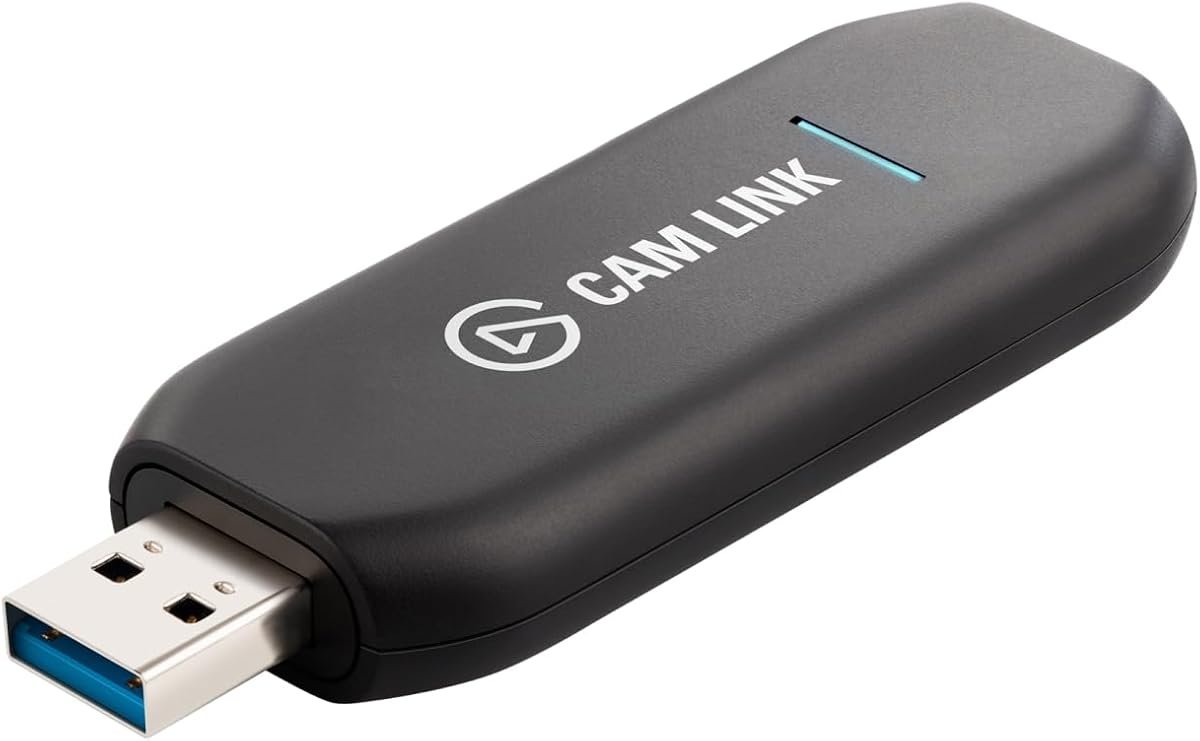
The Elgato Cam Link 4K is a specialized single-input capture device with a 4.6 rating, the highest among the ten products included here. Instead of ingesting four HDMI sources, it turns a compatible DSLR, mirrorless camera, camcorder, action camera, or iPhone into a high-quality computer video source.
We may earn a commission when you buy through this link, at no additional cost to you.
Its simplicity is a major advantage. A USB connection replaces the need to install an internal capture card, while the device is recognized for conferencing and live-production workflows. The stated 1080p60 and up-to-4K60 capability can provide a substantial quality improvement over a built-in computer camera when the source camera supports the selected format.
The product is clearly outside the literal four-channel requirement. Users cannot connect several HDMI sources at once, and capture resolution is constrained by the camera's output settings, cable, software, and computer. Some cameras also require clean HDMI output and may need settings adjusted before they can function as a webcam or capture source.
Choose the Cam Link 4K for meetings, teaching, interviews, and live production centered on one high-quality camera. It is a sensible complement to, rather than replacement for, a quad capture card: use it to create an excellent primary feed and add a multi-input card when several sources must be managed simultaneously.
Connecting a capable DSLR or mirrorless camera can provide sharper images, more natural depth of field, and better control over framing than a typical built-in webcam. Clean HDMI output and compatible camera settings remain essential.
The device can work with camcorders, action cameras, and compatible iPhones, giving creators flexibility without changing the capture hardware. The chosen source must meet the video and audio requirements of the destination application.
We may earn a commission when you buy through this link, at no additional cost to you.
The AVerMedia Live Gamer Ultra S is a polished single-input capture card aimed at console, PC, and gaming creators. Its 4.2 rating accompanies support for 4K60, 1440p144, and 1080p240 workflows, along with HDR and VRR passthrough when the source and display support those features.
We may earn a commission when you buy through this link, at no additional cost to you.
Beyond video, the card can capture 5.1-channel audio on Windows through Streaming Center or its plug-in for OBS. Ultrawide input support includes 3440×1440 and 2560×1080, which is useful for 21:9 gaming setups. Compatibility includes PS5, PS5 Pro, Xbox, Nintendo Switch 2, PCs, Macs, and iPads across the stated modern operating-system versions.
As with other single-input gaming products, the card cannot manage four simultaneous sources. Its RGB24 designation also points to an 8-bit-per-channel color pipeline, so users seeking deeper 10-bit workflows should verify the actual source, software, and output path before assuming the headline 4K resolution covers every color requirement.
This is a good option for a creator who records one primary game feed and values smooth passthrough, modern console support, and a compact USB workflow. It offers less flexibility than a true quad HDMI card, but its gaming-focused feature set is more comprehensive than a generic single-channel converter.
Support for 4K60, 1440p144, 1080p240, HDR, and VRR addresses current high-refresh display standards. The complete chain must support the target format for passthrough and recording to remain synchronized.
USB 3.2 Gen 1 Type-C connectivity makes the device easier to move between production computers than an internal card. Its stated support for current consoles, PCs, Macs, and iPads broadens its usefulness beyond desktop gaming.
We may earn a commission when you buy through this link, at no additional cost to you.
The Magewell USB Capture HDMI 4K Pro 32150 has the highest listed rating in the group at 5.0 and offers a professional portable capture workflow. It supports HDMI 2.0 input and capture up to 4096×2160 at 60 fps, making it useful for a single high-resolution production source without installing an internal expansion card.
We may earn a commission when you buy through this link, at no additional cost to you.
Its hardware-based FPGA processing handles de-interlacing, scaling, cropping, color conversion, and OSD operations. The card also includes an HDMI loop-through port for real-time preview, embedded HDMI audio capture, external microphone or line input, and headphone output. A compact metal housing, LED indicators, thermal protection, and a three-year limited warranty support its professional positioning.
This is still a one-channel device, and certain HDR10 and deep-color functions require the Magewell SDK rather than standard UVC. The supplied operating-system support includes Windows, macOS, and Linux, but applications still need to recognize the device and its available format options. One USB cable also means the host computer must have suitable bandwidth.
For a mobile or flexible production setup, it is a strong choice: true 4K60 capture, loop-through monitoring, analog audio, and hardware processing in a compact unit. It is best used for one carefully managed source rather than simultaneous four-source switching, making it a professional alternative to a quad card rather than a direct replacement.
Support for 4096×2160 at 60 fps distinguishes the device from converters limited to 4K30. The source, software, storage, encoding settings, and USB link all need to support the selected resolution and frame rate.
HDMI loop-through allows a local display to remain visible while the computer captures the same source. Analog line or microphone input and headphone output add flexibility for productions that require separate audio sources.
We may earn a commission when you buy through this link, at no additional cost to you.
The most important decision is whether the workflow truly requires four simultaneous inputs. After that, match channel count to source formats, confirm interface bandwidth, review processing options, and ensure the operating system and production software are supported.
A true quad capture card ingests four independent HDMI sources at the same time, which is essential for multicamera production, live switching, and monitoring several consoles or computers. Some highly rated products in this guide accept only one source, while another uses SDI rather than HDMI. Check the number and type of physical inputs before comparing resolution claims, because four-channel support cannot be replaced by a faster processor on a single-input device.
Choose four inputs when every source must be available to the software simultaneously. Choose one input when the production centers on a single camera or console and simplicity is more important than switching.
A card that captures four 1080p60 feeds serves many presentations, conferences, and livestreams, but it may not be appropriate for a 4K multicamera production. The DeckLink Quad HDMI and Magewell Pro Capture Quad HDMI offer higher stated input limits, while the ACASIS and unnamed four-channel cards focus on simultaneous 1080p60. Also distinguish capture resolution from passthrough resolution, which are separate capabilities in gaming products.
Prioritize the format your slowest or most demanding source actually requires. Capturing a 4K stream does not help if the computer, encoder, or storage path cannot sustain it.
Internal PCIe cards generally provide a direct path between the capture hardware and the host, while USB devices are easier to install and move. PCIe lane generation and lane width influence sustained multi-stream performance. USB 3.2 devices are convenient but share bandwidth across the computer's ports and controllers, so a high-speed hub can reduce reliability.
Verify both the interface and the host machine. Check motherboard lane layout, available ports, graphics workload, and storage speed before installing a multi-channel card.
FPGA-based scaling, cropping, de-interlacing, color conversion, and OSD composition can reduce CPU load and make a multi-source workflow more stable. The Magewell Pro Capture Quad HDMI and Magewell USB Capture HDMI 4K Pro explicitly highlight this feature, while other cards do not provide comparable detail in the supplied information. Hardware processing does not automatically improve the original image, but it can make live production more efficient.
Prioritize onboard processing when the computer already handles encoding, graphics, and storage. It is less critical for a simple, single-source recording on a powerful workstation.
A capture card is only as useful as the applications that recognize it. DeckLink models state support for Windows, macOS, and Linux, and commonly work with tools such as OBS, vMix, Wirecast, and Blackmagic Media Express. Other cards list narrower systems, including Windows 11 and Linux, or require buyers to contact the seller for a driver download. Confirm support before ordering, particularly for older or newly released operating-system versions.
Also check the exact application and operating-system combination. A card can support OBS on Windows while omitting macOS or Linux, or expose advanced features only through a vendor control utility.
Latency matters most when an operator needs immediate feedback, a presenter must converse with a remote audience, or a game must be captured without a perceptible delay. Some cards advertise ultra-low latency, while the Magewell Pro Capture Quad HDMI specifies latency down to 64 video lines. Actual end-to-end delay includes the source, capture driver, software, encoder, network, and display, so no device specification guarantees the entire workflow.
For gaming, verify passthrough format, refresh rate, HDR, and VRR support. For professional live production, prioritize stable frame delivery and monitoring over a headline latency number.
Embedded audio can simplify camera and console connections, but professional workflows may require separate microphones, mixers, or long-run audio connections. The DeckLink Quad HDMI supports eight channels of embedded audio, while the Magewell Pro Capture Quad HDMI also supports up to eight channels per input. The AVerMedia card offers 5.1-channel capture in its supported Windows workflow, and the Magewell USB Capture HDMI 4K Pro adds analog audio input and headphone output.
Choose based on the number of audio channels, external-audio needs, and synchronization requirements. Broadcast users should also consider reference or genlock support when multiple cameras must share precise timing.
Four active capture paths generate more heat than a single USB converter, so airflow and case clearance matter. The ACASIS card includes a built-in cooling fan, while the Magewell products emphasize robust construction and continuous operation. Expansion also affects the host: multiple cards need enough PCIe lanes, bandwidth, power delivery, storage throughput, and processing capacity. The DeckLink Quad 2 provides eight bidirectional SDI connections, while the four-channel SDI card supports installing up to four cards in one computer.
Design the complete system rather than judging one card in isolation. A technically capable card can still underperform if the host, cooling, or software pipeline cannot sustain its advertised load.
Begin by inventorying every source, its output format, and the resolution and frame rate you intend to capture. Connect each source with a suitable HDMI cable, power the cameras, consoles, and computers first, and then attach the capture card. For an internal PCIe model, shut down the host, install the card in a compatible slot, secure the bracket, and ensure the card is not blocking airflow. For USB models, connect the device directly to the host before launching the capture application.
Install the current drivers and supporting vendor software, then configure the source resolution, color format, and frame rate in the capture utility or streaming application. Create separate scenes or devices for each input and test the full chain with a short recording. Confirm that the preview is synchronized, embedded audio is routed correctly, and the encoder is using the intended source. OBS, vMix, Wirecast, Media Express, QuickTime, VLC, Zoom, Teams, and other applications may expose different features or format limitations.
For long events, monitor CPU, GPU, memory, storage throughput, and temperatures, particularly when all four channels are active. Keep the card and cables clear of obstructions, avoid moving a connected internal card, and do not hot-swap inputs unless the entire device and source support safe disconnection. Update firmware and software periodically, preserve the original installation media or configuration notes, and retest the system before a critical broadcast.
A quad HDMI capture card ingests four independent sources at once, allowing software to switch, record, or monitor multiple feeds. A single-input card handles one source but may offer more advanced gaming features, deeper color, or a more compact USB design. Choose the quad format when simultaneous multi-source access is essential rather than a preference.
The DeckLink Quad HDMI explicitly cannot capture copy-protected HDMI sources, and copy protection is a common limitation across the category. Hardware and software capture methods that bypass such protections may violate service terms or applicable law. Confirm the provider's rules and use authorized capture methods for protected content.
A PCIe card often provides a more direct, consistent connection to the host and is well suited to sustained multi-channel ingestion. A USB card is easier to move between computers and commonly suits a single high-resolution source. The better choice depends on channel count, host portability, software support, and the number of other devices already using USB bandwidth.
Not always. Many streams are delivered at 1080p60, so a four-channel 1080p60 card can provide an effective multicamera or presentation workflow. Choose higher 4K limits when the source cameras, output platforms, encoder, storage, and network all support 4K; otherwise, extra capture resolution adds cost without improving the final stream.
The computer should have enough PCIe lanes, processing power, graphics capacity, storage throughput, and cooling for the selected formats. Exact requirements depend on resolution, color depth, frame rate, encoder, and software. Test the intended configuration well before an event and consider whether hardware processing can reduce the host workload.
Several four-channel cards support embedded audio, but the number of channels varies. The DeckLink Quad HDMI and Magewell Pro Capture Quad HDMI are stated to support eight channels of embedded audio. Check how the connected source exposes audio and how the selected application maps each embedded track before production.
Capture resolution is the video format sent from the source into the recording computer. Passthrough is the video sent from the device to a local display or another system. A gaming card may support a high passthrough format while recording at a different resolution, so verify both specifications for every intended source.
Yes, particularly in broadcast, cinema, and synchronized multi-camera environments where cameras and switchers already use SDI. The DeckLink Quad 2 and the four-channel 3G-SDI card are better suited to those ecosystems. Consumers with only HDMI sources should choose a card with matching connectors unless conversion is part of the plan.
The Blackmagic Design DeckLink Quad HDMI is the best overall choice here because it provides four real HDMI inputs, extensive format and color support, eight-channel embedded audio, and broad operating-system compatibility. The Magewell Pro Capture Quad HDMI 11100 is the premium selection for users who value FPGA processing, multi-card support, and continuous professional operation, while the ACASIS card offers the most budget-conscious route to four 1080p60 inputs.
Prioritize the requirements that cannot be changed after installation: simultaneous channel count, connector type, capture format, PCIe or USB bandwidth, operating-system support, and application compatibility. A single-input product such as the Elgato 4K X, AVerMedia Live Gamer Ultra S, or Magewell USB Capture HDMI 4K Pro may be a better fit for high-frame-rate gaming, portable production, or camera-based workflows, but it does not replace a true quad card.
Before purchasing, review the current listing, driver availability, warranty terms, supported formats, and the specifications of the host computer. Ratings, software compatibility, and retailer listings can change, and prices fluctuate over time, so the final decision should be based on the complete signal path rather than one headline specification.