
WOLFBOX G930
4.3Editor score
4K front, 1080p rear
Adjustable 10-inch display
64GB card included
A rearview mirror backup dash camera combines a forward-facing road camera, a rear-facing camera, and a digital display in one replacement-style mirror. The best units improve visual awareness while recording useful evidence, though differences in resolution, night performance, parking guidance, connectivity, and installation can make one model much more suitable than another for a particular vehicle.
This guide compares ten rearview mirror backup dash cameras using the specifications and features supplied for each product. It covers front and rear recording resolution, screen size, field of view, parking assistance, storage support, app connectivity, wireless features, driver-assistance functions, and installation requirements, with particular attention to what each system offers beyond a basic replacement mirror.
The list identifies an Editor's Choice, a Best Premium option, and a Best Budget pick, then explains the strengths and limitations of all ten products. Ratings and feature availability can change, and prices also fluctuate, so readers should confirm the current listing, vehicle compatibility, included accessories, and any separate parking-monitor cable before purchasing.
4.3Editor score

4.3Editor score
4.1Editor score
As an Amazon Associate we earn from qualifying purchases.
The comparison below highlights the principal differences in display size, recording resolution, connectivity, parking features, and night vision, making it easier to identify the mirror that best matches a vehicle, budget, and recording priorities.


The WOLFBOX G840S combines a 4K UHD front camera, a 1080p rear camera, and an exceptionally large 12-inch display in a single mirror-style housing. Its 4.3 rating reflects a balanced feature set, with the oversized screen, wide viewing angles, GPS, wireless app access, and parking-monitor capability making it the strongest all-around choice in this guide. It is particularly compelling for drivers who want more screen area and clearer forward footage than a basic dual-camera mirror provides.
We may earn a commission when you buy through this link, at no additional cost to you.
The front camera records at 2160p, giving the road-facing image more detail than the 1080p rear channel. A 170-degree front lens and 140-degree rear lens broaden the field of view, while the split-screen mode lets users monitor both directions simultaneously. The low-reflectivity LCD, WDR and HDR processing, six-glass lens, and upgraded sensor are intended to improve visibility in direct sunlight, shadows, and nighttime conditions. The included external GPS antenna also allows speed and direction information to appear on the display when properly connected.
Wireless functionality extends beyond basic recording. The 5.8GHz WiFi connection supports live viewing, playback, downloads, and sharing through the WOLFBOX app for iOS and Android devices. A 32GB card is included, and the parking monitor can use time-lapse recording to reduce storage consumption while the vehicle is unattended. The main caveat is that parking surveillance requires a separate hardwire kit, which should be installed correctly so that the vehicle's power system is not drained.
This is the most balanced recommendation for drivers seeking a large display, high-resolution forward recording, GPS, phone connectivity, and rear-camera coverage in one package. The physical size of the mirror and its curved display should be checked against the original mounting point, windshield controls, and visor clearance. Subject to those fit and installation considerations, the G840S is the most complete option for road recording and parking awareness.
The 12-inch display offers more usable viewing area than conventional mirror-sized screens, while the smart split-screen function makes it practical to keep both the front road and rear traffic visible. Its large curved format may also appear more integrated with the cabin than a standalone screen.
The included GPS antenna adds speed and direction data to the driving display, while 5.8GHz WiFi makes the WOLFBOX app a convenient way to review, download, and share clips. This combination is useful for documenting routes and retrieving important footage after an incident.
We may earn a commission when you buy through this link, at no additional cost to you.
The WOLFBOX G930 is a polished 4K front-and-rear mirror system with a 10-inch display, 64GB memory card, 5.8GHz WiFi, and GPS tracking. Its 4.3 rating and extensive feature set support its position as a premium option, especially for drivers who want a large, adjustable screen and convenient management of recordings from a phone. The front and rear cameras both provide clear road coverage, while the display offers several ways to view them.
We may earn a commission when you buy through this link, at no additional cost to you.
A notable feature is the screen's vertical sliding mechanism, which allows the viewing angle to be adjusted while the unit is mounted. Horizontal swipes change the split-screen or rear-camera layout, providing quick control without navigating a complex menu. The 4K front channel and 1080p rear channel provide a useful resolution balance, while WDR, a low-reflectivity display, and a six-glass lens support clearer results in changing light.
The supplied 64GB card reduces the need for an immediate additional storage purchase. Through the WOLFBOX app, users can connect over 5.8GHz WiFi, download video, and share it. Once the GPS receiver is inserted, the screen displays speed and direction, and recorded clips can be reviewed with GPS information through the relevant player. Loop recording overwrites older material, and the G-sensor locks the current file when a collision is detected.
The G930 is best suited to drivers who prioritize a flexible display, generous included storage, wireless access, and navigation-oriented GPS information. It lacks the G840S's listed time-lapse parking mode, and GPS data depends on the receiver being inserted. Buyers should also compare its 10-inch screen with their windshield and original mirror dimensions. For those seeking a refined connected mirror with strong overall performance, it remains a top-tier option.
The G930's sliding screen can be moved vertically to improve the viewing angle, while horizontal swipes select the front, rear, or split-screen arrangement. This makes the 10-inch display easier to tailor to different drivers and vehicles.
A 64GB card is included for immediate recording, and 5.8GHz WiFi provides app-based preview, download, and sharing. The system also supports loop recording and locks collision footage so it is not overwritten by routine clips.
We may earn a commission when you buy through this link, at no additional cost to you.
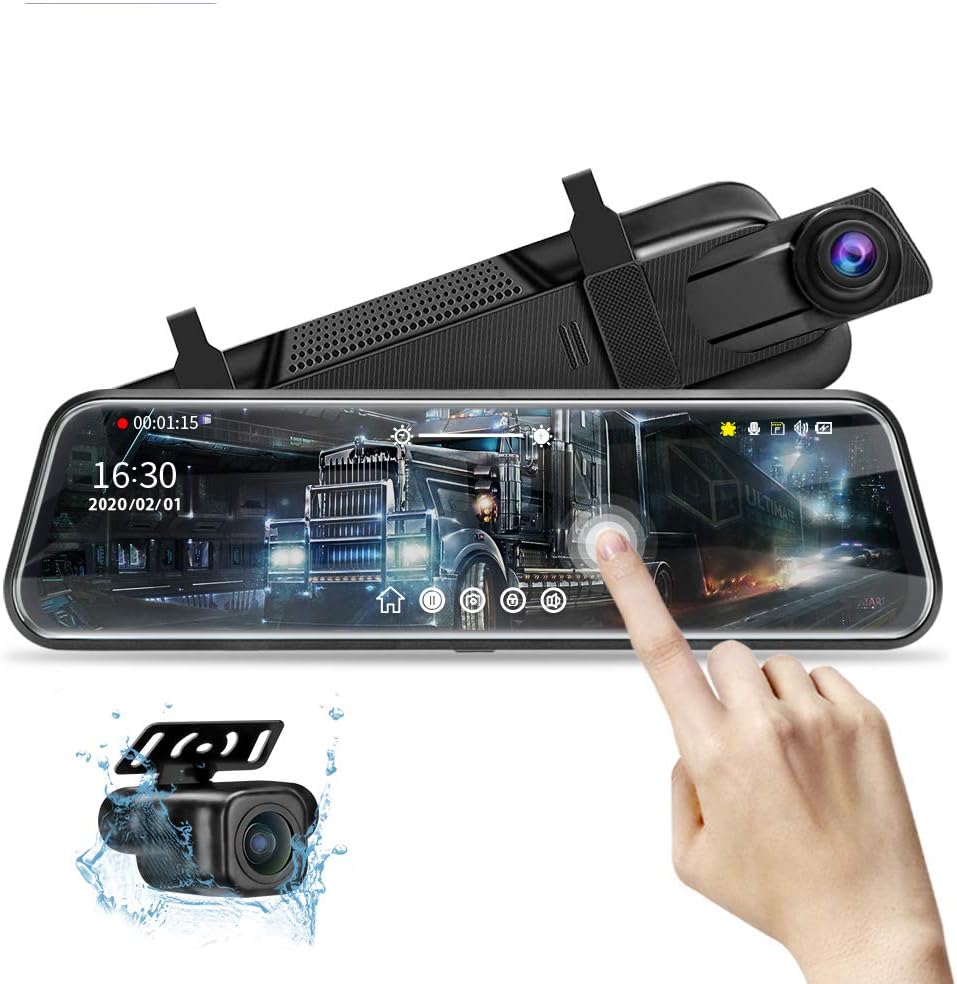
The 10-inch Mirror Dash Cam provides dual 1080p recording, a responsive IPS touchscreen, and an IP68 waterproof rear camera in a straightforward package. Its 4.1 rating indicates a capable budget-oriented option, and the key strengths include improved night processing, a wide field of view, touch-based camera switching, reversing guidelines, loop recording, and automatic protection of collision clips.
We may earn a commission when you buy through this link, at no additional cost to you.
The front camera records at 1080p, while the rear camera also captures 1080p footage and receives dedicated night-exposure and noise-reduction upgrades. The 10-inch screen provides a much larger view than the original mirror, with swiping gestures used to change camera feeds, adjust the viewing angle, control exposure and brightness, and access recording or playback functions. Six layers of glass in the rear camera support the stated low-light performance.
Parking is one of this model's strongest practical areas. When reverse is selected, the rear image fills the screen and displays adjustable guide lines. The viewing range can be moved vertically, and the backing camera can also be vertically flipped for specialized roof or trailer-hook installation. Storage support extends to 128GB, although a card is not included. The G-sensor locks important incident video before loop recording can overwrite it.
This model is a good fit for buyers who prioritize front-and-rear coverage, a large touchscreen, and parking assistance without requiring a wireless app. The listing notes that its display is optimized to reduce reflections and cannot function as a conventional mirror when turned off. Buyers should also check the stated dimensions and weight against their original mirror and mounting area before ordering.
Automatic full-screen rear viewing, adjustable guide lines, and vertical repositioning make this mirror practical for parking and reversing. The optional vertical-flip function also broadens its usefulness for unusual rear-camera placements.
Both cameras record at 1080p, and the rear camera benefits from upgraded night exposure, noise reduction, and a six-layer glass lens. The absence of listed WiFi keeps the feature set focused, while 128GB storage support provides ample recording capacity when a suitable card is added.
We may earn a commission when you buy through this link, at no additional cost to you.
This 13-inch mirror camera stands apart for its unusually large display and wireless CarPlay and Android Auto support. It pairs a 4K 160-degree front camera with a waterproof 1080p 140-degree rear camera, allowing both road directions to be recorded and shown in a sliding split-screen layout. The large screen and large touch icons are particularly useful in larger vehicles, where drivers may need more visual information without navigating a small interface.
We may earn a commission when you buy through this link, at no additional cost to you.
Bluetooth and WiFi provide the basis for the wireless smart-car integration. The system is described as supporting Siri and Google Voice Assistants, navigation, music, and calls, while a separate 5.8GHz connection handles live preview and downloading through the dedicated app. This separates everyday vehicle functions from dash-camera file management and reduces the need to remove the memory card for routine transfers.
Recording is handled through loop recording, with a 64GB card filling and older unlocked clips being overwritten. A G-sensor locks the active file during sudden impacts. The rear view supports reverse assistance, and the parking surveillance system records unusual events while the car is parked. That surveillance function requires a separately sold parking-monitor cable, identified in the supplied product information.
The product is best suited to drivers who want their mirror and connected-car functions combined and who are comfortable with a very large screen. Because no published customer rating is supplied, its real-world reception cannot be compared directly with rated products. Checking windshield fit, confirming app compatibility, and determining whether a separate parking cable is needed are essential before purchase.
Wireless CarPlay and Android Auto bring navigation, communication, music, and voice-assistant access to the mirror. The approach can reduce phone-handling, although vehicle compatibility and the final user experience should be confirmed before installation.
The 13-inch panel gives the front and rear feeds substantial visual space, and enlarged touch icons are intended to reduce accidental touches. Its dimensions may be impressive in a large cockpit but could feel oversized in a smaller vehicle.
We may earn a commission when you buy through this link, at no additional cost to you.
The AZDOME 12-inch mirror is among the most technically ambitious products in the guide, offering 4K front recording, 2.5K rear recording, ADAS, blind-spot detection, lane-change assistance, and AI-powered review overlays. Its 4.2 rating reflects a broad feature set, and the higher-resolution rear channel makes it especially interesting for drivers who want more detail than the usual 1080p backup camera provides.
We may earn a commission when you buy through this link, at no additional cost to you.
The AZDOME app can place augmented-reality information over downloaded footage, including recognized license plates, vehicle distance, speed, and lane guidance. This is primarily a post-recording analysis feature rather than a reason to stop paying attention to the road. During driving, the system can also issue ADAS, BSD, and lane-change warnings, while ten English voice commands allow basic functions such as taking a photo, locking a clip, changing views, and adjusting settings without touching the screen.
The 5.8GHz WiFi connection supports preview, download, sharing, settings control, and timeline playback. A 64GB card is included, and reverse activation brings up the rear feed with parking guide lines. For parked-vehicle coverage, the mirror supports both time-lapse and collision-detection recording. Each method requires a separately purchased 3-lead Type-C hardwire kit with a 3A output.
This mirror is best for drivers who value advanced visual analysis and proactive collision-related alerts over a simple camera-and-screen setup. Its capabilities are extensive, but users should understand that ADAS and blind-spot warnings are supplementary tools rather than substitutes for careful driving and mirror checks. The included storage and app features also make it a strong option for people who regularly review footage on a phone.
ADAS, BSD, and lane-change assistance create a broader safety layer around the dual cameras. These alerts are designed to flag potential hazards, while the AI overlays make saved footage easier to analyze after the fact.
Recording at 4K in front and 2.5K in back provides substantial image detail for incidents, parking, and traffic review. Night vision, parking guides, and event-based parking modes extend that recording capability into low-light and unattended situations.
We may earn a commission when you buy through this link, at no additional cost to you.
The WOLFBOX G850 PRO is built around 4K front recording, 1080p rear capture, a full IPS touch display, and a collection of advanced driver-assistance features. With a 4.3 rating, it delivers one of the strongest combinations of recording, alerts, connectivity, and convenience in the lineup. The ADAS suite covers forward collision, pedestrian collision, lane departure, lead-vehicle start, and distance monitoring.
We may earn a commission when you buy through this link, at no additional cost to you.
Its enhanced blind-spot algorithm looks for hazards involving the driver's car and following vehicles during lane changes and also provides rear-collision alerts. These features expand the mirror's role beyond passive recording, although drivers remain responsible for judging alerts in real-world conditions. Both camera channels use WDR and HDR processing and wide-angle lenses to help preserve visibility when transitioning between bright sunlight, deep shadows, and nighttime environments.
A 64GB card is included, while 5.8GHz WiFi connects with the WOLFBOX app for video download and sharing. Twelve voice commands are listed, including commands for enabling WiFi, taking a picture, and locking a video, which can reduce menu interaction while driving. The touch display also provides direct control over the front and rear channels and the mirror's broader settings.
The G850 PRO is a strong choice for drivers who want an advanced warning system and hands-free operation in a conventional recording mirror. Compared with the AZDOME, its rear channel has lower listed resolution and its app analysis tools are less extensively described. The absence of a listed parking-monitor function also makes it less complete for drivers seeking unattended surveillance. For ADAS-focused road use, it remains a compelling option.
Forward, pedestrian, lane-departure, lead-vehicle, distance, blind-spot, and rear-collision alerts give the G850 PRO a broad awareness toolkit. These warnings can support attentive drivers but should never be used as a reason to reduce focus on the road.
The included 64GB card supports immediate use, while 5.8GHz WiFi makes downloading and sharing clips convenient through the WOLFBOX app. Twelve voice commands provide a practical alternative to navigating the IPS touchscreen while the vehicle is moving.
We may earn a commission when you buy through this link, at no additional cost to you.
The Upgraded 10-inch Rear View Mirror Camera distinguishes itself with a 19.6-foot rear-camera cable, dual 1080p recording, and a full touch interface. Its 4.1 rating is supported by a practical feature set that includes wide-angle views, night vision, automatic reverse-screen switching, loop recording, a collision sensor, and optional parking surveillance. The extended cable is particularly valuable in larger vehicles or installations requiring a longer route.
We may earn a commission when you buy through this link, at no additional cost to you.
The front camera uses a 170-degree wide-angle lens, while the rear camera uses a 140-degree lens. Both record at 1080p, and the system supports real-time image transmission and a full-screen rear perspective. Night performance is supported by WDR and HDR processing, a STARVIS sensor, and a six-glass lens. On the 10-inch display, vertical swipes adjust the viewing angle and horizontal swipes control brightness or camera selection.
Loop recording continuously replaces older files as storage fills, while the G-sensor locks footage following a sudden collision. Parking monitoring adds another layer by recording a roughly 20-second locked clip when an impact is detected while the vehicle is parked. That function requires an additional ACC hardwire kit. A memory card is also not included, and the system supports cards up to 128GB.
This mirror is best for buyers whose vehicles need a longer rear-camera cable or who want a simple waterproof rear camera with a generous field of view. It does not list WiFi or app connectivity, and several useful storage or parking features require separate purchases. The included rubber straps and rear-camera mounting hardware simplify installation, while the touch controls make day-to-day operation straightforward.
The 19.6-foot rear-camera cable provides more routing flexibility than a short lead, especially in SUVs, trucks, and vehicles with substantial distance between the mirror and rear mounting point. The waterproof rear camera can be mounted externally to help resist rain and road exposure.
Swiping vertically changes the camera angle, while horizontal controls adjust brightness or switch between views. The screen can be powered down while both cameras continue recording, and selecting reverse automatically presents the rear perspective with parking guidelines.
We may earn a commission when you buy through this link, at no additional cost to you.
The 4K Mirror Dash Cam combines 4K front recording, a 1080p rear camera, a 10-inch IPS touchscreen, and WiFi in a straightforward mirror system. Its 4.5 rating is the highest published customer rating among the products in this guide. It also includes a 32GB card, making it a well-equipped option for drivers who want high-resolution forward footage and wireless access without immediately adding storage.
We may earn a commission when you buy through this link, at no additional cost to you.
The front camera is paired with a 1080p backup camera, and an F1.8 aperture is listed as supporting low-light performance. The 130-degree front and 145-degree rear lenses cover a broad area, with the rear image automatically taking over when reverse is selected. The full-touch display provides simple switching between the two camera feeds, and night-vision features are included for tunnels, dark roads, and parking environments.
WiFi connectivity enables the app to connect to the mirror, download footage, and share clips without describing a card-reading step. For unattended monitoring, the parking function is accessed through an OBD connection and is described as supporting 24/7 vehicle surveillance. A G-sensor detects collisions and locks the current recording so that it remains available separately from ordinary overwritten footage.
This model is a strong value-oriented choice for drivers who want 4K front video, a large display, WiFi, and included storage. Its principal limitation is that the rear camera remains 1080p, so it does not match the AZDOME's 2.5K rear channel. The precise parking-monitor behavior and OBD connection requirements should also be confirmed for the intended vehicle. Overall, it offers a balanced feature set and the guide's strongest published rating.
The 4K forward channel is well suited to capturing fine road details, while the free 32GB card lets the system record immediately. A 1080p rear camera and F1.8 aperture support the combined daytime and night-driving use case.
The app provides wireless preview, downloading, and sharing, while the G-sensor protects collision clips. OBD-based parking monitoring adds unattended surveillance, though compatibility and installation should be confirmed before relying on it.
We may earn a commission when you buy through this link, at no additional cost to you.
The AUTO-VOX Dual 2K OEM takes a different approach from strap-on digital mirrors by replacing the original rearview mirror at its factory mounting position. It uses multiple bracket adapters to fit many vehicles, creating a cleaner appearance without straps, suction cups, or an additional dashboard screen. Its 4.3 rating and integrated design make it the most distinctive premium installation option in the guide.
We may earn a commission when you buy through this link, at no additional cost to you.
The specification section describes 2K HDR recording from both the front and rear, with sensors using HDR and WDR to help reduce overexposure from headlights and improve balanced night visibility. A 9.36-inch streaming-media touchscreen presents the camera views and provides a wider rear perspective than a conventional mirror. Automatic brightness adjustment dims the display at night and increases visibility in daylight, reducing the need for manual changes.
CarPlay and voice control support navigation, calls, music, and voice-assistant functions without requiring the driver to handle a phone. The mirror is designed to support a factory-style fit, and a support team is available for installation questions and vehicle-specific guidance. Four bracket adapters are included, although the correct attachment and compatibility still need to be verified for the target vehicle.
This camera is best for drivers who value integration and appearance more than strap-on convenience, particularly owners of compatible vehicles who want a permanent-looking replacement. It does not list a parking monitor or explicit parking-assistance function, and professional advice may be useful for unusual mounting positions. The 2K dual-camera specification, adaptive display, and CarPlay integration make it a refined option for compatible vehicles.
Mounting at the original mirror position removes visible straps and creates a more integrated dashboard appearance. Four included adapters cover many common mounting configurations, but buyers should check their exact vehicle before ordering.
HDR and WDR processing help the dual 2K cameras cope with bright headlights and uneven lighting. Automatic display brightness provides a further reduction in glare, making the mirror easier to view during both daytime and nighttime journeys.
We may earn a commission when you buy through this link, at no additional cost to you.
The 4.5-inch Mirror Dash Cam prioritizes a compact footprint, straightforward dual-camera recording, and useful unattended monitoring. It includes a 150-degree camera positioned inside the vehicle and a 120-degree rear camera, both recording at 1080p. Although no published rating is supplied, the product's small dimensions, night-vision support, collision locking, and parking functions make it a notable option for cars and trucks where a large mirror could obstruct the windshield.
We may earn a commission when you buy through this link, at no additional cost to you.
The interior-facing camera can record the cabin as well as the road-facing view, a useful characteristic for drivers carrying passengers or working with ride-share services. The rear camera keeps track of traffic and obstacles behind the vehicle, while the IPS touchscreen provides a compact control interface. Night-vision support is included to maintain usable footage in darker environments and potentially provide evidence after a nighttime incident.
A gravity-shock sensor automatically locks a recording when it detects a collision or bump. Loop recording overwrites the oldest unprotected clips as the card approaches capacity, keeping routine recording continuous while preserving incident footage. For parked use, motion detection and collision detection can initiate recordings when relevant activity occurs, allowing the camera to avoid storing unnecessary idle footage.
This is the most compact recommendation in the guide and may appeal to drivers who dislike oversized digital mirrors. The parking function requires an extra hardwire kit, and the small 4.5-inch display offers less visual detail and fewer touch targets than the 10-, 12-, and 13-inch alternatives. For users who prioritize low-profile installation, dual 1080p coverage, and flexible event-triggered monitoring, it remains a practical choice.
At 4.5 inches, the display takes up considerably less space than the larger mirror systems in this guide. Its compact proportions can be attractive in trucks, work vehicles, and cars with unusual mirror mounts, although the viewing area is necessarily more limited.
The 150-degree interior camera adds cabin context while the 120-degree rear camera covers traffic and parking behind the vehicle. Motion- and collision-triggered parking recording provides flexible unattended coverage when the required hardwire kit is installed.
We may earn a commission when you buy through this link, at no additional cost to you.
Choosing the right mirror camera involves balancing image quality, screen size, parking features, connectivity, power requirements, and physical fit. The most expensive specification is not automatically the most useful, so drivers should identify their daily driving conditions and installation constraints before comparing models.
Resolution determines how much fine detail each camera can preserve, but the two channels should be considered separately. The WOLFBOX G840S and G930, the 13-inch mirror, the AZDOME, the G850 PRO, and the 4K Mirror Dash Cam list 4K front recording, while most rear cameras provide 1080p. The AZDOME stands out with 2.5K rear video, and the AUTO-VOX lists 2K for both directions. Higher resolution can make license plates, road signs, and lane markings easier to inspect, provided lighting and focus are favorable. It does not replace good night performance or a wide field of view.
Choose at least 1080p in both directions, and consider 4K forward recording if fine detail matters. Compare rear resolution separately when reversing or documenting following traffic.
Display size ranges from a compact 4.5-inch panel to an expansive 13-inch screen. Larger screens can provide a more useful split-screen view, larger touch targets, and easier reading of menus, but they may obscure part of the windshield, interfere with visors, or look out of place on a factory mirror. The 10-, 12-, and 13-inch products generally favor visibility and camera control, while the compact model favors a low-profile installation. One listing provides exact dimensions and weight, making it especially important to compare the unit with the original mirror and its mounting hardware.
Measure the available windshield area and check mirror clearance before ordering. Do not assume every large digital mirror will fit every vehicle.
A wide-angle lens can reduce blind spots, but a larger viewing angle can also distort nearby objects at the edges of the frame. Front lenses across the guide range from 130 to 170 degrees, while rear lenses range from 120 to 145 degrees. Reverse assistance is another important factor: several units automatically switch to the rear camera, and some add adjustable parking lines. The AZDOME and the 10-inch budget model offer clear reversing guidance, while other products emphasize camera switching without detailing line adjustment. Drivers who regularly reverse or maneuver in tight spaces should prioritize the actual parking interface rather than resolution alone.
Look for automatic reverse switching, adjustable guide lines, and a rear view you can reposition. Wider angles are useful, but clarity and distortion control matter too.
Night capability depends on more than a night-vision label. Useful features include WDR, HDR, low-reflectivity displays, wide apertures, specialized sensors, and multi-layer glass lenses. The G840S combines several of these elements, the G850 PRO uses WDR and HDR on both channels, and the AZDOME includes low-light recording. The AUTO-VOX adds automatic screen brightness to reduce glare after dark. Headlights can still overwhelm a camera, so video quality will still depend on the scene, reflective surfaces, and exposure behavior.
Prioritize HDR or WDR, a low-reflectivity screen, and automatic brightness. Check whether night features apply to both cameras rather than only the front channel.
Storage capacity affects how much footage remains available before loop recording overwrites older clips. Some products include a 32GB or 64GB card, while others support cards up to 128GB but do not include one. Loop recording is standard across the category, and a G-sensor is used to lock clips when an impact is detected. The 13-inch mirror lists 64GB, the G930 and G850 PRO also list 64GB, and the G840S and 4K Mirror Dash Cam include 32GB. Buyers should consider card format, available storage, and how quickly routine footage may overwrite an incident clip.
Check whether a card is included and the maximum supported capacity. Keep locked incident clips backed up through the app before the card fills.
WiFi makes it easier to preview, download, and share recordings without removing the memory card. Most premium options use 5.8GHz WiFi for the dash-camera connection, including the WOLFBOX G840S, G930, and G850 PRO, the AZDOME, the 13-inch model, and the 4K Mirror Dash Cam. The WOLFBOX products use the WOLFBOX app, while AZDOME footage can be reviewed through the AZDOME app with timeline playback and AR overlays. The 13-inch product adds wireless CarPlay and Android Auto, and the AUTO-VOX includes CarPlay. App compatibility, wireless stability, and the inconvenience of connecting before file transfers are worth checking.
Wireless access is valuable for frequent reviews and easy sharing. Confirm the supported phone platform, app availability, and whether a separate connection is needed for smart-car features.
An ordinary 12-volt socket is sufficient for driving recordings, but continuous parking surveillance usually requires a hardwire connection, OBD connection, or another low-drain power method. The G840S requires a hardwire kit for time-lapse parking mode. The 10-inch budget model and 4.5-inch model also require a hardwire kit for parking surveillance. The AZDOME requires a specified 3-lead Type-C kit with 3A output, and the 13-inch model uses a separately sold parking-monitor cable. The 4K Mirror Dash Cam accesses its parking function through OBD. Improper wiring can cause battery drainage or interfere with the vehicle's electrical systems.
Plan for a compatible hardwire or OBD solution before purchase. A professional installation may be worthwhile for complex vehicles or unfamiliar wiring.
ADAS, blind-spot detection, lane-change assistance, voice control, and AI overlays can make recordings more useful, but they should be treated as supplements to attentive driving. The AZDOME offers the broadest analysis tools, including recognized license plates, distance, speed, and lane overlays in its app. The G850 PRO lists several active collision and lane alerts. Voice commands appear in the AZDOME, G850 PRO, and 13-inch product, while the AUTO-VOX emphasizes CarPlay. These features vary considerably in how they are implemented, so checking the supplied descriptions is more reliable than assuming they perform identical functions.
Choose advanced alerts for added context, not as a substitute for safe driving. Verify what each system detects and how warnings are presented.
Begin by identifying the correct installation method for the vehicle. Strap-on mirrors generally attach around the original mirror, while OEM-style units require removal or adaptation of the factory mounting point. Route the rear-camera cable away from sharp edges, moving components, and windshield airbags. Mount the rear camera where it has an unobstructed view, and confirm that any included bracket or adhesive is secure and weather resistant.
Once installed, format a compatible memory card in the dash camera before relying on it, then adjust the display brightness, date, time, recording mode, and camera angle. Test both channels while the vehicle is parked. Shift into reverse to confirm automatic rear switching, guide lines, and the reverse-trigger cable where applicable. Connect to the app over WiFi, download a short sample, and verify that front and rear clips are recorded correctly.
Review the parking-monitor wiring carefully. A hardwire or OBD installation should be completed with the vehicle powered down according to the vehicle-specific instructions, and the low-voltage cutoff should be configured appropriately. During routine use, check that the screen is not obstructing visibility, clean both lenses with a soft microfiber cloth, and remove recordings that are no longer needed. After an incident, preserve locked files before loop recording replaces them.
It can replace the mirror function while powered on because the display provides a live rear-camera image. However, some optimized anti-glare screens cannot display a conventional mirror image when turned off, as noted for one of the products in this guide. Drivers should also check local laws and their insurer's guidance before covering or replacing an approved mirror.
A 4K front channel can preserve more detail and is useful for reviewing license plates, signage, and road conditions. It is not automatically better in every situation because lighting, motion, sensor quality, and file size also affect usability. A model with balanced 1080p front and rear recording may still provide better evidence than a 4K model with weak night performance.
Several models support parking surveillance, but most require a compatible hardwire kit, OBD connection, or separate parking cable. Depending on the model, recording can use low-frame-rate time-lapse, motion detection, collision detection, or a short event clip. Review the accessory requirement carefully and use a proper installation to avoid draining the vehicle battery.
Choose a card that meets the dash camera's stated capacity and format requirements, and use a reputable card designed for continuous video recording. Products in this guide support different maximum capacities, with some including 32GB or 64GB cards and others requiring the buyer to supply storage. Format the card in the camera before the first use and back up important clips periodically.
No. ADAS, blind-spot detection, and lane-change alerts are supplementary tools that may help identify certain risks, but they can produce false warnings or miss unexpected events. Drivers must continue watching the road, checking mirrors, maintaining a safe distance, and following all applicable traffic laws.
No. WiFi is listed for the WOLFBOX G840S, G930, and G850 PRO, the AZDOME, the 13-inch mirror, the 4K Mirror Dash Cam, and the AUTO-VOX through its connected-car features. The 10-inch dual-1080p models and compact 4.5-inch model do not list app-based WiFi in the supplied information, so recording retrieval may require removing the memory card.
Compare the mirror's dimensions with the original mirror, check windshield and visor clearance, and ensure that no controls or airbags are obstructed. Large 10-, 12-, and 13-inch models are best suited to vehicles with adequate space. The compact 4.5-inch option may be more practical where a factory-style appearance and minimal obstruction are priorities.
OEM-style models can require more care than strap-on units because they attach at the factory mirror position and may need a vehicle-specific adapter. The AUTO-VOX includes four adapters and installation support, but drivers should still verify compatibility, disconnect the battery safely if required, and seek professional help when wiring or mounting points are unfamiliar.
The WOLFBOX G840S is the strongest all-around recommendation because it combines a large 12-inch display, 4K front recording, GPS, wide-angle cameras, app connectivity, and parking surveillance. The WOLFBOX G930 stands out as the premium pick with its adjustable 10-inch display, included 64GB card, and strong wireless and GPS features, while the 10-inch dual-1080p model offers the most approachable option for basic front-and-rear recording and parking guidance.
Prioritize the features that match your driving rather than the longest specification list. Large-screen buyers may favor the AZDOME or 13-inch model, smart-warning users may prefer the G850 PRO, and drivers seeking a factory-style fit may appreciate the AUTO-VOX. Compact-vehicle owners can consider the 4.5-inch model, while anyone needing wireless downloads should verify that WiFi and the relevant app are included.
Before ordering, confirm screen clearance, camera-cable routing, memory-card support, app compatibility, and parking-monitor power requirements. Prices, ratings, accessories, and product availability can change, so check the current listing and the latest manufacturer information. With those final checks completed, the selected mirror camera can add valuable road awareness, parking visibility, and incident documentation without adding unnecessary complexity.