
AT&T ML17929 2-Line Corded Speakerphone
4.3Editor score
Two analog lines
Power-failure line support
Built-in speakerphone
A phone system for a doctor’s office should make incoming calls easier to manage without adding complexity for staff or patients. The right setup can support multiple lines, reliable voicemail, cordless movement, hands-free communication, call screening, and orderly expansion as a practice grows. Clinical environments also benefit from clear displays, accessible controls, and practical call-routing features.
This guide compares ten business-oriented and small-office phone systems using the supplied specifications, customer ratings, line capacity, answering-machine functions, wireless technology, expansion options, conference calling, call blocking, and device connectivity. It covers both dedicated corded systems and cordless or hybrid designs, ranging from simple two-line phones to feature-rich systems with multiple handsets and larger displays.
Each review explains who the product is best suited for, what stands out, and where its compromises may matter. The VTech AM18447 leads for multi-line call control, while the AT&T ML17929 stands out for straightforward business essentials and the VTech IS8251-3 offers extensive cordless functionality. Product availability, configurations, and pricing can change, so confirm the current listing and office requirements before purchasing.
4.3Editor score

4.0Editor score
4.3Editor score
As an Amazon Associate we earn from qualifying purchases.
The comparison below organizes all ten systems by their most useful office phone characteristics. It highlights line capacity, wireless or corded design, answering-machine support, expansion potential, and key controls that can affect day-to-day operation in a medical practice.


The VTech AM18447 is the most purpose-built office option in this guide, combining a four-line main console, professional auto attendant, digital answering system, intercom, and expansion for up to 10 stations. Its 4.0 customer rating reflects a practical feature set for small practices that need more control than a basic two-line telephone provides. The console’s large display and wide array of office functions make it easier to manage calls from reception, consultation rooms, and administrative desks.
We may earn a commission when you buy through this link, at no additional cost to you.
Its strongest advantage is call organization. The auto attendant can answer each of four lines, offer a company directory, route calls to extensions, and record voicemail. Shared voicemail capacity of up to 180 minutes gives a practice ample room for announcements, memos, and incoming messages. Expansion to nine additional cordless handsets or desksets allows the system to grow without replacing the main console, while one-touch DECT 6.0 pairing is intended to simplify wireless installation.
There are practical limitations. The main console connects to analog lines through RJ11, so a clinic using a modern VoIP or fiber service must confirm that its gateway provides compatible analog ports or an appropriate terminal adapter. The feature set may also feel elaborate for a very small office, and the additional stations needed to cover several work areas are not included with the console. Cordless range still depends on building materials and where the base is positioned.
This is the strongest overall recommendation for a doctor’s office that needs multiple incoming lines, centralized call routing, and room to expand. It suits receptionists who handle a steady appointment flow and administrators who need voicemail access throughout the building. For a one-desk office with only one line and minimal cordless movement, a simpler system may be easier to manage.
The per-line auto attendant gives staff a structured way to answer incoming calls and direct visitors or patients to the correct extension. It can share a company directory, route calls, and capture voicemail, which is especially useful when the reception desk must remain focused on patients already present.
With capacity for 10 stations, the AM18447 can serve multiple desks and clinical areas as staffing changes. Its one-touch DECT 6.0 pairing is designed to make adding cordless handsets or desksets more approachable than professional wiring.
We may earn a commission when you buy through this link, at no additional cost to you.
The AT&T DLP73590 is built around a five-handset cordless package with DECT 6.0, a large color base display, a smart call blocker, and Bluetooth connectivity to a cell phone. Its 4.2 rating reflects a balanced combination of useful office features and wireless convenience. The five included handsets make it a practical option for offices that want several rooms connected to a shared cordless system without sourcing each handset separately.
We may earn a commission when you buy through this link, at no additional cost to you.
The base display is one of the most useful elements. Its 5-inch color screen and side and bottom soft keys provide clear access to contacts, messages, call history, and timers. One-touch shortcuts can place frequently used functions within immediate reach, while conference calling supports an outside line and up to four cordless handsets. Intercom calling also allows staff to communicate between extensions without placing a call through the public network.
The smart call blocker is particularly relevant to a busy office because it can prevent robocalls from reaching the landline on the first ring and lets users blacklist a number instantly. Its block list can store up to 1,000 names and numbers. DECT 6.0 and noise-filtering technology support the system’s long-range positioning, although real coverage depends on walls, floors, obstructions, and the base location. Bluetooth connection to a cell phone is useful for staff who want one handset interface for both landline and mobile calls.
Choose the DLP73590 when wireless reach and a high included handset count matter more than managing several traditional analog lines. It is well suited to a practice with multiple exam rooms, consultation spaces, and a reception station. Practices that require several independent inbound numbers, advanced per-line routing, or a full business console should examine a system explicitly designed around those functions.
The included handset count makes the DLP73590 convenient for distributing calls throughout a small practice. Staff can move between consultation and treatment areas while retaining access to shared office calling features and the central answering system.
Blocking robocalls before they ring can create a calmer reception environment. The ability to store as many as 1,000 blocked contacts also provides room for a practice to suppress persistently unwanted callers.
We may earn a commission when you buy through this link, at no additional cost to you.
The AT&T TL86103 combines a corded base with cordless handsets, two analog lines, an answering machine, and Bluetooth Connect-to-Cell functionality. It has a 4.1 customer rating and targets small offices that want staff to move away from a fixed desk while retaining a dependable corded option. The system can connect to as many as two cell phones and two landlines, making it a flexible choice for practices that rely on both mobile and office lines.
We may earn a commission when you buy through this link, at no additional cost to you.
Connect-to-Cell lets staff make and receive calls through their existing cellular plans over the office phone system, and up to 6,000 cell-phone contacts can be downloaded to the cordless handsets. The answering system provides two mailboxes with up to 22 minutes per mailbox, which helps separate different users or call categories. The corded base includes a backlit display, speakerphone, large keypad, and line-power mode that supports communications during a power outage.
Two USB ports on the base allow two cell phones to charge while the office system remains in use. That practical detail can be valuable in a busy reception area, although the practice should still maintain its own charging plan and avoid depending on the base for extended battery management. Expansion to 12 handsets offers room for future growth, while the stated coverage of up to 1,000 feet should be treated as a maximum rather than a guaranteed distance in every building.
The TL86103 is a strong recommendation for a small practice that wants a mix of desk reliability and cordless mobility. It is especially convenient for administrators who use a mobile phone as an important part of their communication routine. It is less suitable for a practice needing four or more independent inbound lines, sophisticated auto-attendant routing, or a large formal call tree.
The corded base gives reception or an individual office a stable handset with a large backlit display, while cordless extensions support movement around the practice. This mixed format lets the practice assign devices according to each workstation rather than forcing every employee into the same arrangement.
Separate mailboxes can keep individual users or functions apart, which is useful in an office where a shared answering machine would otherwise create confusion. Recording capacity of up to 22 minutes per mailbox provides a practical balance between message storage and manageable audio retrieval.
We may earn a commission when you buy through this link, at no additional cost to you.
The Panasonic KX-TG9582B is a two-line corded-and-cordless system with two handsets, an answering machine, Link2Cell Bluetooth, call blocking, and three-way conferencing. Its 4.2 rating makes it a credible all-around option for a small medical office. It offers a useful combination of shared desk functions, wireless extension coverage, and mobile-device connectivity without relying on a large multi-line console.
We may earn a commission when you buy through this link, at no additional cost to you.
Its most distinctive feature is the ability to link up to four smartphones to the home or office phones through Bluetooth. Staff can make and receive mobile calls through the linked cordless handsets, which helps unify communication when physicians or administrators are away from their desks. The base and handsets also support three-way conversations, and noise reduction is designed to suppress background interference and emphasize voice tones for clearer discussion.
The Call with Outlook function connects the phone and answering machine to a compatible office computer, allowing outgoing calls to Outlook contacts and incoming calls to be answered with a single click. This can improve workflow for practices that already organize patients, referrals, and administrative contacts in Outlook. The handset’s 1.8-inch monochrome display is less visually rich than the color screens found on some competing systems, and the PC-dependent features require configuration that some users may not need.
The KX-TG9582B is best for a small practice that values three-way conversations, mobile call integration, and flexible cordless use. It works particularly well for administrators who coordinate with colleagues or outside offices from several rooms. Practices with more than two lines or advanced automated routing should consider the AM18447 or a dedicated business PBX instead.
A three-way conference can bring the corded desk phone and two cordless extensions into one conversation. This supports quick coordination among reception, clinical staff, and an outside office without requiring staff to return to a single desk.
Connecting as many as four smartphones lets employees keep mobile communication accessible through office handsets. The feature is useful for staff who switch between direct patient contact, internal coordination, and external calls throughout the day.
We may earn a commission when you buy through this link, at no additional cost to you.
The VTech DS6151-2 is a two-line, two-handset cordless phone system with an answering system, caller ID, intercom, and expansion to 12 handsets. Its 4.1 rating reflects a focused design for homes and small offices. For a doctor’s office, it is most attractive when staff need several wireless extensions and two incoming lines but do not require automated call trees or advanced business-console features.
We may earn a commission when you buy through this link, at no additional cost to you.
The system supports conference calling between an outside line and up to two cordless handsets, allowing a receptionist to include a colleague without moving away from the front desk. Intercom communication between the base and handsets makes it easy for staff to ask another room for information. The digital answering system can record up to 13 minutes and provides a voice guide, while caller ID history stores 50 names and numbers for quick reference.
Language accessibility is another practical benefit. The system offers trilingual prompts in English, Spanish, and French, which can help practices serving varied communities or employees with different language preferences. Its limitations center on simplicity: voicemail capacity is shorter than that of several competing systems, and there is no detailed auto-attendant or directory-routing feature. The included configuration is two handsets, so wider coverage may require additional compatible accessories.
The DS6151-2 is a sensible choice for a small practice that prioritizes cordless convenience, simple two-line handling, and an answering machine. It fits consultation rooms and administrative desks particularly well. If the office needs multiple line-specific greetings, detailed call reports, or advanced routing, a more specialized system would provide a better fit.
Two included handsets allow a reception point and another work area to use the same system. Expansion up to 12 handsets means a practice can add stations gradually as its space and staffing develop.
English, Spanish, and French prompts make the system more accommodating for a multilingual workforce and patient base. Staff can select the language that best supports the users and callers they serve.
We may earn a commission when you buy through this link, at no additional cost to you.
The AT&T ML17929 is a straightforward two-line corded telephone with a built-in speakerphone, caller ID, call waiting, three-way conferencing, and headset compatibility. Its 4.3 rating is among the strongest in the guide, and its uncomplicated feature set makes it a sensible choice for a doctor’s office with one main reception desk. It emphasizes dependable calling rather than wireless coverage or elaborate automation.
We may earn a commission when you buy through this link, at no additional cost to you.
The two-line design lets a practice separate functions such as general inquiries and a dedicated clinical or administrative line. Line-status indicators and automatic line selection make it easier for staff to identify an active line, while the 99-name caller ID history helps staff recognize returning callers. The adjustable speakerphone supports hands-free conversations during scheduling, note-taking, or coordination with a colleague, and the headset connection offers another option for frequent phone users.
A particularly valuable office feature is power-failure operation on line 1. Because the telephone is powered by the analog line rather than only by an external adapter, it can support continued calling during an outage. The tradeoff is that this model has no built-in answering machine, so the practice must provide another way to capture messages. It also remains a desk-bound corded system without a cordless option, making it most appropriate for a fixed workstation.
The ML17929 is an excellent choice for a small office that wants dependable dual-line calling without the complexity of a full business system. It works well at a reception desk, records room, or administrative office where a speakerphone and caller history meet the greatest need. Choose it over a cordless model when reliable operation, easy line selection, and hands-free use matter most.
Line 1 can continue operating during a power outage because the phone receives power through the analog line. This makes the system a dependable option for urgent communication when conventional office equipment and charging infrastructure are temporarily unavailable.
Two line-status indicators and automatic line selection help staff manage separate numbers without guessing which line is active. The arrangement can support a general office line alongside a second number reserved for another function or department.
We may earn a commission when you buy through this link, at no additional cost to you.
The AT&T TL88102BK combines two analog lines, three DECT 6.0 cordless handsets, an answering system, dual caller ID and call waiting, and expansion to 12 handsets. Its 4.1 rating makes it a strong candidate for medical offices that want every station to have a wireless handset. Compared with a basic corded model, it provides broader internal reach and a more distributed workflow.
We may earn a commission when you buy through this link, at no additional cost to you.
DECT 6.0 is presented as offering clearer calls, stronger security, a wider range, and reduced interference. The extra-large LCD can be tilted for easier viewing at different desk heights, while two-line operation allows reception to manage a general number and a second line. Up to four-way conferencing adds flexibility for internal discussions involving several staff members. The included three handsets are useful for the front desk, a consultation room, and an administrative area.
Expansion to 12 handsets is the system’s key long-term advantage. A growing practice can distribute cordless stations without changing its core two-line base, although the included accessories and additional compatible handsets should be checked for current availability. The supplied information does not state the answering machine’s recording duration, so buyers should not assume it matches systems with 22-, 40-, or 180-minute capacities. Four-way conferencing is also more demanding than a simple two-party speakerphone.
The TL88102BK is a good fit for offices prioritizing many wireless stations, straightforward line handling, and useful conference calling. It is especially suitable when employees need to answer calls away from a fixed desk but the practice still needs only two conventional lines. Practices requiring extensive voicemail retention or advanced call routing should examine models with explicitly documented capacity and automation.
The ability to add compatible handsets allows a practice to extend cordless service to additional rooms over time. This is valuable for clinics that expect to add workstations or change staff locations without replacing the entire base system.
DECT 6.0 is designed to provide clearer audio, a broad range, and interference-resistant operation. It remains important to position the base carefully because walls, equipment, and multiple floors can affect actual wireless performance.
We may earn a commission when you buy through this link, at no additional cost to you.
The VTech DS6151-11 pairs a two-line DECT 6.0 cordless system with three DS6101-11 accessory handsets, providing four handsets for office use. Its 4.1 rating reflects a practical package for clinics that want wireless coverage across several work areas. The system’s handset locator, paging, dual speakerphone, and expandable design make it a practical internal communications platform for a busy practice.
We may earn a commission when you buy through this link, at no additional cost to you.
Its 1.9 GHz DECT 6.0 technology is intended to provide interference-free operation, wide range, and increased battery life. The base and handsets include speakerphones, while the large backlit display helps staff read caller information and navigate the system. A 50-name directory and 50-entry caller ID history provide useful reference lists, and selectable ringtones help employees distinguish calls without relying only on sound.
The handset locator and paging function are particularly useful in a multi-room clinic. If an employee cannot locate a handset, the base can help staff find it, reducing the need to interrupt a patient or colleague. The 13-minute answering system can record calls, but it is shorter than several alternatives, and there is no advanced auto-attendant described in the specifications. A practice that receives a high volume of detailed voicemail may need to review its call-handling workflow carefully.
The DS6151-11 is a strong option when the primary objective is to place a reliable cordless handset in several rooms. The included four-handset configuration offers broader coverage than two-handset packages while preserving the option to expand to 12. It is well suited to moderate-size offices that need internal paging and flexible movement but not sophisticated centralized call routing.
The bundle provides enough cordless endpoints to establish coverage at reception and in several other work areas immediately. Additional compatible handsets can extend the system as the practice grows.
The handset locator and paging features can help staff communicate with or find an employee carrying a cordless unit. In a clinic, this can reduce interruptions caused by staff moving between treatment, consultation, and administrative areas.
We may earn a commission when you buy through this link, at no additional cost to you.
The AT&T ML17939 is a two-line corded desk telephone with an integrated 12-minute answering machine, caller ID, call waiting, three-way conferencing, and a backlit display. Its 4.3 rating makes it a compelling basic system for a small doctor’s office that values essential call handling in a single device. The phone combines traditional line management with a hands-free speakerphone and headset jack.
We may earn a commission when you buy through this link, at no additional cost to you.
The answering system can record up to 12 minutes, play a custom greeting, and support remote message access. That last feature lets staff check messages from another telephone when they are away from the desk. The system stores 100 names and numbers, provides 18-number speed dial, and shows incoming caller information and time on the large display. Chain dialing and automatic line selection make the two lines easier to manage during busy periods.
A vital compatibility note is that this model plugs into a standard analog RJ11 phone jack rather than an Ethernet or router connection. If the practice receives service through a VoIP or fiber box, administrators should confirm that the gateway has an RJ11 output or add a compatible terminal adapter. The phone is entirely corded, so it cannot serve staff who need to carry a handset between rooms. Its 12-minute voicemail capacity is adequate for basic use but shorter than several other systems in this comparison.
The ML17939 is a good recommendation for a single reception desk that needs two lines, dependable call recording, and basic hands-free communication. It is especially useful for a home-based or satellite office that does not need a large cordless network. Practices with multiple rooms should consider a cordless-capable model or a system that can support more distributed endpoints.
Remote access lets staff retrieve messages when they are not physically beside the phone. In a medical practice, this can help authorized personnel monitor calls without tying up the main desk or depending on a separate personal device.
The phone requires a traditional RJ11 connection, which may not be present on a modern fiber or VoIP gateway. Confirming line output before ordering avoids compatibility surprises and helps determine whether an analog terminal adapter is necessary.
We may earn a commission when you buy through this link, at no additional cost to you.
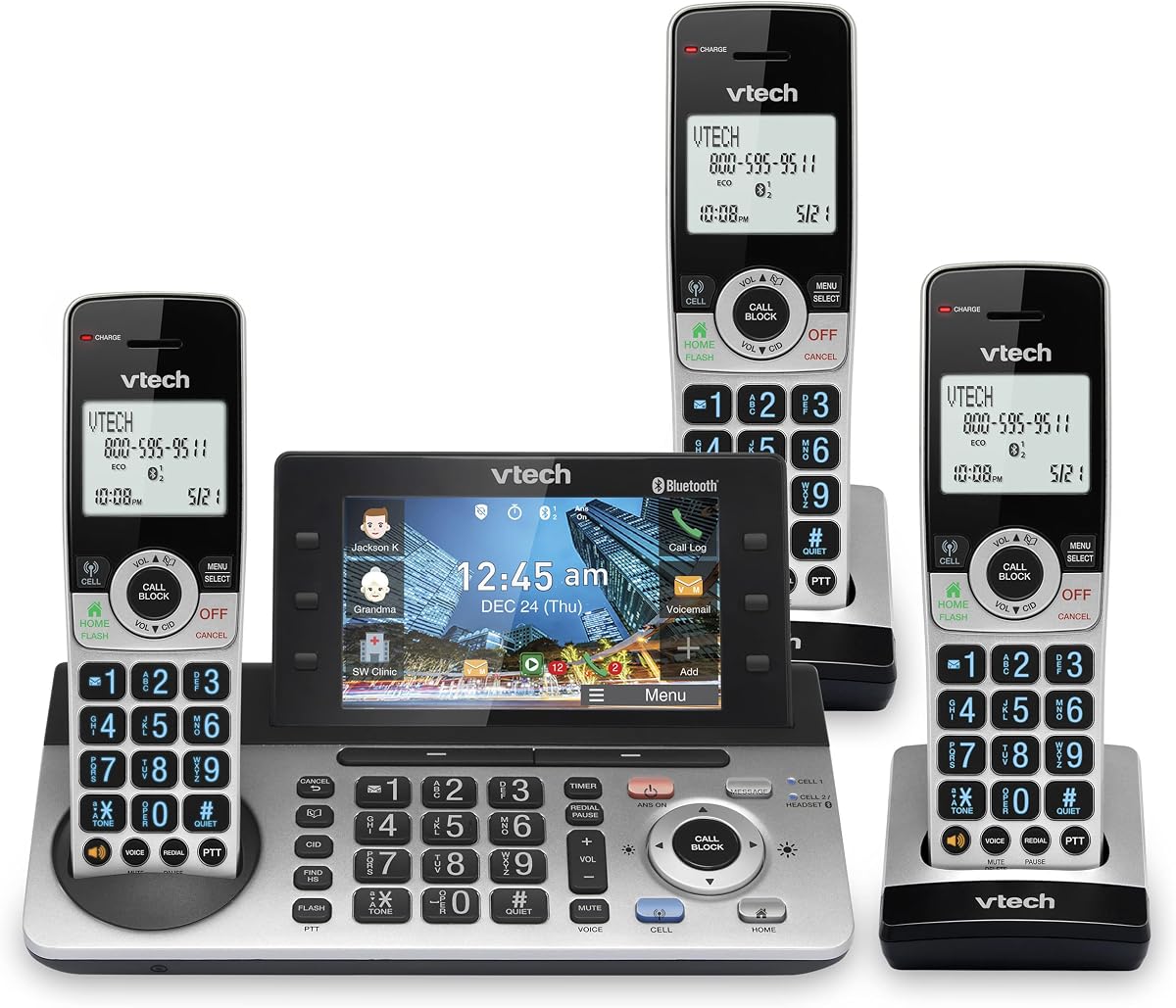
The VTech IS8251-3 is a business-oriented, three-handset cordless system with a 5-inch color base display, programmable shortcuts, smart call blocking, a 40-minute answering system, and Bluetooth cell connectivity. Its 4.3 rating reflects a polished feature set for practices that want a visually clear, highly accessible central console. The larger screen and detailed message list make it especially approachable for staff who are not comfortable with small, text-heavy phone menus.
We may earn a commission when you buy through this link, at no additional cost to you.
The virtual two-line system can manage a landline and a cell line simultaneously. Users can pair up to two cell phones, or one cell phone and one Bluetooth headset, for use with landline calls. This creates a useful hybrid workflow for staff whose responsibilities involve both office and mobile communication. The 40-minute recording capacity offers substantially more voicemail space than most of the two-handset and two-line systems in the guide.
Smart call blocking can stop robocalls on the landline before they ring, while one-touch blacklist controls help staff suppress unwanted numbers during the day. Programmable shortcuts, a timer, and one-touch callbacks from message or call history can shorten common tasks. The larger color display also presents caller information for recorded messages, allowing staff to select which message to listen to first. These functions add convenience, although a virtual two-line arrangement should not be treated as identical to two dedicated analog business lines.
The IS8251-3 is an excellent choice for a small practice that wants generous voicemail, a modern central display, several cordless handsets, and mobile-phone integration. It is particularly well suited to receptionists and coordinators who need quick access to messages and frequently used controls. If the office must support multiple independent inbound numbers with line-specific automated routing, the four-line AM18447 offers a more direct fit.
The color screen can display caller information for received messages and let users choose which recording to hear first. With up to 40 minutes of storage, the system is well suited to offices that receive many calls and need a clear overview of outstanding messages.
One-touch controls can be assigned to contacts, messages, call history, and timers. Reception staff can therefore move from receiving a call to taking action without navigating several menu levels, which is helpful when interruptions are frequent.
We may earn a commission when you buy through this link, at no additional cost to you.
Choosing a doctor’s office phone involves balancing incoming-line requirements, staff mobility, message handling, and compatibility with the practice’s communication service. The following factors help narrow the field before comparing individual models.
Begin by distinguishing traditional analog lines, virtual lines, and hybrid arrangements that combine a landline with a cell phone. The VTech AM18447 explicitly supports four analog lines and per-line automation, whereas the IS8251-3 uses a virtual two-line arrangement. These are not interchangeable. A practice should document how many public numbers patients call, whether separate numbers are required for departments or staff, and whether existing service provides suitable RJ11 ports or requires a terminal adapter.
A corded phone is dependable at a fixed desk, offers straightforward controls, and can be less distracting during continuous use. Cordless systems support movement into examination rooms and help staff answer calls away from reception. Hybrid models, such as the AT&T TL86103, combine the two approaches. Practices should consider where staff work, whether patients can be heard on a speakerphone, how many rooms require coverage, and whether the need to carry a handset outweighs the simplicity of a dedicated desk phone.
A medical office may receive calls when every staff member is occupied, so voicemail capacity and usability deserve attention. The range in this guide extends from 12 or 13 minutes on several systems to 180 shared minutes on the AM18447. More capacity can be useful for a busy reception desk, but message organization matters just as much. Look for caller information, custom greetings, separate mailboxes, remote access, and a clear display that makes it easy to identify the correct recording.
Auto attendant, directory access, intercom, and extension routing can reduce the need for staff to answer every incoming call. The AM18447 is the only product here with a clearly described professional auto attendant for each of four lines. Other systems are better suited to simpler environments where a receptionist manages two lines directly. A small practice may not need automated greetings, while a growing multi-department office may benefit greatly from them.
DECT 6.0 is used across many cordless options, but the specification does not guarantee identical performance. Walls, floors, medical equipment, elevators, and the base’s placement can all influence signal quality. Estimate how many handsets will operate in each area, place the base centrally, and test the proposed configuration in the building. For a clinic with several treatment rooms, a five-handset package may provide a better starting point than a basic two-handset system.
Hands-free calling can help reception staff coordinate appointments or speak with colleagues while checking a schedule. The AT&T ML17929, ML17939, TL88102BK, and DS6151-11 offer conference or speakerphone functionality, while several models include a headset jack. Conference quality can vary, so a practice should decide whether it needs two-way informal discussion or a formal multi-party meeting. A headset may be more practical than a shared speakerphone in a confidential office.
Smart call blocking can prevent robocalls from reaching a busy reception area, while Bluetooth linking allows a cellular phone to be used through office handsets. The DLP73590 and IS8251-3 emphasize both features. Mobile integration is useful when staff answer business calls away from the practice, but it should be implemented according to the practice’s policies for patient information and staff separation. Call blocking is helpful only if the office wants to suppress specific categories of calls.
An expandable system should be judged by more than its current handset count. The AM18447 supports 10 stations, while several AT&T and VTech systems support 12. Confirm that additional handsets are available, compatible with the exact model, and suitable for the intended rooms. Also check installation requirements. The AM18447 connects to analog lines through RJ11, the AT&T ML17939 requires a traditional RJ11 jack, and the Panasonic system offers PC-based contact integration that needs configuration.
Begin by mapping each line, extension, and staff role before connecting the system. Identify which number patients use for scheduling, which line is reserved for another function, and where each cordless handset will remain. Connect the base according to its manual, confirm line status, test outbound calls, and place the base in a central area away from thick walls and large electronic equipment.
Program the system before opening the office or beginning a busy schedule. Record clear voicemail greetings that identify the practice and explain when callers should leave a message. Set up the directory, speed dials, shortcuts, call-blocking list, and intercom groups. Train staff to use speakerphone and headsets appropriately, establish a process for transferring messages, and make sure everyone knows how to distinguish general inquiries from urgent medical concerns.
Care for the system by keeping handsets charged on their approved bases, cleaning surfaces with a lightly dampened cloth, and avoiding liquid or harsh cleaners near the keys and ports. Review blocked numbers, stored contacts, and voicemail messages periodically. Test the system after a power outage, firmware or service change, handset replacement, or move to a new office so that staff can identify and correct coverage or line problems early.
The best choice depends mainly on line count, mobility, and voicemail needs. A fixed reception desk with two analog lines may be well served by the AT&T ML17929, while a clinic needing wireless extensions should consider the TL86103, DLP73590, or IS8251-3. A practice requiring four lines and automated routing should examine the VTech AM18447.
These products are general business phones and do not advertise specialized compliance certifications or electronic health record integration. A medical practice should still follow organizational policies for call screening, voicemail handling, patient information, and mobile device use. When a workflow requires secure messaging, audit trails, or integration with a clinical platform, a supported business communication platform may be more appropriate.
It depends on the system and the gateway. The VTech AM18447 and AT&T ML17939 connect through analog RJ11 interfaces, so the service must provide a compatible analog port or the office must add an appropriate terminal adapter. The VTech IS8251-3 offers virtual lines and Bluetooth cell connectivity, which is a different connection method. Confirm compatibility before installation.
A corded phone stays at a desk and generally provides simple, consistent calling with a speakerphone. A cordless system gives staff the ability to carry an extension into other rooms, which is useful in exam rooms and consultation spaces. A hybrid system combines both and often provides the most flexible arrangement for a small practice.
The right number depends on how the practice organizes calls rather than how many employees it has. One general number may be sufficient for a very small office, while multiple departments, clinical lines, fax-related calls, or administrative functions may justify two or more lines. The AM18447 supports four lines and adds per-line auto attendant, making it relevant to practices that need greater separation.
An answering system is valuable because patients may call when the reception desk is occupied or after hours. Important features include sufficient recording time, a clear greeting, caller information, and easy message retrieval. The DLP73590 and IS8251-3 offer robust wireless workflows, while the ML17929 and ML17939 provide straightforward corded answering systems for a single desk.
Several models support Bluetooth mobile-device connections. The VTech IS8251-3 can pair up to two cell phones or one cell phone and one Bluetooth headset, while the AT&T DLP73590 and Panasonic KX-TG9582B also offer Bluetooth connectivity. A practice should establish which staff may use these features and how mobile calls are handled to protect patient information.
Place the base centrally and away from metal objects, dense electrical equipment, and thick structural walls when possible. Keep the number of distant handsets within a reasonable range, and test calls in every room where staff will use a handset. Building materials can reduce DECT range, so a coverage test should be completed before buying additional stations for the full practice.
The VTech AM18447 is the clearest overall choice for a practice that needs four analog lines, auto attendant routing, shared voicemail, and room to add stations. The AT&T ML17929 is a focused alternative for a fixed desk with two lines, while the VTech IS8251-3 is the most feature-rich cordless option, with a large color display, generous recording capacity, call blocking, and mobile connectivity.
For most small medical offices, the right system is the one that matches the actual call flow. Prioritize the correct number of lines, a dependable connection to the practice’s service, enough voicemail for missed calls, and handsets that can cover the rooms staff actually use. Complex features add value only when employees will use them and the setup remains easy to maintain.
Before buying, verify the exact model, required connection type, included handsets, and expansion compatibility. Product configurations and pricing can change, so review the current listing and compare it carefully with the office’s present and anticipated needs. A well-chosen phone system can make patient communication more organized without imposing unnecessary complexity on the staff responsible for answering.