
FLYDIGI Direwolf 4
4.5Editor score
Adjustable 40–80gf sticks
Six-axis gyro sensing
Three connectivity modes
Discover the best controller with gyro for PC gaming, comparing polling rates, gyro control, drift resistance, trigger options, connectivity, comfort, and
A controller with a gyro can give PC gamers more ways to aim, steer, and interact with supported games. The best models combine accurate motion sensing with dependable sticks, responsive polling, flexible triggers, and software that makes every control easier to configure.
This guide compares ten PC-focused controllers across gyro implementation, polling rate, stick technology, trigger behavior, connectivity, button customization, comfort, and platform compatibility. It also considers the practical differences between wired and wireless models, entry-level designs, and premium esports-oriented options.
Each review explains the strongest features, limitations, and ideal buyer, helping you identify the right controller for competitive shooters, racing games, action titles, and mixed-platform gaming. Product ratings and availability can change, and current prices should be checked before purchasing.
4.5Editor score
4.3Editor score

4.1Editor score
The comparison below highlights the principal differences among these ten gyro-equipped controllers, including their connection methods, polling rates, stick systems, trigger styles, and platform support.


The FLYDIGI Direwolf 4 combines a 6-axis gyro with adjustable stick tension, dual-mode trigger stops, and 1000Hz polling, making it a strong general recommendation without moving into the premium esports tier. Its 4.5 rating reflects a well-rounded feature set, and the Forceflex sticks offer a level of personal adjustment that many conventional controllers cannot provide.
We may earn a commission when you buy through this link, at no additional cost to you.
The main appeal is the ability to tune the sticks from 40gf to 80gf. Lighter tension can support quick corrections, while firmer settings may feel more deliberate. The Forceswitch Triggers 2.0 can move between rapid micro-switch action and linear Hall Effect behavior for racing. Wired, Bluetooth, and 2.4G connections further broaden its appeal across PC, Nintendo Switch, Android, TV, and laptop use.
There are a few limitations. The dedicated Direwolf 4 dock is an optional extra, and the controller does not support Xbox or PlayStation consoles. Gyro control still depends on whether the game exposes suitable motion inputs and whether the user configures those inputs correctly, so the sensor alone does not guarantee compatibility.
This is an excellent choice for PC gamers who want gyro aiming, adjustable sticks, and flexible triggers in one reasonably balanced controller. It is particularly attractive for players who move between shooters, racing games, and everyday PC gaming but do not need the extreme polling rates or specialized grip controls found in high-end esports hardware.
The 40–80gf tension ring makes the Direwolf 4 unusually adaptable. Players can begin with a lighter setting for fast movement, then test a firmer configuration for controlled aiming or precise racing inputs.
The built-in six-axis sensor provides motion input for supported PC titles. Flydigi software adds further value by allowing button customization and saved profiles, although the controller remains usable without the software.
We may earn a commission when you buy through this link, at no additional cost to you.
The EasySMX X20 is built around a 6-axis gyro, 2-stage Hall Effect sticks, and 1000Hz polling over its wired and 2.4G connections. Its 4.0 rating places it in the middle of this group, but its support for PC, Steam Deck, Nintendo Switch, Android, and iOS makes it particularly practical for people who do not game exclusively at a desk.
We may earn a commission when you buy through this link, at no additional cost to you.
Both sticks can be removed and adjusted in height, allowing players to match their preferred grip or replace a worn pair. Mecha-tactile ABXY buttons and a D-pad provide crisp feedback, while the trigger lock supports either fast hair-trigger firing or a longer racing pull. RGB lighting and a rechargeable battery round out the feature set.
The restrictions are significant enough to check before buying: the X20 does not support Xbox consoles, PlayStation consoles, Luna, or GeForce Now. Bluetooth is also only as consistent as the host device, so competitive PC players should favor the 2.4G receiver or wired USB-C connection for more predictable input.
Magnetic Hall Effect sensing reduces contact-related stick drift, while detachable shafts add a practical level of customization. The included recalibration procedure helps restore stable behavior if the sticks require adjustment.
Wired USB-C, 2.4G wireless, and Bluetooth make the controller useful beyond PC. For PC gaming, the receiver or wired mode offers the most direct and stable experience.
We may earn a commission when you buy through this link, at no additional cost to you.
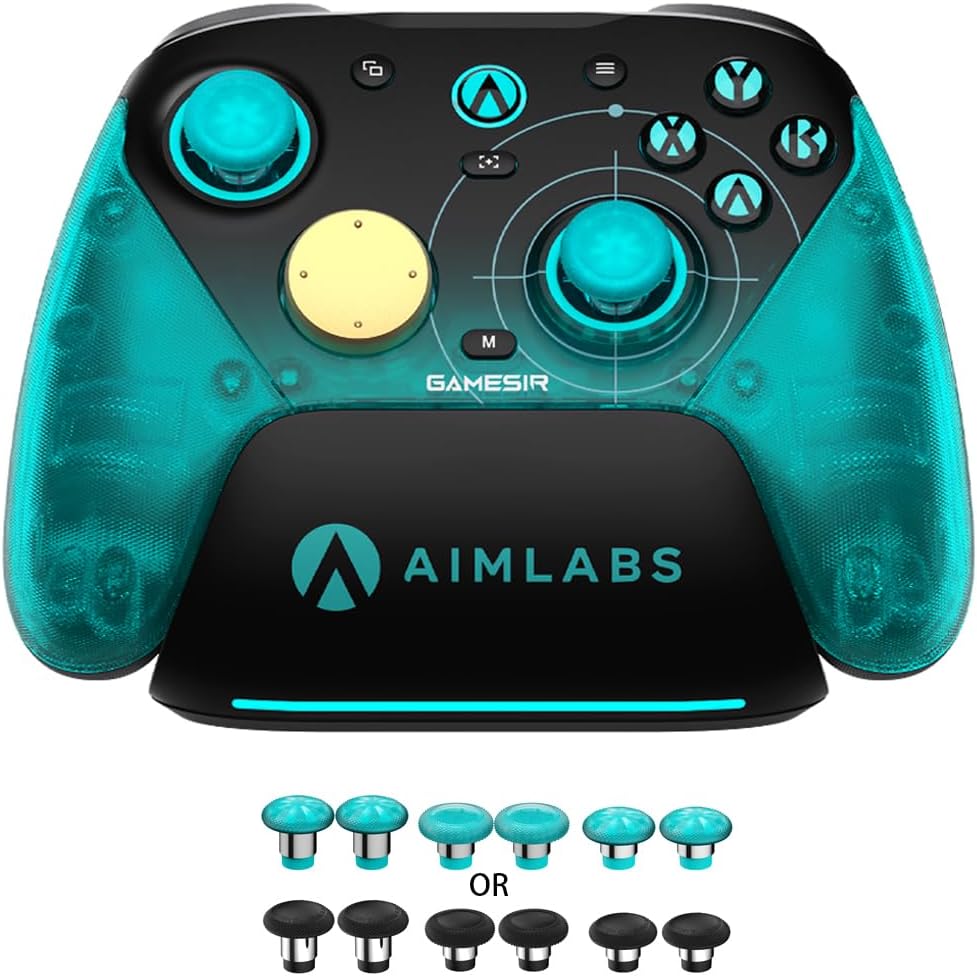
The GameSir G7 Pro 8K Aimlabs Edition is built for players who want a quick response rate and extensive control over their inputs. Its headline feature is 8000Hz polling in both wired USB and 2.4G wireless modes, paired with Gen-2 magnetic TMR sticks and a six-axis gyroscope. The 4.3 rating reflects strong competitive hardware with some deliberate platform limitations.
We may earn a commission when you buy through this link, at no additional cost to you.
Optical ABXY switches and a mechanical D-pad provide quick actuation and clear tactile feedback. Trigger stops let players alternate between linear Hall Effect analog behavior and clicky micro-switch response. Four programmable buttons, including two lockable back buttons and two mini bumpers, can each record up to 32 steps, making the controller well suited to complex bindings and repeatable actions.
The central compromise is compatibility. This model is designed specifically for Windows 10 and Windows 11 PCs and does not work with Xbox Series X/S or Xbox One consoles. Its specialized feature set also offers less value if your priority is a single controller for home consoles, handheld gaming, and mobile devices.
The 8000Hz polling rate applies to both wired and 2.4G connections, providing a consistently responsive foundation for competitive shooters, racing games, and fighting titles. Wired mode remains useful when absolute predictability is the priority.
Four macro-capable rear controls expand the available binding space. Combined with the physical trigger toggle, optical face buttons, gyro controls, and asymmetric rumble, the controller can be tuned for several input preferences.
We may earn a commission when you buy through this link, at no additional cost to you.
The GameSir Tarantula 8K PC has the highest listed rating in this roundup at 4.7, a strong result for a controller built around 8000Hz wired polling, Gen-2 TMR sticks, and a six-axis gyroscope. Its emphasis on competitive PC gaming makes it a natural fit for players who prefer a stable desk setup over wireless convenience.
We may earn a commission when you buy through this link, at no additional cost to you.
Its trigger system can shift between smooth Hall Effect analog operation and crisp micro-switch stops, allowing the same controller to serve shooters and racing games. Two lockable back buttons, two mini bumpers, and five additional front buttons each support up to 32-step macro recording. GameSir Connect expands the possibilities with mapping, profile, stick, trigger, and macro customization.
The wired-only design is the main limitation. It avoids charging management and wireless interference, but it also means the controller cannot be used conveniently away from the PC. Gamers who move between desktop and handheld systems will need to accept the same Windows-oriented focus that defines this model.
An 8000Hz wired polling rate makes this controller particularly compelling for fast competitive inputs. The physical connection also removes receiver pairing and wireless interference from the setup.
Lockable rear buttons, mini bumpers, and five extra front controls create extensive room for custom bindings. The 32-step macro support helps simplify demanding combinations without crowding the face of the controller.
We may earn a commission when you buy through this link, at no additional cost to you.
The GameSir Cyclone 2 blends a six-axis gyro, TMR sticks, 1000Hz polling, and an included aluminum charging dock into a flexible wireless package. Its 4.4 rating and broad connection support make it an attractive all-rounder for PC, Switch, Android, and Steam-oriented setups.
We may earn a commission when you buy through this link, at no additional cost to you.
The controller works through 2.4G wireless, Bluetooth, and USB-C wired mode. Hall Effect analog triggers and micro-switch hair-trigger mode cover different play styles, while microswitch ABXY buttons are rated for five million clicks. Dual asymmetric motors, RGB lighting, and two remappable rear buttons add useful everyday features.
GameSir Connect provides control over dead zones, trigger sensitivity, vibration intensity, gyro settings, and button mapping. Three saved profiles can also be changed with button combinations, which is convenient when moving between FPS, racing, and RPG games. Xbox compatibility is absent, however, and gyro behavior depends on both the game and the selected connection.
The included aluminum alloy dock charges the controller and stores the 2.4G receiver. That combination reduces desk clutter and makes it easier to keep the wireless setup ready.
Three instantly switchable profiles support different control needs. GameSir Connect also exposes the settings that commonly require adjustment, including dead zones, vibration, trigger travel, and gyro sensitivity.
We may earn a commission when you buy through this link, at no additional cost to you.
The GameSir Super Nova pairs a six-axis gyro with Hall Effect sticks and triggers, 1000Hz polling in wired and 2.4G modes, and a tri-mode connection system. Its 4.3 rating reflects a capable controller aimed at comfortable, flexible play across PC, Switch, Android, and iOS.
We may earn a commission when you buy through this link, at no additional cost to you.
Rubberized grips and silent buttons are designed for longer sessions. The smart charging dock and 1000mAh battery simplify wireless use, while programmable rear buttons, customizable RGB lighting, a detachable faceplate, and a swappable ABXY layout allow considerable personalization.
Software support comes through both the GameSir app and GameSir Connect, which provide firmware updates, dead-zone adjustments, vibration customization, and button testing. The controller is not compatible with Xbox consoles and requires Windows 10 or a newer supported operating system for PC use.
Ergonomic rubberized grips help reduce the discomfort associated with holding a hard plastic gamepad. Silent buttons also make the controller more suitable for shared spaces or late-night play.
The swappable ABXY arrangement and detachable faceplate create a more distinctive platform than basic mapping alone. RGB and programmable rear buttons add further options for personalizing the setup.
We may earn a commission when you buy through this link, at no additional cost to you.
The GameSir G7 Pro 8K Gen 2 combines 8000Hz polling over wired and 2.4GHz wireless connections with a six-axis gyroscope and Gen-2 TMR sticks. Its 4.2 rating reflects a feature-complete controller designed primarily for Windows PC gaming.
We may earn a commission when you buy through this link, at no additional cost to you.
A rechargeable battery and included charging dock improve wireless convenience, while dual-mode trigger stops let players switch between linear Hall Effect input and clicky micro-switch behavior. Optical ABXY buttons, a mechanical D-pad, four macro-capable rear controls, asymmetric rumble, and a 3.5mm headset jack cover common competitive and everyday needs.
GameSir Connect provides mapping, macro, stick, and trigger configuration, which is essential if you intend to make full use of the controller. The model is aimed at Windows rather than console or mobile ecosystems, so its strongest appeal is among PC players who want fast wireless polling without giving up a wired option.
Supporting 8000Hz in both wired and 2.4GHz modes makes this one of the more complete high-polling options in the guide. Players can keep the dock and receiver organized while retaining a wired path for particular games or setups.
The physical trigger toggle and four programmable rear controls allow rapid changes between trigger styles and bindings. Gyro input can also be mapped to sticks, buttons, or mouse controls for supported PC experiences.
We may earn a commission when you buy through this link, at no additional cost to you.
The Razer Wolverine V3 Pro 8K is a premium, Windows 11-focused controller featuring 8000Hz hyperpolling, TMR thumbsticks with swappable caps, and six programmable buttons. Its 4.1 rating is solid, while its specialized mouse-style back controls and claw-grip shape distinguish it from conventional PC gamepads.
We may earn a commission when you buy through this link, at no additional cost to you.
Razer emphasizes the lightest wireless esports controller design in its range, with rubberized handles intended to reduce hand fatigue. The Pro HyperTriggers can operate as fast digital mouse clicks or full analog controls, and four mouse-click back buttons plus two claw-grip bumpers provide a large set of alternate inputs.
Compatibility is deliberately narrow. It supports Windows 11 PCs with USB-A for the wireless dongle and USB-C for wired play, but it is not compatible with Xbox consoles, PlayStation, macOS, or mobile devices. The included carrying case, two spare stick caps, and braided cable add polish, but the limited platform range should guide the decision.
Four mouse-click back buttons and claw-grip bumpers offer a familiar alternative to standard shoulder inputs. Players accustomed to gaming mice can experiment with additional bindings without relying entirely on crowded face and shoulder buttons.
Swappable TMR caps allow changes in stick feel, while Pro HyperTriggers provide a physical switch between digital and analog behavior. Four onboard profiles can be saved directly to the controller for quicker setup changes.
We may earn a commission when you buy through this link, at no additional cost to you.
The 8BitDo Ultimate 2 combines TMR joysticks, customizable six-axis motion control, and 1000Hz polling over 2.4G and wired connections. Its 4.5 rating matches several of the strongest controllers in the guide, and the included dock gives the design a polished home and travel setup.
We may earn a commission when you buy through this link, at no additional cost to you.
Its 8Speed wireless technology is specified to maintain latency below 1ms, with strong anti-interference and a 10-meter range. A physical mode switch changes the Hall Effect triggers between linear and non-linear tactile operation. Two rear paddles, extra R4 and L4 bumpers, tactile bumpers, a D-pad, rumble, and a turbo function provide a broad control vocabulary.
Support for 8BitDo Ultimate Software V2 adds customization options, while the dock and included USB-C adapter simplify charging and connection. Motion control remains game-dependent, so players should confirm that a title supports gyro aiming or another suitable motion-controlled mechanic before purchasing.
The 8Speed system focuses on stable 2.4G communication, low latency, and interference resistance. That makes it a practical choice for a dedicated PC setup where consistent input timing matters.
Two pro paddles and additional R4 and L4 bumpers expand the available rear controls. The trigger mode switch makes it easy to move between precise linear pulls and more familiar tactile resistance.
We may earn a commission when you buy through this link, at no additional cost to you.
The ManbaOne Interactive Screen stands apart with a two-inch display that lets players adjust vibration, buttons, joysticks, lighting, and other settings without opening an app. Its 4.3 rating reflects a distinctive and flexible controller for PC, Switch, Android, and iOS, with a six-axis gyroscope and Hall Effect anti-drift sticks.
We may earn a commission when you buy through this link, at no additional cost to you.
Four configurations can be stored for different games, while the four back buttons support macro definitions. Micro-switch buttons, ALPS bumpers, linear Hall Effect triggers, and selectable high or low joysticks provide a useful range of physical preferences. The wired polling rate is specified at 800Hz or higher.
Its smart charging station includes a visual battery indicator and storage for the wireless receiver. PC users should favor the dongle because the manufacturer notes that Bluetooth requires selecting an iOS phone mode and is not recommended. The controller also does not support wake-up on Nintendo Switch, and it is incompatible with Xbox, PlayStation, and GeForce Now.
The built-in screen turns controller configuration into a visual task rather than a process of memorizing button shortcuts. This is especially helpful for players who want to alter vibration, lighting, sticks, and button behavior without a computer.
Four saved configurations provide dedicated setups for different characters or genres. Four macro-capable back buttons add one-press actions for demanding sequences, while the charging station keeps the receiver and controller together.
We may earn a commission when you buy through this link, at no additional cost to you.
Choosing a gyro-equipped PC controller requires balancing motion support with stick reliability, input speed, trigger design, connectivity, software, and compatibility. The most important factor is the type of game and control style you expect to use.
A gyro sensor only creates useful motion control when the game or PC software can translate movement into an aim, steering, camera, or cursor input. Some shooters support gyro-assisted aiming, while racing and action titles may use motion for steering or camera movement. Check the product description and your game’s settings before purchasing, because a built-in sensor does not guarantee native gyro support in every title.
Choose a gyro controller only when you plan to use motion input regularly. If the selected game has no gyro option, prioritize stick accuracy, triggers, and polling instead.
Polling rate indicates how frequently the controller reports input to the PC. The models here range from 800Hz-plus to 8000Hz, with many supporting 1000Hz in both wired and wireless modes. A higher figure can be useful in competitive games, but input processing, display refresh rate, and the PC also influence the experience. It is best understood as one part of a complete control system rather than the only measure of performance.
Prioritize 1000Hz or greater for a responsive everyday or competitive setup. An 8000Hz model makes more sense when your games reward rapid adjustments and you understand how to configure its gyro and stick sensitivity.
Drift occurs when a stick reports movement despite no physical input. The models in this guide use magnetic sensing systems such as Hall Effect or TMR to reduce contact-related wear. TMR designs combine magnetic sensing with an analog stick structure, while detachable Hall Effect sticks can also be replaced if the caps or modules wear over time.
Look for an anti-drift mechanism rather than assuming all magnetic sensors behave identically. Familiarize yourself with any included recalibration process, and recalibrate after installation or whenever a stick begins to feel off-center.
Trigger style can determine whether a controller suits shooting or racing. Physical trigger stops allow a fast hair-trigger setting for shooters and a longer, linear pull for racing. TMR and Hall Effect sticks provide smoother, more consistent analog movement, while adjustable tension lets players alter the physical feel of each stick.
Choose short trigger stops for competitive shooters and linear travel for racing or gradual throttle control. Test the stick tension and switch direction before committing if possible, since these physical characteristics matter as much as the underlying sensor technology.
Wired controllers provide a direct connection, eliminate receiver pairing, and require no battery management. Wireless models offer more freedom and can be more convenient for switching between a PC and compatible handheld or mobile device. Their performance depends on the quality of the 2.4G receiver, Bluetooth implementation, battery condition, and surrounding interference.
Competitive desktop players may prefer a wired connection for predictability, while wireless supporters should check whether the advertised polling rate applies to both wired and 2.4G modes. Look for an included dock if you want straightforward storage and charging.
Gyro aiming becomes more practical when sensitivity, axis mapping, dead zones, and button bindings can be adjusted. GameSir Connect and Flydigi software provide broader configuration options, while the ManbaOne uses its built-in screen and saves four profiles without requiring an app. EasySMX also includes a manual procedure for stick recalibration.
Prioritize a controller whose software suits your preferred workflow. Check whether settings can be saved as profiles, whether the core functions require a connection to a computer, and whether gyro output can be mapped to mouse, stick, or button controls.
A controller advertised for PC gaming may not work with every console, handheld, or streaming service. None of these options supports Xbox or PlayStation consoles, and several exclude specific streaming services. Some support Nintendo Switch, Android, and iOS, while the Razer model is restricted to Windows 11 PCs and the Aimlabs edition targets Windows 10 and 11.
Make a list of every device you plan to connect before buying. Treat the listed compatibility notes as firm boundaries, and confirm the operating-system and service requirements for your intended games.
A controller used for long sessions should feel balanced in the hands and avoid unnecessary strain. Rubberized grips, curved handles, lightweight construction, and quiet buttons can improve comfort, while the claw-grip shape found on the Razer may suit players accustomed to competitive mouse ergonomics. Removable or swappable stick parts can also affect grip and feedback.
Look for a shape that matches your hand size and preferred grip. Features such as remappable rear buttons are useful only if they sit where your thumbs can reach them without disrupting your normal hold.
Begin by connecting the controller in the mode recommended for your setup. For the most consistent PC connection, use the supplied USB-C cable or 2.4G receiver. If you select Bluetooth, verify that the PC recognizes the controller and that any required device mode has been chosen correctly. Install the appropriate software, update the controller firmware if applicable, and confirm that Windows recognizes it as a gamepad.
Configure the gyro before entering a competitive match. Begin with conservative sensitivity and short motion inputs, then gradually increase the range as you become comfortable. If the controller supports mouse mapping, assign gyro movement to horizontal or vertical mouse input rather than placing excessive control demands on a single stick. Map gyro adjustments to accessible buttons, and calibrate the sticks using the manufacturer's procedure whenever they feel misaligned.
Clean the controller with a soft, dry cloth and avoid pushing debris into the joystick openings. Keep the charging contacts clean, and use the included dock or the specified cable for charging. Inspect stick caps, cable connectors, and receiver storage from time to time. If a stick develops drift, recalibrate it before attempting a more involved fix, and consult the manufacturer if the problem persists.
No. Gyro control must be supported by the game or mapped through compatible PC software. Some competitive shooters offer native motion aiming, while other games use motion for camera or steering effects. Check the game’s control settings and the controller’s software before buying.
Not necessarily. Higher polling can reduce input-reporting intervals, but the overall experience also depends on the game, PC, display, software, and control settings. A well-configured 1000Hz controller may feel excellent for most players, while 8000Hz is most relevant to competitive users seeking the fastest available input path.
Neither technology is literally immune to every possible problem, but both reduce or resist the contact-based wear associated with traditional potentiometer sticks. Calibration may still be required after installation, and unusual behavior should be checked before assuming the controller has a hardware fault.
Wired mode offers a direct connection and avoids receiver pairing or battery management. Wireless mode provides greater freedom and is essential for switching between a PC and supported handheld or mobile device. For competitive desktop play, check whether the controller supports its full polling rate over 2.4G wireless.
No. Every controller listed in this guide explicitly excludes Xbox and PlayStation console support. Some also exclude particular streaming services. Check each product's compatibility notes before ordering if you need more than Windows PC or one of the additional platforms explicitly listed.
Connect the controller, open its supported configuration software, and locate the motion or gyro settings. Choose a suitable output such as mouse movement, then assign activation buttons and adjust sensitivity gradually. If the game has its own gyro settings, use both layers carefully rather than applying maximum sensitivity to each one.
It depends on the controller and game. The FLYDIGI Direwolf 4 can be used without Flydigi software, and the ManbaOne handles basic configuration on its screen. Other controllers may require their software for dead-zone, trigger, gyro, mapping, or firmware settings, so check the included instructions before first use.
Controllers with dual-mode trigger stops are particularly versatile because they can provide a short hair-trigger pull for shooters or a longer linear pull for racing. The FLYDIGI Direwolf 4, GameSir Cyclone 2, GameSir G7 Pro 8K models, and 8BitDo Ultimate 2 all offer adjustable trigger behavior for these different play styles.
The FLYDIGI Direwolf 4 stands out as the best balanced budget choice, combining adjustable stick tension, dual-mode triggers, a six-axis gyro, and three connection methods. The GameSir G7 Pro 8K Aimlabs Edition takes the lead for competitive PC gaming with 8000Hz polling, TMR sticks, extensive macro controls, and trigger stops, while the Razer Wolverine V3 Pro 8K offers the most premium, specialized experience.
Prioritize the features your games actually reward. Gyro-sensitive players should check native game support, competitive shooters benefit from high polling and hair-trigger stops, racing players may prefer linear Hall Effect triggers, and multi-device users should confirm that the chosen connection methods match their habits. Comfort and configuration should remain important even when a controller has a long specification list.
Ratings, firmware behavior, game compatibility, and current prices can change over time. Review the latest product listing and confirm the platform notes before ordering, then update gyro sensitivity and stick calibration gradually for the most comfortable and reliable results.